Referral management software: Track and close every referral
Referral management software in healthcare sends, tracks, and follows up patient...

Last Updated: Oct 26, 2026

A patient portal is a secure online tool that gives patients 24/7 access to their health records, appointments, test results, and billing.
Core features include secure messaging, appointment scheduling, digital intake forms, prescription access, and online payments.
Patient portals reduce administrative burden on clinic staff while improving patient engagement and satisfaction.
Choosing HIPAA-compliant patient portal software that integrates with your EHR and practice management system is critical for clinics.
Most clinic staff spend hours every week answering calls about appointment times, test results, and prescription refills. A patient portal eliminates the majority of those calls by giving patients direct, secure access to their own health information. According to the Office of the National Coordinator for Health Information Technology (ONC), 90% of patients who accessed their online medical records used them to view test results, and 70% viewed clinical notes. That is the kind of self-service that frees your front desk to focus on higher-value work. This guide covers what a patient portal actually does, the core features to expect, the benefits for both patients and clinic teams, and what to look for when choosing one.
A patient portal is a secure, web-based platform that gives patients access to their personal health information outside of the clinic visit. That is the short patient portal definition: a private digital space where a patient can view their records, message their care team, request appointments, and pay invoices without calling reception. The patient portal built into modern practice management systems brings this functionality together in one place rather than routing patients through separate apps or email threads.
From the clinic side, the portal acts as a two-way communication layer between your team and your patients. Patients log in using secure credentials, complete tasks on their own time, and those actions feed directly back into your clinical and administrative systems. The result is less phone traffic, fewer paper forms, and a more informed patient walking through your door.
The National Library of Medicine describes patient portals as tools that help patients track provider visits, test results, billing, and prescriptions. That covers the basic meaning of what patient portals are, but what they do in a clinic setting goes considerably further, especially when the portal is tightly integrated with your scheduling and records systems.
Not every portal offers the same functionality. The features below represent what a well-built patient portal should include for a private clinic or specialist practice.
The depth of each feature varies across systems. A portal bolted onto a basic booking tool looks very different from one built into an all-in-one platform where every action updates the same clinical record in real time.
The operational case for patient portals is clearest on the clinic side. Every patient self-service action is an administrative task removed from your team’s plate.
| Task before patient portal | Task after patient portal |
|---|---|
| Receptionist takes appointment calls | Patient books online 24/7 |
| Staff fax or mail test result letters | Results visible in patient record immediately |
| Paper intake forms scanned at arrival | Digital forms completed before visit, auto-populated |
| Phone calls for prescription queries | Patient views prescriptions or requests refills online |
| Invoice mailed or emailed as PDF | Patient views and pays invoice in portal |
Structuring patient care management workflows around a portal also reduces transcription errors. When a patient enters their own medical history into a structured digital form, that data flows directly into their clinical record without anyone retyping it. A single data entry point means fewer mistakes and faster pre-visit preparation for the clinician.
For multi-location clinics, a shared portal means a patient’s record is consistent regardless of which site they attend. That consistency matters most when a patient transfers between practitioners or returns after a long gap.
The portal can also carry your marketing. Running promotions inside the portal inside the portal puts seasonal offers in front of patients who already log in to book.
Patients consistently report that accessing their health information easily makes them more engaged in their own care. Improving patient engagement through self-service access has measurable effects on appointment adherence and treatment plan compliance. Pairing the portal with patient reactivation software brings lapsed patients back through the same self-service journey. A portal covers self-service, while two-way patient messaging covers the questions patients would otherwise phone in.
The practical advantages patients value most:
The American Medical Association notes that patient portals help patients become more active participants in their own care. Clinics that use online booking through a client portal typically see higher patient satisfaction scores alongside lower no-show rates.
Set up automated appointment reminders through your patient portal as soon as you go live. Reminders sent 48 hours and 24 hours before an appointment consistently reduce no-shows without any manual work from your team. Review the timing after 30 days and adjust based on your cancellation data.
Any platform that stores or transmits patient health information in the United States must comply with HIPAA (Health Insurance Portability and Accountability Act). For a patient portal, that means encrypted data transmission, secure authentication, audit logs, and clearly defined access controls.
Understanding HIPAA compliance for clinic software is essential before choosing any portal solution. A HIPAA-compliant patient portal has to cover the following requirements:
The ONC’s information blocking rules, established under the 21st Century Cures Act, require providers to share patient data electronically on request. A compliant portal built on a system that supports interoperability helps practices meet this obligation without manual workarounds. Reviewing patient data security tools in your current stack is a good first step before evaluating any new portal.

Pabau’s built-in client portal lets patients book appointments, complete digital forms, view their records, and pay invoices – all from one secure login. Book a demo to see how it fits into your clinic workflow.

A patient portal that operates as a separate system from your clinical records creates more work, not less. When a patient books through the portal and that booking does not update your calendar automatically, someone on your team has to reconcile it manually. The same problem applies to intake forms, billing, and clinical notes. Online booking that sits inside the same portal keeps the calendar, intake forms, and billing in sync automatically.
Solid EHR integration workflows mean that every action a patient takes in the portal updates the corresponding record in your system in real time. A patient completing a pre-visit health questionnaire through the portal should populate their medical records automatically, with no manual data transfer. That is the integration standard to hold any vendor to. The same test applies when comparing EHR systems in Ireland or platforms built for US practices.
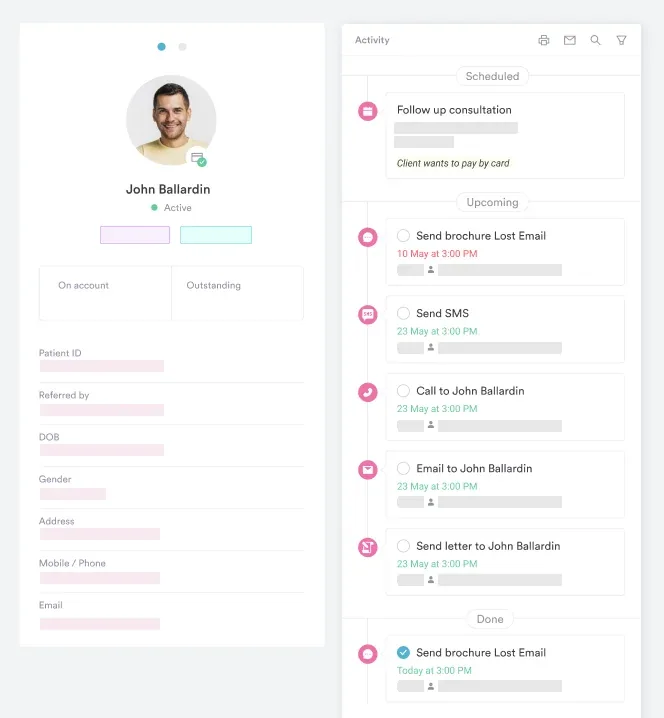
The key integration points to verify before choosing a portal:
Pabau’s client portal is built into the same platform as scheduling, clinical records, forms, and billing. There is no separate login, no data sync to maintain, and no reconciliation between systems. Patients interact with the portal; clinicians see the results directly in their workflow. That single-database design is one of the main reasons clinics choose Pabau.
The answer to “what is a patient portal” looks different depending on the context. A large hospital system often deploys an enterprise portal connected to dozens of departments, lab systems, and specialist teams. A private aesthetic clinic, dermatology office, or men’s health clinic has different priorities.
For private practices, the most valuable portal features tend to be:
Exploring patient portal software options for private practices reveals a clear divide: standalone portals that require custom integration versus all-in-one platforms where the portal is a native feature. For most specialist and aesthetic practices, the all-in-one approach reduces technical overhead and delivers a more consistent patient experience. Visual specialties have their own shortlists. Comparisons of dermatology EMR software show how photo documentation shapes the choice.
Before evaluating any patient portal, map the five most common patient calls or admin tasks your reception team handles each week. Use that list as your feature checklist. A portal that does not address your top five pain points is not the right fit regardless of how feature-rich it looks on a demo.
Selecting the right patient portal comes down to fit with your clinical workflows, your patient demographic, and your technical setup. If you are comparing full platforms, our review of ModMed competitors shows how portal quality varies between vendors. Here are the criteria that matter most for private and specialist clinics:
Patient adoption is where many portals stall. A portal that sends registration invites automatically at the point of booking has a much higher uptake rate than one that requires staff to manually email each patient. Look for automation built into the patient journey, not an add-on feature your team has to remember to activate. Roundups like our list of Tebra alternatives compare how much adoption tooling each platform builds in.
A patient portal is not a fix-all, and the drawbacks tend to land on the practice rather than the patient. Knowing the disadvantages of patient portals up front lets you choose a setup that sidesteps most of them. Structured EHR training for your team also stops most portal issues before they reach patients.
Patient portals are no longer a feature reserved for large hospital systems. For private clinics, specialist practices, and aesthetic businesses, a well-integrated portal is one of the fastest ways to reduce administrative load, improve data accuracy, and give patients the self-service experience they expect.
Pabau’s built-in client portal connects booking, digital forms, clinical records, invoicing, and secure messaging in a single system, so every patient interaction updates the same record without manual reconciliation. If your team is still spending significant time on calls that a portal could handle automatically, book a demo to see how Pabau handles it.

Want to understand the full range of benefits before choosing a portal? Benefits of patient portals covers how portals affect retention, revenue, and clinical outcomes for private practices.
Want patients to book without a phone call? Best patient self scheduling software reviews nine tools that let patients book anytime while staff focus on care.
Want the portal to handle those routine calls? Patient engagement portal guide explains how a portal cuts the hours staff spend on booking and form calls.
A patient portal is a secure online platform that gives patients access to their personal health information, including appointments, test results, clinical notes, prescriptions, and billing. It acts as a two-way communication channel between the patient and their care team, available 24/7 without requiring a phone call to the clinic.
Clinic staff use patient portals to reduce inbound calls, automate appointment confirmations and reminders, collect completed intake forms before appointments, and send invoices for online payment. The portal handles routine patient communication so staff can focus on in-clinic tasks that require direct interaction.
Yes. Any platform that stores or transmits patient health information in the US must comply with HIPAA. This means encrypted data transfer, role-based access controls, audit logging, and a signed Business Associate Agreement with the software vendor. Always verify these requirements before deploying a portal.
Patients can book and manage appointments, view test results and clinical notes, complete intake and consent forms, send secure messages to their care team, access prescriptions, and pay invoices. Some portals also allow patients to view before-and-after photos, join telehealth consultations, and access post-treatment care instructions.
An EHR (electronic health record) is the internal clinical system used by providers to document and manage patient care. A patient portal is the patient-facing interface that pulls relevant information from the EHR and presents it in a format patients can access and interact with. The best setups have the portal built into the same platform as the EHR so data stays in sync automatically.
The purpose of a patient portal is to give patients self-service access to their own health information and to move routine tasks off the phone. Booking, intake forms, prescription requests, payments, and non-urgent questions all happen through one secure login. For the practice, that means fewer inbound calls and cleaner records; for the patient, it means handling healthcare admin whenever it suits them, not only during office hours.
Not exactly. MyChart is one specific portal product tied to Epic’s electronic health record and used mostly by large hospital systems, so it is a single example rather than the whole category. Private practices usually run a portal built into their own practice management software, which delivers the same core functions, records, secure messaging, scheduling, and payments, without tying the practice to a hospital-scale EHR.