How to Effectively Manage Your Dermatology Practice In 2026
Pabau helps dermatology and aesthetic clinics manage scheduling, payments, marke...

March 17, 2026


Buy now, pay later is now available in Pabau

Starting a private therapy practice takes 3–6 months — but with the right plan and systems in place, the process is far more manageable than it looks.
Your biggest early decisions — practice model, pricing, and business structure — shape everything that follows. Get these right before you do anything else.
The right tools make or break your operations — you need scheduling, digital records, payments, and a client portal from day one. An all-in-one platform like Pabau saves you from juggling five different systems.
Most common mistakes are avoidable — undercharging, skipping the business plan, and ignoring marketing early on are the top reasons new practices struggle. A little preparation goes a long way.
Ready to be your own boss — but not sure where to start? You’re not alone. Opening a private practice feels overwhelming at first: licensing, business setup, insurance, software, finding clients… the list never seems to end.
But have no doubt — yes, you can do this — and it doesn’t have to be as complicated as it looks.
This step-by-step guide to how to open a private practice in 2026 covers everything you need to go from idea to open doors. We’ll walk you through choosing your business structure, getting licensed, setting up your systems, and common mistakes to avoid.
Before you jump into business registration and booking systems, take a breath. A little reflection now saves a lot of headaches later.
Here are the key things to think through:
The good news? With the right practice management software, you can keep operations lean and costs predictable from day one.
💡 Tip: You don’t need to have every answer before you start. But knowing where you stand on these factors will help you build a more solid foundation.
Here’s your full roadmap on how to start your own private practice — from your first business decision to seeing your first client. Follow the steps in order and you won’t miss a thing.
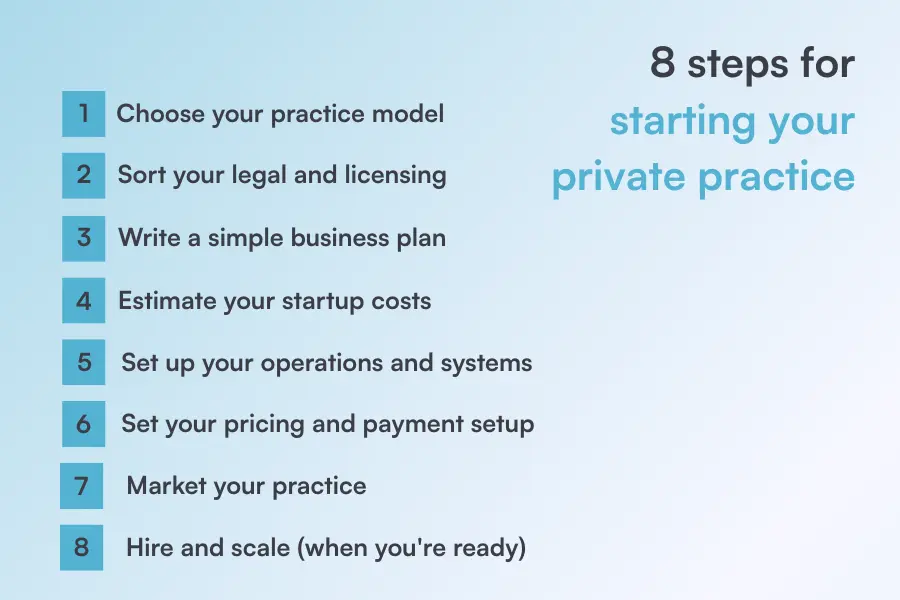
Before anything else, decide what kind of practice you’re building. This shapes every decision that follows.
Are you branching into other specialties too? Check out our guides on opening a physiotherapy clinic and how to start an aesthetics business for focused, field-specific advice.
Don’t overthink this at the start. Pick a model that matches your current resources — you can always evolve it later.
This step isn’t glamorous, but skip it and you’ll regret it.
Most of these steps can be completed online in a single day and at a low cost. Don’t let the legal side put you off — it’s simpler than it looks.
Whether you’re launching a therapy practice, a private counseling practice, or a specialist mental health service, you don’t need a 40-page document. You need enough clarity to make good decisions.
A solid business plan for a private practice covers:
Keep it concise. A one-pager is fine to start. For a deeper dive, check out our medical practice business plan guide — it walks you through each section with examples.
Your business plan is a living document. You’ll update it as your practice grows — so don’t let perfectionism slow you down.
One of the biggest mistakes new practice owners make is underestimating what it costs to get started. Here’s a realistic breakdown:
| Expense | Estimated Cost |
|---|---|
| Business registration & legal fees | $50 – $800 |
| Liability and malpractice insurance | $400 – $3,000 |
| Office space (if physical) | $500 – $1,800/month |
| Office furniture & equipment | $1,000 – $5,000 |
| Practice management software | $62/month+ (Varies depending on the solution) |
| Website & domain | $16 – $99/month (DIY builder, hosting included) + $500 – $2,000+ one-time (professional design, optional) + $20 – $70/year (domain renewal after first year) |
| Total estimated startup (solo therapy/allied health) | $4,000 – $25,000 |
| Medical practice (primary care, small clinic) | $80,000 – $150,000+ |
Estimates are based on small-business cost guidance from SCORE; medical practice startup cost analyses from Wolters Kluwer; commercial real estate rent data from IPA Commercial Real Estate); office and furniture cost from Humanly; malpractice insurance pricing information from Giffilth E. Harris; website building services from Squarespace. Actual costs vary by location and specialty.
Practice management software pricing can vary widely. Some providers, like SimplePractice, charge a flat monthly fee per practitioner — for example, its Starter plan begins at around $49 per month. This model works well for solo practitioners who prefer predictable, per-user pricing.
Other platforms, such as Pabau, use tiered pricing that scales with your practice size. Instead of a simple per-practitioner fee, you can choose grouped packages designed for startups starting at $62 per month, growing teams, multi-location clinics, or enterprise practices — with features, support, and automation increasing at each level.
Virtual therapy practices sit at the lower end of this range. If you’re opening a physical space, budget conservatively and keep 3–6 months of operating expenses in reserve.
According to industry data, most private counseling practices pay between $400 and $800 per year for stand-alone professional liability insurance.
Costs can rise to $3,000 or more when malpractice coverage is bundled with additional policies like general liability, cyber liability, or workers’ compensation.
This is where most new practice owners lose time — and money. Getting your systems right early saves enormous headaches later.
Here’s what you need to set up before your first client:
A client portal — giving clients access to their records, documents, and appointments builds trust and cuts admin.
Tools like Pabau bring scheduling, records, intake forms, payments, and reporting into a single platform — so you don’t have to juggle five different tools from the start. It’s especially well-suited for small teams who want cloud-based practice management without the enterprise price tag.
The features you actually need from your practice management software on day one are: scheduling, digital records, intake forms, and payment processing. Everything else can come later.
Pricing is where many new practitioners undercharge — and burn out quickly as a result.
📌 Note: Many therapists charge $100–$200 per session, and specialists often charge more. Don’t underprice yourself out of fear. Price based on your value, your costs, and what the market is already proving clients will pay.
Our free guide — How to Start Your Business — covers everything from startup budgeting to your first paying client. Download it free and keep it handy as you work through these steps.
You don’t need a big budget to get your first clients. You need a clear message and a few consistent channels.
Start here:
For a more in-depth strategy, our marketing for clinics guide covers everything from SEO to patient retention.
You don’t need to be everywhere. Focus on one or two channels and do them well. Consistency beats complexity every time.
Most practices start solo. But if demand grows, you’ll eventually face the question: do I hire?
Growth should be intentional, not reactive. Scale your systems before you scale your headcount — otherwise the cracks show up fast.
🚨 Ready to set up your practice the right way from day one? Pabau gives you everything you need — scheduling, records, online booking, payments, and more — in one easy-to-use platform. Book your free demo →
The right tools don’t just save you time — they help you look professional, stay compliant, and keep clients coming back. Here’s what you actually need.
Playing phone tag with clients to confirm appointments is a thing of the past. In 2026, patients expect to book online, and practices that offer it fill their diaries faster.
What to look for:
Tip: Practices using online booking software typically see a significant drop in no-shows within the first few months. Reminders alone are worth the setup.
Paper records are a liability — literally. A good EHR keeps you compliant, organised, and protects you if anything is ever challenged.
What to look for:
The best EHR systems for private practice aren’t just digital filing cabinets. They connect your notes to your schedule, your billing, and your client history — all in one view.
Getting paid shouldn’t be complicated. But without the right setup, invoicing can quickly eat into clinical time.
What to look for:
A client portal gives your clients a professional, secure space to manage their own experience with your practice — and it dramatically reduces the back-and-forth admin on your side.
What to look for:
Pabau’s client portal handles all of this out of the box — giving clients a polished, professional experience from the very first interaction.
You can’t grow what you don’t measure. Reporting tools give you visibility into how your practice is actually performing — not just how it feels.
What to look for:
💡 Tip: Even as a solo practitioner, reviewing your numbers monthly helps you make smarter pricing, scheduling, and marketing decisions. You don’t need an accountant for the basics — the right software does it for you.
The good news? You don’t need five separate tools.
Most new practice owners make the mistake of stitching together a different platform for each of these features. That means five logins, five monthly fees, and five things that can go wrong.
Pabau brings all of this into one platform — scheduling, EHR, billing, client portal, intake forms, payments, and reporting. It’s built specifically for private practices and small clinical teams who want a professional setup without the enterprise complexity.
See how Pabau works →
Even the best-prepared practitioners get tripped up early on. Here are the five most common mistakes when opening a private practice — and how to avoid them.
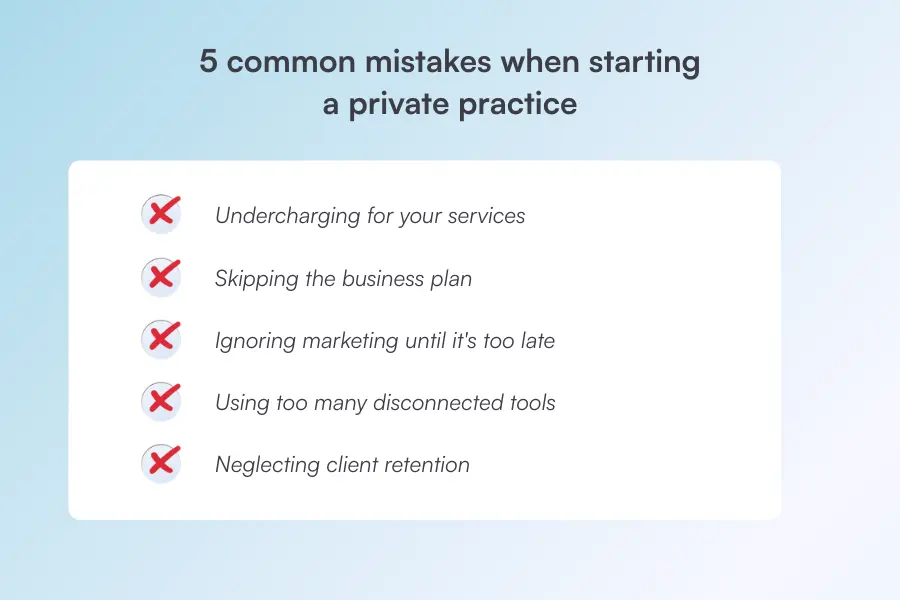
Many new practitioners undercharge because they feel guilty or fear they’ll lose clients if they set rates too high. But low fees don’t just hurt your income — they create financial stress that leads to burnout fast.
Base your rates on your local market, your overheads, and your experience — not what feels “safe.” You can always offer a limited number of sliding scale spots without devaluing your full rate.
Opening your doors without a plan is like driving without a map. Many practitioners dive in without a solid business plan, only to find themselves overwhelmed by expenses, unclear goals, and inconsistent income.
It doesn’t need to be long. A one-page plan covering your target clients, fees, costs, and marketing approach is enough to start.
Did you know AI can run a big chunk of your practice admin for you? From automated reminders to smart scheduling and marketing campaigns — find out which AI practice management tools are worth your attention in 2026.
SEO takes a really long time — if you want your practice to grow a year from now, you need to plan your strategy months in advance. Many new practitioners assume referrals will just come. They won’t — at least not fast enough.
Set up your Google Business Profile and a basic website before you open. A built-in marketing system can automate campaigns, send follow-up emails, and track what’s actually bringing clients in, so you’re not doing it all manually.
Juggling separate tools for scheduling, records, billing, and communication is a time and money drain. Many practitioners use different tools to manage the business side of things, jumping from one service to another — and it creates gaps, errors, and frustration.
💡 Tip: Choose a platform that handles multiple functions from day one. Knowing the difference between a practice management system and an EMR will help you pick the right setup — and avoid paying for tools you don’t need.
Getting new clients takes effort. Keeping them costs far less. Yet most new practice owners pour all their energy into acquisition and forget about retention entirely.
One of the most common risks in private practice is failing to establish a referral network and that starts with the clients you already have. Happy clients refer people. Forgotten clients don’t come back.
💡 Tip: Simple things go a long way — automated follow-ups, easy rebooking, and a smooth client experience. A good healthcare CRM helps you stay in touch with clients automatically, so nothing falls through the cracks.
For more on building long-term growth, check out our guide on how to grow a medical practice.
Starting a private practice is a big step, but you don’t have to figure out the operations side alone.
The last thing you want after a full day of clients is to spend your evening buried in admin.
Pabau helps treatment providers take care of the operational side, so you can get back to doing what you’re actually good at.
Ready to see it in action? Explore Pabau’s patient experience management software and find out why thousands of private practices trust it to run their day-to-day.
Typically 3 to 6 months. Licensing, business registration, and finding a space take the most time. Telehealth-only practices can launch faster.
It depends. If you want more autonomy, better income potential, and control over your clients, it’s worth seriously considering.
Yes. It doesn’t need to be long — even a one-pager covering your costs, target clients, and fees will set you up for success.
Yes. At minimum, you need a system for scheduling, client records, and payments. An all-in-one tool like Pabau keeps everything in one place.
Sometimes. The early months are the hardest. But with the right systems and a clear plan, the overwhelm fades quickly.
Yes, if you plan to bill insurance companies or work with third-party payers. Applying for an NPI is free and can be completed online in minutes.