Punch excision aftercare instructions template
Punch excision is a minor procedure that removes a small cylinder of skin with a...

7
Last Updated: Oct 15, 2026

Seven connected areas decide how a dermatology practice runs — scheduling, documentation, billing, staff, patient experience, reporting, and the system that ties them together.
Non-attendance is dermatology’s most expensive habit — reported no-show rates run from 17% to 31%, and automated reminders recover a large share of those slots.
A Daily / Weekly / Monthly Practice Rhythm stops those areas drifting — four checks each day, four each week, and four each month, each with an owner.
Dermatology compliance carries its own list — iPledge enrollment for isotretinoin, DEA registration, state licenses, and MIPS reporting for Medicare Part B clinicians.
One system beats a stack of tools — running scheduling, notes, payments, and reporting in one place cuts admin time and errors together.
How to manage my dermatology practice is a question that surfaces on a bad Friday, not a good one. You didn’t spend years in med school to chase unpaid invoices or untangle a double-booked afternoon.
Managing a dermatology practice comes down to seven connected areas: scheduling, documentation, billing, staff, patient experience, reporting, and the one system that ties them together.
This guide works through each one, in the order that pays back fastest. The clinical side already has your attention, so the business side is where the hours come back.
The seven steps are the easy part, and holding them in place is the job. So this guide also hands you a Daily / Weekly / Monthly Practice Rhythm, a fixed routine at three intervals that stops the seven areas drifting back.
A dermatology practice runs two businesses at once: insurance-billed medical care and self-pay cosmetic work, on the same schedule and with the same staff.
Day to day that means eligibility checks and deposits at one front desk, notes finished between patients, and a denial list somebody has to work.
Patients come to you about how they look and feel. That might be a stubborn psoriasis flare, a worrying mole, a surgical excision, or the wish to feel comfortable in their own skin again.
When you’re working on someone’s face, the stakes feel higher. Skin is personal, patients feel exposed, and they need your full attention in the room.
Here’s where the operational load comes from:
None of that means you’re running the practice badly. Dermatology is genuinely complex to operate, so the answer is a better operational foundation rather than more effort.
Dermatologist practice management usually breaks down at the handoffs, not inside any one department.
Every dermatology practice management problem in the table below starts the same way. A piece of information fails to move from one system to the next, so somebody re-types it or nobody does.
In the practices we onboard, the first data migration turns up the same picture. Appointments sit in one tool, balances in another, and signed consents in a drawer.
| Area | Common problem | First thing to check |
|---|---|---|
| Scheduling | Double bookings, no-shows, manual errors | Whether every appointment type has a reminder attached |
| Billing and coding | Claim denials, missed charges, slow reimbursements | Your clean claim rate on first submission |
| Patient communication | Missed follow-ups, late reminders, low retention | How many patients left last month without a next appointment |
| Documentation | Incomplete notes, thin audit trails, paper records | How many notes are still unsigned after 48 hours |
| Staff management | High turnover, unclear roles, rushed training | Whether each recurring task has one named owner |
| Reporting and analytics | No view of which services and providers earn | Whether you can pull revenue per provider without an export |
The seven steps run in payback order. Scheduling comes first because it pays back within a month, and the software decision comes last because it depends on the six before it.
| Step | Focus area | Goal |
|---|---|---|
| 1 | Scheduling and patient flow | Reduce no-shows, remove bottlenecks |
| 2 | Documentation and compliance | Stay audit-ready, save clinical time |
| 3 | Billing and revenue operations | Get paid faster, reduce claim denials |
| 4 | Staff and provider performance | Build a team that runs itself |
| 5 | Patient experience and retention | Keep patients coming back |
| 6 | Reporting and analytics | Decide from numbers, not memory |
| 7 | Centralize with one system | Connect the other six |
Control the schedule by moving booking online, sending automated reminders, holding buffer time between procedures, and keeping a same-day waitlist for cancellations.
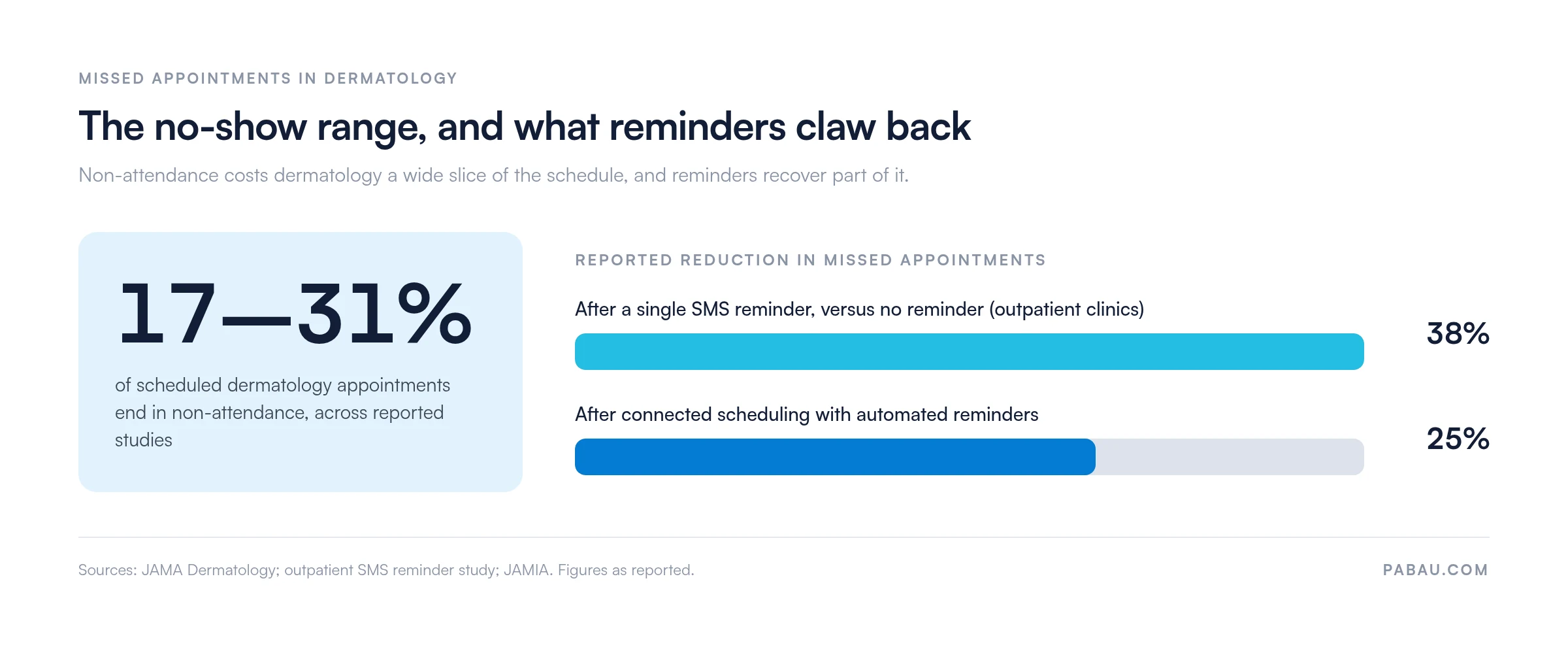
Poor scheduling is the fastest way to lose money and annoy patients. Dermatology studies report that 17–31% of scheduled appointments end in non-attendance, which leaves holes in the day and pushes other patients further out.
Those empty slots aren’t random, and reminders move the number more than any other single change you can make this month.
The fix starts with your scheduling rules, not with more effort at the front desk.
What to focus on:
Send at least one reminder before every appointment. One outpatient study found that text reminders reduced non-attendance by 38% compared with no reminder. That’s a slot you keep, at almost no cost.
Dermatology compliance runs on four items: HIPAA-secure records, current state licenses, DEA registration for controlled prescribing, and iPledge enrollment for isotretinoin.
Incomplete notes and paper records are a compliance risk and a clinical one. Your electronic medical record, or the lack of one, is usually where the trouble starts.
Dermatology records carry sensitive clinical data, before-and-after images, and long treatment histories. All of it has to be stored securely and pulled up in seconds.
What to focus on:
A general HIPAA checklist misses the dermatology-specific items, so name them separately:
Good documentation also improves care. When a patient comes back six months later, you want their notes, images, and previous treatments in front of you before they sit down.
A dermatology EMR keeps records, images, and consents together instead of in three places. Starting each patient on a standard dermatology intake form also means the history arrives complete, before the first appointment.
Run billing on a fixed cycle: submit claims daily, work the denial list weekly, and review days in accounts receivable every month.
Billing in dermatology is unusually complex. You handle insurance claims for medical treatments and card payments for cosmetic procedures, often on the same afternoon.
Knowing how to run a successful dermatology billing department comes down to two habits and three numbers. Submit clean claims the first time, work the ones that come back, and watch clean claim rate, denial rate, and days in accounts receivable.
Denied claims are the most expensive paperwork in the building. Give one person a fixed weekly slot to work the denial list, and rework each claim inside the payer’s appeal window.
What to focus on:
Four coding rules do most of the work in dermatology claims: modifier 25, lesion sizing, biopsy technique codes, and the actinic keratosis lesion count.
Whether billing stays in house is the other decision this step forces. Here is a rule you can apply this quarter: outsource when two of these three are true.
If only one is true, fix that one before you move the work. An outsourced biller inherits your documentation habits, so a coding problem follows the claims out of the building.
Credentialing belongs on the same calendar. Most commercial payers re-credential providers on a 36-month cycle, and Medicare revalidates enrollment every five years, so both recur long after the practice opens.
Each payer sets its own due date, so a provider on 15 plans carries 15 of them. A lapsed one stops claims for that provider until it clears.
Billing that reads your clinical and scheduling data directly means fewer missed charges and faster reimbursement.
Manage provider performance with defined roles, structured onboarding, short check-ins through the year, and per-provider numbers for utilization, revenue, and patient satisfaction.
Your team decides the patient experience, so the aim is a routine they can run without you in the room.
Replacing an experienced staff member is expensive. Recruitment, onboarding, and the productivity you lose in between all land in the same quarter.
Larger practices often add a relationship manager, someone who connects the clinical team, the admin team, and referral partners. The role gives each group one person to go to.
What to focus on:
The practices with the lowest turnover tend to be the ones with the clearest processes. People leave confusion faster than they leave a salary band.
Per-provider reporting does most of this work for you, as long as the numbers come out of the system your team already uses every day.
Watch note-completion timestamps too. Charting finished after hours is an early burnout signal, and it shows up in your system long before it shows up in a resignation.
Retention in dermatology runs on follow-ups: a message after every visit, a recall when the next treatment is due, and rebooking patients can do themselves.
Winning a new patient costs five to 25 times more than keeping one you already treat. Retention rarely gets the budget or the attention that new patient marketing does.
Dermatology is built for retention. Treatment courses, skin checks, and repeat cosmetic work bring the same patient back. So a few dermatology marketing ideas aimed at existing patients go further than a broad campaign.
What to focus on:
A short “How was your visit?” message the day after an appointment surfaces problems before they turn into reviews. It also tells happy patients that someone noticed them. That short message doubles as patient feedback you can collect, manage, and respond to before it becomes a public review.
A steady social media presence supports the same job. It keeps your practice in mind between appointments, which is when most patients decide where to go next.
Track six numbers weekly: no-show rate, clean claim rate on first submission, patient retention, revenue per provider, average appointment value, and days in accounts receivable.
Your busiest days are easy to name from memory. Cost per appointment, revenue per provider, and drop-off by treatment are not, and each one needs a report.
What to track:
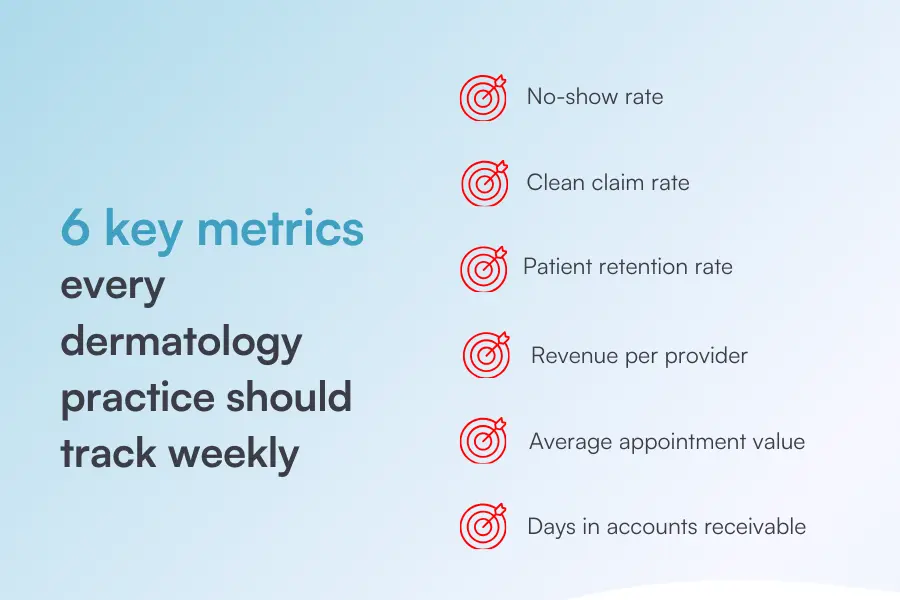
Put these six numbers on one page and review them the same day each week. A metric you look at weekly gets managed, while a quarterly report only gets explained.
Medicare reporting adds a second set of numbers. MIPS, the Merit-based Incentive Payment System, scores Part B clinicians on quality, cost, improvement activities, and promoting interoperability.
Your MIPS score moves your Medicare payment two years later, so a weak reporting year costs money well after it ends. Many dermatology practices submit through DataDerm, the American Academy of Dermatology’s clinical data registry and a CMS-approved qualified clinical data registry.
Centralizing means one system holds the schedule, the note, the photo, the consent, the invoice, and the report, so nobody re-types anything.
Most of the problems above share one cause. One tool holds the schedule, another holds billing, a spreadsheet holds the staff schedule, and consents sit in a paper file.
When information sits in separate places, a person has to carry it across by hand. That’s where the missed charges and the unsent follow-ups come from.
Bringing it together is the highest-leverage change most practices have available. Software for aesthetic practices covers medical dermatology alongside cosmetic work, which matters when your day contains both.
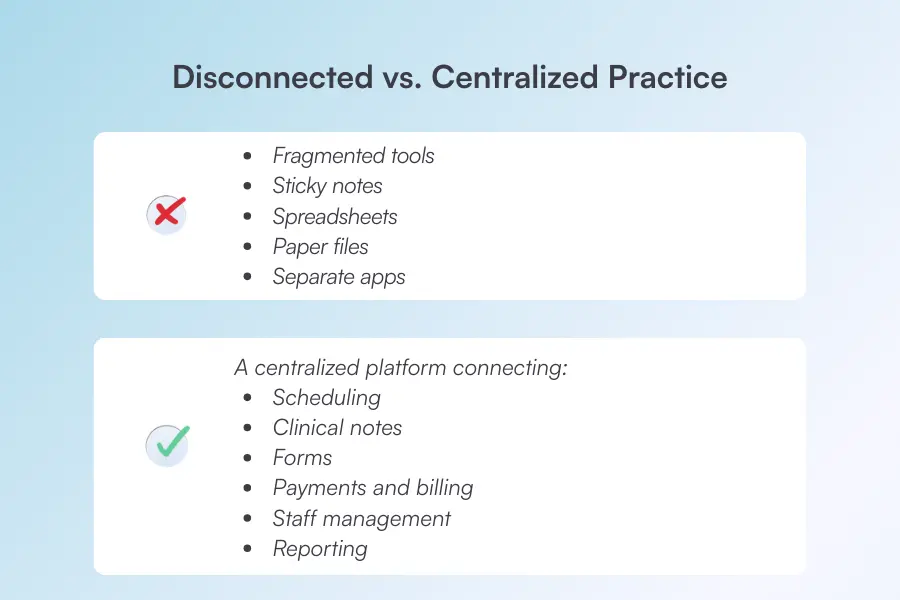
One system should hold:
When scheduling, notes, and billing share one patient record, your admin time drops and so does your error rate.
Practice management software like Pabau connects scheduling, clinical notes, payments, and patient messaging in one place, so the same record follows the appointment.
Ready to see it in action? Book a free demo of Pabau and see how it fits your practice.
The right system removes work, and the wrong one adds a second place to type the same information.
Three platforms are worth a look for dermatology, and the table below compares them on the two jobs a dermatology schedule stresses hardest. Our longer roundup of dermatology practice management software covers more of them side by side.
For high-volume scheduling and before/after photo management, three platforms cover both jobs: Nextech, Pabau, and ModMed.
Nextech and ModMed lead on dermatology-specific charting for heavy medical volume. Pabau runs a mixed medical and cosmetic schedule from one patient record, which matters when both sit in the same day.
| Platform | Best for | Starting price | Before/after photo handling | High-volume scheduling fit |
|---|---|---|---|---|
| Nextech | Mid-to-large US practices with high cosmetic volume | No published pricing, quoted on practice size | Photo management built into the dermatology chart | Dense specialty schedules, with mobile charting on iPad |
| Pabau | Practices running medical and cosmetic work on one schedule | From $62 per month | Before-and-after photos held against the patient record | Online booking, reminders, and staff scheduling in one calendar |
| ModMed | Practices wanting deep clinical documentation and reporting | No published pricing, quoted per practice | Photos captured inside EMA, its dermatology-specific record | Scheduling built into EMA, with analytics attached |
Nextech and ModMed both quote per practice rather than publishing rates, so a budget comparison needs a sales call. Pabau publishes a starting rate, and every subscription includes every feature.
Treat these three as your core dermatology management resources, then shortlist on price and on how each one stores photos against the record.

Nextech is a dermatology-specific EHR and practice management platform, named 2024 Best in KLAS for Ambulatory Specialty EHR. It suits high-volume medical and cosmetic dermatology practices in North America.
Pabau is an all-in-one practice management platform for medical and aesthetic practices, dermatology included. The breadth is the point here. A practice running medical dermatology alongside cosmetic treatments gets scheduling, clinical notes, payments, and patient messaging in one system. That replaces a specialist EMR plus three other tools.
Want to see it in action? Book a free Pabau demo and see how it fits your practice.

ModMed offers a cloud-based, specialty-specific EMR called EMA, with practice management tools built in. Clinical documentation and analytics are its strongest areas.
Run this checklist as a Daily / Weekly / Monthly Practice Rhythm: four checks at the end of each day, four each week, and four each month.
The rhythm is what keeps the seven areas above from drifting. Each tier has an owner and a time box, so it survives a busy week instead of getting postponed.
Daily — 10 minutes, front desk lead, end of day
Weekly — 30 minutes, practice manager, same slot every week
Monthly — 60 minutes, owner and practice manager, first week of the month
Each check is short on its own. The Daily / Weekly / Monthly Practice Rhythm works because the checks happen on a schedule, rather than after something has already gone wrong.
In most dermatology practices the schedule lives in one tool, the notes in another, and the payment in a third. Someone re-types the same appointment two or three times a day, and the follow-up message depends on who remembers to send it.
Pabau holds all three against the same patient record. The appointment opens the note, the note carries the treatment and the photos, and the invoice picks up what was done. Reminders and recalls then run on their own from that schedule.
Pabau Scribe, our AI scribe, drafts the treatment note from the consultation itself. Your clinician leaves the room with the chart already written, instead of finishing notes at 6pm.
So your front desk stops re-keying, and claims go out with the codes your clinician entered. The weekly numbers come from one place instead of three exports. Every Pabau subscription includes every feature, so none of that sits behind an upgrade.

Pabau connects scheduling, clinical notes, payments, and patient messaging against a single patient record. Your team stops re-keying appointments, and your weekly reporting comes from one source instead of three.

Managing a dermatology practice well is mostly a sequencing problem. Tighten the schedule first, because reminders and a waitlist pay back within a month. Documentation and billing come next, and the software decision comes after that.
The difference between a calm practice and a chaotic one is rarely patient volume. A calm practice is one where each of the seven areas has an owner, a routine, and a number somebody checks weekly.
So pick one area this week, fix its routine, and fold it into the Daily / Weekly / Monthly Practice Rhythm before you move on. Book a demo to see how Pabau runs those routines from one patient record, so your team stops holding the practice together from memory.

Opening a practice, or another location? How to start a dermatology practice covers the licensing, staffing, and setup decisions that are hard to reverse later.
Shortlisting clinical systems? 7 best dermatology EHR software compares the records platforms dermatology practices shortlist most often.
Need consent paperwork that holds up? Our dermatology consent template covers the risks, alternatives, and sign-off an auditor expects to see.
Turning consultations into treatment plans? Performing consultations that convert gives your team a structure for the conversation before the treatment.
Want faster skin assessments? The full skin assessment template keeps head-to-toe checks consistent between clinicians and easy to audit.
The typical salary for a dermatology practice manager in the US runs from around $73,000 to $108,000 a year, averaging $88,909. Location, practice size, and experience drive most of that spread, and senior roles at larger groups pay more.
Disconnected systems. When scheduling, billing, documentation, and patient messaging each sit in their own tool, charges get missed and follow-ups go unsent. The admin work multiplies, and revenue leaks quietly.
Automated reminders are your best tool. Practices that connect scheduling and reminders have reported no-show reductions of 25%. Send one reminder 48 hours before the appointment, and a second 24 hours before.
No, and separate tools usually cost you money. When your billing system can’t read your appointment data, charges get missed and codes get entered twice. One system that covers both is the cleaner setup.
Start with follow-ups. Patients drift away when a practice goes quiet after the appointment. Automated post-visit messages, recall reminders for repeat treatments, and easy rebooking through a patient portal all bring them back.