Medicare charting cheat sheet
A Medicare charting cheat sheet is a one-page reference that lists what Medicare...

6
Last Updated: Oct 21, 2026
In the practice management system vs EMR comparison, the electronic medical record (EMR) holds the clinical chart. The practice management system (PMS) runs scheduling, billing, payments and reporting. Almost every practice that treats patients needs both, because one keeps the record of care and the other gets you paid.
So the EMR vs practice management system decision is about setup: Two separate systems, or one integrated platform. This guide compares them side by side, names common examples, explains where the EHR fits and gives a decision table by practice type.
The guide also gives you the handoff map, which traces one patient visit and marks each point where data crosses between the two systems. Count the handoffs your staff re-key, and that number tells you whether one system is worth it.

An EMR records clinical care, and a practice management system runs the scheduling, billing and payments around it.
An EHR is an EMR built to share records beyond one practice, so it splits from a PMS along the same clinical-versus-business line.
Most practices need both, so the decision that matters is two connected systems or one integrated platform.
By Pabau’s rule of thumb, five or more re-keyed handoffs per visit means one integrated system pays for itself in saved admin.
Cash-pay med spas, multi-location groups and new practices gain most from one system, while insurance-heavy specialists may run PMS-led.
An electronic medical record (EMR) is the digital chart one practice keeps for each patient: Notes, history, medications, allergies, results and consent.
Clinicians use the EMR for charting: SOAP notes, treatment plans, clinical photos, telehealth visit notes and the signed consent behind each treatment. Most EMRs add e-prescribing, lab orders and results, and clinical decision support such as allergy and drug-interaction alerts.
The EMR stores protected health information, known as PHI, in its most sensitive form. That puts the EMR at the center of HIPAA compliance, with role-based access, audit trails and encryption. An EMR answers one question well: What happened clinically, and what should happen next?
A PMS in healthcare is the software that runs a practice’s operations: Scheduling, patient demographics, billing and claims, payments and reporting.
The front desk works in the PMS all day, and the billing team uses it to turn visits into revenue. Every practice management system covers roughly the same modules:
A PMS holds very little clinical detail. The PMS knows a patient had an appointment and paid for it, but not what the practitioner found. Most EMR and PM applications split the work at exactly that seam.
Buyers looking for a PMS EMR combination usually want one login that covers both sides. Larger vendors still sell PM and EHR software as separate products that share a database or an interface. Others package the two as one EHR/PM suite. Our guide to practice management software features covers the modules in more depth.
The difference between electronic medical records and practice management software is purpose: The EMR records clinical care, and the PMS runs the business around it.
One serves clinicians. The other serves the front desk and the billing team. The table sets out the difference between EMR and practice management system software row by row. It includes the billing role and certification rules each one carries.
Put simply, the difference between PM and EMR is the difference between the appointment and what happened during it.
The two systems hold different data about the same patient. The EMR holds symptoms, diagnoses, results, notes, photos and consent. The PMS holds appointment slots, recalls, invoices, balances and message logs.
In an EMR and PM pair, the data both sides need is small: Who the patient is, and what was done. Keeping the rest apart protects clinical data. Trouble starts when that shared slice is copied by hand.
Clinicians, nurses and estheticians live in the EMR. Receptionists, billers and practice managers live in the PMS. Owners and medical directors need both views, often in the same afternoon.
In practices we onboard, the friction usually shows up at the front desk first. Staff field clinical questions about records they cannot see, then chase treatment notes they need before they can bill.
HIPAA applies to both systems, because demographics and insurance details are PHI too. The EMR carries the heavier load: Clinical record integrity, access logs and prescribing rules. The PMS adds billing compliance, coding accuracy and PCI DSS for card payments. Once a payment record names the treatment, medical credit card processing falls under HIPAA as well as PCI DSS.
Each system also talks to a different outside world. The EMR connects to labs, pharmacies and other providers through HL7 and FHIR. The PMS connects to clearinghouses and payers through standard X12 transactions for eligibility, claims and remittances.
Federal certification applies only to the clinical side. The ONC Health IT Certification Program is voluntary. The program tests health IT modules against set criteria and lists those that pass on the Certified Health IT Product List (CHPL).
“Certified health IT” means an EHR module passed those tests. The criteria cover clinical functions such as e-prescribing, quality measures and patient access to records. Scheduling and billing modules are not what gets certified, so a PMS carries no ONC label.
Certification matters most to practices that bill Medicare, for three reasons:
A cash-pay aesthetic practice outside Medicare has less exposure. Promoting Interoperability does not apply to it, though HIPAA and patients’ right to access their records still do. CMS sets out the reporting rules on its Promoting Interoperability page.
That split is the practical core of practice management vs EMR. A bundled EMR and practice management system connects the two internally, so neither side needs an interface built between them.
An EHR is an EMR built to share records across providers, so practice management system vs EHR is the same clinical-versus-business split.
An electronic health record (EHR) follows the patient, sharing summaries with specialists, hospitals, labs and pharmacies. An EMR mostly stays inside the practice that created it. In everyday use the terms overlap, and many vendors use them interchangeably. Our EMR vs EHR comparison covers the distinction in detail.
The key differences between an EHR and a practice management system follow from that. The EHR holds diagnoses, notes and orders, and exchanges them over HL7 and FHIR. The PMS holds the schedule, the claim and the balance, and exchanges them with payers over X12.
EHRs are now close to universal in outpatient care. As of 2024, 91% of office-based physicians had adopted a certified EHR, according to ONC’s Health IT Quick-Stat #61. So most buyers already have a chart and are choosing the practice management system to run beside it.
Many vendors now sell EHR practice management suites, where scheduling, billing and charting share one database. The difference between EHR and practice management software stays the same inside those suites. One module holds the clinical record, and the other runs the business around it.
Epic and Oracle Health lead with the EHR, while Tebra and AdvancedMD lead with practice management and add an EHR on top.
Integrated suites from athenahealth, eClinicalWorks and NextGen Healthcare sell the two together. Pabau, the all-in-one practice management system we build, runs both on one patient record.
Practice management system examples are easier to compare once you know where each vendor started, because the starting side is usually the deeper one. Descriptions below come from each vendor’s own website, and the table carries no prices.
For a shortlist of widely used EMR systems, start with five: Epic, Oracle Health, athenahealth, eClinicalWorks and NextGen Healthcare. Epic and Oracle Health serve mainly hospitals and health systems. The other three are built for ambulatory practices.
Epic is an EHR. Epic describes its software as “a single comprehensive health record” and sells scheduling and revenue-cycle applications on that same record.
The handoff map traces one patient visit through six steps and shows which system owns each step and which data must cross to the other.
The example is a cash-pay aesthetic visit, with the insurance variant noted at check-in and billing. That combination covers the widest spread of data a visit can generate.
Drawn as a flow, the same six steps show how often the visit switches sides.
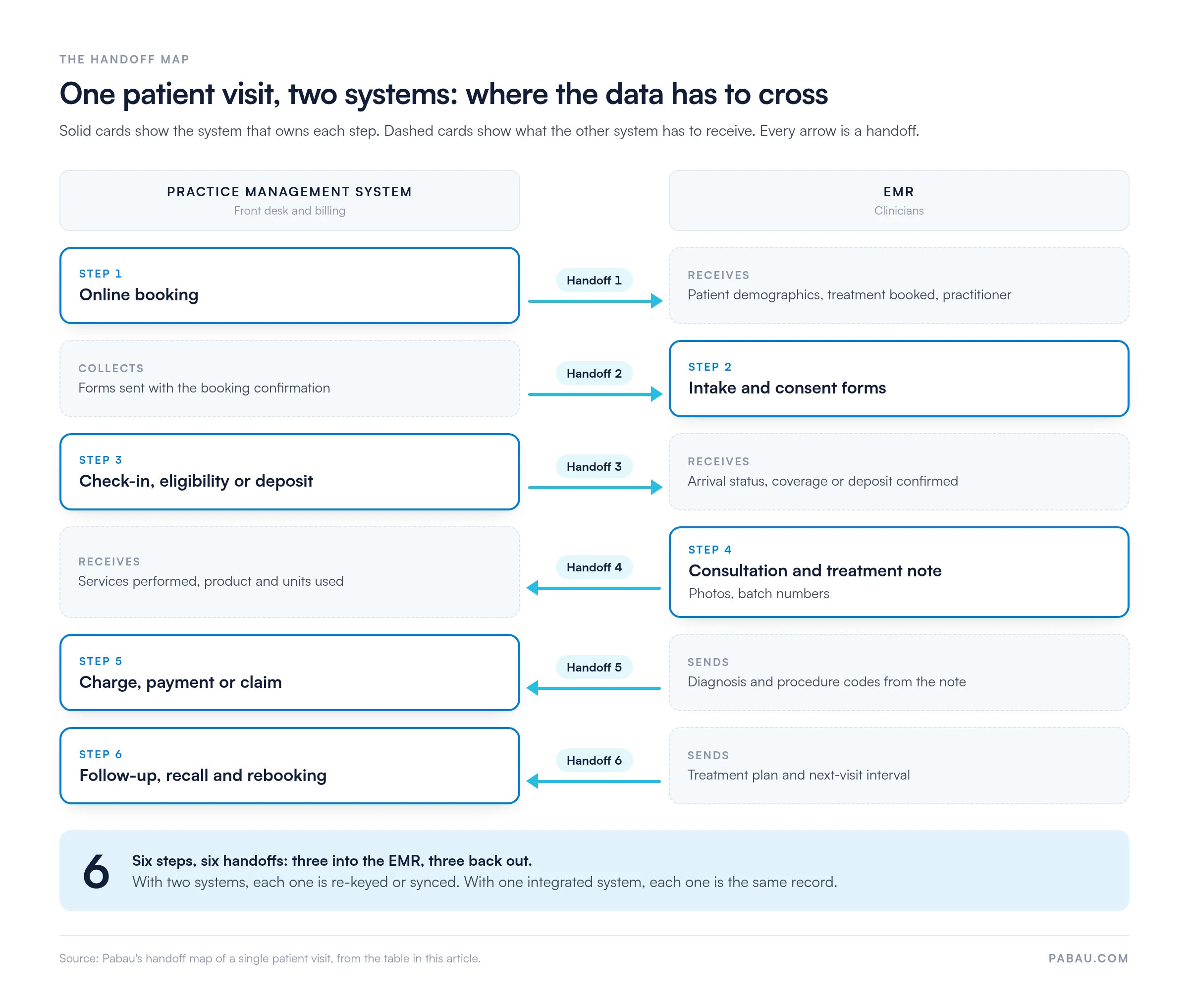
Count the arrows and you get six handoffs from six steps: Three into the EMR and three back out. Every handoff is a point where a two-system setup re-keys data or depends on a sync.
A cash-pay aesthetic visit skips the eligibility check but still takes a deposit. Step 4 then carries the heaviest load: Before-and-after photos, the consent for that treatment, and product batch numbers. An insurance-billed visit leans on steps 3 and 5 instead, where eligibility and coding errors turn into denials.
Pabau’s rule of thumb starts with your most common visit. Count the handoffs your staff re-key or check by hand on that visit, then read the setup from the table.
List the steps of that visit type, and mark each step where staff open a second screen or retype a value. A crossing an interface syncs reliably does not count. A crossing someone has to double-check does.
Then multiply by volume to see the workload. Six re-keyed handoffs across 40 visits a week is 240 manual crossings. Each one is a chance for a duplicate chart or a missed charge.
If you keep two systems, an EHR integration can automate some crossings and lower your count. Each automated crossing still needs mapping, testing and monitoring when either vendor updates.
The pros and cons of each system are easiest to judge side by side, because one system’s weak spot is usually the other one’s job.
Pros
Cons
A structured EMR conversion plan keeps patient data intact if you are moving from paper or an older system.
Pros
Cons
Once you know you need both, the choice is EMR practice management software from one vendor, or two tools joined by an interface. Buyers who look for practice management plus EMR in one platform usually want to stop re-keying at each handoff.
Separate systems: Pros
Separate systems: Cons
One integrated system: Pros
One integrated system: Cons
Almost every practice that treats patients needs both EMR and practice management software, because one keeps the clinical record and the other gets you paid.
The choice is whether to run them as one system, and practice type decides how much that choice matters.
Before you choose, work through these questions in order:
Pabau collapses the handoff map into a single patient record that serves both the treatment room and the front desk. Charting, booking, payments and reporting all work from that record, so none of the six handoffs on the map needs re-keying.
A patient books through online booking, which creates or matches their record. Intake and consent forms go out with the confirmation and land in that same record. The practitioner sees them before the patient arrives.
Treatment notes, before-and-after photos and product batch numbers are saved against the appointment. The charge, the payment and the follow-up recall all come from that appointment too. Your front desk stops retyping names, chasing consent and matching invoices to notes.
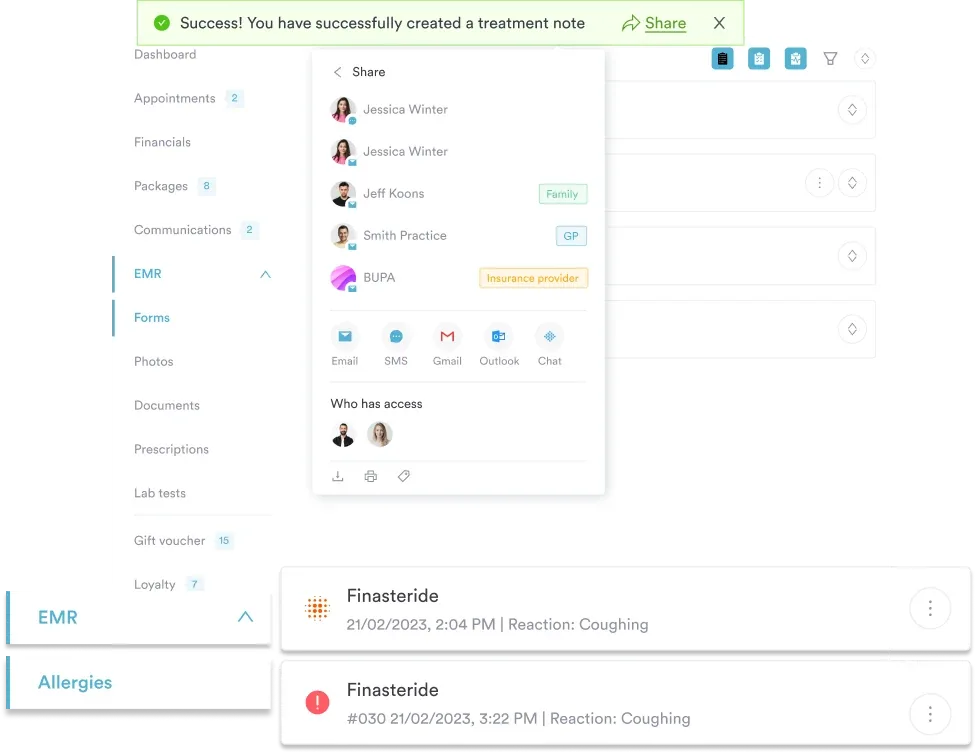
Practitioners can also work from Pabau GO, our iOS app for practitioners. Pabau GO shows each patient’s pre-appointment checklist of forms, consents and photos, and the completed items flow into the record.
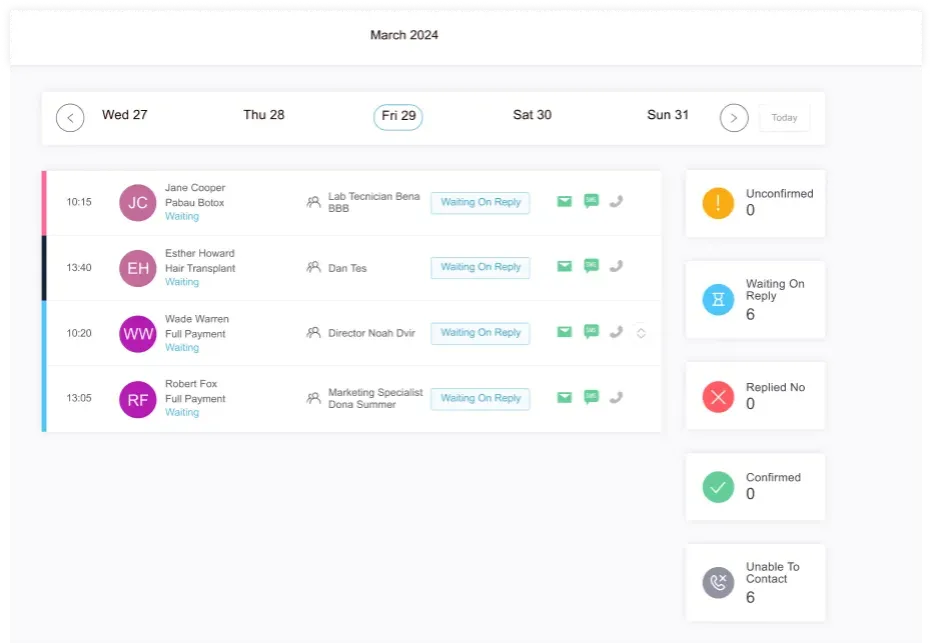
Every Pabau subscription includes every feature, from the EMR to reporting. Structured onboarding moves your existing records across with a dedicated coordinator, so the switch is planned. See how Pabau’s practice management app brings the front desk and the treatment room together.

Pabau keeps treatment notes, consent forms, photos, appointments and payments on one patient record, so your team stops re-keying data between systems.

You need the clinical record and the business side either way, so the practice management system vs EMR decision comes down to handoffs.
Map your most common visit this week and count the crossings your staff re-key. At two or fewer, a well-run pair of systems is fine. At five or more, one integrated system removes that work at every visit, for the price of a one-time migration and reliance on one vendor.
Book a demo to see how Pabau keeps your charting, booking and billing on one patient record.

Comparing full platforms? Best medical practice management software compares systems that cover the front desk and billing.
Running a small practice? Best EMR for small practice shortlists EMRs sized for smaller teams.
Planning a move? Switching EHR systems walks through migrating records without losing history.
Writing a feature checklist? Practice management software features lists the modules worth testing in a demo.
Checking the clinical side? EMR features covers the charting tools clinicians rely on.
An EMR is the clinician’s chart, while a PMS schedules, charges and collects payment for the same patient. EMR stands for electronic medical record and PMS for practice management system. A PMS EMR bundle keeps both halves on one record.
An EHR is a clinical record designed to be shared with other providers, while a practice management system runs scheduling and billing. Integrated EHR practice management suites combine both, so the chart and the claim use the same patient data.
EHRs and EMRs are closely related but not identical. An EMR is one practice’s patient chart, and an EHR is built to share that record with other providers. Many vendors use the two terms interchangeably.
Epic is an EHR, because Epic builds its software as one comprehensive health record designed to work inside and outside a health system. Epic also sells scheduling and revenue-cycle applications that run on that record.
In medical billing, the EMR is the source of the diagnosis and procedure codes that justify each charge. The practice management system turns those codes into a claim. If the note and the claim disagree, payers can deny it.
The core applications are scheduling and online booking, patient registration, insurance eligibility checks, billing and claims, payments, and reporting. Many systems add a patient portal, reminders, inventory and staff management.
An EMR documents care, while a revenue cycle management (RCM) system gets that care paid for. RCM covers eligibility, charge capture, claims, denials and payment posting, and it often sits inside the practice management system.