Maja Popovska
Massage Gift Card Template
A massage gift card template is a fill-in-the-blank certificate you customize wi...

23
Last Updated: Sep 11, 2026
Free PDF 1 page, print-ready Clinician-reviewed
Most practice websites either skip a contact form and list a bare email address, or bolt on a generic contact widget built for e-commerce. Neither captures what a practice needs before responding to a patient: Their reason for reaching out, a preferred way to be contacted, and documented consent to process their information.
The template below solves that by structuring the fields a practice’s front desk actually uses — name, phone, email, message, and a consent checkbox — with optional fields for appointment timing and reason for inquiry. It also includes the consent language regulators expect, so there’s a documented trail from the moment a patient first reaches out.
This guide covers what to include on the form, how it differs from a generic contact widget, and how to move from a static PDF to a form that routes inquiries straight into your patient records.
A ready-to-use contact form template that captures patient details, contact preferences, reasons for inquiry, consent declarations, and appointment request information — designed for practices and clinics of every kind.
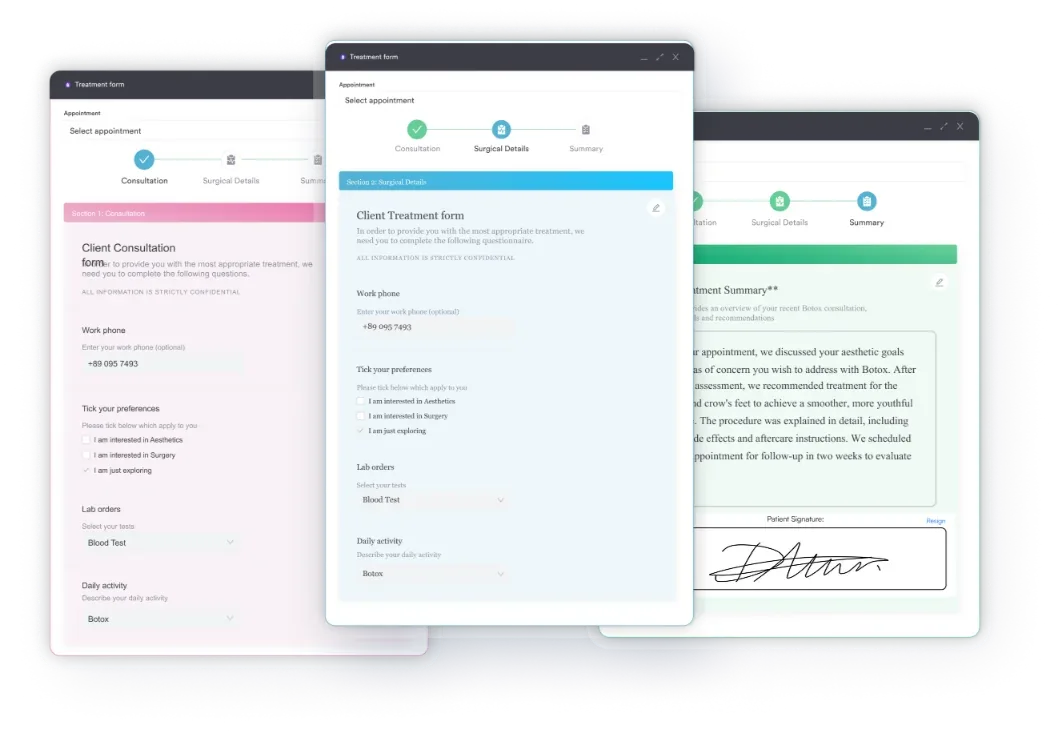
Start from scratch, or upload this PDF or any form you already use, and Pabau's AI Form rebuilds it with tick boxes, text fields and a signature. Attach it to the treatment once, and every patient gets it on time.
AI Form rebuilds the consent, history and aftercare forms you already use. You review each one, then publish.
Patients complete forms on their phone before they arrive, so the front desk stops retyping paper.
Every signed form is versioned and attached to the treatment record, ready when you need it.
Set how long a consent stays valid. Returning patients skip forms they have already signed.
Supports HIPAA and GDPR compliance AES-256 encryption 4.8 on G2 4.7 on Capterra Trusted by 4,000+ practices worldwide

A contact form is a structured web form that captures patient inquiries, appointment requests, and contact details without exposing your practice email directly to the internet.
Essential fields include full name, email, phone number, message, and consent checkbox; optional fields depend on your practice’s workflow (appointment time preference, reason for inquiry, service interest).
Contact forms must include GDPR consent language for UK/EU patients, or equivalent local law such as Australia’s Privacy Act, plus clear data retention and usage policies to protect patient privacy.
Practice management software like Pabau routes inquiries directly into your patient CRM, automating follow-up and cutting manual data entry compared with static HTML contact forms.
A contact form is a structured web-based tool that lets patients and prospective clients message your practice without exposing your practice email address directly to the internet. Unlike a bare email link.
For practices, this means inquiries arrive through a single channel, usually email or directly into your patient management system, rather than scattered across multiple inboxes. That makes follow-up faster and more reliable. A contact form also signals professionalism and gives patients confidence their information is handled securely, which matters in healthcare, where data protection is a legal requirement.
The template below is structured to work out of the box for most practices. Here are five steps to implement and customize it for yours:
Contact forms are useful for any practice with a website. Specifically, they matter most for:
A structured contact form template delivers measurable operational benefits for practice teams:
Generic website contact forms, built for e-commerce or SaaS businesses, fall short for healthcare practices because they ignore the regulatory and workflow constraints unique to medical practice.
A healthcare-specific contact form has to account for patient privacy law (GDPR in the UK/EU, HIPAA in the US), the need to capture clinical context — reason for visit, symptom descriptions, treatment preferences — before an appointment, and the legal requirement to document consent and data handling.
A generic form typically skips the privacy notice checkbox, doesn’t ask for appointment time preference, and omits the consent language regulators expect. A patient submitting through a bare email link or a generic contact form may not have explicitly consented to data processing, which puts your practice at risk of a regulatory finding.
Every contact form should include a core set of fields that balance information capture with form brevity. Shorter forms tend to have higher completion rates, so prioritize only the fields your practice genuinely needs:
How you present the contact form matters as much as which fields you include. Small design choices affect completion rates and data quality:
If your practice serves UK, EU, or Australian patients, GDPR or the equivalent local law is non-negotiable. A contact form is a point where personal data enters your practice, so you need documented consent. Key compliance steps:
US practices work under different logic: A contact form for appointment requests isn’t necessarily HIPAA-regulated, but if you collect health information such as symptom descriptions or medical history, you need a HIPAA-compliant form tool that encrypts submissions. When in doubt, get legal advice before launch. ICO guidance and GDPR Article 7 cover consent requirements in more detail.
A static HTML form works, but Pabau’s digital forms go further by integrating directly into your practice’s patient management workflow. Submissions no longer land in an inbox for manual entry — Pabau routes inquiries straight into your CRM.
The patient record is created automatically, appointments can be booked from the response, and follow-up reminders fire without staff intervention.
That removes the loop where a contact form lands in email, a receptionist retypes the patient’s details into the system, and appointment details get lost in the back-and-forth. Pabau’s online booking integration lets patients book directly from the contact form.
For compliance-focused practices, Pabau’s forms include built-in consent checkboxes, GDPR-compliant privacy notices, and audit logs showing when each patient consented to data processing.
Collect contact preference at the form stage, not after. A patient who requests ‘SMS only’ or ‘email only’ during contact form submission lets your practice respect their boundaries immediately, which cuts missed communications and improves patient trust.

Replace scattered contact form emails with automated inquiry routing, instant patient record creation, and integrated appointment booking.

A well-designed contact form is one of the highest-impact, lowest-cost tools a practice can deploy. It captures patient inquiries systematically, demonstrates compliance with data protection law, and sets the tone for a professional patient experience before the first appointment.
The template above gives you a starting point — download it, customize it for your practice type (medical spa, GP surgery, therapy practice), and deploy it on your website or connect it to your practice management system.

Standardizing dental exam documentation? Dental examination form template It documents patient history, clinical findings, tooth charting, and dentist certification in one form.
Collecting medical history before dental treatment? Dental medical history form template It gathers medications, allergies, medical conditions, and surgical history before dental treatment begins.
Registering a first-time dental patient? Dental new patient form template It offers a free intake form covering registration, medical history, insurance details, and treatment consent.
A contact form must capture: Full name, email address, phone number, message or inquiry description, and a privacy consent checkbox (required in UK/EU/AU). Optional fields include reason for inquiry, preferred contact method, and preferred appointment time. Keep the form short (5-7 fields) to maximize completion rate.
Download the template above and customize it for your practice type. Then either (1) use the template PDF on your website directly, (2) build a live web form using a tool like JotForm or Typeform and embed it on your site, or (3) use Pabau’s built-in digital forms, which route inquiries straight into your patient management system and enable instant appointment booking.
Yes, if you serve UK, EU, or Australian patients. You must include an explicit consent checkbox confirming the patient agrees to data processing, link to a privacy notice, and document data retention periods. Non-compliance can result in regulatory findings or fines. Consult your data protection officer or legal team if uncertain.
5-7 fields is the sweet spot. Each field above 7 tends to reduce completion rate. Collect only information you genuinely need to respond to the inquiry; defer detailed medical history, insurance information, and consent forms to the appointment intake process, not the contact form.
Yes, and it is recommended. Add a “preferred appointment time” or “reason for inquiry” field to the contact form. This allows patients to express availability and need in one submission, which your reception team can then match against your schedule, reducing back-and-forth emails and accelerating appointment booking.