How to Start Private Practice in California as a LCSW (Step-by-Step)
Pabau helps new LCSW practices stay organized and compliant with integrated clie...

April 6, 2026


Buy now, pay later is now available in Pabau

EHR optimization (or Electronic Health Records optimization) is ongoing, not a one-time fix. It’s the continuous process of refining workflows, templates, and automation so your system works smarter.
Warning signs include documentation overload, staff workarounds, duplicate records, and compliance struggles. If any of these sound familiar, your EHR needs attention.
The most impactful strategies are customizing templates, automating workflows, standardizing intake forms, and implementing role-based permissions—all reducing admin burden and improving patient care.
Track KPIs to prove it’s working: Documentation time, no-show rates, patient satisfaction, and provider burnout indicators show whether optimization is delivering real results.
Your Electronic Health Records (EHR) system should make life easier — but too often it slows teams down and pulls focus from patient care. When workflows break, care quality, patient safety, and clinical efficiency suffer. EHR optimization helps streamline processes, reduce clicks, and turn your system into a tool that truly works for you.
EHR optimization is the answer.
In this guide, you’ll learn how to spot the warning signs your EHR needs help, get a practical optimization checklist, and discover which KPIs actually measure success.
Let’s reclaim those lost hours and get back to patient care.
Electronic Health Records or EHR optimization is the process of fine-tuning your electronic health records system to better support your clinical workflows, improve data accuracy, boost EHR usability, and increase operational efficiency.
In a nutshell, it’s the process of getting your system to work smarter, not harder — a continuous approach to true system optimization across your practice.
Here’s the thing: optimization isn’t a one-and-done deal. Here’s the thing: successful EHR implementation is just the beginning; optimization isn’t a one-and-done deal. It’s not the same as your initial EHR setup or migrating from paper records. Those are important first steps, but optimization is the ongoing work of refining your system as your practice evolves.
You’re constantly tweaking templates, adjusting workflows, and removing friction points.
Why bother? Because proper optimization delivers real benefits:
The difference between basic EHR adoption and true optimization is like the difference between owning a car and knowing how to drive it well. One gets you from A to B. The other makes the journey efficient, safe, and far less stressful.
As of 2024, about 95% of U.S. office-based healthcare providers used an electronic health record (EHR) system, and approximately 84% used certified EHR technology. This shows that EHRs are a foundational tool for the entire healthcare industry in delivering efficient, high-quality patient experiences.
Tip: Want to know the difference between EHR and practice management systems? Check out our guide. Are you new to practice management software? Discover what it is and why it matters.
Think your EHR system might need some help? Here are the telltale signs that it’s time to optimize.
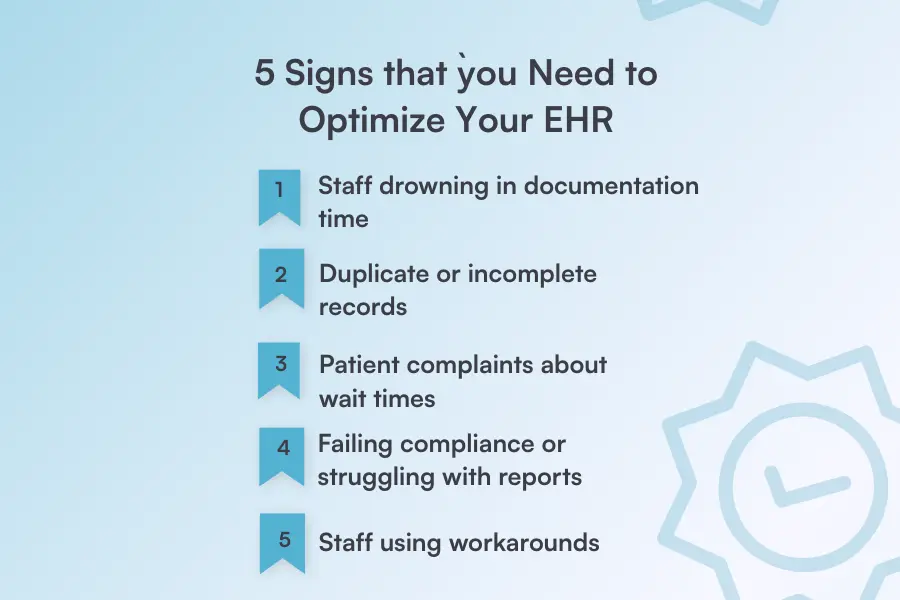
If your clinicians are spending more time typing than treating, something’s wrong. You’ll notice staff staying late to finish notes, rushing through documentation during patient visits, or complaining about repetitive data entry.
What this looks like:
This is a fast track to physician burnout in healthcare. When your system demands more clicks than care, it’s time to start working on workflow optimization.
Nothing kills efficiency like hunting for information that should be right there. If you’re constantly asking patients to repeat their history, finding conflicting data in charts, or discovering empty required fields, your EHR system isn’t doing its job.
This is especially common in practices still running on legacy systems that weren’t built for modern workflows.
Red flags to watch for:
Keeping client records up to date shouldn’t feel impossible. If your system makes it hard to maintain accurate data, optimization can fix those gaps.
Your EHR system should speed things up, not slow them down. If check-ins take forever, patients sit in the waiting room while staff hunts for forms, or visits run late because of system delays, your patients notice.
Common patient frustrations:
A well-optimized system actually improves patient outcomes by making visits smoother and communication clearer. Your patients shouldn’t pay the price for clunky workflows.
If pulling reports feels like pulling teeth, or you’ve had close calls (or actual failures) during compliance checks, your EHR system needs work. Compliance shouldn’t require a detective and three hours of manual data compilation.
Warning signs:
Your system should make patient data security and compliance easier, not harder. Optimization helps you stay ahead of regulations without the stress.
When your team creates their own systems—sticky notes, spreadsheets, personal tracking methods—to get around the EHR system, that’s a massive red flag. These workarounds seem helpful, but actually create data security risks and inefficiencies.
What workarounds look like:
If your staff has collectively decided the EHR is too difficult to use properly, listen to them. These workarounds are creative problem-solving, yes—but they’re also proof that your system needs optimization.
Pabau’s practice management software is built to save private practices time with intuitive workflows, smart automation, and features that actually fit how you work. See how we can help optimize your entire practice—not just your records.
Explore Pabau’s Features →
Not sure where your EHR stands? Run through this quick audit to spot gaps and prioritize improvements.
How’d you do? If you checked fewer than 70% of these boxes, your EHR needs optimization. Even if you scored higher, any unchecked items represent opportunities to work smarter.
Need help ensuring your practice stays compliant while optimizing? Check out Pabau’s compliance management features that automate the heavy lifting.
Follow this roadmap to transform your EHR from frustrating to functional. Each step builds on the last.
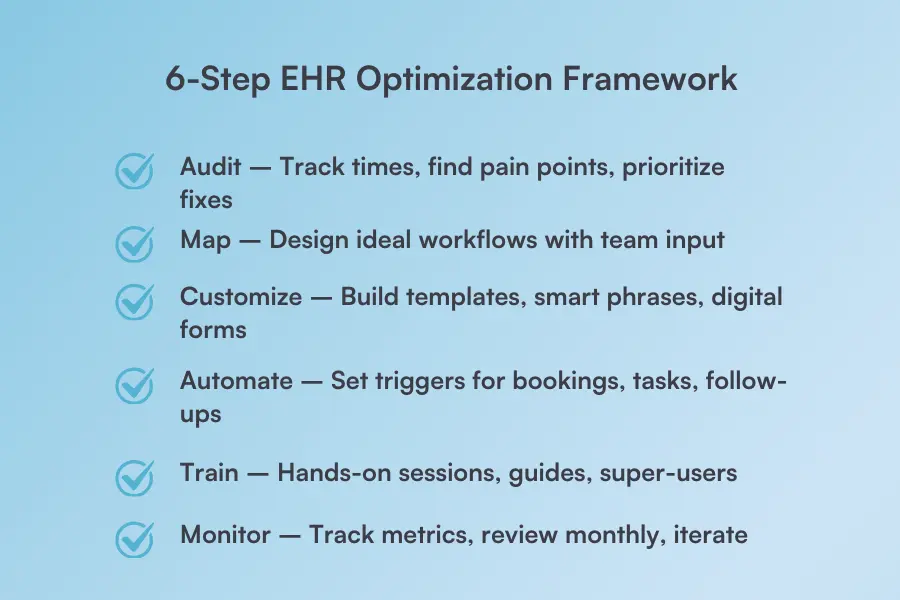
Start by understanding where you actually are. Spend a week tracking how long common tasks take, where staff get stuck, and which features nobody uses.
Talk to your team—they know exactly what’s broken. Document the pain points, then prioritize them by impact and effort required.
Design how processes should work, not how they currently do. Sketch out patient journeys from scheduling to checkout. Identify bottlenecks and unnecessary steps.
Get input from everyone who touches the EHR—front desk, primary care teams, billing, and healthcare providers. The software should work around your practice — not the other way around.
Now tackle the biggest time-waster: documentation.
Build templates for your most common visits. Create smart phrases for frequently used text. Set up digital forms patients can complete before arriving.
Remove unnecessary fields that just create busywork. Every template should save time, not add clicks.
Let the system handle repetitive tasks. Set up automated workflows that trigger client journeys the moment something happens—booking confirmed, treatment completed, form submitted.
Use conditional logic to tailor each step: send intake forms automatically after booking, trigger after-care protocols when treatment ends, or assign follow-up tasks to specific team members based on their role.
The goal: reduce manual work that doesn’t require human judgment.
Optimization only works if everyone actually uses the new workflows. Hold hands-on training sessions focused on the changes you’ve made.
Create quick-reference guides for common tasks. Assign super-users who can help teammates troubleshoot. Good onboarding makes the difference between adoption and abandonment.
Set up your clinic dashboard to track key metrics: documentation time, patient wait times, staff satisfaction, and error rates. Review these monthly. What’s improving? What’s still broken?
EHR optimization isn’t one-and-done—it’s an ongoing process. Keep refining based on real data and team feedback.
Want to know how EHR integration can streamline your entire practice? Learn how connected systems save time and reduce errors.
Ready to see real improvements? Here are strategies you can implement now for measurable results.
Stop making patients fill out the same information every visit. Digital intake forms that patients complete before they arrive save 10-15 minutes per appointment, reduce front desk bottlenecks, and improve care coordination across your team.
How it works:
Imagine a dermatology practice that moves consent forms online. Patients complete paperwork at home or in the waiting room on their phones. Check-in becomes a quick ID verification instead of a lengthy form-filling session, and staff can prep treatment rooms while patients finish up.
“My appointments are shorter because the forms have already been filled out before the patient arrives.”

Generic templates waste time. Custom templates for your most common visits dramatically reduce documentation time. This is especially true when utilizing an outpatient EMR designed for your specific clinical workflows rather than a one-size-fits-all system.
What to include:
A pilot study published in Frontiers in Digital Health found that optimized templates required fewer clicks and keystrokes, saving clinicians an average of 23 minutes per patient and adding up to several hours saved each day compared with older templates.
Picture an orthopedic practice that creates templates for post-op visits, sports injuries, and joint injections. Instead of starting from scratch each time, healthcare providers click through relevant sections, adjust as needed, and finish notes in a fraction of the time.
Not everyone needs access to everything. Role-based permissions protect patient data, reduce errors, and keep workflows clean.
Set permissions by role:
Consider a multi-provider clinic where each team member only sees what they need. The front desk can’t accidentally modify clinical notes, and billing staff can’t change patient demographics. Everyone works in their lane, reducing mistakes and protecting sensitive information.
Documentation is the biggest time drain. Modern Health Information Technology tools — including AI-powered digital scribe solutions — can significantly reduce charting time while improving documentation accuracy and supporting clinical efficiency.
Options to consider:
A family practice implements AI digital scribes, and healthcare providers notice they can complete notes during patient encounters instead of spending hours charting after the clinic closes. They leave work on time and feel less burned out.
Every manual task is an opportunity for automation. Set up automated workflows that trigger based on specific events to keep your entire health system running smoothly.
Automate these common tasks:
Picture a physical therapy clinic where the entire post-treatment workflow runs itself. When a session ends, the system automatically sends exercise instructions, schedules the next appointment, and assigns a follow-up call task to the front desk—all without staff intervention.
Paper prescriptions slow everything down and increase errors. E-Prescribing sends medications directly to pharmacies electronically, reducing medical errors and improving accuracy across the entire prescribing process.
Benefits you’ll see:
A primary care practice where primary care physicians send prescriptions with a few clicks. Patients pick up medications on their way home, pharmacies don’t have to call back about illegible handwriting, and the system automatically catches potential drug interactions before they become problems.
You can’t improve what you don’t measure. A robust reporting dashboard gives you instant visibility into what’s working and what’s not.
Key metrics to track:
A wellness clinic discovers through their dashboard that certain time slots consistently have more no-shows than others. They adjust their reminder timing and strategy for those appointments, leading to better attendance and fuller schedules.
The less your staff has to do manually, the more efficient your practice becomes. Patient portals put routine tasks in patients’ hands.
What patients can do themselves:
Consider an urgent care center that enables online scheduling. Patients book appointments at midnight when they can’t sleep or during lunch breaks at work. Phone lines stay quieter, and staff can focus on helping patients who are actually in the clinic.

6 Best Plastic Surgery Practice EMR Software for 2026: See which EMR platforms best support consults, consent, before-and-after photos, and the full surgical patient journey.
Best Primary Care EHR Software Solutions for 2026: Discover the top EHR systems helping primary care practices streamline records, scheduling, and patient management in one place.
Best Direct Primary Care EHR Software Solutions for 2026: Find the best EHR tools built for DPC practices that prioritise patient relationships over insurance-driven workflows.
If you’re tired of wrestling with your current system, Pabau offers a different approach. We’ve built our platform around real optimization challenges—from first contact to follow-up care.
More than just an EHR
Pabau goes beyond basic electronic health records. It’s a complete practice management solution that handles online booking, scheduling, billing, marketing, team management, inventory, and client communication—all in one place.
Want to see how Pabau handles the optimization challenges we’ve covered in this guide? Check out our practice management software features.
You’ve made changes—now prove they’re working. Track these metrics to measure real optimization success.
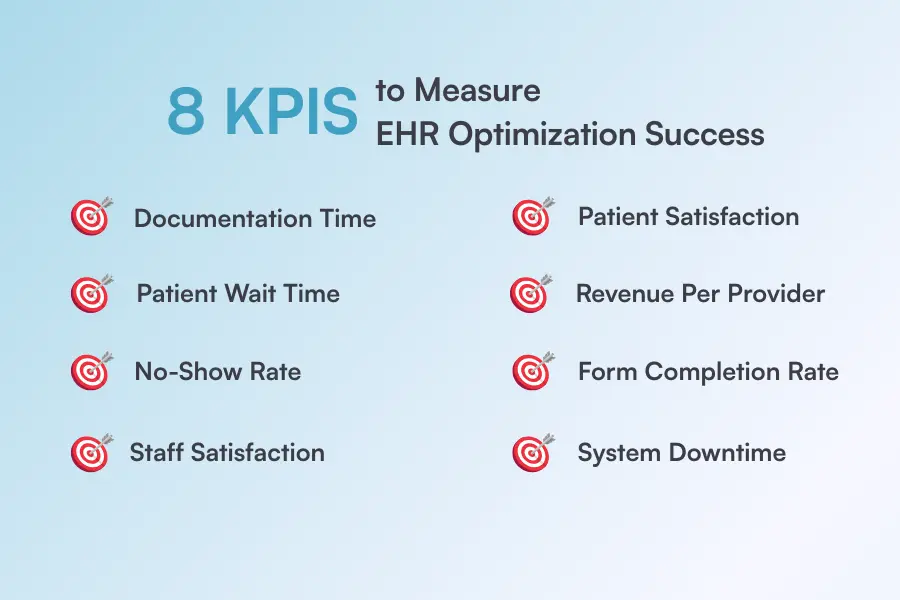
Want to dig deeper into the metrics that actually move the needle? Check out our complete KPI guide for med spas.
EHR optimization is an ongoing commitment to working smarter. You now have the checklist, the framework, the strategies, and the KPIs to make it happen.
The next step? Putting it all into practice.
Pabau is built for exactly this. From customizable templates and automated workflows to real-time dashboards and built-in compliance tools, everything you need to optimize your practice is already here—waiting for you to use it.
See why thousands of practices choose Pabau or take the first step today.
👉Book your free demo and see how Pabau can transform your EHR workflows in 2026.
It depends. Small workflow tweaks take days. A full optimization project typically runs 3–6 months.
Everyone. Providers, front desk staff, billing teams, and IT should all have input. Real users spot real problems.
Not always. Most systems have untapped features. Optimization often means using what you already have—better.
Clinical burnout, compliance gaps, poor patient experience, and lost revenue. Inefficiency compounds quickly over time.