Referral management software: Track and close every referral
Referral management software in healthcare sends, tracks, and follows up patient...

Last Updated: Oct 26, 2026

EHR optimization never finishes the way an implementation does. It is the continuous work of refining workflows, templates, and automation as your practice changes.
Five electronic health record challenges signal it is time to act: Documentation overload, duplicate records, rising wait times, failed audits, and staff workarounds.
The EHR optimization scorecard in this guide pairs each KPI with a red flag, a target benchmark, and the strategy that moves it.
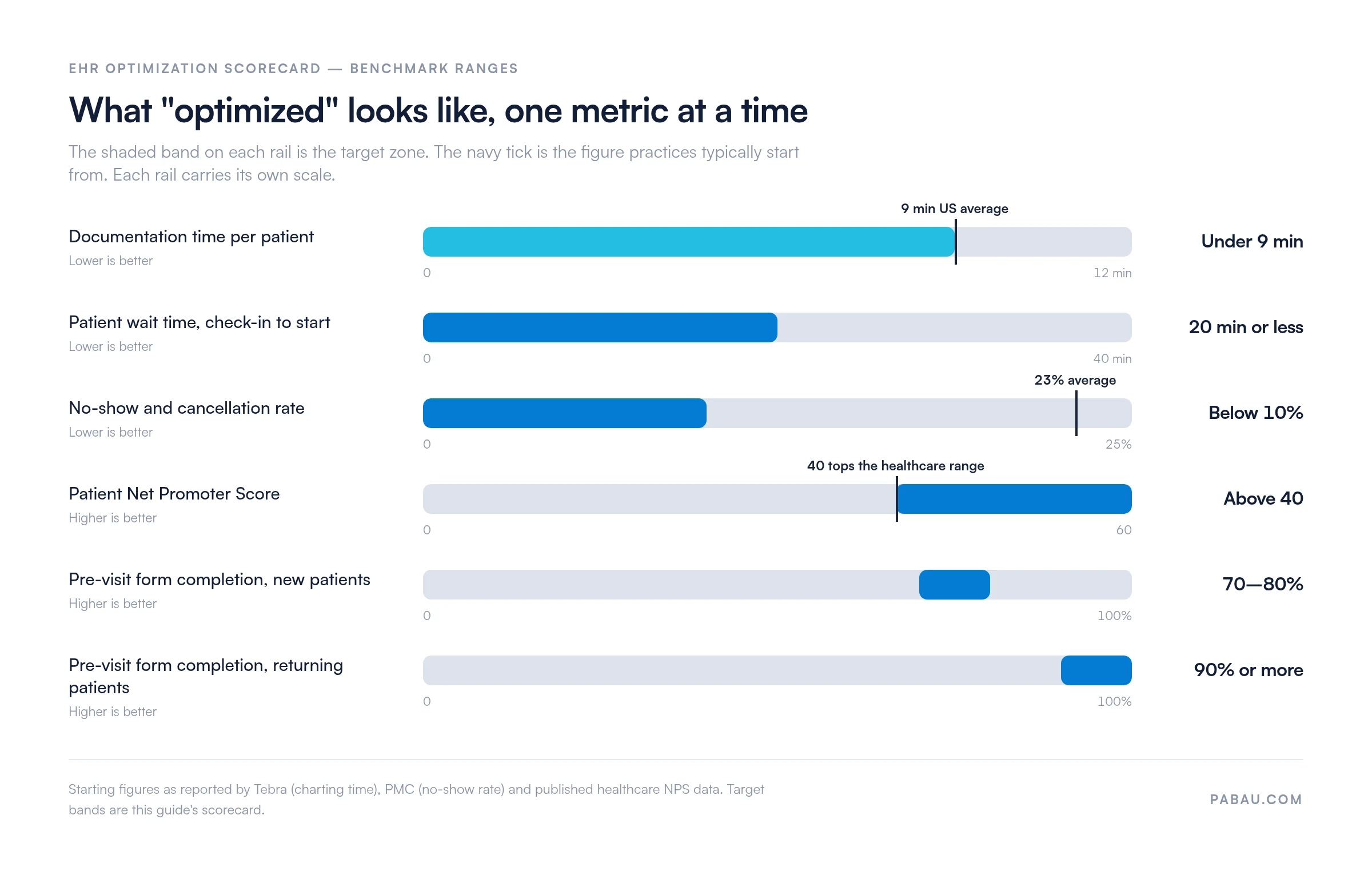
Aim for documentation under nine minutes per patient, waits of 20 minutes or less, and a no-show rate below 10%.
Specialty and multi-location practices need consent, before-and-after photos, and role-based permissions handled inside one record.
EHR optimization is the ongoing work of reshaping your electronic health records system around how your team already works. It is not a project with an end date. Fix the templates, cut the clicks, automate the follow-ups, and the system that was costing you evenings starts giving them back.
Strategies alone won’t tell you whether the work landed. So this guide includes an EHR optimization scorecard. Each KPI is paired with the red flag that exposes it, the number to aim at, and the strategy that moves it.
You’ll get the warning signs, a fast audit you can run this week, and a six-step framework. Then eight strategies with worked examples, and the scorecard to check your progress against.
Electronic health records optimization is the process of fine-tuning your EHR to fit the way your team already works. The goal is better data accuracy, fewer clicks, and a system that keeps up with a full clinic day.
It is a different job from your initial EHR setup or your migration off paper. A successful EHR implementation is the starting line. Optimization is what follows, month after month, as your services and your team change.
In practice it looks unglamorous. You tweak templates, resequence a workflow, delete a required field nobody reads, and remove one friction point at a time.
How far you get also depends on how much of the practice the system already covers. Records, scheduling, forms, and billing inside one practice management app leave fewer handoffs to optimize in the first place.
Why bother? Because a well-configured system pays out in places your team feels every day:
Adoption means the system is in place and staff log in. Optimization means the system has been shaped around your workflows, so logging in saves time rather than costing it. The second job is the one that keeps paying.
As of 2024, about 95% of US office-based healthcare providers used an electronic health record system, and roughly 84% used certified EHR technology. So the open question in most practices is no longer whether to run an EHR. It is whether the one you already pay for is set up to work.
Five electronic health record challenges surface first. Documentation overload, duplicate records, rising wait times, failed audits, and staff workarounds each point at a specific fix, so read for the one you recognize.
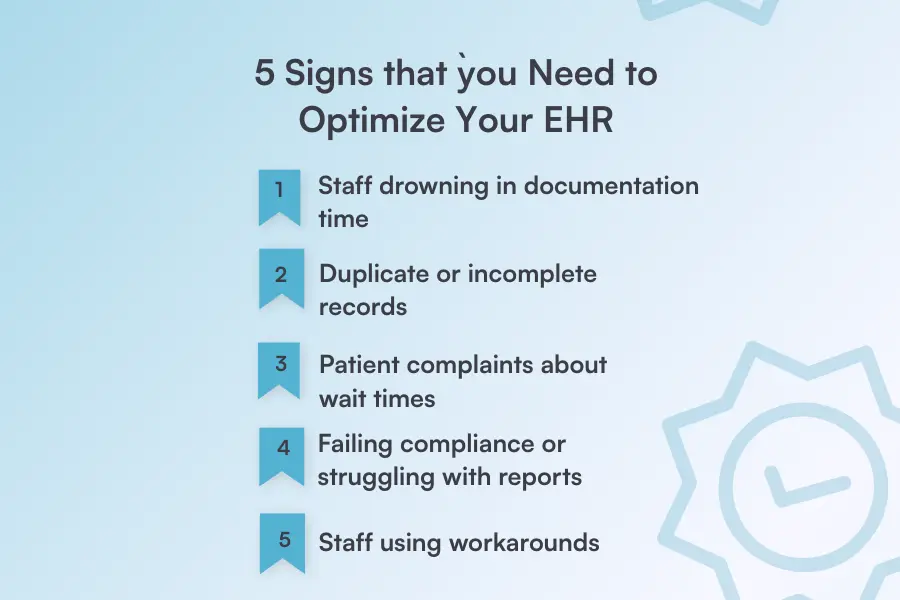
If your clinicians spend more time typing than treating, the templates are the problem. You’ll see staff staying late to finish notes, rushing documentation during visits, or re-entering data the system already holds.
What this looks like:
This is a fast track to clinician burnout. When your system demands more clicks than care, workflow optimization is overdue.
Duplicate records mean your intake path has more than one way in. If you keep asking patients to repeat their history, find conflicting data in charts, or hit empty required fields, the record structure needs work.
This is especially common in practices still running on legacy systems that weren’t built for modern workflows.
Red flags to watch for:
Keeping patient records up to date shouldn’t feel impossible. Merge the duplicates, then close the second entry path that created them.
When patients complain about waiting, check-in is usually doing work that should have happened at home. Forms handed over on arrival, system delays at the desk, and visits running late all show up in the same reviews.
Common patient frustrations:
A well-configured system improves patient outcomes by making visits smoother and communication clearer. Every minute you take off check-in is a minute the patient does not spend in your waiting room.
If an audit request costs you a morning of manual data compilation, your reporting layer is not configured. Close calls during compliance checks are the same signal, only louder.
Warning signs:
Your system should make patient data security and compliance easier, not harder. Optimization helps you stay ahead of regulations without the stress.
When your team builds its own systems to route around the EHR, they are telling you exactly which screens don’t work. Sticky notes, side spreadsheets, and personal trackers all create data security risk on the way to solving a workflow problem.
What workarounds look like:
Workaround culture is also where nursing errors start. A vital sign written on paper at 9am and typed in at 4pm is a transcription error waiting to happen. Nobody can check it against the original, because the original was a sticky note.
So if your staff has collectively decided the EHR is too hard to use properly, listen to them. Ask which three screens they avoid, and you have your optimization backlog.
Practice management software like Pabau ships configurable workflows, automation, and records shaped around how you treat. The screens your team avoids are the ones you can rebuild yourself, instead of filing a ticket about them.
Score yourself against the seven areas below. It takes about 10 minutes, and the unchecked boxes become your work order.
Point-of-care diagnostics make this urgent. A practice running a rapid test on-site needs the result posted straight to the chart, not retyped from a printout.
How’d you do? If you checked fewer than 70% of these boxes, your EHR needs optimization. Even at a higher score, each unchecked item is a specific job you can hand to someone this month.
Work the six steps in order. Each one produces the input the next one needs, so skipping the audit means guessing at step three.
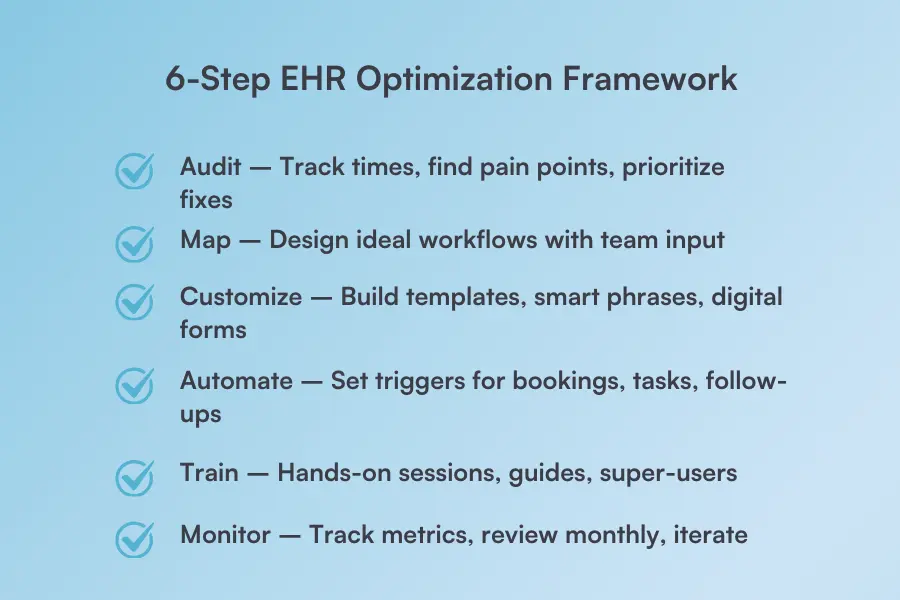
Spend one week timing the basic EHR workflow you already have, before you change a single template. Ten check-ins, ten notes, ten claims, stopwatch in hand.
Note which features nobody opens and where staff hesitate. Then talk to your team, because they know exactly what’s broken. Write the pain points down and rank them by impact against effort.
Design how processes should work, not how they currently do. Sketch out patient journeys from scheduling to checkout. Identify bottlenecks and unnecessary steps.
Get input from everyone who touches the EHR: front desk, clinical teams, billing, and providers. The software should work around your practice, not the other way around.
Now tackle the biggest time-waster: documentation.
Build templates for your most common visits. Create smart phrases for frequently used text. Set up digital forms patients can complete before arriving.
Then delete the fields nobody reads. Every template should save a clinician time, not add clicks.
Let the system handle repetitive tasks. Set up automated workflows that trigger the moment something happens, like a booking confirmed, a treatment completed, or a form submitted.
Use conditional logic to tailor each step. Send intake forms automatically after booking, trigger aftercare protocols when treatment ends, or route follow-up tasks by role.
The goal is to remove manual work that doesn’t need human judgment.
Optimization only works if the new workflows get used. Hold hands-on sessions built around the specific changes you made, not a general tour of the system.
Create quick-reference guides for common tasks. Name a super-user per location who can troubleshoot without opening a ticket. Structured onboarding separates adoption from abandonment, and role-specific EHR training is what makes it stick.
Set your dashboard to track documentation time, patient wait times, staff satisfaction, and error rates. Review them monthly against the scorecard further down this guide. Pair those numbers with an EHR ROI calculation so the savings show up in dollars.
Then pick the next item off your ranked list from step one. That loop is the whole discipline.
Step six also tells you where the next constraint sits. If the numbers stall because data still moves by hand between systems, EHR integration is the next piece of work.
These eight strategies are ordered by how fast they pay back. The first three usually show up in your numbers inside a month.
Stop making patients fill out the same information every visit. Digital intake forms completed before arrival save 10-15 minutes per appointment, clear the front desk queue, and improve care coordination across your team.
How it works:
Imagine a dermatology practice that moves consent forms online. Patients complete paperwork at home or in the waiting room on their phones. Check-in becomes a quick ID verification instead of a lengthy form-filling session, and staff can prep treatment rooms while patients finish up.
“My appointments are shorter because the forms have already been filled out before the patient arrives.”

Generic templates waste time because they ask for findings you never record. Custom templates for your most common visits cut documentation time sharply. The difference grows when you pick one of the best outpatient EMR software options built for your specialty rather than a one-size-fits-all system.
What to include:
A pilot study in Frontiers in Digital Health rebuilt four note types used in a neonatal nursery. Across a typical two-day stay, the optimized templates saved about 23 minutes of documentation per infant, mostly through fewer clicks and keystrokes. Read that as evidence the approach works, not as a per-visit benchmark for your own specialty.
Picture an orthopedic practice that creates templates for post-op visits, sports injuries, and joint injections. Instead of starting from scratch each time, providers click through relevant sections, adjust as needed, and finish notes in a fraction of the time.
Access should match the job, not the org chart. Role-based permissions protect patient data, cut accidental edits, and keep each person’s screen down to what they use.
Set permissions by role:
For multi-location groups this is also how you keep one standard. Permissions travel with the person, so a receptionist covering a second site sees the same screen she trained on.
Consider a multi-provider clinic where each team member only sees what they need. The front desk can’t accidentally modify clinical notes, and billing staff can’t change patient demographics. Everyone works in their lane, reducing mistakes and protecting sensitive information.
Documentation is the biggest single time drain, so this is where a tool beats a process change. AI scribes and dictation cut charting time while keeping the detail an auditor will look for.
Options to consider:
A family practice adopts an AI scribe, and providers start finishing notes during the encounter instead of charting after the clinic closes. They leave on time, and the after-hours documentation figure on their scorecard drops for the first time in two years.
Every task a person triggers by hand is a task that gets missed on a busy day. Set up automated workflows that fire on events instead.
Automate these common tasks:
Picture a physical therapy clinic where the post-treatment workflow runs itself. When a session ends, the system sends exercise instructions and offers the next appointment slot. It also assigns a follow-up call to the front desk, with no staff intervention.
Paper prescriptions add a phone call to every renewal and a handwriting risk to every script. E-prescribing sends medications straight to the pharmacy, which cuts transcription errors out of the process.
Benefits you’ll see:
A primary care practice where physicians send prescriptions with a few clicks. Patients pick up medications on their way home, and pharmacies stop calling back about illegible handwriting. The system catches potential drug interactions before they reach the patient.
Without a dashboard you find out at quarter end, when the cause is three changes ago. A reporting dashboard tells you this week whether last month’s changes held.
Key metrics to track:
A wellness clinic sees on its dashboard that Monday morning slots no-show twice as often as the rest of the week. It moves reminders for those bookings to 72 hours out, adds a deposit, and the pattern flattens.
Work your patients can do themselves is work your front desk stops doing. Patient portals hand back the routine tasks that fill your phone lines.
What patients can do themselves:
Consider an urgent care center that enables online scheduling. Patients book appointments at midnight when they can’t sleep or during lunch breaks at work. Phone lines stay quieter, and staff can focus on the patients already in the building.
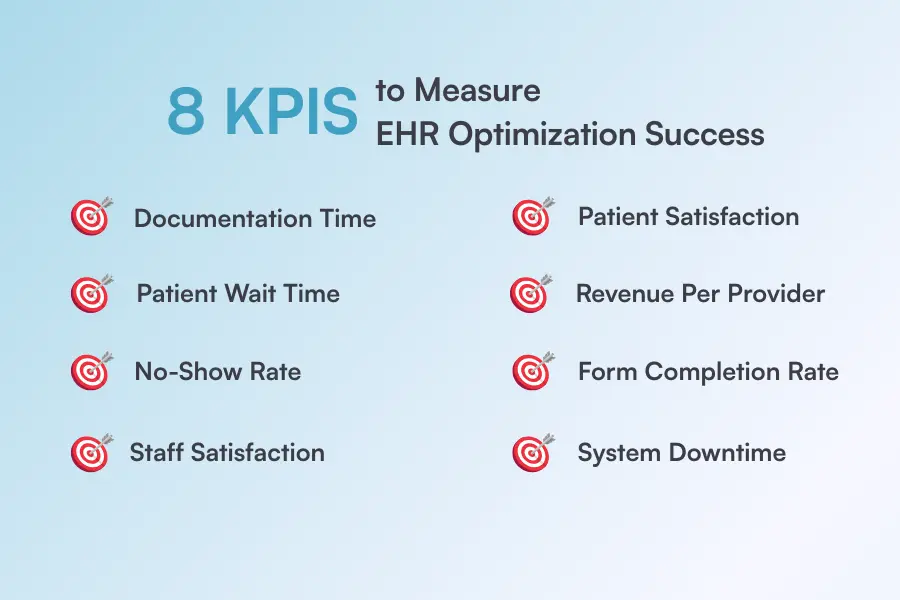
Eight metrics tell you whether the work landed. Track documentation time, wait time, no-show rate, and staff burnout, then patient satisfaction, revenue per provider, form completion, and downtime.
The scorecard below pairs each metric with the red flag that gives it away and the number to aim at. The fourth column names the strategy from this guide that moves it.
| KPI | Red flag today | Target benchmark | What moves it |
|---|---|---|---|
| Documentation time per patient | Charts finished at home, 2+ hours after clinic | Under 9 minutes per patient | Strategy #2 (specialty templates), Strategy #4 (AI scribes) |
| Patient wait time | Forms handed over at the front desk on arrival | 20 minutes or less, check-in to start | Strategy #1 (digital intake), Strategy #8 (self-service) |
| No-show and cancellation rate | Front desk phones every booking that morning | Below 10%, against a 23% healthcare average | Strategy #5 (automated reminders 48 hours out) |
| Staff burnout indicators | Sticky notes and side spreadsheets outside the EHR | After-hours charting hours falling each quarter | Step #5 (training), Strategy #3 (role-based permissions) |
| Patient satisfaction | Reviews mention waiting and repeated paperwork | NPS above 40, reviews above 4.5 stars | Strategy #8 (self-service), Strategy #1 (pre-visit forms) |
| Revenue per provider per day | Providers block slots to catch up on notes | 10-15% above your pre-optimization baseline | Strategy #2 (templates), Strategy #7 (dashboard) |
| Pre-visit form completion | Staff chase forms by phone on appointment day | 70-80% for new patients, 90%+ returning | Strategy #1 (standardized intake and consent) |
| Downtime and IT tickets | The same three questions reach IT every week | Zero unplanned downtime, ticket count falling | Step #1 (audit), Step #5 (training) |
Those benchmark ranges are worth seeing side by side, because the distance you have to close varies a lot by metric.
Much of the work above exists because the records, the calendar, the forms, and the billing are separate systems. Practice management software like Pabau keeps them on one patient timeline, so there is no copying between them left to optimize.
That matters most for the details generic systems treat as attachments. Consent forms, before-and-after photos, membership plans, and treatment notes all sit on that same timeline. A practitioner opens one screen mid-appointment instead of four.
Across multiple locations, role-based permissions follow the person rather than the site. Front desk staff see scheduling and demographics only, in every location they log into.
Pabau Scribe, our AI scribe, drafts the note from the consultation itself. Automated workflows send intake forms, aftercare, and reminders without anyone triggering them. Every subscription includes every feature, so none of that sits behind a higher tier.
There is no free trial, because a system this configurable needs setting up before it earns its keep. You get structured onboarding and a dedicated coordinator instead, which is the same reason step five of the framework matters.

Pabau keeps records, scheduling, forms, billing, and reporting on a single patient timeline. Your team stops copying data between systems, and the notes get finished before everyone goes home.

Optimization has no finish line, so the only question worth asking each quarter is whether the numbers moved.
So pick the two rows on the scorecard where you sit furthest from the target, and work only the strategies tied to them. Chasing all eight at once is how optimization projects stall in month three.
There is a trade-off worth remembering. Every hour spent rebuilding templates is an hour not spent with patients. That hour pays back inside a quarter, but only if you measured the baseline first.
Book a demo to see how Pabau handles the documentation, consent, and reporting workflows this guide asks you to fix.

Still deciding which system to run? EHR selection process: a 5-step guide for practice owners walks through shortlisting, demos, and the questions that expose a bad fit.
Moving off an older system? EHR migration: a practical guide for practice owners covers data mapping, cutover timing, and the checks to run before go-live.
Not sure which features you are missing? EHR features: the complete guide for clinic owners sets out what to expect from a modern record system, module by module.
Budgeting the work? EHR software cost: a complete pricing breakdown for clinics shows where the money goes beyond the monthly license.
A full optimization project typically runs three to six months. Single workflow tweaks, like trimming the required fields on one template, take days.
Providers, front desk staff, billing, and IT all need a say, plus one owner who can make decisions. The people using the system daily spot the friction fastest.
Usually not. A practice typically uses a fraction of what it already pays for, so optimization starts with the features in the contract. Switch only when the system cannot support your specialty’s documentation.
Clinician burnout, failed compliance audits, longer patient waits, and lost revenue, in roughly that order. Inefficiency compounds, because staff build workarounds that later have to be undone.
The ones that keep documentation and billing inside a single patient record, so staff learn one screen instead of two. Look for EHR workflows that carry an appointment through the note, the code, and the invoice with no export step. Then ask who configures your templates and permissions before go-live, because structured onboarding decides how fast the team gets productive.