Seven platforms make this shortlist: Pabau, SimplePractice, TherapyNotes, Heidi Health, Practice Fusion, Upheal, and Elation Health.
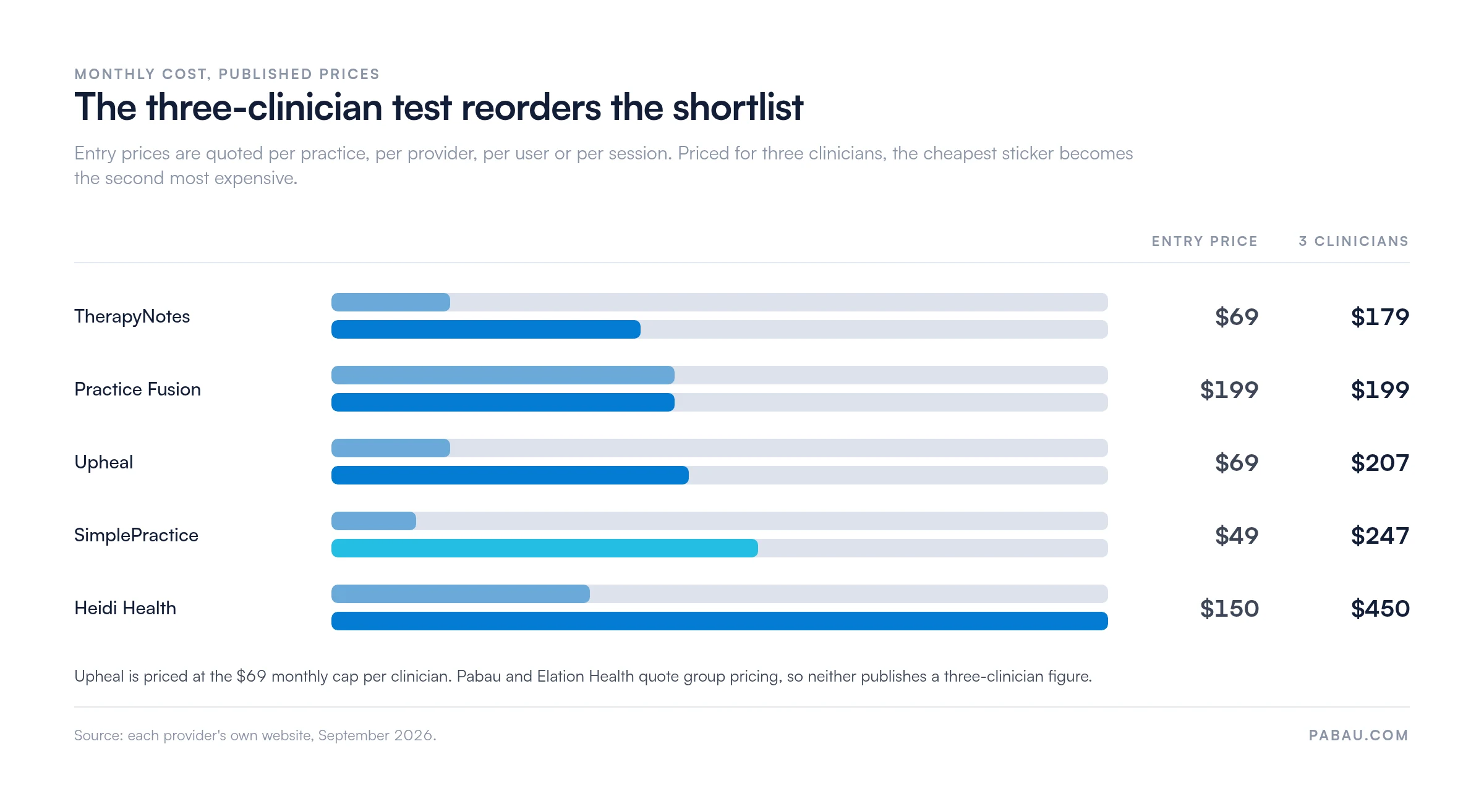
The three-clinician test reorders them: TherapyNotes costs $179 a month for three clinicians, SimplePractice $247, and Heidi Health $450.
Entry prices here are quoted per practice, per provider, per user, or per session, so the lowest headline figure tells you little.
A scribe alone will not replace your chart, and no vendor here publishes an error rate behind its time-saved claim.
Pabau, our own practice management software, is the broadest option here, combining clinical notes, AI scribing, telehealth, and a branded patient portal.
Clinical notes software exists because documentation follows physicians home. A 2022 JAMA Internal Medicine study of 2019 national survey data put documentation outside office hours at a mean of 1.77 hours per day. That after-hours charting is widely cited as a leading driver of burnout.
The question for a private practice owner is which platform saves that time without costing accuracy, compliance, or billing readiness.
This guide compares seven platforms on AI ambient scribing, SOAP and DAP templates, HIPAA compliance, telehealth, e-prescribing, and published pricing. It covers the solo therapist hunting for a focused AI scribe and the multi-provider group that wants one platform.
Every price below also goes through the three-clinician test. We take each vendor’s published entry price and normalize it to what a three-clinician practice pays each month, and the ordering changes. TherapyNotes lands at $179 and SimplePractice at $247, even though SimplePractice carries the cheaper sticker.
Found our content helpful?
Top 7 clinical notes platforms at a glance
Clinical notes software starts from a free tier and runs to $199 per provider a month, so sticker prices cannot rank these seven.
Seven platforms evaluated across clinical documentation features, AI capabilities, telehealth, pricing, and best-fit practice profile. Pabau, our own practice management software, is listed first as the broadest all-in-one option. Every figure in both tables below comes from the provider’s own website.
Platform
Best for
Standout feature
Starting price
Pabau
Multi-service and multi-provider practices needing all-in-one documentation
Customizable clinical notes with built-in AI scribe and patient portal
From $62/month (one user, full platform)
SimplePractice
Solo and small-group behavioral health practices
Clean interface and fast onboarding
From $49/month (solo Starter)
TherapyNotes
Insurance-heavy psychotherapy and psychiatry groups
Audit-ready psychotherapy templates and treatment plans
From $69/month (solo)
Heidi Health
Clinicians who want an AI scribe layered on an existing EHR
Ambient AI documentation with custom templates
Free plan, or $150/user/month
Practice Fusion
Independent primary-care practices wanting a cloud EHR
Cloud EHR with strong lab and pharmacy network
$199/month, covering three signing staff
Upheal
Solo therapists wanting AI-first documentation
AI SOAP, DAP, and EMDR notes with session analytics
Free plan, or $1/session capped at $69
Elation Health
Direct primary care and value-based care practices
Clinical-first chart with longitudinal patient view
Contact for pricing
The three-clinician test
Those seven starting prices sit on four different units. One is priced per practice, one per provider seat, one per user, and one per session held. So the three-clinician test puts them on a single unit: what does a practice with three note-writing clinicians pay each month?
Platform
Entry price as quoted
What the price is per
Monthly cost for 3 clinicians
Free option
Pabau
From $104/month
One user, whole platform
Quote only (Team plan, 2–3 users)
No free tier, structured onboarding instead
SimplePractice
$49/month
A solo practice on Starter
$247 ($99 first practitioner + $74 each)
30-day free trial
TherapyNotes
$69/month
A solo practice
$179 ($79 first clinician + $50 each)
30-day free trial
Heidi Health
$150/month
One clinician seat
$450 (three seats; Practice plan is quoted)
Free plan, no time limit
Practice Fusion
$199/month
A provider license covering three signing staff
$199 (no change)
Two-week trial
Upheal
$1/session, capped at $69
Each session held, per clinician
$207 (three clinicians at the cap)
Free plan, unlimited notes
Elation Health
Not published
Quoted per practice
Quote only
Not published
The assumptions are deliberately plain, so you can redo the sum. Three clinicians, all writing and signing their own notes, on each vendor’s cheapest plan that supports a group. For Upheal, which bills per session, assume each clinician holds enough sessions to reach the $69 monthly cap.
Two rows repay a second look. Practice Fusion carries the highest published sticker at $199. Practice Fusion is also the second cheapest at three clinicians, because its license covers three signing staff. SimplePractice carries the cheapest sticker at $49, and lands second most expensive at $247.
Sorted by what three clinicians actually pay, the sticker order breaks down completely. Prices from each provider’s own website, September 2026.
In practices we onboard, the headcount at signup is rarely the headcount a year later. So price your shortlist at the team you expect, not the team you have today.
Pabau: Best clinical notes software for multi-service practices
Rating4.5/5★★★★★Top pick
The bottom line
The note lives in the same record as the appointment, the invoice, and the patient's forms.
Who it’s for
Multi-service practices combining medical, aesthetic, therapy or allied health
Group practices with three or more providers
Practices that want automated recalls and follow-ups
Every plan carries the full platform, whatever the team size
Plans priced by team size and per location
Note templates you can build for any modality
What doesn’t
Longer setup than a single-purpose scribe
ERA and EOB depth trails TherapyNotes
Mobile app does not yet cover every desktop workflow
Pabau is a complete practice management and clinical notes platform, built for practices that need more than a documentation-only tool. Much of this category locks providers into one specialty template library, or asks them to bolt on scheduling, billing, and patient communication from separate vendors.
Pabau covers documentation, AI scribing, the calendar, payments, telehealth, and patient engagement in one platform.
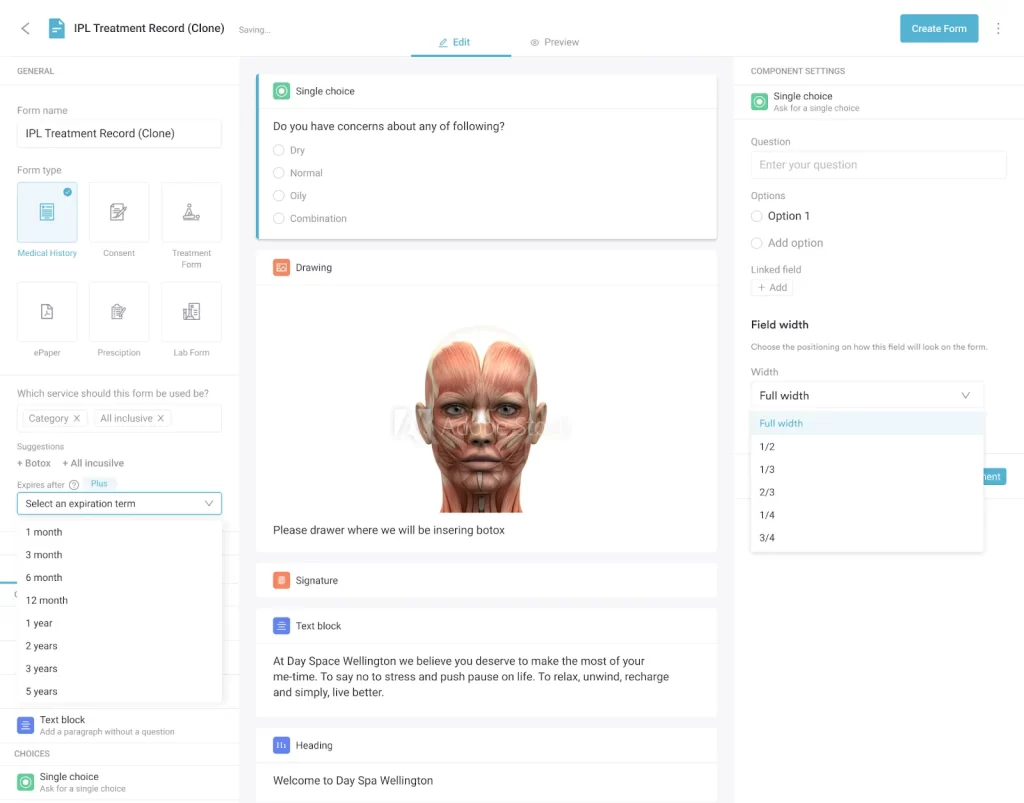
Pabau’s form builder assembles a treatment record from choice fields, body diagrams, and signatures, so the note template matches your own protocol.
The platform covers the full patient journey. It handles branded online booking, appointment reminders, HIPAA-aligned intake forms, video consultations, customizable treatment note templates, invoicing, and post-care follow-up automations.
Practices running several providers get multi-location calendars and granular permissions. Clinicians see only the records relevant to their cases, while administrators keep the full operational view.
The notes engine supports SOAP, DAP, BIRP, and custom layouts, with image annotation, body charting, and structured fields that feed reporting. Our guide to SOAP note structure covers what belongs in each of the four sections.
Key features
Customizable note templates: Build SOAP, DAP, BIRP, intake assessments, treatment plans, or bespoke clinical formats without development work
Pabau Scribe (AI medical scribe): Ambient AI documentation that drafts clinical notes from the consultation conversation in real time
Integrated telehealth: HIPAA-compliant video with pre and post-session forms, charting, and billing built into the call workflow
Body charting and image annotation: Mark up clinical photography, anatomical diagrams, and injection sites directly inside the note
Digital intake and consent forms: Sent automatically before appointments with e-signature capture and structured field mapping into the chart
Patient portal with branding: Patients book, complete intake, sign consents, and access records under the practice’s own brand
Automation engine: Recall reminders, follow-up sequences, post-treatment care instructions, and win-back campaigns configured without code
Reporting and analytics: Track documentation completion, no-show rates, revenue by service, and clinician productivity from a single dashboard
Pabau GO, our iOS app for practitioners: Chart, capture clinical photos, and collect consents from an iPhone or iPad between appointments
Compliance posture: HIPAA and GDPR compliance, with application data hosted on SOC 2 Type II certified infrastructure
Pricing
Plan
Price
Who it is for
Starter and Solo
From $62/month, one user
Single-clinician practices
Team
Quoted, 2–3 users
Practices adding a second or third clinician
Medium
Quoted, 4–5 users
Small groups running several practitioners
Group and Enterprise
Quoted, 6+ users
Larger and multi-location practices
Pabau publishes the one-user price and quotes larger plans by user count and location. Every band carries the full platform, so a bigger plan buys seats rather than features. You can see the current breakdown on Pabau’s pricing page.
Where Pabau shines
Operational breadth: The only platform in this comparison that covers documentation, AI scribing, scheduling, billing, marketing automation, and patient retention in one system
Template flexibility: Customize note formats for any specialty without waiting on the vendor to build a template library for your modality
No feature gating: Plans differ only by the number of users, so a Solo subscription carries the same feature set as Enterprise
Branded patient experience: Patients see your practice’s name and logo across booking, forms, telehealth, and the portal, not a third-party software brand
Built-in AI scribe: Pabau Scribe comes with every subscription, not a paid add-on, and its usage runs on credits rather than a plan tier
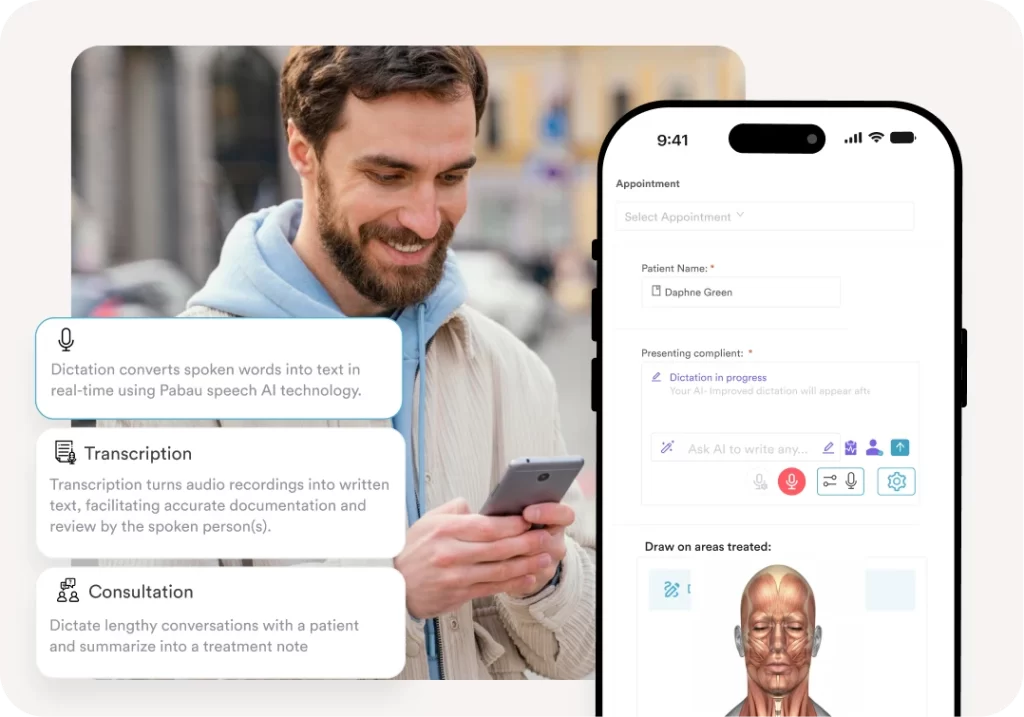
Pabau Scribe dictates the consultation straight into the treatment note on a phone, so the chart is drafted before the patient leaves.
Where Pabau falls short
Onboarding investment: The platform’s breadth means initial setup takes longer than single-purpose tools like Heidi Health or Upheal
US insurance billing depth: ERA and EOB processing is less mature than TherapyNotes for high-volume insurance practices
Mobile experience: Some users report the mobile app does not yet cover every workflow available on desktop
Customer reviews
General sentiment across public reviews lands on three points. Reviewers highlight the all-in-one workflow, the customizable clinical templates, and support that answers. Multi-location practices add that audits get easier once forms and notes sit in the same system.
The limitation raised most often is the setup curve, which is longer than a single-purpose scribe asks for.
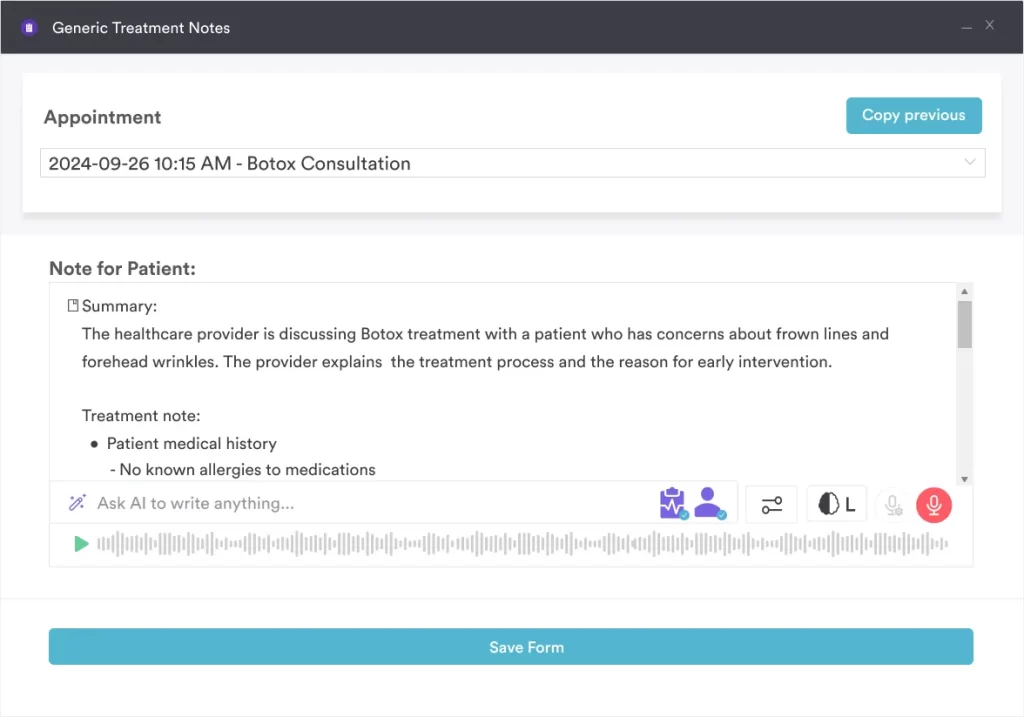
Pabau Scribe turns the recorded consultation into a summary and a structured treatment note, so review replaces typing.
Who Pabau is best for
Multi-disciplinary practices combining medical, aesthetic, therapy, or allied health services under one roof
Group practices with three or more providers where per-clinician pricing from competitors becomes expensive
Practices that want automated recalls, follow-ups, and retention campaigns layered on top of clinical documentation
Practices that need a fully branded patient portal rather than generic third-party software
SimplePractice: Best for solo and small-group behavioral health
Rating4.5/5★★★★★
The bottom line
The quickest platform here to get running, and the easiest for patients to use.
Who it’s for
Solo therapists, counselors and small behavioral health groups
Telehealth tied into the chart, not a separate app
What doesn’t
Steep year-over-year price increases
Multi-payer claims thinner than TherapyNotes
Templates hard to adapt outside behavioral health
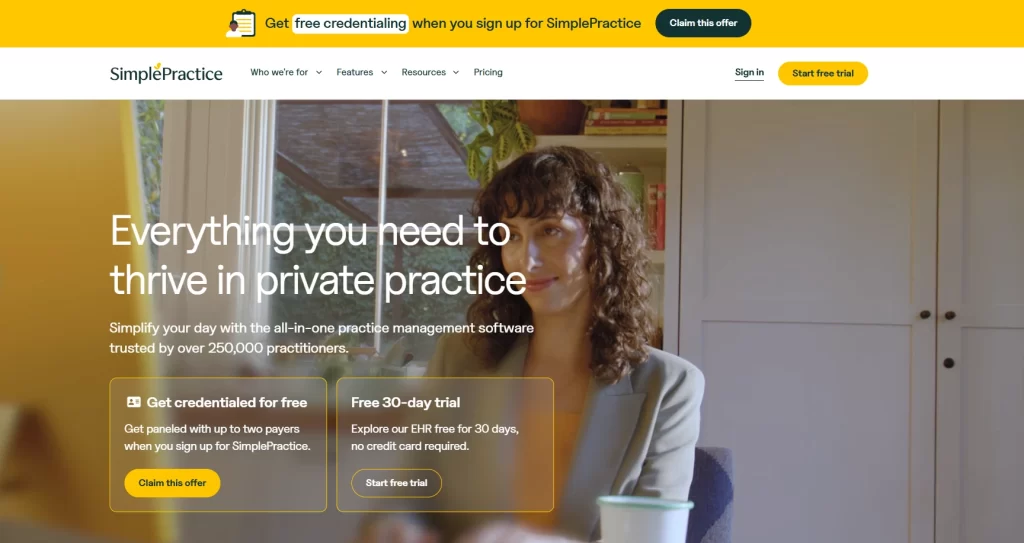
SimplePractice is the most widely used clinical notes software among US behavioral health professionals, with the vendor reporting more than 250,000 practitioners on the platform. Its reputation rests on usability. The interface is clean, the self-scheduling widget works reliably, and the patient portal scores well with clinicians and patients. Solo therapists evaluating their first electronic chart frequently start here, and many stay long-term.
SimplePractice leads on scale and a 30-day trial, and the vendor puts its base at more than 250,000 practitioners.
Key features
Progress note templates: Pre-built SOAP, DAP, intake assessments, and treatment plans designed for behavioral health
Care Aide AI add-on: Its Note Taker drafts a progress note from the session, priced separately from the base plan
Integrated telehealth: HIPAA-compliant video with concurrent charting in the same interface
Patient portal: Self-scheduling, intake forms, billing, and secure messaging
Mobile charting: Native iOS and Android apps for documentation on the go, both listed on its own site
Trust center: HIPAA compliance and a HITRUST listing published on SimplePractice’s own trust center
Pricing
Plan
Price
Who it is for
Starter
$49/month
Solo clinicians who need the core chart
Essential
$79/month
Solo clinicians wanting the fuller feature set
Plus, solo
$99/month
Solo clinicians running group appointments
Plus, group
$99 first practitioner + $74 each additional
Group practices up to five practitioners
Custom
Contact sales
Groups of six or more practitioners
Care Aide AI add-on
$59/month owner + $49 each clinician
Practices wanting AI-drafted notes
A 30-day free trial runs before the first bill, and the AI suite is charged on top of every tier. Three clinicians on the group plan reach $247 a month before any add-on.
Where SimplePractice shines
Onboarding speed: Most solo clinicians are fully operational within a week, with minimal training friction
Patient experience: The patient portal is consistently rated as one of the easiest for patients to navigate
Telehealth integration: Built-in video is reliable and tightly tied to the chart, not a separate app
Where SimplePractice falls short
Pricing increases: Reviewers frequently flag steep year-over-year price hikes once practices are dependent on the platform
Insurance and claims depth: Multi-payer claims management is thinner than TherapyNotes for insurance-heavy practices
Customization limits: Note templates are flexible within behavioral health but harder to adapt for non-mental-health specialties
Customer reviews
Public sentiment is consistent on what SimplePractice does well. Ease of use, telehealth quality, and the patient portal draw the most praise. Complaints cluster around support response times and recurring price increases, which solo subscribers raise most often.
Who SimplePractice is best for
Solo therapists, counselors, and small-group behavioral health practices
Private-pay-heavy practices that do not need deep multi-payer claims processing
Clinicians who prioritize patient experience and minimal onboarding time
TherapyNotes: Best clinical documentation software for psychotherapy
Rating4.5/5★★★★★
The bottom line
Documentation and billing depth for practices where a payer audit is a live risk.
Who it’s for
Insurance-heavy psychotherapy and psychiatry groups
Practices that treat audit-readiness as non-negotiable
ERA, EOB and claims scrubbing that rivals enterprise tools
Support rated near the top of the category
What doesn’t
Built for psychotherapy only, not multi-disciplinary work
No public API for outside integrations
AI scribe is a paid add-on
TherapyNotes is the documentation-first counterpoint to SimplePractice. Where SimplePractice optimizes for breadth and ease of use, TherapyNotes optimizes for clinical depth and billing accuracy.
Its note templates are built around psychotherapy and psychiatry workflows, and treatment plans link straight into progress notes. For practices that bill insurance heavily, the integrated claims and ERA processing is among the strongest in the category.
TherapyNotes positions itself squarely on behavioral health, and its homepage puts insurance billing alongside records, scheduling, and documentation.
Key features
Specialty templates: Psychotherapy intake, progress notes, treatment plans, and psychiatric assessments built around behavioral health workflows
Treatment plan linkage: Goals and interventions in the treatment plan auto-populate progress notes for documentation continuity
Insurance billing: Integrated claims submission, ERA posting, and remittance management for multi-payer practices
E-prescribing: EPCS-ready prescribing for psychiatric medications
TherapyFuel AI scribe: Optional ambient AI documentation as a paid add-on, around $40/month
Integrated telehealth: HIPAA-compliant video with charting in the same window
TherapyNotes Mobile: A free iOS and Android companion app for your agenda, patient directory, and secure messaging, rather than full charting
Pricing
Plan
Price
Who it is for
Solo
$69/month
Single clinician practices
Group
$79 first clinician + $50/additional
Group practices with multiple providers
TherapyFuel AI add-on
~$40/month
Clinicians wanting AI-drafted notes
Where TherapyNotes shines
Documentation quality: Templates are built to satisfy payer audits and keep progress notes defensible
Insurance billing: ERA, EOB, and claims scrubbing rival much more expensive enterprise platforms
Customer support: Consistently rated near the top of the category for support response and quality
Where TherapyNotes falls short
Single-specialty focus: Built for psychotherapy and psychiatry, so it is not a fit for multi-disciplinary practices
No public API: Integrations with outside systems are limited compared with cloud-native competitors
AI scribe is a paid add-on: AI documentation is not bundled into the base plan
Customer reviews
Reviewer sentiment consistently favors documentation depth, billing accuracy, and support quality. The recurring complaint is feature velocity, with new capabilities arriving slower than at newer entrants like Upheal or Heidi Health.
Who TherapyNotes is best for
Insurance-heavy psychotherapy and psychiatry group practices
Clinicians who treat documentation quality and audit-readiness as non-negotiable
Practices that need EPCS-ready e-prescribing alongside therapy notes
Heidi Health: Best AI clinical notes scribe
Rating4.5/5★★★★★
The bottom line
A scribe you bolt onto the chart you already have, rather than a replacement for it.
Accurate transcription in noisy, multi-speaker rooms
Custom templates without engineering support
Runs alongside any existing EHR
What doesn’t
No scheduling, billing or patient portal
Occasional fabricated detail on long encounters
Steep jump from the free plan to $150
Heidi Health is a specialist AI ambient scribe rather than a full EHR. Clinicians open the app at the start of a consultation, and Heidi listens, transcribes, and drafts a structured note from a template they select.
The output drops into whichever EHR the practice already runs. That makes Heidi a natural fit for clinicians who like their current chart but want documentation time back.
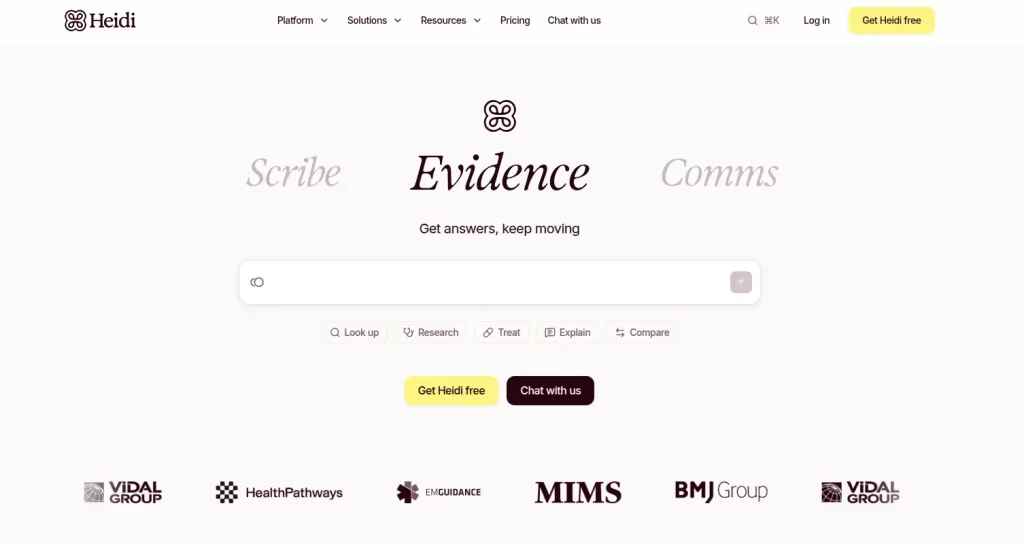
Heidi splits its product into a scribe, a clinical lookup, and patient comms, with no chart of its own underneath.
Key features
Ambient transcription: Captures in-person and telehealth consultations, including multi-speaker scenarios
Template library: Pre-built and custom templates for SOAP, consult letters, referrals, and specialty-specific notes
Multilingual support: Transcription and note drafting across multiple languages
Ask Heidi: Prompt-based queries against the consultation transcript for differential diagnoses, summaries, or follow-up planning
Dictation mode: Hands-free note creation for clinicians who prefer post-encounter dictation
EHR integrations: Heidi publishes write-back integrations for Epic and Oracle Cerner, plus athenahealth, CareStack, Cliniko, and Best Practice
Apps on every device: One login across iOS, Android, Mac, Windows, and Chrome, so the scribe works in any consult room
Certifications: Heidi publishes SOC 2 Type II and ISO 27001 certification alongside HIPAA and GDPR compliance
Pricing
Plan
Price
Who it is for
Free
$0
Individual clinicians trialing AI documentation with limited Pro Actions
Clinician
$150/user/month, or $110 billed annually
Full-time clinicians wanting unlimited scribing
Practice and Enterprise
Custom
Health systems and large group practices
Heidi quotes its group plans, so three clinicians on individual seats come to $450 a month at list price. Heidi is the steepest three-clinician figure in this comparison.
Where Heidi Health shines
Transcription accuracy: Strong performance even in noisy clinical environments with multiple speakers
Template flexibility: Clinicians can build custom templates without engineering support
Stack-on deployment: Works alongside any existing EHR rather than replacing it
Where Heidi Health falls short
Hallucination risk on long encounters: Reviewers report occasional fabricated details in complex or extended consultations, requiring careful clinician review
Not a complete EHR: No scheduling, billing, charting beyond notes, or patient portal
Price step from free to paid: The jump from $0 to $150 per user per month is steep for part-time clinicians
Customer reviews
Heidi has a short public review history, so treat sentiment as early rather than settled. Users report meaningful time savings on documentation and value the template flexibility. Criticism centers on occasional transcription errors and on the price next to AI-only competitors.
Pro Tip
AI scribes are sold on the minutes they save per encounter. That saving only lands where the clinician trusts the draft enough to skip line-by-line editing. Before you commit to a paid plan, run a structured two-week test. Track how often you accept the draft as written, and how often you rewrite it. If you rewrite more than three notes in ten, the platform is not ready for your clinical context. The time savings will not arrive.
Who Heidi Health is best for
Clinicians who like their current EHR but want to cut documentation time
Specialty practices needing custom note templates without vendor development support
Multilingual clinical settings where transcription needs to handle non-English consultations
Practice Fusion: Best cloud EHR for independent primary care
Rating4.5/5★★★★★
The bottom line
A browser-based primary-care chart with an unusually broad lab and pharmacy network.
One of the broadest ordering integrations in ambulatory EHR
No local install or server to maintain
ICD-10 and CPT coding tools inside the chart
What doesn’t
Support response times widely criticized
Interface feels dated next to newer competitors
No bundled AI scribe
Practice Fusion, now part of Veradigm, has been a familiar name in ambulatory cloud EHR since its earlier ad-supported free model. Practice Fusion has moved to paid tiers, and stays one of the more accessible cloud charts for small primary-care practices.
Its strengths are the ambulatory feature set, the broad lab and pharmacy network, and a lower barrier to entry than an enterprise EHR contract.
Practice Fusion now sits under Veradigm and sells the chart alongside billing services for independent primary-care practices.
Key features
Customizable SOAP charting: Templates configurable per specialty and provider preference
E-prescribing: EPCS-ready prescribing with drug interaction and allergy checks
Lab and imaging integration: Broad ordering network across major lab vendors
ICD-10 and CPT coding: Coding tools built into the chart for billing accuracy
Patient portal: Self-scheduling, secure messaging, and records access
ONC-certified EHR: Practice Fusion publishes its certification, which matters for quality reporting and incentive programs
No app to install: Practice Fusion runs a touch-optimized browser view for iPad and tablets instead of a mobile app
Pricing
Plan
Price
Who it is for
EHR
$199/month per provider (annual commitment)
Small primary-care and specialty practices
Integrated billing services
Contact sales
Practices outsourcing claims and collections
Practice Fusion publishes one plan on its website, and the price assumes an annual commitment. The license covers three signing staff plus unlimited non-signing staff, so a small team shares one provider seat.
Where Practice Fusion shines
Lab and pharmacy network: One of the broadest ordering integrations in the ambulatory cloud EHR category
Cloud-native: No local install or server requirements; works on any modern browser
Familiar workflow: Long-running product with documentation and training materials widely available
Where Practice Fusion falls short
Customer support: Slow and inconsistent response times are widely cited in recent reviews
Dated interface: UI feels older than newer cloud-native competitors
Limited AI features: No bundled AI scribe, so clinicians must layer a separate AI scribe on top
Customer reviews
Public sentiment praises the lab integrations and the convenience of a browser-based chart. Complaints cluster heavily around support response times and an interface that feels dated next to newer competitors.
Who Practice Fusion is best for
Independent primary-care practices wanting a cloud chart without an enterprise contract
Small specialty practices needing strong e-prescribing without an enterprise EHR contract
Clinicians who plan to layer a separate AI scribe on top of an existing chart
Upheal: Best AI-first clinical notes for therapists
Rating4.5/5★★★★★
The bottom line
The note and the treatment plan arrive drafted, so the therapist reviews rather than types.
Upheal is built for therapists who want AI to do the heavy lifting on documentation. Sessions can be recorded in person, over Upheal’s own video module, or imported from telehealth platforms. The AI produces SOAP, DAP, EMDR, or custom progress notes, plus treatment plans and session analytics. The clinician reviews and signs off rather than typing from scratch.
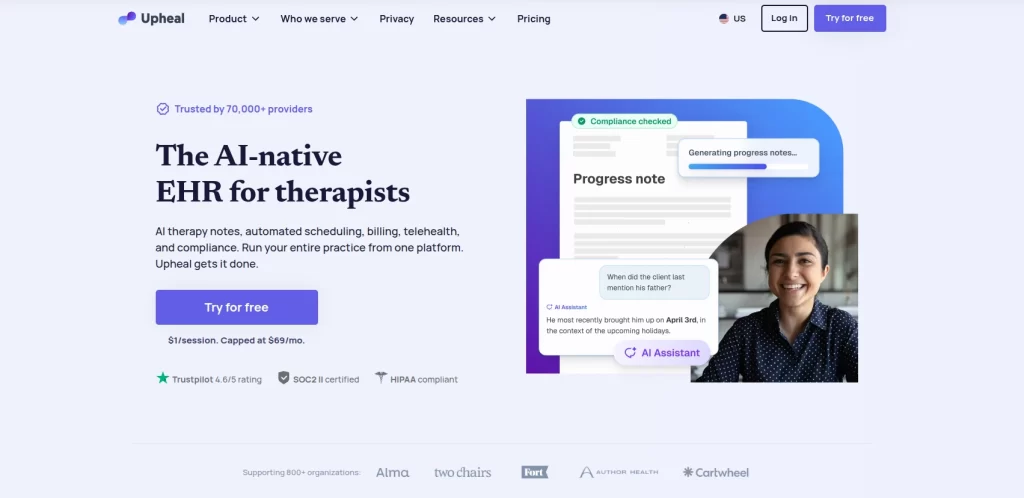
Upheal publishes its price on the homepage, at $1 per session capped at $69 a month, which suits a variable caseload.
Key features
AI progress notes: SOAP, DAP, EMDR, and other therapy-specific formats generated from session audio
Session recording and transcription: In-person, telehealth, or uploaded audio
Treatment plan generation: AI drafts treatment plans from initial assessments
Session analytics: Speech patterns, sentiment, and topic frequency for clinical supervision
HIPAA-compliant storage: Encrypted at rest and in transit, with PHIPA support for Canadian practices
Certifications: Upheal publishes SOC 2 Type II certification alongside HIPAA, GDPR, and PHIPA compliance
Mobile and desktop apps: The practice syncs across devices, so a note can be reviewed away from the consult room
Pricing
Plan
Price
Who it is for
Free
$0
Unlimited notes, but SOAP, DAP, and intake formats only
Pay as you go
$1/session, capped at $69/month
Variable-volume therapists
Group and Enterprise
Contact Upheal
Group practices and larger teams
A 30-day full trial runs first, and the free plan stays available afterwards. Three clinicians all reaching the monthly cap come to $207.
Where Upheal shines
Therapy-specific note formats: Out-of-the-box SOAP, DAP, and EMDR templates without configuration
Usage-based pricing: Pay-per-session pricing keeps costs predictable for part-time or variable caseloads
Session analytics: Speech-pattern and sentiment data offer supervision insights that competitors do not provide
Where Upheal falls short
Speaker attribution errors: Occasional misattribution between therapist and client in noisy recordings
Depth beyond the notes: Scheduling and billing arrived after the AI notes, so insurance-heavy practices should test claims workflows first
Phone-session recording on iPhone: Reviewers report inconsistent capture on iOS for phone-only sessions
Customer reviews
Upheal’s public review history is short but consistently positive on time savings and on the quality of its therapy-specific note formats. Two complaints surface repeatedly, and both are narrow. Reviewers mention speaker attribution errors and inconsistent recording of iOS phone sessions.
Who Upheal is best for
Solo therapists who want the note drafted before they open the chart
Part-time clinicians who benefit from pay-per-session pricing
Group supervisors interested in session-level analytics for training
Elation Health: Best for direct primary care and value-based practices
Rating4.5/5★★★★★
The bottom line
A chart that reads like a chart, with the patient's whole history beside the active note.
Full clinical history visible during the encounter
Care reminders for quality measures
EPCS e-prescribing built in
What doesn’t
No published pricing, every plan is quoted
Billing onboarding is steeper than the clinical side
Optimized for primary care, not multi-specialty
Elation Health is a clinical-first EHR designed around primary care rather than retrofitted from a billing platform. Its longitudinal patient view, problem-oriented charting, and care reminders make it a frequent pick for direct primary care, known as DPC, and for value-based arrangements.
The note interface is clean. The patient’s full history sits alongside the active note rather than buried under tabs.
Elation sells itself on the clinical chart rather than the billing engine, which is why direct primary care practices shortlist it.
Key features
Longitudinal patient view: Full clinical history visible alongside the active note
Problem-oriented charting: Notes structured around active problems rather than visit-by-visit
E-prescribing with EPCS: Controlled-substance prescribing built in
Lab and imaging integration: Direct ordering and result inbox
Care reminders: Quality measure tracking for value-based contracts
Elation Go: A physician mobile app for charting and patient lookup away from the desk
Pricing
Plan
Price
Who it is for
All plans
Contact sales / no published pricing
Direct primary care and value-based practices
Elation publishes no prices on its own website, so every plan is quoted. Budget for a sales call before you can line it up against the rest of this list.
Where Elation Health shines
Clinical-first design: Built for clinicians who want the chart to feel like a chart, not a billing system
Direct primary care workflows: Strong fit for membership-based and DPC practices
Longitudinal view: Patient history is genuinely visible during the encounter
Where Elation Health falls short
Billing learning curve: The billing module has a steeper onboarding than the clinical side
Higher price point: One of the more expensive options in this list per provider
Limited multi-specialty fit: Optimized for primary care, so it is less suited to aesthetic, therapy, or allied health
Customer reviews
Elation has a small public review footprint relative to its market presence, so sentiment is thin. What surfaces consistently is praise for the clinical interface and the longitudinal view. The most common criticism is the billing module’s learning curve.
Who Elation Health is best for
Direct primary care, concierge medicine, and membership-based practices
Independent practices in value-based or risk-bearing arrangements
Clinicians who want a problem-oriented chart rather than visit-oriented charting
What a good clinic note example looks like
A complete clinic note carries the subjective account, the objective findings, the assessment, and the plan, tied to one patient timeline.
Vendor pages describe note templates without ever showing one filled in. So here is a worked clinic note example: a fourth weekly session with an adult client, written in SOAP format.
Section
What the clinician wrote
Subjective
Reports sleeping five to six hours a night, down from seven. Describes work deadlines as constant since a team change three weeks ago. Denies thoughts of self-harm.
Objective
Alert, oriented, cooperative. Speech normal in rate and volume. GAD-7 score 12, up from 8 four weeks ago. PHQ-9 score 9, unchanged.
Assessment
Generalized anxiety disorder, moderate, worsening alongside occupational stress. No safety concerns at this visit.
Plan
Continue weekly CBT. Introduced a sleep-restriction protocol and issued a written schedule. Rescreen GAD-7 in four weeks. Contact prescriber if the score passes 15.
Three details do the work there, and they are the three most soap notes examples leave out. A scored instrument with a date beside it. A named intervention rather than a summary of the conversation. And a threshold that tells the next reader when to escalate.
SOAP is the default, but it is not the only structure a payer or a supervisor will accept. Four formats cover almost every private practice.
SOAP — subjective, objective, assessment, plan. The medical default, and the format most payers expect to see on a progress note.
DAP — data, assessment, plan. Merges the subjective and objective into one data section, which suits talk therapy where the observation is the conversation.
BIRP — behavior, intervention, response, plan. Records what the clinician did and how the client responded, which is what a utilization reviewer looks for.
GIRP — goal, intervention, response, plan. Opens on the treatment-plan goal, so every note visibly advances the plan on file.
Nursing teams plan care on a different structure. A nursing concept map ties assessment data to diagnoses, interventions, and expected outcomes on one page.
Scored instruments attach in the objective or data section, never in the plan. GAD-7 for anxiety and PHQ-9 for depression are the two most common in behavioral health. Record the number and the date, because a single score proves nothing and a trend proves a great deal.
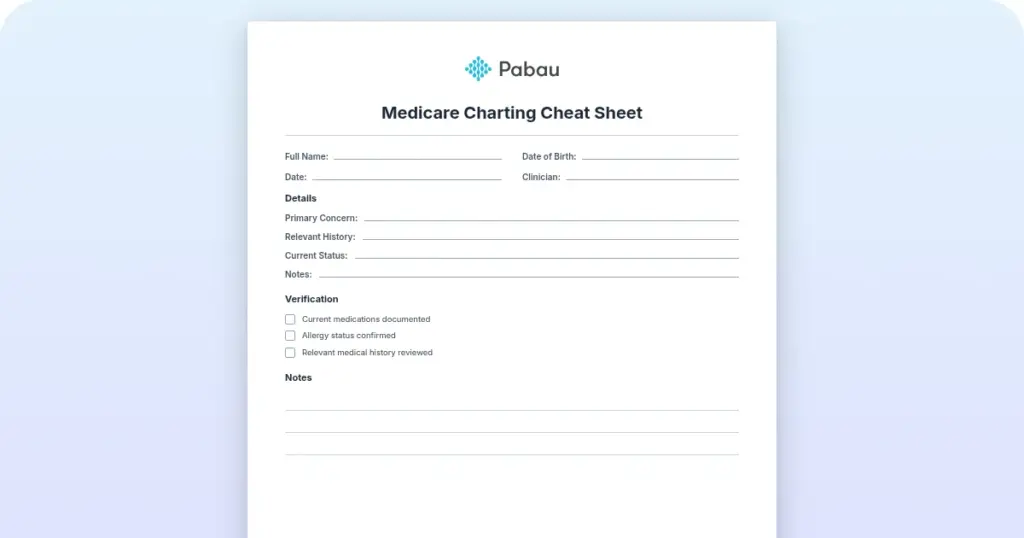
A therapy progress notes cheat sheet pdf helps a new clinician remember which field goes where. A guided notes template does the same on paper, prompting each section. It cannot carry the note into the patient record, and it leaves no audit trail. That is the whole argument for note templates living inside the chart rather than beside it.
Is there free clinical notes software?
Yes — Heidi Health and Upheal both run a free plan, and each one limits the feature a growing practice needs most.
Heidi Health’s free plan has no time limit. It gives unlimited transcription and the standard template set, while advanced templates and patient-session linking are capped. Document sharing, coding, and session status all sit on the paid Clinician plan.
Upheal’s free plan carries unlimited session notes and HIPAA-compliant telehealth. The limit is the note format: Free covers SOAP, DAP, and intake notes only. BIRP, GIRP, EMDR, and psychiatry formats need the paid plan.
Both free plans are genuine, and both solve documentation only. A free AI scribe drafts the note and then hands it to you. What it does not do is hold the record, and that is the part a private practice cannot outsource to a free tier.
Scheduling and reminders stay in whatever calendar you already run, so the note and the appointment live apart.
Payments and claims stay outside, which means the service you documented is invoiced somewhere else.
The patient record needs a system underneath with a signed Business Associate Agreement, audit logs, and role-based access.
The other four platforms run trials rather than free tiers. SimplePractice and TherapyNotes each give 30 days, and Practice Fusion gives two weeks. Elation Health publishes neither a price nor a trial.
Pabau does not run a free trial either. Every Pabau subscription includes every feature, so there is no tier to unlock later, and setup runs through structured onboarding with our team. A platform this broad rewards being configured properly more than it rewards being poked at for a fortnight.
Specialist tools we considered and left off the shortlist
Four more products rank for this query, and each one failed a shortlist test rather than a quality test. The test was simple. A platform had to hold the patient record for a US private practice, or drop notes into the record that practice already runs. It also had to add something the seven above do not.
ClinicNote — an EMR built for speech-language pathology and audiology, and specifically for university training clinics. Student documentation with supervisor sign-off is its whole design, which is a different workflow from a private practice.
Freed — an AI scribe for independent practices, with a coding assistant and an AI receptionist alongside it. Strong product, same category as Heidi Health, and Heidi publishes the longer EHR integration list.
PatientNotes — an AI scribe that drafts SOAP notes, summaries, and referral letters across a wide range of allied health professions. PatientNotes is a scribe rather than a chart, so Heidi Health and Upheal already represent that category here.
Zanda — practice management software for allied health, covering physical therapy, psychology, podiatry, and dietetics. Zanda is the closest of the four to a full platform. Its documentation targets allied health rather than the mixed medical and aesthetic caseload this list covers.
If your practice is a university speech and hearing program, stop reading comparison posts and look at ClinicNote. Fit beats feature count every time.
How to choose clinical notes software for your practice
Choose clinical notes software by matching its pricing unit and template depth to your specialty, payer mix, and headcount. No single platform wins for every practice.
Six criteria separate a platform you keep from one you replace in eighteen months. Weigh them against your own situation rather than chasing whichever tool sits top of a review site.
Decision factor
What to evaluate
Strongest options
Specialty fit
Template depth for your modality and clinical workflow
HIPAA BAA, audit logs, encryption, and access controls
All listed platforms offer a BAA; verify audit trails and access controls in your demo
One evaluation habit costs practices money. Teams demo each platform in isolation and grade it on note-taking. Six months later they find that the scheduling, billing, and patient messaging around the note eat the hours.
Documentation accounts for roughly 30 to 40 percent of administrative workload in a typical private practice. Coordination tasks outside the note account for the rest. So if your shortlist mixes notes-only tools with full platforms, score them on the whole workflow.
The decision rule, by pricing unit
The pricing unit is a statement about which practice shape a vendor was built for. Read it that way and the shortlist narrows fast.
Choose a per-practice plan if you are one clinician and want a bill that does not move. SimplePractice Starter at $49 and TherapyNotes Solo at $69 both work this way.
Choose a first-clinician-plus-seat plan if the team grows slowly and each clinician carries their own caseload. TherapyNotes adds clinicians at $50 each, the cheapest step in this list.
Choose a flat per-user plan only where every clinician documents heavily all day. Heidi Health charges $150 a seat, so a part-time clinician rarely earns that back.
Choose per-session pricing if caseloads swing month to month. Upheal caps at $69, which protects a busy month and rewards a quiet one.
Choose a plan banded by team size if you expect to add clinicians and do not want to re-price the stack. Pabau bands plans by user count, and every band carries the full platform.
Choose an unpriced platform only if you have room for a sales cycle. Elation Health quotes every plan, so budget a call before you can compare it.
Billing readiness and the coding layer
Notes feed coding, and coding feeds the claim. Practice Fusion and TherapyNotes put ICD-10 and CPT selection inside the chart, so you avoid running separate medical coding software beside the note. A scribe that exports text into a document does none of that, which is the hidden cost of a documentation-only tool in an insurance practice.
Treat every time-saved claim as unverified
Every AI scribe in this category is sold on time saved, and not one of these vendors publishes how it measured that. Upheal promises notes in minutes rather than hours. SimplePractice says its Note Taker writes a progress note in moments.
None of them states a sample size, an error rate, or how often a clinician had to rewrite the draft. None of them commits to a human-review requirement in the marketing claim either. So treat the number as a hypothesis and test it on your own encounters during the trial.
On compliance, HIPAA sets a six-year retention period for its own required documentation, and it sets none for the medical record itself. Retention periods for the chart come from state law and vary, so check the rule where you practice. Then confirm your platform can hold consent records and audit trails to the strictest standard you face.
Practices combining therapy with aesthetics, physical therapy, or allied health hit this wall earliest, because no single-specialty tool maps cleanly onto a multi-service operation.
Pabau is the only platform here that carries customizable clinical notes, AI scribing, telehealth, and a branded patient portal under one roof. That breadth is why Pabau leads this list for multi-service practices rather than single-modality solos.
How Pabau keeps the note inside the rest of the workflow
Most multi-service practices end up running two systems. The chart lives in one tool, and the calendar, invoices, and patient messages live in another, so someone re-keys the same visit twice.
A therapy PMS, meaning practice management software built specifically for a therapy practice, solves the therapy half neatly. It tends to leave the aesthetic, physical therapy, or allied health half stranded in a second system.
Pabau keeps the note inside the record that already holds the appointment. Pabau Scribe, our AI scribe, drafts the note from the consultation, and the clinician edits and signs it. The invoice then picks up the service without a second entry.
The forms your patients complete before the visit land in the chart, so the history is there when they sit down. Plans are banded by team size and per location, and every subscription includes every feature.
So a fourth clinician adds a seat, never a feature you have to buy back. That is the other half of the three-clinician test. What a platform charges you to grow matters more than what it charged you to start.
See how Pabau handles your clinical documentation workflow
Pabau combines customizable clinical notes, AI scribing, telehealth, automated reminders, and a branded patient portal in one platform. Book a personalized walkthrough for your practice.
Run the three-clinician test before you shortlist anything. TherapyNotes comes to $179 a month for three clinicians, Practice Fusion $199, Upheal $207, and SimplePractice $247. The cheapest sticker on this page turns out to be the second most expensive answer.
Then settle the shape of your practice. A solo behavioral health clinician will struggle to beat SimplePractice on ease of use. An insurance-heavy psychotherapy group will find TherapyNotes hard to dislodge on billing depth.
If documentation is only one part of the workload, judge the shortlist on total cost. Count how many systems each option removes, not note quality alone. Test every candidate against your own notes and your own week, never the vendor’s demo script.
Book a demo to see how Pabau documents a full patient visit, from the intake form to the signed note to the invoice.
Continue your research
Comparing documentation platforms more broadly?Clinical documentation software compares the wider category, including the compliance features a notes tool alone will not cover.
Only need the audio turned into text?Best medical transcription software ranks the transcription tools that sit under a scribe, with the accuracy trade-offs spelled out.
Want the history in the chart before the visit?Patient intake software covers the forms, consents, and e-signatures that populate a note before the patient arrives.
Prefer a note format that leads with the plan?APSO note template reorders the SOAP sections so the assessment and plan sit at the top of the chart.
Handing a patient over between shifts?Bedside shift report template gives nurses a structured framework for documenting handovers, vitals, and care plans.
Frequently asked questions
What is the best clinical notes software for private practice?
For solo behavioral health practices, SimplePractice is the most widely used option due to its ease of use and patient portal quality. For insurance-heavy psychotherapy groups, TherapyNotes offers stronger documentation and billing workflows, and it is also the cheapest of these platforms at three clinicians. For multi-service or multi-provider practices, Pabau provides the broadest operational platform, combining clinical notes, AI scribing, scheduling, billing, and patient communication. The best choice depends on specialty, practice size, and whether documentation is your only need.
What features should I look for in clinical notes software?
Start with a signed HIPAA Business Associate Agreement and note templates that fit your modality. Then look for AI scribing or fast structured charting, and telehealth you can document inside. Audit-ready records with full version history and role-based access controls are non-negotiable. Finally, check what the platform costs at the headcount you expect, not the one you have. Verify each feature in a structured demo using your own clinical workflow, not the vendor’s scripted scenario.
How much does clinical notes software cost in 2026?
Entry prices run from a free plan to $199 a month, and the unit differs by vendor. Upheal is free to start, then $1 per session capped at $69 a month. Heidi Health keeps a free plan, with its Clinician plan at $150 per user per month. SimplePractice starts at $49 a month for a solo practice, and TherapyNotes at $69. Practice Fusion charges $199 a month with an annual commitment, covering three signing staff. Pabau starts from $104 a month for one user, and larger plans are quoted by team size. Priced for three clinicians, those figures become $207, $450, $247, $179 and $199 respectively.
Are AI clinical notes HIPAA compliant?
AI clinical notes can be HIPAA compliant when the vendor signs a Business Associate Agreement. The vendor must also encrypt data at rest and in transit, keep audit logs, and support access controls. Your own staff still need training on minimum-necessary use. Compliance is a vendor configuration question, not an inherent property of AI. Before adopting any AI scribe, request the BAA. Confirm that data is not used to train external models without explicit consent, and check how long recordings are kept. The HHS Office for Civil Rights treats vendors handling PHI as Business Associates regardless of whether AI is involved.
What is the difference between an AI scribe and clinical notes software?
An AI scribe is a documentation-only tool that listens to a consultation and drafts a structured note. It does not handle scheduling, billing, patient communication, or chart history. Clinical notes software in the broader sense is the full electronic chart. It usually sits inside an EHR or practice management platform, and it stores and secures the patient record over time. Many practices use both: the EHR is the system of record, and the AI scribe drafts notes that get reviewed and saved into it. Pabau combines both layers in one platform. Heidi Health is scribe-only and needs a chart underneath, while Upheal has added scheduling and billing around its AI notes.
Can I run a private practice on free clinical notes software?
Rarely, because a free plan covers the note and leaves the rest of the record somewhere else. Heidi Health’s free plan has no time limit and gives unlimited transcription with standard templates. Upheal’s free plan carries unlimited session notes and telehealth, but restricts note types to SOAP, DAP, and intake. Neither one schedules an appointment, takes a payment, or holds the chart. For a practice that bills insurance, the workable minimum is a paid plan with a signed Business Associate Agreement, audit logs, and role-based access controls.
What is the best app for taking medical notes?
SimplePractice is the strongest all-round app for taking medical notes, because it ships both iOS and Android apps tied to the same chart. Heidi Health also publishes iOS, Android, Mac, and Windows apps on one login, which suits a scribe that has to work in any room. Pabau GO, our iOS app for practitioners, covers notes, clinical photos, and consents on an iPhone or iPad. Elation Go is the primary-care equivalent, and Upheal ships mobile and desktop apps. Two caveats matter. The TherapyNotes app is a companion for your agenda and messaging rather than full charting. Practice Fusion ships no app at all, running instead in a touch-optimized browser view.
How much does clinical notes AI cost per month?
Clinical notes AI costs between $0 and $150 per clinician per month on these platforms. Upheal charges $1 a session, capped at $69 a month, and keeps a free plan underneath. Heidi Health runs a permanent free plan, with its Clinician plan at $150 a month or $110 a month billed annually. SimplePractice sells its Care Aide AI suite separately, at $59 a month for the account owner plus $49 for each additional clinician. TherapyNotes prices its TherapyFuel scribe as an add-on at around $40 a month. Pabau includes Pabau Scribe, our AI scribe, in every subscription, with usage running on credits rather than a higher tier.