Pabau vs Hyland OnBase: Healthcare document management software compared
Healthcare document management software captures, stores, and retrieves patient ...

Last Updated: Nov 2, 2026
The best EHR for therapists depends on who pays for your sessions and how big your team will get. For a practice that runs therapy alongside other services, our pick is Pabau, the all-in-one practice platform we build. Solo private-pay therapists get the most from SimplePractice, while insurance-heavy practices should start with TherapyNotes.
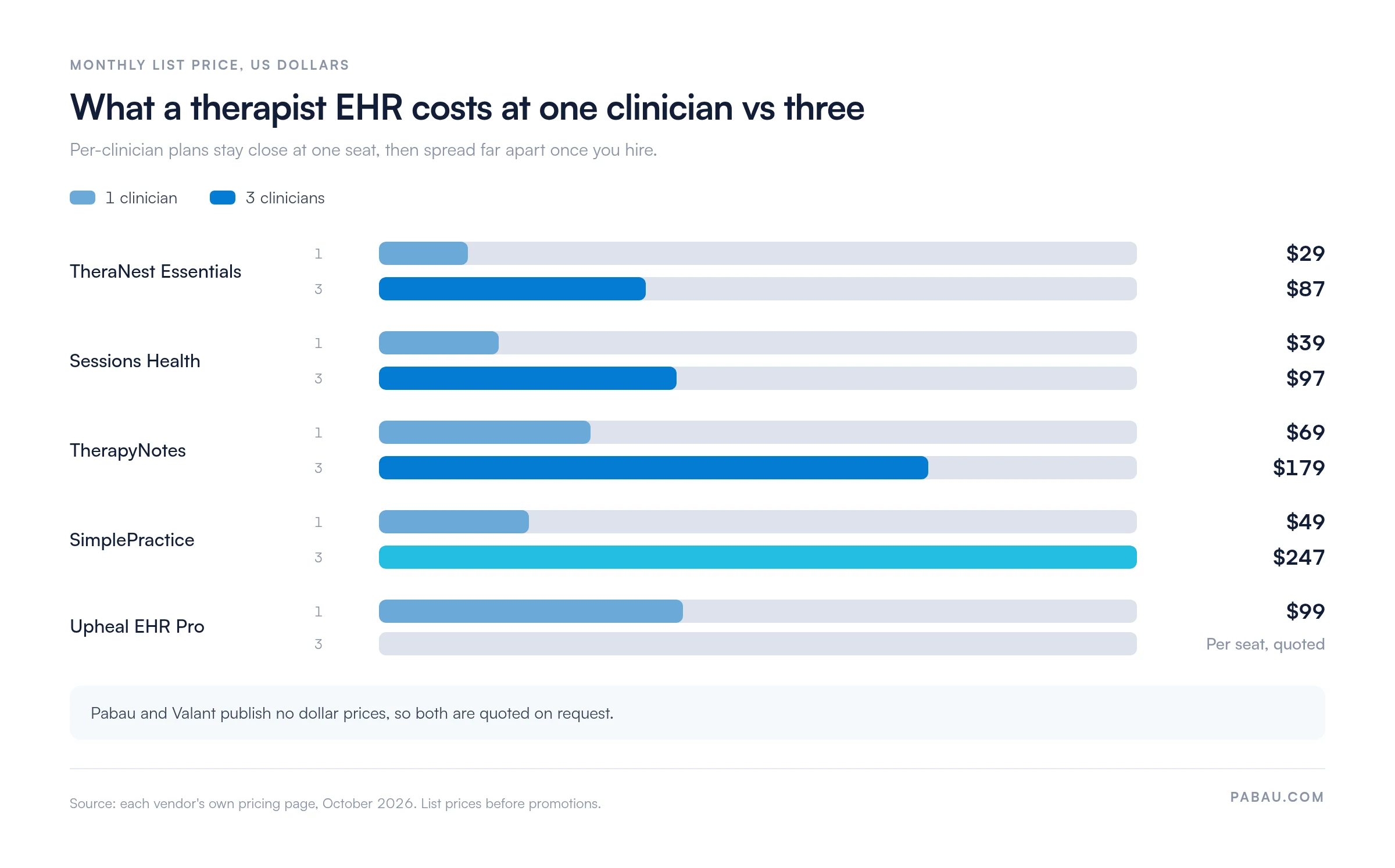
Per-clinician plans that look cheap for one therapist can cost five times as much at three. Below, we compare seven platforms on price, claims, telehealth and AI notes, using each vendor’s own pricing page. Then you’ll get a 90-minute scorecard for testing your shortlist in a live demo.

1. Pabau — best for therapy practices that also offer other services and want booking, notes, billing and marketing in one system.
2. SimplePractice — best for a solo private-pay therapist who wants a polished patient portal and built-in telehealth.
3. TherapyNotes — best for insurance-heavy practices that need low per-claim fees and ERA posting.
4. TheraNest — best for budget-conscious group practices that pay per therapist.
5. Valant — best for psychiatric groups and IOP or PHP programs that track outcomes.
6. Sessions Health — best low-cost start, with a free plan for your first three patients.
7. Upheal — best for therapists who want AI-written session notes before full practice management.
The table puts all seven side by side. It shows the monthly cost for one and three clinicians, plus what each platform charges extra for claims, telehealth and AI notes.
| Provider | Best for | 1 clinician, per month | 3 clinicians, per month | Insurance claims | Telehealth | AI notes |
|---|---|---|---|---|---|---|
1Pabau OUR PRODUCT | Multi-service and allied health practices | Quoted in a demo | Quoted in a demo | Claims management, US via Claim.MD | Built in, browser video, usage credits | Pabau Scribe, usage credits |
2SimplePractice | Solo private-pay therapists | $49 Starter | $247 on Plus | Included, $0.39 per claim | Included on every plan | Note Taker add-on, $35 |
3TherapyNotes | Insurance-heavy practices | $69 Solo | $179 on Group | 14 cents per claim | Basic free, Premium $15 per clinician | TherapyFuel add-on, $40 per clinician |
4TheraNest | Budget-conscious groups | $29 Essentials | $87 on Essentials | From the Advanced plan | $12 add-on, included from Advanced | Ensai add-on, $35 per provider |
5Valant | Psychiatric groups and IOP/PHP programs | Quote only | Quote only | Integrated clearinghouse | Available, priced in quote | AI Notes Assist, priced in quote |
6Sessions Health | Low-cost solo start | Free, or $39 Professional | $97 on Professional | $0.25 per claim, less at volume | $10 per practitioner | AI Assist add-on, $35 |
7Upheal | AI-first documentation | $99 EHR Pro, or $1 per session | Per-seat, quoted | $0.30 per claim | Included | Included |
Prices are monthly list prices before promotions, taken from each vendor’s site in October 2026. Pabau and Valant publish no dollar prices, so both show as quoted. The ratings on each provider card are our editorial scores against the criteria in this article, not user reviews.
The bigger story is what happens when you hire. Per-clinician plans look cheap for one therapist and climb quickly at three, as the chart below shows.
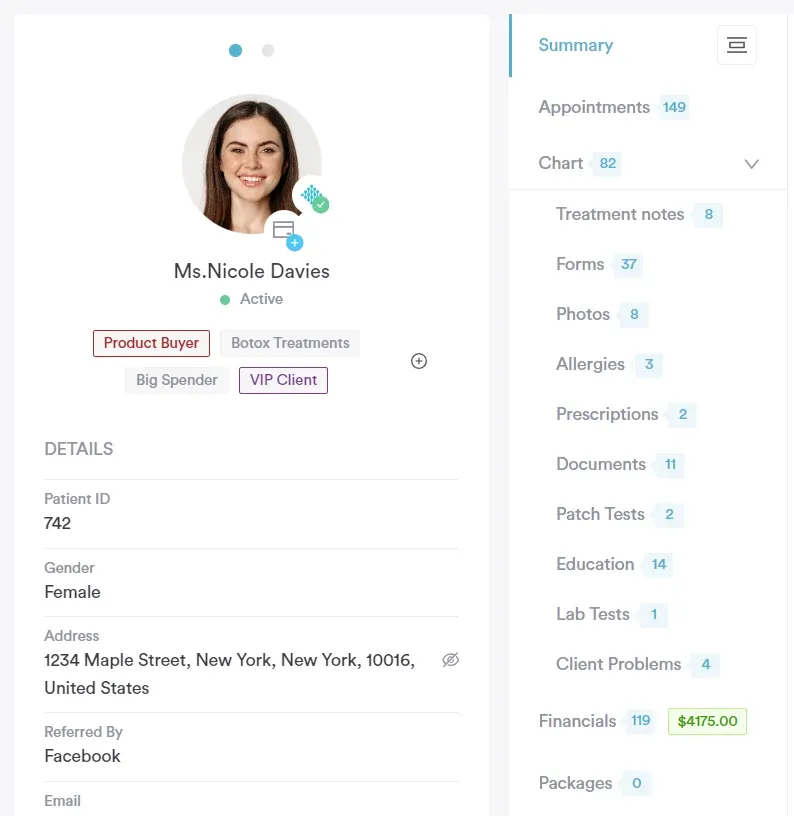
One system for therapy notes, booking, payments and marketing, priced by users rather than by feature.
Pabau fits a practice where therapy is one service among several, such as counseling alongside psychology, physical therapy or wellness. It works as both therapy practice management software and a mental health EMR.
Pabau keeps the appointment, intake forms, consent, session notes and invoice on one patient timeline. A practice manager and a therapist see the same record, with staff permissions limiting who opens clinical notes.
| Plan | Price | Clinicians | Key inclusions |
|---|---|---|---|
Solo | Quoted in a demo | 1 user | Full platform, unlimited patients |
Team | Quoted in a demo | 2–3 users | Full platform |
Medium | Quoted in a demo | 4–5 users | Full platform |
Group | Quoted in a demo | 6–15 users | Full platform |
Enterprise | Quoted in a demo | 16+ users, multi-location | Full platform |
Pricing scales with users and location, and annual billing saves 20%. Every plan includes the full platform, and Pabau quotes each one in a demo.
The easiest start for a solo therapist, as long as the practice stays small.
SimplePractice is the best EHR for mental health private practice when you work alone and mostly take private pay. The company says 250,000 practitioners use it, and every plan includes telehealth, progress notes and paperless intake.
SimplePractice now includes insurance claims on every plan, filed at $0.39 per claim. The catch arrives with your second hire, because group practices must move to the Plus plan.

| Plan | Price | Clinicians | Key inclusions |
|---|---|---|---|
Starter | $49 / month | 1 | Core features, telehealth, insurance claims |
Essential | $79 / month | 1 | Starter features plus additional tools |
Plus (solo) | $99 / month | 1 | Group appointments and group telehealth |
Plus (group) | $99 / month + $74 per clinician | 2–5 | Per-clinician fee drops to $72 at 6–15 and $69 at 16+ |
Groups with six or more practitioners can also ask for custom pricing. Current plans are listed on the SimplePractice website.
The cheapest way to run high claim volume, with fees that stay predictable as a group grows.
TherapyNotes is the best mental health EMR for practices where insurance pays most sessions. It charges 14 cents per electronic claim, ERA claim and eligibility request, which keeps billing costs low at volume.
Group pricing is gentler than SimplePractice: $79 for the first clinician and $50 for each additional one. Billers and schedulers join at no extra cost.

| Plan | Price | Clinicians | Key inclusions |
|---|---|---|---|
Solo | $69 / month | 1 | Notes, scheduling, portal, basic telehealth |
Group | $79 / month + $50 per clinician | 2+ | Unlimited non-clinical users |
Enterprise | Group rates | 30+ users | Designated account manager |
Claims, reminders, ePrescribe at $65 per prescriber and TherapyFuel are billed on top. Plans are published on the TherapyNotes website.
The lowest per-therapist entry price here, with claims and telehealth unlocked on the middle plan.
TheraNest is the best fit for a group practice that wants to add therapists without per-seat costs climbing fast. Now part of Ensora Health, it charges $29, $59 or $89 per therapist each month.
The middle Advanced plan is the realistic choice for most groups. Advanced adds unlimited telehealth, online booking and 50 free claims per practice each month.
| Plan | Price | Clinicians | Key inclusions |
|---|---|---|---|
Essentials | $29 / therapist / month | Per therapist | Scheduling, portal, basic intake and notes |
Advanced | $59 / therapist / month | Per therapist | Telehealth, booking, 50 free claims a month |
Premier | $89 / therapist / month | Per therapist | Billing automation, unlimited claims, Wiley planner |
Annual billing works out to $27, $54 or $82 per therapist each month. Details are on the Ensora Health website.
Built for behavioral health organizations with prescribers, programs and outcome reporting.
Valant suits psychiatric group practices and intensive outpatient or partial hospitalization programs. It combines ePrescribing, treatment planning, group therapy tools and outcome tracking in one behavioral health EHR.
Valant prices each deal around the number and type of provider licenses, such as therapist, prescriber and supervisor. Telehealth and AI-assisted documentation are options that change the quote. Practices comparing psychiatry EHR options should ask for that breakdown in writing.

Valant builds each quote around provider licenses and optional features. Request one through the Valant website.
The cheapest EHR for therapists who want claims and a portal without paying for extras they skip.
Sessions Health is the cheapest EHR for therapists who need insurance billing from day one. It offers a free plan for up to three patients and a $39 Professional plan with unlimited patients.
Each extra practitioner adds $29 a month, so a three-clinician practice pays $97. Electronic claims start at $0.25 each and drop with volume.

| Plan | Price | Clinicians | Key inclusions |
|---|---|---|---|
Freemium | $0 / month | 1 | Up to 3 patients |
Professional | $39 / month + $29 per practitioner | 1+ | Unlimited patients and administrators |
Telehealth, claims, eligibility checks and AI Assist are charged per use or per practitioner. See the Sessions Health website for current terms.
AI notes are the product, and the EHR wraps around them.
Upheal suits a solo therapist whose biggest pain is documentation. The $39 AI Notes plan writes notes from telehealth, in-person audio or dictation, and the full EHR costs $99 flat or $1 per session.
Upheal deletes session audio by default once the note is ready, and you can opt out of AI model training. Even so, tell patients you record sessions and get their consent before you do.

| Plan | Price | Clinicians | Key inclusions |
|---|---|---|---|
Free | $0 / month | 1 | Basic AI notes, telehealth without AI |
AI Notes | $39 / month | 1 | Unlimited AI notes and telehealth |
EHR pay-as-you-go | $1 / session | 1 | Full EHR, billed per session |
EHR Pro | $99 / month | 1 | Full EHR with Assistant Pro included |
Groups buy AI Notes or EHR plans per seat. Check the Upheal website for current terms.
Choose the best EHR for therapists by settling payer mix and team size first, then scoring each finalist in a live demo. Feature lists look alike on paper, so the demo decides.
Forum threads tell you what annoyed one therapist. A scored demo tells you whether the same problem will annoy you.
The 90-Minute Demo Test is our scorecard for one vendor demo: five criteria, up to two points each, scored live. Ask the vendor to do each task on screen rather than describe it.
| Criterion | What to ask for in the demo | 2 points | 0 points |
|---|---|---|---|
Note to signed | Write and sign a progress note from a sample session | ✓Signed in under five minutes, template matches your format | ✕Template needs vendor setup or a workaround |
Claim or superbill | Turn that session into a claim, or a superbill if you take private pay | ✓One click from the appointment, fee shown up front | ✕Export to a separate billing tool |
Telehealth room | Start a video session as the patient would | ✓Patient joins from a link, no second app | ✕Patient must install software or use another vendor |
Assessment scoring | Send a PHQ-9 or GAD-7 and view the score | ✓Scored automatically and charted over time | ✕Paper form or manual totals |
Full export | Export one patient’s complete record | ✓Notes, documents and billing history in standard formats | ✕Export only on request or for a fee |
Our decision rule is simple. Score 8 or more and the platform makes your shortlist. Score 6 or 7 and book a second demo on the weak criteria. Below 6, walk away, whatever the price.
Group practices should add two questions to the demo. Can a supervisor co-sign a trainee’s note? Can one note document a group session for every attendee?
If insurance pays a third or more of your sessions, put claims tooling first. Below that, a cheaper private-pay setup with superbills and card payments usually wins. That threshold is our rule of thumb, not an industry standard.
The tooling differs more than most demos show. Our guide to insurance billing for therapists covers the workflow in depth.
A HIPAA-compliant therapy EHR comes from a vendor that signs a business associate agreement. The system also encrypts data, logs access and limits who sees notes. Ask for that agreement before the demo, not after.
A good therapy EHR lets patients book, sign intake forms, pay and join video from one link. Every extra login is a patient who emails you instead.
Paperless intake and automated reminders save the most front-desk time. A patient portal also keeps messages inside the secure record rather than in personal email.
Pick an EHR whose templates match the note format you already write. The four formats below cover most therapy documentation.
| Format | Sections | Common use |
|---|---|---|
| SOAP | SSubjectiveOObjectiveAAssessmentPPlan | Mixed medical and therapy settings |
| DAP | DDataAAssessmentPPlan | Brief outpatient therapy notes |
| BIRP | BBehaviorIInterventionRResponsePPlan | Behavioral health and payer-facing notes |
| GIRP | GGoalsIInterventionRResponsePPlan | Treatment-plan-driven therapy |
AI scribes now come with most platforms, often as a paid add-on. Get written consent before recording a session, and read every AI draft before you sign it.
Psychologists should give assessment scoring extra weight. Testing-heavy work lives or dies on scored, charted instruments.
Each of these shows up in the pricing and features above, and each is cheap to catch in a demo.
Switching EHRs safely means getting a complete export, running both systems through one billing cycle, and confirming the new vendor can import your format. Start with the export.
When our onboarding team migrates a practice into Pabau, the first request is a complete export, because a sample file hides missing fields.
Most therapy EHRs assume every appointment is a therapy session. Once a practice adds physical therapy, nutrition or wellness services, staff start keeping a second calendar and a second set of records.
Pabau puts every service on one calendar and one patient record, so a counselor and a physical therapist see the same history. Intake forms and consent go out automatically through the Client Portal, and telehealth opens from the booking confirmation.
Pabau Scribe drafts the session note for the clinician to review and sign. Questionnaire scores, invoices and recall reminders stay on the same timeline, so nobody re-enters data between tools.
Every subscription includes every feature, and structured onboarding moves your existing records across. Your team starts on a configured system rather than a blank one.

Pabau keeps therapy notes, telehealth, intake forms and billing on one timeline, so multi-service practices stop juggling separate systems.

Price the practice you will have in two years, not the one you have today. Per-clinician plans reward staying solo and charge you for every hire.
Solo private-pay therapists can stop at SimplePractice or Sessions Health. Insurance-heavy practices should test TherapyNotes first. A practice that already offers more than therapy will outgrow both, and should judge platforms on the whole patient journey.
Run the 90-Minute Demo Test on two finalists and let the score decide. Book a demo to see how Pabau handles therapy alongside every other service your practice offers.

Billing insurance for the first time? Insurance billing for therapists walks through claims, ERAs and eligibility checks step by step.
Opening your own practice? How to start a private therapy practice covers licensing, setup and the systems to choose first.
Writing tighter progress notes? SOAP notes for social work shows how to structure each section with examples.
Running a psychology practice? Best psychology practice software compares platforms built around testing and assessment.
Feeling the admin load? Therapist burnout: signs, causes and prevention covers practical fixes, from boundaries to workload.
Every platform in this comparison offers HIPAA safeguards, so the best choice is one that signs a BAA and fits your billing. Before you sign, confirm encryption, audit logs and role-based access for document storage.
No federal law requires a therapist to use an EHR, and paper records are still legal. Paper makes insurance billing, telehealth and remote access harder, though. HIPAA applies either way once you bill insurance electronically.
Yes. HIPAA treats psychotherapy notes, a therapist’s private session impressions, as separate from the main record. Most disclosures of them need the patient’s specific authorization. Diagnoses, treatment plans and progress notes stay in the standard record, so pick an EHR that stores the two apart.
Your state sets the retention period, not HIPAA, and it often runs several years past the last session. Records for minors are usually kept longer. Check your licensing board’s rule, and make sure you can still export records after you cancel.
An EMR for therapists stores records inside one practice, while an EHR is built to share records with other providers. Most therapy platforms sold as EHRs work mainly as EMRs plus practice management.