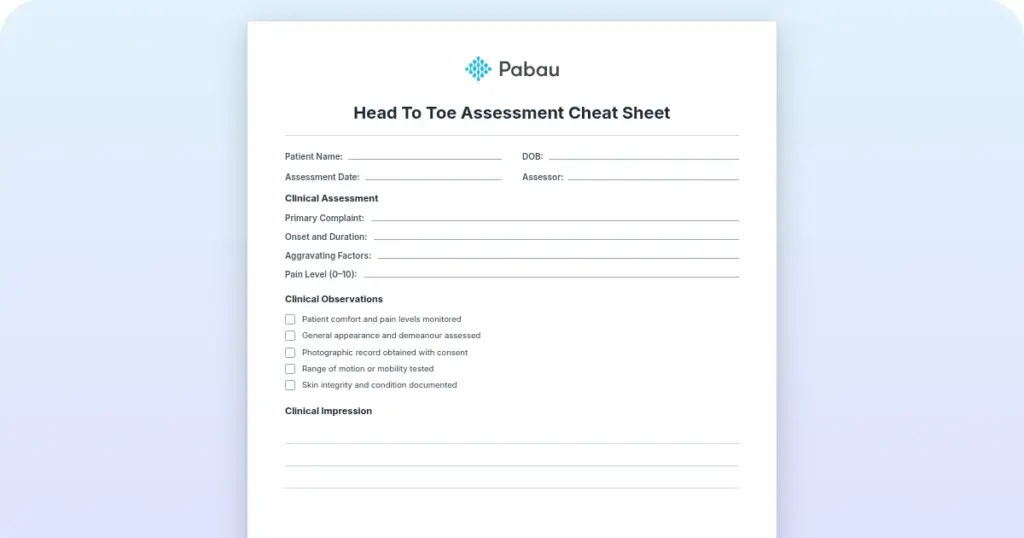
Head to toe assessment cheat sheet: Printable nursing guide
A head to toe assessment cheat sheet gives you one fixed order at the bedside, s...

5
Last Updated: Oct 23, 2026
An AI EHR is an electronic health record (EHR) with artificial intelligence built into it. In most systems, that means an ambient scribe that listens to the consult and drafts the clinical note for you.
The one point to hold onto is that the AI writes a draft. A note only becomes part of the medical record once a clinician reviews and signs it.
Getting the setup right decides whether you finish on time or rewrite notes at 9pm. Private practices also buy on different terms than hospitals do. There is no IT team, just a Tuesday afternoon between patients.
Below, you’ll find what the AI does, how scribing works, and the checks to run before you sign a contract.

An AI EHR is an electronic health record with artificial intelligence built in. Its most common feature is an ambient scribe that turns a spoken consult into a structured note.
AI does five jobs inside the record: documentation, scheduling, billing support, patient messaging, and clinical decision support.
AI-native platforms build the AI into the record, while older systems add it later. That choice usually decides where your drafted note ends up.
The AI’s draft only becomes the medical record once a clinician reviews and signs it. HIPAA covers the platform, but your state’s audio consent rules are separate.
Price the AI itself, not just the platform. Bundled, per-note, and percentage-of-collections billing produce very different bills at the same visit volume.
An AI EHR takes the digital patient chart you already know and adds AI that listens, reads, and drafts on top of it.
The chart itself stays the same. An electronic health record still holds a patient’s history, treatment notes, consents, prescriptions, and results in one place.
What changes is who does the typing. Ambient scribing is the headline use, but the same drafting idea shows up in scheduling and patient messages too. Either way, the AI assists and the clinician decides.
Practices usually get there by one of two routes. Your current record system adds AI features, or you move to a platform built with AI from the start.
An AI-native EHR has the AI inside the record from its first release. A bolt-on adds AI to a chart system that already existed. Vendors use both labels loosely, so compare them on these five points instead.
Epic’s generative AI features are the best-known bolt-on example. Epic added them to a chart system that hospitals have run for decades.
Most new generative AI EHR features reach practices the same way, from drafted patient messages to one-paragraph summaries of a long history.
In the end, the route matters less than where the output ends up. So ask one blunt question in every demo. Does the drafted note file itself into the patient chart, or does someone paste it in?
Inside an EHR, AI takes on five jobs, and each one removes a different slice of admin. Here’s what each looks like on a normal working day:
Not every AI EHR does all five, and quality varies a lot between vendors. Ambient scribing, though, is now standard on most leading platforms. Our roundup of the best AI medical scribe tools compares the main options side by side.
Ambient scribing documents the visit in the background while you run the consult. Afterward, it hands you a draft to check and sign.
There’s no dictating and no typing during the appointment. Here’s the walkthrough, start to finish:
The last step is the one to protect. A good AI scribe saves you the typing and leaves clinical judgment with you. If your notes follow a SOAP structure, our guide to AI SOAP notes shows what the draft looks like field by field.
Early problems tend to sit in the workflow around the scribe. Watch for these three:
Accuracy percentages lead most AI EHR marketing. What practices are buying, though, is time.
Picture a practitioner with a full afternoon list. Without a scribe, each consult ends with typing, and the backlog lands after the last patient leaves. With one, the draft is already waiting when the consult ends.
That time shows up in four places:
The value compounds when the AI sits inside the practice management software you already use. A separate scribing app just moves the typing somewhere else.
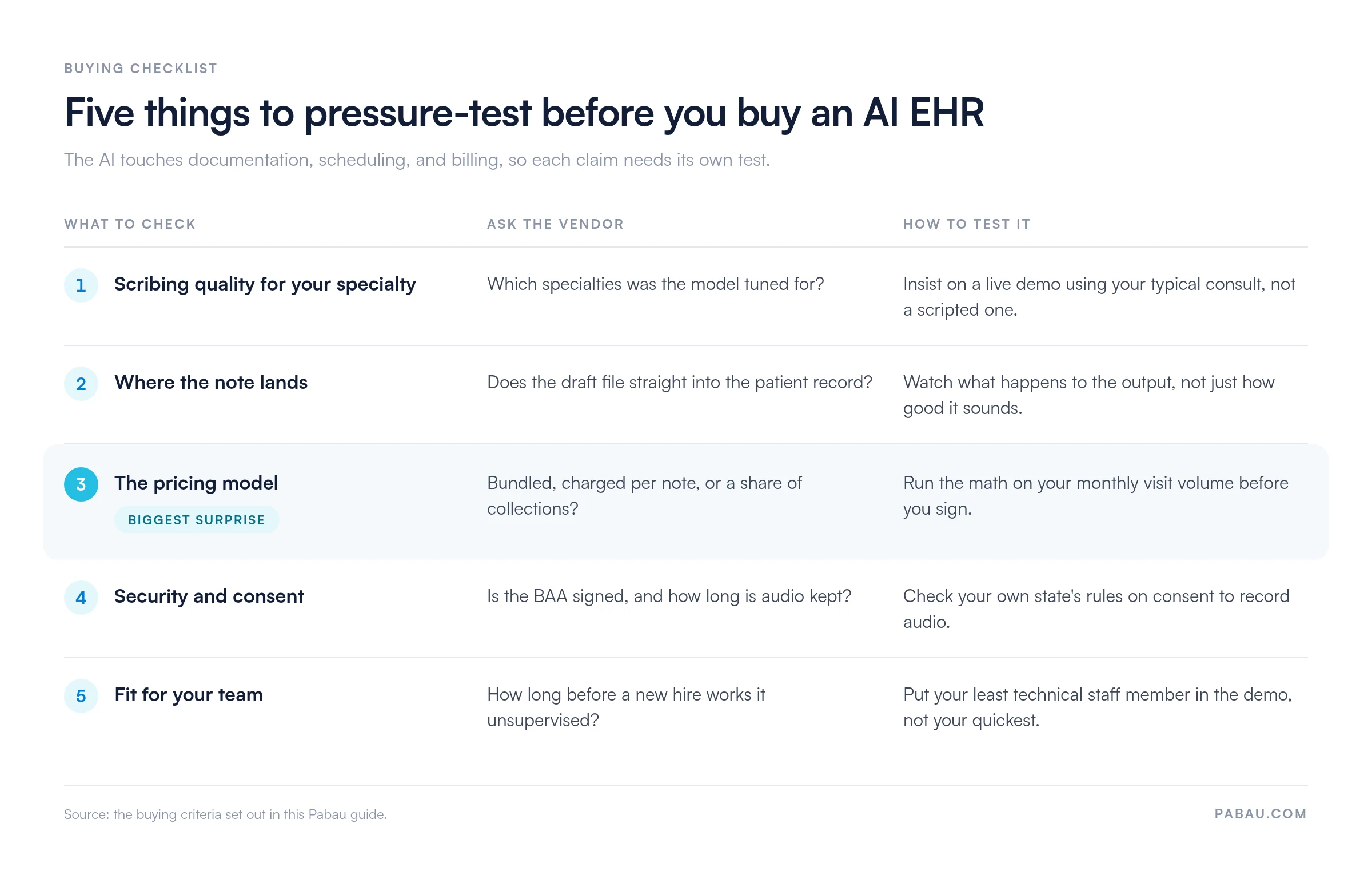
Five questions separate AI EHR software that saves time from software that moves the typing elsewhere. The AI touches documentation, scheduling, and billing, so test each claim before you commit.
Take this checklist into every demo, in this order:
In practices we onboard, adoption turns on that last point more often than on scribing accuracy. A hospital rollout has an IT team to absorb the friction. Most private practices don’t, so the whole checklist has to fit on one page:
HIPAA compliance is the floor for any AI EHR, and a signed vendor agreement makes it binding. Audio consent is a separate question that your practice has to answer. Here’s how the pieces fit, one question at a time.
Why does HIPAA apply? Any AI that handles patient data touches protected health information, known as PHI. In the US, that puts it under HIPAA, the federal health data privacy law.
What does the vendor sign? A reputable vendor will sign a Business Associate Agreement (BAA). That contract makes them responsible for protecting the data.
Is a BAA enough? No. It covers the platform, but ambient recording also needs consent to record audio. Recording laws vary by state, and some require explicit patient permission first. The same applies to recorded telehealth visits.
Our review of HIPAA compliant AI tools shows how eight vendors handle patient data, and which of them will sign a BAA.
Before you switch on an ambient scribe, run through this short checklist:
For OB-GYN practices, AI-assisted EHR platforms use an ambient scribe to draft SOAP notes. Obstetricians and gynecologists stop typing through the visit, then review and sign the draft.
OB-GYN documentation differs from a general practice in three ways:
That last point is why ambient listening suits an OBGYN EHR. The scribe records the consultation with the patient’s consent, so both hands stay free. Afterward, the conversation becomes a structured SOAP note, ready for review.
To test OBGYN EHR software, ask each vendor to run its AI on two scenarios. Use a mock gynecology consult and a repeat prenatal check. See which fields the scribe fills and which your team still types.
In the same demo, check clinical decision support and automated reminders for repeat visits. Do this whether the vendor calls its product an EHR or an EMR.
AI-powered EHR platforms with an open API let a practice connect AI assistants, voice agents, and phone software to its patient data. A strong API also limits how much of that data an outside app can reach.
Take an AI phone assistant that answers calls after hours. Through the API, it reads open slots, books the patient in, and writes the booking to the calendar. Any call notes belong on the patient record, where the practitioner will see them.
Our comparison of AI medical receptionist options shows how these phone tools differ on booking and handoff.
Before you connect outside apps, ask the EHR or EMR vendor three questions:
API-first design matters most for high-volume and multi-location groups. One AI phone line may serve several sites, so the API must book the right practitioner at the right location.
The best AI tools for EHR reporting turn the data you already record into a short list of numbers to act on each week. They work best when bookings, notes, and invoices live in one system, so the analytics read a single set of data.
As a starting point, four numbers deserve a weekly check:
Predictive analytics, which many vendors now sell as an AI feature, means the software forecasts from your own history. Typical examples include a no-show risk flag on tomorrow’s bookings, a recall list, and a forecast of busy days.
Treat each prediction as a prompt for the front desk, with a person making the call. Before you pay for AI reporting, run three checks in the demo:
Productivity tools linked to your EHR need the same scrutiny. If figures flow into Slack or Microsoft Teams, ask which ones are shared, how often, and whether patient details stay out.
Practice management software like Pabau takes the one-system approach this guide keeps returning to. Pabau Scribe, our AI medical scribe, records the consult with the patient’s consent and drafts a structured clinical note.

The draft lands directly in the patient record, where the clinician edits and signs it. That same record holds the appointment, before-and-after photos, consent forms, and the invoice. So a practice juggling a booking tool, a card terminal, and a folder of notes can swap that patchwork for one system.
Reporting runs on the same data. The open Pabau API also connects AI phone or voice tools, directly or through Zapier and Make. More than 30 native integrations come with every subscription.
On pricing, every subscription includes every feature, and cost scales with your locations and users. Pabau Scribe usage runs on credits you top up as needed, so the AI cost follows how much you record.

Pabau Scribe, our AI scribe, drafts the consult note into the patient’s chart, ready for you to review and sign. Scheduling, payments, and records sit in the same platform, so the note connects to the rest of the visit.

The surest way to judge an AI EHR is to watch it handle your own workflow. So bring one of your typical consults to the demo, and follow the draft all the way into the patient record.
Above all, keep the review step in mind. An AI scribe pays for itself only when signing the draft takes seconds. If your clinicians rewrite every note, the typing has moved rather than disappeared.
Pricing deserves the same scrutiny. Model the AI fees against your monthly visits before you commit, because per-note billing climbs fast in a busy week.
Want to see Pabau Scribe draft a note into the same record that holds your bookings and invoices? Book a demo, and we’ll walk through it using your own consult types.

Want the documentation side in more depth? AI clinical documentation walks through how the draft gets produced and where HIPAA applies.
Wondering what changes in a clinician’s day? AI medical scribe benefits for physicians looks at the workload an ambient scribe takes off a physician.
Rolling AI out across the practice? AI in healthcare compliance is an adoption checklist written for practice owners.
Need the scheduling side too? AI patient scheduling explains how it works and how to choose between tools.
Shortlisting vendors that will sign a BAA? HIPAA compliant AI tools reviews eight picks and how each handles patient data.
An EMR (electronic medical record) is the digital chart one practice keeps for its own patients. By contrast, an EHR is built to share that record with other providers, such as labs, specialists, and pharmacies. Many vendors now use the two terms interchangeably. So ask what the system shares, rather than what it’s called.
A plain cloud EHR usually starts at $49 to $150 per provider per month, and that price rarely includes AI. Ambient scribing is often an add-on of $80 to $100 per provider per month. AI-native platforms can run to several hundred dollars per provider. Per-encounter pricing can look cheap and then climb fast at high volume, so model it against your monthly visits.
Accuracy varies by vendor, by specialty, and by the room itself. Background noise, crosstalk, strong accents, and unusual drug names all raise the error rate. That’s why every draft needs a clinician’s review before signing. Test a scribe on your own consults, with your own team, before you trust its published accuracy figures.
Not with patient details in a standard consumer account. Personal versions of general chatbots don’t come with a Business Associate Agreement, so entering PHI into them risks a HIPAA breach. For AI help with notes, choose a tool whose vendor signs a BAA and keeps the note inside your EHR.