
HCPCS Code E0272: Foam rubber mattress billing guide
HCPCS Code E0272: official descriptor and code overview HCPCS Code E0272 is the ...

Last Updated: Nov 6, 2026
L0999 is the HCPCS Level II code for an addition to a spinal orthosis, not otherwise specified. Suppliers use it for an add-on component that no other L-code describes and that the base orthosis code doesn't already include.
As a not-otherwise-classified (NOC) code, it has no fixed Medicare fee. Each claim needs a narrative with the item description, manufacturer, product name and number, and price list amount, or the DME MAC rejects it.
Let Pabau's smart automation suggest the right codes, reduce claim denials, and keep your practice compliant—effortlessly.
Automate repetitive tasks and focus on what matters most—your patients.
Reduce coding errors and ensure compliance with the latest regulations.
Clean claims, fewer denials, and faster reimbursements.
Powerful insights and reporting to help your practice thrive.
HIPAA compliant SOC 2 certified GDPR-compliant Trusted by 4,000+ clinics worldwide

HCPCS code L0999 bills an addition to a spinal orthosis that no other L-code describes and the base code doesn’t already include.
Every L0999 claim needs a narrative in NTE02 or Item 19, covering the item, manufacturer, product name and number, and price list amount.
Add modifier KX only when the applicable LCD requires it, and use NU, UE, RA or RB per your DME MAC’s guidance.
L0999 has no fixed Medicare fee, so the DME MAC prices each claim from the narrative, invoice and documentation.
Pabau’s claims management software links clinical notes and documentation to the claim, so the evidence is ready when the payer asks.
HCPCS code L0999 carries the official CMS descriptor “Addition to spinal orthosis, not otherwise specified.” It bills an add-on component for a spinal orthosis when no specific L-code describes it. Because it’s a not-otherwise-classified (NOC) code, it’s the last code you reach for, never the first.
L0999 belongs to HCPCS Level II, the national code set maintained by the Centers for Medicare and Medicaid Services (CMS). Orthotic procedures run from L0000 to L4999, and prosthetic procedures from L5000 to L9999. L0999 closes the spinal orthotics section, L0112 to L0999, which is why it works as that section’s catch-all.
CMS updates HCPCS every year, so bill against the descriptor in force on the date of service. To compare neighboring codes, the HCPCS code library lists the spinal orthosis codes around L0999.
L0999 covers an addition to an LSO, TLSO or other spinal orthosis that has no L-code of its own. The item must attach to the orthosis or work as part of it. Your DME MAC then decides whether it’s medically necessary under its Local Coverage Determination (LCD). Stocking supporter grips, for example, have a code of their own, HCPCS code L0982, so they never go under L0999.
The trap is the base code. Many spinal orthosis descriptors already include straps, closures and padding. L0648’s descriptor, for example, “includes straps, closures, may include padding.” Medicare’s DME contractors don’t allow a NOC code for features or functions another L-code already includes.
So L0999 is the wrong code for any of these:
Billing L0999 when a specific code exists is a coding error. In an audit, it can read as miscoding, so record why no other code fits.
Code selection runs in a fixed order, and a “yes” at any step sends the item to another code. The flow below shows the four checks to run before L0999 applies.
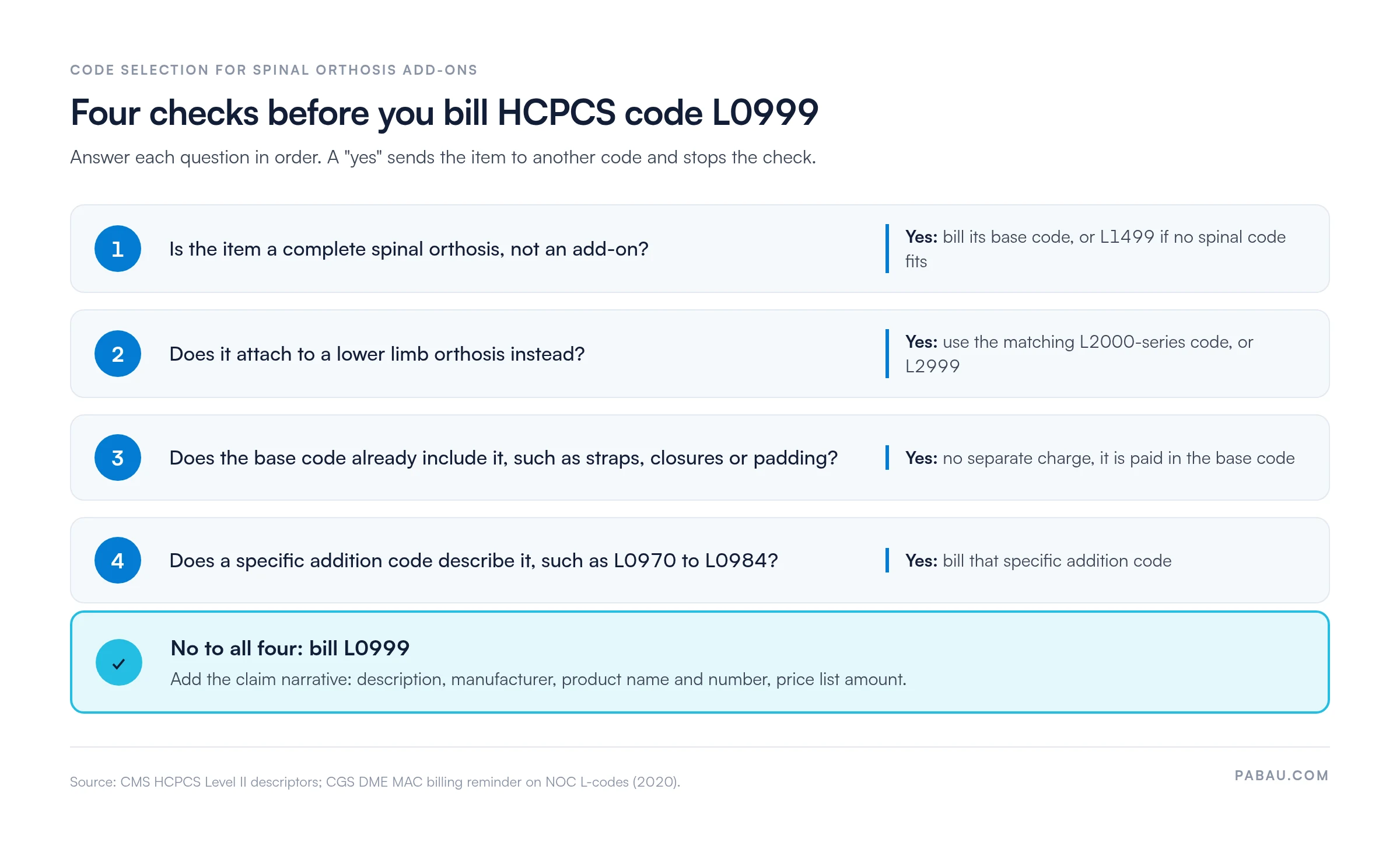
The table lists codes billers often weigh against L0999. Read the base code descriptors closely, because they spell out what’s already paid for. The L0648 guide covers that LSO’s coverage rules in full.
No single modifier belongs on every L0999 claim. Modifier KX applies only when the applicable LCD makes it a coverage-criteria modifier. A NOC claim normally rests on its narrative description and invoice instead. Check your DME MAC’s current guidance before each submission.
Pairs that get rejected: KX and GZ contradict each other, since one says the criteria are met and the other says they aren’t. NU and UE clash the same way, because an item can’t be both new and used. A claim line carrying either pair is rejected before anyone reads the documentation.
Every NOC claim needs a line-level narrative. Electronic claims carry it in loop 2400, segment NTE02, and paper claims use Item 19. According to a CGS billing reminder, the narrative includes:
Claims missing this information are rejected and have to be resubmitted. Behind the narrative, the patient file needs the clinical evidence that supports it.
Consistent medical billing compliance means each record below is present, dated and tied to the patient’s clinical need. File them before the claim goes out, not during an appeal.
Read your DME MAC’s spinal orthoses LCD before the item is dispensed, not after. It lists the covered diagnoses and functional criteria. If the patient’s records don’t meet them, the L0999 claim is denied however accurately it’s coded. A documentation checklist at intake catches missing records before submission.
Prior authorization for L0999 follows the same DMEPOS rules as other spinal orthosis codes. CMS keeps a Required Prior Authorization List for certain DMEPOS items, and it changes between policy cycles. Confirm the current rules with your DME MAC before you furnish the item.
Two contractors handle the four DME MAC jurisdictions. Noridian covers Jurisdictions A and D, and CGS Administrators covers Jurisdictions B and C.
A DME MAC can also send an additional documentation request (ADR) before it pays. On a NOC code, that request tests two points: the item is a spinal orthosis addition, and no specific code applies. A late or incomplete response ends in a denial, so keep the order and code search record easy to pull.
CMS lists L0999 as carrier-priced, so there’s no national fee schedule amount. The DME MAC prices each claim individually from the narrative, the price list amount, the invoice and the clinical documentation.
Fees for specific codes still make a useful benchmark when you weigh L0999 against a close match. CMS publishes them in the DMEPOS fee schedule, which updates every January 1 and varies by state. Never estimate a current claim from a prior-year figure.
For descriptor and status checks, the AAPC Codify HCPCS lookup and the NLM HCPCS Level II API carry current information. Neither replaces the DME MAC’s pricing decision on a NOC claim.
An L0999 claim follows the usual DMEPOS path, with one extra stop at code selection. Here’s the walkthrough, in order.
A claim that clears this list has a far better chance at first-pass adjudication. The same checks fit a wider clean claim routine across your billing cycle.
Most L0999 denials trace back to five mistakes, and each one is preventable before submission. Structured denial management workflows catch them far earlier than an appeal can.
The evidence behind an L0999 claim is often scattered. The order sits in an inbox, the clinical notes in another system, and the code search in a spreadsheet. When the DME MAC asks for records, someone rebuilds the file by hand.
Pabau, the practice management platform we build, keeps clinical notes, treatment records and patient documents in one patient record. Its claims software for practices links those notes and documents to the claim. The evidence is in place before the claim goes out.
That means fewer rejected NOC claims and faster answers to documentation requests. Your billing team spends less time chasing paperwork after the fact.

Pabau’s claims management software links clinical notes and documentation to the claim, so the records behind an L0999 claim are ready when the payer asks.
L0999 pays only when the claim proves two points. The item is a spinal orthosis addition, and no other code or base descriptor covers it. Build that proof before the item is dispensed, not after a rejection.
Start with the narrative and the code search record, since a NOC reviewer reads those first. Get both right and a hard-to-price code becomes a routine claim. Book a demo to see how Pabau links clinical notes to your claims, so documentation requests stop holding up payment.

Need a framework for reducing claim rejections? Denial management in healthcare covers how to track, appeal and prevent payer rejections across DME and clinical billing.
Is the whole brace unlisted, not just an add-on? HCPCS code L1499 explains how to bill a complete spinal orthosis that no specific code describes.
Billing a corset-front addition? HCPCS code L0970 shows when the TLSO corset front has its own code, so L0999 isn’t needed.
Want to see how billing fits the larger revenue picture? Revenue cycle management explained walks through the patient-to-payment process that DMEPOS codes sit within.
Keeping track of the equipment you supply? Durable medical equipment list gives you a ready template for logging DME items against each patient.
Yes. L0999 is an active HCPCS Level II code, billed to the DME MAC for the patient’s state. It’s carrier-priced, so the DME MAC sets the allowed amount claim by claim from the narrative and documentation.
No. CGS states that supplier time spent fabricating, modifying or delivering an item can’t be billed with a NOC code. Fitting and delivery are part of the orthosis you supply, not a separate addition.
L0999 bills an addition to a spinal orthosis. L1499 bills a complete spinal orthosis that no specific code describes. If the item works on its own as a brace, it isn’t an L0999 addition.
The PDAC, Medicare’s Pricing, Data Analysis and Coding contractor, publishes a list of products with verified HCPCS codes. If your product appears there with a specific code, that code is binding and L0999 doesn’t apply.
It depends on the payer and the current CMS Required Prior Authorization List, so check with your DME MAC before furnishing the item. Noridian covers Jurisdictions A and D, and CGS Administrators covers B and C.