Physician credentialing checklist
A physician credentialing checklist lists every license, certificate, verificati...

Last Updated: Oct 23, 2026
A durable medical equipment list is a working reference of the reusable medical devices your practice prescribes. Each entry records the item’s category, coverage status, HCPCS code and prior authorization requirement.
Medicare counts an item as durable medical equipment (DME) when it withstands repeated use, serves a medical purpose and suits use in the home. A physician must also prescribe it. The usual categories are mobility aids, respiratory equipment, hospital beds, orthotics, monitoring devices and pressure relief.
Without a shared list, billers and clinicians check coverage rules and codes from memory on every order. That is where coding errors and denied claims start. The free template below gives your team one place to log each item, from prescription to billed claim.
A ready-made template for tracking DME items by category, Medicare coverage status, HCPCS codes, prior authorization requirements, and ordering workflows. Customize the fields to match your practice’s specialty and payer mix.
Download template
DME must be durable, medically necessary, suitable for the home and prescribed by a physician to qualify for Medicare coverage.
Medicare Part B pays 80% of the Medicare-approved amount for covered DME after the patient meets the Part B deductible.
Some items, such as certain power wheelchairs, also need prior authorization because they appear on Medicare’s required prior authorization list.
Most DME is billed with HCPCS Level II E codes and K codes. CMS updates the code set every quarter, so check each code before billing.
Pabau, the all-in-one practice management system we build, links prescription management, automated workflows and claims management in one patient record to reduce coding errors.
A durable medical equipment list is an inventory or template that sorts medical devices by type, clinical use, coverage status and billing code. Healthcare teams use it as the reference for ordering, prescribing, documenting and billing DME.
Under CMS guidelines, durable medical equipment has to meet four criteria:
A wheelchair, an oxygen concentrator and a hospital bed all meet these criteria. A daily-use medication or a hearing aid does not.
Practices use the list to keep ordering consistent, reduce prescription errors, speed up billing and prove compliance during audits. It also shows which items need prior authorization from payers before dispensing, which is how practices avoid denials and delayed reimbursement.
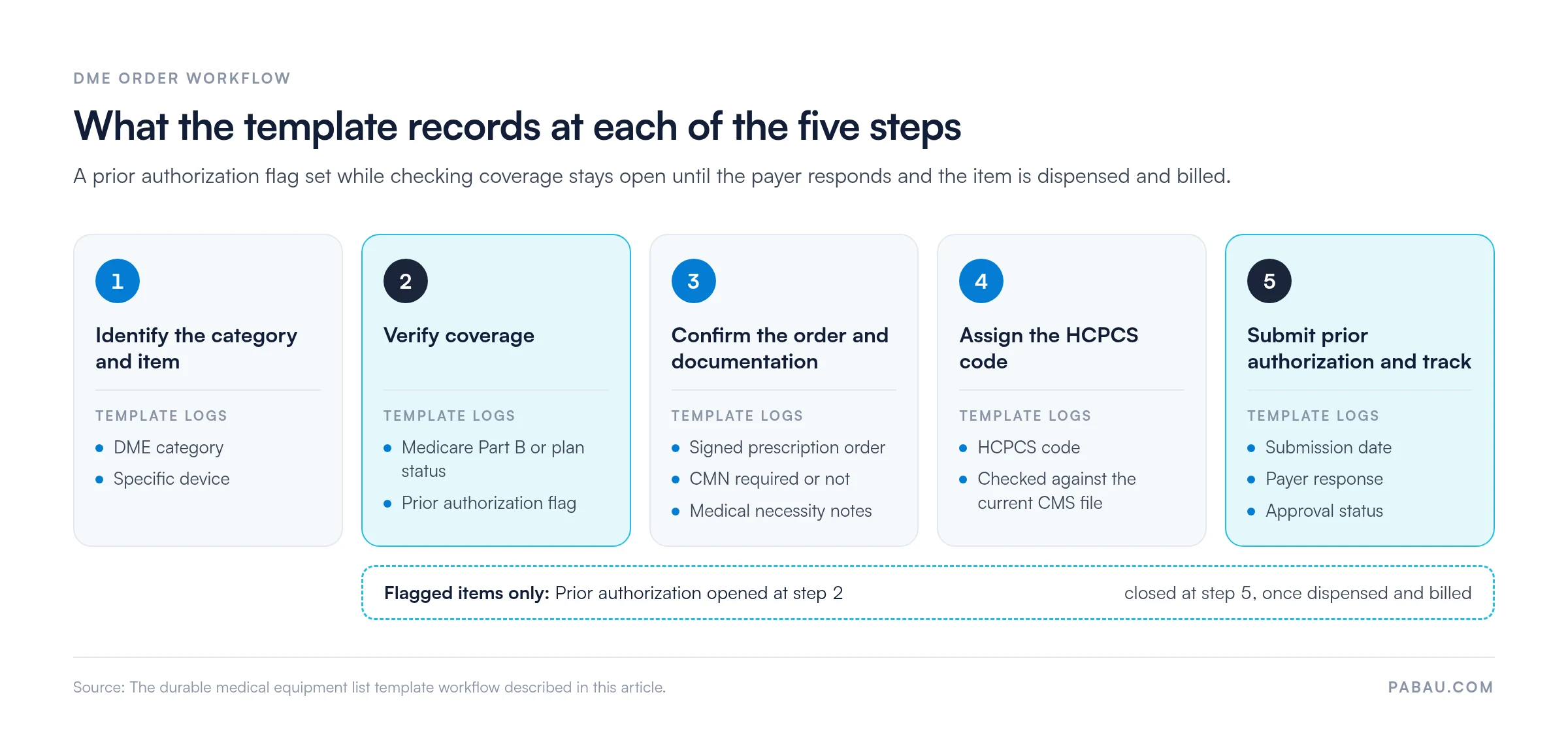
The downloadable template follows five steps your team works through each time a clinician prescribes DME.
The flag you set in step 2 is what ties the five steps together, as the overview below shows.
The template suits any practice that prescribes or dispenses equipment for home use. That includes physical therapy, occupational therapy, orthopedic, wound care and respiratory therapy practices, plus home health agencies.
It helps most where the practice bills Medicare Part B, runs its own prior authorization requests or has dedicated billing staff. A shared list means staff no longer rely on memory for coverage rules and codes, and it leaves an audit trail.
Solo practitioners and small practices often have no documented DME reference, so the template gives them one before the team grows. Multi-location groups can share one standard list across sites, which cuts coding variation between locations.
Compliance and audit readiness: A standardized list shows CMS and private payers that your practice orders and bills DME to a consistent protocol. During an audit, you can point to the criteria and documentation your team applied to each order.
Coding accuracy and claim approval: Correct HCPCS code assignment is non-negotiable for claim approval. A template that maps equipment categories to current code ranges reduces coder errors and denial rates. When the right code goes out on the first submission, claims process faster and reimbursement arrives on schedule.
Prior authorization efficiency: Power wheelchairs and other items on the payer’s required prior authorization list can delay discharge or treatment. That risk grows when the authorization process is ad hoc. A template that flags these items and records their authorization status keeps your team on track.
Staff training and consistency: New billing or clinical staff can use the template as a reference guide, which shortens onboarding. One shared process replaces the habit of each person doing it their own way, and that habit is where billing errors and compliance problems start.
Document the clinical reason for each DME prescription in the patient record. CMS and payers scrutinize medical necessity, and vague notes like ‘patient requested’ or ‘standard for condition’ invite denials. Record the specific functional limitation, the diagnosis and how the equipment addresses it.
Many practices keep the DME list in a spreadsheet, the prescription in the EHR and the claim in a billing portal. Staff then copy the same patient details between all three, and each copy is a chance for a coding error.
Pabau’s prescription management keeps prescriptions inside the patient record with a full audit trail. The clinical notes that justify medical necessity sit on that same record. Automated workflows can then assign the follow-up on each order to the right team member, so a flagged authorization doesn’t stall unnoticed.
Once the item is dispensed, error-catching claims management pre-fills the claim from the patient record. Before it goes out, Pabau checks that details like authorization codes are in place. In the US, claims reach payers through Claim.MD, and your team tracks each claim’s status from one dashboard.
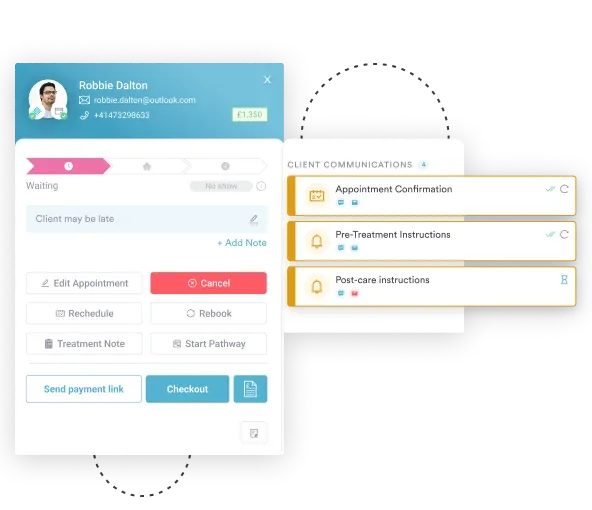

Pabau keeps prescriptions, clinical notes and insurance claims on the same patient record. Claims are pre-filled and checked for details like authorization codes before they go out.

A DME list only earns its keep if every order runs through it, including the routine walker or cane. Leave the low-cost items off and those claims still get coded from habit, which is where small, repeated denials come from.
Start with the items your practice orders most. Check each code against the current CMS file, then mark the items that sit on your payers’ prior authorization lists. Revisit the list each quarter, when CMS updates HCPCS codes.
Book a demo to see how Pabau keeps DME prescriptions, documentation and claims on one patient record.

Need to understand HCPCS coding for your specialty? Best medical billing software for US practices reviews platforms that automate code assignment and track billing workflows.
Chasing payer approvals by phone? Prior authorization software compares tools that submit and track authorization requests for you.
Preparing for a billing audit? Medical billing compliance covers the rules and documentation payers check when they review your claims.
Billing DME on paper claims? CMS-1500 form walks through each field of the standard professional claim form.
Want fewer claims sent back? What a clean claim is explains the details a claim needs to pay on the first submission.
Durable medical equipment is medical equipment and devices that are durable, reusable, suitable for home use, medically necessary, and prescribed by a physician. Examples include wheelchairs, oxygen concentrators, hospital beds, walkers, CPAP machines, and pressure-relief mattresses.
Medicare Part B covers DME if it is medically necessary, prescribed by a physician, and meets CMS durability and home-use criteria. Common covered items include mobility aids (wheelchairs, walkers), respiratory equipment (oxygen, CPAP), hospital beds, and monitoring devices. Medicare.gov lists covered items by category. Coverage rules vary by item, and some items need prior authorization.
DME is durable, reusable equipment, such as a wheelchair or an oxygen concentrator. Medical supplies are consumable items used up during treatment, such as bandages, lancets and syringes. Medicare covers both but under different rules. DME is billed with HCPCS E codes or K codes, while supplies typically use A codes.
Yes. Medicare requires a physician’s signed prescription order for all DME. Many items also require a Certificate of Medical Necessity (CMN) that documents the clinical justification for the equipment. Medicaid rules vary by state but generally also require a prescription.
HCPCS Level II codes for DME usually start with E or K, such as E1390 for an oxygen concentrator. K0823, for example, covers a group 2 standard power wheelchair. CMS updates HCPCS codes every quarter, so verify each code against the current CMS HCPCS file before billing.
Prior authorization requirements vary by payer and item. Medicare’s Required Prior Authorization List for DMEPOS requires prior authorization for specified items, such as certain power mobility devices and pressure-reducing support surfaces. Check your payer’s list, and get approval before dispensing to avoid claim denials.