Pabau vs Hyland OnBase: Healthcare document management software compared
Healthcare document management software captures, stores, and retrieves patient ...

Last Updated: Nov 2, 2026
Most roundups of the best dermatology practice management software cover the same four enterprise platforms. That leaves cosmetic dermatology, hybrid med-spa practices, and non-US practices with little to act on.
The category splits in two. On one side sit the deep clinical systems covered in our guide to dermatology EHR software, built for insurance-heavy medical dermatology. On the other sit all-in-one platforms built around self-pay cosmetic workflows.
Pabau, the all-in-one practice platform we build, is our top pick for cosmetic and hybrid practices. Nextech leads for insurance-heavy US medical dermatology.
Picking the wrong side costs a practice months of rework and tens of thousands in implementation spend. This guide covers seven platforms across both categories, with structured deep dives on features, pricing, reviews, and the practice profile each one fits.
It also hands you the revenue thresholds that decide which side you belong on, before you sit through a single demo. If you want the dermatology-specific view of an all-in-one platform, our dermatology EMR software overview covers that feature set in depth.

1. Pabau — best for cosmetic and hybrid practices, with native photos, injection plotting and digital consent from $62/month.
2. ModMed — an AI scribe trained on 750M+ encounters, built for large medical groups.
3. Nextech — Best in KLAS Ambulatory Specialty EHR 2024 and 2025 and AAD DataDerm Gold, for insurance-heavy US practices.
4. Ezderm — 3D Body Map with auto ICD-10/CPT coding for specialist dermatology.
5. PrognoCIS — configurable templates for mid-size practices.
6. CureMD — role-based dashboards and task management.
7. DrChrono — iPad-native charting for Apple-first practices.
Seven platforms evaluated across clinical documentation, billing, patient engagement, cosmetic workflow support, and pricing accessibility. Channel coverage belongs on that list too, since bookings arriving by text, email, and web chat need one inbox.
The only platform here that treats cosmetic documentation as core functionality rather than an add-on module.
Pabau is practice management software built for cosmetic, aesthetic, and hybrid medical-aesthetic practices. Where enterprise EHRs optimize for insurance workflows, Pabau optimizes for the patient journey from booking through treatment documentation and follow-up. It supports medical aesthetics, dermatology, skin practices, plastic surgery, wellness, and multi-specialty groups. That range makes it a natural fit for practices that blend cosmetic dermatology services with medical treatments.
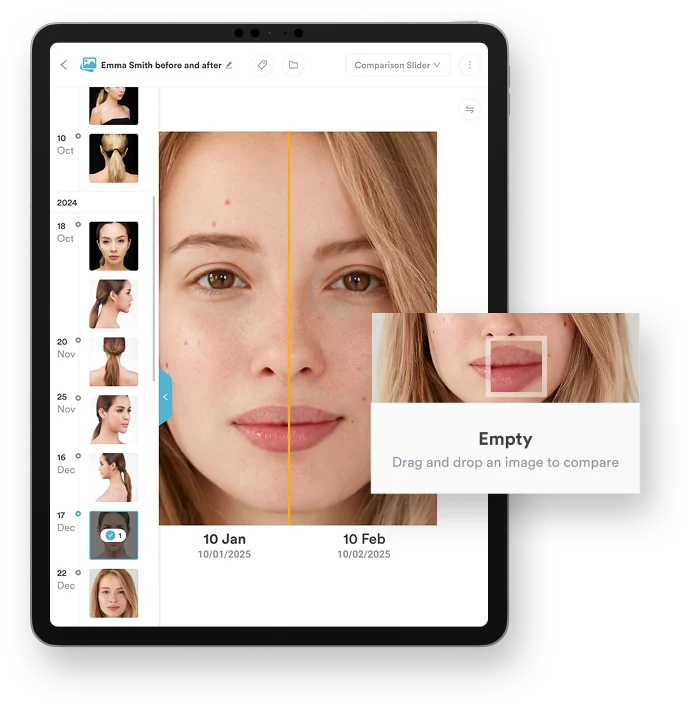
Cosmetic dermatology runs on visual documentation. Pabau’s before and after photos feature supports standardized capture, side-by-side comparison views, and secure linking to the patient record. Every treatment session therefore carries a visual audit trail. Combined with injection plotting for precise anatomical mapping, it gives cosmetic dermatologists the documentation depth that specialist EHRs reserve for medical procedures. These are core features, not add-on modules.
According to Capterra reviewers, Pabau earns 4.7 out of 5 stars from over 600 verified reviews. Practitioners consistently highlight the comprehensive workflows in Pabau’s aesthetic EMR software and the strength of its automated patient communication. One reviewer noted: “The before and after photo feature alone justified switching. Our cosmetic consultations are now fully documented with zero extra admin.” On the improvement side, some users mention a learning curve when first configuring automation sequences.
| Plan | Price | Who it’s for | Key inclusions |
|---|---|---|---|
| Starter | From $62/month | Solo practitioners | Full feature set, one user |
| Team / Group | Scales by users and locations | Growing and multi-site practices | Full feature set, volume-based rates |
| Enterprise | Custom quote | Large multi-location groups | Full feature set, structured onboarding |
Pabau is the only platform here that publishes an entry price, and every subscription includes every feature.
The deepest AI documentation in dermatology, priced and scoped for large medical groups.
ModMed’s EMA platform is purpose-built for medical specialties, and dermatology is one of its strongest verticals. Its defining capability is ModMed Scribe, an AI documentation tool. ModMed’s product page says it trained on de-identified clinical data from over 750 million patient encounters. That volume of training data gives it dermatology-specific language comprehension. It recognizes anatomical terminology, condition names, and treatment protocols that general-purpose AI scribes miss.

ModMed holds 4.5 out of 5 on Capterra across 568 reviews. Positive reviews focus on the dermatology-specific charting depth and the time saved by AI documentation. Critical reviews flag high costs, a steep learning curve, and implementation complexity. Those are the pain points for practices that underestimated the onboarding investment.
| Plan | Price | Who it’s for | Key inclusions |
|---|---|---|---|
| Enterprise | Contact sales, no published pricing | Large dermatology groups and multi-provider practices | Full EHR, AI scribe, billing, patient engagement modules |
ModMed publishes no rates on its own site, so budgeting starts with a scoped quote. Ask for implementation and data-migration costs in writing at the same time.
The credential leader in dermatology EHR, and the safest answer when certifications are a procurement requirement.
Nextech occupies the clearest niche in this roundup. It is the recognized leader for US medical dermatology practices with high insurance billing volume. The platform earned Best in KLAS Ambulatory Specialty EHR for two consecutive years, 2024 and 2025, from KLAS Research, an independent healthcare IT evaluation firm.
Nextech also holds AAD DataDerm Gold Recognition as the only EHR with that designation from the American Academy of Dermatology. The 2026 Ambulatory Specialty EHR award went to Canvas Medical, while Nextech won that year in ambulatory ophthalmology. For practices that treat those certifications as procurement requirements, the decision is effectively made.

Nextech holds 4.1 out of 5 on Capterra across 239 reviews. Reviewers who rate it highly emphasize billing accuracy and the credibility of its KLAS and AAD recognitions. Critical reviews focus on inconsistent customer support and costs that outpace the value delivered below a certain practice size.
| Plan | Price | Who it’s for | Key inclusions |
|---|---|---|---|
| Enterprise | Contact sales, no published pricing | US dermatology practices with insurance billing | EHR, RCM, patient portal, DataDerm integration, reporting |
Nextech quotes per practice and publishes nothing on its own site. Because RCM is usually part of the deal, ask whether billing is priced as a license or a percentage of collections.
The most precise anatomical documentation in dermatology, from a vendor most shortlists never reach.
Ezderm is a cloud-based dermatology EHR built by dermatologists, running natively on iPad, iPhone, and Mac. Its defining feature is the 3D Body Map, a visual interface covering 3,000+ anatomical locations. It links documentation directly to anatomy and generates location-specific ICD-10 and CPT codes from the SNOMED database. The core EHR module includes 1,100+ prebuilt, customizable treatment plans. Ezderm reports that its RCM customers typically achieve 95-98% net collection rates.

Ezderm holds 5.0 out of 5 on Capterra, though from only 26 reviews, so treat the score as directional rather than settled. Reviewers there praise the 3D mapping depth and the speed of charting on iPad. Practitioner commentary elsewhere follows the same pattern, with strong satisfaction among specialist dermatologists and little feedback from cosmetic or hybrid practices.
| Plan | Price | Who it’s for | Key inclusions |
|---|---|---|---|
| Custom suite | Contact sales, no published pricing | Specialist dermatology practices | EHR, practice management, RCM, payments, patient engagement, AI automation |
Ezderm sells the suite rather than individual modules and publishes no rates, so ask which modules a quote actually covers.
A practical middle ground for practices that need charting flexibility without an enterprise rollout.
PrognoCIS positions itself as a configurable dermatology EMR built around flexible template design. It ships a library of dermatology-specific templates that practices can adjust to their workflow. Integrated billing and RCM handle both self-pay and insurance-based models. Some mid-size practices need more than a basic EHR but cannot justify a ModMed or Nextech rollout. PrognoCIS sits in that middle ground. A dermatology-specific template might cover acne face mapping, tying breakout patterns in each facial zone to a treatment plan.

PrognoCIS holds 4.1 out of 5 on Capterra across 295 reviews. Reviewers who rate it positively focus on the billing integration and template configurability. The main criticism is an interface that needs meaningful training before staff feel confident working in it unsupervised.
| Plan | Price | Who it’s for | Key inclusions |
|---|---|---|---|
| Custom | Contact sales, no published pricing | Mid-size dermatology practices | EHR, configurable templates, RCM, patient portal, telehealth |
PrognoCIS quotes per practice with no published rates, so confirm whether template configuration work is included or billed as a service.
Run a billing workflow audit before you shortlist anything. Calculate what share of revenue comes from insurance claims versus self-pay cosmetic procedures. If self-pay clears 40% of revenue, an enterprise RCM platform like Nextech charges you for depth you will not use. Platforms designed for cosmetic workflows, with payment processing and package management built in, return more for that practice profile.
Strong operational visibility for split admin and clinical teams, weak on cosmetic documentation.
CureMD comes at this category from a different angle, focusing on dashboard design and role-based task management. According to its product documentation, the platform gives dermatologists real-time visibility across patient workflows, billing status, and compliance monitoring through configurable dashboards. That matters most where the administrative team and the clinical team need different views of the same data at the same time. CureMD handles dermatology documentation, billing, and patient management in one cloud-based system.
CureMD holds 3.6 out of 5 on Capterra from roughly 79 reviews, the lowest score of the seven platforms here. Positive reviews cite the dashboards and billing tools. Critical reviews concentrate on support responsiveness and billing workflow friction, and cosmetic capability is rarely mentioned either way.
| Plan | Price | Who it’s for | Key inclusions |
|---|---|---|---|
| Custom | Contact sales, no published pricing | Practices prioritizing dashboards and task management | Configurable dashboards, EHR, billing, compliance monitoring |
CureMD routes pricing through its sales team and publishes no rates. Ask how many dashboard configurations are included before extra setup fees apply.
The best point-of-care iPad experience here, with the least dermatology-specific depth.
DrChrono is built iPad-first, which suits clinicians who document at the point of care on a tablet rather than a desktop terminal. The platform covers EHR, practice management, and medical billing in a mobile-native architecture. In dermatology practices where clinicians move between exam rooms, a light documentation device beats a fixed workstation. It also integrates with Apple Health, which matters for practices that fold wearable data into chronic skin condition monitoring.
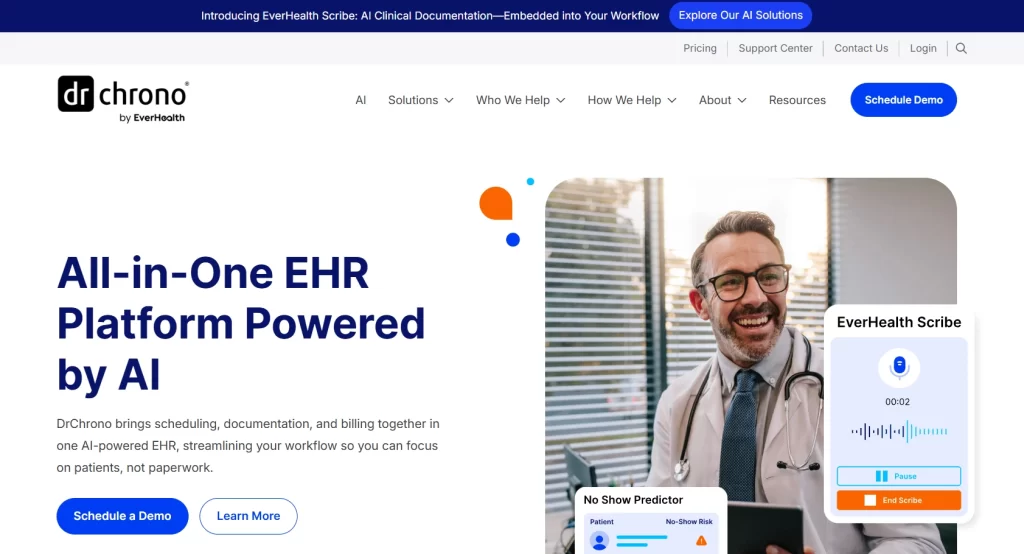
DrChrono holds roughly 3.9 out of 5 on Capterra across 496 reviews, the largest review base of the seven. Reviewers praise the iPad experience and the speed of charting between rooms. The recurring criticisms are billing support quality and a learning curve for practices coming from simpler scheduling tools.
| Plan | Price | Who it’s for | Key inclusions |
|---|---|---|---|
| Foundation | Contact sales, no published pricing | Practices needing core EHR and billing | EHR, patient engagement, practice management, billing |
| Growth | Contact sales, no published pricing | Practices automating the revenue cycle | Foundation plus automated revenue cycle workflows |
| Premium | Contact sales, no published pricing | Practices wanting AI and add-ons | Growth plus advanced AI features and premium add-ons |
DrChrono lists three plans on its own site, Foundation, Growth and Premium, but prices each one by quote. Treat any figure on a comparison site as out of date until sales confirms it.
These seven platforms split into two groups based on practice profile. Choosing the wrong group, rather than the wrong vendor inside a group, is the expensive mistake. The table below maps each practice profile to the category it belongs in, and the five criteria after it explain how to place yourself.
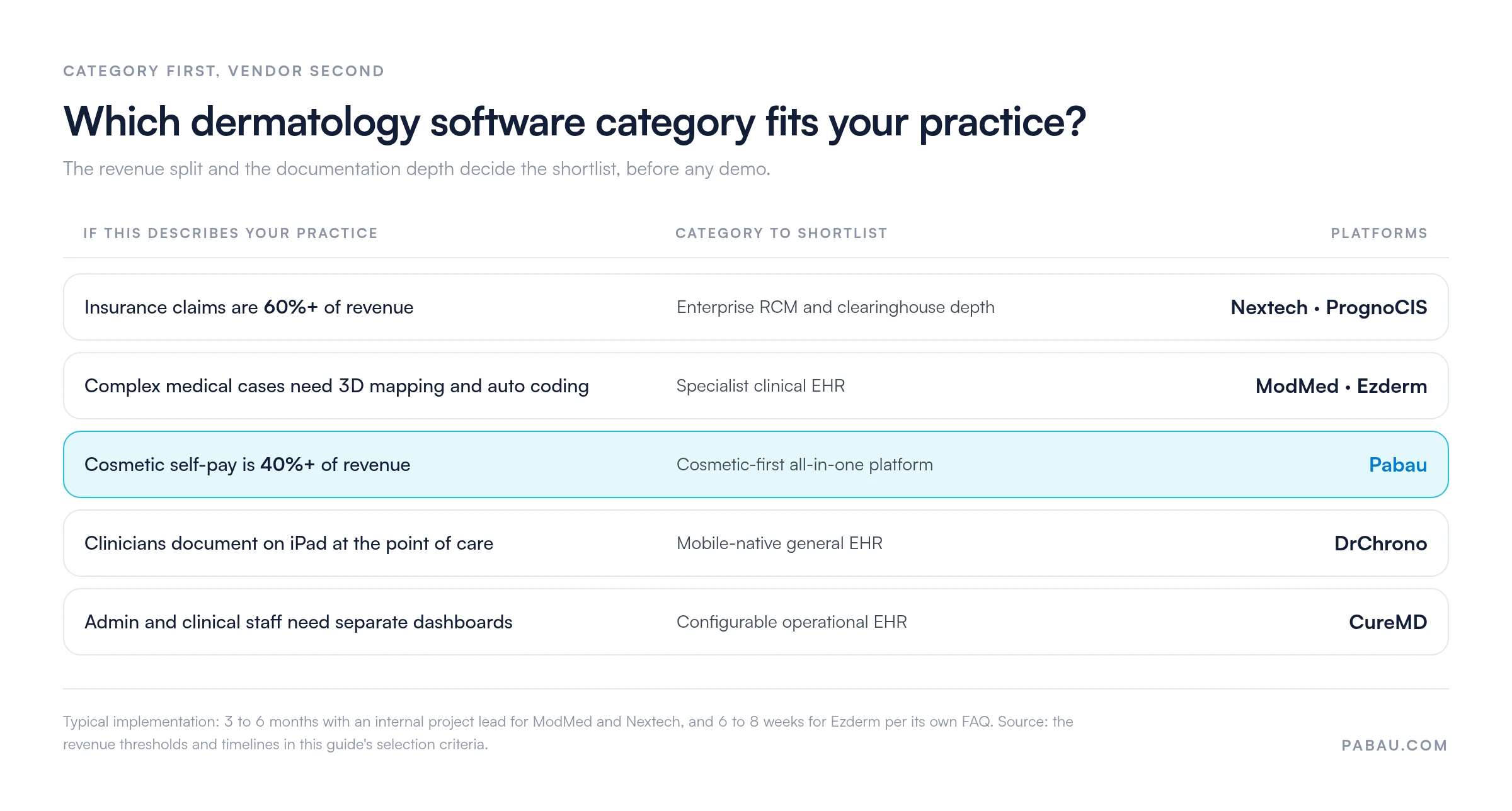
Practices that blend cosmetic and medical dermatology tend to score well on all five criteria with one of the cosmetic-first platforms. Some of those practices also run injectables or body treatments alongside skin work. The same shortlist logic applies to medical spa software, because the underlying workflows match.
Dermatology billing software should code medical visits accurately, scrub claims before they leave, and bill cosmetic self-pay work in the same system.
One dermatology visit can mix covered and self-pay work. A biopsy bills to the payer, while a chemical peel booked the same day is paid at the desk. Run these five checks in every demo:
Pabau covers the cosmetic side and submits US claims through its Claim.MD integration. Pabau doesn’t generate codes from a body map or run a denials service, though. An insurance-heavy practice should weigh Nextech or Ezderm’s billing service, which Ezderm prices as a percentage of claim volume.
The best dermatology software for before-and-after photos and insurance tracking keeps both on one patient record rather than in separate tools. Before-and-after photo management sits on the patient record alongside insurance authorization, so a practice documents the treatment and the claim from the same chart.
Dermatology sits on the line between covered and cosmetic care. A payer may cover a lesion removal or a scar revision only when the record shows medical need. Dated clinical photos can be part of that evidence, alongside the note and the diagnosis code.
With the photo and the prior authorization on the same chart, the evidence for a covered procedure is on file before the claim goes out. If the payer asks for records, the team pulls them from that one file.
In Pabau, the photo and insurance workflows run from the same patient record:
Dermatology practices use Pabau to manage before-and-after photos, insurance authorization and high-volume scheduling in a single system. Photo storage and charting no longer run as separate tools. Because the photo prompt, the eligibility check and the booking share one platform, a full day of appointments runs without a second login.
Dermatology practice management software built for enterprise revenue cycle work goes further for insurance-heavy practices. Nextech, for example, adds denial management and revenue reporting to its claims tools.
Dermatology platforms that run cosmetic and medical appointments in a single system keep one calendar and one patient record for both kinds of visit. A patient booked for a mole check in March and a chemical peel in April has one chart, with both visits on it.
Dermatology practice management software still has to keep medical and cosmetic rules apart. Medical visits carry diagnosis codes, insurer details and clinical notes. Cosmetic visits carry their own consent forms, self-pay prices, deposits and packages.
Running both on one platform means each treatment sends its own consent forms, and insured visits bill from that insurer’s price list. Self-pay cosmetic visits take a deposit at online booking instead. The front desk books both in the same system, and the practitioner sees the full history before either appointment.
Dermatology practices that add cosmetic surgery can keep those surgical consults and consents on the same record, as Pabau also serves plastic surgery practices.
For a high-volume dermatology practice, the best scheduling software handles a full day of appointments without the front desk working around it. Review scores rarely show this, so a practice manager evaluating platforms should test it in a demo using the practice’s own schedule.
A practice manager checking dermatology scheduling software for a high-volume practice should look at five points:
Pabau’s calendar books practitioners, rooms and equipment together, blocks double bookings and marks each patient as arrived, completed or no-show. Automated reminders go out by email and SMS on a schedule the practice sets, which reduces no-shows without a staff member sending anything by hand.
Pricing scales with users and locations. Every subscription includes every feature, so a high-volume dermatology practice gets the full calendar, waitlist and reminders from its first user.
In most hybrid dermatology practices, the software story is a stack rather than a system. Bookings arrive through one tool and consent forms live in a second. Before and after photos sit on a phone, and payments run through a terminal that never touches the patient record. Every handoff between those pieces is somewhere a document goes missing.
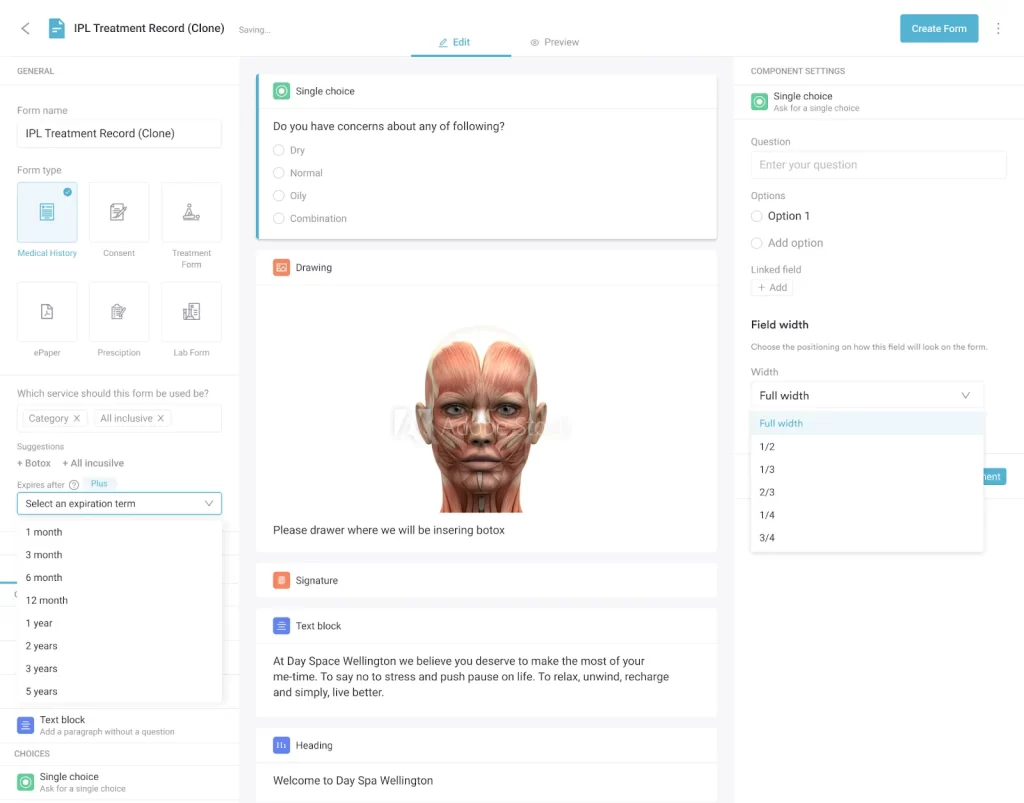
Pabau replaces that stack with one record. A patient books online, receives their consent form before arrival, and signs it digitally. The clinician plots the injection sites and captures standardized photos against the same treatment note. Pabau Scribe, our AI scribe, drafts the note from the consultation. Payment, package balance, and the follow-up sequence all attach to the same file.
The outcome is a practice where a cosmetic consultation is fully documented without extra admin, and where recall campaigns run on their own. Every subscription includes every feature, so a solo practitioner works from the same toolset as a six-site group. Onboarding is structured rather than self-serve, which is how practices migrating from paper get their data across without losing a week of appointments.

Pabau handles before and after photos, digital consent forms, injection plotting, and automated patient follow-ups in one platform. Book a 15-minute demo to see how it fits your practice’s workflow.

One question decides this purchase. Does your practice mostly bill insurance for medical procedures, or mostly charge self-pay patients for cosmetic treatments? The answer routes you to a different shortlist, and getting it wrong costs far more than picking the second-best vendor within the correct category.
Enterprise EHRs like ModMed and Nextech are excellent for the practices they were designed for. They are the wrong starting point for a cosmetic or hybrid practice. There, the patient journey begins with an online booking and ends with a photo comparison. The trade-off worth remembering is that clinical depth is bought with implementation time, and cosmetic practices rarely get that time back.
If your dermatology practice runs any volume of cosmetic treatments, Pabau is the most complete place to start. Book a demo to see how it handles your consent, photo, and follow-up workflow end to end.

Want the clinical-EHR side of this decision in more depth? Best dermatology EHR and EMR software ranks the platforms built for insurance-heavy medical dermatology.
Already running the practice and fixing the operations? How to manage my dermatology practice covers scheduling, staffing and follow-up once the software is chosen.
Comparing US and Canadian options? Dermatology software in Canada covers the platforms and compliance considerations north of the border.
Need the paperwork before the platform? Dermatology intake form template gives you a structured intake document you can use immediately.
Want the dermatology-specific product view? Pabau dermatology EMR software covers the full feature set built for cosmetic and medical dermatology workflows.
The answer depends on your billing model. Nextech won Best in KLAS Ambulatory Specialty EHR in 2024 and 2025. It is also the only AAD DataDerm Gold Recognition system, which suits insurance-heavy US medical dermatology. Pabau is the strongest option for cosmetic and hybrid practices, with photos, injection plotting, and digital consent built in. ModMed and Ezderm serve large medical groups needing AI documentation and 3D body mapping.
Requirements vary by practice type. Medical dermatology practices need specialty charting templates, insurance billing with clearinghouse integration, ICD-10 and CPT code management, and a patient portal. Cosmetic practices additionally need before and after photo documentation, digital consent with e-signature, anatomical mapping, automated recall workflows, and integrated payment processing. Practices running both should look for one platform that covers all of it without separate module purchases.
Pricing varies by platform and practice size. Pabau publishes entry-level pricing from $104/month, which makes it the most transparent option here. ModMed, Nextech, Ezderm, PrognoCIS, CureMD, and DrChrono all use custom pricing that requires a sales call. Implementation for the enterprise platforms typically runs from several thousand to tens of thousands of dollars. Practice size, configuration scope, and data migration complexity drive that figure, so verify current pricing with each vendor.
An EHR focuses on clinical documentation. That covers patient records, charting, diagnosis coding, e-prescribing, and clinical notes. Practice management software handles operations such as scheduling, billing, payments, staff management, and patient communication. Most platforms marketed as dermatology EHR or dermatology practice management software now combine both. The distinction still matters, because some legacy EHR vendors need third-party integrations for operational functions that all-in-one platforms include natively.
Every US-facing platform in this roundup is built with HIPAA compliance as a baseline requirement. Compliance posture means the platform supports HIPAA requirements, not that it guarantees compliance for your implementation. Practices remain responsible for configuration, staff training, and data handling. Practices operating under GDPR or another framework should verify each platform’s posture for their own jurisdiction directly with the vendor.