The best EMR software for most private, aesthetic and multi-specialty practices is Pabau, an all-in-one practice management system. Pabau keeps charting, online booking, payments and insurance claims in one patient record.
Hospitals and health systems should shortlist Epic. Insurance-heavy primary care fits athenaOne best, and therapists get the most for their money from SimplePractice.
The top EMR software for a hospital is rarely right for a med spa, so we ranked 10 systems with the payer-mix fit test. How your practice gets paid decides which type of EMR fits, before features or price. Every price below comes from the vendor’s own website, checked in September 2026.
Key takeaways
1. Pabau — best all-in-one EMR for private, aesthetic and multi-specialty practices that take both self-pay and insurance.
2. athenaOne — best for insurance-heavy primary care that wants its fee tied to a percentage of collections.
3. Epic — best for hospitals and large health systems that need records shared across every care setting.
4. eClinicalWorks — best value for ambulatory groups, with published per-provider pricing and an RCM service option.
5. ModMed — best for specialty practices such as dermatology, orthopedics and ophthalmology.
6. Tebra — best for independent practices that bill insurance and want the EHR and billing in one subscription.
7. DrChrono — best iPad-native EHR for providers who chart on a tablet.
8. SimplePractice — best for therapists and mental health practices, from $49 a month.
9. Nextech — best for plastic surgery and ophthalmology practices running surgical and cosmetic work together.
10. Aesthetic Record — best dedicated charting app for injector-led med spas.
Found our content helpful?
EMR software list: 2026 comparison at a glance
This table compares the 10 EMRs on what decides a purchase: Who each one fits, how it charges, and what you sign. Read the payer-mix column first.
EMR
Best for
Payer-mix fit
Pricing model
Published starting price
Contract or cancellation terms
Built-in billing/RCM
Mobile app
Pabau
Private, aesthetic and multi-specialty practices
Cash-pay and mixed
Flat monthly fee by users and location
$62/month (one user)
Monthly or annual billing; annual saves up to 20%
Yes, US claims via Claim.MD
Yes, Pabau GO (iOS)
athenaOne
Insurance-heavy primary care
Insurance-heavy
Percentage of collections
Quote only
Not published
Yes, plus billing services
Yes
Epic
Hospitals and health systems
Insurance-heavy
Enterprise quote
Quote only
Not published
Yes
Yes, plus MyChart for patients
eClinicalWorks
Ambulatory multi-specialty groups
Insurance-heavy
Per provider per month, or percentage of collections
$499/provider/month
No start-up costs; term not published
Yes, with the $599 plan or RCM service
Yes, eClinicalMobile and healow
ModMed
Dermatology, orthopedics, ophthalmology
Insurance-heavy and mixed
Custom quote
Quote only
Not published
Yes, plus RCM services
Yes, iPad-native
Tebra
Independent practices billing insurance
Insurance-heavy
Per provider, bundled
Quote only
Not published
Yes
Yes
DrChrono
Providers who chart on an iPad
Mixed
Tiered, quote-based
Quote only
Not published
Yes
Yes, iPad and iPhone
SimplePractice
Therapists and mental health
Mixed
Per clinician per month
$49/month
Billed monthly; 30-day free trial
Yes, insurance claims
Yes
Nextech
Plastic surgery and ophthalmology
Mixed
Custom quote
Quote only
Not published
Yes, plus RCM services
Yes, TouchMD photo app
Aesthetic Record
Injector-led med spas
Cash-pay
Per user per month, plus startup fee
$15/user/month + $399 startup
Not published; e-prescribing on 6- or 12-month terms
Not advertised; POS built in
Yes, iOS
Six of the 10 vendors publish no price at all, and eight publish no contract terms. Treat a missing figure as a question for the sales call, not as a sign the product is cheaper.
1. Pabau — Best for private, aesthetic and multi-specialty practices
Rating4.7/5★★★★★Top pick
The bottom line
One patient record runs the chart, the booking, the payment and the insurance claim.
Who it’s for
Med spas and aesthetic practices
Private and multi-specialty practices taking self-pay and insurance
Photos, consents and injection plotting in the chart
Online booking, POS and memberships built in
Every subscription includes every feature
What doesn’t
Not a hospital or inpatient EHR
No outsourced billing service for high-volume insurance groups
Pabau is an all-in-one practice management system with the EMR at its center. Pabau’s EMR shares one record with scheduling, online booking, payments, marketing, inventory and reporting.
That matters most in cash-pay and mixed practices. A patient who books a filler appointment, signs a consent, gets photographed and pays should never be re-keyed into a second system.
Key features
Digital intake and consent forms: Treatment-specific medical questionnaires and consents feed straight into the patient record before the visit.
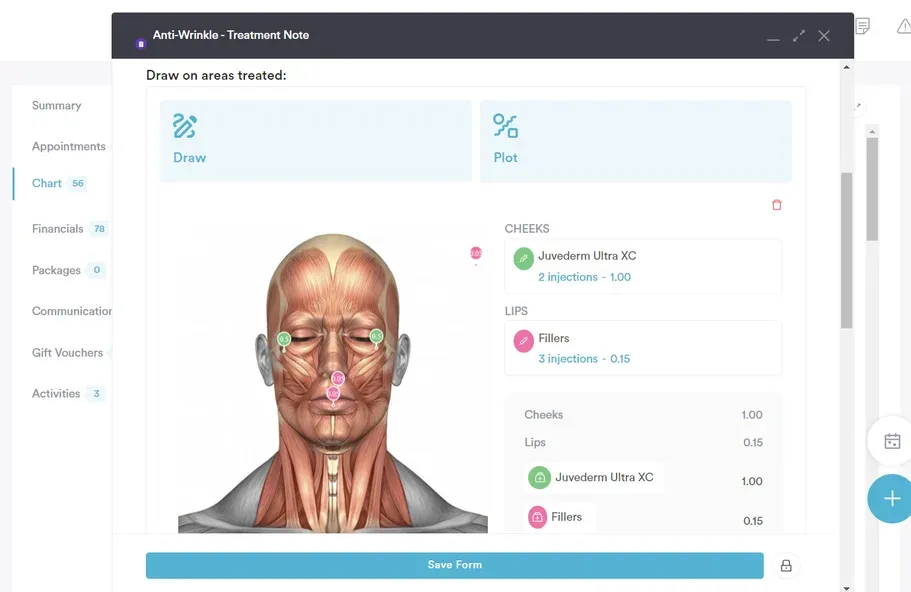
Treatment notes with injection plotting: Practitioners chart on a face map, log the product and units, and attach before-and-after photos to the same note.
Pabau Scribe, our AI scribe: Pabau Scribe drafts treatment notes and consultation summaries from the conversation, so charting doesn’t spill into the evening.
Prescriptions and safety checks: Prescriptions live inside the patient record, with cross-checks against recorded allergies and contraindications.
US insurance claims: Pabau connects to the Claim.MD clearinghouse for electronic claims, real-time eligibility checks, claim status and ERA posting.
Role-based access and two-factor login: Staff see only what their role needs. Role-based access supports HIPAA compliance in the US and GDPR in the UK and EU.
Pabau’s injection plotting logs each product and unit against the treatment area, so the chart doubles as the record an auditor asks for.
Where Pabau shines
One record for self-pay and insurance work: A dermatology practice can bill a medical visit and sell a cosmetic package without switching systems.
No feature gating: Every Pabau subscription includes every feature, so a solo injector and a 30-person group get the same platform.
Structured onboarding: New customers get a dedicated Client Coordinator and an onboarding portal for data migration, then a Customer Success setup phase.
Where Pabau falls short
Not built for hospitals: Pabau has no inpatient modules, so health systems should look at Epic, Oracle Health or MEDITECH.
No outsourced billing service: Your team works the claims in Pabau. High-volume insurance groups that want billing done for them will prefer athenaOne or eClinicalWorks’ RCM service.
Customer reviews
Pabau holds a 4.7 out of 5 rating from 652 reviews on Capterra, as of September 2026.
“Exceptional onboarding that exceeded every expectation.” — Paul W., GP, Capterra, February 2026
“Once everything is set up properly, it really supports both clinical and admin.” — Nicole F., pharmacy technician, Capterra, May 2026
“A little worried about customer support being mostly AI.” — Shannon L., director of operations, Capterra, June 2026
Who Pabau is best for
Pabau fits cash-pay and mixed-payer practices on the payer-mix fit test. That covers med spas and medi aesthetics clinics, cosmetic dermatology, plastic surgery, wellness and private practices that also bill insurance.
Book a demo to see Pabau configured around the way your practice gets paid.
Pricing
Plan
Price
Users
Key inclusions
Starter
$62/month
1 user, up to 100 patients
Full platform
Solo
Quoted on a demo
1 user, unlimited patients
Full platform
Team, Medium, Group
Quoted on a demo
2–15 users
Full platform
Enterprise
Quoted on a demo
16+ users, multi-location
Full platform
Pabau prices by location and number of users, not by feature, and annual billing saves up to 20%. SMS, telehealth and Pabau Scribe usage run on top-up credits. The full breakdown sits on Pabau’s pricing page.
2. athenaOne — Best for insurance-heavy primary care
Rating3.8/5★★★★★Best for insurance-heavy primary care
The bottom line
The EHR, practice management and billing services come in one contract, priced as a share of what you collect.
Who it’s for
Primary care and family medicine
Practices where most revenue comes from claims
Groups that want billing work taken off their team
Claims, eligibility and denial work handled as a service
Fee rises and falls with your collections
Large payer network behind the rules engine
What doesn’t
Rate not published, so budgeting needs a quote
Reviewers report a click-heavy interface
athenaOne is athenahealth’s cloud platform, combining the EHR, practice management and revenue cycle services in one subscription. athenaOne is among the top EMR software choices for primary care because the billing work is part of the product.
Key features
Revenue cycle services: athenahealth works claims, eligibility checks and denials for you, rather than leaving that work to your front desk.
Clinical documentation: The EHR covers charting, e-prescribing, orders, and quality and MIPS reporting for value-based programs.
Patient engagement: A patient portal, reminders and online payments come bundled with the platform.
Where athenaOne shines
Aligned incentives: athenahealth only earns more when you collect more, so slow claims hurt both sides.
Less billing headcount: Practices that would otherwise hire a biller get that work inside the subscription.
Where athenaOne falls short
Opaque cost: The percentage isn’t published, so you can’t compare it with a flat fee until you have a quote.
Weak fit for self-pay work: Cash-pay services like aesthetics still need POS, packages and photo tools that athenaOne doesn’t center on.
Customer reviews
athenaOne holds a 3.8 out of 5 rating from 913 reviews on Capterra, as of September 2026.
“EMR really easy to handle for multiple patients. Good for middle to small size practices.” — Jonathan S., Capterra, July 2025
“The portal is incredibly slow and very glitchy requiring me to reload the page often.” — Erika B., Capterra, June 2025
Who athenaOne is best for
athenaOne fits the insurance-heavy branch of the payer-mix fit test: Primary care, pediatrics and internal medicine groups where nearly every visit ends in a claim. Our eClinicalWorks vs athenahealth comparison sets the two insurance-first options side by side.
Pricing
Plan
Price
Users
Key inclusions
athenaOne
Percentage of collections, rate not published
Per practice
EHR, practice management, billing services, patient engagement
athenahealth states that athenaOne is priced as a percentage of collections and quotes each practice individually. No rate appears on the vendor’s site, so ask for it in writing alongside any implementation fees.
3. Epic — Best for hospitals and large health systems
Rating4.4/5★★★★★Best for hospitals
The bottom line
The most widely used hospital EHR in the US, built to share records across every setting a patient touches.
Records follow the patient across hospital and practice
MyChart patient app is widely recognized
Modules for nearly every specialty
What doesn’t
Implementation cost and timeline suit large organizations
Overbuilt for a small independent practice
Epic is the EHR behind 43.7% of US acute care hospitals, according to KLAS. Epic serves health systems, hospitals and their affiliated practices, with MyChart as the patient-facing app.
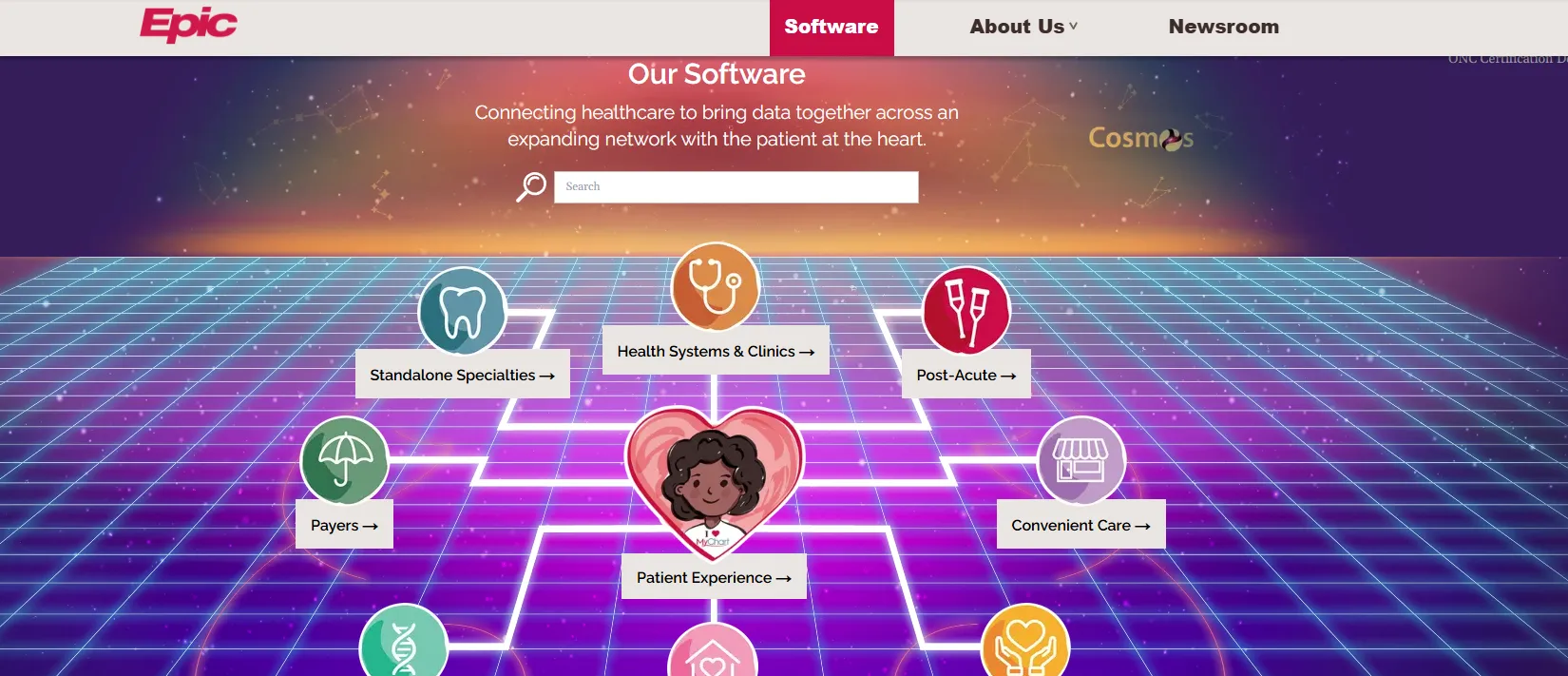
Epic’s product map spans health systems, specialties, payers and post-acute care, which is why Epic suits organizations rather than single practices.
Key features
Interoperability: Care Everywhere exchanges records with other Epic sites and outside organizations, so referrals arrive with history attached.
MyChart: Patients book, message, pay and read results in one app.
Revenue cycle: Hospital and professional billing run inside the same system as the chart.
Where Epic shines
Breadth: Inpatient, outpatient, emergency and specialty workflows live in one record.
Affiliate access: Through Epic’s Community Connect program, independent practices can run on a partner hospital’s Epic instance.
Where Epic falls short
Cost and effort: Implementation is priced and staffed for health systems, not a five-provider practice.
Learning curve: Reviewers mention heavy clicking before users get fluent.
Customer reviews
Epic holds a 4.4 out of 5 rating from 456 reviews on Capterra, as of September 2026.
“Great interface! User friendly! 100% Recommend!” — Carlie R., Capterra, February 2026
“The overall interface can be clunky and have a lot of button pressing just to get to one thing.” — Kathleen B., Capterra, May 2025
Who Epic is best for
Epic is the strongest hospital EHR on this list. On the payer-mix fit test it sits firmly in the insurance-heavy branch, with scale that only a hospital or health system uses fully.
Pricing
Plan
Price
Users
Key inclusions
Epic enterprise license
Contact sales / no published pricing
Hospitals and health systems
Full EHR, revenue cycle, MyChart
Community Connect
Set by the host health system
Affiliated practices
Access to the host’s Epic instance
Epic publishes no prices. Practices joining through Community Connect negotiate terms with the host hospital rather than with Epic.
4. eClinicalWorks — Best value for ambulatory multi-specialty groups
Rating3.3/5★★★★★Best value for ambulatory groups
The bottom line
One of the few EHRs that publishes both a per-provider price and a percentage-of-collections price.
eClinicalWorks is a cloud EHR and practice management system for ambulatory care. eClinicalWorks also runs healow, its patient app, and Sunoh.ai, its ambient AI scribe.
Key features
EHR plan inclusions: The $499 plan covers the EMR, patient portal, e-prescribing with formulary checks, registry reporting and cloud hosting.
Practice management: The $599 plan adds scheduling, billing and billing implementation services.
RCM as a service: For 2.9% of collections, eClinicalWorks handles claims, denials, rejections and appeals.
Where eClinicalWorks shines
Price you can model: Published per-provider and percentage prices let you run the worked example later in this article with vendor figures.
No start-up costs: eClinicalWorks states no start-up costs on all three plans, with training included for one to nine providers.
Where eClinicalWorks falls short
Service complaints: Reviewers describe slow support and features promised in sales that arrived late.
Extra fees at scale: Practices with more than nine providers pay additional implementation fees, and patient statements are charged per item.
Customer reviews
eClinicalWorks holds a 3.3 out of 5 rating from 396 reviews on Capterra, as of September 2026.
“The customization, especially Smart Forms and workflow tools, allows you to tailor processes to your clinic.” — Reneisha H., Capterra, May 2026
“Right now they want to charge all my 9 providers while we are waiting for medical records.” — Aamr H., Capterra, September 2025
Who eClinicalWorks is best for
eClinicalWorks fits insurance-heavy ambulatory groups that want predictable per-provider pricing. The RCM service suits groups that would rather pay a percentage than hire billers.
Pricing
Plan
Price
Users
Key inclusions
EHR only
$499/provider/month
Per provider
EMR, portal, e-prescribing, reporting, hosting
EHR with practice management
$599/provider/month
Per provider
EHR plan plus billing and scheduling
RCM as a service
2.9% of practice collections
Per practice
Claims, denials, appeals and A/R management
All three eClinicalWorks plans state no start-up costs. Practices above nine providers pay additional implementation fees, and airfare for on-site training is billed separately.
5. ModMed — Best for specialty practices
Rating4.5/5★★★★★Best for specialty practices
The bottom line
Specialty-built templates that chart dermatology, orthopedics and ophthalmology the way those physicians think.
Thin on med spa tools like packages and injection plotting
ModMed, short for Modernizing Medicine, builds specialty-specific EHR and practice management software. ModMed’s EMA is the EHR, organized around each specialty’s exam and coding patterns.
ModMed sells specialty-specific EHR software, so dermatology and orthopedics practices start from templates built for their exams.
Key features
Specialty templates: Exam templates for dermatology, orthopedics, ophthalmology and more speed up charting.
AI documentation: ModMed Scribe drafts notes and suggests diagnoses and billing codes.
Analytics: Dashboards track MIPS performance, financial metrics and clinical outcomes.
Patient engagement: Portal, self-scheduling, secure messaging and telehealth.
Where ModMed shines
Specialty depth: Ophthalmology and dermatology practices start from exam templates built for them, which removes most of the setup work.
Mixed dermatology: ModMed handles medical dermatology billing well, which matters when cosmetic work is a smaller share of revenue.
Where ModMed falls short
Opaque pricing: Cost depends on specialty, modules and practice size, and ModMed publishes no prices.
Aesthetic workflows: ModMed lacks the injection plotting, packages and memberships that med spa teams use daily.
Customer reviews
ModMed holds a 4.5 out of 5 rating from 566 reviews on Capterra, as of September 2026.
“Stream-lined, efficient and time-saving all in one EMR.” — Lindsay H., Capterra, February 2025
“Too, too many clicks and page changes to complete notes.” — SC K., Capterra, October 2025
Who ModMed is best for
ModMed fits insurance-heavy and mixed specialty practices: Dermatology, orthopedics, ophthalmology, gastroenterology and urology. Choose it when specialty templates matter more than cash-pay retail tools.
Tebra formed from the merger of Kareo and PatientPop, and sells a certified EHR alongside billing and patient-experience tools. Tebra prices per provider rather than per user seat.
Key features
Certified EHR: Charting, e-prescribing with EPCS, and a patient portal.
Billing: Claims, eligibility and payment posting, sold as Billing Starter or inside a bundle.
Patient experience: Online booking, reviews and marketing from the PatientPop side.
Where Tebra shines
Modular buying: Practices can start with EHR Starter or Billing Starter and add modules later.
Low-volume tier: Providers billing 100 claims a month or fewer get a separate tier.
Where Tebra falls short
Add-on fees: EPCS setup costs about $75 per provider, and PDMP integration is $500 one-time plus about $50 per user a year.
Exit friction: Several reviewers describe difficult cancellations, so read the termination clause before signing.
Customer reviews
Tebra holds a 4.0 out of 5 rating from 1,384 reviews on Capterra, as of September 2026.
“The ease of use is amazing. Navigating through the system is fairly easy.” — Nicole M., Capterra, October 2025
“The process of cancelling our service with them has been the absolute worst experience.” — Robbie H., Capterra, November 2025
Who Tebra is best for
Tebra fits independent practices on the insurance-heavy branch that want EHR and billing from one vendor without outsourcing the billing work.
Pricing
Plan
Price
Users
Key inclusions
All in One, EHR+, EHR Starter, Billing Starter
Contact sales / no published pricing
Per provider
EHR, billing and patient experience in chosen bundles
EPCS setup
About $75 per provider, one-time
Per prescriber
Controlled-substance e-prescribing
Tebra publishes its add-on fees but not its subscription prices. Pricing varies by provider count, modules and implementation needs.
7. DrChrono — Best iPad-native EHR
Rating3.9/5★★★★★Best iPad-native EHR
The bottom line
An EHR built to chart on an iPad or iPhone, with billing in the same app.
Who it’s for
Providers who chart on a tablet
Practices mixing insurance and self-pay
Small practices wanting EHR and billing together
PricingQuote onlyFoundation, Growth and Premium tiers
DrChrono is a cloud EHR and practice management system designed around Apple devices. DrChrono sells three tiers, from core EHR and billing up to AI tools and premium add-ons.
Key features
Mobile charting: Providers document, prescribe and review labs on an iPad or iPhone.
Custom templates: Practices build specialty forms and SOAP note layouts.
Revenue cycle: The Growth tier adds automated revenue cycle workflows.
Where DrChrono shines
Tablet-first design: Providers who see patients away from a desk chart in the room.
Published add-on fees: DrChrono lists overage and processing fees up front.
Where DrChrono falls short
Usage fees: Texts cost $0.05 each, faxes $0.07 per page and paper claims $1.00 each.
Dated interface: Recent reviewers call some workflows click-heavy.
Customer reviews
DrChrono holds a 3.9 out of 5 rating from 492 reviews on Capterra, as of September 2026.
“The interface is outdated, non-intuitive, and clunky — basic workflows require excessive clicks.” — Ahmad B., Capterra, October 2025
Who DrChrono is best for
DrChrono fits mixed-payer practices whose providers want to chart on a tablet and bill from the same app.
Pricing
Plan
Price
Users
Key inclusions
Foundation
Request a quote
Per provider
EHR, patient engagement, practice management, billing
Growth
Request a quote
Per provider
Adds automated revenue cycle workflows
Premium
Request a quote
Per provider
Adds AI tools and premium add-ons
DrChrono publishes no subscription prices. Extended lab integration costs $30 per provider per month, and card processing runs 3.25% plus $0.30 per transaction.
8. SimplePractice — Best for therapists and mental health
Rating4.5/5★★★★★Best for mental health
The bottom line
The easiest EHR on this list to price, set up and run for a solo therapist.
SimplePractice is a cloud EHR and practice management system for therapists and other health and wellness clinicians. SimplePractice’s EHR bundles scheduling, notes, telehealth and insurance claims per clinician.
Key features
Therapy notes: Templates for intake, progress notes and treatment plans.
Telehealth: Video sessions launch from the appointment reminder.
Billing: Insurance claims and card payments from the same account.
Where SimplePractice shines
Transparent pricing: Plans are published, so a solo therapist knows the cost before a demo.
Fast setup: A 30-day free trial lets clinicians see patients on SimplePractice before paying.
Where SimplePractice falls short
Add-ons stack up: ePrescribe, Note Taker and Care Aide are billed on top of the plan.
Group scale: Practices with six or more clinicians move to custom pricing.
Customer reviews
SimplePractice holds a 4.5 out of 5 rating from 2,827 reviews on Capterra, as of September 2026.
“Automated appointment reminders via phone, text and email that seamlessly link to opening up the app for video appointments.” — Christine B., Capterra, March 2026
“Price is very expensive ($99 per month) and system issues at least 4 to 6 times per week.” — Tiffany W., Capterra, December 2024
Who SimplePractice is best for
SimplePractice fits mental health clinicians on the mixed branch of the payer-mix fit test. Some of their patients pay privately and others use insurance.
Pricing
Plan
Price
Users
Key inclusions
Starter
$49/month
1 clinician
Core scheduling, notes and billing tools
Essential
$79/month
1 clinician
More features, per the vendor’s plan comparison
Plus
$99/month
1 clinician; $74/month per additional clinician
Most features, per the vendor’s plan comparison
Custom
Contact sales
6+ clinicians
Group pricing
SimplePractice bills monthly and offers a 30-day free trial. Add-ons such as ePrescribe carry their own monthly fee and a one-time setup fee.
9. Nextech — Best for plastic surgery and ophthalmology
Rating4.1/5★★★★★Best for plastic surgery
The bottom line
A specialty EHR and practice management system for surgical practices that also sell cosmetic services.
Nextech builds EHR, practice management and revenue cycle software for specialty practices, including plastic surgery, dermatology and ophthalmology. Nextech also owns TouchMD, a visual consultation and photography app.
Nextech positions itself around specialty practices, which is why plastic surgeons and ophthalmologists see it on most shortlists.
Key features
Specialty charting: Templates tailored to plastic surgery, ophthalmology and dermatology.
Photo tools: TouchMD captures and compares before-and-after images for consultations.
E-prescribing: Bi-directional e-prescribing with allergy and interaction checks.
Where Nextech shines
Surgical plus cosmetic: As a plastic surgery EMR, Nextech handles surgical documentation and billing alongside cosmetic consults.
Multi-location support: Scheduling and reporting cover several offices and providers.
Where Nextech falls short
Cost: Reviewers describe Nextech as expensive, and no prices are published.
Med spa workflows: Injection plotting, iPad check-in forms and memberships are thinner than in aesthetic-first systems.
Customer reviews
Nextech holds a 4.1 out of 5 rating from 239 reviews on Capterra, as of September 2026.
“Disorganized, not user friendly, poor communication, poor service.” — Reza B., Capterra, November 2025
Who Nextech is best for
Nextech fits mixed-payer surgical practices: Plastic surgeons billing reconstructive work to insurance while selling cosmetic procedures privately.
Pricing
Plan
Price
Users
Key inclusions
Nextech EHR and practice management
Contact sales / no published pricing
Per provider
Specialty EHR, PM, optional RCM services
Nextech doesn’t publish pricing. Its certification disclosures note possible additional per-provider costs for e-prescribing, so ask for those in the quote.
10. Aesthetic Record — Best dedicated med spa charting app
Rating3.5/5★★★★★Best med spa charting app
The bottom line
Photo-led charting for injectors, at the lowest published per-user price on this list.
Aesthetic Record is a cloud EMR and practice management system for aesthetic practices and med spas. Aesthetic Record centers on charting, photos and point-of-sale checkout.
Aesthetic Record markets itself to aesthetic practices only, so its tools lean toward photos, charting and checkout rather than claims.
Key features
Charting: Treatment note templates and injection mapping for injectables.
Media: Before-and-after photo and video management inside the chart.
Checkout: AR Pay, memberships, loyalty programs and packages.
Engagement: Patient portal, two-way texting and automated reminders.
Where Aesthetic Record shines
Low entry price: $15 per user per month is the lowest published per-user price in this comparison.
Photo workflow: Photos and video sit next to the treatment note, ready for consultations.
Where Aesthetic Record falls short
Add-ons: E-prescribing with EPCS runs $40–$45 per prescriber, and ChartSmart AI starts at $30 a month.
Support: Reviewers report difficulty reaching a person for help.
Customer reviews
Aesthetic Record holds a 3.5 out of 5 rating from 76 reviews on Capterra, as of September 2026.
“AR responds timely and will work to reconcile challenges quickly.” — Robin J., Capterra, February 2022
“The chat feature is very frustrating.” — Christina K., Capterra, October 2022
Who Aesthetic Record is best for
Aesthetic Record fits the cash-pay branch of the payer-mix fit test: Injector-led med spas that bill no insurance and want charting ahead of marketing depth.
Pricing
Plan
Price
Users
Key inclusions
Essentials
$15/user/month + $399 startup
Per user
Core EMR, photos, booking, portal, inventory
Accelerator
$19/user/month + $399 startup
Per user
Adds RepeatMD and PatientFi integrations, advanced dashboards, two-way texting
Enterprise
Contact sales
Multi-location
Multi-location dashboards and dedicated support
Aesthetic Record’s e-prescribing add-on runs on six-month or annual terms, with 20% off for annual billing.
Which is the best aesthetic EMR?
The best aesthetic EMR is Pabau for practices that want charting, online booking, POS and marketing in one system, and Aesthetic Record for injector-first charting.
Most aesthetic EMR software handles photos and consents. The differences show up in injection charting, memberships and whether the system can also bill insurance for medical visits.
Aesthetic EHR
Before-and-after photos
Injectables charting
Packages and memberships
POS and payments
Insurance billing
Published price
Pabau
Yes, in the patient record
Injection plotting and face mapping
Yes
Yes, plus Pabau Pay terminals
Yes, US claims via Claim.MD
From $62/month
Aesthetic Record
Yes, photo and video
Injection mapping
Yes
Yes, AR Pay
Not advertised
$15/user/month + $399
AestheticsPro
Yes, AP Photo tools
500+ customizable EMR forms
Loyalty and memberships
Yes, PCI-compliant POS
Not advertised
$160/month for up to 3 users
Symplast
Yes, photo and video
Custom mobile templates
Recurring billing
Yes, iPad and iPhone payments
Yes, e-claims
Quote only; 1-year agreement
PatientNow
Yes, RxPhoto
Aesthetic charting
Yes
Yes
Yes
Quote only; no contract
Nextech
Yes, via TouchMD
Specialty templates
Check with vendor
Check with vendor
Yes, plus RCM services
Quote only
For AestheticsPro vs Aesthetic Record, the choice comes down to pricing shape. AestheticsPro charges $160 a month for up to three users, plus $85 per additional user, while Aesthetic Record charges per user.
Symplast suits plastic surgery and aesthetic teams that chart on iPads and want SymplastAI transcribing visits. Symplast’s standard agreement runs one year with monthly payments, plus a one-time setup and migration fee.
PatientNow suits growth-focused med spas that want marketing automation, and PatientNow advertises no contract and free onboarding. Some reviewers find its reporting hard to customize.
Cosmetic dermatology practices that manage before-and-after photos and also bill medical dermatology codes sit on the mixed branch. Pabau, ModMed and Nextech are the aesthetic EHR options that handle both in one record.
Best EMR software by practice type
The best EMR software for your practice type follows your payer mix. Hospitals choose Epic, insurance-heavy practices choose athenaOne or eClinicalWorks, and cash-pay aesthetic practices choose Pabau.
Practice type
Typical payer mix
Shortlist
Why
Hospitals and health systems
Insurance-heavy
Epic, Oracle Health, MEDITECH
Records shared across inpatient and outpatient care
Insurance-heavy primary care
Insurance-heavy
athenaOne, eClinicalWorks
Billing services or percentage-of-collections pricing
Independent practices billing insurance
Insurance-heavy
Tebra, DrChrono
EHR and billing from one vendor
Small and solo practices
Varies
Shortlist by your payer-mix row
Compare published per-provider prices first
Dermatology, orthopedics, ophthalmology
Insurance-heavy with some self-pay
ModMed
Specialty templates and MIPS reporting
Plastic surgery
Mixed
Nextech, Pabau
Surgical billing and cosmetic sales in one record
Aesthetic and cosmetic practices
Mostly self-pay
Pabau, Aesthetic Record
Photos, consents, POS and memberships
Mental health and therapy
Mixed
SimplePractice
Therapy notes, telehealth and claims per clinician
Chiropractic
Mixed
ChiroTouch, Cliniko
Chiropractic and allied health workflows
Physical therapy
Insurance-heavy
WebPT, Jane
Therapy documentation and outcomes tracking
Chiropractors usually shortlist specialty systems such as ChiroTouch, or Cliniko for mixed allied health teams. Neither is reviewed in full here because neither fits most readers of this list.
Smaller teams face a sharper version of the same decision, because one bad contract is a bigger share of revenue. Our small practice EMR guide ranks options by team size.
How to choose the best EMR software: The payer-mix fit test
To choose the best EMR software, start with how your practice gets paid. Then match specialty templates, compare pricing models at your size, and check contract and data export.
We call this the payer-mix fit test. In the practices we onboard, the most expensive mistake is choosing an EMR for its charting and discovering the billing model after signing.
1. Work out your payer mix
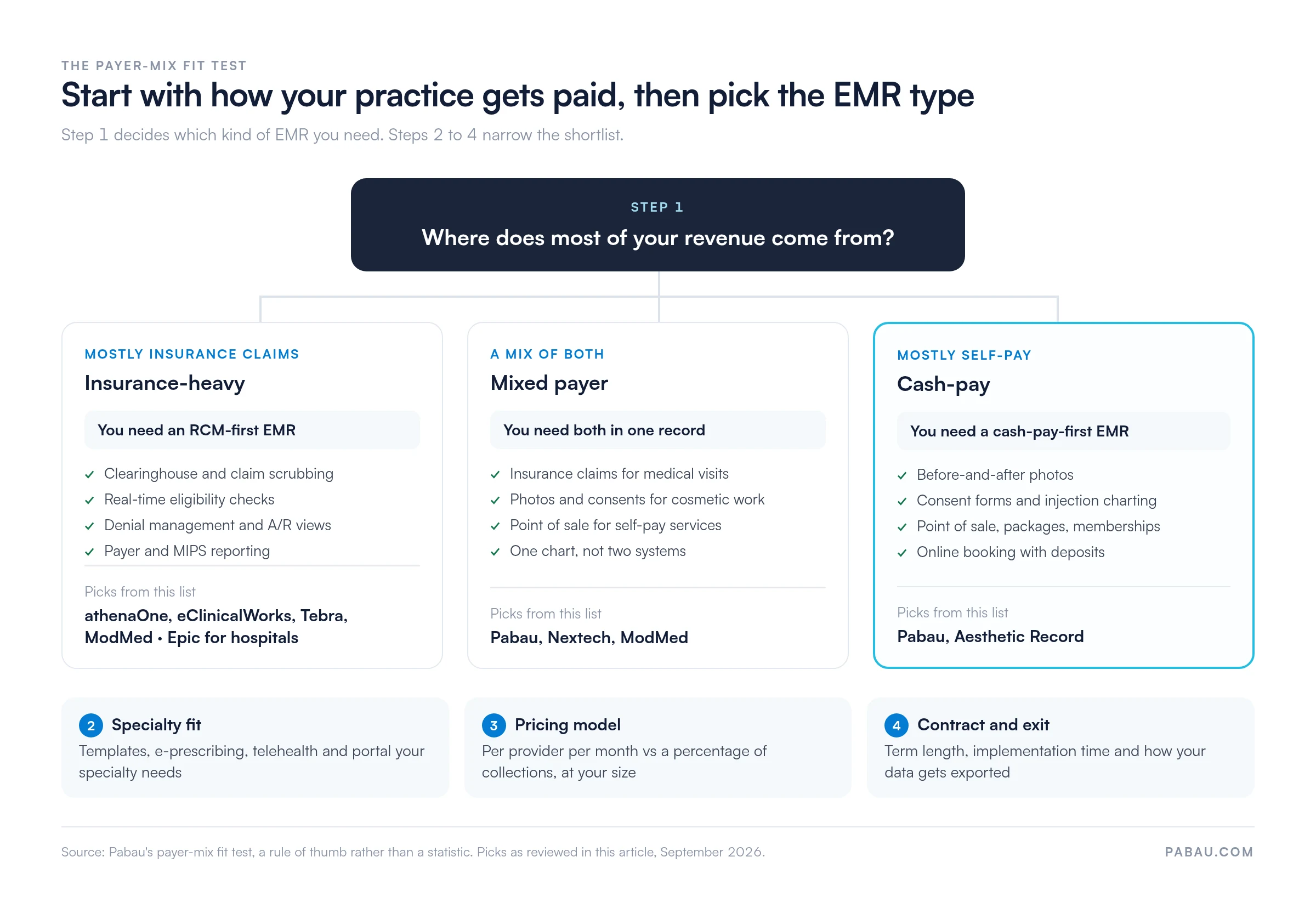
Look at the last 12 months of revenue and decide which of three groups you fall into. The three groups are Pabau’s rule of thumb, not a statistic.
Most revenue from insurance claims: You need an RCM-first EMR with a clearinghouse, claim scrubbing, eligibility checks and denial management.
A mix of insurance and self-pay: You need claims and cash-pay tools in one record, so one patient never lives in two systems.
Mostly self-pay: You need before-and-after photos, consent forms, POS, packages, memberships and online booking far more than a clearinghouse.
The decision tree below maps each branch to the picks in this article.
The payer-mix fit test sends insurance-heavy practices to RCM-first systems and cash-pay practices to aesthetic-first ones. Picks as reviewed in this article, September 2026.
2. Match specialty templates and must-have clinical features
Once the EMR type is set, check the clinical features your specialty uses every day. The old checklist of charting and patient records still applies, but these items separate products now.
E-prescribing and EPCS: Confirm controlled-substance prescribing is included or priced, because several vendors charge per prescriber.
Telehealth: Check whether video visits are included, metered by credits or sold as an add-on.
Patient portal: Patients should book, sign forms, pay and message without calling the front desk.
Interoperability and FHIR: Ask how labs, referrals and outside records connect, and whether the vendor supports FHIR APIs.
ONC certification and MIPS: Medicare-billing practices reporting under MIPS need an ONC-certified EHR.
AI documentation: Ambient scribes such as Pabau Scribe, ModMed Scribe and Sunoh.ai cut after-hours charting.
Photos and consents: Aesthetic and surgical practices need photos stored against the note, not on a personal phone.
3. Compare pricing models against your size
EMR vendors charge in three ways: A flat fee per provider or user, a percentage of collections, or an enterprise quote. The same practice can pay very different amounts under each.
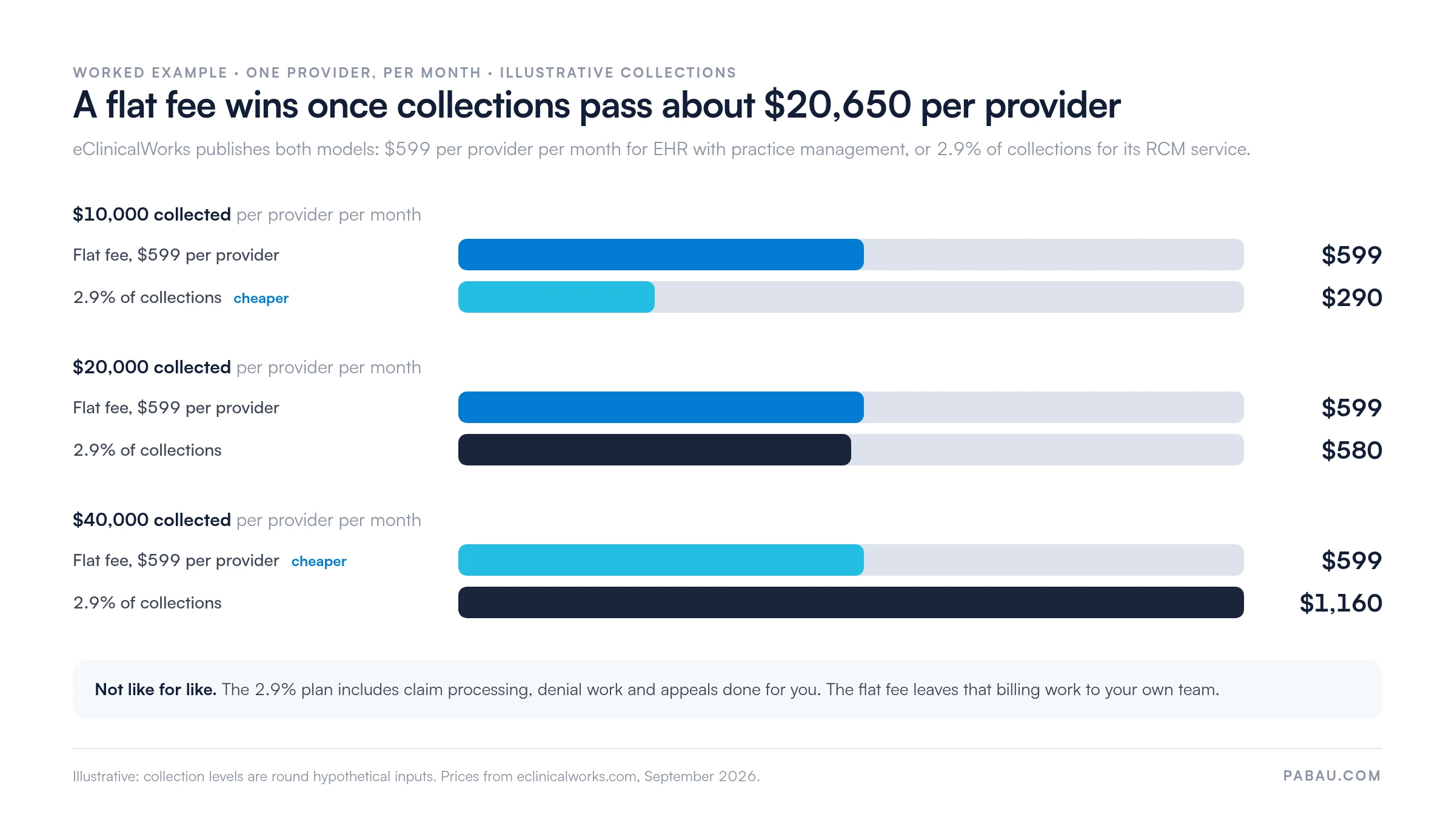
eClinicalWorks publishes both main models, so it makes a clean worked example. At $10,000 collected per provider a month, 2.9% costs $290, well under the $599 flat fee.
At $40,000 collected, the same 2.9% costs $1,160. The break-even sits near $20,650 per provider per month, as the chart shows.
A percentage fee is cheaper for low-collecting providers and dearer for busy ones. Collections are illustrative inputs; prices from eclinicalworks.com, September 2026.
The comparison isn’t like for like, because the percentage plan includes billing work your team would otherwise do. Our breakdown of EMR software cost adds implementation and training to the total.
4. Check contract terms, implementation time and data export before signing
Contract terms decide how hard it is to leave, and most vendors don’t publish them. The ones that do vary widely.
Symplast: One-year agreement with monthly payments, plus a quoted setup and migration fee.
Practice Fusion: $199 per provider per month with a required annual commitment.
PatientNow: Advertises no contract and free onboarding.
eClinicalWorks: No start-up costs, with extra implementation fees above nine providers.
Pabau: Monthly or annual billing, with structured onboarding and data migration handled by a Client Coordinator.
Before signing, ask three questions in writing. How long does implementation take? What does data migration cost? In what format do you hand back our records if we leave?
EMR vs EHR: Does the difference change your shortlist?
No, because most current products do both jobs, so the best EHR software and the best EMR software share one shortlist.
HealthIT.gov defines an EMR as the digital version of the paper chart in one practice. An EHR is built to share information with other providers, such as labs and specialists.
Whichever term you search, the right system for you still depends on payer mix and specialty. Our EMR vs EHR guide covers the definitions in more depth.
What is the most widely used EMR software?
Epic is the most widely used EMR software in the US, running 43.7% of acute care hospitals at the end of 2025.
The top three are Epic, Oracle Health (formerly Cerner) at 21.9% of hospitals, and MEDITECH at 14.7%. Oracle Health is Epic’s biggest competitor by share.
The most popular EHR software in hospitals says little about outpatient practices, though. Any list of EHR systems in healthcare that stops at hospital vendors skips the practice-focused systems reviewed above.
How Pabau runs the EMR for private and aesthetic practices
Most private and aesthetic practices run the patient journey across four or five tools. Booking sits in one app, consents on paper, photos on a phone and payments on a separate terminal.
Pabau replaces that patchwork with an all-in-one practice management app, so each step lands in the same patient record. If you want to see that journey on your own services, schedule a demo with our team.
Online booking: Patients book themselves and pay deposits, so no-shows cost less.
Digital intake and consent: Forms go out automatically and come back signed before the visit.
Charting with photos: Practitioners chart on Pabau GO, our iOS app, with face mapping and before-and-after photos.
POS or insurance claim: Self-pay treatments check out through Pabau Pay, our card terminals, while medical visits go to Claim.MD as claims.
Automated follow-up: Aftercare, reminders and rebooking messages send themselves, so your team finishes on time.
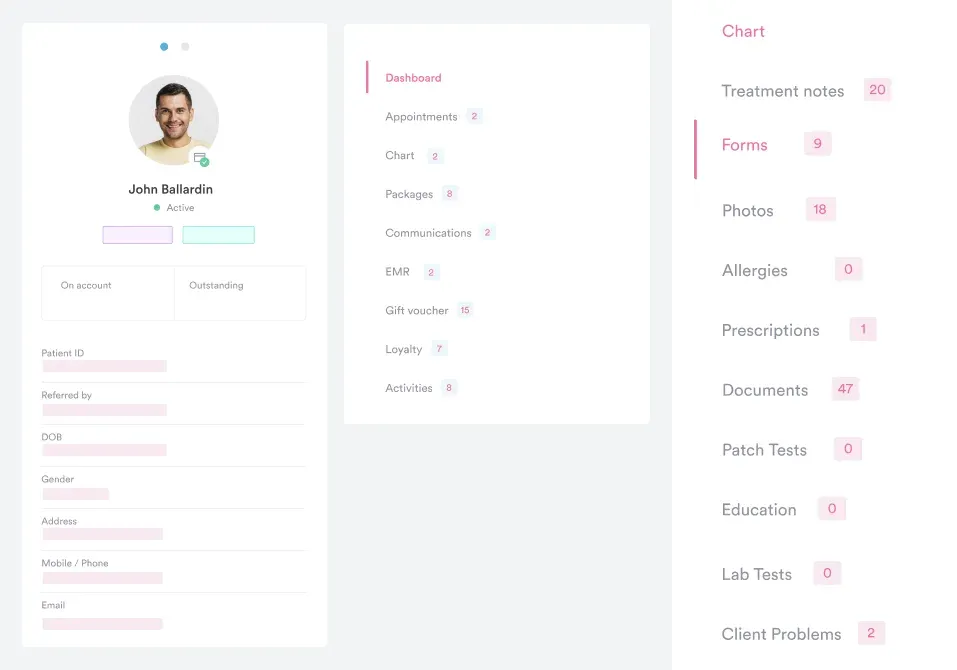
Pabau’s Client records keep treatment notes, forms, photos, prescriptions and packages on one screen, so a mixed-payer visit never needs a second system.
Run charting, booking and billing from one record
Pabau keeps the chart, consent, photos, payment and insurance claim in one patient record. See how that works for your practice type in a demo built around your payer mix.
Decide how your practice gets paid before you watch a single demo. That one answer removes most of this list and tells you which pricing model to model.
Insurance-heavy hospitals and primary care belong on Epic, athenaOne or eClinicalWorks. Private, aesthetic and multi-specialty practices that sell self-pay services and bill some insurance get more from one record that does both.
The trade-off is depth versus breadth. RCM-first systems work claims harder, while Pabau covers booking, consents, POS, marketing and claims in one place. Book a demo to see how Pabau handles your payer mix from booking to payment.
Continue your research
Worried about moving years of patient records?EHR migration walks through the steps, timeline and checks for moving records without losing history.
Building a shortlist with your team?EHR selection lays out a process for scoring vendors and running demos.
Not sure whether you need a hospital-grade system?Ambulatory EHR vs inpatient EHR explains which type fits outpatient practices.
Running a practice on your own?Best EHR for solo practice compares options priced for a single provider.
Want a feature checklist for demos?EMR features lists the capabilities worth testing before you sign.
Frequently asked questions
What is the best free EMR software?
CharmHealth’s free edition is the best free EMR software for very small practices, covering up to 50 encounters and 1,000 patients a month. For a system with no license fee at any size, OpenEMR is open source, though you pay for hosting and support. Practice Fusion is no longer free and costs $199 per provider per month.
What is the best cheap EMR software?
Aesthetic Record has the lowest published entry price at $15 per user per month plus a $399 startup fee. SimplePractice starts at $49 a month and Pabau at $104 a month. A cheap EMR can cost more once e-prescribing, AI notes and texting add-ons are counted, so compare totals rather than headline prices.
Is Cerner or Epic better?
Epic is the stronger choice for most hospitals today, with 43.7% of US acute care hospitals against 21.9% for Oracle Health, formerly Cerner. KLAS reports Epic added 77 hospitals in 2025 while Oracle Health lost 56.
What are the top 3 EHR systems?
The top three EHR systems in the US are Epic, Oracle Health and MEDITECH, which together run about 80% of acute care hospitals. That share comes from KLAS’s 2026 market share report. For outpatient practices, the leaders depend on specialty and payer mix.
What is the best EMR for a small practice?
The best EMR for a small practice depends on payer mix: Pabau for self-pay and mixed practices, Tebra or eClinicalWorks for insurance-heavy ones. Our guide to the best EMR for a small practice compares options by team size.
How much does EMR software cost?
Published EMR prices range from $15 per user a month to $599 per provider a month, and percentage models start around 2.9% of collections. Most enterprise and specialty vendors quote only, so add implementation, training and data migration to any comparison.
Is Pabau HIPAA compliant?
Yes. Pabau is HIPAA compliant for US practices and GDPR compliant for UK and EU practices, with role-based access controls and two-factor authentication. Practices operating in both regions can run one system under both rules.