Choosing dermatology EMR software comes down to one question: how does your practice make its money? For insurance-billed medical dermatology, ModMed is our top pick, and EZDERM follows closely for lesion-heavy work. If you also sell injectables, Pabau, our all-in-one practice management system, bills both sides from one patient record.
A poor fit shows up fast. A medical-first system pushes cosmetic bookings, photos, and payments into side tools that your front desk reconciles by hand. Every platform here has to meet HIPAA, but only some hold ONC Health IT certification. You need that certification to report under Medicare’s Promoting Interoperability Program.
Below, we rank eight systems and then show you how to test them in a demo.
Key takeaways
1. ModMed — the deepest dermatology-specific charting, built for insurance-billed medical practices.
2. EZDERM — a purpose-built dermatology EHR with a 3D body map for lesion and Mohs documentation.
3. Pabau — the only platform to score Both on Mixed-Practice Fit, running insurance and cash-pay cosmetic work from one record.
4. Nextech — procedure-based scheduling templates for multi-provider practices.
5. athenahealth — cloud-native scale and managed billing for larger dermatology groups.
6. eClinicalWorks — the widest third-party integration marketplace for enterprise stacks.
7. AdvancedMD — claims scrubbing and denial management for insurance-heavy practices.
8. DermEngine — AI lesion analysis and dermoscopy imaging that sits beside your existing EMR.
Found our content helpful?
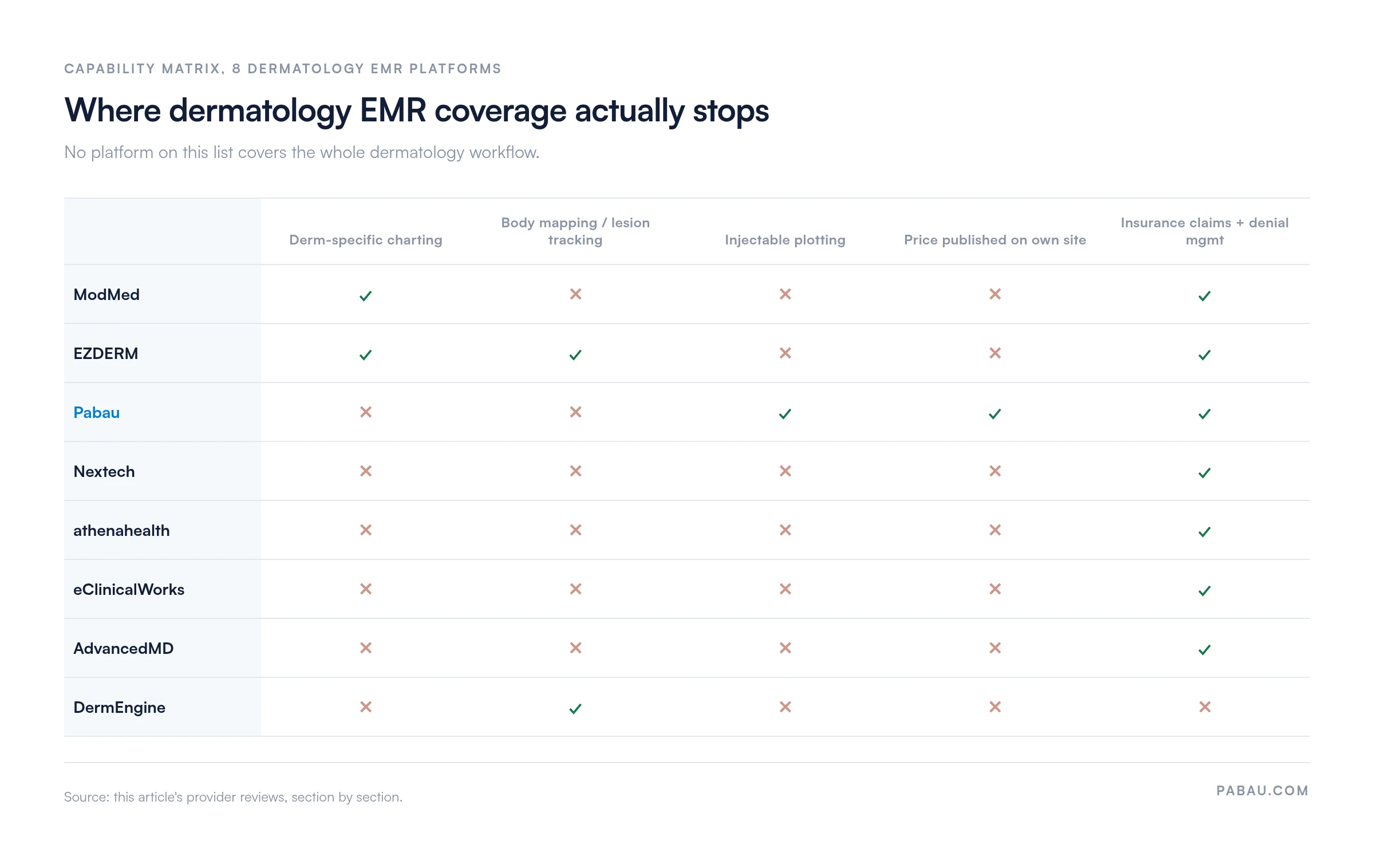
Compare 8 dermatology EMR platforms at a glance
Our Mixed-Practice Fit score looks for injection plotting, cosmetic packages or memberships, and cash-pay checkout, all alongside insurance billing in one patient record. Here’s how all eight compare.
Name
Best for
Standout feature
Mixed-Practice Fit (medical + cosmetic billing)
Starting price
Rating
1ModMed
Medical dermatology practices that want specialty templates and clinical decision support
Charting templates written only for dermatology
Medical-first: no cash-pay cosmetic workflows
Contact sales
4.4/5 (Capterra, 360 reviews)
2EZDERM
Dermatology-only practices documenting biopsies, lesions, and Mohs surgery
3D body map with over 3,000 anatomical points
Medical-first: not built for injectables
Contact sales
5.0/5 (Capterra, 26 reviews)
3Pabau OUR PICK
Practices billing insurance and cash-pay cosmetic work from one system
Injection plotting tied to before and after photos
Both: insurance and cash-pay in one ledger
$62/month, one user
4.7/5 (Capterra, 650+ reviews)
4Nextech
Multi-provider practices with procedure-specific scheduling needs
Appointment templates built around procedure type
Partial: cosmetic quoting and packages, no injection mapping
No published price, so every quote needs a sales call
ModMed’s dermatology EHR is EMA, short for Electronic Medical Assistant, and it carries the deepest dermatology-specific charting on this list.
ModMed says practicing dermatologists built EMA, which suggests common diagnoses and treatments based on each provider’s charting patterns. Clinical documentation, practice management, and revenue cycle management sit in one ModMed system.
ModMed leads with specialty fit rather than breadth, and that positioning matches what dermatologists say they use it for. Screenshot from modmed.com.
More than 40,000 providers across several specialties use ModMed. The EMA dermatology EMR carries templates for psoriasis, melanoma, and actinic keratosis.
Clinical decision support references dermatology treatment protocols and medication guidelines. The EMA EMR system also holds ONC certification for interoperability standards.
What ModMed’s EMA includes
Dermatology-specific templates: Pre-built charting templates for common dermatologic conditions, procedures, and anatomical documentation
Clinical decision support: Specialty treatment protocols, drug interaction checking, and evidence-based dermatology guidelines
Photo documentation: Clinical photography with annotation tools and treatment timeline tracking
Practice management: Scheduling, billing, and patient communications tied to clinical workflows
Revenue cycle management: Claims submission, denial management, and payment posting built around dermatology billing codes
Patient portal: Secure messaging, appointment requests, and access to visit summaries and treatment plans
ModMed Scribe 2.0: Ambient documentation inside the EMA EHR. ModMed trained it on specialty data from over 750 million patient encounters, and it turns conversations into structured notes with suggested billing codes
Where ModMed shines
Deep dermatology expertise: Templates, decision support, and documentation standards are written for dermatology rather than adapted from a general EMR
Clinical focus over aesthetic: Designed for medical dermatology rather than cosmetic services, which suits practices prioritizing insurance-based care
Specialty integration: Works inside dermatology workflows without asking staff to adapt to a generic EMR structure
Where ModMed falls short
Limited cosmetic dermatology tools: No injection plotting, aesthetic treatment planning, or cash-pay billing workflows of the kind Pabau offers
Pricing transparency: Quote-based pricing makes cost comparison difficult without a sales consultation
What ModMed users say
ModMed holds a 4.4/5 rating on Capterra across 360 reviews. Users praise the dermatology templates for cutting documentation time, and the built-in MIPS reporting. The specialty-focused clinical workflows draw consistent praise from medical dermatologists. Common complaints cover the number of clicks a note takes and limited phone support.
Who ModMed is best for
Medical dermatology practices treating skin disease rather than selling cosmetic services
Dermatologists who want specialty decision support and templated charting for complex conditions
Practices prioritizing ONC-certified interoperability and Promoting Interoperability reporting
Groups needing revenue cycle management built around dermatology billing codes
Pricing
Single quoted plan
All practice sizes. Quote depends on provider count, module selection, and implementation scope.
Contact sales
ModMed publishes no rates on its own site, so the only route to a number is a sales conversation. Ask for the implementation fee separately, because it is quoted apart from the subscription.
EZDERM: A 3D body map built for lesion-heavy dermatology
Rating5/5★★★★★Best for lesion documentation
The bottom line
The strongest specialty fit if your day runs on biopsies, body maps and Mohs documentation.
EZDERM is the best purpose-built dermatology EHR software for body mapping, thanks to a 3D map of more than 3,000 anatomical points. Lesions, biopsies, and Mohs sites all get plotted on that map.
Unlike a general EMR with dermatology templates added, EZDERM was designed around dermatology workflows from the start and serves dermatology practices only.
EZDERM combines charting, scheduling, billing, and patient engagement in one platform. Documentation runs on location-specific ICD-10 and CPT codes drawn from the SNOMED database. EZDERM reports net collection rates of up to 98% and a steep drop in claim denials.
What EZDERM includes
3D anatomical body mapping: Interactive body map with over 3,000 anatomical points for documenting lesions, biopsy sites, and surgical plans in real time
Lesion tracking: Longitudinal documentation with visual markers rather than text-only notes, so progression is visible across visits
Clinical image management: High-resolution image upload and storage with annotation tools for comparing treatment results over time
Dermatology-specific billing: Automated ICD-10 and CPT verification against dermatology requirements before a claim goes out
Mohs surgery documentation: Workflows for Mohs micrographic surgery, including layer tracking and margin documentation
Patient portal: Online scheduling, secure messaging, and access to treatment records and visit summaries
Where EZDERM shines
Pure dermatology focus: Every feature is designed for dermatology workflows rather than adapted from a general EMR template
Visual documentation: The 3D body map makes lesion and procedure documentation faster than text-based alternatives
Billing accuracy: Code verification before submission supports high collection rates and fewer denials
Where EZDERM falls short
Dermatology only: Not suited to multi-specialty practices, or to practices adding injectables and body contouring alongside dermatology
Limited marketing tools: No built-in patient marketing automation, recall campaigns, or review management
What EZDERM users say
EZDERM holds a 5.0/5 rating on Capterra across 26 reviews. Users single out the responsive support team and the willingness to build requested features. Reviewers also note regular updates and thorough training for physicians and staff.
Who EZDERM is best for
Pure dermatology practices focused on medical and surgical work rather than broader aesthetics
Practices running high volumes of skin cancer screenings, biopsies, and Mohs surgery
Dermatologists who want an EHR that needs little customization to match specialty workflows
Practices prioritizing billing accuracy through dermatology-specific code verification
Pricing
Single quoted plan
All dermatology practice sizes. Quote depends on provider count and module requirements.
Contact sales
EZDERM lists no prices on its own site either, so compare quotes on a per-provider basis. Ask whether data migration from your current EHR is included.
Pabau: One record for medical and cosmetic dermatology
Rating4.7/5★★★★★Best Mixed-Practice Fit
The bottom line
One system for practices that bill insurance in the morning and take cash for injectables after lunch.
Injection plotting tied to before and after photos
Insurance and cash-pay billing in one ledger
Every subscription includes every feature
What doesn’t
Less dermatology-specific decision support than ModMed
Complex multi-location setups need longer onboarding
Not ONC-certified, so no Promoting Interoperability reporting
Pabau is the only platform here to score Both on Mixed-Practice Fit. Insurance-billed visits and cash-pay cosmetic work share one patient record and one ledger. The platform combines clinical charting, online booking, patient records, and marketing. More than 4,000 practices in over 40 countries use Pabau.
For US dermatology practices, Pabau supports ICD-10-CM and CPT coding for insurance claims and records cosmetic services in the same ledger. Injection plotting maps filler and neurotoxin treatments inside the patient record, linking photos to treatment dates.
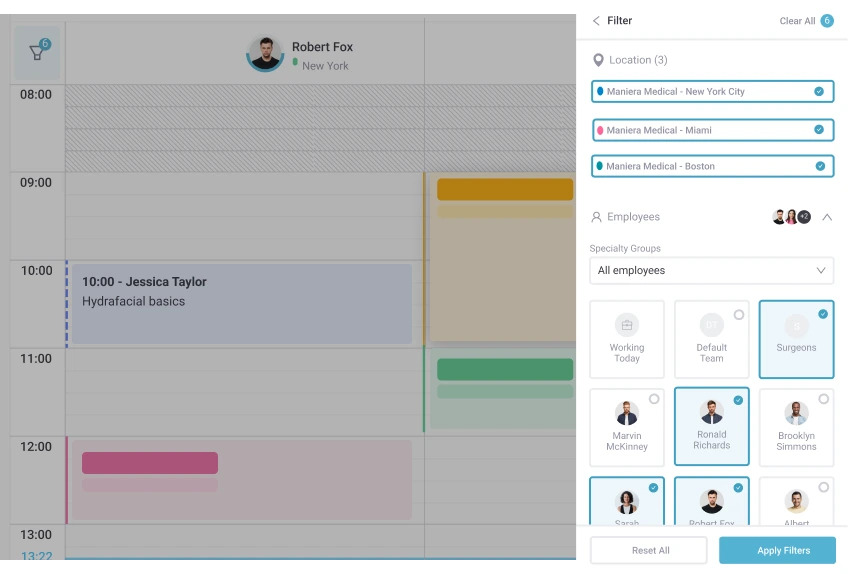
Pabau’s calendar filters by location and by practitioner, so a dermatology group can work across three sites without switching accounts.
The platform runs on cloud infrastructure with HIPAA-compliant data encryption. Pabau is not ONC-certified, so practices can’t use it for Medicare’s Promoting Interoperability reporting.
Multi-location practices manage staff schedules, inventory, and financial reporting from one dashboard. Scheduling handles recurring visits, waitlists, and automated SMS reminders. Appointment scheduling can also manage staff, rooms, and resources from one central calendar to help avoid double bookings.
What Pabau includes
Injection plotting: Visual face mapping for neurotoxins, fillers, and other injectables, with treatment history linked to patient photos
Before and after photo management: Timestamped clinical photography with side-by-side comparison and consent form integration
Digital forms and consent: Intake forms, medical history questionnaires, and treatment consent completed online or on in-office tablets
Online booking: An embedded scheduling widget for practice websites, with service-specific appointment types and staff availability controls
Billing and payments: Insurance claims submit as CMS-1500s through Claim.MD, our US clearinghouse partner, with real-time eligibility checks and electronic remittance advice, alongside cash-pay cosmetic transactions in the same ledger
Marketing and patient communications: Email and SMS campaigns with patient segmentation, recall workflows for follow-up treatments, and review requests
Multi-location management: Central inventory tracking, staff scheduling across sites, and consolidated financial reporting
Pabau Scribe, our AI scribe: Voice-to-text clinical note generation that cuts the time a provider spends charting after each visit
Where Pabau shines
Unified medical and cosmetic workflows: Handles insurance-based dermatology and cash-pay cosmetic services in one system, with no second platform to reconcile
Visual treatment documentation: Injection plotting and photo management are designed for cosmetic dermatology, which speeds up both documentation and patient conversations
A price you can check: Per-user pricing published on our own site, so practices can budget without a quote cycle
Marketing included: Recall campaigns, review management, and patient segmentation come with the subscription rather than a separate tool
Where Pabau falls short
Less medical dermatology depth: The platform serves the wider aesthetic market, so it lacks the dermatology-specific clinical decision support ModMed and EZDERM offer
Learning curve for complex setups: Multi-location groups with intricate workflows need a longer structured onboarding before the system earns its keep
Lighter revenue cycle tools: No claims scrubbing or denial management to match ModMed or AdvancedMD
Not ONC-certified: Practices can’t use Pabau for Medicare’s Promoting Interoperability reporting
What Pabau users say
Pabau holds a 4.7/5 rating on Capterra across more than 650 reviews and a 4.7/5 rating on G2 across more than 320. Users consistently highlight having scheduling, patient records, charting, billing, and marketing in one place.
Clinical photography and before and after documentation draw strong feedback from aesthetic dermatology practices. Some reviewers report occasional bugs and want a more intuitive interface for complex workflows.
Who Pabau is best for
Cosmetic and aesthetic dermatology practices offering injectables, laser treatments, and skin rejuvenation
Mixed medical and cosmetic practices needing one ledger for insurance and cash-pay procedures
Multi-location dermatology groups that want central operational management and standardized workflows
Practices competing on patient experience through online booking, automated messages, and digital consent
Pricing
Plan
Price
Who it’s for
Key features
Starter
From $62/month
1 user
Full platform, up to 100 patients, open API
Solo
Quoted on a demo
1 user, full-time clinician
Full platform, unlimited patients, open API
Team
Quoted on a demo
2–3 users
Full platform, unlimited patients, open API
Medium
Quoted on a demo
4–5 users
Full platform, unlimited patients, open API
Group
Quoted on a demo
6–15 users
Full platform, unlimited patients, open API
Enterprise
Quoted on a demo
16+ users
Full platform, unlimited patients, open API, multi-location support
Pabau prices by user count and location, and every plan includes the whole platform and the API. Starter caps at 100 patients, while Solo and every larger plan include unlimited patients.
Four optional add-ons sit on top: Marketing Plus, Care Plus, Insights Plus, and Engage Plus, which adds WhatsApp and a cloud phone system. For larger teams, Pabau confirms the price on a short demo call.
Nextech: Scheduling templates that fit every procedure length
Rating4.1/5★★★★★Best for complex scheduling
The bottom line
Scheduling templates that hold procedure length, room and equipment together across several providers.
Online booking that respects provider availability
Scheduling links straight through to billing
Cosmetic quoting and treatment packages through TouchMD
What doesn’t
Add-on modules push the total cost up
No injection mapping tied to inventory
Nextech is the strongest pick for specialty-specific scheduling, because its dermatology templates set duration, room, and equipment for each procedure type.
Nextech provides cloud-based practice management and electronic health records for specialty healthcare markets. The templates also handle varying appointment lengths and provider availability.
Nextech suits multi-provider practices with complicated schedules. Online scheduling plugs into the practice website, so patients book a specific service inside the rules you set.
What Nextech includes
Specialty scheduling templates: Pre-configured appointment types for dermatology procedures with customizable duration and resource requirements
Multi-provider coordination: Scheduling that covers several dermatologists, physician assistants, and support staff in one practice
Online appointment booking: Patient-facing scheduling with service-specific options and live availability
Practice management: Patient registration, insurance verification, billing workflows, and claims management
Clinical documentation: Electronic health records with dermatology templates and photo documentation
Cosmetic treatment quoting: TouchMD supports visual consultations, treatment packages, and injectable inventory checks for aesthetic and plastic surgery specialties
Revenue cycle management: Billing, coding assistance, and payment processing tied to the schedule
Where Nextech shines
Procedure-specific scheduling: Templates absorb the difference between a five-minute check and a long surgical block
Multi-provider coordination: Handles complex scenarios across several providers, rooms, and pieces of equipment
Integrated workflows: Links the schedule directly to clinical documentation and billing
Where Nextech falls short
Generic clinical workflows: Dermatology templates exist, but the decision support behind them is thinner than ModMed’s
Limited injection mapping: Cosmetic quoting and treatment packages exist through TouchMD, but nothing maps injections to inventory
What Nextech users say
Nextech holds a 4.1/5 rating on Capterra across 239 reviews and a 4.3/5 rating on G2 across 52 reviews. Users highlight streamlined navigation and flexible specialty customization. Others report recurring bugs, slow updates, costly add-on modules, and unexpected charges. Ask for a detailed pricing breakdown before signing.
Who Nextech is best for
Multi-provider dermatology practices with complex scheduling across different procedure types
Practices whose services need very different appointment durations and resource allocations
Practices that want patients to book themselves in through online scheduling
Groups needing scheduling, clinical documentation, and billing in one platform
Pricing
Single quoted plan
All practice sizes. Quote depends on provider count and module selection.
Contact sales
Nextech publishes no rates on its own site. Because reviewers flag add-on module costs, ask for the fully loaded figure rather than the base subscription.
athenahealth: Cloud-native scale for larger dermatology groups
Rating3.8/5★★★★★Best for large groups
The bottom line
Cloud-native scale and managed billing for dermatology groups large enough to need both.
Percentage-of-collections pricing costs more at volume
athenahealth is the best cloud-native option for larger dermatology groups, pairing a browser-based EHR with revenue cycle services athenahealth staff can run for you. The athenahealth platform covers electronic health records, practice management, and patient engagement across medical specialties.
The platform runs entirely in the browser and in mobile apps, with no local install. Its network model lets athenahealth push updates without practice-side IT work. The system handles MIPS reporting, quality measure tracking, and data exchange with outside systems.
What athenahealth includes
Cloud-native architecture: A fully web-based platform reachable from any device, with no local software to install
Mobile access: Native mobile apps for clinical documentation and practice management on phones and tablets
MIPS reporting: Quality measure tracking and reporting for Medicare Merit-based Incentive Payment System compliance
Patient portal: Appointment scheduling, secure messaging, bill payment, and access to medical records
Revenue cycle services: Managed billing with coding review and denial management support
Interoperability: Health information exchange and electronic data sharing with outside providers
Where athenahealth shines
Enterprise scalability: Cloud infrastructure supports large multi-location dermatology groups under central management
Mobile accessibility: Native apps support clinical work on phones and tablets for providers moving between sites
Managed services: The revenue cycle option hands billing management to athenahealth staff
Where athenahealth falls short
Generic clinical tools: No dermatology-specific templated charting or decision support of the kind specialty platforms carry
Pricing model: Charging a percentage of collections gets expensive for high-revenue practices
What athenahealth users say
athenahealth holds a 3.8/5 rating on Capterra across 835 reviews and a 3.4/5 rating on G2 across 110. Users appreciate the cloud-native architecture and automated billing that speeds up reimbursement. Steep subscription costs and slow support responses come up often. Some workflows take too many clicks, and major updates occasionally introduce temporary problems.
Who athenahealth is best for
Large dermatology groups and multi-location practices needing enterprise-scale management
Practices that prefer cloud-native architecture and mobile access to on-premise systems
Groups wanting managed revenue cycle services instead of more internal billing staff
Organizations that need solid MIPS reporting and quality measure tracking
Pricing
Single quoted plan
All practice sizes. Quotes typically combine a percentage of collections with per-provider fees.
Contact sales
athenahealth publishes no rates on its own site. Model the percentage against your own collections, because the cost rises as the practice grows.
eClinicalWorks: The widest integration marketplace for enterprise stacks
Rating3.7/5★★★★★Best for third-party integrations
The bottom line
A hub you extend with other tools, rather than a platform that already knows dermatology.
healow Marketplace covers labs, pharmacies and imaging
Cloud or on-premise deployment
Population health and chronic disease tools
What doesn’t
Core charting is not dermatology-specific
Each added integration brings its own upkeep
eClinicalWorks leads on third-party integrations, because its healow Marketplace connects the EMR to a large library of specialty tools, billing services, and practice management apps. eClinicalWorks provides cloud-based and on-premise electronic health records for ambulatory care across several specialties, dermatology among them.
The system includes core EMR functionality with customizable templates, e-prescribing, and a patient portal. Dermatology practices use the marketplace to connect specialized tools, laboratory systems, and imaging platforms. The modular approach lets a practice build its stack around eClinicalWorks as the hub.
What eClinicalWorks includes
healow Marketplace: A large library of third-party integrations covering specialty tools, labs, pharmacies, and imaging platforms
Customizable templates: Flexible clinical documentation templates that can be shaped to dermatology workflows
Population health: Tools for managing patient panels, tracking chronic disease, and sending preventive care reminders
Patient portal: Appointment scheduling, secure messaging, prescription refills, and medical record access
Revenue cycle management: Billing, coding, claims submission, and payment posting
Telehealth: Video consultations built into the patient portal
Where eClinicalWorks shines
Integration ecosystem: The marketplace lets practices connect specialized tools instead of waiting for built-in features
Deployment flexibility: Cloud-based and on-premise options suit different IT setups
Enterprise features: Population health and chronic disease management support large practice networks
Where eClinicalWorks falls short
Generic dermatology features: Core charting is not dermatology-specific, so it needs customization or a third-party tool
Integration complexity: Every extra connection adds technical overhead and another point of failure
What eClinicalWorks users say
eClinicalWorks holds a 3.7/5 rating on G2 across 150 reviews. Users find the interface easy to learn for daily charting and schedule management, and rate the file organization highly. Reviewers also report variable billing from per-virtual-visit charges, a slow mobile app, and too many clicks in some workflows. The integration ecosystem cuts both ways.
Who eClinicalWorks is best for
Enterprise dermatology groups that need extensive third-party integrations
Practices wanting a choice between cloud-based and on-premise infrastructure
Multi-specialty organizations running dermatology alongside other clinical services
Groups prioritizing population health management and chronic disease tracking
Pricing
Single quoted plan
All practice sizes. Quote depends on deployment model and provider count.
Contact sales
eClinicalWorks publishes no rates on its own site. Reviewers flag per-virtual-visit charges, so ask how telehealth is billed before you commit.
AdvancedMD: Claims scrubbing for insurance-heavy dermatology
Rating3.6/5★★★★★Best for revenue cycle management
The bottom line
Billing automation first and clinical depth second, which suits practices fighting claim rejections.
Denial tracking with appeal and resubmission workflows
Clearinghouse links to a long list of payers
What doesn’t
Built for insurance rather than cash-pay cosmetic work
Clinical documentation takes second place to billing
AdvancedMD is the best choice here for revenue cycle management, with claims scrubbing and denial workflows built to cut insurance rejections. AdvancedMD delivers cloud-based practice management, electronic health records, and billing for medical specialties including dermatology.
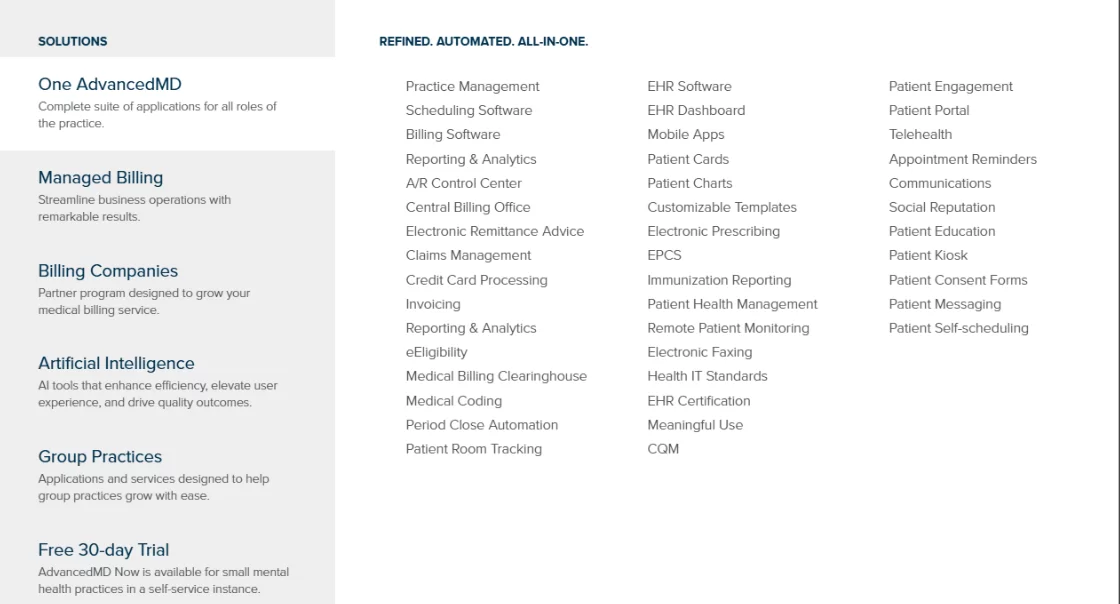
AdvancedMD groups practice management, billing, and EHR modules into one menu, which shows how billing-led its product thinking is. Screenshot from advancedmd.com.
The system includes coding assistance for CPT, HCPCS, and ICD-10-CM codes. Claims scrubbing flags likely rejection issues before submission. Denial workflows track rejected claims and speed up resubmission. The platform connects to clearinghouses for electronic claims and ERA processing.
What AdvancedMD includes
Claims scrubbing: Pre-submission validation catches coding errors and missing information before claims reach payers
Denial management: Automated tracking of rejected claims with workflow tools for appeals and resubmission
Coding assistance: Built-in support for CPT, HCPCS, and ICD-10-CM codes with specialty code suggestions
Clearinghouse integration: Electronic claims submission to multiple payers with live status tracking
Practice management: Scheduling, patient registration, insurance verification, and payment posting
Electronic health records: Clinical documentation with customizable templates and e-prescribing
Where AdvancedMD shines
Revenue cycle focus: Billing automation and denial management cut administrative load and lift collection rates
Claims scrubbing accuracy: Pre-submission validation catches errors before payers see them, which lowers rejection rates
Multi-payer integration: Clearinghouse connections cover electronic claims to a long list of insurance carriers
Where AdvancedMD falls short
Limited cosmetic billing: Built for insurance billing rather than cash-pay cosmetic dermatology
Clinical features secondary: The platform puts billing and practice management ahead of clinical documentation
What AdvancedMD users say
AdvancedMD holds a 3.6/5 rating on Capterra across 462 reviews and a 3.6/5 rating on G2 across 62. Users praise the billing module and the efficiency of its revenue cycle workflows. Others report signed notes changing after completion and weekend performance problems. Support accessibility draws mixed feedback.
Who AdvancedMD is best for
Dermatology practices built around insurance billing and revenue cycle performance
Practices with high claim rejection rates that need automated scrubbing and denial management
Multi-provider groups running billing workflows across many payers
Practices that value collection rates above clinical feature depth
Pricing
Single quoted plan
All practice sizes. Quote depends on provider count and module requirements.
Contact sales
AdvancedMD publishes no rates on its own site. Ask whether the quote covers the billing service or only the software, because the two are priced apart.
DermEngine: AI lesion imaging that sits beside your EMR
RatingLimited reviewsBest imaging add-on
The bottom line
An imaging layer for the EMR you already run, rather than a replacement for it.
AI lesion analysis flags areas worth a second look
Side-by-side comparison across visits
Secure image sharing for remote consults
What doesn’t
No scheduling, billing or patient communications
Runs alongside a primary EMR, never instead of one
DermEngine is the best imaging platform for dermoscopy and lesion analysis, but DermEngine plugs into an existing EMR rather than replacing one.
DermEngine specializes in clinical photography, lesion tracking, and AI-assisted skin lesion analysis. Dermatologists run it alongside their primary EMR for body mapping, mole tracking, and comparison of suspicious lesions over time.
The system connects to dermoscopy devices and digital cameras to capture high-resolution images. AI algorithms assess lesion characteristics and flag changes between visits. Image libraries are organized by anatomical location and visit date, which supports teledermatology and patient education.
What DermEngine includes
AI lesion analysis: Machine learning assesses lesion characteristics and highlights areas that warrant clinical attention
Body mapping: Full-body photography with anatomical location tagging for skin surveillance
Dermoscopy integration: Direct connection to dermoscopy devices for capturing and analyzing magnified lesion images
Longitudinal tracking: Side-by-side comparison of lesions across visits to identify change over time
Teledermatology support: Secure image sharing for remote consultations and specialist referrals
Patient portal: Patients reach their clinical images and treatment documentation through a secure web portal
Where DermEngine shines
Advanced image management: Built for clinical photography and dermoscopy, with AI-assisted analysis that general EMR platforms do not offer
Lesion tracking focus: Comparison tools designed specifically for monitoring suspicious lesions over time
Not a practice management system: No scheduling, billing, or patient communications, so it cannot run a practice on its own
Requires EMR integration: Practices run DermEngine beside a separate primary EMR, which is why it ranks last here
What DermEngine users say
DermEngine has limited review data on the major platforms, which reflects its niche position as an imaging tool rather than a general EMR. Specialty forums and clinical publications praise its lesion analysis accuracy and longitudinal tracking. Practices evaluating it should ask for a demo focused on integration with their current EMR.
Who DermEngine is best for
Dermatology practices running high volumes of skin cancer screening and mole mapping
Practices offering teledermatology consultations that need secure image sharing with specialists
Practices using dermoscopy devices heavily and needing integrated image capture
Dermatologists who want AI-assisted lesion analysis alongside their own clinical judgment
Pricing
Subscription
Solo practitioners to enterprise groups. Quote depends on user count and feature tier.
Contact sales
DermEngine publishes no rates on its own site. Budget for it on top of your primary EMR subscription rather than instead of one.
How to choose dermatology EMR software: Start with your revenue split
Match the software to how your practice earns: insurance-billed medical work, cash-pay cosmetic work, or both. Once you know that split, size, billing, infrastructure, and integrations narrow the field quickly.
Mixed-Practice Fit is your first filter
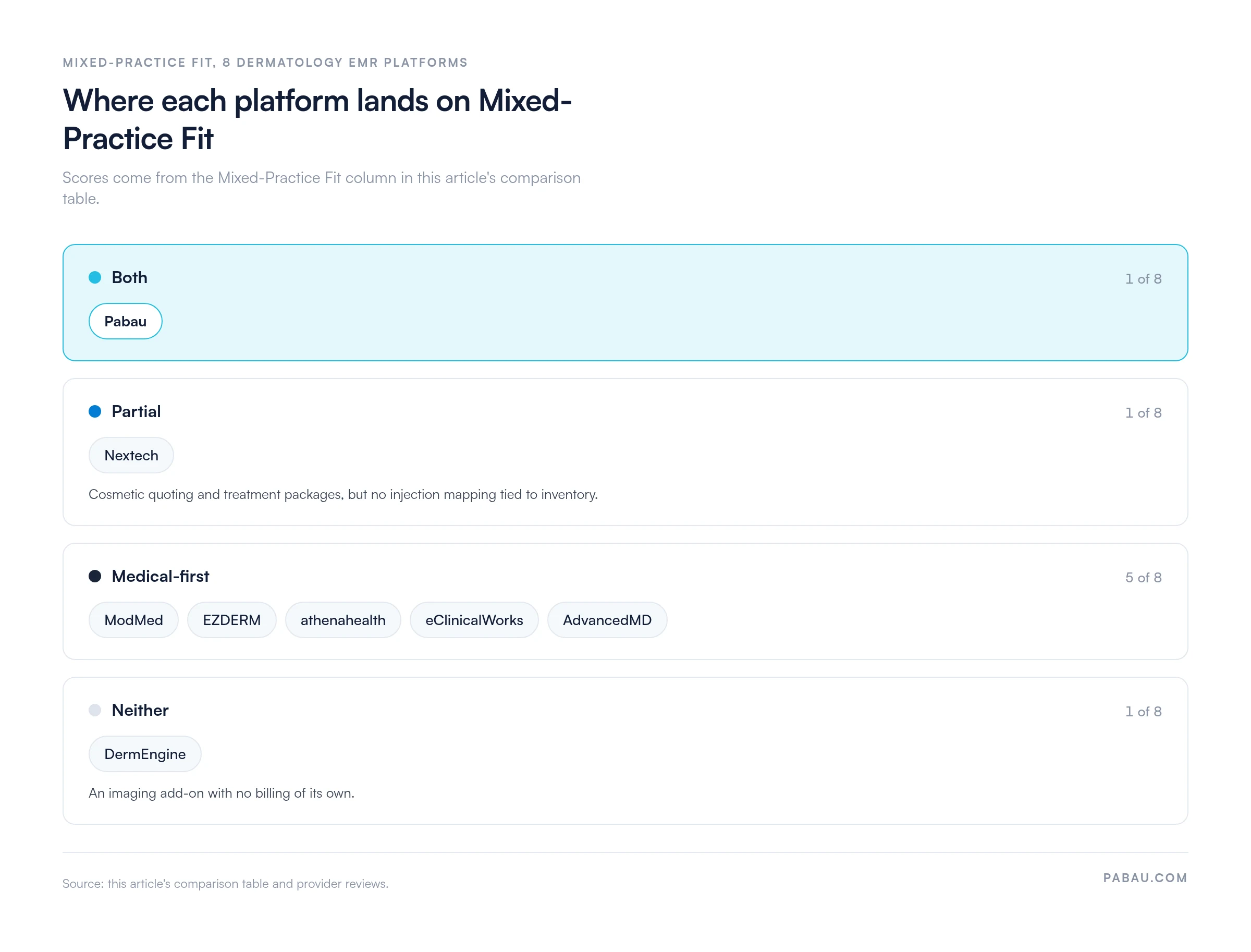
If your revenue splits between insurance-billed visits and cash-pay cosmetic work, shortlist platforms that score Both: cosmetic workflows and insurance billing in one record. Among the eight reviewed here, only Pabau scores Both. Nextech scores Partial, five are medical-first, and DermEngine handles neither.
Picture a three-dermatologist practice that adds an injector two days a week. On a medical-first system, those filler visits need a separate booking tool, card terminal, and photo folder. The front desk then reconciles all three against the EMR by hand.
So the best EMR for dermatology looks different for a Mohs-heavy practice than for one that sells injectables. The grid below groups all eight platforms by their score.
Five of the eight platforms bill insurance well but push cosmetic work into a second tool, and Nextech offers cosmetic quoting without full injection mapping. Scores come from the Mixed-Practice Fit column in this article’s comparison table.
Practice size and specialty mix shrink the list
Clinical workflow comes next. Medical dermatology needs specialty templates and decision support, while cosmetic work needs photo documentation, injection mapping, and cash-pay billing. Mixed practices need both, which narrows the field fast.
Practice size decides the rest. Solo practitioners value ease of use and a price they can check. Multi-location groups, on the other hand, need central management, staff scheduling across sites, and consolidated reporting. For an enterprise network, scalable cloud infrastructure favors athenahealth and eClinicalWorks.
Multi-specialty groups face one more test. The best dermatology software for managing multi-specialty practices keeps every service line on one patient record, so dermatology-only tools like EZDERM drop out. To compare dermatology solutions for practices of your size, line up the “Who it’s for” lists on each provider card above.
Billing and integrations decide the finalists
Revenue cycle priorities come next. Practices leaning on insurance benefit from strong claims management software with scrubbing and denial workflows. Cosmetic-focused practices need smooth cash-pay transactions and membership billing instead. Our guide to med spa EMR software covers that cash-pay end platform by platform.
After that, check infrastructure. Cloud platforms remove server maintenance but depend on a reliable connection. On-premise systems give you control, although they demand internal IT support. Mobile access matters for providers moving between sites.
Integrations close out the list. If you use dermoscopy devices or AI lesion analysis, your EMR has to talk to them. Lab integrations speed up results, and accounting connections cut double entry. The American Academy of Dermatology (AAD) also runs DataDerm, a national clinical data registry, so ask each vendor whether its EMR reports to it.
How a mixed visit moves from chart to claim
Here’s the path a same-day psoriasis follow-up and filler appointment should take in a mixed-practice EMR. Ask each vendor to walk you through it step by step.
Check-in: The front desk verifies insurance for the medical visit and takes a card on file for the cosmetic booking.
Charting: The dermatologist documents the psoriasis visit with an ICD-10-CM code, such as L40.0 for psoriasis vulgaris, plus the E/M level.
Splitting: The filler goes on a separate cash invoice, because payers treat cosmetic work as non-covered.
Submitting: Only the medical services go to the clearinghouse as a claim.
Posting: The insurance payment and the cosmetic invoice land in the same patient ledger, so reports show both revenue lines.
Claims tend to stall in three places. The diagnosis code may not support the procedure billed. Modifier 25 may be missing from an E/M visit billed on the same day as a minor procedure. Or a cosmetic line reaches the payer by mistake.
Claims scrubbing, which AdvancedMD and EZDERM both offer, flags the first two before submission. The third usually happens when cosmetic work lives in a separate tool and someone rekeys it.
Before you sign, run this demo checklist
Make every vendor run your own workflows rather than their standard script. Before you sign, check off each of these:
Chart a psoriasis visit, schedule a Mohs surgery block, and bill one medical and one cosmetic code live
Get the full first-year cost in writing, including implementation, data migration, and training
Request a sample data export, and confirm photos keep their dates and body locations
If you report to Medicare, confirm the product appears on the ONC certified product list
Ask how many weeks onboarding takes for a practice your size, and who runs it
Pro Tip
Run the pilot with your own front desk, not the vendor’s trainer. Your team will spot the rekeying and double-booking problems that a polished sales demo hides.
Dermatology software isn’t always a dermatology EMR
Dermatology software is the broad category, covering booking and billing tools. A dermatology-specific EMR adds charting built for skin conditions, lesions, and procedures. Plenty of dermatology practice management software handles scheduling, claims, and payments well but stores clinical notes as free text.
Check these three points before you book a demo:
Charting templates exist for the conditions you treat most, such as psoriasis, acne, and actinic keratosis
Lesions and biopsy sites are recorded on a body map rather than in a text note
Photos attach to the visit and its consent form, not to a shared folder
A platform that passes all three works as a dermatology EHR, whatever the vendor calls it. The best dermatology software for a mixed practice passes those checks and still takes cash-pay cosmetic bookings. If your consent forms still live on paper, adapt a free dermatology consent form for whichever system you choose.
How Pabau handles both sides of a dermatology practice
Mixed dermatology practices often run two systems. Insurance-billed visits sit in a clinical EMR. Cosmetic consultations, photos, deposits, and recall emails scatter across a booking tool, a phone camera, and a marketing platform. When we onboard mixed practices, we often find cosmetic photos on staff phones and deposits on a separate card terminal.
Pabau’s dermatology EMR earns its Mixed-Practice Fit score by keeping both revenue lines in one patient record. A psoriasis visit coded to ICD-10-CM and a filler appointment paid by card sit in the same chart, on the same timeline. Injection plotting maps each treatment against the patient’s photos.
The result is one place to look. Front-of-house staff stop copying data between tools, and reporting covers both revenue lines at once. Pabau was built first as all-in-one med spa software, so the cosmetic side gets the same depth as the clinical side. Every subscription includes every feature.
Run medical and cosmetic dermatology from one record
Pabau keeps insurance-coded dermatology visits and cash-pay cosmetic treatments in one patient record, with injection plotting, photos, and consent attached. See both workflows in a demo built around your practice.
Start with the half of your practice that pays the bills. If insurance-billed medical work drives revenue, ModMed or EZDERM will repay their specialty depth. If a cosmetic line is growing, Pabau keeps it out of a second system.
Either way, you give something up. Specialty depth costs you cosmetic workflow and marketing, while breadth costs you some clinical decision support. Decide which compromise you can live with before the first demo, and you’ll sit through far fewer of them.
If your practice runs both sides, book a demo and watch a psoriasis visit and a filler appointment share one Pabau patient record.
Continue your research
Running the practice, not just the charts?How to manage a dermatology practice covers the staffing, scheduling, and reporting decisions that sit around the EMR.
Need the paperwork before the software?Dermatology intake form template gives you a patient history form you can hand out or load into your EMR.
Want a fuller schedule to run through it?Dermatology practice marketing covers the channels that bring skin patients back for follow-up treatment.
Comparing how you assess skin today?Using skin assessment tools explains how structured assessments feed the charting your EMR stores.
Frequently asked questions
How does an EMR help with prior authorization for biologics?
Biologics for psoriasis and eczema usually need payer approval before the first dose. A good EMR tracks each request as a task, attaches chart notes, and flags renewal dates. Under a CMS rule, Medicare Advantage, Medicaid, and marketplace plans must offer prior authorization APIs from January 2027.
Can you run a dermatology EMR on a tablet?
Yes. Cloud-based EMRs run in a tablet browser, and some vendors add native apps, as athenahealth does. Tablets suit photo capture and consent at the chair. Check that photos save straight to the patient record, not the camera roll.
How do you move records and photos to a new EMR?
Request a full export from your current vendor before you give notice. ONC-certified EHRs must support a complete electronic health information export. Confirm photos keep their dates and body locations, then test a sample import before go-live.
Is there a free EMR system?
Yes. OpenEMR is a free, open-source EHR with ONC certification, but it ships without dermatology templates or body mapping. None of the eight platforms here offers free dermatology EMR software, so budget for hosting, setup, and support either way.
What are the top 5 most commonly used EMR systems?
Per KLAS Research’s 2025 market share report, the five most widely used hospital EHRs in the US are Epic, Oracle Health, MEDITECH, TruBridge, and Altera. Epic alone runs 43.7% of acute care hospitals. None of the five targets outpatient dermatology.
How long does dermatology EMR implementation take?
Timelines run from about four weeks for a simple cloud rollout to six months for a complex enterprise deployment. Data migration, staff training, and integrations move that number most. Ask each vendor for a phased plan with a pilot group.