Massage Gift Card Template
A massage gift card template is a fill-in-the-blank certificate you customize wi...

19
Last Updated: Sep 11, 2026

EHR features span clinical documentation, scheduling, billing, patient engagement, security, and AI – evaluate each category before committing to a system.
Clinical documentation tools (customizable templates, structured note types, e-prescribing) are the highest-impact EHR features for reducing documentation burden.
Missing EHR features for compliance (HIPAA, GDPR, audit trails) expose practices to regulatory fines and data breaches – not just workflow friction.
Pabau’s all-in-one platform covers every core EHR feature category plus aesthetics-specific tools like injection plotting and before-and-after photo management.
Clinic owners spend months evaluating EHR systems only to find that a critical feature is locked behind an expensive add-on, or simply doesn’t exist. According to the Office of the National Coordinator for Health IT (ONC), EHR adoption has grown substantially across the US, yet practitioner satisfaction remains uneven, largely because feature sets vary dramatically between systems.
The right EHR features determine whether your team documents faster or slower, whether billing errors pile up, and whether patients return. The benefits of electronic health records only show up once the underlying features fit how your team actually works.
This guide covers every major EHR feature category, what to look for inside each one, and the questions worth asking before you sign up for practice management software like Pabau or any other clinical documentation tool.
The National Library of Medicine identifies eight core EHR capabilities:
These categories map neatly to how modern practice management software is structured, and to the core components and modules you will see on any vendor spec sheet. The distinction matters: a true EHR, sometimes called an electronic medical record (EMR), brings the clinical and administrative tools found in an EHR system into one platform, while a standalone PMS handles only the operational side. Judge the functionalities of an EHR by how those clinical and administrative tools work together, not by the length of the feature list.
For a narrower look at the same ground from the EMR side, see our companion guide to EMR features worth evaluating.
The practical question is not whether a system has these EHR features, but how well each one works inside your specific workflow. A system that checks every box on a features list but requires 12 clicks to document a visit is still a productivity drain.
Before you compare individual EHR features, it helps to know what kind of system you’re actually looking at. Types of electronic health record systems fall into a few broad categories, and the category determines which features are even on the table.
Pabau runs as a cloud-based, all-in-one platform built specifically for aesthetic, wellness, and private-pay practices, so the EHR features below come standard rather than needing to be bought separately or bolted on. Staff can also manage bookings and payments away from the desk with Pabau GO, our mobile app.
Documentation is where most clinicians feel the daily weight of their EHR. The average physician spends nearly two hours on EHR documentation for every hour of direct patient care, according to American Medical Association research. The documentation-specific EHR features below determine how much of that time you can reclaim.
Pre-built SOAP note formats and specialty-specific templates eliminate blank-page documentation. The best systems let you build your own templates with smart fields that auto-populate from the patient record, reducing repetitive data entry across visits.
Neurological findings like Kernig’s sign need the same structured fields, not a paragraph of free text buried in the note.
Ambient AI documentation tools listen to the clinician-patient conversation and generate structured clinical notes automatically. Pabau’s AI medical scribe tool transcribes and structures notes in real time, so practitioners complete documentation before the patient leaves the room.
This capability is one of the fastest-growing EHR features today, particularly for high-volume practices. For a broader look at how AI is reshaping clinic operations, see AI in practice management.
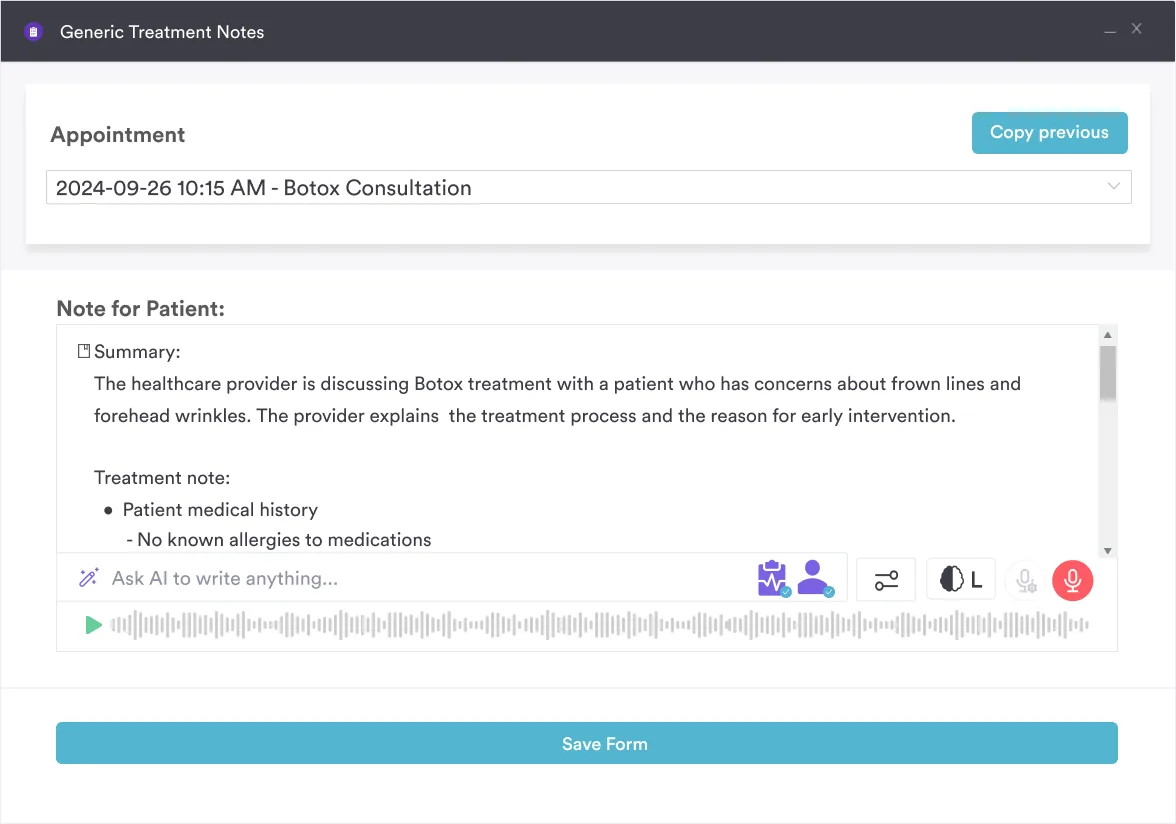
Electronic prescribing eliminates handwriting errors and creates a direct, auditable link between the prescriber, the pharmacy, and the patient record. For controlled substances, look for DEA-compliant Electronic Prescribing for Controlled Substances (EPCS) functionality. Prescription management tools should also flag drug interactions at the time of prescribing, not after.
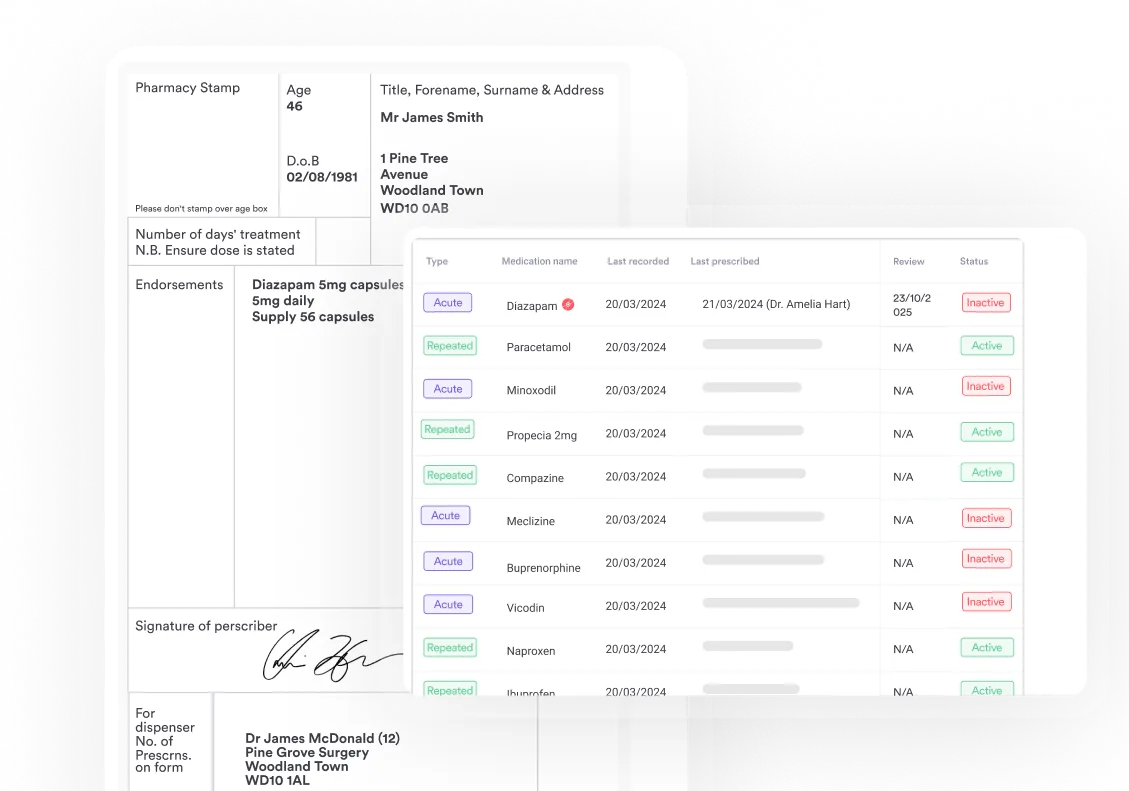
For aesthetic clinics and med spas, generic note templates are not enough. Procedure-specific documentation — including injection site mapping and before-and-after photo management — is a category of EHR features that enterprise systems often overlook entirely.
Pabau includes injection plotting directly in the treatment record, alongside consent documentation and post-care instructions, making aesthetic workflow documentation self-contained. It’s one of the few software solutions offering before-and-after photos in its documentation.
Audit your current documentation workflow before evaluating EHR features. Track how many clicks it takes to open a patient record, complete a note, and file it. Any modern EHR should cut that click count by at least 40%. If a demo does not show you a realistic clinical workflow, ask the vendor to run one in real time.
Poor scheduling EHR features create downstream problems: overbooking, staff overtime, missed appointments, and lost revenue. The scheduling capabilities below distinguish systems built for clinical settings from generic calendar tools.
For practices growing from one location to several, scheduling EHR features need to scale without requiring separate logins or duplicate data entry. This is where purpose-built medical spa software tends to outperform generic EHR platforms, which were designed for single-site primary care.
Billing errors cost US physician practices an estimated 5-10% of annual revenue, according to the Healthcare Financial Management Association (HFMA). The billing EHR features listed below directly address the root causes of those losses.
The billing and administrative EHR features you need depend on your payment model. Insurance-heavy practices need robust claims workflows. Private-pay clinics need package management and flexible checkout. Confirm which model a system was designed for before comparing feature lists.

Pabau combines clinical documentation, scheduling, billing, and patient engagement in one platform built for aesthetic and wellness clinics. Book a personalized demo to see how the features work together in a real clinic workflow.

Engaged patients attend more appointments, follow treatment plans, and refer others. Patient engagement EHR features connect the clinic visit to everything that happens before and after it.
A patient portal gives patients access to their records, upcoming appointments, invoices, and secure messaging. Practices with active patient portals see measurably higher treatment plan adherence, partly because patients can review their documentation, consent forms, and post-care instructions on their own schedule.
The ability to message the care team directly through the portal, rather than playing phone tag, is consistently rated among the most valued EHR features by patients on the G2 and Capterra review platforms.
Paper intake forms are a compliance liability and an operational bottleneck. Digital intake forms sent before the appointment populate the patient record automatically on submission, eliminating manual data re-entry. For med spas and aesthetic clinics, this includes photo consent flows and treatment-specific health questionnaires.
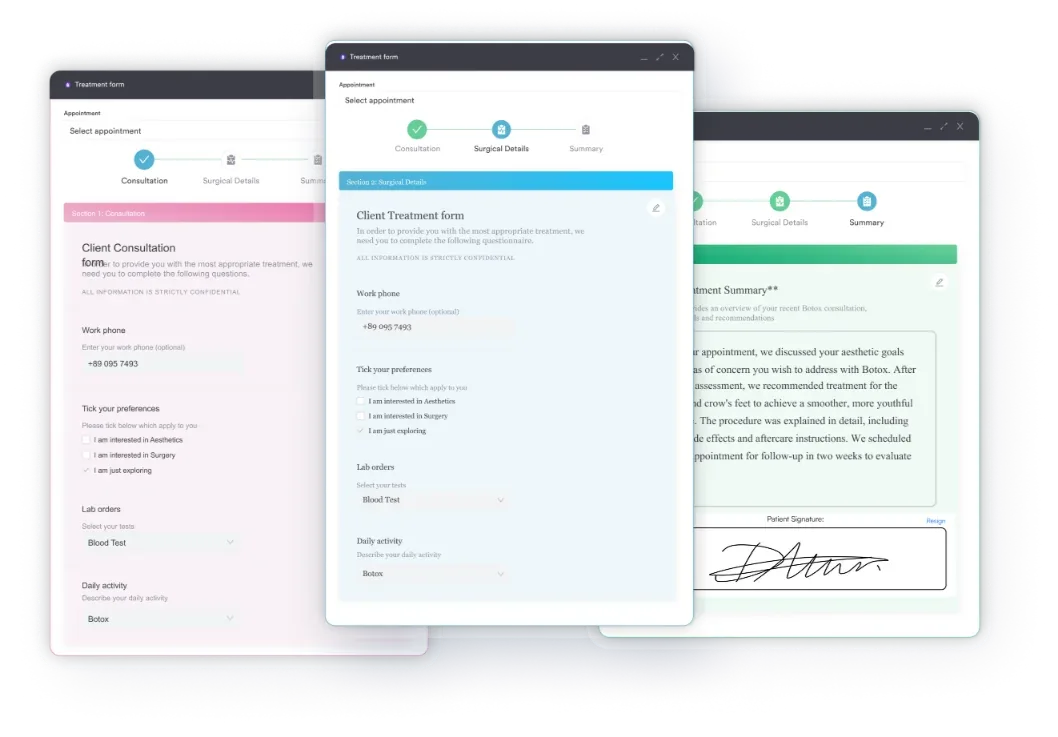
Automated delivery of pre-treatment preparation instructions and post-care guidance reduces missed-prep cancellations and improves patient safety outcomes. These instructions should be sent automatically based on the booked service, not manually composed for each patient.
Video consultation capabilities built into the EHR, rather than bolted on via a separate platform, keep telehealth visits within the same documentation and billing workflow as in-person appointments.
Pabau’s telehealth software connects video consultations directly to patient records and supports post-consultation note creation in the same interface. Telehealth regulatory requirements vary by jurisdiction, so confirm compliance coverage for your operating region before selecting this feature.
A single data breach in a healthcare setting costs an average of $10.9 million, according to the IBM Cost of a Data Breach Report 2024. Security is not a secondary EHR feature consideration. It is the foundation every other feature sits on.
For UK-based practices, CQC inspection requirements add another layer. The CQC expects documented evidence of data governance processes, which means your EHR security features need to generate audit-ready reports, not just protect data passively. EHR integration workflows that connect your security logs to compliance reporting tools simplify this significantly.
Before finalising an EHR vendor, request their SOC 2 Type II report and ask specifically which data centres your patient data will be stored in. Cloud-based EHRs hosted in non-compliant jurisdictions can create GDPR exposure even when the software itself is marketed as GDPR-ready. This single question eliminates a large share of vendors quickly.
Reporting transforms data from a compliance obligation into a growth tool. The reporting EHR features that matter differ by practice type, but every practice should be able to answer these four questions from their EHR dashboard without exporting to a spreadsheet.
| Question | Required EHR report type |
|---|---|
| Which services generate the highest margin? | Per-service revenue and cost breakdown |
| Which providers are most productive? | Per-provider appointment volume and revenue |
| Where are patients dropping off in the treatment journey? | Retention and rebooking rate tracking |
| Are we meeting quality measure targets? | Clinical quality reporting (for CMS Promoting Interoperability programs) |
Pabau’s reporting and analytics tools are built to cover all four of these, with deeper population-level reporting, trend analysis, and custom dashboards arriving through Insights Plus, an additional reporting add-on. This is a meaningful distinction from systems where reporting requires manual data extraction.
Traditional EHR features are falling further behind the current generation of AI-driven capabilities. Practices that adopt these tools now are building a structural efficiency advantage over competitors still relying on manual workflows.
Clinical decision support remains the most clinically significant category. According to NCBI Bookshelf (NBK221802), EHR systems that surface drug-drug interaction alerts at the point of prescribing measurably reduce adverse medication events. This is a verified, tier-one capability that should be non-negotiable in any clinical EHR evaluation.
Feature lists from vendors are marketing documents. The evaluation process that actually surfaces EHR features relevant to your workflow involves four steps.
For aesthetic practices and med spas specifically, the evaluation must also include specialty-specific EHR features that generic systems do not support: treatment mapping tools, before-and-after photo libraries, and procedure-specific consent and documentation flows. These are not minor conveniences. Missing them means maintaining a parallel paper or photo-based system alongside your EHR, which creates both compliance risk and operational friction.
Most EHR evaluation failures happen because practices compare feature lists rather than outcomes. The EHR features that matter are the ones that reduce documentation time, prevent billing errors, keep patient data secure, and make the practice easier to run as it grows.
Pabau combines every core EHR feature category into a single platform built for aesthetic, wellness, and private-pay clinics. From AI-assisted documentation with Pabau Scribe, our AI scribe, to automated recall workflows and integrated claims management, every feature connects to the same patient record. Book a demo to see how Pabau’s EHR features map to your specific clinic workflow.

Comparing practice software options outside the US? Clinic software in South Africa compares Healthbridge, GoodX, Elixir, and other platforms on features, pricing, and support.
Need to compare EHR and practice management systems? Practice management system vs EMR explains where the two overlap and where they diverge.
Want to understand the full feature set in context? Practice management software features walks through the administrative and clinical capabilities that complement your EHR.
Every practice needs eight core EHR features: health information and data management, results management, order entry, clinical decision support, electronic communication, patient support tools, administrative processes (scheduling and billing), and population health reporting. These eight capabilities were defined by the ONC as the baseline for a functional EHR system.
For small private practices, the highest-priority EHR features are customizable clinical note templates, integrated billing with automated claim submission, a patient portal for secure communication and intake forms, and automated appointment reminders. These four capabilities have the largest impact on documentation time and administrative overhead for solo or small-group practices.
Aesthetic and med-spa clinics need EHR features not typically found in general-purpose systems: injection site mapping, before-and-after photo storage with consent documentation, treatment-specific note templates, package and membership billing, and pre/post-care instruction automation. Generic EHRs built for primary care or mental health often lack these capabilities entirely.
The key administrative EHR features for billing include integrated claims management with clearinghouse submission, real-time eligibility verification, automated coding suggestions from clinical notes, denial tracking with resubmission workflows, and financial reporting by provider and service. Practices relying on manual billing without these features typically leave 5-10% of revenue uncollected annually.
EHR security features protect patient data through encryption at rest and in transit, role-based access controls that limit record visibility to authorized users, continuous audit trails of every record access and modification, and anomalous activity monitoring that flags unusual usage patterns. For HIPAA-covered entities in the US and GDPR-regulated practices in the UK and EU, these security features are legal requirements, not optional enhancements.
An EHR system pairs clinical tools such as charting, e-prescribing, results review, and clinical decision support with administrative ones like scheduling, billing, claims, and reporting. Keeping both sides in one patient record is what separates a full EHR from a booking-only system.
The main functionalities of an EHR are documentation, order entry and results management, e-prescribing, clinical decision support, scheduling, billing, patient engagement, secure data exchange, and reporting. Aesthetic and med-spa practices also need procedure-specific capabilities like injection mapping and before-and-after photos.
The core components of an EHR are the patient record, the scheduling and administrative module, the billing and revenue module, the patient engagement layer, and the security and reporting infrastructure. Most vendors package these as modules you can map against your own workflow during a demo.
The most cited EHR disadvantages are the learning curve during rollout, the time clinicians spend documenting instead of treating patients, and the risk of vendor lock-in once records live inside one platform. None of these outweigh the benefits of electronic health records for most practices, but they’re worth planning for — budget for training time, and confirm your data can be exported before you sign a contract.