CPT Code 62284: Injection procedure for myelography
CPT Code 62284: official descriptor and procedure overview The American Medical ...

Last Updated: Oct 19, 2026
HCPCS Code V5000 is a deleted HCPCS Level II code from the V5000-V5999 hearing services range. It can’t be billed for any current date of service. AAPC’s Codify lists it as deleted with a 1990 date and shows no descriptor. So the specific device type it once covered isn’t confirmed in available reference sources.
A claim carrying V5000 is rejected as an invalid procedure code, so refile with the active code for what you supplied. Monaural aids use V5030, V5050 or V5060 by style, and binaural aids use V5120-V5150. The assessment and fitting visits bill as V5010 and V5011.

HCPCS Code V5000 is deleted and can’t be billed today, so any claim carrying it is rejected as an invalid code.
V5000 sits in the V5000-V5999 HCPCS Level II hearing services range, which CMS maintains.
Medicare excludes hearing aids under Section 1862(a)(7), while Medicaid and commercial coverage vary by state and plan.
Monaural aids bill as V5030, V5050 or V5060 by style, while V5010 and V5011 cover the assessment and fitting visits.
Practice management software like Pabau holds a claim back until details such as authorization codes are in place.
HCPCS Code V5000 is a Level II Healthcare Common Procedure Coding System (HCPCS) code in the CMS-maintained V5000-V5999 hearing services chapter. It historically described a hearing aid, but available reference sources don’t confirm the specific device type. AAPC’s Codify lists its descriptor as not available.
CMS lists V5000 as deleted, meaning it has been removed from the active HCPCS Level II file. The code has no valid effective date range for claim submission. Medicare claims systems and most commercial payer edits don’t recognize it.
The deletion matters beyond the code itself. Many older encounter forms, superbill templates and charge-master files still carry V5000 as a line item. Billing staff who inherit those sheets without a current-year HCPCS update will submit the code in good faith. The denial comes back with a remark code saying the service code is invalid for the date of service.
Three facts carry forward from this section. V5000 was a hearing aid code, though available references don’t confirm which device type it described. It sits in the V5000-V5999 hearing services block, and it isn’t billable for any date of service.
A deleted HCPCS code is one CMS has removed from the active Level II code file. That usually happens because the code was folded into a successor, the service category was restructured, or use no longer justified a standalone descriptor.
Once deleted, the code has no billing status at all. Labels like “covered but not payable” or “non-covered but reportable” don’t apply to it.
Practical consequences for a claim carrying HCPCS Code V5000 include:
CMS publishes HCPCS Level II code updates annually. The CMS HCPCS overview maintains the official active code files, addenda, and deletion notices. Cross-reference every V code on your charge sheet against the current year’s alpha-numeric HCPCS file before submission.
No single official replacement code for V5000 appears in publicly available CMS sources at the time of writing. CMS annual HCPCS addenda list deletions and, where they apply, successor codes. The V5000 deletion record shows no direct one-to-one crosswalk, so verify against the CMS alpha-numeric HCPCS file for the relevant year.
In practice, the coding path forward depends on the device or service you’re billing:
For a single behind-the-ear aid, for example, the device line bills as V5060. A pair of in-the-ear aids, one in each ear, bills as V5130. The decision map below walks the same choice from what was supplied to the code.
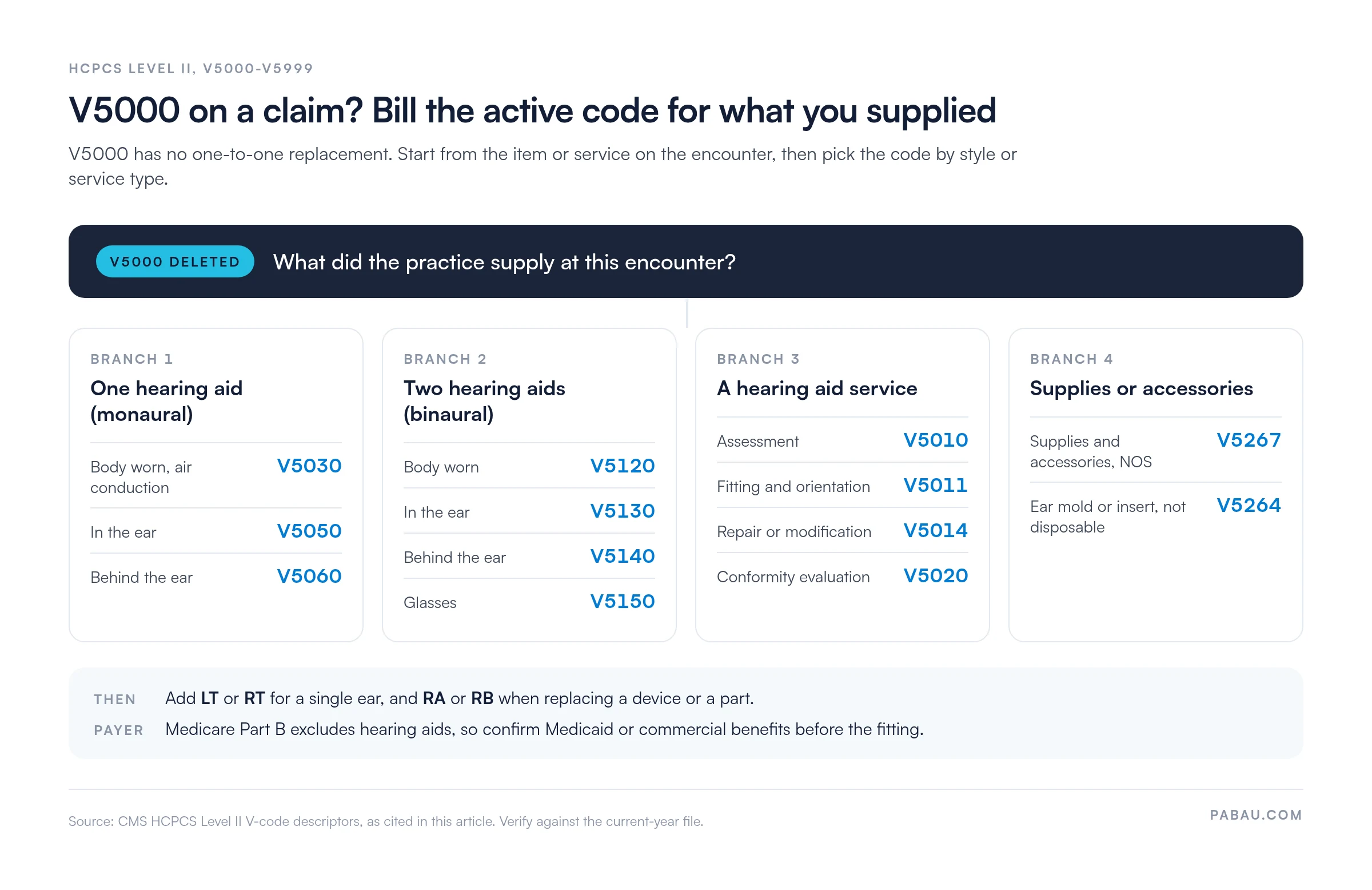
Body-worn aids split once more by conduction pathway. V5030 covers an air conduction fitting, while V5040 covers bone conduction.
Action required before refiling: Pull the current CMS HCPCS alpha-numeric file, locate the V5000-V5999 section, and identify which codes carry an active effective date. Do not refile using a code sourced from a third-party lookup tool or a prior-year charge sheet without confirming it appears in the current-year file.
The V5000-V5999 block is the HCPCS Level II chapter for hearing services, hearing aids and related accessories. CMS assigns it to devices and services from audiologists, hearing instrument specialists and durable medical equipment (DME) suppliers. The range is organized by service type, device style, laterality and supply category.
With V5000 gone, the range opens on the service codes V5008-V5020, and the first device code is V5030. Coders unfamiliar with the full range sometimes assume V5000 is still the default hearing aid code and submit it without checking. Mapping your services against the whole chapter means you bill the device style and service category that match the encounter.
Run an annual HCPCS code audit before each new fiscal year. Pull the CMS alpha-numeric HCPCS file, filter the V5000-V5999 range, and compare it against your charge master. Flag any code whose effective-date end falls before the current year. This takes about 30 minutes and prevents the entire class of deleted-code denials.
Medicare does not cover hearing aids. Section 1862(a)(7) of the Social Security Act excludes hearing aids from Medicare Part B, along with exams for prescribing, fitting, or changing them.
This statutory exclusion applies regardless of which V code is submitted. A correctly coded, well-documented claim for an active hearing aid V code will still be denied by Medicare on coverage grounds.
Two narrow exceptions exist. Bone-anchored hearing aids (BAHAs) qualify as prosthetic devices rather than hearing aids under CMS policy, and may be covered under certain criteria. Cochlear implants are also treated as prosthetic devices, with a separate coverage pathway. Outside those exceptions, Medicare Part B doesn’t pay for hearing aid V codes.
Payer coverage varies significantly beyond Medicare. Checking insurance eligibility and hearing aid benefits before every appointment stops V codes going to a payer with a blanket exclusion. The table below summarizes the general landscape:
For audiology practices, revenue cycle management means building a payer-verification step into the front-end workflow, before the hearing aid is dispensed. Recouping costs from a patient after a denied claim is harder than collecting correctly at the point of service.
After a deleted or non-covered code, missing documentation is a leading denial reason for V-series claims. Each document below ties to a specific denial risk when it’s absent or incomplete. Digital intake and consent forms that capture these fields at the point of care cut the follow-up needed at claim time.
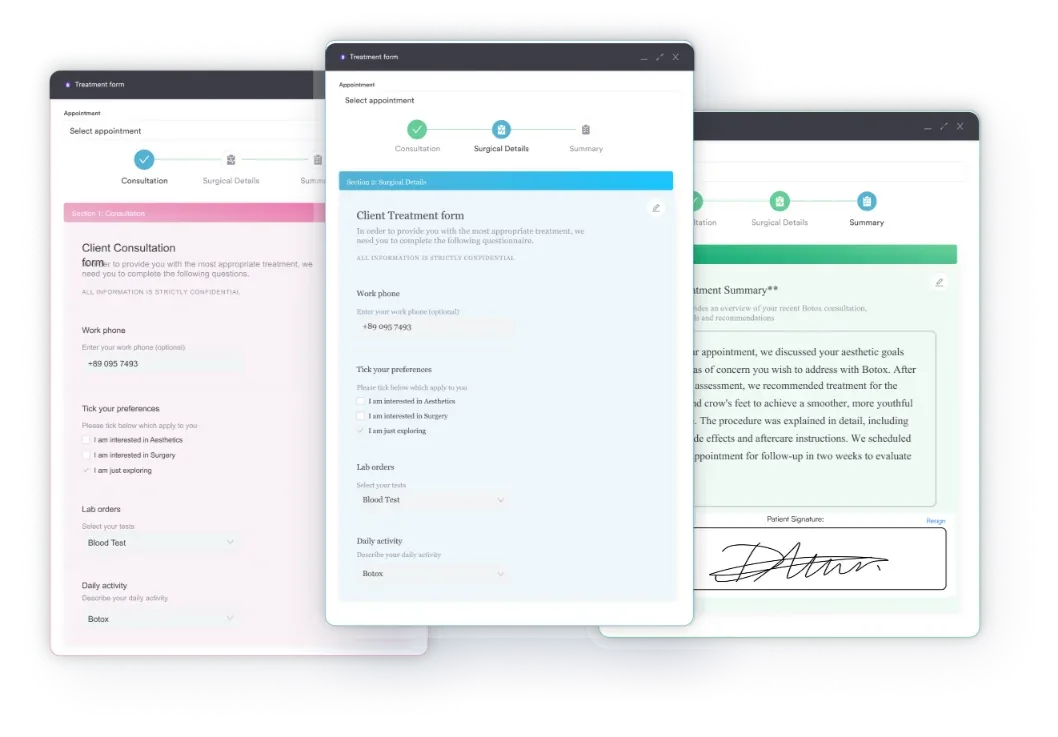
Medical billing compliance for hearing aid claims means keeping all of these documents in the patient record, ready for any records request. Payers may request records up to three years after the date of service.
Modifiers clarify the anatomical side, replacement status, or supply quantity for a V-code claim. Missing or incorrect modifiers are a consistent denial reason for hearing aid claims. The modifiers below are common on active hearing services V codes. Verify current CMS modifier guidance before applying them, because payer-specific policies vary.
Binaural hearing aid claims, where both ears receive a device, need extra care with modifiers. Payer policies on binaural billing differ, so check the payer’s current benefit manual or policy before submitting.
Hearing aid HCPCS claims can fail at several independent points: a deleted code, the Medicare statutory exclusion, and modifier-sensitive payer edits. Denial management for audiology practices starts with mapping each denial to its root cause, rather than refiling the same claim repeatedly.
Knowing the common denial codes is the fastest way to categorize these errors at scale. When the same remark code appears across several hearing aid claims in one week, the problem is systemic. Look for a charge-master issue or a missing front-end step before blaming a one-off data-entry error.
Coders searching for V5000 usually need the active code that fits the device or service they’re billing. The table below maps the codes most often confused with it, by device style and ear placement. Verify each code’s active status against the current CMS HCPCS file before billing.
Style and laterality drive most of these choices. Technology can matter too, because the V5242-V5261 codes split analog from digital aids by style. Picking a code from placement alone, when a technology-specific code exists, is an error that audits surface quickly. Routing is one more variable, and a spectacle-mounted CROS aid bills as V5190.
Billing HCPCS V codes accurately is as much a workflow problem as a coding one. The steps below follow a hearing aid claim from intake to submission inside audiology claims management software. Each step maps to a denial category from the table above.
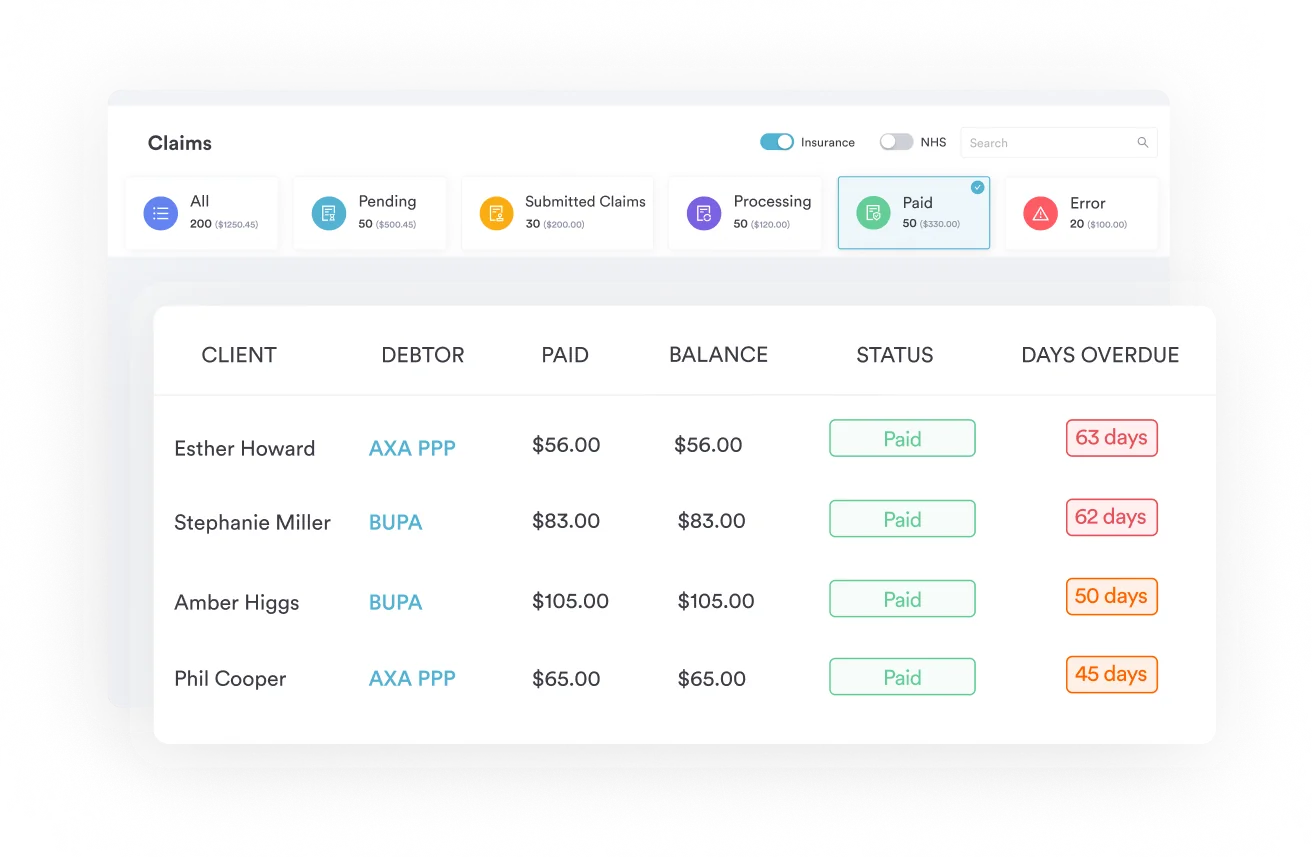
When you compare medical billing software, check how each option handles HCPCS V codes. Useful criteria include a current-year code library, alerts on deleted codes at charge entry, and rules that require laterality modifiers.
Build a pre-submission claim edit rule that rejects any claim carrying a V-series code not in the current HCPCS active file. Most billing platforms allow custom claim edits at the charge-entry or claim-scrubbing stage. This single rule catches every deleted-code submission before it reaches a clearinghouse.
Hearing aid billing often runs across a scheduling tool, a clearinghouse portal and a spreadsheet of claim statuses. Each handoff is a chance for a missing authorization number or an outdated insurer record to reach the payer.
Pabau keeps the insurer and policy on the patient record, so each invoice goes to the right third party without re-keying. In the US, Pabau connects to Claim.MD for electronic claims, real-time eligibility checks, claim status tracking and ERA posting.
Before a claim goes out, Pabau checks that details such as membership numbers and authorization codes are in place. The Send button stays disabled until they are, so fewer V-code claims come back rejected. Your team still chooses the HCPCS code and modifiers, and Pabau makes sure the claim around them is complete.

Pabau checks each claim for missing details, such as authorization codes, before it’s sent and tracks its status through to payment. See how it fits your audiology billing in a live demo.

If V5000 still appears on a charge sheet or superbill template, remove it now instead of correcting claims one denial at a time. Replace it with the active device or service code that matches what you dispensed, then add the laterality modifier.
Once the code is right, coverage becomes the bigger risk. Medicare won’t pay for hearing aids, so confirm Medicaid or commercial benefits and prior authorization before the fitting appointment.
Book a demo to see how Pabau keeps insurer details, authorization codes and claim status in one place for your hearing aid billing.

Need a full denial workflow guide? Denial management in healthcare covers how to categorise, track, and reduce claim denials across all code types.
Want to understand the full billing cycle? Revenue cycle management explained maps every step from patient eligibility through payment posting.
Looking for a clean-claim checklist? Submitting a clean claim outlines the pre-submission checks that prevent the most common denial triggers.
Billing the assessment visit? HCPCS code V5010 explains how to code and document the hearing aid assessment.
Billing batteries or accessories? HCPCS code V5267 covers the catch-all code for hearing aid supplies and accessories.
HCPCS Code V5000 is a deleted HCPCS Level II code from the V5000-V5999 hearing services range. It historically described a hearing aid, but available reference sources don’t confirm the specific device type. CMS removed it from the active code file, and it can’t be submitted on a claim for any current date of service.
V5000 is deleted. Submitting it to any payer returns an automatic denial with an invalid procedure code edit. Billers should identify the active V-series code that matches the device type dispensed by cross-referencing the current CMS alpha-numeric HCPCS file.
No single confirmed replacement code appears in CMS sources. The right active code depends on what you supplied. Monaural aids use V5030, V5050 or V5060 by style, and binaural aids use V5120-V5150. Verify the code against the current-year CMS HCPCS file before refiling.
No. Medicare Part B excludes hearing aids under Section 1862(a)(7) of the Social Security Act. Bone-anchored hearing aids and cochlear implants are narrow exceptions covered as prosthetic devices. For all other hearing aids, obtain an Advance Beneficiary Notice (ABN) and bill the patient directly.
The most common reasons are a deleted code (V5000 itself), the Medicare statutory exclusion for hearing aids, and a missing laterality modifier (LT or RT). Absent prior authorization and incomplete documentation, such as an expired audiogram or missing serial number, also trigger denials.
LT (left side) and RT (right side) show which ear received the device on a unilateral hearing aid claim. RA (replacement of a DME item) and RB (replacement of a part of a DME item) apply when a device or component is replaced. Confirm current modifier requirements with the specific payer before submitting.