HCPCS code G0143: Thin-layer Pap screening with rescreening
HCPCS code G0143 means two manual reads of one liquid-based slide HCPCS code G01...

Last Updated: Oct 19, 2026
V5271 is the HCPCS Level II code for assistive listening device, television caption decoder. It covers one stand-alone unit that decodes closed-caption signals and shows the text on a TV screen, supplied to a patient with documented hearing loss.
The code sits in the V5268-V5290 assistive hearing device range. It excludes hearing aids, cochlear implants, and FM or loop systems, and traditional Medicare Part B treats it as a statutorily excluded hearing device.
Let Pabau's smart automation suggest the right codes, reduce claim denials, and keep your practice compliant—effortlessly.
Automate repetitive tasks and focus on what matters most—your patients.
Reduce coding errors and ensure compliance with the latest regulations.
Clean claims, fewer denials, and faster reimbursements.
Powerful insights and reporting to help your practice thrive.
HIPAA compliant SOC 2 certified GDPR-compliant Trusted by 4,000+ clinics worldwide

V5271 covers one television caption decoder for a patient with documented hearing loss. It is not a hearing aid, cochlear implant, or FM system.
Traditional Medicare Part B excludes hearing devices under Section 1862(a)(7), so V5271 coverage depends on the payer, plan type, and state Medicaid policy.
Most V5271 denials come from a non-covered benefit, a missing prior authorization, or an ICD-10 code too vague to support a caption decoder.
Practice management software like Pabau keeps HCPCS claims, supporting documents, and denial tracking in one dashboard for audiology and assistive-device billers.
HCPCS code V5271 is the HCPCS Level II code for an assistive listening device, television caption decoder. The Centers for Medicare and Medicaid Services (CMS) maintains it as an active, non-CPT code. It sits in the V-series, which Level II reserves for vision, hearing, and speech-language services. The table below summarizes the key reference data.
A television caption decoder is a stand-alone electronic device that decodes closed-caption signals and displays the text on a television screen. It is prescribed for patients who can’t follow TV audio because of sensorineural or other documented hearing loss. It is a separate device from a hearing aid, a cochlear implant, or a personal sound amplifier.
Covered under V5271 is a single television caption decoder unit supplied to a patient with documented hearing loss and a qualifying order. The code does not bundle installation, accessories sold separately, or replacement parts.
An FM system, a hearing loop, or any other assistive listening technology that doesn’t decode closed-caption signals takes a different V-series code. Billing V5271 for one of those devices is a coding error that triggers denials and audits.
The V5268-V5290 range groups several assistive hearing device types under neighboring codes, so coders must match the exact device to the exact code. Billing V5271 for a device that belongs under HCPCS code V5268 or V5272 is a misuse error that payer edits flag. The table below maps the codes most often confused with HCPCS code V5271.
The AAPC HCPCS Level II code lookup provides descriptor text for the full V5268-V5290 range, which is useful for side-by-side verification when auditing claim lines.
Traditional Medicare Part B does not cover hearing aids or most assistive hearing devices. Section 1862(a)(7) of the Social Security Act makes hearing aids a statutory exclusion, and television caption decoders fall into the same non-covered category. A V5271 claim sent to traditional Medicare Part B will typically deny as a non-covered benefit.
Check how each payer handles V5271 before the claim goes out. A pre-service insurance eligibility verification that confirms the hearing-device benefit prevents most non-covered-benefit denials. The matrix below lines up coverage, modifiers, prior authorization, and rate source for each payer type.
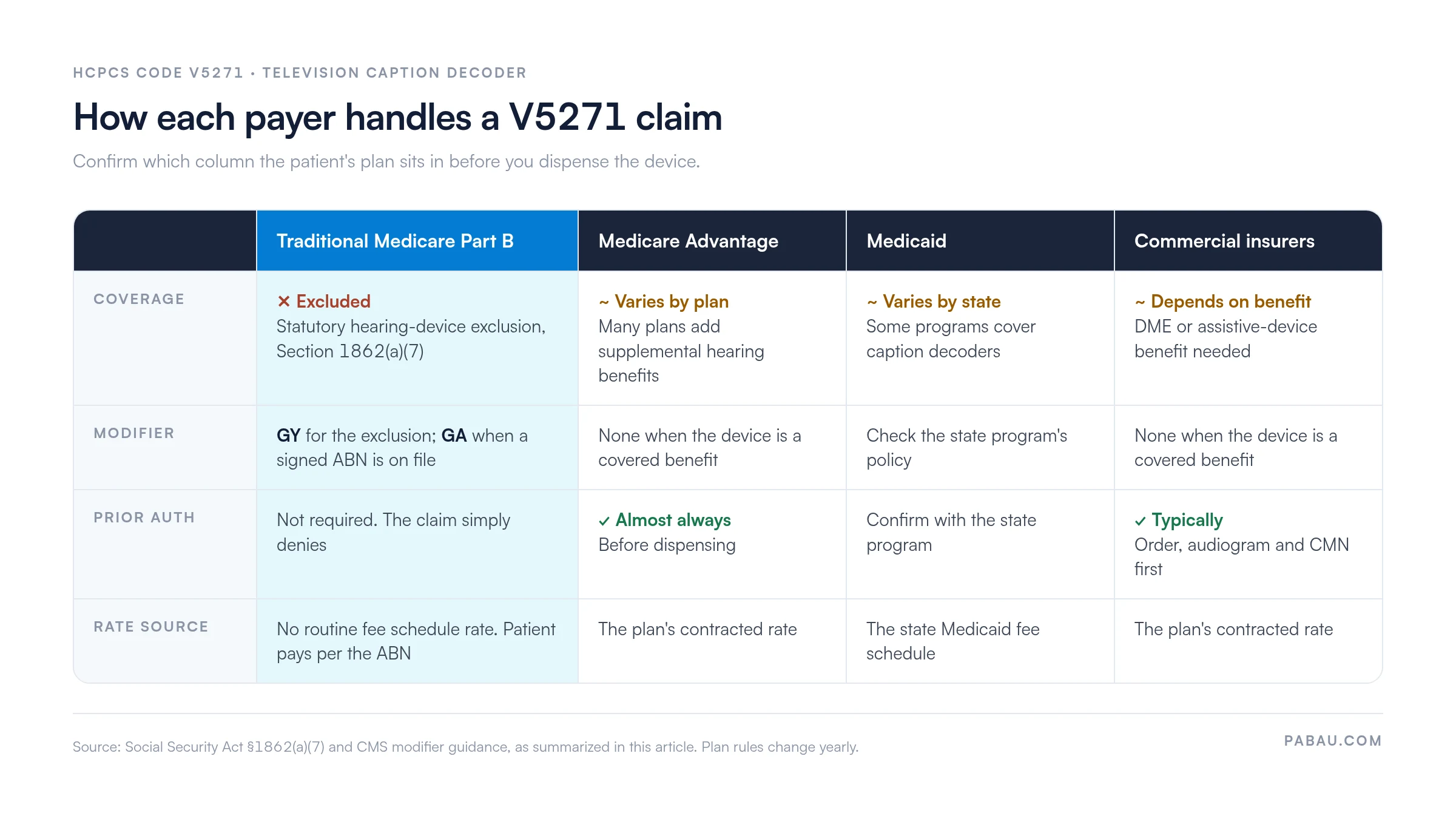
Prior authorization for V5271 depends entirely on the payer. Traditional Medicare doesn’t require it for non-covered items, because the claim will simply deny. Medicare Advantage plans that cover the device almost always require prior authorization before dispensing.
Commercial insurers typically want three documents before they issue an authorization number. Those are a written order from a physician or licensed audiologist, documented audiometric results, and a completed certificate of medical necessity. Confirm current requirements through each payer’s provider services line or provider portal before dispensing.
Traditional Medicare Part B doesn’t routinely cover V5271. For most claims, a published Medicare Physician Fee Schedule rate for this code won’t be available or won’t apply. When a Medicare Advantage plan or a commercial insurer does cover the device, the plan’s contract sets the rate. No standard national fee schedule applies. Verify the contracted rate with the payer directly.
For a rate benchmark, the CMS Physician Fee Schedule lookup tool lets you search by HCPCS code, region, and year. Fee schedule amounts change every year, so re-check any rate you verify today when the next calendar year starts. State Medicaid programs that cover assistive listening devices publish their own fee schedules on their provider portals.
Run a fee-schedule check at the start of each plan year before billing V5271. Medicare Advantage supplemental benefit rates, state Medicaid rates, and commercial contracted rates all reset annually. Billing at the previous year’s rate is a common underpayment trigger.
Insufficient documentation is the second most common denial trigger for HCPCS code V5271, behind the non-covered-benefit determination. The patient record must contain each of the following before a claim is submitted.
Payers most often request the audiogram and the signed order during post-payment audits, so keep both easy to retrieve. Electronic records that let you attach scanned documents to the patient file turn an audit request into a quick lookup.
The ICD-10-CM code submitted with HCPCS code V5271 has to support the medical necessity of a television caption decoder specifically. A broad hearing-loss code is a start, and a code that reflects the severity and type of loss strengthens the claim. These ICD-10-CM codes are the ones most often paired with V5271 claims.
Payers expect the diagnosis code to tie the clinical finding (hearing loss severity) to the functional limitation being addressed (inability to follow television audio). If the audiogram shows mild hearing loss but the order requests a caption decoder, document the functional impact explicitly in the clinical notes. Otherwise a payer reviewer may question medical necessity whatever ICD-10 code you select.
Claim construction for HCPCS code V5271 follows a simple pattern. Three technical errors cause most avoidable billing-edit failures: A wrong unit count, a missing modifier, and incorrect form placement.
Bill one unit per device dispensed, because V5271 describes a single television caption decoder. Never bill two units for one device. A replacement decoder goes on a new claim with one unit, and the record should document the medical reason for the replacement.
LT and RT (left/right) modifiers don’t apply to V5271, because the device isn’t a paired, lateralized item. The modifiers most likely to be required relate to Medicare coverage status and advance beneficiary notice (ABN) situations.
For Medicare Advantage or commercial claims where the device is a covered benefit, no coverage-status modifier is required. Confirm each payer’s modifier requirements before submitting. Audiology claims management software that flags missing details before submission cuts these errors. The superbill should capture the V5271 code, modifier, units, ICD-10 pairing, and the dispensing provider’s NPI in one record.
Submit V5271 on the CMS-1500 claim form. Enter the HCPCS code in Box 24D and the units in Box 24G (quantity: 1). Link the diagnosis pointer in Box 24E to the ICD-10-CM codes listed in Box 21. The date of service (date of delivery) goes in Box 24A.
The rendering provider NPI goes in Box 24J. Make sure the dispensing date matches the proof-of-delivery receipt exactly. A mismatch between the claim’s service date and the delivery record is a frequent audit finding.
V5271 denials cluster around five root causes, and each has a specific prevention step and, where it applies, an appeal strategy. Knowing the common denial codes behind each one helps audiology teams stop a claim before it leaves the practice.
A denial management workflow tracks V5271 denials by root cause and flags recurring patterns. It then triggers a pre-submission checklist for the next claim of the same type. Reviewing denial data monthly cuts repeat denials faster than handling them claim by claim.
Flag any V5271 claim where the ICD-10 code is H91.90 (unspecified hearing loss, unspecified ear) before submission. Reviewers at many payers treat unspecified codes as insufficient medical necessity documentation. Replace with the most specific H90.x code supported by the audiogram and document the functional impact of the hearing loss in the clinical notes.
A clean V5271 claim needs five items in place before it leaves the practice. Those are the correct code, the right modifier, a paired diagnosis, a matched service date, and complete documentation. Many audiology teams still check them by hand, jumping between a billing system, a paper order, and a scanned audiogram.
Practice management software like Pabau brings that check into one system. Insurer details live on the patient record, next to the signed order and the audiogram. Claims go to Claim.MD from inside Pabau, and missing details get flagged before they turn into rejections.
The result is fewer V5271 claims bouncing back for a missing GY modifier or an unsigned delivery receipt. Your billers spend less time rebuilding claims and more time on the ones that need a judgment call.

Pabau’s claims management software helps audiology and assistive-device practices track HCPCS codes, apply correct modifiers, and resolve denials before they repeat. See how it works for your practice.

V5271 is a narrow code: One device, one patient population, and a payer landscape where traditional Medicare Part B denies by statute. That makes the plan check at intake the most valuable step in the whole claim.
Before you dispense a caption decoder, confirm the patient’s plan type. For traditional Medicare, get a signed ABN and bill with GY so the patient-pay conversation happens up front. For Medicare Advantage or commercial plans, secure prior authorization and a specific H90.x diagnosis first. The trade-off is a few extra minutes at intake against weeks spent chasing a claim that was never going to pay.
Book a demo to see how Pabau keeps HCPCS claims, audiograms, and orders together so your V5271 claims go out clean the first time.

Need a reference for handling billing denials systematically? Denial management in healthcare covers the end-to-end process for tracking, appealing, and preventing recurring claim rejections.
Want to understand what makes a claim pass first-pass edits? Medical billing compliance requirements outlines the documentation and coding standards that keep claims clean from submission to payment.
Looking for a guide to the broader billing process? Medical billing fundamentals explains how claims move from service delivery through adjudication and payment posting.
Wondering what payers count as a clean claim? What is a clean claim in medical billing? defines the standard a V5271 claim has to meet on first submission.
Setting up prior authorization for assistive devices? The prior authorization process lays out a step-by-step workflow practices can follow before dispensing.
HCPCS code V5271 is the Level II HCPCS code for an assistive listening device, television caption decoder. It covers a decoder prescribed for patients with documented hearing loss. It falls within the V5268-V5290 assistive hearing device range and is maintained by CMS.
Traditional Medicare Part B does not cover V5271. Television caption decoders fall under the statutory hearing-device exclusion in Section 1862(a)(7) of the Social Security Act. Some Medicare Advantage plans include supplemental hearing benefits that may cover the device, so verify with the individual plan before dispensing.
V5268 describes a telephone amplifier, a device that boosts audio on a telephone handset. V5271 describes a television caption decoder, which displays closed-caption text on a TV screen. The two codes aren’t interchangeable, and using either one for the other device is a misuse error.
LT and RT modifiers do not apply to V5271 because caption decoders are not lateralized devices. For traditional Medicare claims, use GY (statutory exclusion) when a denial notice is needed. Add GA when a signed advance beneficiary notice (ABN) is on file, or GZ when no ABN is on file. Commercial and Medicare Advantage claims typically require no coverage-status modifier.
Bill one unit per device dispensed, because V5271 covers a single television caption decoder. Never bill two units for one device. A replacement decoder needs a new claim with one unit and documentation of the medical reason for the replacement.
The top denial reason is a non-covered-benefit determination from traditional Medicare. A missing prior authorization from a Medicare Advantage or commercial plan is close behind. Weak medical necessity documentation, such as a vague ICD-10 code or a missing audiogram, comes next. So does a service date that doesn’t match the signed proof-of-delivery record. A pre-submission checklist prevents each of these.