HIPAA compliant texting: What you can send patients & how to communicate securely
HIPAA compliant texting is possible when a text holds no protected health inform...

Last Updated: Oct 16, 2026

Patient intake software automates pre-visit data collection, consent forms, and medical history gathering before a patient arrives.
This guide compares seven leading platforms — Pabau, SimplePractice, Jane App, IntakeQ, Kareo/Tebra, DrChrono, and Jotform Health — across form customization, automation, EHR integration, compliance, and price.
The right fit depends on clinical context: Pabau suits aesthetic, med spa, and multi-discipline practices, while therapy tools, insurance-billing EHRs, and budget form builders each serve narrower needs.
Pabau links intake to treatment-specific workflows, before-and-after photos, consent automation, and billing in one GDPR-first platform, reducing admin by eliminating manual data entry.
Choosing patient intake software is less about which tool has the longest feature list and more about which one fits how your practice actually works. A solo therapist, a multi-location med spa, and an insurance-billing medical group each need something different from the same category of tool. This guide compares seven platforms and matches each to the practice type it serves best, so you can shortlist by clinical context instead of marketing copy.
Most practices switch to patient intake software for one reason: paper forms waste time and create errors. But the platform you choose matters as much as going digital in the first place. Whether you call it clinic intake software or patient intake software, the seven tools compared in this guide all automate intake, yet they serve very different clinical contexts — from aesthetic clinics and med spas to solo therapy practices, allied health clinics, and insurance-billing medical groups.
Before a patient sits in your chair, patient intake software has already collected their medical history, captured their signatures on consent forms, and pushed that data directly into their record. No clipboard, no manual entry, no chasing incomplete paperwork after the appointment. For a first visit especially, new patient intake software captures history, consent, and contact details before day one, so the record is complete the moment they walk in.
Most practices move off paper one document at a time. Digitizing a general information sheet covering contact details, history, and allergies clears most of the clipboard in a single step.
The core functions are consistent across platforms: digital forms dispatched by SMS or email, e-signatures, conditional logic that surfaces relevant questions based on prior answers, and automatic sync to the patient record. Where platforms diverge is how deeply intake connects to the rest of the clinical workflow. That connection extends past onboarding too, since the same record feeds dedicated patient retention software that handles recall and reactivation. Forms sent by text invite replies, so two-way patient texting keeps those answers attached to the record.
For aesthetic and multi-discipline practices, intake is only the start. You also need treatment-specific consent forms, before-and-after photo capture, and billing linkage. For therapy practices, the priority is session documentation, progress notes, and a reliable client portal. These are genuinely different use cases, which is why choosing the right patient intake software requires looking past the feature checklist.
According to Gartner Peer Insights, patient intake software covers the full registration and admitting process, including insurance information, patient payments, and pre-visit data collection. Some vendors brand the category as patient intake management software, but the underlying job is the same: collecting and syncing pre-visit data. Whether a platform handles all of that, or just part of it, shapes its real-world value for your clinic type.
Intake forms are where these platforms diverge most clearly. Pabau builds form customization around treatment journeys: each form can be triggered by a specific service, include conditional logic that adapts based on patient responses, and automatically attach consent documentation to the appointment record. Pabau’s digital intake forms include e-signatures and can capture treatment-specific information like skin type, contraindications, or previous procedure history. A cannabis clinic, for example, can deploy a dedicated medical cannabis intake form that screens for cardiac and psychiatric contraindications before certification.
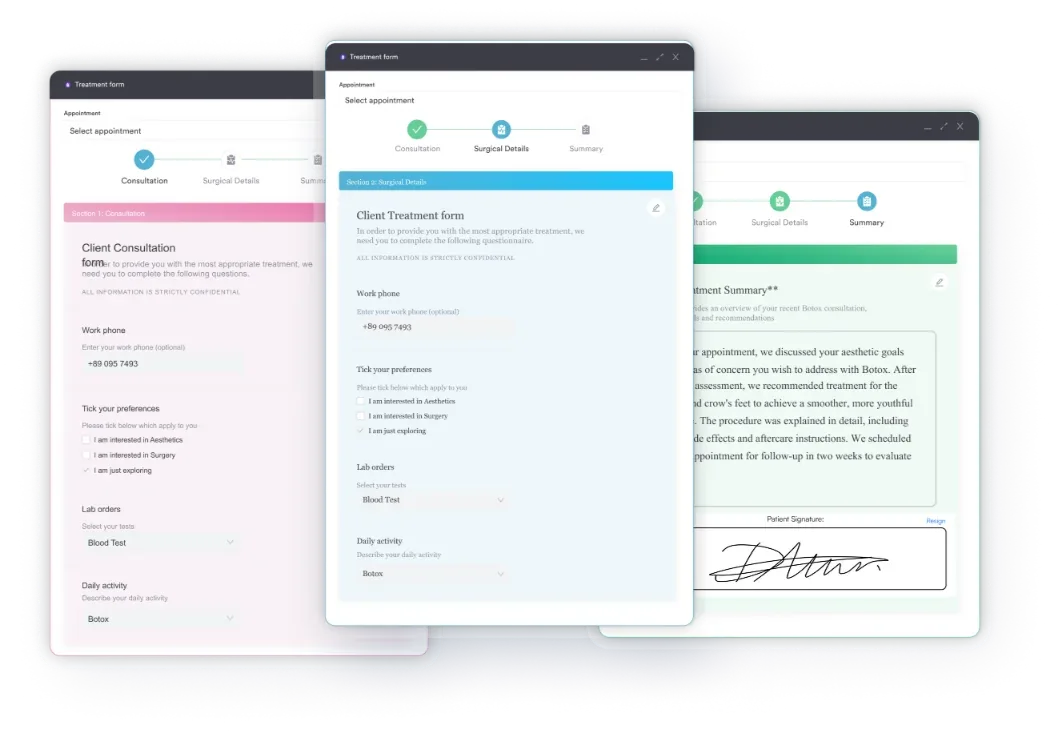
SimplePractice takes a therapy-oriented approach. Its intake questionnaires and consent forms sit inside the client portal and are highly rated for ease of use, earning 4.6/5 from over 2,800 Capterra reviews, with hundreds of pre-built templates geared toward mental health and allied health settings. Jane App follows a similar template-led model but for a broader allied health audience, letting you assign practitioner-specific or discipline-specific intake forms with conditional logic.
IntakeQ and Jotform Health compete on raw form flexibility rather than clinical depth. IntakeQ offers a powerful form builder with conditional logic and e-signatures designed to bolt onto an existing EHR, while Jotform Health provides the most general-purpose drag-and-drop builder of the group — flexible, but with no clinical record to attach consent to. Neither triggers consent by treatment type the way Pabau does.
Kareo/Tebra and DrChrono approach forms from a medical-records angle. Their intake captures the demographic, insurance, and clinical-history fields a US physician practice needs, and DrChrono adds iPad-native check-in forms that sync straight to the chart. Both are built around insurance billing and e-prescribing rather than procedure-specific consent, so treatment-linked consent and aesthetic-style screening are not their focus. Some US practices also collect a health care proxy at registration, alongside the demographic and insurance fields.
The practical difference: if your intake needs to vary by treatment type (a dermal filler consultation looks nothing like a physiotherapy first appointment), Pabau’s treatment-linked forms give you that granularity with consent attached to the record automatically. If you want fast templated therapy intake, SimplePractice or Jane App handle it cleanly; if you only need a flexible form layer over an existing system, IntakeQ or Jotform Health do the job; and if insurance-driven medical intake is the priority, Kareo/Tebra and DrChrono are built for it.
Platform choice does not write the form for you. A Fillmed consent form still has to cover contraindications, risks, and aftercare before anyone signs it.
All seven platforms support conditional logic, but the depth varies. In Pabau, conditions can be tied to service type, patient history flags, or prior answers, so a patient booking a laser treatment sees different questions than one booking a facial. SimplePractice and Jane App apply conditional logic within questionnaire templates, primarily for clinical assessments rather than procedure-specific screening. IntakeQ and Jotform Health offer strong general-purpose branching logic, while Kareo/Tebra and DrChrono focus their logic on medical and insurance data capture rather than treatment-specific pathways.
All seven platforms send intake forms automatically before appointments, but the trigger logic differs. Pabau dispatches intake links via SMS and email tied to the booked service, tracks completion status in the appointment view, and flags incomplete forms before the patient arrives. This automated patient intake flow, powered by Pabau’s automated workflows, means staff don’t need to manually chase forms, and completed data flows straight into the clinical record without re-entry.
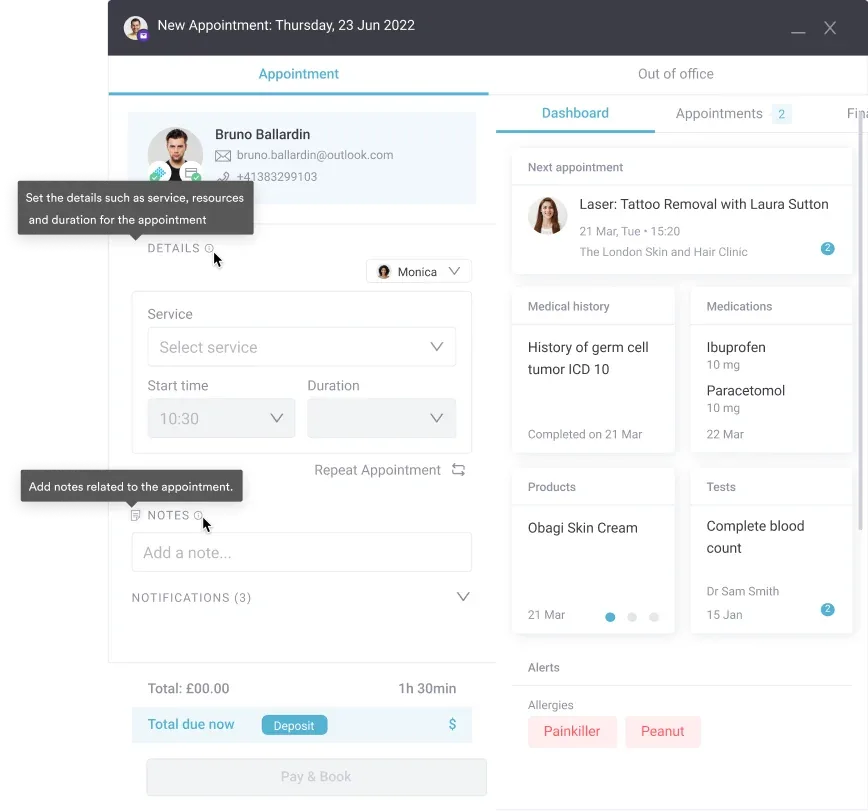
The other platforms automate dispatch in similar ways but differ in reach. SimplePractice and Jane App send mobile-friendly intake requests through their client portals before the first visit, with automated reminders if forms stay incomplete — both are praised for a smooth remote onboarding experience. IntakeQ automates form sending and reminders too, then pushes completed data to whichever EHR it is integrated with. DrChrono leans on iPad check-in for on-site completion, while Kareo/Tebra triggers intake and insurance-eligibility steps as part of its appointment workflow. Jotform Health can automate form delivery but relies on integrations for anything beyond the form itself.
Pre-visit payment collection is where the field splits most clearly. Pabau, IntakeQ, Kareo/Tebra, and DrChrono can all capture deposits or card details during the pre-visit flow, reducing no-shows and outstanding balances. SimplePractice allows clients to pay through its portal but is less tightly integrated into the pre-visit journey, Jotform Health collects payment only via a third-party integration, and Jane App does not collect payment at the intake stage. Pabau goes furthest by embedding deposits and card authorizations directly into the booking and intake sequence.
Automated appointment reminders are table stakes across all seven platforms. Where they differ is in the configurability of those sequences. Pabau allows multi-step reminder workflows (initial confirmation, 48-hour reminder, day-of SMS) tied to specific appointment types. SimplePractice and Jane App offer reliable, well-regarded reminders that are simpler to configure but less suited to complex multi-treatment schedules. IntakeQ, Kareo/Tebra, and DrChrono include reminder automation oriented around their EHR or billing workflows, and Jotform Health depends on integrations for reminder sequences beyond basic form notifications.

Customizable digital forms, automated pre-visit dispatch, treatment-linked consent, and full EHR sync. Book a walkthrough to see how it fits your clinic.

The biggest structural difference between these tools is whether intake feeds a native EHR or has to push data elsewhere. Pabau, SimplePractice, Jane App, Kareo/Tebra, and DrChrono all include their own EHR, so intake data lands directly in the clinical record. IntakeQ and Jotform Health do not — they are intake layers that rely on integration with, or export to, a separate system. Where a coded record is needed, the patient details on a diagnosis form should carry over from intake rather than being retyped.
In Pabau, intake feeds directly into the clinical notes, billing record, and treatment history. A skin assessment completed during intake populates fields in the consultation note. Consent signatures appear in the audit trail. Treatment history from previous visits informs the next intake automatically. For practices treating the same patient across multiple service types, this continuity of data matters. The before-and-after photos captured pre-treatment are linked to the same record, giving practitioners a full picture at every visit.
SimplePractice and Jane App optimize the post-intake workflow for therapy and allied health: intake data feeds into progress notes, treatment plans, and session documentation, and both handle telehealth natively so intake can be completed before a video session. Pabau matches this with built-in telehealth software, so pre-visit forms flow straight into a video consultation. Kareo/Tebra and DrChrono carry intake into medical charting, insurance billing, and e-prescribing, with DrChrono’s iPad check-in syncing in real time to the EHR — well suited to US physician practices but heavier to configure. If documentation is the bigger bottleneck, compare clinical notes software separately before committing to an intake tool.
IntakeQ is the strongest pure middleware option: it offers broad third-party EHR integrations, so practices that already run a separate clinical system can add flexible intake without migrating. Jotform Health stops at the form — completed submissions have to be moved into a clinical system manually or via integration. For practices starting fresh or replacing a legacy system, an all-in-one platform like Pabau removes that integration overhead entirely; for those committed to an existing EHR, a standalone tool such as IntakeQ avoids a full migration.
All seven platforms support HIPAA compliance with a signed Business Associate Agreement (Jotform Health requires a paid plan for it). SimplePractice, Jane App, IntakeQ, Kareo/Tebra, and DrChrono are primarily designed for US practices, and UK clinics should verify their GDPR provisions directly. Pabau is built GDPR-first for UK and international private practices, with data stored securely and full audit trails maintained — a material advantage for UK-based clinics. Whichever platform you shortlist, verify current compliance documentation and BAA or GDPR terms against your specific workflows before relying on them contractually. It also helps to know which fields on a personal details form sit in which GDPR tier.
Pabau is an all-in-one platform built for medical spa software and multi-discipline private practices. Its intake capabilities are integrated with scheduling, clinical documentation, billing, and marketing in a single system.
SimplePractice is purpose-built for mental health therapists, counselors, and allied health solo practitioners. Its intake workflow is clean, mobile-friendly, and deeply embedded in a therapy-oriented practice management system.
Jotform Health is a HIPAA-compliant digital form builder rather than a full practice management system. It suits small practices that only need to replace paper forms and already have a clinical system in place.
Best for: Small practices or sole practitioners who only need to replace paper forms and have no EHR integration requirement. Starting price: Free — $39/month.
Pricing across these platforms ranges from free to $199+/month. The right tier depends on whether you need a full clinical platform or just a form layer on top of an existing system.
The lowest sticker price is rarely the lowest total cost. Standalone tools like IntakeQ and Jotform require a separate EHR investment. Tiered platforms like SimplePractice often push practices onto higher plans once billing or telehealth is needed. Practices hunting for free patient intake software will find Jotform Health’s free tier the only genuine no-cost option here, though it stops at the form and leaves clinical workflows to a separate system. Pabau’s pricing includes the full feature set — intake, consent, clinical notes, and billing — rather than gating core functionality behind premium tiers. Check current Pabau pricing for region-specific and user-count details.
When comparing patient intake software pricing, look beyond the base subscription. Factor in per-clinician add-on fees, onboarding costs, and whether key features like consent automation and before-and-after photo capture require an upgrade. A lower entry price can become more expensive as your team grows.
Review data surfaces recurring pain points that marketing pages don’t. Here is how each platform scores on Capterra and what themes emerge most consistently.
The answer comes down to your clinical context, not a feature checklist. Here is the clearest way to match platform to practice type:
Every platform on this list replaces paper forms. The difference is what happens next. Standalone tools like Jotform and IntakeQ stop at the form. Therapy platforms like SimplePractice carry data into session notes. Full clinical platforms like Pabau connect intake to consent, clinical documentation, before-and-after photos, billing, and the entire patient record — before the patient has even arrived.
For aesthetic clinics, medical spas, and multi-discipline private practices, that depth of integration is the difference between a digital form and a genuinely streamlined clinical operation. If you want to see how Pabau handles your specific intake workflows, book a demo and walk through the setup with a product specialist.
Patient intake software is a digital tool that collects medical history, consent forms, and demographic information from patients before their appointment. It replaces paper forms with electronic versions sent by SMS or email, captures e-signatures, and automatically syncs completed data to the patient record — eliminating manual data entry at the front desk and reducing admin time for clinical staff.
The core features are: customizable digital forms, conditional logic that adapts questions based on patient answers, e-signatures, automated dispatch via SMS and email, and direct sync to the patient record or EHR. For aesthetic and clinical practices, treatment-linked consent forms and before-and-after photo capture are important additions. Payment collection at the intake stage is valuable for reducing no-shows and outstanding balances.
Most patient intake software either sits inside an all-in-one platform (like Pabau) or integrates with a separate EHR via API (like IntakeQ). Built-in integrations within a single platform offer the most reliable bidirectional data flow. Standalone intake tools that claim EHR integration vary significantly in sync depth, and one-way data pushes are common. Verify bidirectional sync before committing to any tool.
Digital intake reduces no-shows by embedding appointment confirmation and deposit collection into the pre-visit flow. When a patient has completed a form, paid a deposit, and received a reminder sequence, they are more committed to attending. On the admin side, completed forms arrive in the patient record automatically, removing the manual entry that typically costs reception staff several minutes per new patient.
It depends on your specialty. Solo therapists and counselors typically find SimplePractice well-matched to their workflow. Small aesthetic clinics and med spas get more value from Pabau, which handles treatment-linked consent, multi-service intake, and billing in a single system. Practices on a tight budget that only need digital forms can start with Jotform Health.
Most dedicated patient intake platforms offer HIPAA compliance with a signed Business Associate Agreement (BAA), including Pabau, SimplePractice, Jane App, IntakeQ, Kareo/Tebra, DrChrono, and Jotform Health (on paid plans). UK and international practices should also verify GDPR compliance — Pabau is built GDPR-first, while US-focused platforms vary. Always verify compliance documentation directly with the vendor before going live with patient data.
The patient intake process starts when an appointment is booked: the practice sends a digital form by SMS or email, the patient completes their medical history, demographics, and consent on their own device, and the completed data syncs automatically into the patient record before they arrive. Software handles dispatch, e-signatures, reminders for incomplete forms, and (on integrated platforms) pre-visit payment, so the front desk no longer rekeys anything or hands out clipboards.
It is the same category as patient intake software, described from the workflow side: a system that manages the full pre-visit registration sequence — form dispatch, data capture, consent, insurance and payment collection, and the sync into the clinical record. All-in-one platforms like Pabau fold this into scheduling and billing, while standalone tools cover the form layer and pass data to a separate EHR.
Yes. Jotform Health offers a genuine free tier for digital intake forms, though HIPAA compliance and higher submission volumes require a paid plan, and it stops at the form with no clinical record behind it. All-in-one platforms like Pabau aren’t free, but they include intake, consent, and billing in one subscription rather than charging separately for each piece, which often works out cheaper than bolting a free form tool onto a separate EHR.