7 Best Fresha alternatives for salons and med spas (2026)
Fresha alternatives fall into two camps, and the split decides your monthly bill...

Last Updated: Oct 6, 2026

A patient booking form captures essential appointment details, contact information, and medical history needed before a patient’s visit.
Required fields vary by clinic type and regulation (HIPAA, GDPR, CQC) – but must always include name, contact info, appointment preference, and any contraindications.
Digital forms streamline intake and feed the automated reminders that reduce no-shows, syncing booking data directly into practice management systems like Pabau.
Pabau’s digital forms feature lets you build, customize, and automatically sync patient booking data into your EHR and CRM – eliminating manual re-entry.
Use the free patient booking form below as your starting point. Download the patient booking form PDF, then adapt the fields, consent wording, and screening questions to match how your practice actually books patients.
A ready-to-use appointment scheduling form covering patient details, appointment preferences, health history, contraindication screening, and consent capture – designed for private practices, medical spas, and aesthetic practices.
Download templateA patient booking form is an online document that captures the information needed to schedule and prepare for an appointment. When patients book online, they provide contact details, medical history, appointment preferences, and any relevant health conditions – all before arriving for their visit.
It’s sometimes called a patient appointment form, or simply an appointment form, but the job is the same: turning a booking request into structured data your team can act on.
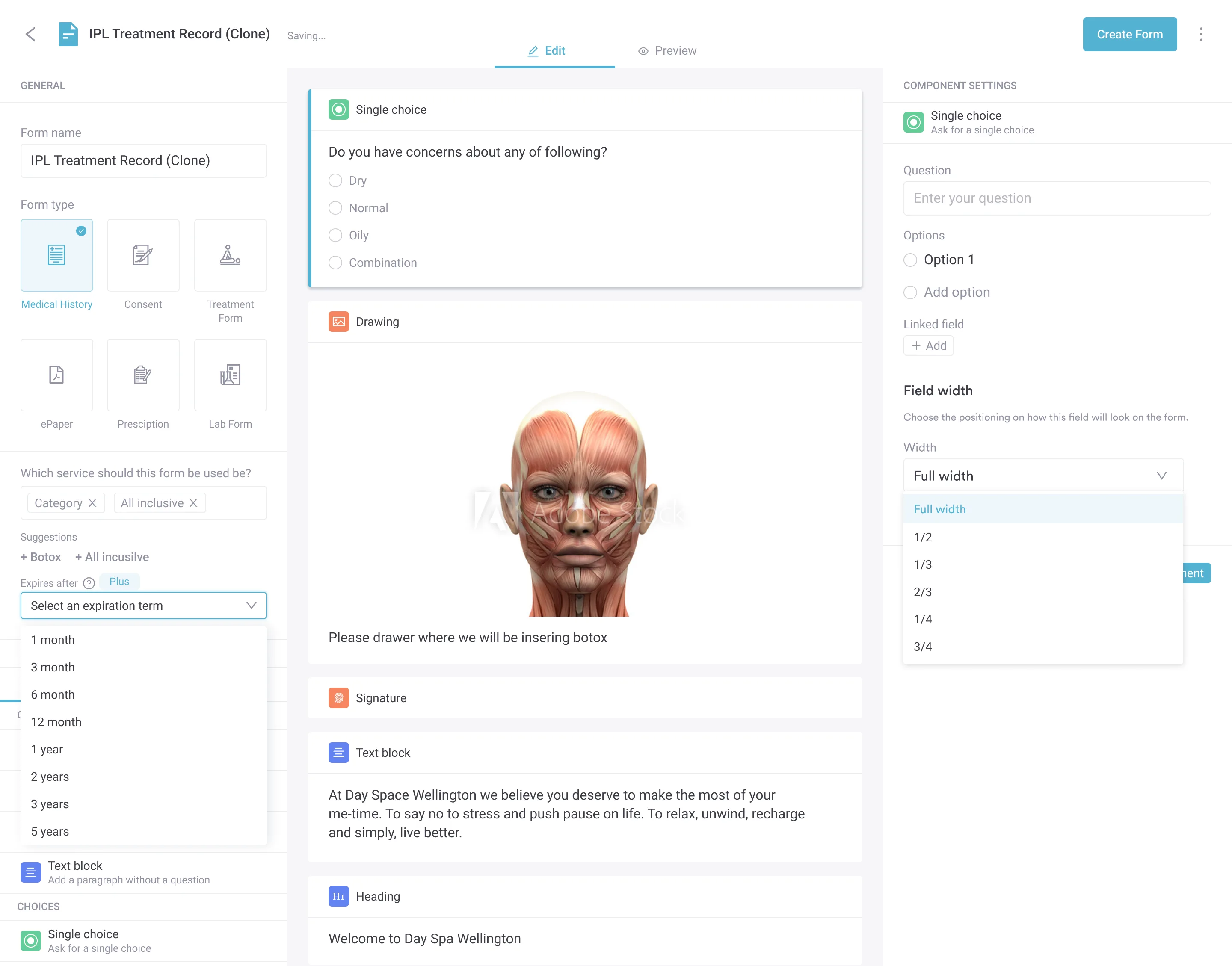
Unlike paper sign-in sheets, a digital patient booking form integrates directly with your practice management system. This means the data flows automatically into the patient’s record, eliminating manual data entry and reducing the risk of lost or illegible information.
Paper-based booking creates friction. Patients fill forms by hand, handwriting is illegible, key information gets lost, and staff spend time transcribing data into your system. As a result.
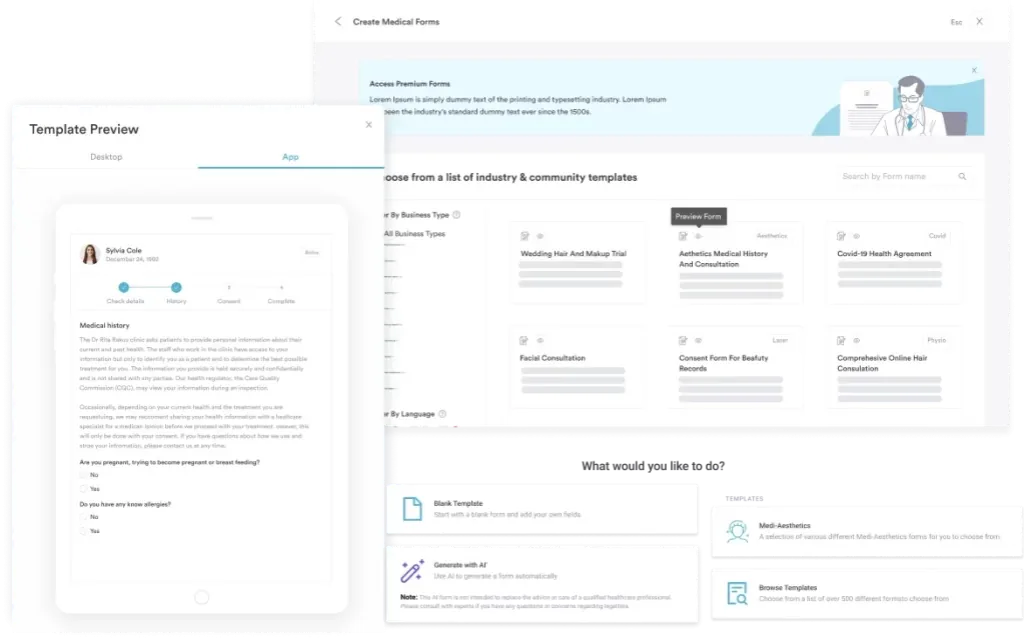
A structured patient booking form also improves the patient experience. Patients complete the online booking form once – on their own time, on any device – and the data syncs automatically into your system. In other words, there is no re-entry, no delays, and no lost forms.
A comprehensive patient booking form balances data capture with user experience. Asking for too much discourages bookings, and asking for too little leaves your team missing details when the patient arrives. The same core fields apply whether you call it an appointment request form or a booking form, and the table below outlines them:
Running this form inside a GP practice system keeps clinical documentation in one place.
The appointment form template above is a starting point. Customize it to match your practice’s workflows and regulatory context. Here are five steps to implement:
These forms overlap, so it helps to know where each one fits. A patient booking form captures just enough to schedule the visit and flag anything that would change it.
A patient intake form, sometimes called a medical intake form, goes deeper into clinical history and is usually completed once the appointment is confirmed. A patient registration form – often the new patient form a practice sends first – collects the demographic, insurance, and consent details that open a patient record.
In a connected system you collect each detail once. The booking form starts the record, the intake form adds clinical depth before the visit, and registration fills in the rest – all tied to one patient timeline instead of three separate documents your front desk has to reconcile.
Collecting patient information online triggers regulatory obligations depending on your location and patient base. It’s essential to understand which rules apply to your practice:
HIPAA (United States): Any form collecting Protected Health Information (PHI) must be encrypted in transit and at rest. Your practice management system must be HIPAA-compliant. Never store patient data in unencrypted spreadsheets or cloud storage. Pabau is HIPAA compliant and encrypts all patient data.
GDPR (EU and UK): If you collect data from patients in the EU or UK, you must obtain explicit consent before processing their personal data. The consent checkbox within your booking form must state what you will do with their data (e.g., “I consent to my appointment details being stored in my patient record”).
Patients have the right to access, correct, or delete their data upon request.
CQC (UK): Care Quality Commission guidance requires practices to maintain accurate, legible patient records. Digital forms satisfy this requirement and are preferred over handwritten entries. Ensure your system creates an audit trail showing when the form was completed and by whom.
In all cases. The form also shouldn’t ask for unnecessary data – collect only what you need to deliver safe, effective care.
Different practice types need different booking form fields, so it’s worth tailoring your patient booking form to match your practice’s focus:
Medical spas and aesthetic practices: Prioritize contraindication screening (pregnancy, active acne medication like isotretinoin, recent chemical peels. Add checkboxes for common injectable or laser contraindications. Include before-and-after photo consent.
Mental health and therapy practices: Collect detailed health history, current medications, previous diagnoses, and emergency contact information. Ask about current suicidality or safety concerns that may require immediate intervention before the first appointment.
Physical therapy and sports medicine: Ask about recent injury, surgery, or trauma. Request imaging results (X-rays, MRI) if available. Collect information about activity level and functional limitations to guide treatment planning, the same data a physical therapy EMR uses to track recovery.
Primary care and wellness practices: Collect comprehensive health history, current medications, and lifestyle factors (smoking, alcohol use, exercise). Ask about specific health goals for the appointment.
A well-designed patient booking form is the first step toward reducing no-shows. When you capture accurate contact information and appointment preferences, you can send timely reminders and confirmations. In a randomized trial published in The American Journal of Medicine, no-show rates fell from 23.1% with no reminder to 13.6-17.3% when patients received one.
To support this, include a field in your booking form asking how the patient prefers to be reminded (SMS, email, push notification). Then use this data to send reminders 24 hours and 2 hours before the appointment. Additionally, add a one-click confirmation button so patients can confirm their attendance without a phone call.
The biggest advantage of a digital patient booking form is automatic data integration. In practice, when a patient submits the form, the data flows directly into your EHR, CRM, and billing system – no re-entry needed. A HIPAA compliant CRM protects that data as it syncs across each connected system.
How this works: Your online booking page collects the form data. The practice management system receives it, creates or updates the patient record, schedules the appointment, and triggers automated workflows (reminder emails, payment requests, pre-visit instructions). All without staff intervention.
As a result, clinicians see the patient’s booking form data, health history, and contraindications immediately – before the patient even arrives. This enables better preparation and safer, more efficient visits.
A patient portal lets patients view, update, and manage their booking information and health records anytime. For example, after they complete the initial booking form, they can log back in to update their contact details, add new health information, or view appointment reminders – all without contacting the practice.
Portals also enable collecting patient feedback after visits. Send a post-appointment survey through the portal asking about their experience with the booking process, treatment quality, and likelihood to recommend. Use this feedback to refine your booking form and overall patient experience.
A well-designed patient booking form is the foundation of a streamlined practice operation. It captures the information you need to deliver safe, effective care, and it does so without burdening the patient or your staff. Digitizing your booking process eliminates handwritten forms, reduces data-entry errors, and enables the automated workflows that modern practices depend on to scale.
Download the free patient booking form template above, customize it to match your practice’s specialty and regulatory context, and integrate it into your practice management system. The result: faster bookings, fewer no-shows, better patient experience, and more time for clinicians to focus on care.
Book a demo with Pabau to see how our digital forms integrate directly with your patient records and billing workflows.

Want to streamline your entire appointment workflow? Pabau’s appointment management system integrates online booking, automated reminders, and no-show reduction in one platform.
Want to cut down routine phone calls? patient portal guide explains how a patient portal gives patients direct access to their health information.
Want patients to manage their own bookings? patient portal software comparison compares 9 platforms for communication, appointments, forms, and engagement.
A patient booking form is an online document that captures appointment details, patient contact information, medical history, and consent before a visit. It replaces paper intake sheets and integrates with your practice management system to streamline scheduling and patient record creation.
Required fields are: full name, email, phone number, date of birth, appointment date/time, and service type. Recommended fields include medical history, contraindications checklist, consent declaration, and emergency contact. Practice type determines additional fields – aesthetic practices add treatment-specific contraindications; mental health practices add detailed health history.
Only if built on a HIPAA-compliant platform. Your form and the practice management system receiving the data must encrypt patient information in transit and at rest. Never use unencrypted email or spreadsheets. Pabau is HIPAA compliant and encrypts all patient data collected through digital forms.
Yes. Include a consent statement acknowledging the patient understands treatment risks, side effects, and aftercare responsibilities. The consent should be treatment-specific. Work with your medical advisor to draft language appropriate to your practice. Digital forms capture e-signatures, which are legally binding in most jurisdictions.
Many practice management platforms, including Pabau, include unlimited digital forms in every subscription with no per-submission fees. Standalone form builders like Jotform or Typeform start free but add costs per submission or for higher tiers. For medical practices, a HIPAA-compliant system is non-negotiable and worth the investment.
Yes. Conditional logic lets you show different fields based on the service selected. For example, “if patient selects Botox, show contraindications for injectables; if patient selects physical therapy, show injury history fields.” This keeps the form short and relevant to each service type.
You can download the patient booking form PDF at the top of this page at no cost. It’s a ready-to-use starting point you can adapt, then rebuild inside your practice management system as a digital form so submissions flow straight into the patient record.
Yes. Hosting it as an online booking form lets patients fill it in from any device before they arrive, and the details sync into their record automatically – no phone calls and no paper to re-key.