7 Best Fresha alternatives for salons and med spas (2026)
Fresha alternatives fall into two camps, and the split decides your monthly bill...

Last Updated: Oct 6, 2026

Patient no-show rates average 5-30% depending on specialty, making proactive scheduling a direct revenue lever for every practice.
Each of the five scheduling methods suits a different practice type, and picking the wrong one inflates wait times and idle slots at once.
Automated multi-channel reminders, sent by SMS, email, and phone, are one of the highest-ROI scheduling interventions for cutting no-shows, per AMA guidance.
Practice management software like Pabau brings online booking, reminders, and waitlist management into one platform, cutting data-sync friction between separate tools.
A full calendar looks like a busy day. It doesn’t always mean a profitable one. Between no-shows, late cancellations, and appointments squeezed into the wrong slot length, practices lose 5% to 30% of their available appointments every week.
That estimate comes from the Medical Group Management Association, or MGMA. For a 10-provider practice running 400 appointments a week, even a 15% no-show rate means 60 empty slots a month. That’s tens of thousands of dollars in lost revenue, invisible until someone adds it up.
Fixing that starts with choosing the right scheduling model for your practice, then automating the specific points where no-shows happen. Get the model right, and every tactic below works harder. Get it wrong, and you end up fixing symptoms while the underlying problem stays exactly the same.
There is no single best method. It depends on your patient volume, your appointment mix, and how predictable you need each day to be. A high-volume primary care practice needs a different setup than a med spa running long procedure appointments.
Here’s how the five common approaches compare:
Urgency-based scheduling deserves attention in mixed-acuity settings, where clinical need decides who gets seen first. Most aesthetic and private practices won’t use this model for routine bookings. Understanding it still matters for triage protocols when urgent cases arrive.
For most private practices and med spas, a hybrid approach works best. Use time-slot scheduling for standard appointments and cluster blocks for procedure-heavy days. Add a reserved buffer at the end of each session for urgent or overrun cases.
The goal is a predictable flow that still leaves room to flex when something urgent comes in.
Phone-based booking creates a bottleneck that compounds across the day. Every call takes 3 to 7 minutes of staff time. It generates phone tag when patients don’t answer callbacks, and it risks booking errors when staff are juggling several tasks at once.
Online booking removes the bottleneck entirely. Patients self-select available slots any time, cutting inbound call volume for routine appointments. That frees front-desk staff to handle the scheduling needs that genuinely require a human touch.
Practices that offer patient self-booking consistently report a meaningful share of appointments now happen outside business hours. That turns what used to be a lost voicemail into a confirmed booking.
What to look for in an online scheduling tool:
Automated reminders are the highest-return scheduling fix available to most practices.
The American Medical Association’s scheduling guidance points to multi-channel automated reminders as one of the most effective ways to cut no-shows. That logic holds up. Patients forget and life gets in the way, so a well-timed nudge is often what gets them through the door.
Effective reminder sequences typically follow a three-touch pattern. A 72-hour reminder gives patients enough notice to cancel or reschedule without wasting a slot.
Twenty-four hours out, a second reminder catches patients who’ve lost track of tomorrow’s calendar. A same-day reminder, sent 2 to 4 hours before, catches last-minute conflicts. Each reminder should include the appointment time, location, any pre-appointment instructions, and a clear cancellation link or phone number.
SMS consistently outperforms email for response rates, though combining both channels covers patients with different communication preferences.
Phone call reminders add value for high-risk appointments, like new patients or complex procedures, but they’re too resource-intensive to run manually for every booking. Automated reminder workflows handle the sequencing without needing staff to lift a finger once the rule is set.
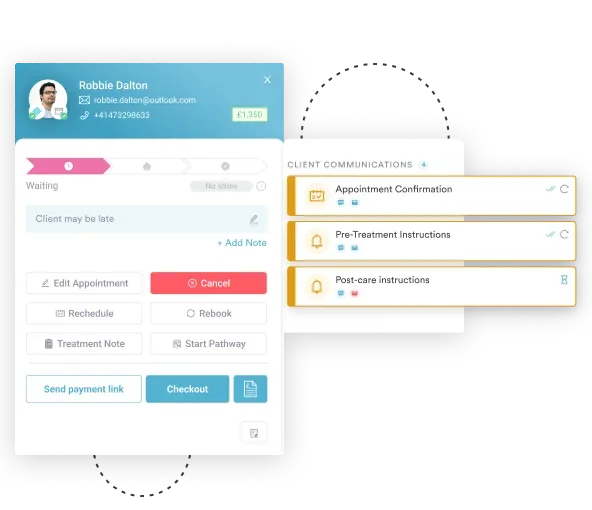
For sample scripts your team can adapt, this reminder template guide walks through wording that performs well across appointment types.
Set your cancellation window in the reminder itself. ‘Reply CANCEL to release your slot’ in a 72-hour SMS immediately activates your waitlist fill process. That beats waiting for a patient to call the next morning.
Reminders are necessary but not sufficient. Practices that consistently hold no-show rates below 8% don’t rely on reminders alone. They add a deposit requirement, a written cancellation policy, and a waitlist system that backfills vacated slots quickly. Each layer reinforces the others.
The no-show reduction playbook combines four levers:
No-show management is as much a patient-access issue as an administrative one. Practices with high no-show rates often have access barriers behind them, like long appointment waits or a confusing booking process. Proactive scheduling design can fix that directly.
A passive waitlist rarely fills slots, because calling around to check for cancellations puts too much friction on the patient. An active waitlist works differently. A waitlist only works if patients keep joining it, so pair it with strategies to get more patients in the door.
The system matches the next eligible patient the instant a slot opens. From there, your team fires off the notification with one click, or the patient can self-book straight from the alert.
Either way, a cancellation turns into a confirmed booking in minutes instead of staying empty until the next scheduled review.
Building a functional waitlist system involves three operational decisions:
This kind of waitlist backfill is especially valuable for aesthetic and med spa practices. Appointment slots run longer there, so each unfilled one costs more than a missed slot in high-volume primary care. It also improves the patient relationship. Clients feel prioritized when a preferred slot opens up and they hear about it first.
One of the most common scheduling errors is allocating a uniform slot length to all appointment types. A new patient consultation takes two to three times longer than a follow-up.
Complex procedures need setup and cleanup time that a routine injection doesn’t. Treating all appointments as equivalent creates compounding delays across the day.
Configuring your scheduling software to enforce slot lengths per appointment type prevents staff from accidentally double-booking or squeezing a 60-minute consultation into a 30-minute window.
The Pabau calendar applies appointment-type-specific durations automatically. That way, the system enforces the rules on its own, instead of relying on staff to remember them one by one.
A scheduling workflow scales when a new front-desk hire can follow it without pulling a manager aside every few minutes. That means writing the rules down instead of keeping them in one person’s head. The practice then runs the same way, whether the owner is in the building or not.
A scalable workflow needs four documented pieces:
Multi-location practices need this workflow layer even more. A centralized scheduling system applies consistent rules across sites, while still giving each location’s staff room to flex. Multi-location scheduling comes with its own configuration decisions worth planning for separately.
If you want the end-to-end view of how these pieces click together, this appointment management guide walks through the full workflow.
Scheduling optimization is not a one-time project. It’s an ongoing process of measuring, spotting bottlenecks, and adjusting. Practices that review their scheduling data monthly consistently outperform those that rely on anecdotal feedback from staff and patients.
The four KPIs that matter most:
Pabau is also building Insights Plus, a specialist add-on for deeper scheduling reports. It isn’t live yet.
For now, pull these four numbers from your existing scheduling reports each month, rather than waiting on a dashboard to do it for you. This med spa KPI guide connects these same numbers to overall practice growth, putting them in a revenue context you can act on.
None of this data means much if it lives apart from your clinical and financial records. When scheduling sits in a separate tool from your EHR and billing system, someone has to reconcile it by hand. That’s where errors and time lags creep in.
A platform where scheduling is native to the clinical record, like Pabau, keeps appointment data, patient records, and billing in sync without that manual step. The case for EHR integration is strongest for practices where appointment outcomes directly affect billing codes and treatment plans.
Technology handles the automation. Staff handle the exceptions, and that’s where most scheduling breakdowns happen.
A front-desk training checklist for scheduling should cover:
For practices with high staff turnover, put this training in a written protocol that every new hire works through during onboarding. A documented protocol gets a new front-desk hire to full competency faster, and it keeps things consistent no matter who’s on shift that day.
Most of the tactics above still work with separate tools, a booking widget here, a reminder service there, a spreadsheet tracking the waitlist. That patchwork gets harder to manage as your practice grows, and every extra tool is one more place for data to fall out of sync.
Pabau puts online booking, automated reminders, waitlist matching, and appointment-type scheduling rules in the same system as the calendar, the patient record, and billing. A cancellation that comes in through the waitlist shows up against the same record the front desk already uses. Nobody has to cross-check two systems to confirm a slot is open.
The result is fewer empty slots and less time spent reconciling calendars by hand. Your front desk gets to focus on patients, instead of chasing bookings across four different apps. Practice management software earns its place when the front desk and the clinician read the same record.

Online booking, automated reminders, waitlist management, and cancellation policies, all inside one platform. No third-party integrations required.

Patient scheduling inefficiency is almost always a systems problem. No-shows, overbooking, and idle slots are symptoms of a workflow that was never designed on purpose. The practices that get this right chose the right scheduling model for their patient mix. They automated the highest-friction touchpoints and built a workflow their team can run without them in the room.
Get the model and the automation right, and everything else, deposits, reminders, waitlist rules, turns into maintenance instead of firefighting. Book a demo to see how Pabau handles the specific scheduling setup your practice runs on.

Want to see how scheduling connects to the full patient journey? Patient scheduling software: what to look for covers the feature checklist that separates basic booking tools from full workflow solutions.
Running a medical practice and looking to tighten your operations further? Practice management software features that save time goes deeper on the tools that reduce administrative load across the whole practice.
Overbooking works only if you track your own no-show rate by provider and appointment type, and even then, it’s a blunt tool. A waitlist that fills a cancelled slot in real time gets you the same result. There’s no risk of double-booking a patient who shows up after all.
Most practices do best with a booking window between 24 hours and 60 days out, with same-day slots held back for urgent needs. Shorter windows tend to lower no-show rates, since patients book closer to when they actually need the visit.
Set a documented threshold, such as two no-shows in six months, before requiring a deposit or a phone confirmation for that patient’s future bookings. Flagging it on the patient record means front-desk staff apply the policy consistently, instead of making a judgment call every time.
Pricing usually scales with the number of providers and locations, rather than a flat per-practice fee. Get a quote based on your own team size instead of comparing sticker prices, since the bundled features vary a lot between vendors.
Yes. Blocking known time off, vacation, CME days, parental leave, directly in the calendar stops the front desk from booking into it by mistake. Most scheduling software supports recurring blocks, so the calendar reflects reality instead of relying on someone remembering to update it by hand.