HIPAA compliant texting: What you can send patients & how to communicate securely
HIPAA compliant texting is possible when a text holds no protected health inform...

Last Updated: Oct 16, 2026

OSHA Form 300A is the annual summary of work-related injuries and illnesses, posted from February 1 through April 30.
Employers with 11 or more employees at any point in the year must keep and post it, with narrow exemptions for small and low-hazard employers.
Three establishment tiers must also file their 300A data through OSHA’s Injury Tracking Application by March 2.
A company executive has to certify the totals, and a safety director or HR manager cannot sign in their place.
Keep each summary for five years, and hand employees the Form 300 log by the end of the next business day on request.
The federal Summary of Work-Related Injuries and Illnesses, ready to print and post. It carries the case totals, the days-away and job-transfer columns, the six illness category boxes, and the executive certification block.
Download templateOSHA Form 300A is the annual summary of work-related injuries and illnesses, and covered employers must post it from February 1 through April 30. Any employer with 11 or more employees at any point in the year has to keep one, unless a partial exemption applies.
The federal recordkeeping forms are free, so the compliance work is in the totals, the signature, and the dates. This guide covers who files, what belongs in each field, and how the posting window works.
It also sets out the three electronic submission tiers that most summaries of this rule collapse into one. You get the current penalty amounts too, plus the points where California diverges from federal OSHA.
Form 300A is the Summary of Work-Related Injuries and Illnesses. It rolls 12 months of Form 300 entries into totals. Those totals cover recordable cases, days away from work, job transfers, and the injury and illness categories. Employees read the same numbers when the form goes up on the wall.
The duty comes from 29 CFR Part 1904, the OSHA recordkeeping rule. Any employer required to keep injury records completes one summary per establishment, per year. The form is still required in a year with zero recordable cases. In that case the totals read zero and an executive signs it anyway.
OSHA recordkeeping runs on three forms with three separate jobs. Only one of them is ever posted where employees can read it.
Form 300 is the detail, Form 301 is the case file, and Form 300A is the number the public sees. Form 301 is OSHA’s own incident report, and many practices capture the same details on an internal incident report form first. Whichever you use, the log and the summary have to agree.
Coverage turns on two questions: how many people worked at the establishment, and which industry it sits in.
Being exempt from the routine paperwork is not the same as being outside the rule. OSHA can also ask a partially exempt employer to keep records for a survey year. Details on the boundaries sit in OSHA’s Injury Tracking Application FAQs.
Every field on the summary is pulled from the Form 300 log or from payroll. Nothing on it is an estimate, which is why inspectors reconcile it line by line.
The certification is the field most often filled in wrongly. Under 29 CFR 1904.32 the signer must be the company owner or an officer of the corporation. The highest-ranking official at the establishment, or that person’s supervisor, also qualifies. A safety director or HR administrator does not.
The work is a reconciliation, not a data-entry job. Run it in this order and the totals hold up under review.
If you want an incidence rate for benchmarking, divide total recordable cases by total hours worked, then multiply by 200,000. That standardizes the figure to 100 full-time employees, so you can compare your site against published industry rates.
The window never moves. Every covered establishment posts its summary across the same three months, in a spot employees pass every day.
The posting dates are the easy part. The two that trip practices up are the certification deadline underneath February 1, and the filing deadline a month later.
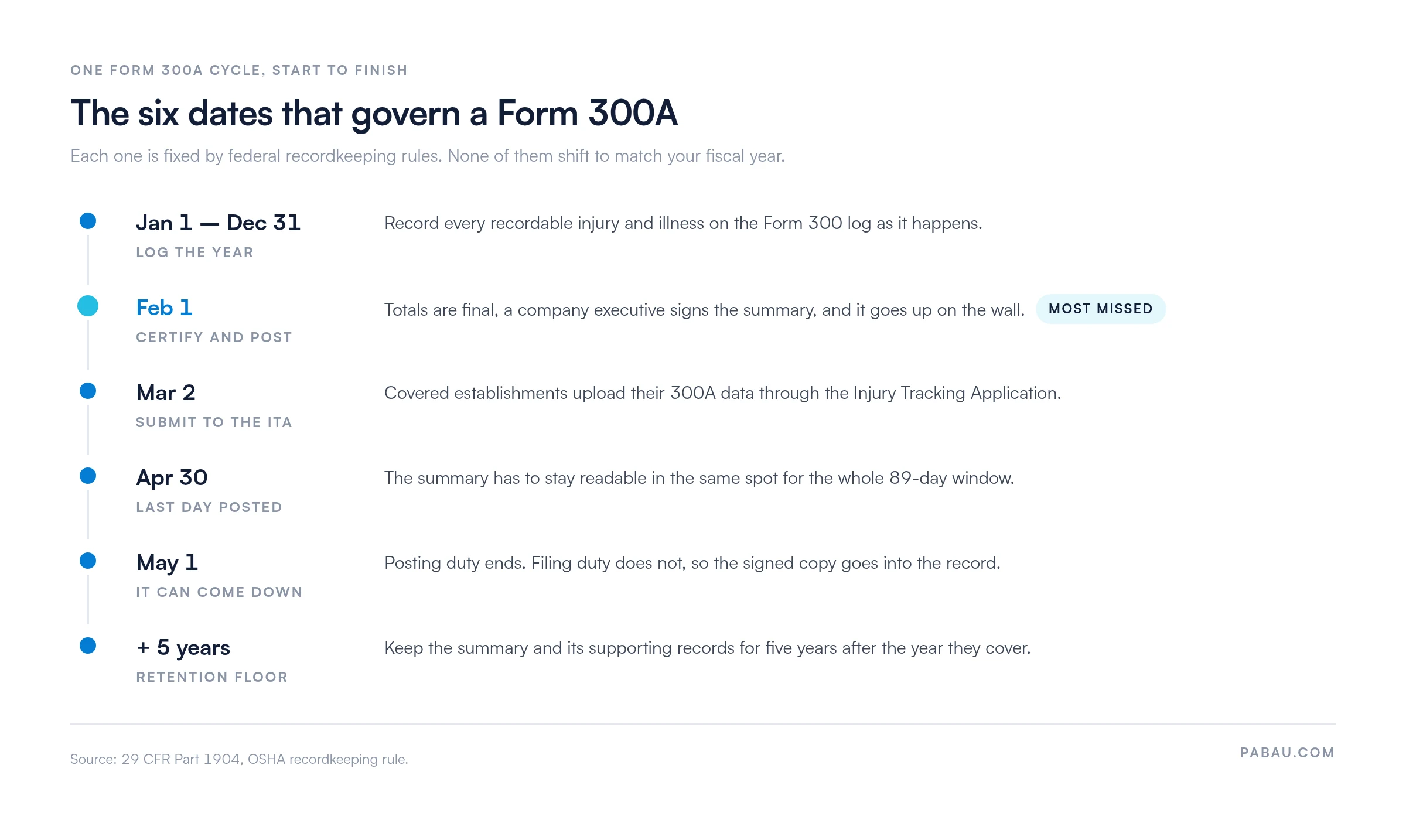
Inspectors check posting during and just after the window. A summary that went up on February 10 is a late posting, even though April 30 has not passed yet.
Posting the summary and filing it with OSHA are two separate duties. Three establishment tiers have to file electronically, and they do not all send the same forms.
Under 29 CFR 1904.33 you keep the summary, the Form 300 log, and the Form 301 reports for five years. The clock starts at the end of the year they cover. A 2026 summary is therefore on file through December 31, 2031.
Two things extend that clock. Records tied to an open citation or an ongoing OSHA investigation stay until the matter closes. Injury records also follow their own schedule, separate from the medical record retention rules that govern patient charts.
Access matters as much as retention. Under 29 CFR 1904.35 an employee, a former employee, or their representative can ask for the Form 300 log or their own Form 301. You have to provide it by the end of the next business day.
Five years of paper in a back office makes that hard. Practices that keep the summaries in audit-ready compliance software can pull any year on request instead.
Recordkeeping citations carry the same maximums as any other OSHA violation. The figures below are the 2026 amounts, unchanged from January 2025.
Penalty maximums adjust each January for inflation, so confirm the current figures on OSHA’s penalty page before you cite them in a policy document.
The same six findings recur across recordkeeping citations. Each one is cheap to prevent and awkward to fix after the fact. Practices that run an inspection checklist as a self-audit catch these in-house, well before a compliance officer arrives.
California runs its own state plan, so federal OSHA rules reach California employers through Cal/OSHA. The summary itself is the same form, but four practical differences are worth knowing.
Washington, Oregon, and the other state-plan jurisdictions can also go beyond the federal floor, so verify locally if you operate outside federal OSHA states. Recordkeeping rarely travels alone, either. The inspector who asks for your 300A will usually ask for your written OSHA emergency action plan in the same visit.
In most practices the injury record lives in three places at once. There is a paper incident form in a drawer, a spreadsheet someone maintains, and a folder of scanned summaries on a shared drive. That works until an employee asks for the log and you have one business day to produce it.
Practice management software like Pabau keeps the whole chain in one system. Staff log an incident through a digital form, the entry is timestamped and attributed, and the record sits alongside the rest of your compliance documentation. Retention is a setting rather than a calendar reminder, so a 2026 summary is still findable in 2031.
That changes what February looks like. Instead of rebuilding the year from a drawer, you export the log, reconcile the totals, and hand the executive a summary to sign. The five-year file stays searchable, so a records request takes minutes rather than an afternoon.

Log incidents through digital forms, keep every entry timestamped and attributed, and retrieve any year’s summary in seconds. Your team spends February reconciling totals instead of rebuilding the log from paper.

Form 300A is a short form with a long tail. The sheet takes an hour. The totals on it depend on 12 months of honest logging, and the signature depends on someone with authority reading it first.
So the useful work happens in January, not in February. Close the log, reconcile the counts, confirm which ITA tier your site falls in, and book the executive’s time before the deadline arrives. Do that and posting is a five-minute task.
The trade-off worth remembering is storage. Five years of retention is easy to promise and hard to honor on paper, and the next-business-day access rule is where that shows. Book a demo to see how Pabau keeps your injury log, incident reports, and signed summaries retrievable for the full retention period.

Want to know what a reviewer actually looks at? Medical chart audit walks through how records get sampled and scored during a compliance review.
Planning for the incident itself, not just the paperwork? Crisis management plan gives you an escalation chain and a staff communication script to fill in.
Form 300 is the running log where you add a line for every recordable case as it happens. Form 300A is the annual summary of those totals, and it is the only one of the two that gets posted.
The signer has to be the company owner, an officer of the corporation, the highest-ranking official at the establishment, or that person’s supervisor. A safety director or HR administrator cannot certify the summary in their place.
Employers with 10 or fewer employees are generally exempt from routine recordkeeping, so there is usually nothing to post. They must still report a fatality, an inpatient hospitalization, an amputation, or an eye loss to OSHA.
Late posting is a recordkeeping violation and can be cited even though the window has not closed. Post the summary as soon as you notice, and record when it went up and why it was late.
California employers use the same federal Form 300A, but they post and file it under Cal/OSHA rather than federal OSHA. Cal/OSHA penalties are generally higher, so confirm the current instructions with the state first.
It depends on your industry as well as your headcount. Establishments with 100 or more employees in the Appendix B high-hazard industries submit Forms 300, 300A, and 301. Sites with 250 or more employees in any covered industry submit Form 300A only. The same is true for sites with 20 to 249 employees in the Appendix A industries. The filing deadline is March 2, and you still post a copy on the wall.