
 Despina Petrushevska

OT SOAP note sample: Free template and worked examples
Download your free OT SOAP note sample A four-page form with an identifying head...

1
Last Updated: Nov 5, 2026
Free PDF 1 page, print-ready Clinician-reviewed
A medical record form is the standardized document a practice uses to record a patient's history, medications, examination findings and treatment plan. It gives every clinician the same structure for each visit, and it leaves the practice a clear record if questions come up later. This guide covers what the form should contain and how it differs from history, request and release forms. It also explains where HIPAA sets the rules for releasing records. The free printable medical record form on this page is a one-page clinician notes sheet you can adapt to your practice.
A one-page clinician documentation sheet with a date field and spaces for diagnosis and symptoms, medical and surgical history, and procedures and test results. Further sections record family history, medications, allergies and lifestyle, examination findings, and the impression and plan.
Start from scratch, or upload this PDF or any form you already use, and Pabau's AI Form rebuilds it with tick boxes, text fields and a signature. Attach it to the treatment once, and every patient gets it on time.
AI Form rebuilds the consent, history and aftercare forms you already use. You review each one, then publish.
Patients complete forms on their phone before they arrive, so the front desk stops retyping paper.
Every signed form is versioned and attached to the treatment record, ready when you need it.
Set how long a consent stays valid. Returning patients skip forms they have already signed.
Supports HIPAA and GDPR compliance AES-256 encryption 4.8 on G2 4.7 on Capterra Trusted by 4,000+ practices worldwide

A medical record form is a standardized document for recording a patient’s history, medications, examination findings and plan.
A complete record usually holds demographics, history, medications, allergies, family and social history, and a signature.
The free template focuses on clinical sections, so add demographics, consent and a signature block before using it as a full record.
A HIPAA release needs a description of the information, the recipient, the purpose, an expiry, and a dated patient signature.
Pabau’s digital forms keep patient-completed forms and clinical notes in the same patient record.
A medical record form is a structured document that holds the information a clinician needs before or during care. It sits at the center of the clinical file, linking the patient’s history, the clinician’s findings and the plan for treatment.
Practices typically rely on three related documents. A history form captures what the patient brings to the first visit. A records request form asks another provider for existing notes. A release form authorizes a provider to share records with a third party. Each does a different job, and mixing them up causes delays.
Most practices need four core versions of this document. Each one serves a different point in the patient journey.
A medical history form is the clinical core of the file. Its job is to give the clinician enough context to make safe decisions on day one.
Keep the wording plain. A patient who reads “previous heart problems” will answer more accurately than one who meets a clinical term they don’t recognize. When patients fill in their own history at intake, a medical history questionnaire gives them the questions in that plain form.
A records request form comes from the practice that needs the file. That’s usually when a new patient transfers in or a specialist needs prior notes. The request is only as useful as the details on it, so incomplete requests are the most common cause of delay.
In the United States, the HHS Office for Civil Rights enforces the HIPAA Privacy Rule, which governs when a provider may disclose protected health information. A release form is the patient’s written authorization for that disclosure. Under 45 CFR 164.508, it must contain specific elements to be valid.
A valid authorization names the patient, describes the information to be disclosed, and identifies the recipient. It also states the purpose and an expiry date or event, and carries the patient’s dated signature. An incomplete form may not be valid, so check every element before filing. A ready-made HIPAA authorization form lays these elements out for the patient to complete.
The free template on this page is a one-page sheet for the clinician’s notes. It gives clinicians structured spaces for diagnosis and symptoms, medical and surgical history, procedures and results, and family history. Further spaces cover medications, allergies and lifestyle, examination findings, and an impression and plan.
It has no demographics section, consent or signature block, so add those before you use it as a complete record. The panel below sets out what the sheet holds and what your practice adds.
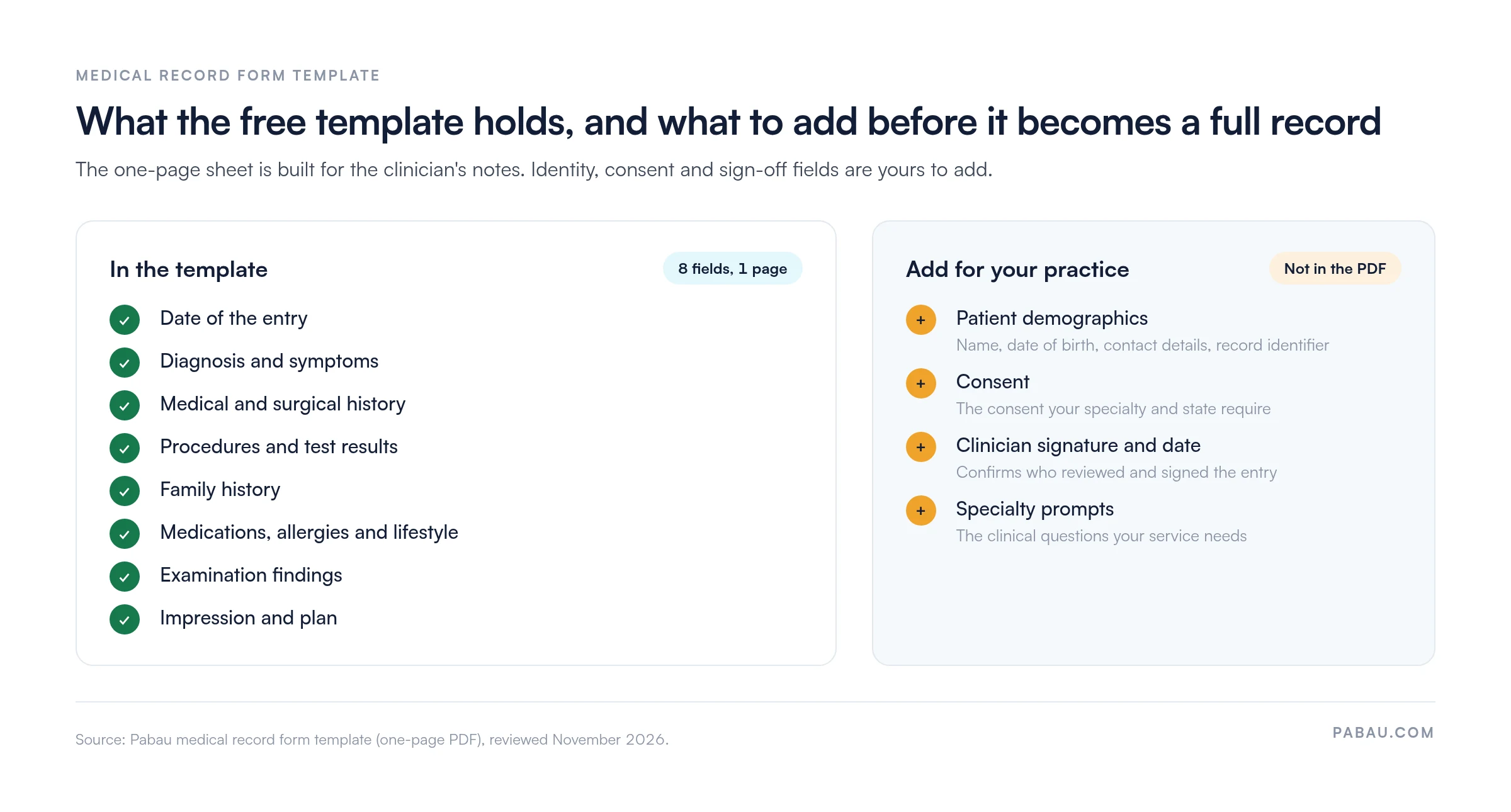
Before using it, review the sections against your specialty and local rules. A physical therapy practice and a dermatology practice will need different clinical prompts, and the template should reflect that. Where the exam itself needs more room, pair the sheet with a medical examination form.
The clinician completes the form during or straight after the visit. The steps below keep the entry accurate and easy for the next clinician to follow.
For follow-up visits, record changes as dated clinical progress notes rather than rewriting the whole form.
Electronic forms reduce transcription errors and make records easier to search. Paper forms remain common in some settings, but they add scanning time and make it harder to flag missing fields. Software for medical records management closes most of that difference by storing each form against the patient.
HIPAA requires covered entities to retain documentation of policies and authorizations for six years from the date of creation or last effective date. State law often sets longer periods for medical records themselves, so the federal minimum is rarely the whole answer.
Minors and mental health records often carry extended retention rules. Confirm the requirement for your state and specialty with a local attorney or your medical board before setting a retention schedule. Compliance management software can then track the schedule for you.
Most practices still print forms like this one, fill them in by hand, then scan them into a folder. The history the patient gave at intake often sits in a different place from the clinician’s notes.
Pabau, the practice management platform we build, turns both into digital forms. Patients complete intake questionnaires on a tablet or through the Client Portal before they arrive. Clinicians then complete their notes in the same patient record, so staff don’t re-key data.
Our patient intake software also captures e-signatures on consent forms at the point of completion. Pabau doesn’t replace your own compliance review, so confirm your signature and retention workflows against local rules.

Pabau’s digital forms send intake questionnaires before the visit and store clinical notes in the patient record. Your team stops scanning and re-keying paper forms.

A medical record form only works when everyone in the practice fills it in the same way. Use the free sheet for the clinical side of the visit, and add identity, consent and sign-off fields before it goes into the file.
Keep the release form separate, because HIPAA judges it on its own elements. If your forms still travel from paper to scanner to folder, that step is where errors creep in. Book a demo to see how Pabau keeps intake forms and clinical notes in one patient record.

Moving intake online? Patient intake software explains how patients complete forms before they arrive.
Handling records requests? Medical records management covers how patient files are kept and retrieved.
Need the patient-completed side? Patient history form template gives patients a structured history form to fill in at intake.
Screening before a visit? Medical questionnaire form collects the health questions to review before treatment.
Sharing records with another provider? Medical release form is the patient’s written permission to release their records.
A medical record form is a standardized document for recording a patient’s history, medications, allergies, examination findings and plan. It gives clinicians a consistent record to work from.
Yes, provided the completed form is stored securely and signed where required. Confirm the format meets your state and HIPAA obligations before adopting it.
It should include demographics, history, medications, allergies, family and social history, and a signature block. Add specialty-specific prompts where your clinical work needs them.
Yes, the template on this page is free to download. It is a one-page clinician notes sheet, so add demographics, consent and signature fields before using it as a full record.