Medicare charting cheat sheet
A Medicare charting cheat sheet is a one-page reference that lists what Medicare...

1
Last Updated: Oct 21, 2026

OptiMantra sells one plan instead of named tiers, and $99 per month covers your first practitioner
Extra seats cost $49 per practitioner and $25 per clinical staff member, while clerical logins are free
Telehealth, online booking, charting, labs, and the insurance billing module all sit in the base plan
Add-ons for eRx, faxing, and texting can take a solo prescriber from $99 to $237 per month
Onboarding, training, and data migration are free, and there is no annual contract to sign
OptiMantra cost starts at $99 per month for your first practitioner, and the company publishes that rate openly. That makes it easier to price than most electronic medical record (EMR) systems built for integrative medicine. There is one plan, no named tiers, and no features held back for bigger accounts.
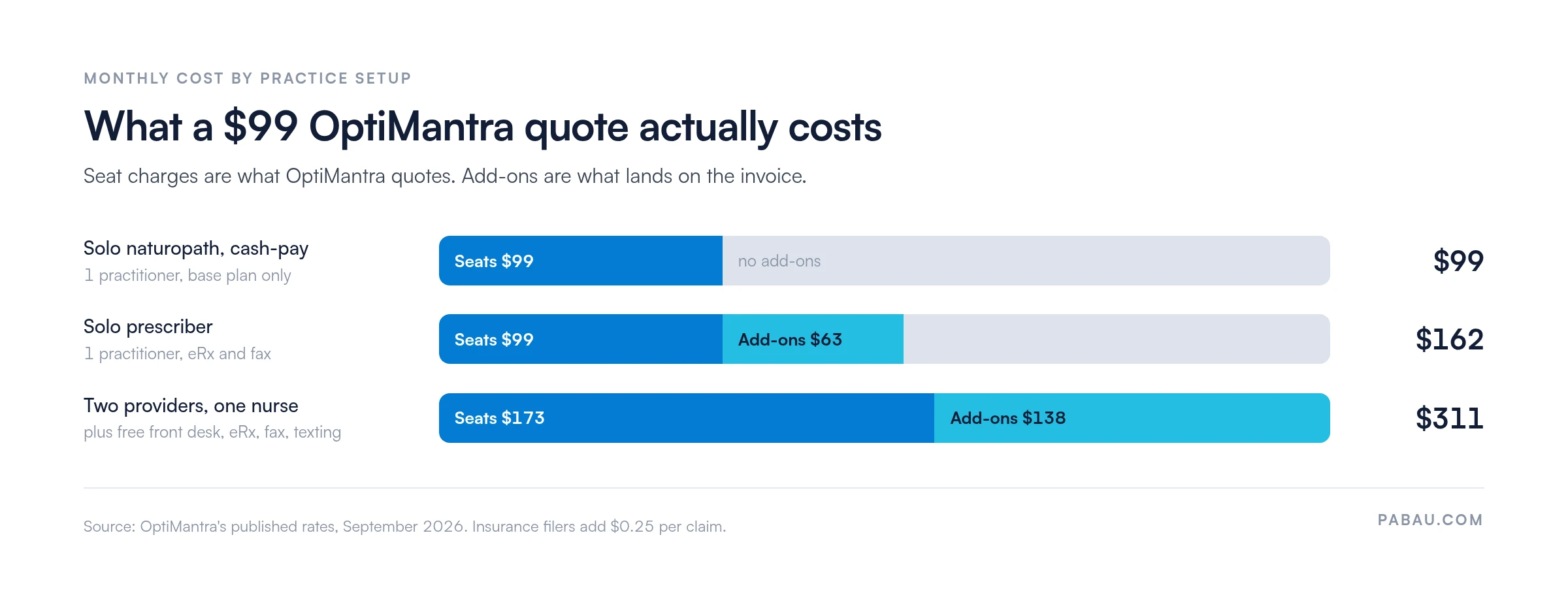
What moves the number is seats and add-ons. Extra practitioners, clinical staff logins, e-prescribing, faxing, and texting all bill separately, so a $99 quote can land as a $311 invoice. Getting that math right before you sign matters, because switching systems twice in a year costs more than any subscription.
The totals below come from OptiMantra’s own published rates.
OptiMantra sells a single subscription. The first practitioner costs $99 per month, and you grow it by adding seats instead of upgrading a plan.
OptiMantra publishes each of these rates itself, so you can check the base cost before a sales call.
Free clerical seats matter more than they look. A two-provider practice with two receptionists pays for two seats, not four. Most per-user systems bill the opposite way.
Three discounts sit against those rates. Students get 50%, part-time and community practices get 30%, and nurse practitioners and physician assistants get 20%.
Only one discount applies per account, and none of them apply to add-ons. Practice-wide discounts cover full-time providers and clinical support seats only.
There is also no annual contract to sign. OptiMantra bills month to month and asks for 30 days’ cancellation notice. A practice that outgrows the platform is not locked in for a year.
The base plan carries the full practice management and record-keeping feature set, not a starter slice of it. Each item in the list below is in the $99, as published on OptiMantra’s own pricing page.
Telehealth deserves a callout, because it is widely assumed to be a paid extra. OptiMantra’s own FAQ confirms built-in, HIPAA-compliant video visits with no third-party software or downloads. Group sessions run through a Zoom integration. It is in the base price for every seat.
Practice management and the medical record arrive as one line item here. That is why an OptiMantra quote looks low next to a separate record system plus a scheduling tool. Two subscriptions become one, and the savings show up before you compare a single feature.
Six features sit outside the base subscription, and five of them carry a published price. They are the reason two practices on the same platform can see very different invoices.
Stack those prices against the seat rates and the shape of the bill changes. A solo prescriber who needs eRx and a fax number pays $63 in add-ons on a $99 base. A two-provider practice that also wants two-way texting pays $138 on top of $173 in seats.
Buying that messaging capability as a standalone platform is the other route. Podium publishes no plan prices on its own site, so our Podium cost breakdown works from independently reported figures.
The insurance billing module itself belongs to the base platform. What you pay for is submission, at 25 cents each, with no fee for resubmissions. A practice filing 200 claims a month adds $50 to its bill.
Several line items that normally pad an EMR quote are absent here. OptiMantra’s FAQ states that data migration is free, and that onboarding and training sessions are included. Compare that with eClinicalWorks pricing, which bills implementation and staff training separately from the subscription.
Its Office of the National Coordinator (ONC) disclosure adds that certified functionality carries no separate access fee.
One caveat sits in that same disclosure. Electronic prescribing routes through MDToolbox, which may require its own subscription alongside the $38 license. Ask about that before you budget for eRx.
Compliance is not billed as an extra either. HHS HIPAA guidance requires specific safeguards from any system holding protected health information.
OptiMantra lists HIPAA and Canadian PHIPA compliance in the base plan. You sign the business associate agreement when you activate the subscription.
Free migration is not the same as fast migration. OptiMantra notes that transfers take longer with larger datasets and older platforms, so book the work well before your go-live date.
Yes, OptiMantra has a free trial, and you can test all of that before you commit. It runs for 15 days with full access to the base platform and no credit card required. Add-ons are the only part it leaves out.
It is not a throwaway sandbox either. Whatever you configure during the trial stays put when you subscribe. You activate the paid account from inside it, under Settings, Business, then OptiMantra Subscription. OptiMantra vets trial requests by hand, so one sent outside working hours can sit for a while.
That is a longer evaluation window than most specialty systems hand you. Spend it building the charting templates you will live in daily, not clicking through demo data.
Those templates are where OptiMantra earns its price. It is built for integrative, naturopathic, and functional medicine practices. Its edge is the depth of its clinical templates rather than the number of specialties it serves.
Charting is designed around the long consultation, with questionnaires, dot phrases, and dispensing for custom compounds, IV therapy, and tinctures.
Around that record sits the operational layer. Online booking, automated reminders, patient portal features for secure messaging and intake, superbills, memberships, and packages all come in the base plan. Electronic lab ordering runs through Labcorp, Quest, Access, Rupa, and hundreds of smaller panels.
The pattern in the add-on list is worth naming. Every paid extra is a communication or prescribing feature. So the base plan is complete for a cash-pay practice and incomplete for a prescribing one.
Which side of that line you sit on decides your budget more than headcount does.
For a cash-pay solo practice, yes. $99 with telehealth, labs, and charting included sits at the affordable end of specialty pricing. OptiMantra holds a 4.8/5 rating from 87 reviews on Capterra, which is strong for a niche platform.
Reviewers return to the same strength. Practices that started on a generic record system highlight how much time pre-built naturopathic and functional medicine templates save per consultation. Support response times draw steady praise too.
The caveat is the add-on list. A solo prescriber who wants eRx, a fax number, and two-way texting pays $237 a month rather than $99. That is still competitive, but it is roughly 2.4 times the headline rate.
Integration breadth is the other limit reviewers raise against OptiMantra. It matters most if you depend on a specific lab, payment, or marketing tool that sits outside its list.
Set that against your own setup and the numbers get concrete. A solo naturopath and a two-provider functional medicine practice see very different totals.
The three build-outs below are priced from OptiMantra’s published rates, with no estimated fees in them.
Insurance filers add 25 cents per claim on top. At 200 claims a month, the two-provider example lands at $361. None of the three carries a setup fee, because OptiMantra does not charge for onboarding or migration.
Certification is worth a last check if you report to quality programs. OptiMantra is certified for ambulatory settings under the ONC Health IT Certification Program. It appears on the Certified Health IT Product List as version 2026.02.01. Its disclosure confirms those certified capabilities are part of the standard subscription.
Run the totals against your own headcount before you sit through a demo. Five line items decide whether $99 stays anywhere near $99.
The mistake that costs most is pricing the trial instead of the subscription. The 15-day trial covers the base platform only. A prescriber who tests it without eRx or texting is trying a $99 product and buying a $237 one. Add the extras you expect to need before the trial ends.
If that total lands higher than you expected, widen the search. OptiMantra’s narrow focus is its strongest selling point and its clearest limit.
If you need broader integrations, more practice types, or a lower entry price, the platforms below cover overlapping ground. Our side-by-side vendor comparisons go into more detail on several of them.
Every rate above comes from the vendor’s own site, checked in September 2026. Two caveats are easy to miss. Jane App publishes in Canadian dollars, and its Balance plan caps you at 20 appointments a month. CharmHealth’s free plan stops at 50 encounters and 1,000 patients.
The two closest matches on price deserve a longer look. Our breakdowns of SimplePractice pricing and Jane App pricing walk through how each one charges for extra practitioners. That is where a $49 seat starts to matter.
If the add-on model or the integration limits give you pause, practice management software like Pabau covers similar ground with a different shape. Scheduling, clinical records, billing, the patient portal, and marketing all sit in one subscription.
Pabau starts at $104 per month for a single user, and every plan includes full access to the platform.
Plans differ by team size rather than by feature, so telehealth, forms, payments, and reporting are never held back for larger accounts. Two optional add-ons, Marketing Plus and Care Plus, sit on top for practices that want to do more in those areas.
Practices evaluating tools for functional and naturopathic care usually focus on intake and documentation. Pabau’s digital intake forms, automated recall workflows, and customizable treatment notes are built for the long consultation formats those practices run on.
Pabau holds a 4.7/5 rating from 651 verified reviews on Capterra, where reviewers highlight the breadth of the feature set and the onboarding support.

See how Pabau handles scheduling, clinical notes, billing, and patient engagement in one platform built for multi-service clinics.

The judgment here is straightforward. If your practice is cash-pay and specialty-deep, $99 is one of the better values in integrative medicine software. Free onboarding and migration make the switch cheap too. If you prescribe, price it at $162 or $237 and decide against that number instead.
Where the model stops fitting is breadth. Practices running several service lines, retail, memberships, and marketing from one system tend to want wider coverage. A specialty record cannot give it, so they end up paying for a second tool. That is the trade worth sitting with before you sign.
If that sounds like your practice, book a demo and we will price Pabau against your own patient journey, seat by seat.

Wondering how OptiMantra compares with the wider market? Pabau competitors and alternatives lines up 15 platforms with their pricing models side by side.
Looking at Jane App as the integrative alternative? Best Jane App alternatives covers seven platforms that wellness practices shortlist against it.
Need a cheaper starting point than $99? Carepatron pricing breaks down a free-tier option and what the paid plans add.
Pricing a general EMR rather than a specialty one? DrChrono pricing walks through its plans, its monthly totals, and the fees that catch practices out.
A solo cash-pay practice pays $1,188 a year at the $99 monthly rate. A solo prescriber with eRx and a fax number pays $1,944, and the two-provider example above runs $3,732. OptiMantra bills month to month, so none of those figures is locked in by a contract.
For a group practice, yes. SimplePractice charges $99 plus $74 per extra practitioner, while OptiMantra charges $99 plus $49. A solo practice is the other way round, since SimplePractice’s Starter plan opens at $49 a month.
Yes, Canadian practices are covered. OptiMantra lists compliance with PHIPA, Ontario’s health privacy law, alongside HIPAA in its base plan. Prices are published in US dollars, so budget for the exchange rate if you bill in Canadian dollars.
Neither. OptiMantra prices by seat, so your bill does not move with patient volume or appointment count. The only usage-based charge is 25 cents per insurance claim submitted.
No. AI charting is the one add-on listed as price on request, so you have to ask for a quote. Get the figure in writing before you sign, because it is the only line you cannot budget from the published rates.