Physician credentialing checklist
A physician credentialing checklist lists every license, certificate, verificati...

Last Updated: Oct 23, 2026
A patient history form is a structured questionnaire that captures a patient’s medical background before their first consultation.
It records past conditions, current medications, allergies, family history, and lifestyle factors in one document. Clinicians use it to plan diagnosis, treatment, and ongoing care, so a missing answer can change what the next clinician decides.
Collecting history through ad-hoc questions at the front desk means details get missed or asked again at every visit. A standard form shortens the first consultation and gives every practitioner the same baseline. The free template below covers seven sections, and this guide explains how to use and maintain each one.
A printable form with sections for the chief complaint, past medical and surgical history, family history, medications, allergies, and social history. It closes with space for the clinician’s review and signature.
Download template
A patient history form records past conditions, medications, allergies, family and social history in one place.
Chief complaint should be recorded in the patient’s own words, not paraphrased by staff.
Medication lists should be reconciled against current prescriptions at every review, with each allergy’s reaction noted.
Digital forms can write answers directly to the patient record, which removes manual re-keying.
Forms that store health data electronically must meet HIPAA requirements in the US.
A patient history form is a clinical document that captures a patient’s health background before diagnosis or treatment. It covers the presenting problem, past medical and surgical history, medications, allergies, and the social and family context that shapes risk.
It often travels with a patient intake form, which collects the administrative side: contact details, insurance, and emergency contacts. The history form stays focused on clinical facts.
The form matters because clinicians cannot make safe decisions on incomplete information. A missed allergy or an unrecorded anticoagulant can change a treatment plan entirely. A documented history also supports informed consent and defensible clinical records.
The template works best when it’s completed before the consultation, so the clinician arrives with the history already in view. Follow these five steps to use it in practice:
Staff shouldn’t treat the form as a tick-box exercise. Each answer is a prompt for a clinical conversation, and the clinician should follow up on any answer that is unclear or left blank.
Private GPs and primary care practices use it to build a complete baseline before a first consultation. Physical therapy and chiropractic practices use it to record injury history and prior treatment. Dermatology practices and med spas use it to screen for contraindications before procedures.
Mental health practices use a version of the form to capture background, prior diagnoses, and medication history before assessment. Each setting adapts the questions, but the core structure stays the same.
A standard form gives every practitioner the same starting point, which reduces the risk of information getting lost between staff members. It also shortens the first appointment, because the clinician spends the time on assessment rather than data gathering.
Consistent records also support audit readiness. When a regulator or insurer asks how a clinical decision was reached, a dated, signed history shows what the clinician knew at the time.
Audit your current intake form against the sections in this template. Mark every section you collect only verbally, then decide whether it belongs on the written form.
A complete patient history form covers the reason for the visit, the medical background, and the lifestyle context. Most templates group these into the sections below, and each one answers a specific clinical question.
The chief complaint is the patient’s main reason for attending, recorded in their own words. Staff should avoid paraphrasing it, because the exact wording often carries clinical clues.
The history of present illness expands on that complaint. It records when the problem started, how it has changed, and what makes it better or worse.
These sections establish the background that shapes current risk. Ask about dates and outcomes where possible. A prior surgery or a family history of heart disease changes how a clinician reads present symptoms.
Where hereditary risk drives the care plan, a dedicated family medical history form records conditions across relatives in more detail than one section can.
Ask for every prescription, over-the-counter medicine, and supplement, with the dose and how often it’s taken. Patients often leave out supplements unless the form asks for them by name.
For each allergy, record the reaction as well as the trigger, because a rash and anaphylaxis call for different precautions. Patients on several medicines may need a full medication reconciliation form alongside the history.
Smoking, alcohol use, occupation, and activity levels all affect healing, drug choice, and treatment risk. Keep these questions neutral and factual, so patients answer honestly rather than defensively.
Taking a comprehensive patient history means combining the written form with a structured conversation. The form captures the facts, and the interview clarifies them.
The SAMPLE history is a mnemonic used in emergency and clinical training to structure the interview. It stands for Signs and Symptoms, Allergies, Medications, Pertinent Past History, Last Oral Intake, and Events leading up to the presentation.
When the interview leads into a physical examination, the findings belong on a history and physical form. That keeps the patient’s account and the clinician’s findings in one signed record.
A new patient history form needs to reflect the clinical setting it serves. A general practice needs broad coverage, while a med spa needs detailed contraindication screening before injectables or energy devices.
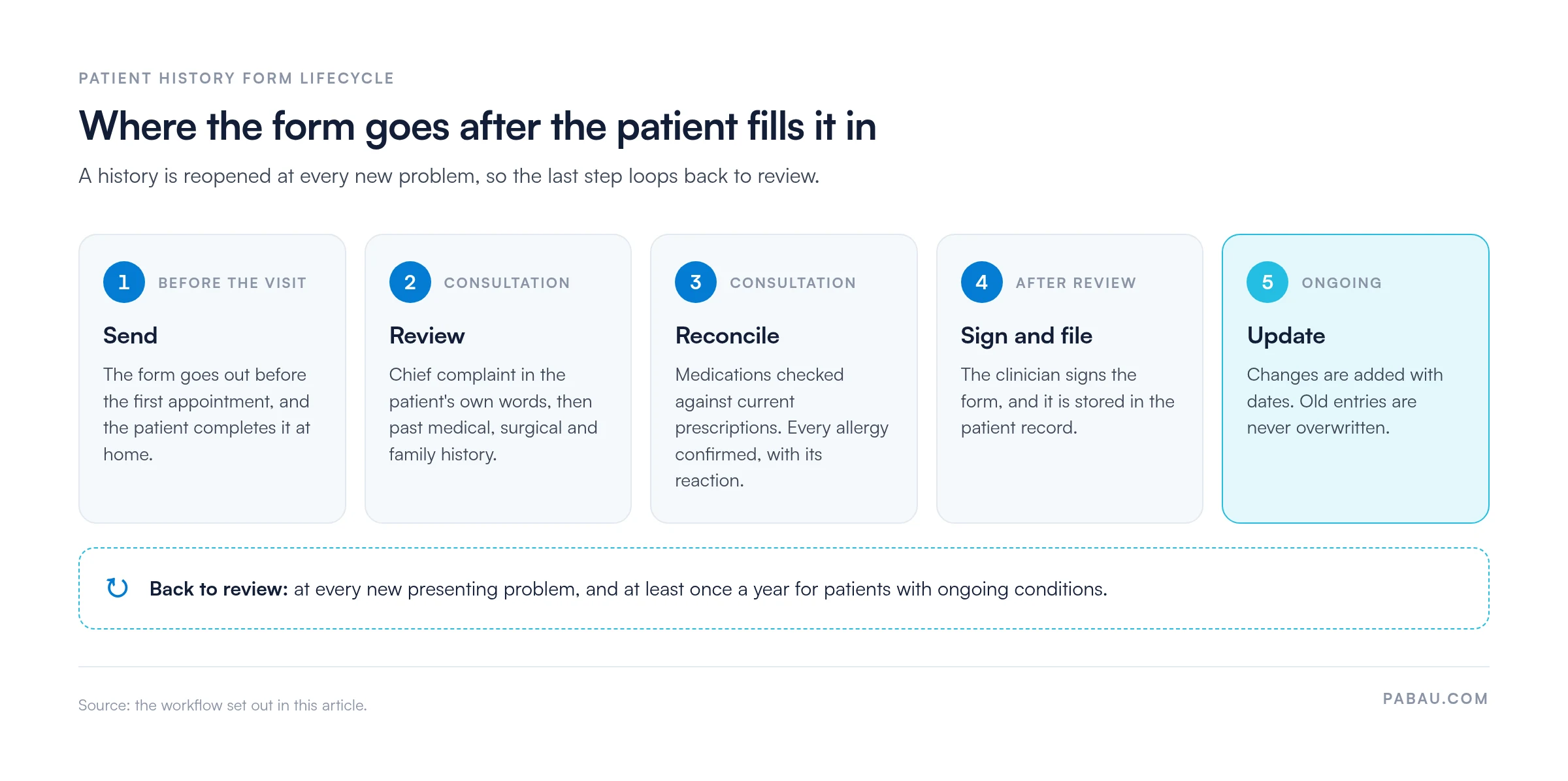
A patient history is a living record that keeps growing after the first visit. Review it at every new presenting problem, and at least annually for patients with ongoing conditions.
Clinicians should note changes with dates rather than overwriting old entries. This keeps the clinical timeline intact for future reviews, and the cycle below shows how the form loops back after its first sign-off.
Paper forms are simple to start with, but they need manual transcription into the clinical record. That adds time and creates room for error. Forms built into patient intake software remove that step, because answers write directly to the patient file.
Under HIPAA, patient history data held by a US practice is protected health information, known as PHI. Once it’s stored or sent digitally, it counts as electronic PHI. US practices should review the HHS HIPAA Security Rule guidance before moving forms online.
Put three safeguards in place before the first digital form goes out:
New patients should also receive your notice of privacy practices at their first visit. It explains how the practice uses and shares the history they’ve just provided.
On paper, the history form gets handed over on a clipboard in the waiting room. Someone then types the answers into the patient file, and any illegible line becomes a phone call.
Pabau, the practice management platform we build, sends a digital history form before each appointment. Answers land in the patient’s file under Client records, so staff can review them before the consultation starts.
Practitioners using Pabau GO, our iOS app for practitioners, see the care pathway as a checklist of pre-appointment steps. Patients complete medical forms and sign consents ahead of time, so the clinician walks in with the history already reviewed.

Send digital patient history forms before each appointment, and file every answer in the patient’s record without re-keying.

Start by sending the form before the first appointment, not on arrival. That single change gives the clinician time to read the history and spot the anticoagulant or allergy that alters the plan.
The trade-off is discipline after sign-off. A history that isn’t dated and updated at each new problem drifts out of step with the patient. A stale record can then mislead the next clinician.
Book a demo to see how Pabau sends history forms before each visit and keeps every answer in the patient’s record.

Comparing tools for digital intake? Best patient intake software compares platforms that collect history forms before the visit.
Choosing a forms platform? Best healthcare forms software weighs HIPAA-ready form builders side by side.
Running a dental practice? Dental medical history forms template adapts the history for dental treatment.
Tracking medicines between visits? Medication log template gives patients a daily and weekly record to bring to review.
Digitizing the rest of your notes? Best clinical documentation software covers tools for notes, forms and records in one place.
A patient history form is a structured questionnaire that records a patient’s medical background before a consultation. It covers the reason for visit, past conditions, medications, allergies and family and social history.
Include the chief complaint, past medical and surgical history, family history, current medications, allergies and social history. Add sections specific to your practice type.
A patient history form focuses on clinical background, while an intake form usually collects administrative details such as contact and insurance information. Many practices combine both into one document.
Yes, digital storage is common, but it must meet data protection rules such as HIPAA in the US or GDPR in the UK and EU. Check your storage and access controls before moving forms online.