

 Tanja Lepcheska

Pabau vs Hyland OnBase: Healthcare document management software compared
Healthcare document management software captures, stores, and retrieves patient ...

Last Updated: Nov 2, 2026
Free PDF 3 pages, print-ready Clinician-reviewed
A medical examination form is the structured record a clinician completes when they assess a patient's health, document physical findings, and state a clinical conclusion. It gives a practice one consistent format for every examination, which makes records easier to read, audit, and hand over between clinicians.
Most practices use the same core sections whether the exam is for employment, sport, or immigration. The differences lie in the questions asked and the standards the examiner must meet. This guide covers what a complete form contains, the main variants, how to fill one out, and how to keep it compliant.
A ready-to-use examination record for musculoskeletal and chiropractic visits. It covers the chief complaint, gait and inspection checklists, spinal segments, reflexes, cervical range of motion, prognosis, care plan and practitioner signature.
Start from scratch, or upload this PDF or any form you already use, and Pabau's AI Form rebuilds it with tick boxes, text fields and a signature. Attach it to the treatment once, and every patient gets it on time.
AI Form rebuilds the consent, history and aftercare forms you already use. You review each one, then publish.
Patients complete forms on their phone before they arrive, so the front desk stops retyping paper.
Every signed form is versioned and attached to the treatment record, ready when you need it.
Set how long a consent stays valid. Returning patients skip forms they have already signed.
Supports HIPAA and GDPR compliance AES-256 encryption 4.8 on G2 4.7 on Capterra Trusted by 4,000+ practices worldwide
A medical examination form is the structured record a clinician completes to document a patient’s history, physical findings, and clinical conclusion.
It gives a practice one consistent format for every exam, which makes records easier to read, audit, and hand over between clinicians.
Most practices use the same core sections whether the exam is for employment, sport, or immigration. The differences lie in the questions asked and the standards the examiner must meet. What follows covers what a complete form contains, the main variants, how to fill one out, and how to keep it compliant.

A medical examination form records history, findings, diagnosis, and the clinician’s sign-off in one place.
Core sections include chief complaint, medical history, vital signs, and physical examination findings.
Pre-employment, DOT, sports, and USCIS I-693 forms share a base but differ in required questions.
Keeping a form HIPAA-compliant depends on workflow and data handling, not on the layout alone.
Digital forms with role-based access can replace paper while keeping a clear audit trail.
A medical examination form is a documented record of a clinical assessment, completed by a licensed clinician during or after an exam. It captures what the patient reported, what the clinician found, and the conclusion reached.
The form serves two purposes. It supports continuity of care, so the next clinician can see what was examined and when. It also creates a defensible record if the findings are later questioned by a regulator, employer, or insurer.
The free PDF is built for musculoskeletal and chiropractic examinations. It opens with patient details, the chief complaint, and a pain score on a visual analog scale (VAS). Its examination pages cover gait, skin inspection, palpation, spinal segments from C0 to S1, reflexes, and cervical range of motion. It closes with a prognosis scale, care plan options, today’s treatment, goals, and the practitioner’s signature.
Practices in other specialties can keep its header and signature block and swap the musculoskeletal pages for their own. Before using it, confirm that each section matches your jurisdiction’s documentation rules and your specialty’s standards.
A complete form typically covers the following sections, in roughly this order.
Those eight sections fall into four stages, from what the patient reports to who signs the record and who keeps it.
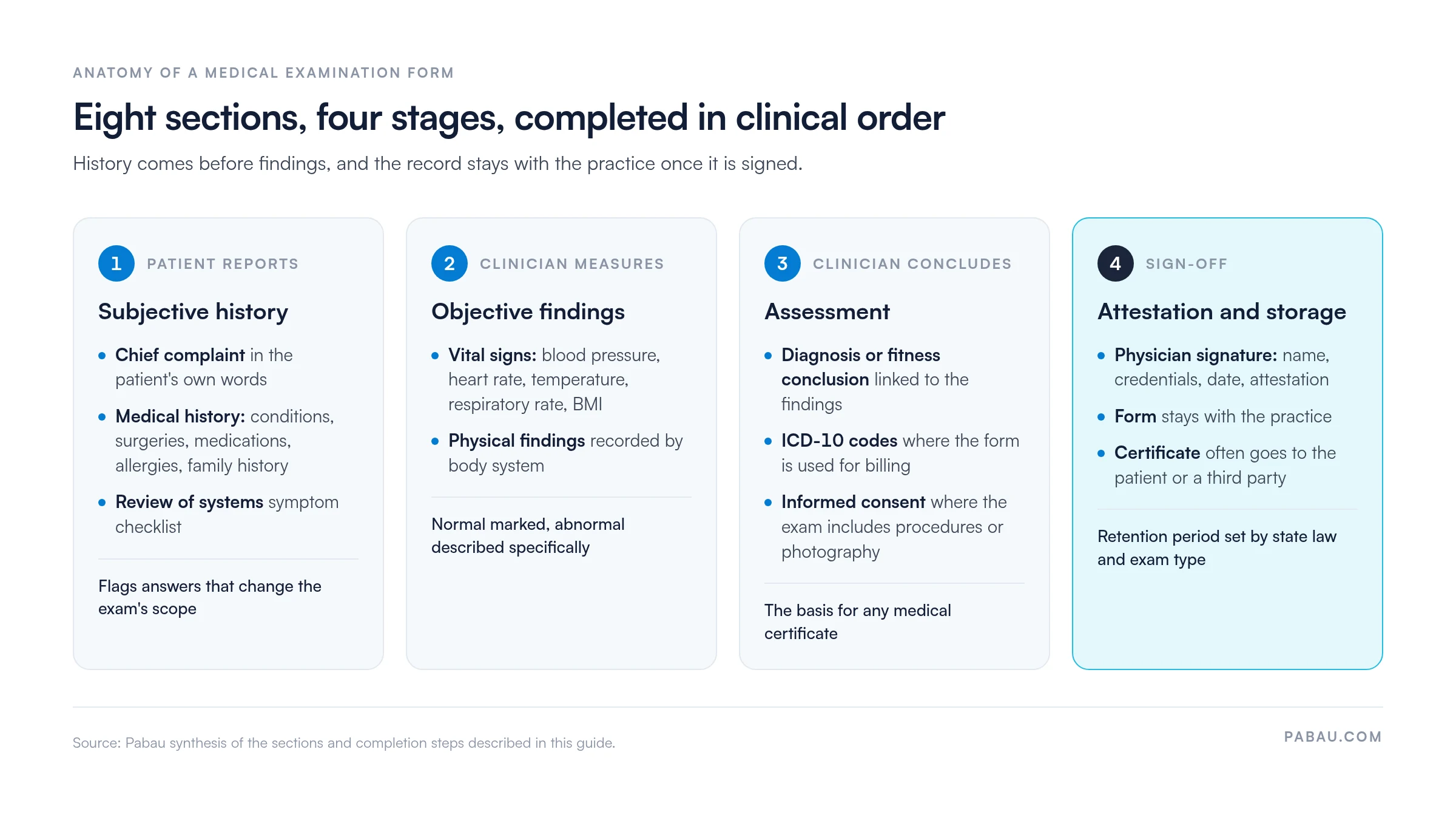
Most variants share the sections above. What changes is the purpose of the exam and the standard the examiner must meet. The table below summarizes the main types.
A pre-employment medical examination form records whether a candidate can perform the job’s essential functions. Under the Americans with Disabilities Act (ADA), an employer may require a medical exam only after making a conditional job offer. The exam must also apply to everyone entering the same job category (EEOC guidance on disability-related inquiries and medical examinations).
Practices completing these exams should record only job-related findings, not the full clinical history. A dedicated pre-employment medical exam template is built around that narrower scope.
The DOT medical examination form is used for commercial motor vehicle drivers. Under FMCSA rules, the physical must be performed by a medical examiner listed on the FMCSA National Registry of Certified Medical Examiners (FMCSA National Registry).
Requirements can change, so examiners should confirm the current form version and standards on the FMCSA site before each exam.
A sports physical form, often called a preparticipation physical evaluation (PPE), screens athletes for conditions that could affect safe participation. Medical societies publish recommended PPE content, and schools and leagues may add their own sections.
The USCIS I-693 is completed by a USCIS-designated civil surgeon as part of an immigration application. Only a designated civil surgeon may complete and sign it. The form version can change, so check the current instructions at uscis.gov before the exam.
HIPAA applies to covered entities and their business associates, and it governs how protected health information is used and disclosed. A form itself is neither compliant nor non-compliant. Compliance depends on who can access the form, how it is stored and transmitted, and what is shared with third parties.
When an employer or insurer needs a copy, a signed HIPAA authorization form records the patient’s permission. For the full federal rules, see the HHS guidance on HIPAA for professionals.
Work through the form in clinical order so each section builds on the last. Completing history before findings keeps the assessment focused.
A medical examination form is the clinical record of what was assessed. A medical certificate is the document issued afterward that states the conclusion, such as fitness or unfitness for a role. The form stays with the practice, while the certificate often goes to the patient or a third party.
Retention periods depend on state law and on the type of exam, so no single period applies everywhere. HIPAA’s policy documentation rule requires covered entities to keep documentation for six years (45 CFR § 164.530(j)). Many states require clinical records to be kept longer.
Check your state medical board’s record-keeping rules before setting a retention schedule.
Audit your examination form every year. Check that the sections still match your current specialty, the current form versions for DOT or I-693 work, and your state’s record-keeping rules.
Primary care practices use it for annual check-ups and new patient assessments. Occupational health teams use it for pre-employment and fitness-for-work reviews.
Sports medicine practices use it for preparticipation screening, while civil surgeons and DOT-listed examiners use the specialist variants described above. The free PDF suits chiropractors and physical therapists best, since its fields cover gait, spinal segments, reflexes, and cervical range of motion.
A standard format makes examinations comparable across clinicians. When every record includes the same sections, a reviewer can find the vitals or the physician attestation without searching the chart.
It also strengthens audit readiness. A complete, signed record answers the question “what was assessed and by whom” if a regulator or employer asks later.
Add a short scope line at the top of every examination form stating the purpose of the exam. Clinicians then record only what the purpose requires, which keeps employment and DOT records focused.
Paper examination forms get filled out by hand, then scanned or filed, and re-keyed whenever another system needs the findings. Each copy adds a chance of a transcription error, and a missing page is hard to spot.
Pabau, the practice management platform we build, sends intake and examination questionnaires as digital forms before the visit. Patients complete a medical history questionnaire at home, so clinicians spend the appointment on findings.
Completed forms land on the patient’s record in Pabau’s medical records software. Access is role-based and every change is logged, so the record shows who viewed or edited it and when.

Digital forms support compliance but do not guarantee it. Your policies, staff training, and access controls still determine whether the records meet HIPAA requirements.

Book a demo to see how Pabau stores examination documentation, controls access, and keeps every clinical record in one place.

Start with a template that matches the exam you run most often, then cut every field your exam’s purpose does not need. A focused form is faster to complete and easier to defend when an employer, insurer, or regulator asks what was assessed.
The trade-off is upkeep. DOT forms, the I-693, and state record rules change, so the form needs a yearly review whether it lives on paper or online.
Book a demo to see how Pabau sends examination questionnaires before the visit and files each signed record against the patient.

Writing up the exam formally? Medical examination report covers the written report that follows an examination.
Documenting findings by body system? Physical exam documentation sets out how to record what the clinician observed.
Collecting history before the visit? Medical history questionnaire gathers past conditions, medications, and allergies in advance.
Running routine screenings? Health screening form gives a shorter format for preventive checks.
Tracking vitals over time? Vital signs record logs repeat readings in one chart.
A medical examination form is a structured clinical record of a patient’s history, vital signs, physical findings, and diagnosis, signed by the examining clinician.
Yes, in most settings the terms describe the same record. Practices often use “physical examination form” for the same document.
Retention depends on state law, and HIPAA policy documentation must be kept for six years. Check your state medical board’s rules.
Yes, digital forms are commonly used, provided access controls and audit logs meet your HIPAA obligations.