Maja Popovska
Nursing pharmacology cheat sheet
What is a nursing pharmacology cheat sheet? A nursing pharmacology cheat sheet i...

1
Last Updated: Oct 29, 2026
Free PDF 3 pages, print-ready Clinician-reviewed
A medical history questionnaire is a form patients complete before their first consultation to record their health background. It covers past conditions, surgeries, medications, allergies, and lifestyle habits such as smoking and alcohol. The clinician reads it before the visit, so appointment time goes on the presenting problem. Answers like anticoagulant use or past anaphylaxis can then be acted on before the patient arrives. This guide covers what to include, sample questions, red-flag answers, specialty sections, and compliance. The free PDF is built for aesthetic practices, so it adds filler and toxin history to the core clinical questions.
A ready-to-use patient intake form for aesthetic practices, covering personal details, treatment history, medications, a condition checklist, allergies, and lifestyle questions.
Start from scratch, or upload this PDF or any form you already use, and Pabau's AI Form rebuilds it with tick boxes, text fields and a signature. Attach it to the treatment once, and every patient gets it on time.
AI Form rebuilds the consent, history and aftercare forms you already use. You review each one, then publish.
Patients complete forms on their phone before they arrive, so the front desk stops retyping paper.
Every signed form is versioned and attached to the treatment record, ready when you need it.
Set how long a consent stays valid. Returning patients skip forms they have already signed.
Supports HIPAA and GDPR compliance AES-256 encryption 4.8 on G2 4.7 on Capterra Trusted by 4,000+ practices worldwide

A medical history questionnaire gives the clinician a documented baseline before the first consultation.
Core sections cover medications, allergies with reactions, past and surgical history, family and social history, and a review of systems.
Specialty sections sit on top of the core clinical fields and never replace them.
Some answers, such as anticoagulant use or past anaphylaxis, need clinician review before the visit rather than during it.
Pabau, the practice software we build, sends the form before the visit and files the answers in the patient record.
A medical history questionnaire is a form patients complete before a consultation to record their health background. It covers past and current conditions, medications, allergies, surgeries, family history and lifestyle. The clinician reads it before the visit, so appointment time goes on the presenting problem instead of basic fact-finding.
The completed questionnaire also becomes part of the medical record. It shows what the patient disclosed and when, which matters if a treatment decision is reviewed later. That is why a strong form is dated, signed, and updated whenever the patient’s health changes.
Any practice that treats patients or prescribes medicines needs a version of this form. Primary care, dental, dermatology, med spa, physical therapy and mental health practices all use one, each with its own specialty sections on top.
Send the form a few days before the appointment rather than the evening before. That gives staff time to chase missing answers, and it lets the clinician review flagged items before the patient arrives.
A medical history questionnaire is complete when it captures the information a clinician needs to make a safe first decision. The core sections are consistent across most practice types, even when the specific questions vary.
Each section should use a clear prompt and a yes or no answer where possible. Open text works best for the chief complaint and for describing reactions.
Name, date of birth, contact details, and insurance information form the administrative base of the questionnaire. Add an emergency contact with a relationship field, so staff know who to call if a patient becomes unwell at the practice.
Record the patient’s primary care provider as well. The clinician then knows who to contact about results, referrals or shared care.
Ask for each medication’s name, dose, and frequency, not just a yes or no. Allergies need a reaction field, because “penicillin” alone tells a clinician less than “penicillin, hives”.
Name supplements, herbal products and over-the-counter painkillers in the prompt itself. Patients often leave them off because they do not think of them as medicines, yet some affect bleeding or interact with prescriptions.
Ask for each condition with the year of diagnosis and its current status, such as “type 2 diabetes, 2019, managed with metformin”. A checklist of common conditions speeds this up. Follow it with a free-text line for conditions the list leaves out.
For surgery, record the procedure, the approximate year, and any problems with anesthesia. A past reaction to anesthesia matters for any procedure that uses sedation or local anesthetic.
Limit family history to first-degree relatives, meaning parents, siblings and children. Focus on conditions with a hereditary link, such as heart disease, diabetes, bleeding disorders, and breast, ovarian or bowel cancer.
Ask for the relative’s age at diagnosis too. Early onset in a close relative can change the screening advice a clinician gives. Practices that track hereditary risk across the wider family can attach a separate family medical history form.
Ask every patient of reproductive potential, not just those booked for women’s health services. Pregnancy changes which medicines, imaging and elective treatments are safe.
Record the date of the most recent tetanus, influenza and COVID-19 vaccines. Add hepatitis B, HPV, pneumococcal and shingles vaccines where the patient’s age or risk makes them relevant.
Patients rarely remember exact dates. Offer an “approximate year” or “not sure” option, and check state immunization registries where your practice has access.
Two short validated screeners fit on almost any intake form. The PHQ-2 asks about low mood and loss of interest over the past two weeks. The GAD-2 asks about anxiety and uncontrollable worry over the same period.
A positive screen calls for a fuller assessment and does not confirm a diagnosis on its own. Decide in advance who reads these answers and how quickly, especially on forms that ask about self-harm.
The review of systems is a quick symptom check, one or two questions per body system. It picks up problems the patient did not think to mention in the chief complaint. Where the heart questions need more depth, a cardiovascular review of systems breaks them down symptom by symptom.
The wording of each question decides how useful the answer is. These examples pair a plain-language question with the answer format that gets the most usable response.
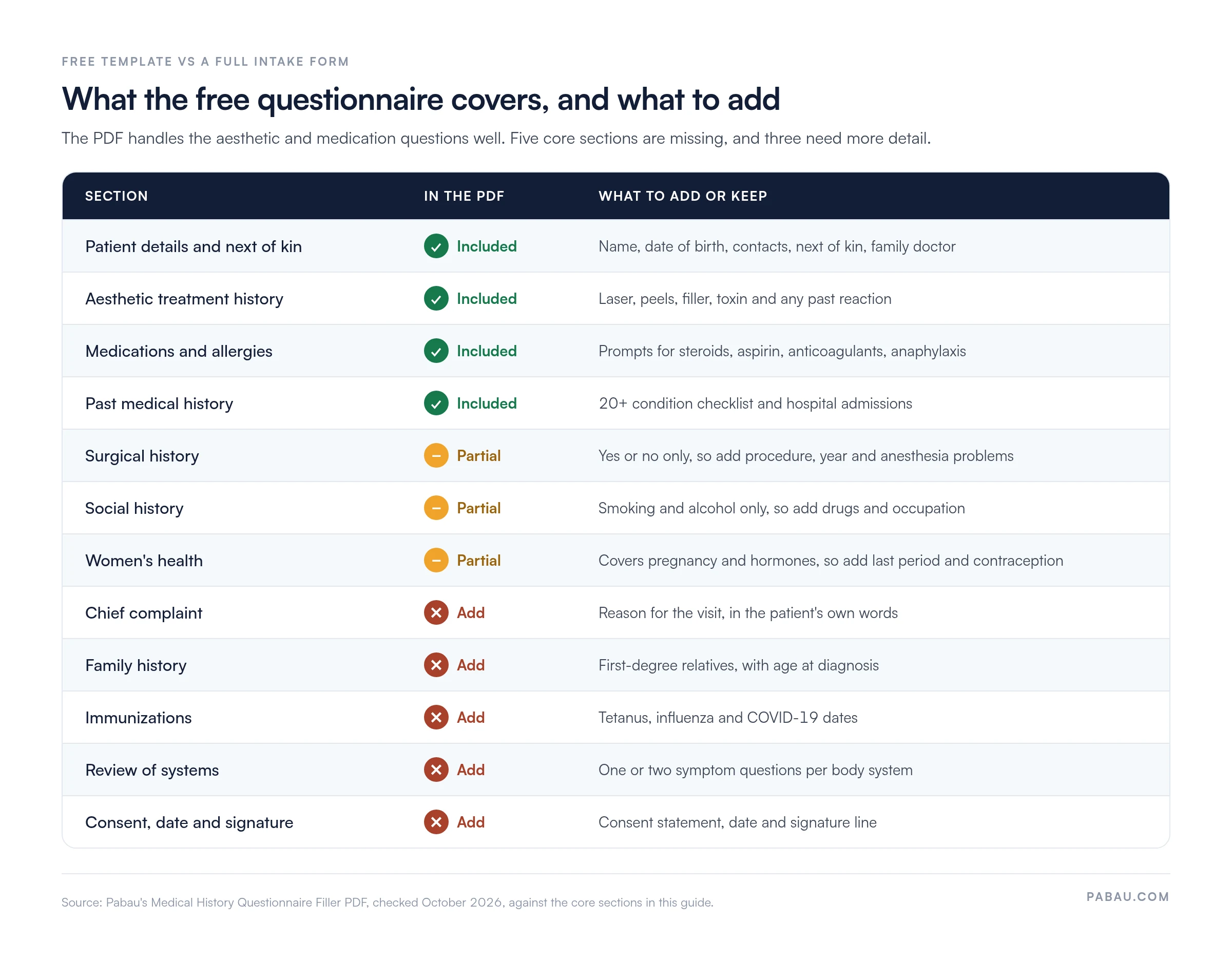
The Medical History Questionnaire Filler is a free PDF built on yes or no questions, with a detail line under each “yes”. It leans toward aesthetic and med spa practices, so it covers treatment history that a general practice form leaves out.
The form closes with a note that treatment may be refused when it is not in the patient’s best interest. It has no chief complaint, family history, immunizations, review of systems, or signature line. The matrix below shows which core sections the PDF covers and which ones to add before you use it as a general intake form.
The template also uses UK terms in a few fields, such as “postcode” and alcohol “units per week”. A US practice can switch these to ZIP code and drinks per week.
Patients answer what they understand and skip what they don’t. The layout and wording of the form decide how complete those answers are.
In the US, Section 1557 of the Affordable Care Act requires many health programs to provide language assistance to people with limited English. Check whether it applies to your practice before you decide which translations to offer.
A questionnaire protects patients only if someone reads it in time. Some answers can wait for the consultation. Others should reach a clinician as soon as the form comes in, because they can change whether the appointment goes ahead.
This triage table lists the answers worth routing to a clinician on the day they arrive. Adapt it to the services your practice offers.
Write the list for your own services and agree who checks it. A named reviewer and a deadline, such as 24 hours before the appointment, turn the questionnaire into a working safety check.
A physical therapy practice needs musculoskeletal history and injury timelines. A med spa needs prior procedures, skin conditions, and pregnancy status. A mental health practice needs trauma, substance use, and previous treatment history. Dental teams can start from a ready-made dental medical history form instead.
Keep the core sections identical across specialties. A shared core means a patient seen by two services in your practice never answers the same questions twice.
Audit your questionnaire once a year. Remove questions nobody reads, and add fields whenever a clinician asks for information that the form did not capture.
Each of these failures is cheap to fix at the design stage. Review a few completed forms each quarter and look for questions patients skip or misread.
Paper and digital questionnaires both collect the same clinical information. The difference lies in how that information moves into the record and how much effort staff spend on it.
Digital intake makes the most sense when a practice has an established patient record to link to. A static PDF is still a valid option for small teams, but someone must type the answers in afterward.
Medical history forms hold sensitive health information, so storage and consent matter as much as the questions. In the United States, the HHS HIPAA Privacy Rule sets the standards for how covered entities protect this information.
Electronic forms also fall under the HIPAA Security Rule. A form vendor that stores patient answers on your behalf is a business associate, so it needs a signed business associate agreement.
This section is general guidance, not legal advice. Consult a healthcare attorney or your data protection officer before finalizing your consent wording.
On paper, staff retype answers, chase missing pages at the front desk, and find red flags during the appointment. Pabau’s digital forms let you build the questionnaire once and send it to patients before their visit. Completed answers are attached to the patient record, so the clinician reviews them in the same place as notes and history.
Every workflow in this article depends on keeping one record per patient. Pabau’s Client records keep intake answers next to treatment notes, and the Client Portal lets patients update their details between visits.
Pabau GO, our iOS app for practitioners, shows the forms each patient still has to complete as a pre-appointment checklist. Staff can see which questionnaires are missing before the day starts, rather than at check-in.

Book a demo to see how Pabau sends questionnaires, attaches answers to the patient record, and flags new medications or allergies for review.

A medical history questionnaire earns its place when a clinician reads it before the patient walks in. Writing the form is the easy part. The harder part is the routine around it. Someone has to decide who reviews which answers, and how quickly.
Start with the free template, add the sections your specialty needs, and write your own red-flag list. Then put a date on the next review, because a form that never changes falls behind the services you offer.
If paper intake is slowing your front desk, moving the questionnaire online removes the retyping and gets answers to clinicians before the visit. Book a demo to see how Pabau sends intake forms ahead of each appointment and puts the answers in front of your clinicians.

Need a deeper family history section? Family medical history form gives you a dedicated form for hereditary risks across relatives.
Running a dental practice? Dental medical history forms template adds the questions dentists need before treatment.
Want more detail on the heart questions? Cardiovascular review of systems explains which symptoms to ask about and why.
Sending forms to new patients? New patient welcome letter sets expectations before the first visit.
Explaining how you use patient answers? Questionnaire privacy statement covers the wording patients see before they share health data.
A medical history questionnaire is a structured intake form that records a patient’s past conditions, medications, allergies, and family and social history before a consultation.
Yes. The Medical History Questionnaire Filler is a free PDF to print and complete by hand, and it can be adapted for most outpatient specialties.
Yes, digital intake works well when answers can feed directly into the patient record. Check that your system meets your local privacy requirements first.
Most practices ask patients to review their history at each new episode of care and at least once a year for ongoing patients.
A medical history questionnaire should include patient details, current medications, and allergies with reactions. It also needs past medical and surgical history, family and social history, and a review of systems. Add a date, a signature, and any specialty sections your practice needs.
It should be long enough to cover the core sections and short enough for a patient to finish in one sitting without help. Yes or no questions with detail fields keep it quick to complete.
A parent or legal guardian usually completes and signs the form for a child. Older teenagers may answer sensitive questions themselves, depending on your state’s consent rules.
No single US law requires a specific questionnaire. Documenting a patient’s history is part of the standard of care, though. The completed form is a medical record covered by HIPAA and state retention rules.
An intake form usually covers administrative details, such as contact information, insurance and consent. A medical history questionnaire covers clinical history. Many practices combine both into one form.