Physician credentialing checklist
A physician credentialing checklist lists every license, certificate, verificati...

Last Updated: Oct 23, 2026
An expense reimbursement form template gives your practice one standard document for staff to claim back business costs they paid out of pocket. Ours is a free two-page PDF covering each expense, its receipt, manager approval, and the total finance pays back.
Claims sent as loose emails or spreadsheet rows tend to arrive late, without receipts, and filed under whatever category the employee picked. A set form gives every claim the same fields and the same approval route. Pair it with a written policy such as SHRM’s sample expense reimbursement policy.
The form also protects the tax treatment. Under IRS accountable plan rules, a reimbursement stays out of the employee’s taxable wages only when it’s substantiated within a reasonable time. A signed form with receipts attached is that substantiation.
A two-page PDF with employee details, a 15-row expense log with category, cost center, patient-related and receipt columns, and totals less any cash advance. Page two covers the employee declaration, manager approval with an optional second sign-off, and a finance-use section.
Download template
An expense reimbursement form records who paid for what, why it was a business cost, the receipt, and who approved the payback.
Every claim needs the employee’s name, date of expense, category, description, amount, receipt, and manager sign-off.
Healthcare practices get more from the form by adding a cost center, a patient-related flag, and the reimbursement method.
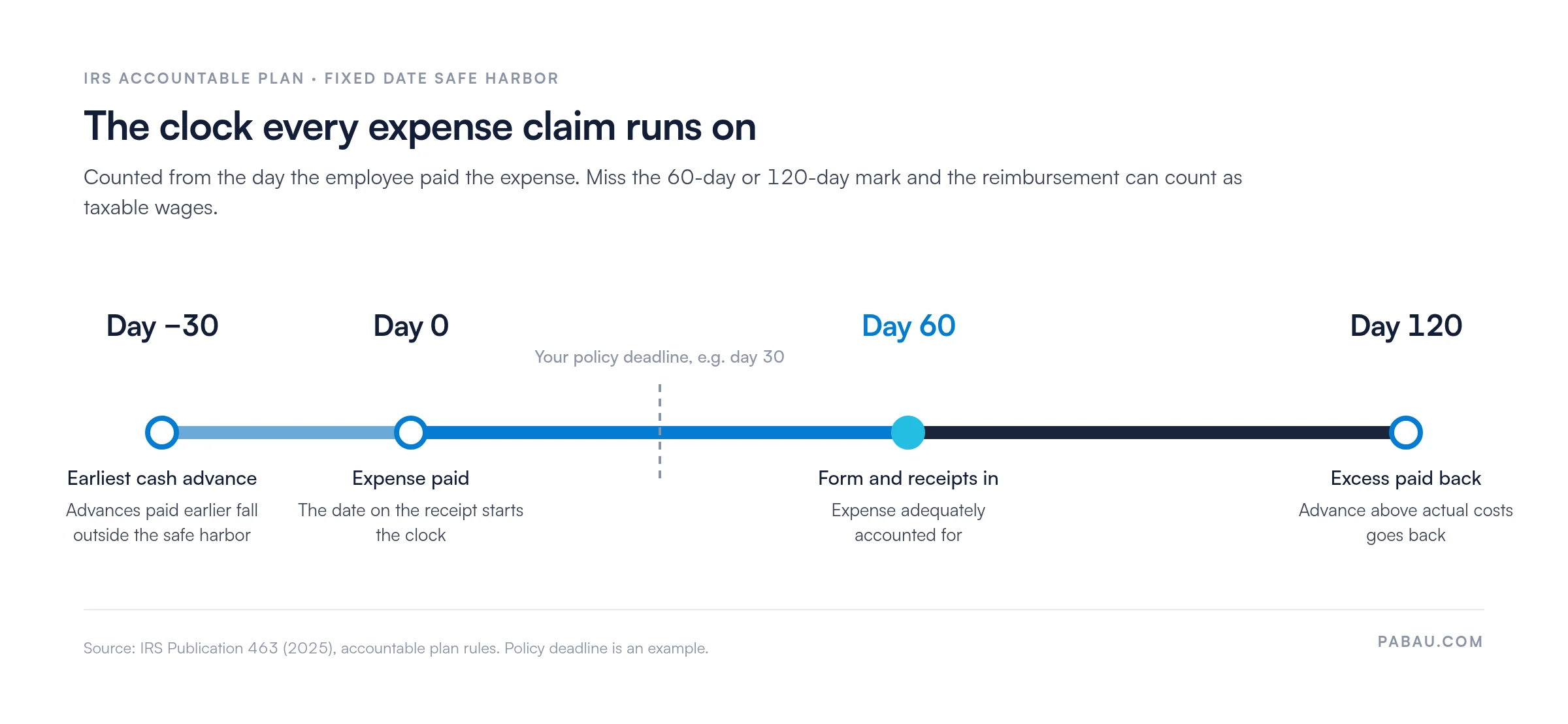
Under the IRS fixed date safe harbor, staff account for an expense within 60 days and return any excess within 120 days.
Practice software such as Pabau can collect the same fields through digital forms, and it integrates with Xero for accounting.
An expense reimbursement form is the request a staff member fills in after paying a business cost themselves. It lets the practice check the cost against policy and pay them back. An expense report is broader, since it rolls up spending across a week or month and may track it against a budget.
In a healthcare practice, typical claims cover conference fees, continuing medical education (CME) courses, and office supplies. Some are tied to one patient, such as specialized equipment bought for their care. With a documented form, each request is tracked, each amount is checked against a receipt, and the approver is named on the page.
The form needs two layers: fields every claim must carry, and optional fields that make healthcare claims easier to allocate and audit. The employee details should match the staff member’s employee info form, so finance can tie the claim to payroll without guessing.
A claim moves through six steps, from download to filing.
The template comes as a two-page PDF. Print it for staff who prefer paper, or mark it up on screen in a PDF editor before it goes to the manager for signature.
Once claims arrive every week, paper slows approval down. Rebuild the same fields as a digital form in your practice software, and submissions arrive complete and sit in one place.
IRS Publication 463 sets out the accountable plan rules. A reimbursement stays tax-free for the employee when it has a business purpose, it is substantiated, and any excess goes back to the practice.
The publication also defines a reasonable time through a fixed date safe harbor. An advance is paid no more than 30 days before the expense. The employee then accounts for the expense within 60 days and returns any excess within 120 days.
Your own submission deadline should sit well inside that 60-day window, as the timeline below shows.
Receipts have a threshold of their own. Publication 463 asks for documentary evidence, such as a receipt, for any lodging expense and for other expenses of $75 or more. A practice rule that asks for more than that is stricter than the IRS, which is fine.
The form works best with a written policy behind it. Add these rules to your staff handbook and to your HR compliance checklist.
Paper forms and email attachments work for a handful of claims a month. As the team grows, receipts go missing and finance spends month-end chasing signatures.
Pabau, the software for practice managers we build, lets you recreate this template’s fields as digital forms. Staff complete the claim on screen, and the finished form is stored in Pabau instead of a shared inbox.
Pabau also integrates with Xero, so invoices and payments from the practice land in the same books your finance team reconciles staff claims against. Its staff management tools keep rotas and timesheets for the same team in one system.

Pabau’s digital forms capture each claim field in one place, and its Xero integration keeps invoices and payments in your books. Staff stop emailing receipts, and managers stop chasing missing forms.

Start with the PDF and a one-page policy. Name the categories you reimburse, your receipt rule, a 30-day deadline, and who signs off above which amount. That combination removes the usual causes of late and incomplete claims.
The trade-off is admin time. Paper forms cost nothing to start with, but every claim still needs printing, signing, and filing by hand. Once claims arrive weekly, moving the same fields into digital forms saves more time than it costs.
Either way, the IRS 60-day window is the line to protect. Book a demo to see how Pabau can collect your practice’s expense claims on screen and keep them filed for audit.

Choosing how to pay staff? 9 best healthcare payroll software platforms compares the payroll tools that can pay out approved claims.
Documenting a policy breach? Employee counseling form gives you the fields and signatures to record issues fairly.
Planning staff reviews? Annual review template for healthcare practices includes sample comments and SMART goal examples.
An expense reimbursement form should capture the employee’s name, date of expense, expense category, description, amount, receipt, manager approval, and total reimbursement amount. Optional fields for healthcare include department, a patient-related flag, reimbursement method, and an accounting reference number for cost allocation and audits.
A reimbursement form asks the practice to pay back specific out-of-pocket costs an employee has already paid. An expense report rolls up spending across a period, such as a month, and may include budgets, mileage, or daily allowances. Reimbursement forms work at the transaction level, while reports show spending trends.
Collect the completed form with receipts, and have the manager approve each item against your policy. Finance then checks the total and pays the employee by direct deposit, check, petty cash, or the next payroll run. File a copy with the employee’s record and the practice’s financial records for audit purposes.
It depends on your policy and payroll cycle. A common target is one or two pay periods after approval, which is typically one to four weeks from submission. A submission deadline, such as 30 days from the expense, and an approval deadline, such as five business days, prevent backlogs.
Yes. The template above is a free two-page PDF. Print it or mark it up on screen, and adjust the categories and approval levels to match your practice’s policy.
Under an accountable plan, a reimbursement needs a business purpose and substantiation within a reasonable time, and any excess must be returned. The IRS safe harbor treats 60 days to substantiate and 120 days to return excess as reasonable. Reimbursements that meet these rules stay out of the employee’s taxable income.