OSHA respirator medical evaluation questionnaire
The OSHA respirator medical evaluation questionnaire is the mandatory health for...

3
Last Updated: Oct 15, 2026
An employee info form template is a ready-made document for recording each staff member’s details in one place. In a healthcare practice, that means personal and payroll information, emergency contacts, and the professional credentials a regulator will ask to see.
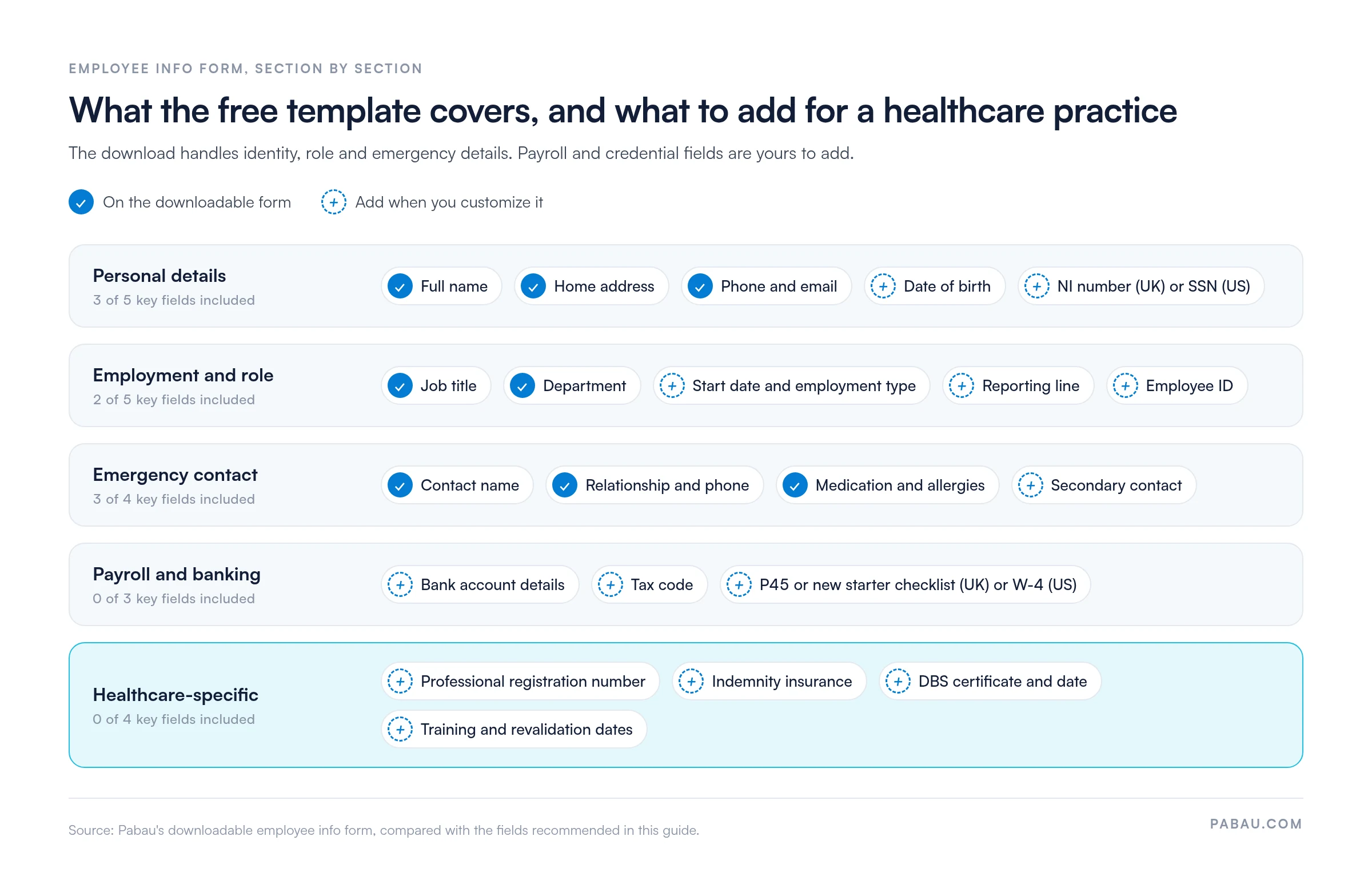
Our free template covers the core: identity, role, contact and emergency details, plus a signed staff declaration. Before you roll it out, add the payroll fields and the healthcare-specific fields in this guide, such as registration numbers and DBS checks.
Kept up to date, the form keeps your practice ready for a CQC inspection or a staff data request. Filled in digitally, it’s also a simple first step toward going paperless.
A one-page form covering name, job title, department, contact details and an emergency contact, plus relevant history, medication and allergies. It closes with a staff declaration, a privacy notice acknowledgment, an office-use section and a signature line.
Download template
An employee info form records each staff member’s personal, employment, emergency contact and payroll details in one place, from hire onward.
Healthcare practices also need fields for professional registration, indemnity insurance, DBS checks, and training and revalidation dates.
Under UK GDPR, you need a lawful basis for holding staff data, a privacy notice, and a clear retention limit.
Official DBS guidance says certificate information shouldn’t be kept for more than six months after the recruitment decision.
Practice management software like Pabau keeps staff documents, role permissions and renewal reminders against each team member’s profile.
An employee information form is a standardized record of the staff data you collect at hire and keep current throughout employment. It captures identification, employment terms, emergency contacts, tax and payroll details, and any credentials your regulator requires.
In a healthcare practice, the form does two jobs. Operationally, it keeps payroll, scheduling and contact details current. For compliance, it documents registration status, DBS checks, indemnity cover and training records, which are the files a CQC inspector expects to find.
General HR forms don’t cover healthcare regulation, so the fields change with the type of practice:
A complete form balances what payroll and day-to-day operations need with what regulators check. The overview below shows which of the five sections the free download already covers, and which fields you add when you customize it.
Generic employee forms leave out the fields healthcare regulators ask about. Add these sections to manage clinical risk and stand up to an inspection:
Build the form into your hire-to-review workflow in five steps:
Send the employee handbook in the same pack, so the new starter signs the information form and the policy acknowledgment together on day one.
The annual appraisal is the natural moment to refresh the form, and an annual review template gives that meeting a structure. A role change is the other trigger, and an employee performance management form sets the new responsibilities, goals and review dates.
Collecting staff data brings data protection duties. Under UK GDPR, you need a lawful basis for processing it, typically contract (the employment agreement), legal obligation (tax and right-to-work records) or legitimate interests.
Before collecting employee data, give staff a privacy notice. It should explain what you collect, why, how long you keep it, who can see it, and what rights they have. That’s how you meet GDPR’s transparency requirement.
GDPR’s storage limitation principle means you keep staff records no longer than necessary. After employment ends, retain them for six years, in line with UK tax and employment law guidance, then delete them securely. DBS information follows its own timeline. Record the certificate number, issue date and outcome instead of keeping a scan. Official DBS guidance says to keep certificate information for no more than six months after the recruitment decision.
For US practices, HIPAA covers protected health information (PHI) you handle as a healthcare provider. Employment records you hold as an employer generally aren’t PHI. Federal and state recordkeeping laws still apply, with retention periods that typically run three to seven years. The US Department of Labor sets out the federal requirements in its recordkeeping guidance.
Health conditions count as special category data under UK GDPR, and DBS details count as criminal offence data. Both need extra protection, so keep them out of team chats and email, and limit access to managers and HR.
Paper forms and scattered email attachments are slow to audit. All-in-one practice management software like Pabau keeps each team member’s details and documents in one profile. The record an inspector asks for is then a search away.
With Pabau’s staff management tools, you upload insurance certificates, qualifications, DBS checks and contracts into folders against the staff member they belong to. Roles decide what each person can see, so front desk staff stay out of medical records while clinicians keep full access.
Log a registration renewal or training refresher as a task with a due date, and Pabau creates a chase automatically if it slips. Clock-ins and hours feed straight into timesheets and wages, so payroll starts from the numbers already on file.
For multi-location teams, every site’s staff records sit in the same system, which makes a group-wide audit much quicker.

Pabau stores staff documents, role permissions and renewal tasks against each team member. Registration, DBS and training records are ready before an inspection.

Download the template, add the payroll and credential fields your practice type needs, and hand it to every new hire before day one. The form only earns its keep if it stays current, so tie each review to the annual appraisal.
The trade-off is effort. A paper file is cheap to start but slow to audit, and renewal dates on paper depend on someone remembering them. Once your team grows past a handful of clinicians, moving these records into software makes each inspection faster to prepare for.
Book a demo to see how Pabau keeps registration, DBS and training records ready before an inspector asks.

Need to record a conduct or performance conversation? Employee counseling form gives you a free template for documenting the session and its agreed next steps.
Setting goals for a team member who is struggling? Performance improvement plan template lays out targets, support and review dates for healthcare staff.
Choosing a payroll system for your practice? 9 best healthcare payroll software platforms compares the options for paying clinical and support staff.
It should capture personal details (name, address, date of birth, and National Insurance or Social Security number), employment terms, emergency contacts and payroll information. Healthcare practices should also record professional registration numbers, indemnity insurance, DBS check status and clinical specializations.
No, the form itself isn’t a standalone legal requirement. UK employers must still keep certain records, such as pay, hours and tax, for HMRC and under employment law. CQC-registered providers must also hold staff records showing registration status and training, and a standard form keeps those records consistent.
Store paper forms in a locked cabinet with access restricted to managers and payroll staff. Digital forms should live in a secure platform with encryption, role-based access control and regular backups. Under GDPR, never share employee personal data unnecessarily or leave forms on desks or shared drives. Limit access to people with a business need.
Review employee information at least once a year, at appraisal, and whenever someone changes role. Ask staff to confirm personal details, emergency contacts and registration status. Check training expiry and DBS recheck dates at least quarterly, so no credential lapses between reviews.
An employee information form is a general record of staff personal and employment details. Form I-9 (US) is the legal form that verifies each new hire’s eligibility to work. A share code (UK) lets a worker prove their right to work online. Both are separate legal requirements, and those records sit alongside the employee information form.