How to Start a Med Spa in 2026: Complete Step-by-Step Guide
The medical spa industry surpassed $21 billion in 2024 and shows no signs of slo...

March 31, 2026


Buy now, pay later is now available in Pabau

Private practice success depends on more than great care. Streamlined systems for scheduling, billing, and records are essential for long-term growth.
Automation is the fastest way to reduce admin overload. Online booking, reminders, and payment workflows can save hours every week.
The right software brings everything together. An all-in-one platform helps you run smoother operations, improve client experience, and stay in control as you scale.
Starting or running a private practice? The admin side can feel overwhelming—especially when your training didn’t cover scheduling software and payment processing.
Successful private practice management takes more than just being great at what you do. In reality, it’s also about running a business—appointments, finances, client records, marketing, operations, the works.
Good news: you don’t need an MBA to optimize your practice. You just need the right systems and strategies.
This guide walks you through how to improve your private practice management. You’ll get practical steps to work smarter, reduce admin headaches, and focus more on your clients.
Let’s get started.
Private practice management is how you run the business side of your practice. It covers everything that keeps your doors open and clients happy:
It’s basically all the behind-the-scenes work that happens so you can focus on delivering great care. When done right, it turns chaos into smooth operations.
The goal is to spend less time on admin tasks and more time doing what you actually trained for.
Thinking about starting your own practice as a nurse practitioner? Check out our complete guide on how to start a nurse practitioner private practice for step-by-step advice on legal requirements, business setup, and getting your doors open.
When your practice management isn’t dialed in, you feel it everywhere. Here’s what happens when systems fall apart:
On the flip side, optimizing how you manage your practice fixes all of this. Discover more about the benefits of running a private practice when you’ve got the right foundation in place.
Running a smoother practice doesn’t require a complete overhaul. These nine strategies will help you cut admin time, boost revenue, and get back to doing what you love.
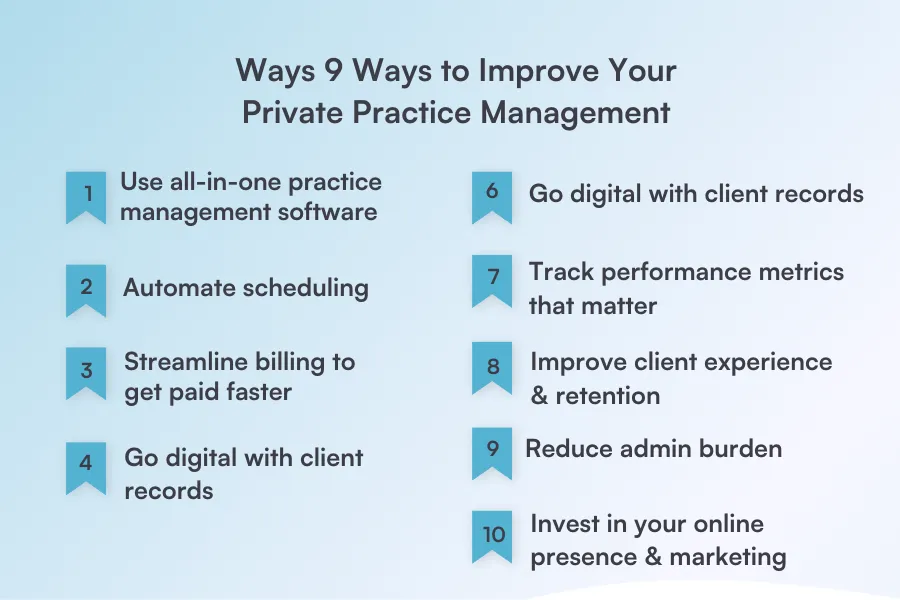
The problem: Juggling multiple apps for scheduling, billing, and notes creates chaos. Or your current software is clunky and missing features you need.
The fix: A good practice management system handles scheduling, client records, billing, reminders, reporting, and marketing in one place.
Time to switch if your software works against you, lacks key features, or requires constant workarounds.
Platforms like Pabau offer comprehensive solutions for growing and large practices—everything you need to run your practice in one place, no app-juggling required.
“Pabau has reduced our time in the office by, I would say at least 10 minutes per patient. So from the old system compared to the new system, it’s been a huge time saver.”

The problem: Double bookings, no-shows, and endless back-and-forth emails waste your time and frustrate clients.
The fix:
Real impact: Studies found that patients who get text reminders are 25% less likely to no-show than those who don’t. That’s a lot of empty appointment slots you can avoid.
Pabau’s automated booking system sends reminders at optimal times and lets clients confirm with a single click, reducing admin calls by hours each week.
The problem: Chasing payments manually is exhausting. Clients forget to pay, you forget to invoice, and cash flow suffers.
The fix:
📌 Side note: With practice management software, you can process payments, track revenue, and identify late payers—all from one screen.
The problem: Paper files get lost, take up space, and waste time when you need to find something quickly.
The fix:
You’ll get faster access to client history, better organization and searchability, HIPAA/GDPR compliant security, and you’ll eliminate the need for physical storage space.
Start with new clients first while gradually digitizing existing paper records to make the transition manageable.
The problem: Miscommunication between staff leads to errors, duplicate work, and frustrated team members.
The fix:
Staff management features in practice management solutions help organize team workflows and responsibilities.
The problem: Without data, you’re making business decisions based on gut feeling instead of facts.
The fix: Monitor these key metrics monthly:
With robust reporting features, you can track what matters and spot trends early, like which services bring in the most revenue or when no-shows spike.
The problem: Acquiring new clients costs 5-7 times more than retaining existing ones, yet many practices focus only on getting new bookings.
The fix:
Happy clients refer others. Word-of-mouth marketing is still one of the most effective ways to grow your practice.
Ready to take your practice to the next level? Check out our complete guide on how to grow a medical practice with proven strategies for attracting new patients and scaling your business.
The problem: You’re spending more time on paperwork than on actual client care.
The fix:
Remember, physicians spend over 20 hours weekly on admin and indirect patient care. Every hour you reclaim is an hour for client care or personal time.
The problem: Even the best practitioners struggle if clients can’t find them online.
The fix:
Look for a practice management system with built-in automated marketing features. The best platforms let you send email campaigns, collect reviews, and nurture client relationships without needing separate marketing software.
Not all practice management software is created equal. The right platform should simplify your workflow, not complicate it. Here are the must-have features to look for.
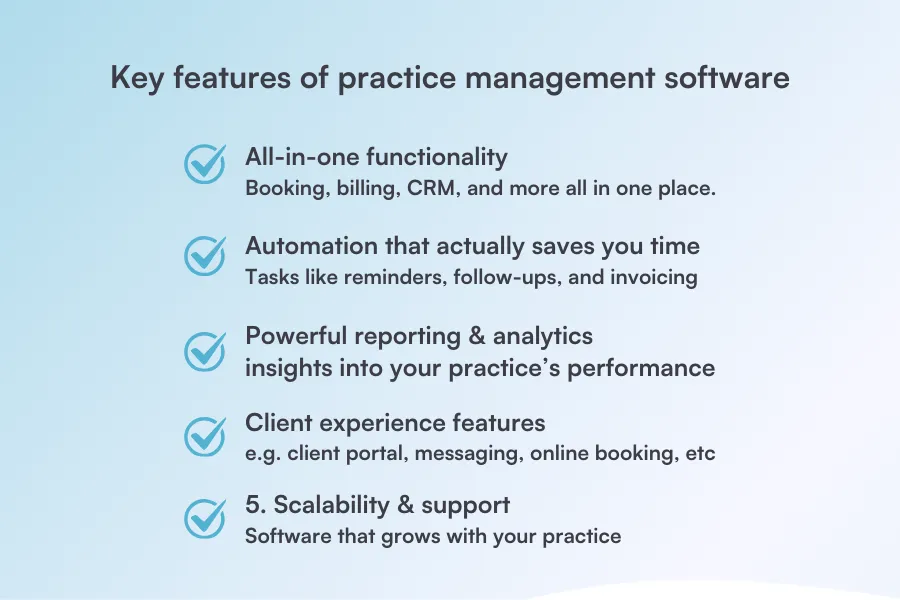
Your software should handle scheduling, client records, billing, communications, and reporting in one platform. If you’re still jumping between three different apps to book an appointment, send a reminder, and process payment, you’re wasting time.
Pabau brings together online booking, calendar management, digital client records, automated billing, SMS/email reminders, and performance analytics in one intuitive system. Everything syncs automatically, without the need for any manual updates or duplicate work.
Automated appointment reminders, payment follow-ups, post-visit messages, and marketing campaigns. If your software can’t handle repetitive tasks while you sleep, you’re leaving efficiency on the table.
Pabau automates the entire client journey—from booking confirmations and appointment reminders to payment processing and follow-up campaigns. Set it once, and it runs on autopilot. You can even automate review requests to build your online reputation effortlessly.
Real-time dashboards showing appointment utilization, revenue by service, no-show rates, outstanding payments, and staff performance. If you can’t see what’s working (and what’s not), you can’t optimize your practice.
Pabau’s reporting dashboard gives you instant visibility into your practice performance. Track revenue trends, monitor staff productivity, identify your best clients, and spot opportunities for growth—all with customizable reports you can generate in seconds.
Online booking that works 24/7, a client portal for accessing records and rebooking, and seamless two-way communication. Your clients expect convenience—if booking an appointment requires a phone call during business hours, you’re losing bookings to competitors.
Pabau’s client-facing features include 24/7 online booking, a branded client portal, automated SMS/email communication, and even online check-in. Clients can book, reschedule, complete forms, and pay—all without calling your office. You look professional, they get convenience, everyone wins.
Platforms with white-label options (like Pabau) let you brand the client experience with your logo and colors, making everything feel cohesive and professional.
Software that works whether you’re a solo practitioner or managing multiple locations with a team. Plus, responsive customer support when you need help because tech issues don’t wait for convenient times.
Pabau is built for practices of all sizes—from solo practitioners to multi-location clinics with dozens of staff. Add team members, locations, and services as you grow without switching platforms.
Not sure which features matter most? Our guide on essential practice management software features breaks down exactly what to look for when evaluating different platforms.
Even the best practitioners fall into these traps. Recognizing these mistakes early can save you time, money, and a lot of headaches down the road.
Sticking with paper files, spreadsheets, and manual booking because “it’s worked so far” costs you hours every week.
The longer you wait to automate, the more time and revenue you lose. What feels manageable with 10 clients becomes overwhelming with 50.
You can’t improve what you don’t measure. Many practitioners have no idea which services are most profitable, when no-shows spike, or how full their schedule actually is.
Without data, you’re making business decisions blindly instead of strategically.
Expecting clients to call during business hours to book, sending no appointment reminders, and providing no easy way to pay online create friction.
Client experience and convenience matter. Medi-aesthetics is a highly competitive industry. If you make it hard for clients to work with you, they’ll find someone who doesn’t.
Healthcare practitioners have unique management needs. Our guide on patient management software covers HIPAA compliance, electronic health records, and features specific to medical practices.
Going with the cheapest option often means missing critical features, dealing with clunky interfaces, or getting zero support when things break.
You end up paying more in wasted time and lost revenue than you saved upfront. Investment in the right tools pays for itself.
Many practice owners resist delegating or automating because they think “it’s faster to just do it myself.”
But this mindset keeps you trapped in admin work instead of growing your practice. Being busy all the time doesn’t mean your practice is running well.
Looking for a system that does it all — EMR, scheduling, billing, automation, and marketing — in one place? Check out our guide covering the best EMR software for medical & aesthetic practices.
Optimizing your private practice doesn’t mean working longer hours—it means working smarter.
When your systems are streamlined, your days are smoother, your clients are happier, and your revenue grows. Pabau puts scheduling, digital records, billing, automation, and client communication all in one powerful platform, so you can ditch the chaos and focus on what you do best.
What could your practice look like without the admin chaos? 👉 Take a quick look at Pabau with a free demo.
Want to dig deeper into finding the right software? Don’t miss our guide on the best EHR for private practice to compare top solutions and choose what fits your needs.