EHR ROI: How to calculate and maximize your return
EHR ROI is the financial return a practice earns on its electronic health record...

Last Updated: Oct 15, 2026

Private practice success depends on more than great care. Streamlined systems for scheduling, billing, and records are essential for long-term growth.
Automation is the fastest way to reduce admin overload. Online booking, reminders, and payment workflows can save hours every week.
The right software brings everything together. An all-in-one platform helps you run smoother operations, improve client experience, and stay in control as you scale.
Starting or running a private practice? The admin side can feel overwhelming, especially when your training never covered scheduling software or payment processing.
Successful private practice management takes more than being great at what you do. It’s also about running a business. That means appointments, finances, client records, marketing, and daily operations.
Good news: you don’t need an MBA to optimize your practice. You just need the right systems and strategies.
This guide walks you through how to improve your private practice management. You’ll get practical steps to work smarter, reduce admin headaches, and focus more on your clients.
Let’s get started.
Private practice management is how you run the business side of your practice. It covers everything that keeps your doors open and clients happy:
It’s basically all the behind-the-scenes work that happens so you can focus on delivering great care. Strong practice management in healthcare turns chaos into smooth operations, whether you run a solo office or a larger medical practice.
The goal is to spend less time on admin tasks and more time doing what you actually trained for.
Thinking about starting your own practice as a nurse practitioner? Check out our complete guide on how to start a nurse practitioner private practice for step-by-step advice on legal requirements, business setup, and getting your doors open.
When your practice management isn’t dialed in, you feel it everywhere. Here’s what happens when systems fall apart:
On the flip side, optimizing how you manage your practice fixes all of this. Discover more about the benefits of running a private practice when you’ve got the right foundation in place.
Part of that foundation is protecting the practice itself. Specialty practices, from physical therapy clinics to chiropractors, should weigh liability insurance before a claim ever lands.
Here is what that shift looks like in day-to-day terms, function by function:
| Task | Manual approach | Optimized approach |
|---|---|---|
| Scheduling | Phone tag, double bookings, and no-shows | 24/7 online booking with automated SMS and email reminders |
| Billing and payments | Chasing invoices by hand and guessing at cash flow | Auto-generated invoices and one dashboard for outstanding balances |
| Client records | Paper files you dig through between clients | Digital records you pull up mid-appointment from anywhere |
| Team communication | Sticky notes, crossed wires, and duplicate work | Shared calendars, assigned tasks, and clear SOPs |
| Performance tracking | Decisions made on gut feeling | Real-time dashboards for revenue, no-shows, and retention |
Running a smoother practice doesn’t require a complete overhaul. These nine strategies will help you cut admin time, boost revenue, and get back to doing what you love.
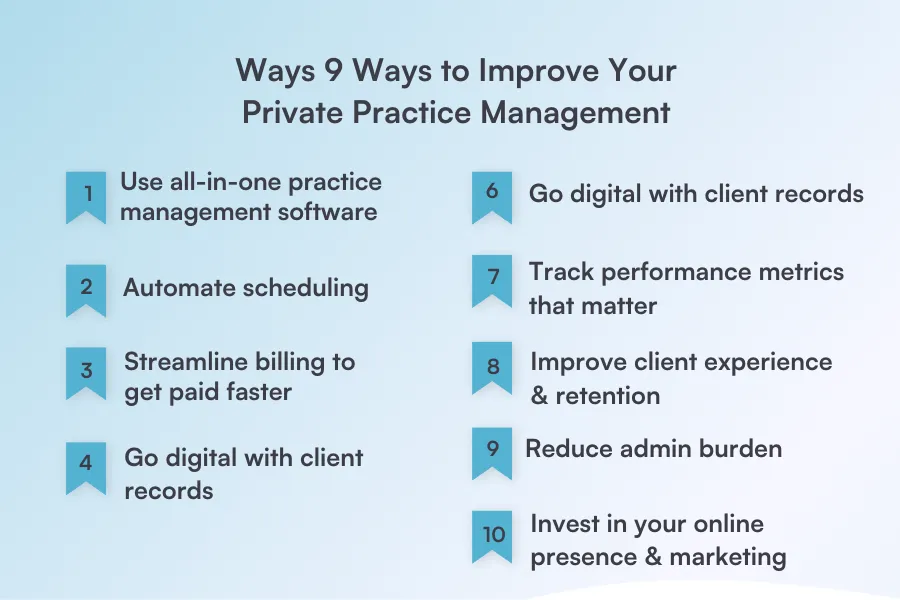
The problem: Juggling multiple apps for scheduling, billing, and notes creates chaos. Or your current software is clunky and missing features you need.
The fix: A good practice management system handles scheduling, client records, billing, reminders, reporting, and marketing in one place.
Time to switch if your software works against you, lacks key features, or requires constant workarounds.
Platforms like Pabau, practice management software built for private practices, bring everything you need to run your practice into one place, with no app-juggling required. It works for practices of all sizes, from solo practitioners to multi-location groups.
“Pabau has reduced our time in the office by, I would say at least 10 minutes per patient. So from the old system compared to the new system, it’s been a huge time saver.”

The problem: Double bookings, no-shows, and endless back-and-forth emails waste your time and frustrate clients.
The fix:
Real impact: A meta-analysis in BMJ Open found that digital appointment reminders measurably improve attendance rates. That’s a lot of empty appointment slots you can avoid.
Pabau’s automated booking system sends reminders at optimal times and lets clients confirm with a single click, reducing admin calls by hours each week.
The problem: Chasing payments manually is exhausting. Clients forget to pay, you forget to invoice, and cash flow suffers.
The fix:
📌 Side note: With practice management software, you can process payments, track revenue, and identify late payers—all from one screen.
The problem: Paper files get lost, take up space, and waste time when you need to find something quickly.
The fix:
You’ll get faster access to client history, better organization and searchability, HIPAA/GDPR compliant security, and you’ll eliminate the need for physical storage space.
Digital charts also keep standardized assessments organized. Clinicians can file results, such as Sensory Profile 2 scoring reports, directly in each client’s record.
Start with new clients first while gradually digitizing existing paper records to make the transition manageable.
The problem: Miscommunication between staff leads to errors, duplicate work, and frustrated team members. Research on teamwork in healthcare links poor coordination to more medical errors and higher staff burnout.
The fix:
Staff management features in practice management solutions help organize team workflows and responsibilities.
The problem: Without data, you’re making business decisions based on gut feeling instead of facts.
The fix: Monitor these key metrics monthly:
With robust reporting features, you can track what matters and spot trends early, like which services bring in the most revenue or when no-shows spike.
The problem: Acquiring new clients costs 5 to 25 times more than retaining existing ones, yet many practices focus only on getting new bookings.
The fix:
Happy clients refer others. Word-of-mouth marketing is still one of the most effective ways to grow your practice.
Ready to take your practice to the next level? Check out our complete guide on how to grow a medical practice with proven strategies for attracting new patients and scaling your business.
The problem: You’re spending more time on paperwork than on actual client care.
The fix:
Remember, physicians spend over 20 hours weekly on admin and indirect patient care. Every hour you reclaim is an hour for client care or personal time.
The problem: Even the best practitioners struggle with patient acquisition if clients can’t find them online.
The fix:
Look for a practice management system with built-in automated marketing features. The best platforms let you send email campaigns, collect reviews, and nurture client relationships without needing separate marketing software.
Not all practice management software is created equal. From practice management software for therapists to platforms built for busy medical offices, the right system should simplify your workflow, not complicate it. Here are the must-have features to look for in the best medical practice management software.
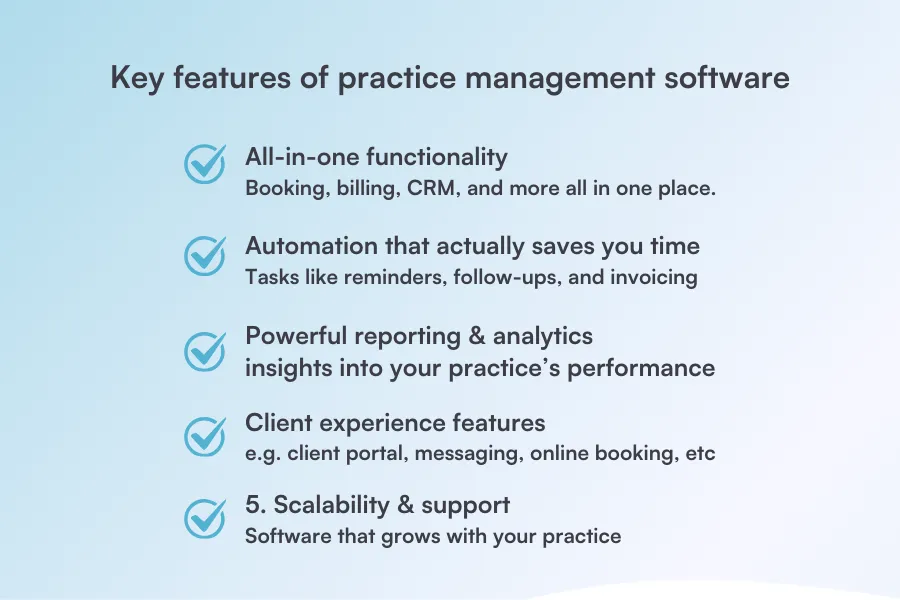
Your software should handle scheduling, client records, billing, communications, and reporting in one platform. If you’re still jumping between three different apps to book an appointment, send a reminder, and process payment, you’re wasting time.
Pabau brings together online booking, calendar management, digital client records, automated billing, SMS/email reminders, and performance analytics in one intuitive system. Everything syncs automatically, without the need for any manual updates or duplicate work.
Automated appointment reminders, payment follow-ups, post-visit messages, and marketing campaigns. If your software can’t handle repetitive tasks while you sleep, you’re leaving efficiency on the table.
Pabau automates the entire client journey—from booking confirmations and appointment reminders to payment processing and follow-up campaigns. Set it once, and it runs on autopilot. You can even automate review requests to build your online reputation effortlessly.
Real-time dashboards showing appointment utilization, revenue by service, no-show rates, outstanding payments, and staff performance. If you can’t see what’s working (and what’s not), you can’t optimize your practice.
Pabau’s reporting dashboard gives you instant visibility into your practice performance. Track revenue trends, monitor staff productivity, identify your best clients, and spot opportunities for growth—all with customizable reports you can generate in seconds.
Online booking that works 24/7, a client portal for accessing records and rebooking, and seamless two-way communication. Your clients expect convenience—if booking an appointment requires a phone call during business hours, you’re losing bookings to competitors.
Pabau’s client-facing features include 24/7 online booking, a branded client portal, automated SMS/email communication, and even online check-in. Clients can book, reschedule, complete forms, and pay—all without calling your office. You look professional, they get convenience, everyone wins.
Platforms with white-label options (like Pabau) let you brand the client experience with your logo and colors, making everything feel cohesive and professional.
Software that works whether you’re a solo practitioner or managing multiple locations with a team. Plus, responsive customer support when you need help because tech issues don’t wait for convenient times.
Pabau is built for practices of all sizes, from solo practitioners to multi-location groups with dozens of staff. Add team members, locations, and services as you grow without switching platforms.
Not sure which features matter most? Our guide on essential practice management software features breaks down exactly what to look for when evaluating different platforms.
Even the best practitioners fall into these traps. Recognizing these mistakes early can save you time, money, and a lot of headaches down the road.
Sticking with paper files, spreadsheets, and manual booking because “it’s worked so far” costs you hours every week.
The longer you wait to automate, the more time and revenue you lose. What feels manageable with 10 clients becomes overwhelming with 50.
You can’t improve what you don’t measure. Many practitioners have no idea which services are most profitable, when no-shows spike, or how full their schedule actually is.
Without data, you’re making business decisions blindly instead of strategically.
Expecting clients to call during business hours to book, sending no appointment reminders, and providing no easy way to pay online create friction.
Client experience and convenience matter. Medi-aesthetics is a highly competitive industry. If you make it hard for clients to work with you, they’ll find someone who doesn’t.
Healthcare practitioners have unique management needs. Our guide on patient management software covers HIPAA compliance, electronic health records, and features specific to medical practices.
Going with the cheapest option often means missing critical features, dealing with clunky interfaces, or getting zero support when things break.
You end up paying more in wasted time and lost revenue than you saved upfront. Investment in the right tools pays for itself.
Many practice owners resist delegating or automating because they think “it’s faster to just do it myself.”
But this mindset keeps you trapped in admin work instead of growing your practice. Being busy all the time doesn’t mean your practice is running well.
Looking for a system that does it all — EMR, scheduling, billing, automation, and marketing — in one place? Check out our guide covering the best EMR software for medical & aesthetic practices.
A physician practice management company handles the business side of a medical practice, such as scheduling, billing, payroll, compliance, and reporting, so clinicians can focus on patients. Many practices get the same result from all-in-one medical practice management software instead of outsourcing the work.
Examples range from standalone scheduling and billing tools to full platforms that combine booking, digital records, payments, reporting, and marketing. An all-in-one option like Pabau covers all of these in one login, so you are not stitching separate apps together.
A management service organization, or MSO, provides the non-clinical business services a practice needs while the clinical entity stays separate. A physician practice management (PPM) arrangement usually pairs that MSO with the medical group. Both exist to take administrative work off the practitioner’s plate.
There is no single required qualification. Most practice managers combine administrative or healthcare experience with skills in scheduling, billing, compliance, and team management. A background in business or health administration helps, but hands-on experience running practice operations matters most.
Pricing usually depends on the size of your practice and how many users you have, rather than a fixed sticker price. With Pabau, cost scales with your locations and team, and whether you run a med spa or need mental health practice management software, every subscription includes the full feature set, with no tiers locking features away.
Optimizing your private practice doesn’t mean working longer hours—it means working smarter.
When your systems are streamlined, your days are smoother, your clients are happier, and your revenue grows. Pabau puts scheduling, digital records, billing, automation, and client communication all in one powerful platform, so you can ditch the chaos and focus on what you do best.
What could your practice look like without the admin chaos? 👉 Take a quick look at Pabau with a free demo.
Want to dig deeper into finding the right software? Don’t miss our guide on the best EHR for private practice to compare top solutions and choose what fits your needs.