How to Start Private Practice in California as a LCSW (Step-by-Step)
Pabau helps new LCSW practices stay organized and compliant with integrated clie...

April 6, 2026

Buy now, pay later is now available in Pabau
Blog / Top 10 Essential Practice Management Software Features in 2026
A practice management system streamlines scheduling, billing, documentation, and communication, cutting admin time and improving efficiency.
Key benefits include better patient engagement, fewer no-shows, smoother workflows, and more organized day-to-day operations.
Look for essentials like online booking, patient portals, EHRs, Telehealth, AI-powered notes, inventory tracking, and reporting.
Pabau stands out as an all-in-one solution that helps practices of all sizes run smoothly, deliver great care, and scale with confidence.
If you’ve been managing your own med spa or healthcare business, you already know how overwhelming it can be to compare practice management software to find the best fit for your practice.
The good news? You don’t need every feature under the sun, just the ones that actually make running your practice easier.
In this guide, we’ll break down the top practice management software features you should look for, why they matter, and how they help you work smarter.
Medical practice management software helps med spas and healthcare practices run their day-to-day operations. It handles scheduling, records, billing, and key admin tasks in one system.
The goal is to simply help you: save time, cut manual work, and keep your practice running smoothly.
The right practice management software can transform your clinic, everything from faster workflows to happier patients.
Here are the key benefits that make running your practice easier and more efficient.
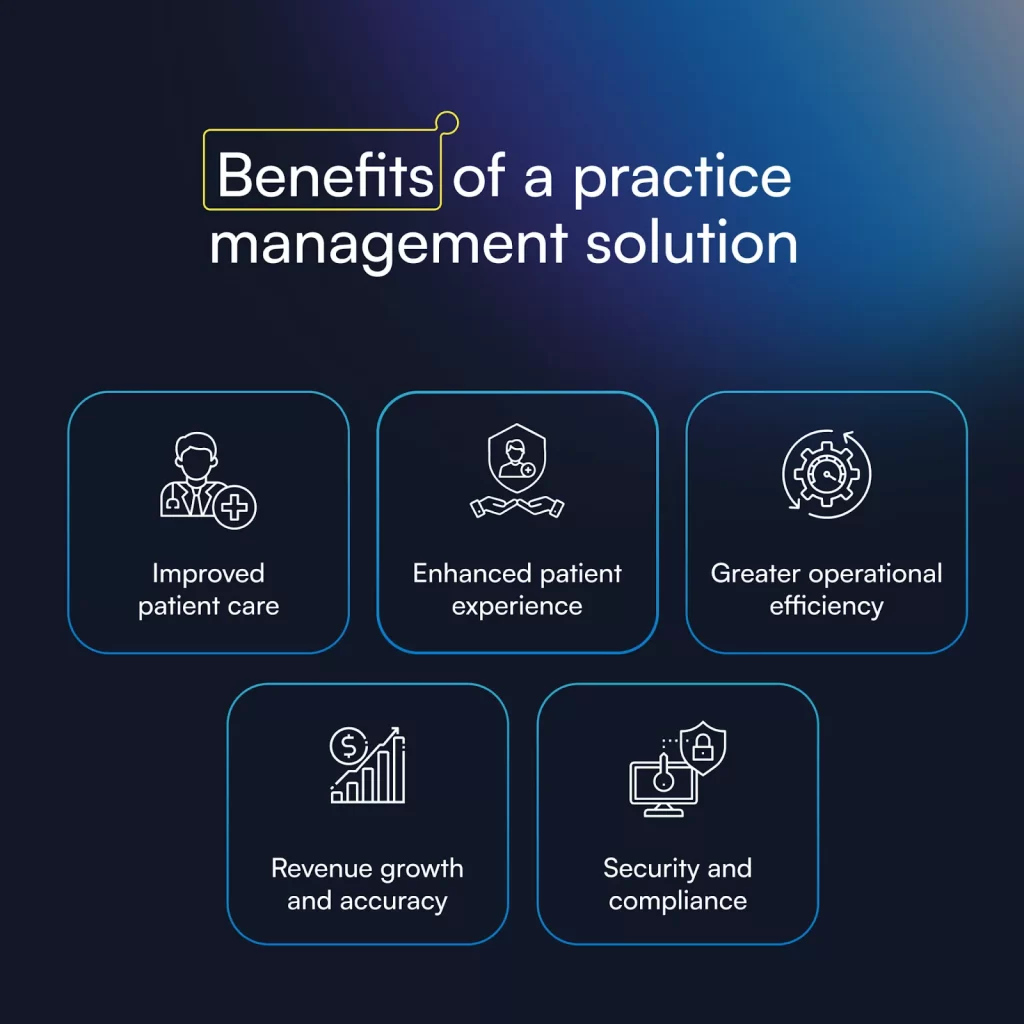
Practice management software keeps all patient records in one place. Providers get a full view of client histories. This helps make faster, smarter decisions and fewer errors.
Patients get care that is accurate, timely, and tailored to their needs, which is essential in both primary care and medi-aesthetic practices.
The Effects of Electronic Health Records on Medical Error Reduction study found that use of electronic health records was significantly associated with reduced medical errors, meaning safer care and better patient outcomes.
Patients can book appointments online and get automated reminders. Accessing medical records and communicating with staff is easier.
Patient engagement improves, and no-shows drop.
Shorter wait times make visits smoother. Happy patients are more likely to return and recommend your clinic.
At the same time, front-of-house teams benefit from better scheduling and client communication and can focus on the patients themselves.
Administrative tasks, such as scheduling, billing, and reporting, are faster and simpler.
Staff spend less time on paperwork. Practice workflows are smoother and admin mistakes are reduced. This frees practice managers to focus on optimizing operations instead of putting out fires.
The whole medical practice or med spa runs more efficiently, giving your team time to focus on patient care.
A 2024–2025 study in a German hospital found that after moving to an electronic system, the completeness of documentation significantly improved. In three surgical departments, the average score went up from 6.02 to 7.20 out of 10.
Automated billing and claims cut down on mistakes and delays.
The practice management system spots missed charges and gaps in billing. Payments come in faster, and over time, revenue grows steadily.
Managing your finances becomes simpler and more accurate, giving you peace of mind.
Patient data is kept safe with strong access controls and encryption. Audit trails track who sees what.
The software makes meeting HIPAA rules simple, so compliance is easier and patients can trust that their information is protected.
Regardless of the type of clinic, primary care, med spa, or specialty practice, strong compliance features are essential to keep patients safe and your practice protected.
Knowing the benefits is just the first step.
To get the most from your system, it’s important to understand what are the features for practice management software and how they help streamline operations, improve patient care, and support your team every day.
| Feature | What it does | Why it matters |
|---|---|---|
| Appointment Scheduling | Organizes appointments in one place. Book, reschedule, or cancel with a click. Sends confirmations and intake forms automatically. | Keeps your calendar accurate, reduces no-shows, and saves time for staff and patients. Ensures a smooth, professional experience. |
| Patient Portal | Secure online platform for patients to view records, messages, and manage their care. | Empowers patients, reduces admin work, and improves engagement. Useful for follow-ups in primary care and medi-aesthetic practices. |
| Electronic Health Records (EHR) | Stores patient charts digitally, including history, notes, allergies, and lab results. | Supports accurate, timely decisions, improves communication, reduces errors, and keeps care consistent. |
| Telehealth | Secure video platform for online consultations. No extra apps needed. | Expands access to care, reduces travel time, supports follow-ups, and decreases no-shows. |
| Point of Sale (PoS) | Manages payments in one place. Accepts in-person and online payments, handles invoices, deposits, memberships, and gift cards. | Streamlines billing, ensures payment accuracy, and offers flexible payment options. |
| Inventory Management | Tracks products and supplies in real time. Updates stock automatically as items are used or sold. | Prevents shortages, reduces mistakes, and keeps treatments running smoothly. Supports compliance with batch and expiry tracking. |
| Reporting & Analytics | Provides prebuilt and custom reports on revenue, bookings, patient satisfaction, and staff performance. Supports multi-location data. | Enables data-driven decisions, helps identify trends, improve efficiency, and optimize staffing, marketing, and treatments. |
| Online Booking & Waitlist | Lets patients book, reschedule, or join a waitlist online. Includes automated appointment reminders. | Keeps the practice organized, reduces phone calls, fills last-minute openings, and improves patient satisfaction. |
| AI Summaries, Treatment Notes & Prescriptions | Generates automated treatment notes, visit summaries, and prescription drafts. Cross-checks allergies and drug interactions. | Reduces admin time, improves documentation accuracy, and allows clinicians to focus on patient care. |
| Built-in Marketing Tools | Run email and SMS campaigns, appointment recalls, special promotions, and client segmentation. | Engages patients, increases rebookings, builds loyalty, and saves time managing marketing efforts. Advanced Marketing Plus adds targeted campaigns, automation, and analytics. |
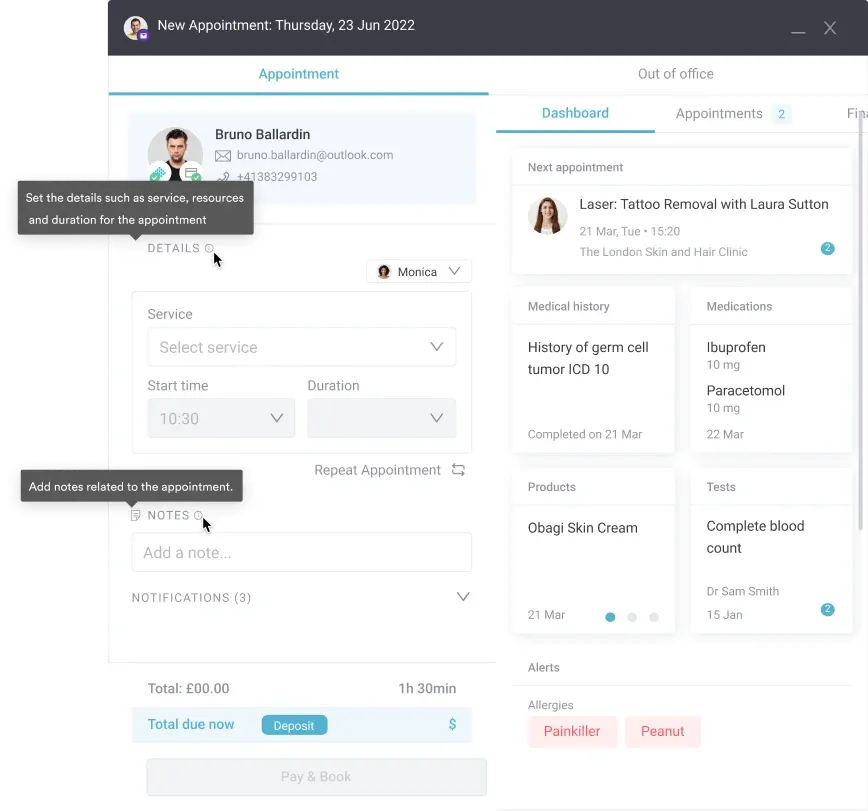
An appointment scheduling tool organizes your clinic’s appointments in one place. It captures all essential details for each visit.
You can book, reschedule, or cancel appointments with a single click. The system prevents double-booking and automatically sends confirmations and intake forms to patients.
Appointment scheduling is crucial for keeping your calendar accurate, reducing no-shows, and saving time for both staff and patients. It ensures a smooth, professional experience from first contact to visit.
Choose practice management software with simple drag-and-drop functionality so you can reschedule or update appointments in a single click.
Make sure it also lets you book rooms and equipment to prevent scheduling conflicts—just like Pabau does
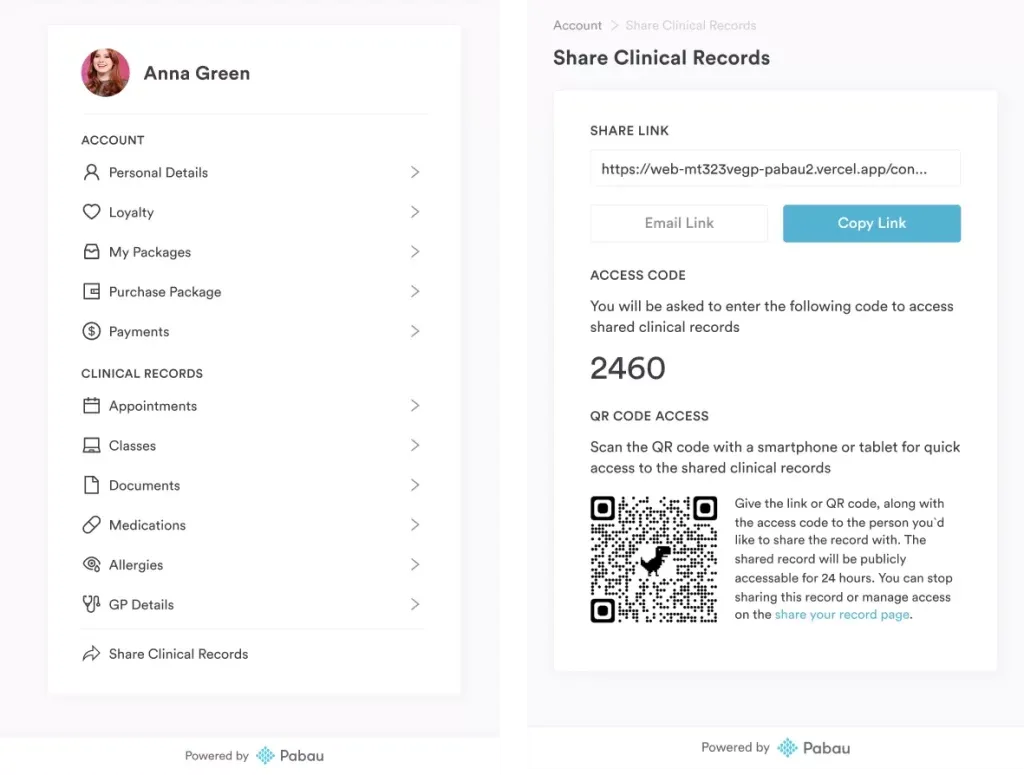
A client portal is a secure online platform where patients can see their medical records and treatment history. They can also see messages from your practice and stay up to date on their care.
Patients can update personal details, book appointments, fill out forms, and read all communication, like pre- and post-care. This way, the client portal cuts down on phone calls and emails and keeps patients engaged.
Patient portals are key for practices that want to empower patients and reduce admin work. They are especially helpful in primary care and medi-aesthetic clinics for follow-ups and ongoing care.
A 2021 study of over 500 patients found that using a patient portal made people feel more satisfied with their care. It improved communication with the care team, made the clinic experience feel smoother, and made post-visit instructions easier to follow.
For example, here’s what a comprehensive client portal looks like in Pabau:
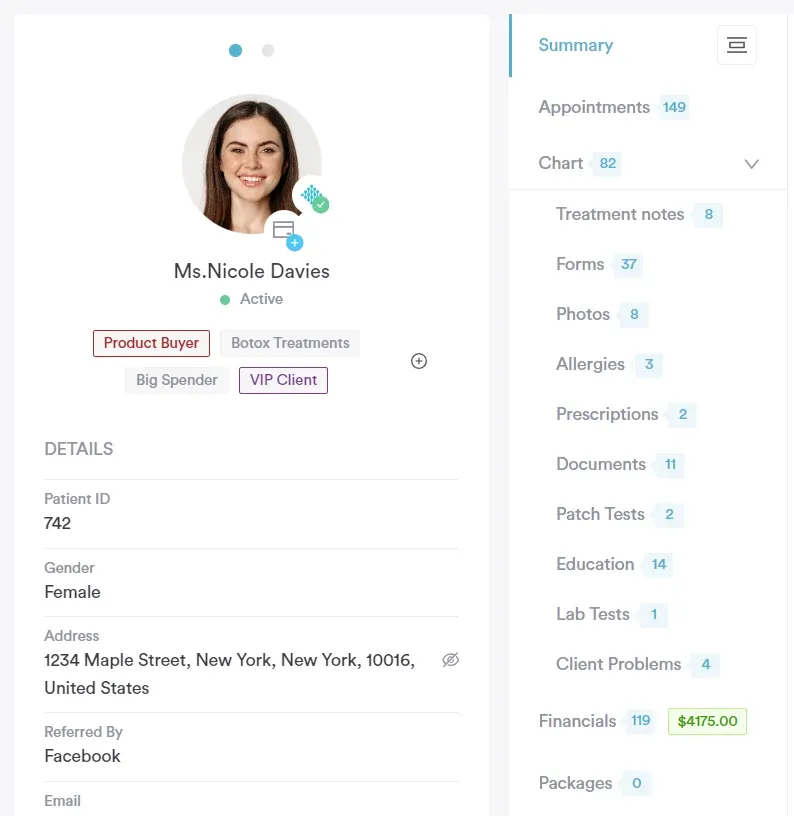
An EHR is a digital version of a patient’s chart. It stores medical history, treatment notes, allergies, lab results, and more. Many clinics also use the term Electronic Medical Records (EMR) to describe the same type of system.
EHRs keep all patient information in one place, so healthcare professionals can make faster and more accurate decisions. You can track health changes over time, spot risks early, and reduce errors. It also supports cleaner workflows because everything is logged and easy to access.
EHRs are one of the most important features of practice management software. They keep care consistent across teams, improve communication, and support better outcomes.
Many tools only offer EHR features and focus on the clinical side. For smoother workflows, pick an all-in-one system that includes both EHR and practice management. You get a clear view of your medical work and your business in one place.

A secure video platform that lets providers meet with patients online. No extra apps or logins needed.
Telehealth makes care easier to access. Patients can join from home, work, or on the go. It reduces travel time, supports quick follow-ups, and keeps care consistent. Virtual consultations also cut down on no-shows because appointments are more convenient
Telehealth is now a core part of modern care across primary care, medi-aesthetic, and specialist clinics. It expands your reach and helps you support patients who can’t always visit in person.
A US nationwide Patient Preferences for Direct-to-Consumer Telemedicine Services survey found that over 70 % of users said telemedicine visits were “easy” or “very easy,” and if telemedicine were no longer an option, about 72 % said they would be disappointed.

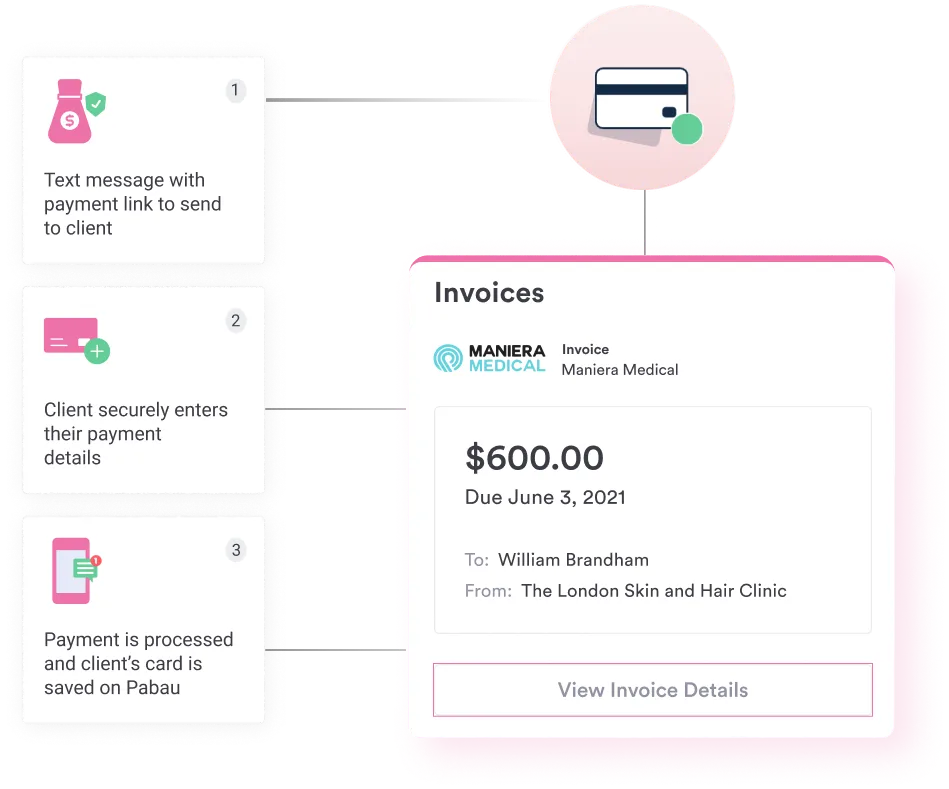
A PoS system lets you manage all payments in one place. It handles charges for treatments, products, memberships, and packages.
You can take in-person and online payments, create custom invoices, and track each client’s payment history. Many systems let you connect your card terminal or use tools like Stripe for quick and secure checkout. You can also sell gift cards, set up deposits, offer payment plans, and process refunds with ease.
A strong payment processing tool keeps your billing clean and consistent. It gives patients flexible ways to pay and makes every transaction fast and simple.
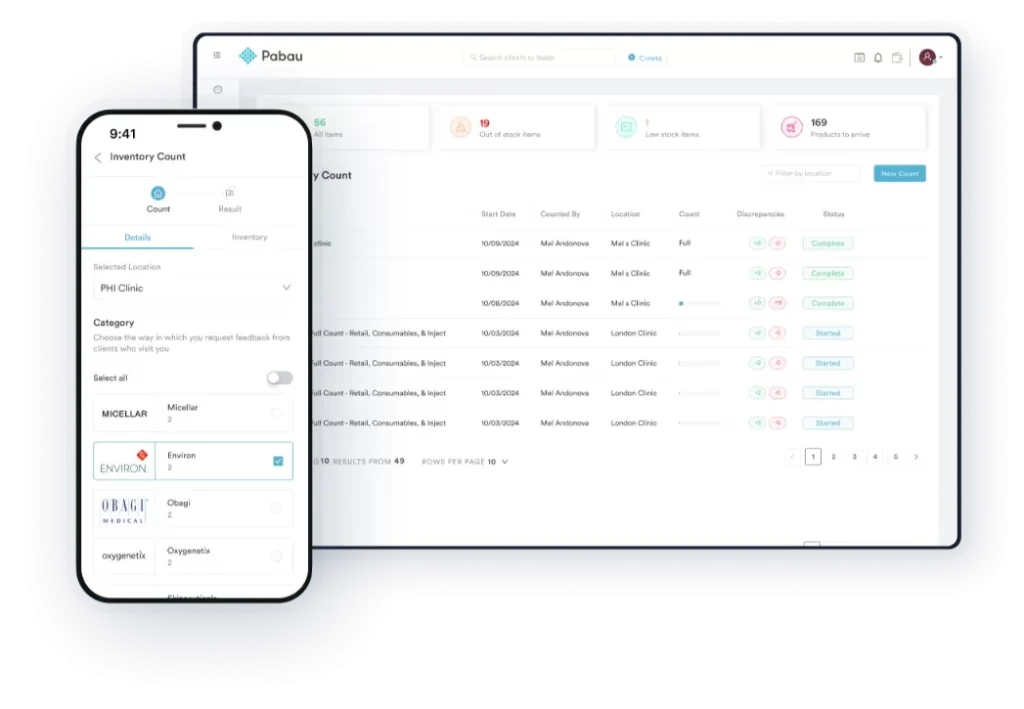
An inventory management system tracks all your practice’s products and supplies. It updates stock levels automatically as items are used or sold.
You can monitor inventory in real time, set reorder alerts, and reduce mistakes. Automatic deductions when products are used or sold save time and prevent shortages.
Inventory management is crucial for keeping treatments running smoothly and avoiding delays. It’s especially helpful for med spas and healthcare practices where supplies need to be ready at all times.
Use a system that tracks batch numbers and expiry dates for all products in stock. This helps you stay compliant and ensures no expired items are used in treatments.
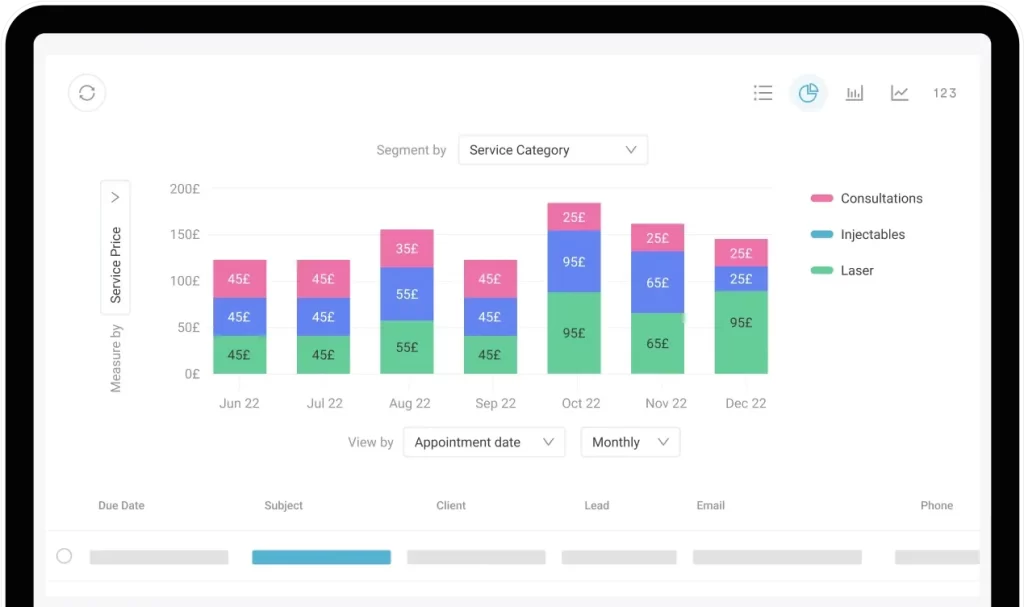
A robust reporting tool that gives you insights into your practice’s performance. It tracks everything from revenue and bookings to patient satisfaction and staff performance.
Prebuilt and custom reports make it easy to see:
Comprehensive analytics give a clear picture of your operations in seconds. Multi-site management lets you consolidate data across multiple locations for a full overview.
Reporting and analytics are essential for data-driven decisions. They help practice owners and managers spot trends, improve efficiency, and make smarter choices about staffing, marketing, and treatments.
If your practice has multiple locations, look for a system that supports multi-location reporting. It lets you consolidate data across all sites and get a clear view of overall performance. Tools like Pabau make it easy to track metrics practice-wide without extra manual work.
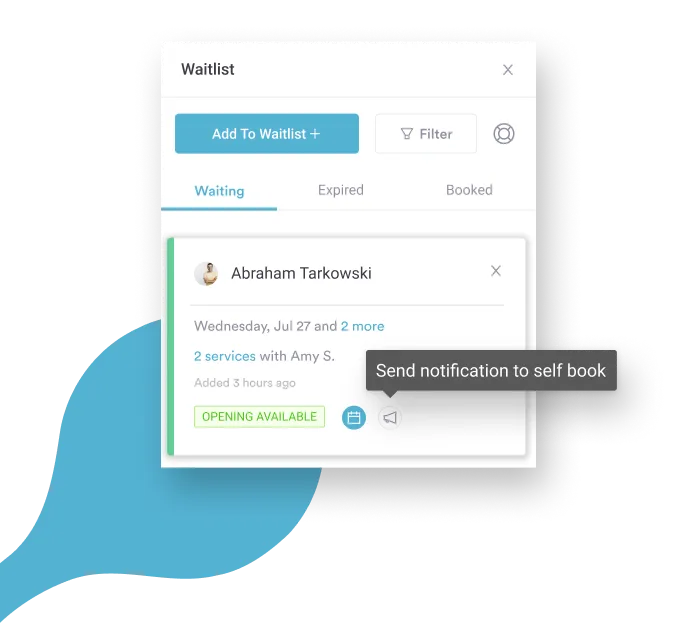
Online booking lets patients book, reschedule, or join a waitlist online. Appointment reminders are included to keep everyone on track.
Patients can book 24/7 and see available slots instantly. Waitlist management helps you fill last-minute openings. Automated reminders reduce no-shows and keep your schedule running smoothly.
Online booking and waitlists are key for keeping your practice organized and efficient. They save staff time, reduce phone calls, and improve patient satisfaction, especially in busy practices.
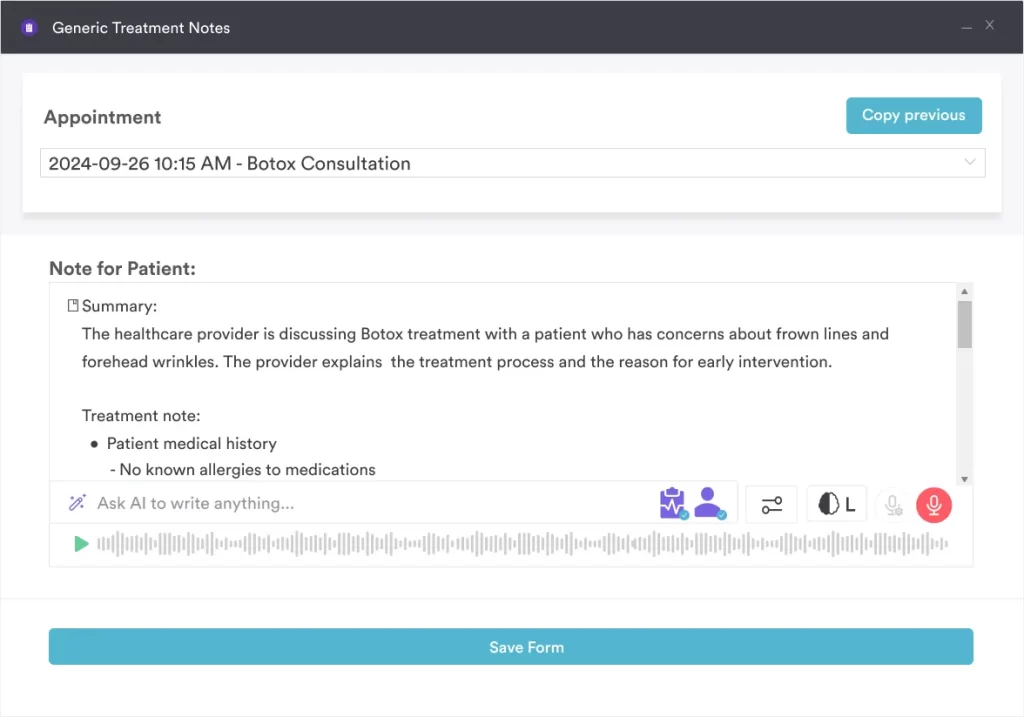
AI-powered tools that create automated treatment notes, visit summaries, and prescription drafts. (Hint: Pabau’s Pabau Scribe provides this kind of functionality.)
AI reduces time spent on documentation and helps ensure accuracy. It can cross-check allergies and drug contraindications while generating notes. Practitioners can focus more on patient care instead of administrative tasks. Notes and summaries are generated instantly, saving hours each week.
This feature is key for practices that want to scale, reduce human error, and make clinical documentation faster and easier.
A research study on the Use of an AI Scribe and Electronic Health Record Efficiency found that clinicians using an AI scribe spent significantly less time on EHR-related tasks. The average EHR time per appointment dropped by 8.5%, and time spent writing notes dropped by 15.9%
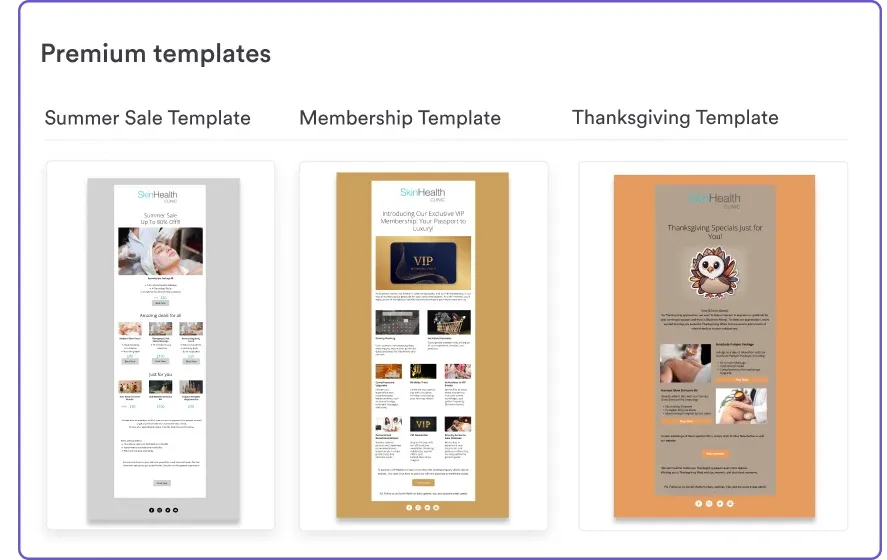
A suite of marketing features built into your practice management software, including email campaigns, SMS promotions, and client segmentation.
You can engage patients with reminders, special offers, and follow-ups without juggling separate tools. Automated campaigns help increase rebooking, promote packages, and build loyalty.
Marketing tools save time and keep your practice top-of-mind for patients. They’re especially valuable for growing practices, boosting client retention, and supporting multi-location operations.
Drive patient engagement with Pabau’s built-in marketing tools, including email and SMS campaigns. Easily run appointment recalls, special promotions, and seasonal offers. Upgrade to Marketing Plus for advanced targeting, automated workflows, and detailed campaign analytics—all in one platform.
Before committing to a new practice management system, here are the smart questions a growing practice should ask:
Will the vendor help you move appointments, client records, forms, and photos without downtime?
Can new staff get up to speed quickly? Is support available when you need it?
Thinking about things like payment processors, accounting software, marketing platforms, labs, or third-party apps.
Will it support small practices today and grow with you later, adding more users, more locations, more providers, and more complex workflows without needing to switch systems?
Are there add-on fees for users, storage, SMS, Telehealth, or marketing tools?
Look for features that streamline care and drive revenue, such as marketing automation, memberships, and advanced reporting.
Ready to simplify your practice management? Pabau combines appointment scheduling, EHR, Telehealth, marketing, and reporting tools in one platform.
Plus, it adapts to your needs, regardless of whether you’re a small team or a multi-location practice.
Want to see it in action? Book your demo now.
Here are a few examples of how an all-in-one practice management system supports different types of practices.
A busy med spa uses practice management tools to manage high booking volumes, automate reminders, track before-and-after photos, and streamline retail and treatment inventory.
Built-in marketing helps boost rebooking and promote seasonal offers without extra tools.
A private GP practice relies on online booking, EHRs, repeat prescriptions, and quick documentation.
Automated notes, visit summaries, and Telehealth make consultations smoother while reducing admin time and keeping patient records organized.
A cosmetic surgery clinic needs detailed EMRs, consent forms, client intake forms, procedure planning, and photo documentation.
Multi-provider scheduling, secure messaging, and post-op follow-ups ensure safe care while keeping complex workflows running efficiently.
Finding the best practice management software isn’t complicated if you know what features you need.
With Pabau’s all-in-one platform, you can streamline appointments, patient records, billing, and marketing—all in one place.
Explore Pabau’s Pabau GO app to see how you can manage your healthcare practice or med spa from your pocket or discover solutions for larger teams.
Want to dig deeper? Check out our guide on the Key Differences Between a Practice Management System and EMR.