CCSD code H4430: Examination of rectum under anaesthetic
CCSD code H4430 pays for the examination alone CCSD code H4430 is the UK private...

Last Updated: Oct 20, 2026
J7070 is the HCPCS Level II code for infusion, d5w, 1000 cc.
Get the count wrong and the claim either underpays the practice or invites a post-payment audit. Payers check the drug code against the volume recorded in the infusion note.
Let Pabau's smart automation suggest the right codes, reduce claim denials, and keep your practice compliant—effortlessly.
Automate repetitive tasks and focus on what matters most—your patients.
Reduce coding errors and ensure compliance with the latest regulations.
Clean claims, fewer denials, and faster reimbursements.
Powerful insights and reporting to help your practice thrive.
HIPAA compliant SOC 2 certified GDPR-compliant Trusted by 4,000+ clinics worldwide

HCPCS code J7070 reports an intravenous infusion of dextrose 5% in water, at 1,000 cc per unit of service.
One unit equals 1,000 cc, so 2,000 cc of D5W is billed as two units of J7070.
J7070 pays for the fluid alone, so the claim also needs the administration CPT code and, for many payers, the NDC.
Medicare allowables differ by MAC locality and by place of service, so check the CMS fee schedule before you quote a rate.
The code has been active since 1982, and it carries into 2026 dates of service unchanged.
J7070 is the Level II alphanumeric code for D5W administered at 1,000 cc per unit. It sits in the J7000-J7999 range.
The Centers for Medicare and Medicaid Services (CMS) maintains that range for drugs and solutions given by routes other than oral. Coders check the attributes in the table below first.
D5W is an isotonic solution used for hydration, medication delivery, and caloric support. It is not the same product as normal saline, and it is not a combination solution such as D5NS or D5LR. Each of those carries its own code, so the first step in coding an infusion is confirming which bag was hung.
Miscounted units cause more J7070 denials than any coding decision. The descriptor is explicit, because one unit is 1,000 cc of D5W.
If the infusion record shows 500 cc, bill 0.5 units where the payer accepts fractional units, or apply that payer’s rounding policy. A 2,000 cc infusion is two units.
The volume that counts is the volume delivered, not the size of the bag hung. A record that reads “D5W administered” with no number behind it will not substantiate a single unit during an audit.
Document the volume delivered, not the volume hung. When a 1,000 cc bag is stopped early, the nurse who pulls the line is the only person who knows the number. Capture it in the infusion record before the patient leaves, and the coder never has to guess or round.
Follow one bag of D5W through the system and the weak points show themselves. The nurse hangs 1,000 cc and records the volume, the start time, and the stop time. Charge capture then picks up one unit of J7070 for the fluid, plus the administration code for running the infusion.
From there the scrubber checks the place of service, the NDC format, and any NCCI pairs before the claim goes out. The payer makes the final call on whether the note supports the hydration.
Six stages, and each one has a characteristic way of sending the claim back.
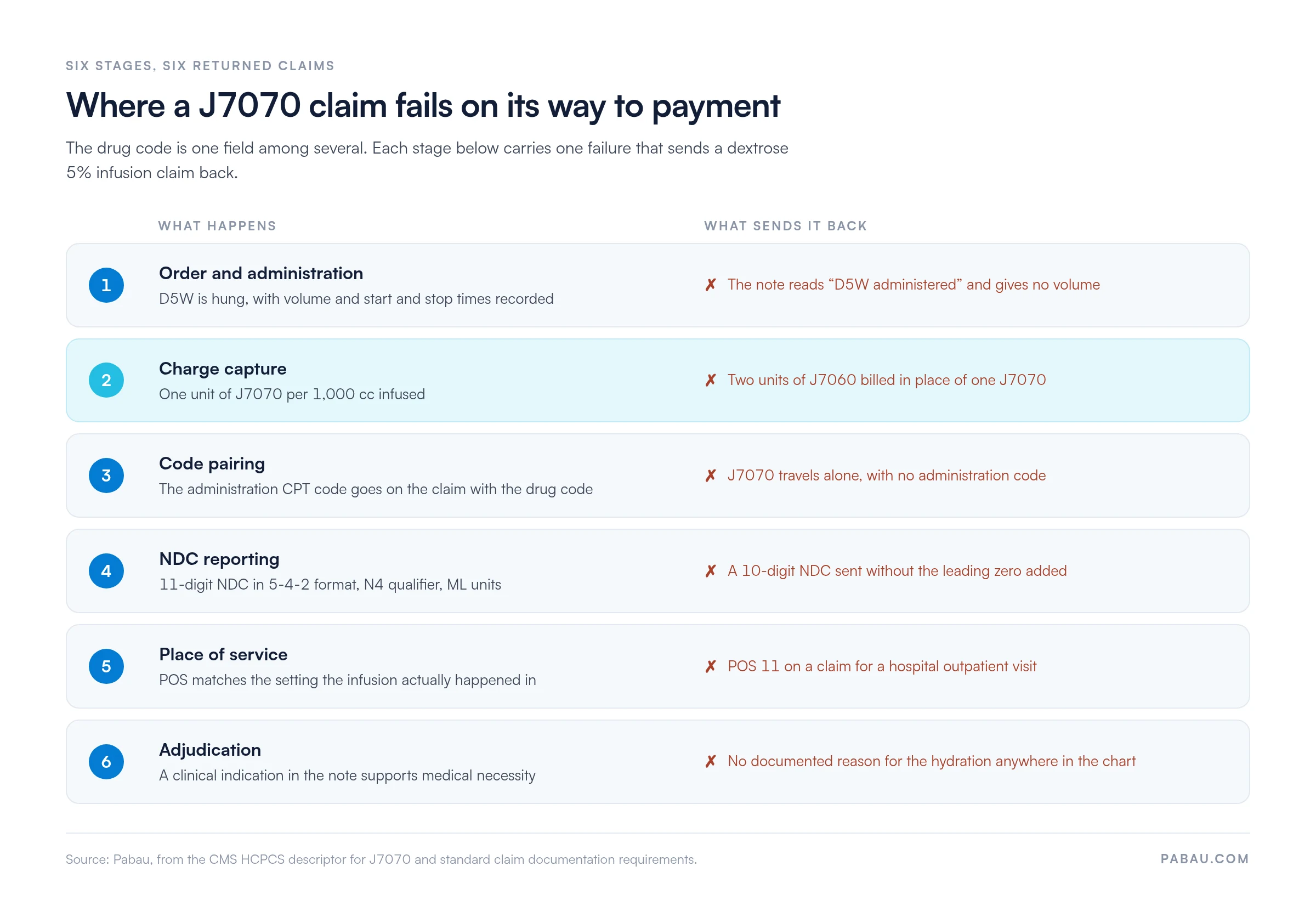
Stage three is worth pausing on, because the drug code and the administration code travel together. J7070 pays for the fluid, while 96360 covers hydration running from 31 minutes to one hour.
Send the bag without the administration code and the work of running the infusion goes unpaid.
Seven lines, and a coder can work through them in under a minute. Practices that run this check at the chair rather than in the billing queue see fewer returns. The person who can still fix the record is standing next to the patient.
Medicare coverage turns on the clinical setting and on the medical necessity of the hydration. The CMS Physician Fee Schedule lookup is the authoritative source for current allowables by Medicare Administrative Contractor (MAC) locality.
Rates move by locality, so never hardcode a figure from a third-party site into your fee schedule.
Where the service happens changes what J7070 pays. In a facility setting, payment usually arrives bundled under the Outpatient Prospective Payment System (OPPS).
That covers hospital outpatient departments and ambulatory surgery centers. The separately billable drug allowable may then be lower, or packaged into the facility rate entirely.
In a physician office or a freestanding infusion center, the full non-facility allowable for the drug applies. That difference is why billing staff confirm the place-of-service code on every J7070 claim before it leaves.
Before submitting a J7070 claim, verify the place-of-service code matches the setting the patient was actually treated in. POS 11 means a physician office, and POS 22 means an outpatient hospital. Mixing the two is one of the top reasons drug infusion claims come back. Build a POS check into your pre-submission routine.
Commercial policies for J7070 vary widely by plan and by region. Medicare publishes a standardized fee schedule, while commercial insurers negotiate rates individually.
They also set their own prior authorization triggers, medical necessity criteria, and volume limits, and none of those has to match Medicare.
Verification before the encounter is cheaper than an appeal after it. Four checks cover most of the risk.
Medicaid adds another layer, because coverage is set state by state. Some programs pay for IV hydration in specific settings, others exclude it, and others ask for extra documentation.
Check the state Medicaid fee schedule or the LCD for your MAC region before you assume the claim is payable.
Many payers, Medicaid programs especially, want the National Drug Code reported next to the HCPCS code on drug claims.
J7070 maps to several NDCs, because D5W 1,000 mL bags come from more than one manufacturer. The NDC to report is the one printed on the product given to that patient.
CMS publishes the NDC-to-HCPCS crosswalk with its Part B drug pricing files, updated on a quarterly cycle. Manufacturers and lots change, so a static NDC list saved to a shared drive goes stale without anyone noticing.
Correct coding is only half of a defensible J7070 claim. The record behind it has to substantiate the code, the units, and the medical necessity of the infusion.
Miss one of the three and the claim is exposed, either to a front-end denial or to a post-payment audit finding later.
The CMS National Correct Coding Initiative can apply edit pairs when J7070 goes out with other infusion or hydration codes. Whether an edit bites depends on the exact code combination and on any modifier attached.
Check the current NCCI edit files for your combination rather than assuming it is clean, since CMS updates them quarterly.
The same code behaves differently across care settings, mostly through the place-of-service code and the coverage rules attached to it.
Knowing which classification your practice falls under is one of the first billing decisions an infusion service makes. That choice drives the POS code on every claim that follows.
Two details cut across all five rows. State law decides who may administer IV therapy, and the supervising clinician’s NPI has to appear on the claim.
Mobile services carry the same NDC and documentation requirements as a fixed site, so a van does not simplify the paperwork.
Choosing J7070 correctly means knowing how it differs from the codes sitting next to it. The table below covers the solution codes most often confused with J7070, with the CMS descriptor for each.
J7060 and J7070 are the pair that causes most substitutions. Both describe D5W, but J7060 is the 500 cc unit and J7070 is the 1,000 cc unit. Billing J7060 twice for a single 1,000 cc bag is incorrect coding, even though the arithmetic looks the same.
The administration codes sit on the CPT side of the claim rather than in the J-code range. Our CPT code guides cover the hydration and infusion administration codes that pair with J7070, including the initial-hour and each-additional-hour rules.
One more distinction matters for wellness practices. A menu item described as a “Myers cocktail with a D5W base” needs documentation that separates each billable component by substance and volume. Without that, the coder cannot tell which codes the encounter supports.
Most infusion practices run billing in two places. The volume, the times, and the indication live in the clinical record, and the claim then gets rebuilt by hand in a separate billing tool. Every re-keyed field is another chance for the units to drift away from the note.
Practice management software like Pabau keeps the two together. The infusion is charged on the invoice attached to the patient record, so the J7070 units and the documentation behind them stay in one place.
Pabau’s claims management software then submits the claim electronically through Claim.MD in the US, with eligibility checks and claim status in the same dashboard.
Validation runs in the background before a claim goes out. If a detail the payer needs is missing, the Send button stays disabled until someone fixes it.
When the payer responds, the ERA posts against the same invoice, so your team can see where every infusion claim stands without exporting a spreadsheet.
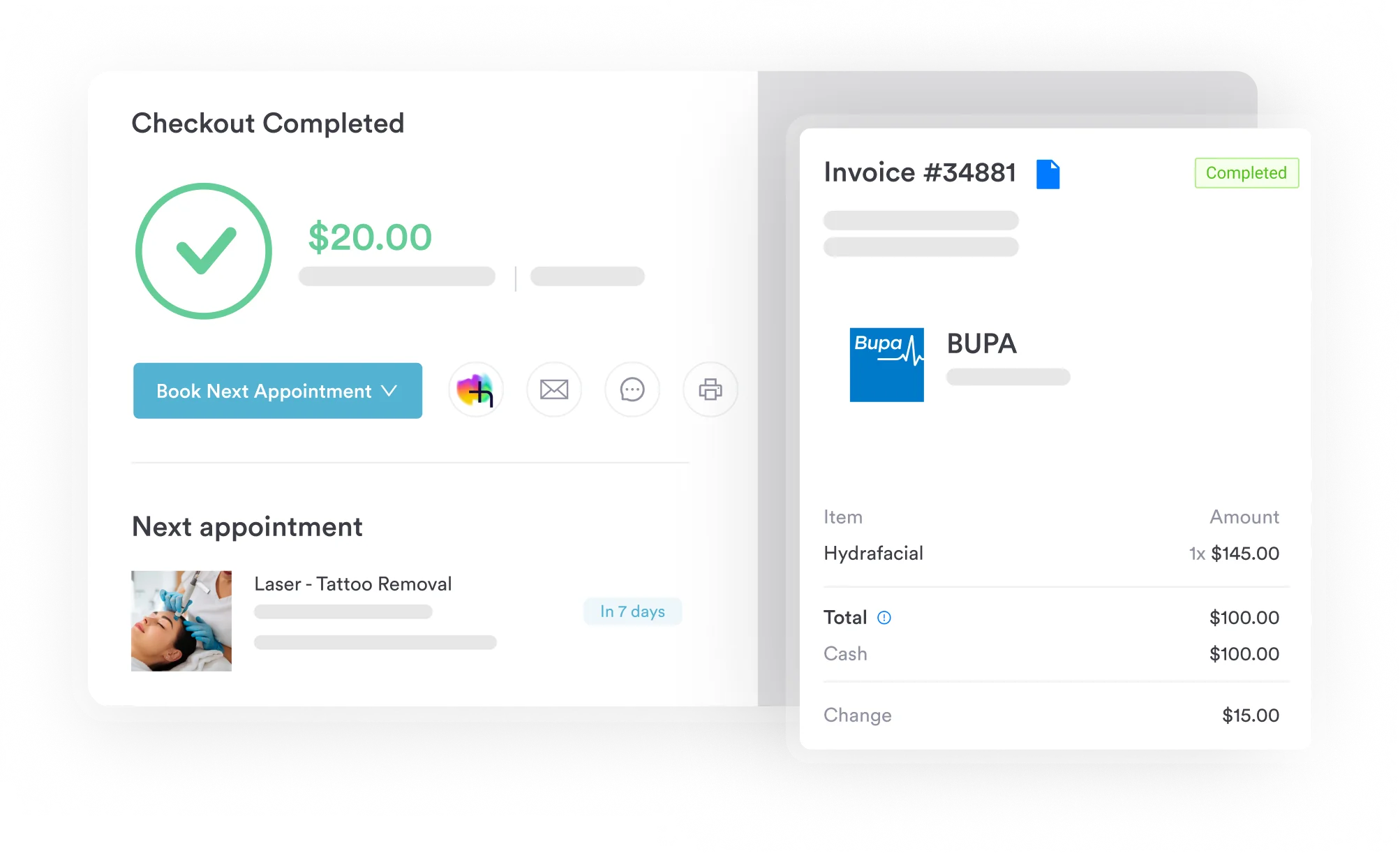

Pabau links each infusion charge to the note that supports it, then submits the claim electronically and tracks it through to payment. Your team stops re-keying billing data between systems.

J7070 is a simple code with an unforgiving unit. Most denials on it trace back to a single mismatch, where the volume in the note disagrees with the units on the claim.
So fix it at the chair rather than in the billing queue. When the nurse records the exact volume delivered, the times, and the indication, the coder already holds what the payer will ask for. The administration code, the NDC, and the place of service all follow from information the encounter produced.
Practices that infuse weekly feel this most, because one small habit repeats across hundreds of claims. Book a demo to see how Pabau keeps J7070 units, documentation, and claim status in one system.

Need the administration code that pairs with J7070? CPT code 96360 covers the initial hour of IV hydration, with the time thresholds and unit rules.
Billing a therapeutic infusion rather than plain hydration? CPT code 96365 explains how the first hour of a drug infusion is reported and reimbursed.
Looking for the diagnosis that supports IV hydration? ICD-10 code E86.0 covers dehydration, the documentation payers expect, and the CPT codes it pairs with.
Infusing in the patient’s home? CPT code 99601 covers home infusion and specialty drug administration, where the coverage rules differ from an office visit.
Want another J-code worked through end to end? HCPCS code J0694 walks through cefoxitin billing units, NDC reporting, and the denials that follow them.
No. J7070 is specific to dextrose 5% in water. Stronger dextrose solutions, such as D10W or D50W, carry their own HCPCS codes. Read the descriptor against the bag label before you code, because concentration is what separates these codes.
The code carries no age restriction, so it applies to children as well as adults. Pediatric volumes rarely reach 1,000 cc, so most pediatric infusions fall to a fractional unit or to J7060 instead. Record the delivered volume exactly.
Medicare does not apply prior authorization to J7070. Some commercial plans do require it for hydration outside an acute clinical indication, wellness infusions especially. Check the payer’s own infusion policy before the appointment rather than after the denial.
Usually not. Where dextrose is the vehicle for another drug, payers generally treat the fluid as part of that drug’s administration. Bill it separately only where the payer’s policy allows it and the note shows hydration was clinically indicated.
Check the format first. A 10-digit NDC needs a leading zero to reach the 11-digit 5-4-2 form, and the qualifier has to be N4. If the format is correct, match the NDC on the bag against the current CMS crosswalk.