Massage Gift Card Template
A massage gift card template is a fill-in-the-blank certificate you customize wi...

23
Last Updated: Sep 11, 2026
AI patient care software uses artificial intelligence to handle the documentation and admin around a patient visit, from intake questions to treatment notes and follow-up.
Care Plus is a paid add-on that brings this category to practice management software like Pabau. It adds smart intake forms, AI prompts for clinical notes, pro photo tools and unlimited video consultations to the core platform.
What sets Care Plus apart is the connected care record. Each tool reads from and adds to the same patient record. The allergy a patient flags on the intake form is already there when you dictate the note, compare photos and send the aftercare video.
Below, you’ll find what the category covers and a row-by-row comparison with Pabau’s built-in care tools. Two worked examples then follow a single visit.

AI patient care software covers intake, clinical documentation, photo evidence and follow-up, with AI drafting and the practitioner reviewing.
Care Plus runs all four on the connected care record, so each step starts with what the previous one captured.
Care Plus is a paid add-on for Pabau practices that want smart forms, unlimited use of Pabau Scribe, our AI scribe, and unlimited video consultations.
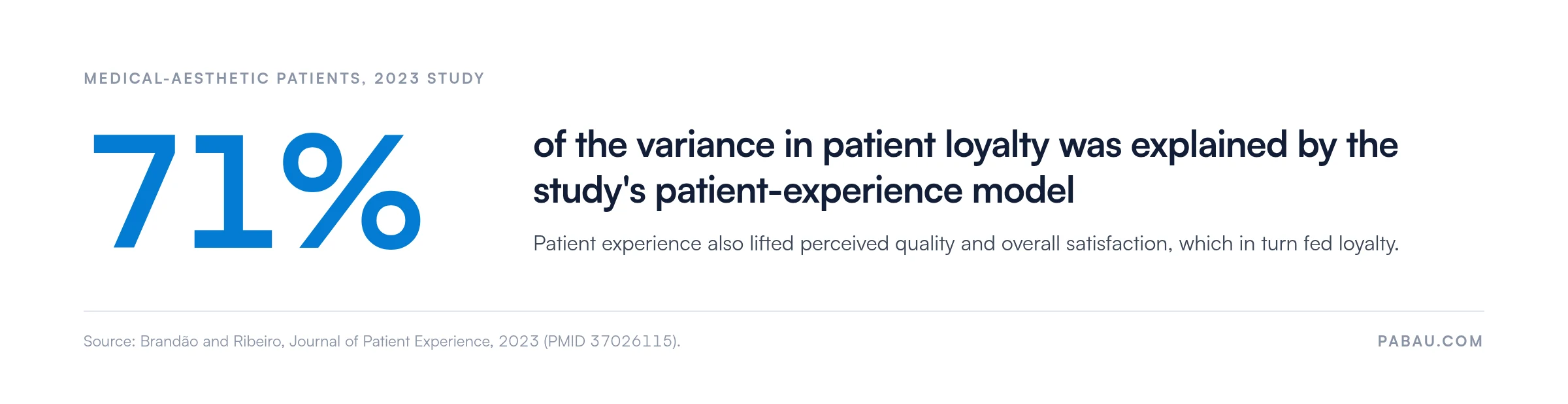
A 2023 study of medical-aesthetic patients found its patient-experience model explained 71% of the variance in patient loyalty.
The payoff is fewer disconnected tools, because one record replaces the separate form builder, dictation app and video platform many practices juggle.
Patients judge your practice on the whole visit, not only the treatment result. They expect booking, forms and follow-up to feel as easy as ordering food or booking travel.
Three things undercut that expectation fast:
Booking is usually a patient’s first touchpoint, which is why choosing the right patient scheduling software is often the first fix. Friction there shows up later as frustrated patients, poor online reviews and bookings lost to other practices.
The research backs the business case. A 2023 study on the impact of patient experience on loyalty surveyed patients of medical-aesthetic clinics. The study’s patient-experience model explained 71% of the variance in patient loyalty.
The study also found that the functional side of care, such as processes, environment and outcomes, shaped experience more strongly than the relational side. Processes are the part software can change.
Care Plus targets exactly those processes. The goal is a more polished visit without more admin for your team.
AI patient care software combines smart patient intake, AI-assisted clinical notes, patient-facing photo and video tools, and access-controlled handling of patient data.
Most roundups of medical AI apps for doctors review these jobs one tool at a time. A scribe sits here, a form builder there. Standalone apps for physicians each keep their own copy of the patient, so someone ends up retyping details between them.
In a busy practice, the best AI for doctors is usually the one that works where the patient record already lives. Care Plus takes that route, which we call the connected care record. Every Care Plus tool works on the same Pabau patient record, as the flow below shows.
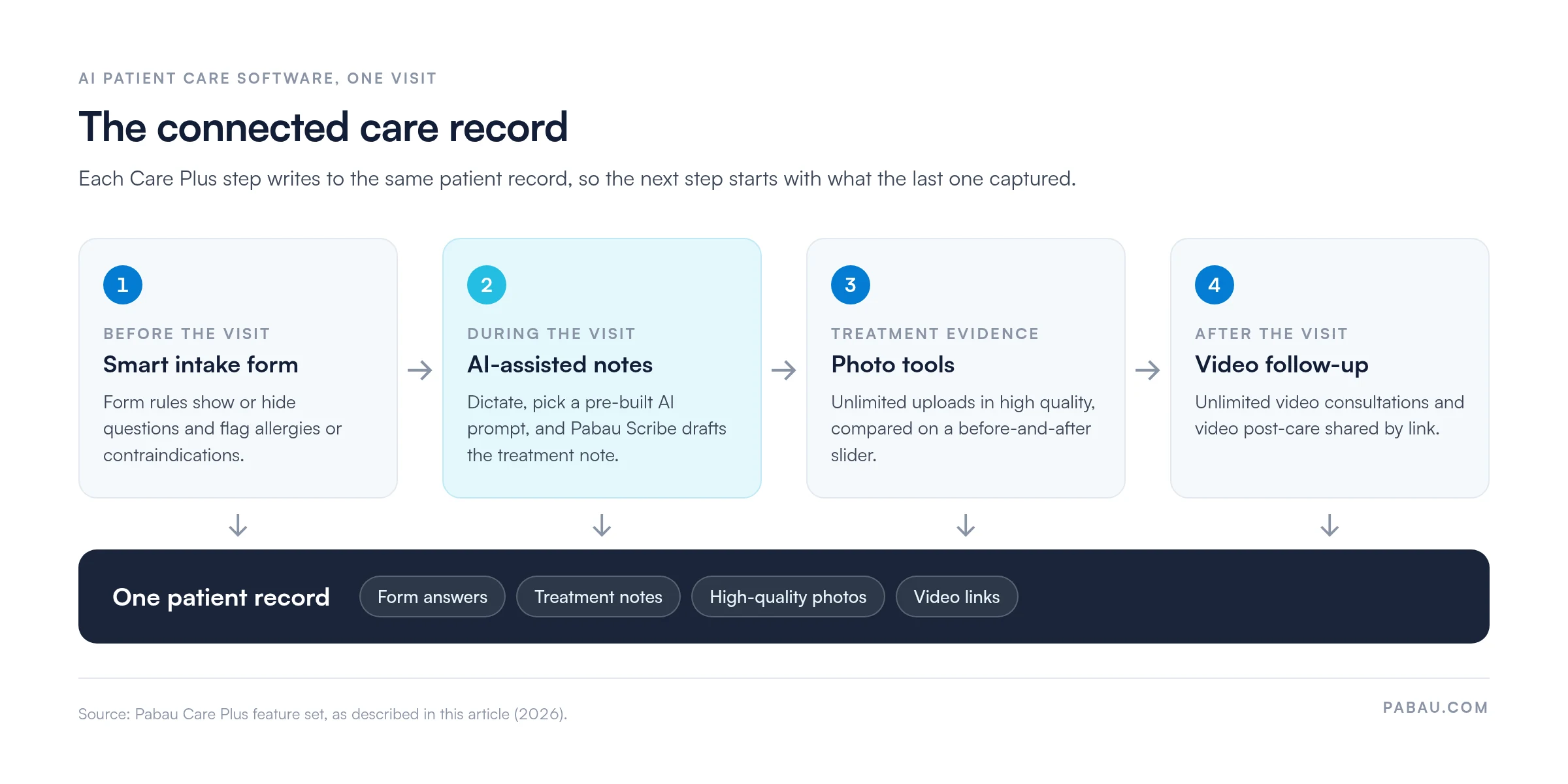
When we set up Care Plus with a practice, we start with the intake form rules, because every later step reads from those answers.
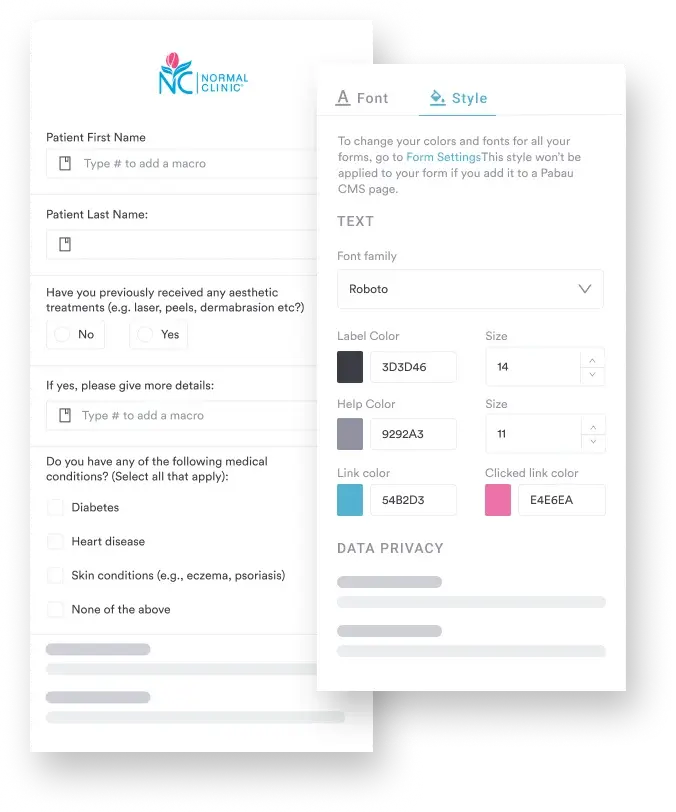
Care Plus intake forms ask follow-up questions automatically, so an allergy or medical condition gets the detail you need without a phone call.
The forms run step by step, with single- and multiple-choice questions, progress bars and your own branding. Patients finish faster, and the answers land on the patient record ready for the consultation.
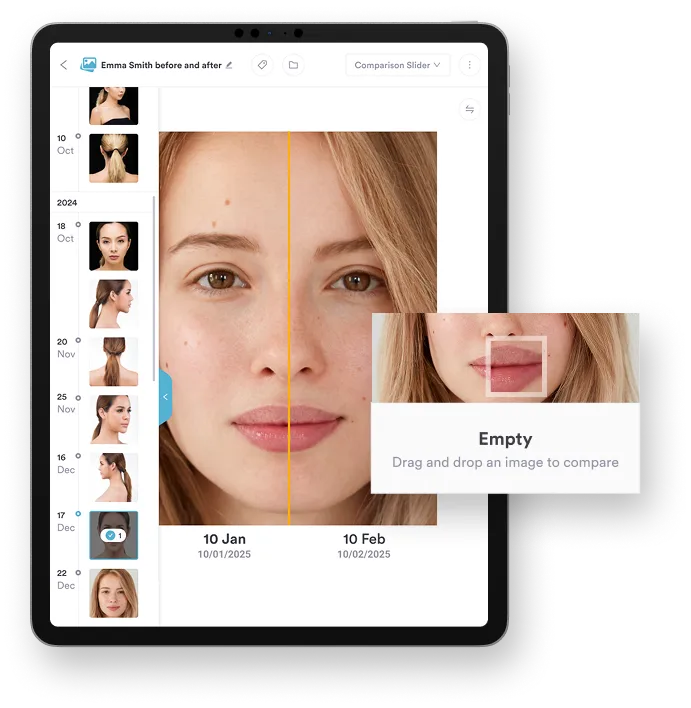
Care Plus stores before-and-after photos in high quality and lines them up side by side on a comparison slider.
You can upload a whole batch at once and catch subtle changes with confidence. The slider makes progress easy to show during a review appointment, which builds patient confidence in the result.
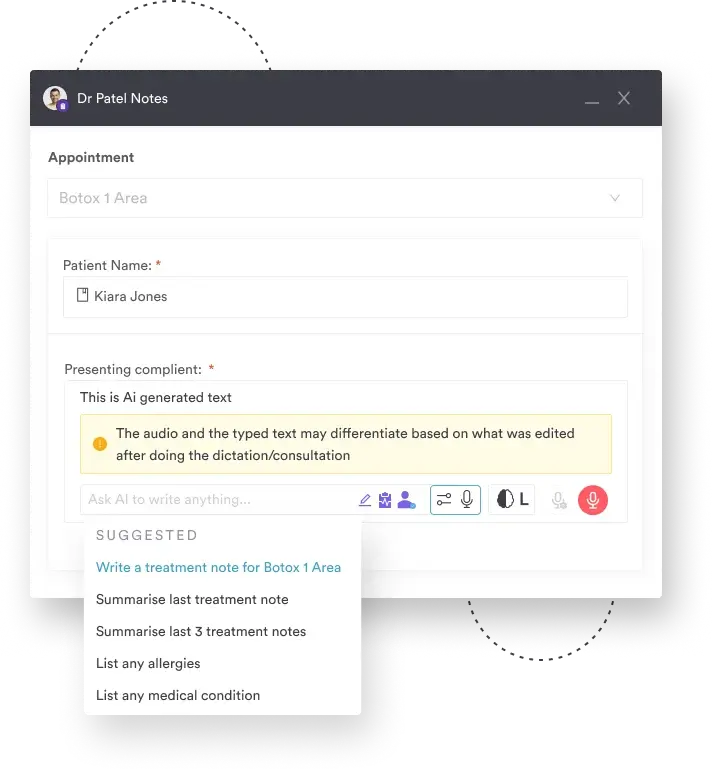
Care Plus includes AI tools for doctors and their teams, with pre-built or custom prompts that turn a dictated consultation into a clear treatment note.
Pick a prompt such as a treatment note for today’s appointment, a summary of the last three notes, or a list of recorded allergies. An AI medical scribe can go further, drafting full visit summaries while you focus on the patient.
You review and edit each draft before it’s saved, so the note stays yours.
Care Plus adds unlimited video consultations with no credit caps, plus reusable video post-care and video links on patient records.
Care Plus also covers the smaller jobs that keep a treatment plan on track:
Care Plus also includes unlimited use of Pabau Scribe, our AI scribe, with no credits to track. You can generate treatment notes and summaries and write service and product descriptions in a click. Pabau Scribe also summarizes the client card in seconds and helps you prescribe with confidence.
Care Plus adds branching forms, unlimited Pabau Scribe, AI prompts, macros and video to the care tools every Pabau subscription already includes.
The table shows the connected care record row by row, against Pabau’s built-in care suite.
| Feature | Pabau’s built-in care suite | Pabau’s Care Plus suite |
|---|---|---|
| Forms | Standard forms appear all at once. No step-by-step guidance, no form rules, and no branding | Step-by-step forms with smart rules, progress bars, and full branding |
| Pre- and post-care | Automatically send written communications by email and SMS | Send written and video pre- and post-care communications |
| Before-and-after photos | Upload limit of 9 photos per batch. Images are compressed in client records but can be downloaded in high quality. Standard comparison tool available | Unlimited bulk photo uploads, high-quality image storage and a before-and-after slider |
| Prescribing | Prescribe via built-in labs or integrations | Fully built-in prescribing tools with quick repeat prescriptions in a single click |
| Macros | Not available | Unlimited reusable macro text for faster, consistent documentation |
| AI features | Pabau Scribe on credits (see below) | Pre-built or custom AI prompts for notes and records |
| Pabau Scribe | Pabau Scribe available on a credit basis per usage (5 or 2 credits depending on task) | Pabau Scribe included and unlimited; also includes pre-built AI prompts for notes and records |
| Video uploads | Cannot upload videos to records | Add videos via links for personalized care |
| Complaint management | Standard record-keeping | Log and manage complaints, incidents and feedback in a secure, structured workflow |
Every Pabau subscription still includes the full built-in care suite. Care Plus is for practices that want more on top of it.
Care Plus shows its value in two ordinary moments of a visit: a new patient’s intake and a busy consultation.

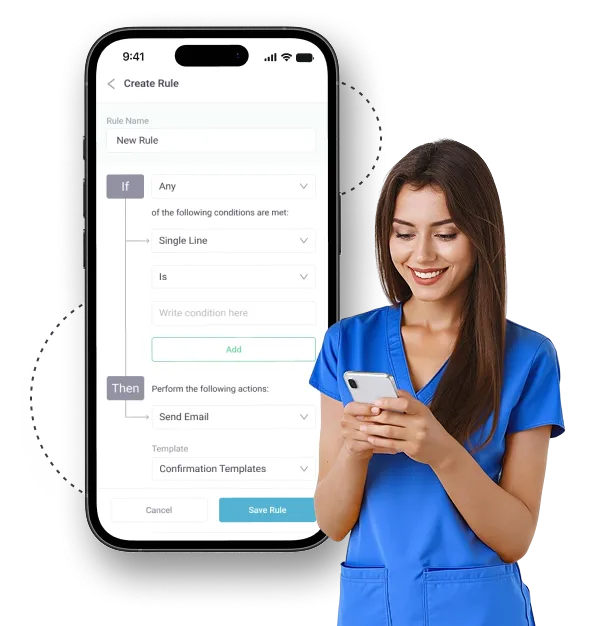
A new patient books a treatment and opens your intake form. You’ve set rules in Care Plus for patients under the minimum age or with an allergy that affects the treatment.
When a rule triggers, the form shows or hides fields, skips steps, or suggests another option before the patient arrives. Patients see only the questions that apply, and your team skips the pre-visit call to fill in missing details.
The same conditional logic suits higher-risk intake. An IV therapy patient intake form, for example, can screen for allergies and contraindications before a drip is booked.
Say you’re mid-consultation and want to keep your attention on the patient, but the note still has to be thorough. With Care Plus’s ready-made AI prompts, you speak freely, then pick the right prompt to create a clear summary in seconds.
The summary lands on the same record that already holds the intake answers and today’s photos. That’s the connected care record at work, and it saves time without losing accuracy.
Pabau is an all-in-one practice management system, and every subscription includes the calendar, online booking, digital forms, treatment notes and before-and-after photos. Care Plus is the paid add-on for practices that want those care tools to do more of the work.
Without it, many practices send a PDF form, retype the answers, write notes after hours and email aftercare by hand. With Care Plus, the form screens the patient, AI drafts the note and a reusable video handles aftercare, all on one record.
The quickest way to judge the fit is to watch your own forms and notes run on it. Book your demo today and see how Care Plus fits the treatments you offer. Our team then sets it up with you during structured onboarding.

Care Plus adds smart intake forms, AI note prompts, unlimited Pabau Scribe and video follow-up to Pabau. Each step of a visit builds on the same patient record.

AI patient care software earns its place when it removes steps rather than adding another app to check. Care Plus does that by keeping intake, notes, photos and follow-up on the connected care record.
The trade-off is cost. Care Plus is a paid add-on, so it makes most sense when forms, notes and aftercare take hours from your team each week.
If they do, start with the intake rules, since every later step reads from them. Book a demo to see how Care Plus turns one patient record into a complete visit workflow.

Want the full picture on Pabau Scribe? Pabau Scribe: How its AI agents handle notes, letters and prescription checks explains what the AI scribe drafts and how you review it.
Charting between treatment rooms? The latest version of Pabau GO covers what our iOS app for practitioners does between appointments.
Looking to keep patients coming back? Announcing Pabau’s Membership feature shows how recurring plans reward the loyalty a better patient experience builds.
The best AI for doctors and other medical professionals is the tool that works inside the patient record they already use. For aesthetic and private practices on Pabau, Care Plus adds AI note prompts and unlimited Pabau Scribe to that record. Drafts never need copying between apps.
For patients, the most useful medical AI is the kind their practice uses behind the scenes for smoother intake, clearer aftercare and faster follow-up. AI patient care software such as Care Plus delivers that through step-by-step forms, video post-care and unlimited video consultations. Diagnosis and treatment decisions still sit with the practitioner.
No. AI patient care software works inside structured patient records with access controls, while a general-purpose AI chatbot has no connection to your patient files. In Care Plus, AI prompts draft notes from the appointment you’re in and save them to that patient’s record. A general chatbot needs details pasted in by hand, which moves patient data outside your system.
AI patient care software can support HIPAA compliance, but no software is HIPAA-certified. HIPAA sets obligations for your practice, and there is no official certification a vendor can earn. Check how the software handles protected health information (PHI). Ask whether the vendor signs a business associate agreement, restricts records to authorized staff and keeps an audit trail. Care Plus AI features run inside Pabau’s patient records, so notes aren’t pasted into an outside tool.