Pabau leads with comprehensive multi-specialty workflows and unlimited photo storage
Jane App excels for smaller Canadian practices with provincial billing integration
DermEngine specializes in AI-powered dermoscopy and diagnostic imaging workflows
Carepatron offers generous free tier for solo practitioners starting out
Canadian clinics need PIPEDA compliance and bilingual interface considerations
Dermatology Software Canada: Compare 7 Leading Platforms
Canadian dermatology practices face unique operational challenges: provincial health plan billing, PIPEDA compliance requirements, and the need to serve both English and French-speaking patients. The right practice management system must handle clinical photography workflows, integrate with provincial EMR systems, and support both medical and cosmetic dermatology procedures.
Seven platforms dominate the Canadian dermatology software market, each with distinct positioning. Pabau serves multi-location practices requiring cross-specialty workflows. Jane App targets smaller clinics with simplified provincial billing. DermEngine focuses exclusively on diagnostic imaging and dermoscopy analysis. ModMed delivers specialty-specific templates developed by dermatologists. Carepatron provides affordable entry pricing for solo practitioners. SimplePractice primarily serves mental health providers but supports some dermatology workflows. Miiskin PRO specializes in teledermatology and remote patient monitoring.
This comparison examines pricing in both USD and CAD, feature depth across clinical documentation and practice management, Canadian regulatory alignment, and real user feedback from verified review platforms. Each system’s strengths and limitations are assessed through the lens of Canadian dermatology practice requirements.
Compare Dermatology Software Canada at a Glance
Seven platforms serve Canadian dermatology clinics with varying depth across clinical features, practice management, and regulatory compliance. For additional verified reviews, see dermatology software in Canada on Capterra.
Unlimited clinical photo storage with face mapping and injection plotting
$62 / £49 per user/month
4.5/5 (370+)
Carepatron
Solo practitioners seeking affordable entry pricing with room to scale
Free tier with unlimited patients and basic telehealth
$0 / $0 (free tier available)
4.9/5 (522+)
DermEngine
Clinics prioritizing diagnostic imaging and AI-powered dermoscopy analysis
Clinical decision support with total body photography workflows
Contact for pricing
N/A
Jane App
Small to mid-sized Canadian practices requiring provincial billing integration
Canadian-built platform with seamless provincial health plan workflows
Contact for pricing
4.7/5 (1050+)
Miiskin PRO
Practices emphasizing asynchronous teledermatology and remote monitoring
Patient-facing mobile app for standardized photo submissions
Contact for pricing
N/A
ModMed
Dermatology-only practices requiring deep specialty-specific templates
Dermatologist-developed clinical workflows with specialty coding
Contact for pricing
N/A
SimplePractice
Wellness-focused dermatology practices serving mental health and aesthetic clients
Strong telehealth and billing for therapy-adjacent dermatology services
Contact for pricing
4.8/5 (3250+)
Pabau: Best Dermatology Software Canada for Multi-Location Practices
Pabau serves aesthetic clinics, dermatology practices, and multi-specialty wellness centres across Canada, the UK, the UAE, and South Africa. The platform combines practice management, electronic health records, clinical photography, and marketing automation in one system. Built for growing practices, it scales from single-location clinics to franchises operating across multiple provinces.
Unlike specialty-only platforms, Pabau supports medical dermatology, cosmetic dermatology, laser treatments, and adjacent services like IV therapy or wellness consultations. Canadian practices benefit from PIPEDA-aligned data storage, multi-currency support, and integrations with provincial EMR systems. The platform eliminates the need for separate tools for scheduling, billing, clinical documentation, and patient communications.
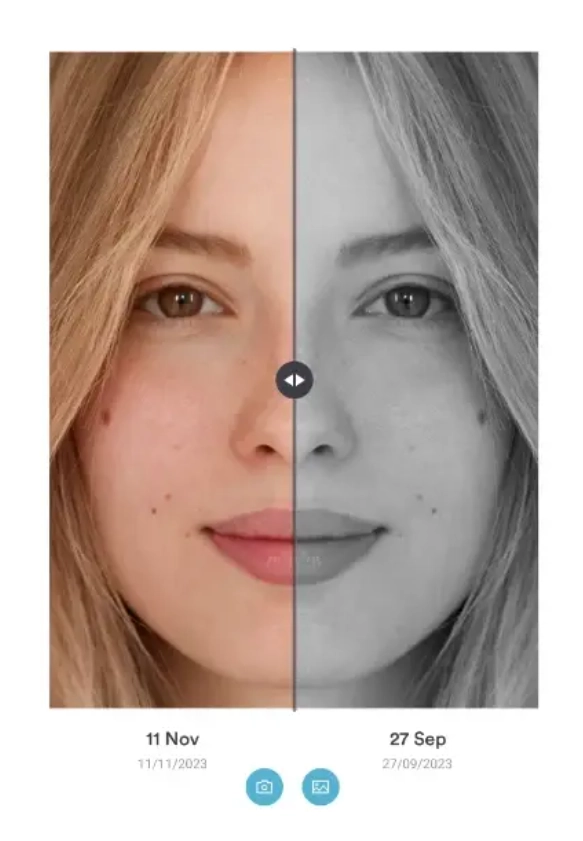
The clinical record system supports injection plotting, body mapping, before-and-after photo comparisons, and customizable dermatology-specific forms. Practitioners document consultations, treatment plans, and follow-up protocols within the patient record. Photos sync across devices, automatically timestamped and organized by service type. According to Capterra reviewers, the photo management system receives consistent praise for eliminating manual filing and streamlining treatment documentation.
Key Features
Unlimited clinical photo storage: HIPAA and PIPEDA-compliant cloud hosting with automated timestamping and service-based organization
Injection plotting and body mapping: Visual charting tools for dermal fillers, Botox, laser treatments, and surgical planning
Multi-location management: Centralized calendar, inventory, staff permissions, and reporting across all clinic sites
Customizable digital forms: Drag-and-drop form builder for consent forms, medical history questionnaires, and post-treatment care instructions
Integrated payment processing: Pabau Pay supports deposits, package sales, memberships, and split payments with Stripe and card terminal integration
Marketing automation: Email and SMS campaigns with appointment reminders, recall workflows, and loyalty program management
Echo AI scribe: Voice-to-text clinical note generation with automated SOAP note formatting and prescription drafting
Patient portal: Online booking, form completion, treatment history access, and secure messaging for Canadian and international clients
Pricing
Plan
Price
Who It’s For
Key Features
Essentials
$62 / £49 per user/month
Single-location practices starting out
Full feature access, unlimited photos, basic reporting
Marketing automation, advanced reporting, priority support
Where Pabau Shines
Multi-industry scalability: Supports dermatology, medical aesthetics, wellness, and allied health workflows within one platform, eliminating the need for separate systems as services expand
Comprehensive photo management: Unlimited storage with automated organization, before-and-after comparison tools, and integrated consent workflows for clinical photography
Cross-location operational control: Centralized inventory tracking, staff scheduling, and financial reporting across multiple clinic sites with role-based permissions
Deep workflow automation: Recall campaigns, appointment reminders, post-treatment follow-ups, and abandoned booking recovery run without manual intervention
Canadian compliance alignment: PIPEDA-compliant data storage, multi-currency billing, and support for provincial health plan workflows through third-party integrations
Where Pabau Falls Short
Onboarding complexity: Full feature adoption requires dedicated training time, particularly for teams transitioning from simpler systems or paper-based workflows
Mobile app limitations: Some advanced features accessible on desktop are not yet available through the mobile app, requiring practitioners to carry tablets or return to workstations for certain tasks
Third-party integration depth: While the platform integrates with major payment processors and accounting software, direct EMR integration with provincial systems requires custom API work
Customer Reviews
“The photo management system transformed our dermatology workflows. We eliminated manual filing entirely and now access treatment histories instantly during consultations.” (Verified user, Capterra)
“Onboarding took longer than expected, but once our team mastered the system, operational efficiency improved significantly. The automation features alone justify the investment.” (Practice manager, G2)
Practices offering both medical and cosmetic dermatology services
Growing clinics planning to add aesthetic treatments, wellness services, or franchising
Canadian practices needing PIPEDA compliance and multi-currency billing capabilities
Carepatron: Best Dermatology Software Canada for Solo Practitioners
Carepatron targets solo practitioners and small clinics with a generous free tier that includes unlimited patients, telehealth, and basic practice management. The platform launched with a focus on wellness providers and has expanded into dermatology and aesthetic services. Canadian dermatologists starting out or transitioning from paper-based systems benefit from the zero-cost entry point and gradual feature scaling as patient volume grows.
The system handles appointment scheduling, clinical documentation, billing, and patient communications. Telehealth consultations run through the platform without third-party integrations. According to Capterra reviewers, the user interface prioritizes simplicity over feature depth, making it accessible for practitioners without dedicated administrative staff.
Key Features
Free tier: Unlimited patients, telehealth consultations, appointment scheduling, and basic invoicing at no cost
Integrated telehealth: Video consultations with screen sharing and secure messaging built into the patient record
Clinical note templates: Pre-built templates for dermatology consultations, treatment plans, and follow-up documentation
Online booking: Patient-facing scheduling portal with automated confirmation emails and SMS reminders
Pricing
While the starter plan is free, the cost for growing clinics depends on specific feature needs. You can find a comprehensive guide to Carepatron pricing and its various tiers below.
Plan
Price
Who It’s For
Key Features
Starter
$0 / $
Solo practitioners starting out
Unlimited patients, telehealth, basic scheduling
Professional
$29 / $37 per user/month
Growing practices requiring advanced features
Payment processing, advanced reporting, API access
Where Carepatron Shines
Zero entry cost: Full practice management access without upfront investment, ideal for new dermatology practices testing software adoption
Telehealth simplicity: Video consultations launch directly from patient records without external integrations or separate logins
Intuitive interface: Minimal training required for practitioners accustomed to paper-based workflows or basic spreadsheet tracking
Where Carepatron Falls Short
Limited dermatology-specific features: No body mapping, injection plotting, or advanced clinical photography workflows found in specialty platforms
Newer platform maturity: Some advanced features remain under development, with evolving functionality based on user feedback
Scaling constraints: Multi-location management and complex inventory tracking require paid tiers or external systems
Customer Reviews
“The free tier eliminated financial barriers when launching my dermatology practice. I upgraded six months later once patient volume justified the investment.” (Solo practitioner, G2)
Who Carepatron Is Best For
Solo dermatologists starting new practices with limited upfront capital
Practitioners prioritizing telehealth consultations over in-clinic workflows
Small clinics requiring basic practice management without specialty-specific complexity
DermEngine: Best Dermatology Software Canada for Diagnostic Imaging
DermEngine specializes in dermoscopy analysis, total body photography, and AI-powered clinical decision support. The platform serves dermatologists prioritizing diagnostic accuracy for skin cancer screening, mole mapping, and lesion tracking. Unlike general practice management systems, DermEngine focuses exclusively on dermatology imaging workflows with tools designed for medical rather than cosmetic dermatology.
The system integrates with dermoscopy devices, captures standardized total body photography sequences, and applies AI algorithms to flag suspicious lesions. Canadian practices conducting high-volume skin cancer screenings or research-focused dermatology clinics benefit from the diagnostic depth unavailable in broader platforms.
Key Features
AI-powered dermoscopy analysis: Algorithmic lesion assessment with risk scoring for melanoma and non-melanoma skin cancers
Total body photography: Standardized patient positioning and lighting protocols for longitudinal mole tracking
Clinical decision support: Evidence-based recommendations integrated into imaging workflows
Teledermatology workflows: Store-and-forward image sharing with consulting dermatologists or specialists
Pricing
Plan
Price
Who It’s For
Key Features
Enterprise
Contact for pricing
Diagnostic dermatology clinics
Full AI analysis, device integration, clinical decision support
Medical dermatology focus: Workflows designed specifically for skin cancer screening and diagnostic workflows
Research-grade documentation: Standardized imaging protocols support clinical trials and longitudinal studies
Where DermEngine Falls Short
Higher price point: Enterprise pricing exceeds general practice management systems
Limited practice management: Requires separate systems for scheduling, billing, and patient communications
Cosmetic dermatology gap: Less relevant for clinics emphasizing aesthetic treatments over diagnostic workflows
Customer Reviews
Review platform data for DermEngine was not found in verified sources as of this article’s publication date. The platform’s diagnostic imaging focus attracts fewer consumer reviews compared to general practice management systems.
Who DermEngine Is Best For
Medical dermatology practices conducting high-volume skin cancer screenings
Clinics requiring AI-powered diagnostic decision support
Pabau combines clinical documentation, photo management, and patient engagement in one PIPEDA-compliant platform. Book a demo to see how Canadian dermatology practices scale operations.
Jane App: Best Dermatology Software Canada for Provincial Billing
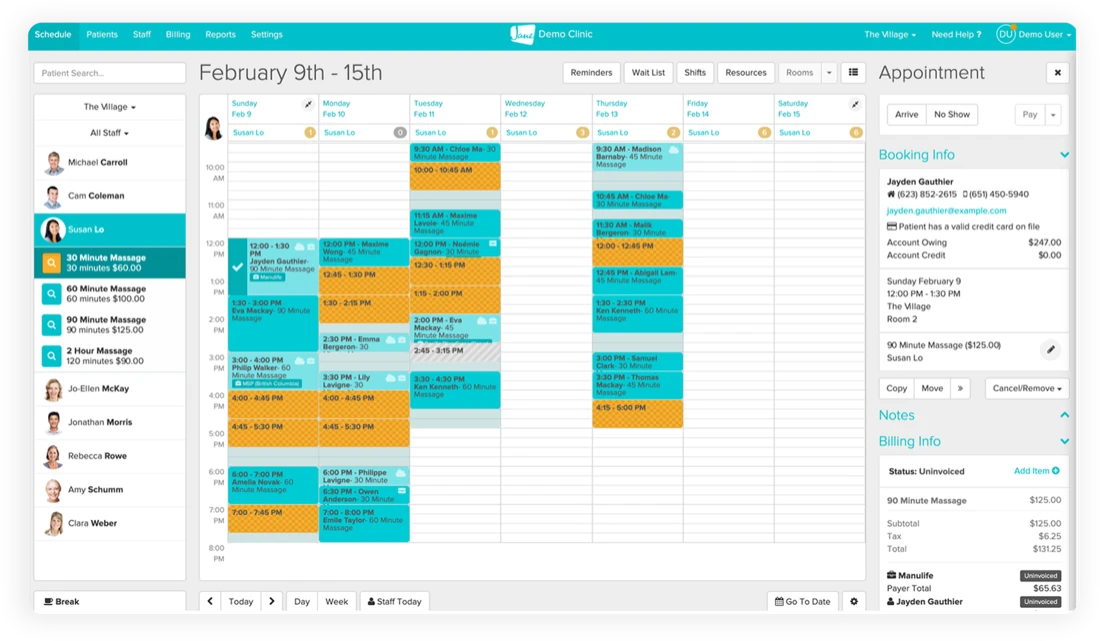
Jane App originated in Vancouver and serves Canadian healthcare providers across physiotherapy, mental health, and dermatology. The platform prioritizes provincial billing workflows, making it the strongest choice for clinics submitting claims to provincial health plans. Canadian dermatologists billing OHIP, MSP, or other provincial insurers benefit from Jane’s native integration with provincial payment systems.
The system handles online booking, charting, billing, and patient communications. According to Capterra reviewers, the interface receives consistent praise for intuitive navigation and minimal training requirements. Jane emphasizes simplicity over feature depth, targeting small to mid-sized practices without dedicated IT staff.
Key Features
Provincial billing integration: Direct submission to provincial health plans with automated claim tracking and reconciliation
Online booking: Patient-facing scheduling portal with customizable availability and service-specific booking rules
Clinical charting: SOAP note templates with customizable assessment fields for dermatology consultations
Patient communications: Automated appointment reminders, recall campaigns, and secure messaging
Pricing
Plan
Price
Who It’s For
Key Features
Standard
Contact for pricing
Small to mid-sized Canadian practices
Full feature access with provincial billing support
Where Jane App Shines
Canadian billing expertise: Provincial health plan integration eliminates manual claim submission and reduces payment delays
User-friendly interface: Minimal learning curve for practitioners transitioning from paper-based or simpler systems
Strong customer support: Canadian-based support team understands provincial billing nuances and regulatory requirements
Where Jane App Falls Short
Limited dermatology-specific features: No injection plotting, body mapping, or advanced clinical photography workflows
Basic reporting: Fewer advanced analytics compared to enterprise practice management platforms
Simplicity trade-offs: Streamlined interface limits customization for complex multi-specialty workflows
Customer Reviews
“Provincial billing integration saved our clinic hours every week. Claims submit automatically and reconciliation happens in the background.” (Practice administrator, G2)
Who Jane App Is Best For
Canadian dermatology practices billing provincial health plans
Small clinics prioritizing ease of use over feature depth
Practices requiring minimal IT support or training resources
Pro Tip
Audit your provincial billing volume before selecting software. If over 40% of revenue comes from provincial health plans, prioritize platforms with native billing integration like Jane App. If private-pay or aesthetic services dominate, comprehensive platforms like Pabau offer greater flexibility for package sales, memberships, and marketing automation.
Miiskin PRO: Best Dermatology Software Canada for Teledermatology
Miiskin PRO specializes in asynchronous teledermatology workflows. The platform pairs a patient-facing mobile app with a practitioner dashboard, enabling standardized photo submissions and remote consultations. Canadian dermatologists serving rural communities or offering virtual screening services benefit from the mobile-first design and structured photo collection protocols.
Patients download the Miiskin app, photograph lesions following guided instructions, and submit images for review. Practitioners access submissions through a web dashboard, annotate photos, and provide treatment recommendations. The workflow eliminates in-person consultations for initial screenings, reducing appointment volume for routine follow-ups.
Key Features
Patient-facing mobile app: Guided photography with consistent lighting and positioning instructions
Store-and-forward teledermatology: Asynchronous image review without real-time video requirements
Lesion tracking: Longitudinal monitoring of moles and suspicious lesions over time
Remote monitoring: Automated reminders for patients to submit follow-up photos at scheduled intervals
Pricing
Plan
Price
Who It’s For
Key Features
Professional
Contact for pricing
Teledermatology-focused practices
Mobile app, lesion tracking, asynchronous consultations
Where Miiskin PRO Shines
Mobile-first teledermatology: Patient app eliminates photo quality issues common in email-based submissions
Rural access expansion: Enables dermatology services in underserved communities without requiring in-person visits
Limited in-clinic workflows: Lacks scheduling, billing, and practice management features required for full dermatology operations
Asynchronous limitations: No synchronous video consultations for cases requiring real-time interaction
Standalone system: Requires integration with separate practice management platforms for complete operations
Customer Reviews
Review platform data for Miiskin PRO was not found in verified sources. The platform’s teledermatology specialization attracts fewer general consumer reviews compared to comprehensive practice management systems.
Who Miiskin PRO Is Best For
Dermatologists serving rural or remote Canadian communities
Practices offering virtual screening services as an add-on to in-clinic care
Clinics prioritizing asynchronous consultations over live video workflows
ModMed: Best Dermatology Software Canada for Specialty-Specific Templates
ModMed delivers dermatology-only electronic health records with templates developed by practicing dermatologists. The platform serves specialty-focused practices requiring deep clinical documentation workflows, ICD-10 and CPT coding support, and Mohs surgery tracking. Canadian dermatology clinics emphasizing medical dermatology over cosmetic services benefit from the specialty-specific design.
The system includes clickable body mapping for skin cancer tracking, dermatology-specific vocabulary for voice-to-text documentation, and automated coding suggestions based on clinical notes. ModMed targets established dermatology practices willing to invest in specialty-grade software rather than general practice management platforms.
Key Features
Dermatologist-developed templates: Clinical workflows designed by practicing dermatologists for diagnostic and treatment documentation
Specialty-specific coding: Automated ICD-10 and CPT code suggestions based on documented conditions and procedures
Mohs surgery workflows: Stage-by-stage documentation with tissue mapping and pathology integration
Clickable body mapping: Anatomical diagrams for lesion tracking and skin cancer screening documentation
Pricing
Plan
Price
Who It’s For
Key Features
Enterprise
Contact for pricing
Dermatology-only practices
Full specialty templates, coding automation, Mohs workflows
Where ModMed Shines
Dermatology-only focus: Clinical workflows designed exclusively for dermatology without generic templates
Coding automation: Reduces documentation time through specialty-specific code suggestions
Medical dermatology depth: Mohs surgery tracking and pathology integration exceed general platforms
Where ModMed Falls Short
Limited cosmetic workflows: Less relevant for practices emphasizing aesthetic dermatology procedures
Single-specialty constraint: Clinics offering multiple services beyond dermatology require separate systems
Enterprise pricing: Higher cost compared to general practice management platforms
Customer Reviews
Review platform data for ModMed was not found in verified sources. The platform’s dermatology-only focus attracts fewer consumer reviews compared to multi-specialty practice management systems.
Who ModMed Is Best For
Medical dermatology practices performing Mohs surgery and complex procedures
Clinics requiring deep specialty-specific clinical documentation workflows
Established dermatology-only practices willing to invest in enterprise-grade systems
SimplePractice: Best Dermatology Software Canada for Wellness-Focused Practices
SimplePractice targets mental health and wellness providers, with dermatology support as an adjacent use case. The platform serves practices offering psychodermatology services, stress-related skin conditions, or dermatology alongside therapy and counseling. Canadian clinics blending dermatology with wellness services benefit from the telehealth strength and therapy-adjacent workflows.
The system handles scheduling, billing, telehealth, and clinical documentation. According to Capterra reviewers, the telehealth platform receives consistent praise for reliability and ease of use. SimplePractice emphasizes therapy workflows, making it stronger for dermatology practices offering mental health support than pure medical dermatology clinics.
Key Features
HIPAA-compliant telehealth: Video consultations with screen sharing and secure messaging
Insurance billing: Automated claim submission and tracking for Canadian and US insurers
Clinical note templates: Pre-built templates for therapy and wellness consultations
Client portal: Patient-facing scheduling, intake forms, and secure document sharing
Practitioners prioritizing telehealth over in-clinic procedures
How to Choose the Right Dermatology Software Canada
Selecting dermatology software requires matching platform capabilities to clinic workflows, patient demographics, and revenue models. Five criteria separate strong fits from poor investments.
Clinical documentation depth: Medical dermatology practices performing Mohs surgery, skin cancer screening, or complex procedures require specialty-specific templates and body mapping tools. Platforms like ModMed and DermEngine prioritize diagnostic workflows. Cosmetic dermatology clinics emphasizing aesthetic treatments benefit more from injection plotting, before-and-after photo management, and package sales capabilities found in Pabau.
Provincial billing requirements: Clinics generating over 40% of revenue from provincial health plans need native billing integration. Jane App eliminates manual claim submission for OHIP, MSP, and other provincial insurers. Practices operating primarily on private pay or cash-based aesthetic services gain greater flexibility from platforms supporting package sales, memberships, and split payment processing.
Multi-location scalability: Single-location practices operate effectively on simplified platforms like Carepatron or Jane App. Clinics planning franchise expansion or managing multiple sites require centralized inventory tracking, staff scheduling across locations, and consolidated financial reporting. Pabau delivers these capabilities without requiring separate systems per location.
Teledermatology priority: Practices serving rural communities or offering virtual consultations require either synchronous video (SimplePractice, Carepatron) or asynchronous store-and-forward workflows (Miiskin PRO). Clinics conducting primarily in-person consultations benefit more from robust in-clinic scheduling and patient communication tools.
Budget and practice stage: Solo practitioners starting out gain immediate access through Carepatron’s free tier or Jane App’s simplified pricing. Established multi-practitioner clinics justify higher investments in comprehensive platforms like Pabau or specialty systems like ModMed. Calculate total cost of ownership including training time, integration requirements, and feature adoption timelines.
For growing dermatology practices requiring both medical and cosmetic workflows, multi-location management, and Canadian compliance, platforms combining comprehensive features with regulatory alignment deliver the strongest return. Pabau’s PIPEDA compliance, unlimited photo storage, and cross-specialty scalability position it as the broadest solution for clinics planning operational expansion beyond single-location dermatology services.
Expert Picks
Planning a multi-location dermatology clinic?Dermatology EMR Software explains how centralized patient records, inventory tracking, and staff management scale across clinic sites without separate systems per location.
Transitioning from paper-based workflows?Digital Forms demonstrates how customizable intake forms, consent workflows, and automated patient communications eliminate manual paperwork in dermatology practices.
Evaluating clinical photography requirements?Before and After Photos shows how unlimited photo storage, face mapping tools, and automated consent management streamline dermatology treatment documentation.
Conclusion
Canadian dermatology practices require software balancing clinical depth, regulatory compliance, and operational scalability. Provincial billing integration, PIPEDA compliance, and multi-currency support distinguish platforms serving Canadian clinics from US-focused systems. The seven platforms compared here serve distinct practice profiles: Pabau for multi-location growth, Jane App for provincial billing simplicity, DermEngine for diagnostic imaging depth, ModMed for specialty-specific workflows, Carepatron for affordable entry, SimplePractice for wellness-adjacent services, and Miiskin PRO for teledermatology specialization.
Practices emphasizing medical dermatology benefit from specialty-grade documentation tools. Cosmetic dermatology clinics require robust photo management, package sales, and marketing automation. Clinics planning expansion across services or locations need platforms scaling beyond dermatology-only workflows. Match platform capabilities to revenue models, patient demographics, and five-year growth plans rather than immediate feature checklists.
For dermatology practices requiring comprehensive clinical documentation, unlimited photo storage, multi-location management, and Canadian compliance, Pabau delivers the operational flexibility supporting both medical and cosmetic dermatology services. Book a demo to see how the platform handles provincial billing workflows, PIPEDA compliance, and cross-specialty scalability for growing Canadian clinics.
Frequently Asked Questions
What is dermatology EMR software?
Dermatology EMR software combines electronic medical records with practice management tools designed for dermatology workflows. The system handles patient records, clinical documentation, photo management, billing, and scheduling in one platform. Specialty-specific features include body mapping for skin cancer screening, injection plotting for cosmetic procedures, and before-and-after photo comparison tools. Canadian dermatology practices require PIPEDA compliance, provincial billing integration, and multi-currency support.
How much does dermatology EMR software cost?
Dermatology software pricing ranges from free (Carepatron’s starter tier) to $62 USD per user per month (Pabau’s Essentials plan). Enterprise platforms like ModMed and DermEngine use custom pricing based on practice size and feature requirements. Most systems charge per practitioner monthly with additional fees for payment processing, SMS messaging, and advanced features. Canadian practices should calculate total cost including training time, data migration, and integration requirements.
What is the most important feature in a dermatology EMR?
Clinical photography management ranks as the most critical feature for dermatology practices. The system must store unlimited photos with automated organization, timestamping, and consent workflows. Medical dermatology clinics require body mapping and lesion tracking. Cosmetic dermatology practices need before-and-after comparison tools and injection plotting. Beyond photography, robust scheduling, billing integration, and patient communication automation determine operational efficiency.
Can I use a general EMR for my dermatology clinic?
General EMR systems lack dermatology-specific workflows. Body mapping, injection plotting, photo comparison tools, and specialty-specific templates require dermatology-focused platforms. Practices emphasizing medical dermatology benefit most from specialty-grade systems. Cosmetic dermatology clinics require package sales, memberships, and aesthetic treatment documentation unavailable in general EMRs. Small practices performing basic consultations may operate on general systems but face workflow limitations as services expand.
Is cloud based EMR software secure for dermatology practices?
Cloud-based dermatology EMR systems meeting HIPAA and PIPEDA compliance standards provide secure patient data storage. Modern platforms use encrypted data transmission, role-based access controls, and automated backup protocols. Cloud systems eliminate local server maintenance and enable remote access for multi-location practices. Canadian clinics must verify PIPEDA compliance and confirm data storage occurs in Canadian or approved international data centres.
What should I check before switching from one dermatology software to another?
Data migration completeness determines switching success. Verify the new platform imports patient records, clinical photos, treatment histories, and financial data without information loss. Confirm the new system supports your current workflows including provincial billing, photo management, and clinical documentation templates. Calculate total switching costs including training time, productivity loss during transition, and integration setup. Test the new platform with a pilot group before full clinic migration.