







Veterinary
Veterinary New Client Form Template
New pet owners arrive at your clinic expecting a smooth first experience. A poor...

April 28, 2026


Buy now, pay later is now available in Pabau

A veterinary new client form template collects essential pet owner and animal information during the first clinic visit
Key fields include owner contact details, pet medical history, vaccination records, and authorization for emergency treatment
Digital intake forms reduce administrative workload and improve record accuracy compared to paper workflows
Pabau’s digital forms feature streamlines client onboarding and integrates data directly into patient records
New pet owners arrive at your clinic expecting a smooth first experience. A poorly designed intake process delays care, fragments information across multiple documents, and forces staff to chase missing details. A well-structured veterinary new client form template solves this immediately, capturing all essential information upfront so clinicians can focus on the animal instead of paperwork. This guide covers how to build an intake form that works, what fields matter most, and how to transition from paper to digital workflows without losing compliance or data quality.
A veterinary new client form template is a structured document that captures comprehensive information about new pet owners and their animals at the first clinic visit. The veterinary new client form template establishes the foundation for accurate patient records and ensures compliance with professional standards set by the Royal College of Veterinary Surgeons (RCVS) and the American Veterinary Medical Association (AVMA).
This form serves three clinical purposes. First, it documents owner contact information and pet identification details (name, breed, age, microchip number, spay/neuter status). Second, it captures medical history, current medications, vaccination records, and any existing conditions. Third, it secures consent for treatment, acknowledges payment policies, and captures emergency contact authorization. Unlike generic intake forms, a veterinary template anticipates the specific decisions and data clinicians need to provide safe, effective care.
The veterinary new client form template also protects your practice legally. It documents informed consent before treatment, establishes financial responsibility upfront, and creates an audit trail for regulatory compliance. RCVS Code of Professional Conduct requires veterinary practices to maintain accurate client and patient records. A comprehensive intake form demonstrates that standard.
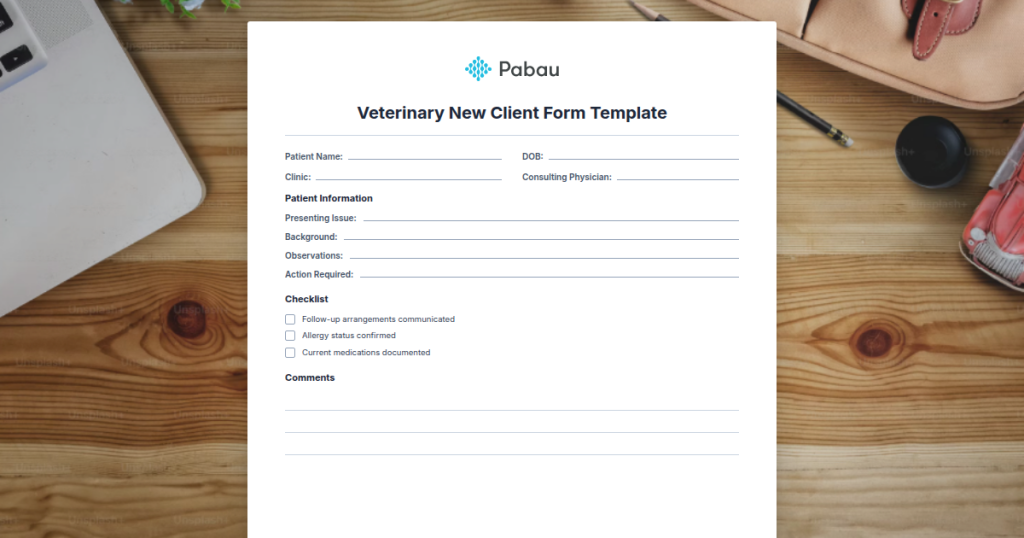
A ready-to-use intake form covering pet owner contact information, pet identification, medical history, vaccination records, consent for emergency treatment, payment policy acknowledgment, and emergency contact authorization.
Download templateImplementing a new client form requires a structured approach. Follow these five operational steps to integrate the template into your clinic workflow and maximize data quality.
Each step minimizes friction for staff and clients while ensuring compliance with RCVS and AVMA documentation standards.

Pabau's digital form builder lets you create custom intake workflows that flow directly into client records and appointment schedules, reducing administrative time and improving data accuracy.

Any veterinary practice that sees new clients benefits from a structured intake form. The template is essential for solo practitioners, small animal clinics, emergency hospitals, and multi-location practices.
Small animal clinics serving dogs and cats use the form to capture breed-specific health risks (hip dysplasia in certain breeds), vaccination history, and dietary sensitivities. Appointment scheduling becomes more efficient when reception staff know the animal’s age and any special handling requirements from the form upfront.
Emergency hospitals rely on comprehensive intake forms to identify allergies to medications, previous adverse reactions, and authorized payment contacts when owners cannot be reached. Multi-pet household owners benefit from a form that captures information on multiple animals in one submission, reducing redundant data entry and speeding up the check-in process for families with three or four pets.
Legal protection and compliance. A signed intake form documents informed consent before treatment and payment authorization. This creates an audit trail that satisfies RCVS and AVMA requirements for accurate client and patient records, reducing regulatory findings during inspections.
Workflow efficiency. Going paperless reduces administrative time significantly. Staff no longer hunt for missing phone numbers or chase clarification on payment terms during the appointment. Reception teams can focus on welcoming clients instead of managing scattered paperwork.
Documentation clarity. A standardized form ensures all clinicians collect the same essential data. New associate veterinarians inherit consistent processes, and cover vets stepping in for emergencies have complete client and medical history at hand.
Patient safety. Capturing medication history, allergies, and previous adverse reactions upfront prevents dangerous drug interactions and allergic reactions during treatment. A centralized record reduces the risk of duplicate testing or conflicting treatment plans across multiple visits.
Data security and GDPR compliance. Digital forms hosted on secure, compliant platforms (rather than scattered paper copies) ensure pet owner personal data is protected according to GDPR and Data Protection Act 2018 standards required in UK and EU veterinary practices.
Customize your veterinary new client form template to match your specific practice needs. Add fields for pet insurance details, dietary requirements, behavioural notes, or referring veterinarian information. Unnecessary fields slow down intake, but missing critical fields force follow-up calls that disrupt the clinic schedule. Test your form with 10-15 new clients and refine it before rolling out permanently.
Paper forms are familiar but costly. They require printing, manual filing, physical storage, and time-consuming data entry into your clinical system. Lost or illegible forms create gaps in patient records. Scanning documents after the fact is a labour-intensive backup process.
Digital intake workflows solve these problems at scale. Clients complete forms on a tablet at reception or via a link sent before their appointment. Digital forms capture data directly into your practice management system, eliminating transcription errors and creating searchable records instantly. Staff spend less time on paperwork and more time on patient care.
The transition requires upfront effort: designing the digital form, training staff on the new workflow, and communicating the change to existing clients. But after the initial setup period (typically 2-4 weeks), clinics report 15-20% reduction in check-in time and near-zero missing-data incidents. For multi-location practices, digital forms enable centralized reporting on intake trends, no-show patterns, and new client acquisition rates across all branches.
A complete veterinary new client form template captures owner and animal information systematically. Key sections are:
Each field serves a specific clinical or operational purpose. Omitting any one of these categories creates gaps during treatment or complications during emergency callbacks.
The real power of a structured intake form emerges when data flows directly into your clinic management software. When a new client completes a digital form, the information automatically populates the client record, saving staff from manual data entry and ensuring accuracy.
Connected systems enable clinicians to access the complete medical history during consultation without flipping through papers or scrolling through disorganized notes. Staff can trigger automated appointment reminders and vaccination follow-ups based on information captured in the intake form. Multi-location practices gain visibility into new client patterns and intake completion rates across all branches through centralized reporting.
Integration also improves compliance. When the form is filed as a digital PDF in the client record, it becomes part of the permanent audit trail for regulatory inspections. No signed documents are lost, and the date the form was completed is automatically recorded.

Need a comprehensive client onboarding workflow? Client portal features enable pet owners to access their appointment history, vaccination records, and invoices from anywhere, reducing calls to reception.
Interested in automating follow-up communications? Email and SMS campaign tools let you send vaccination reminders and appointment confirmations directly to the contact information captured in the intake form.
A veterinary new client form template is not just administrative paperwork. It is the foundation for safe, compliant, and efficient patient care. A well-designed form captures all essential information upfront, protects your practice legally, and enables clinicians to focus on the animal instead of hunting for missing details. Whether you print copies or implement a digital workflow, starting with a structured template ensures consistency across your clinic and reduces the friction that new clients experience on their first visit. Book a demo with Pabau to see how digital intake forms integrate with your practice management system and streamline client onboarding end-to-end.
A comprehensive form should capture owner contact details (name, address, phone, email), pet identification (name, species, breed, age, microchip number), medical history (medications, allergies, previous surgeries), vaccination records, spay/neuter status, emergency contact authorization, payment method, and informed consent for treatment and anesthesia.
Start with a template that covers essential sections. Customize fields to match your clinic’s specific needs (e.g., add dietary requirements or behavioural notes if relevant). Test the form with 10-15 new clients to identify missing information, then refine. For digital deployment, use a forms tool integrated with your practice management system to automate data capture.
Yes. Digital forms can be embedded on your clinic website, sent via email before the appointment, or completed on a tablet at reception. Online completion reduces data entry errors, speeds up check-in, and enables clients to submit forms at their convenience before arriving at the clinic.
A new client form captures owner and general pet information for the first visit. A patient intake form (completed at each appointment) focuses on the specific reason for the current visit, symptoms, and any changes since the last visit. Many practices use both, with the new client form as the foundational document and intake forms for follow-up visits.