Zenoti vs Vagaro: 2026 Comparison, Costs & Feature Breakdown
Compare Zenoti and Vagaro in 2026 - features, pricing, pros & cons. Find which p...

March 27, 2026


Buy now, pay later is now available in Pabau

Setmore’s paid plan starts at $5/user/month. Pricing scales with every staff calendar you add.
Core features require Pro. SMS reminders, recurring bookings, and two-way calendar sync aren’t included on the free plan.
Add-ons increase your total spend. Payment processing fees, SMS limits, and the $99/month Live Receptionist cost extra.
Pabau starts at $69/month and includes scheduling, clinical records, marketing, payments, and no per-user fees.
Looking at Setmore pricing because it seems cheap? It is at first.
Add staff, unlock Pro features, or plug in third-party tools, and the real cost shows up.
In this guide, we break down Setmore’s pricing and when it makes sense to switch to a clinic-first platform like Pabau.
Setmore uses per-user pricing for its paid tier, with an optional receptionist add-on.
Here’s the full pricing breakdown:
| Plan | Price (Annual) | Price (Monthly) | User Limit |
|---|---|---|---|
| Free | $0 | $0 | Up to 4 users |
| Pro | $5/user/month | $12/user/month | Unlimited users |
| Live Receptionist | +$99/month | +$99/month | Add-on |
Larger teams can request a custom Enterprise plan. Pricing is quote-based and not publicly listed.
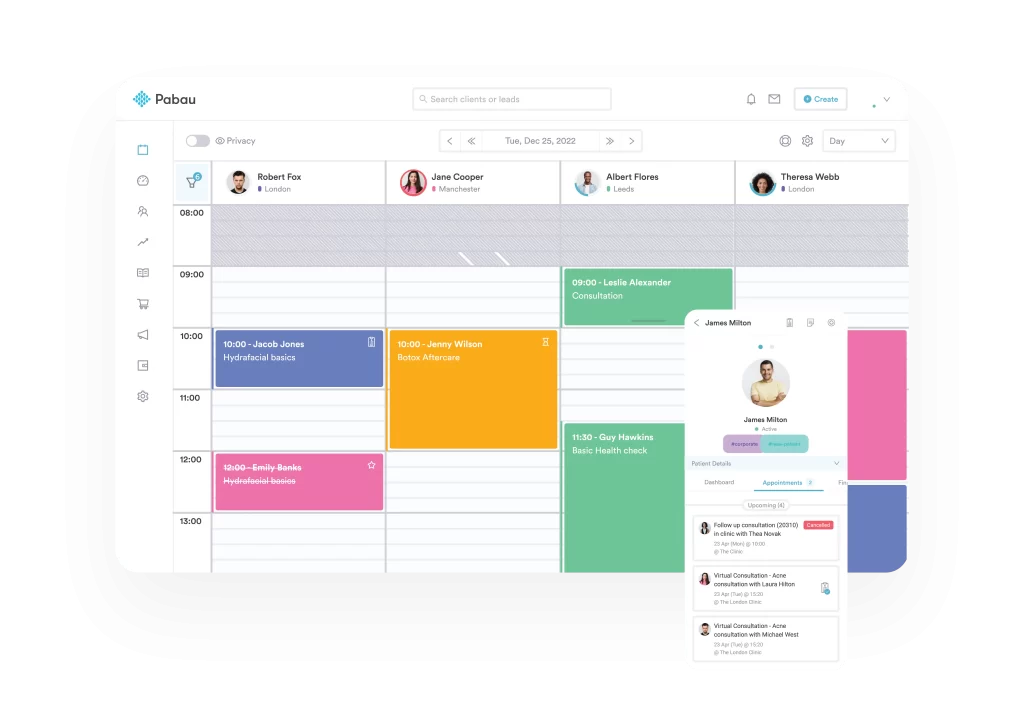
Pabau is a complete practice management system built for medical, aesthetic, and wellness clinics.
Unlike Setmore, which focuses on appointment scheduling, Pabau combines:
Every plan includes core features without per-user charges or feature gating:
| Plan | Price | Designed For |
|---|---|---|
| Startup | $69/month | 1 user, up to 100 clients |
| Solo | Talk to sales | 1 user, unlimited clients |
| Team | Talk to sales | 2–3 users |
| Medium | Talk to sales | 4–5 users |
| Group | Talk to sales | 6–15 users |
| Enterprise | Custom quote | 15+ users, multi-location |
See the full breakdown on Pabau’s pricing page.
Use Pabau’s time-saving calculator to estimate how many hours the platform could save your practice each month.
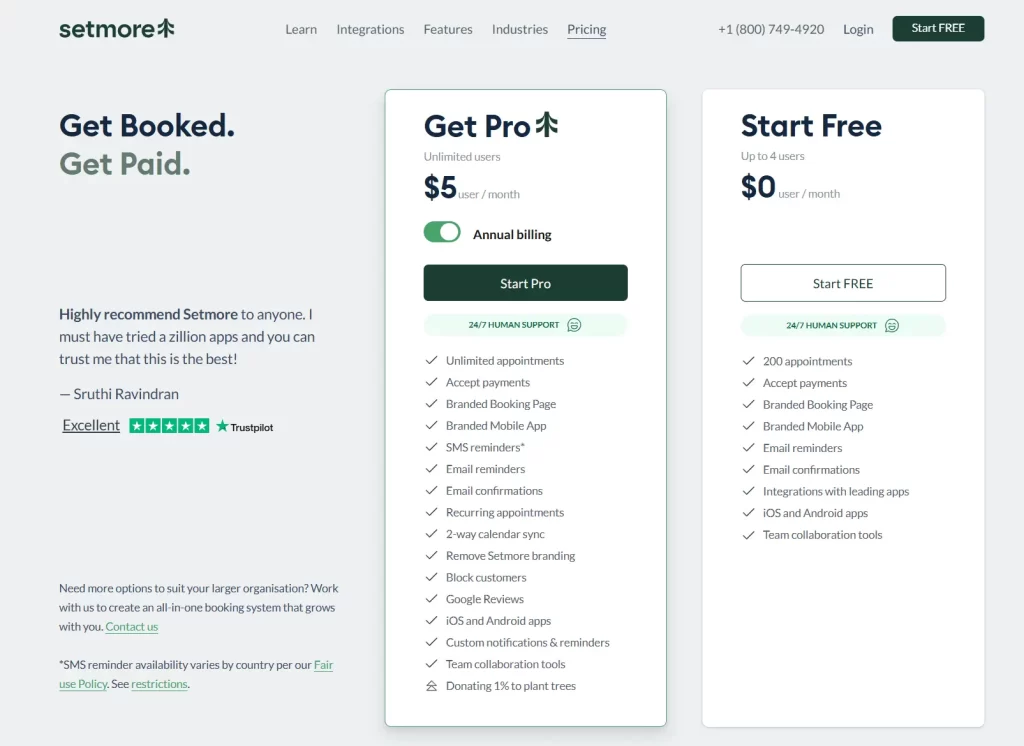
Setmore keeps things simple with two plans: Free and Pro.
Free covers basic scheduling. Pro unlocks the features most growing teams need, like automation, tighter calendar control, and recurring bookings.
Here’s what changes when you upgrade.
The Free plan includes one-way calendar sync. Setmore can read your Google Calendar or Outlook, but it doesn’t block time back.
That means double-bookings are still possible.
Pro adds full two-way sync:
| Plan | Calendar Sync |
|---|---|
| Free | One-way sync (read only) |
| Pro | Two-way sync with Google Calendar, Outlook, iCloud, Office 365 |

The Free plan only includes email reminders.
Pro adds automated SMS reminders before appointments, which helps reduce no-shows and last-minute gaps.
You can customize the message and choose when it sends (from 1 hour to 30 days in advance). Custom notifications run automatically once an appointment is booked.
SMS reminders follow a fair use policy. High usage may require an upgrade or additional charges.
Recurring appointments are only available on Pro.
Pro lets you:
The Free plan only supports one-time appointments.
Pabau includes recurring appointments, treatment protocols, and multi-session packages on every plan.
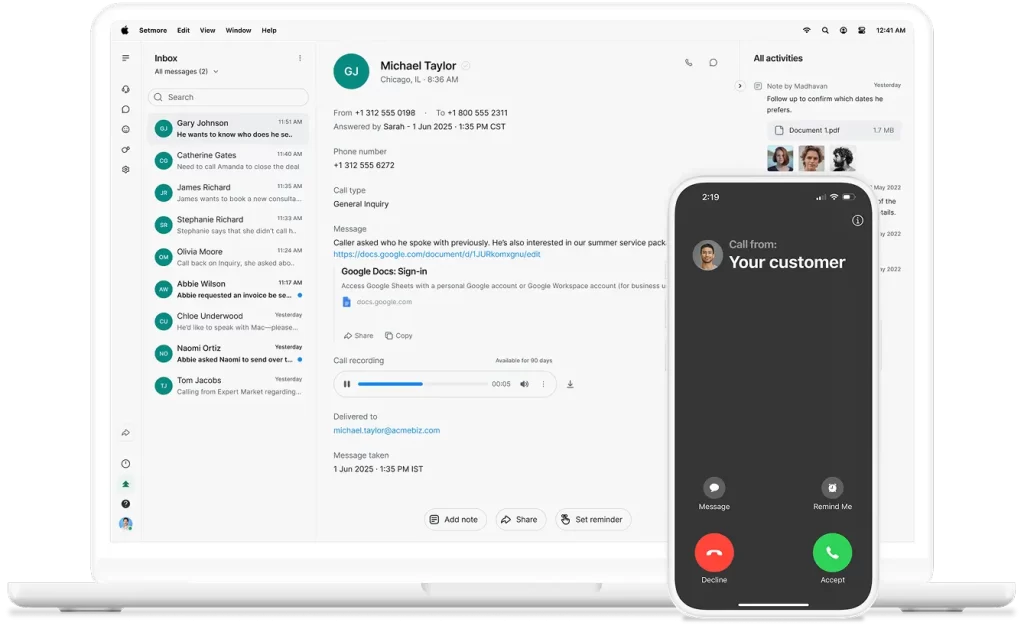
Live Receptionist is a separate add-on that costs $99 per month and is available in the US only.
It provides 24/7 call answering through AnswerConnect. Agents can:
It’s useful for small teams that can’t staff a front desk but don’t want to miss calls.
Setmore’s pricing looks straightforward at first. But a few costs aren’t immediately obvious:
Setmore doesn’t process payments itself. You’ll need a separate payment integration with Stripe, Square, or PayPal. Each provider charges transaction fees, typically 2.6 to 2.9% plus $0.30 per payment, which adds up quickly at higher volumes.
Pro includes SMS reminders, but usage isn’t unlimited. High-volume sending may trigger restrictions or additional charges. SMS availability also varies by country.
The Free plan only offers one-way calendar sync. Managing multiple calendars can lead to double-bookings unless you upgrade to Pro ($5 to $12 per user per month) for two-way sync.
Annual plans are paid upfront. Cancel mid-year, and you won’t receive a prorated refund for unused months.

Need more than scheduling? Review patient management systems for records and daily operations.
Focused on growth? See clinic management software built to increase revenue.
Want easier self-service for patients? Compare top patient portal tools for bookings and messaging.
Here’s a quick breakdown of where Setmore works well and where it starts to show limits.
Want more than basic reports? Check out Pabau’s reporting and analytics tools.
Setmore works best for small service businesses that need straightforward appointment scheduling. Clinics that require clinical documentation, inventory management, and advanced automation often start comparing Setmore alternatives built specifically for healthcare environments.
It doesn’t include clinical documentation or medical workflows.
A solid fit for independent professionals such as:
The Free plan includes online booking, payment processing, and a branded mobile app for clients. You can get started without upfront costs.
Works well for non-medical businesses like:
Upgrading to Pro adds SMS reminders and recurring appointments. This makes it easier to manage regular clients and cut down on no-shows.
You can also set business hours and handle bookings across multiple time zones.
For medical spas and aesthetic clinics, Pabau’s medspa software is typically a better fit.
Setmore is a practical choice for startups and small teams that only need:
If you don’t need clinical records, marketing automation, or advanced reporting, Setmore’s Free plan is a low-cost starting point.
Need more robust features? Consider software built for primary care, GP clinics, skin clinics, or wellness centres (such as Pabau).
Setmore earns strong marks for ease of use and its generous free plan, with a 4.6/5 rating on Capterra.
Users like the simple interface and low cost. Common complaints mention limited customization, patchy calendar sync, and key features locked behind paid tiers.
A Capterra reviewer praises the customization of notifications and alerts, especially for appointments requiring integration with other platforms.
They also appreciate being able to log daily tasks and notes to track productivity throughout the day.
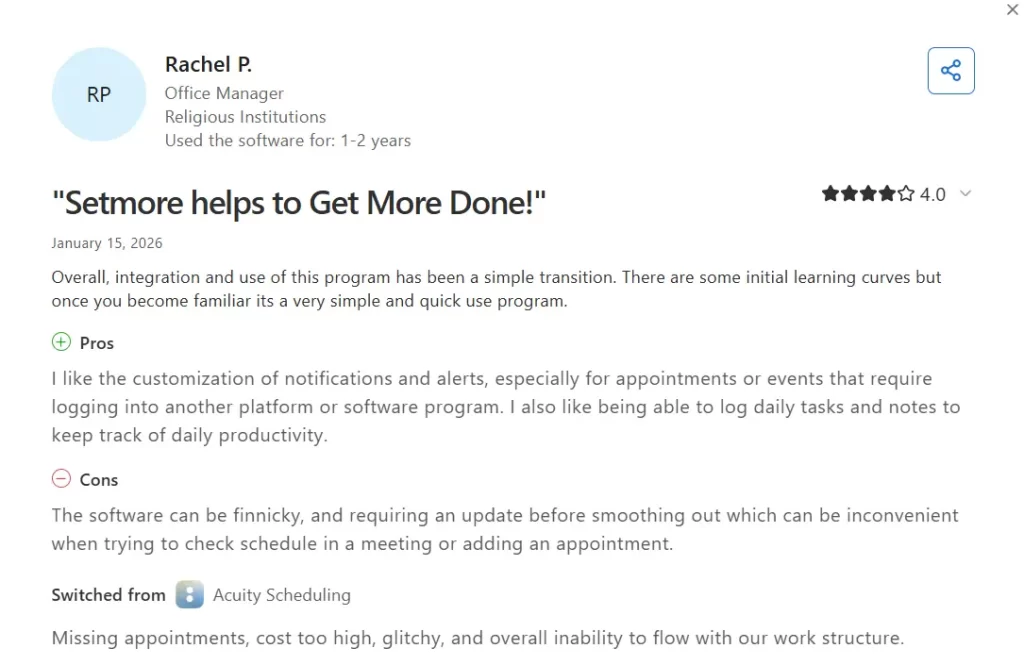
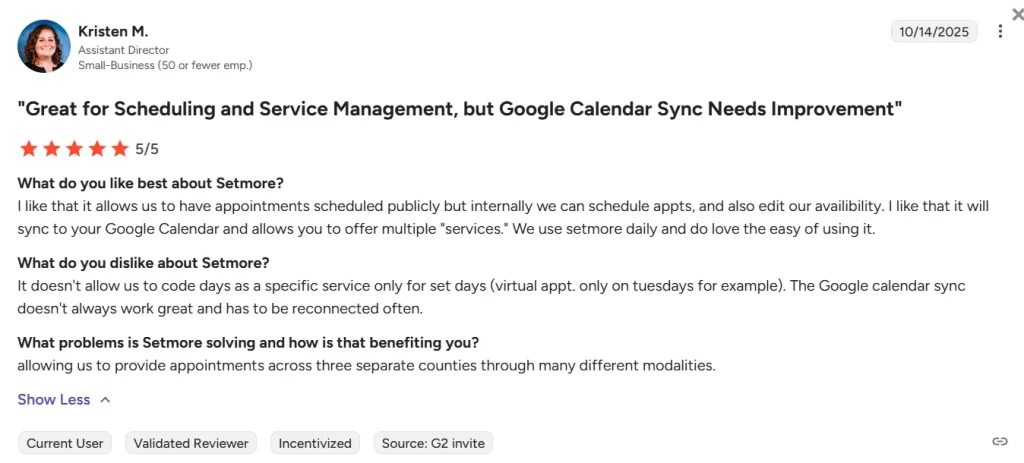
Another reviewer notes frustrations with scheduling flexibility and sync reliability.
They report that day-specific scheduling isn’t possible—like restricting virtual appointments to Tuesdays only. The Google Calendar sync doesn’t always work and requires frequent reconnection.
Pabau is what clinics move to when scheduling software isn’t enough.
It handles the clinical and operational work that Setmore doesn’t.
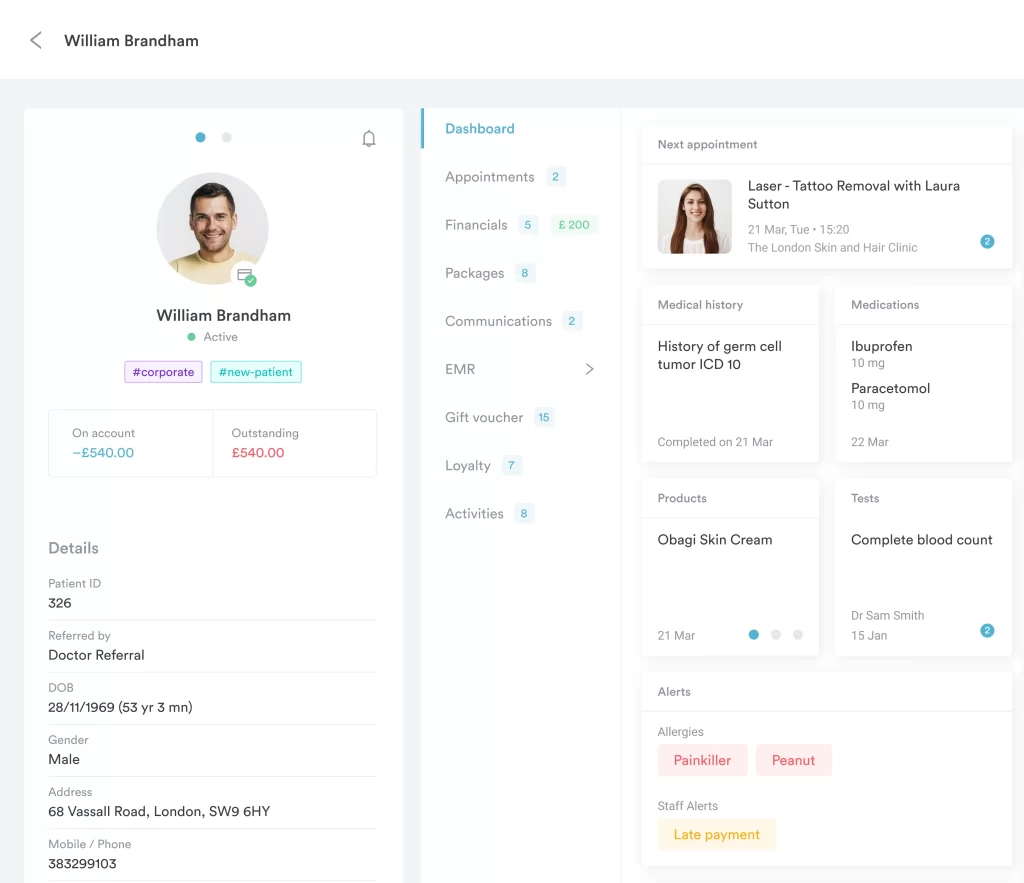
Medical history, consents, treatment notes, prescriptions, and photos are stored in one client record. Staff can view the full timeline at a glance and update everything in the same place.
For more details, see how Pabau compares with other EMR systems.
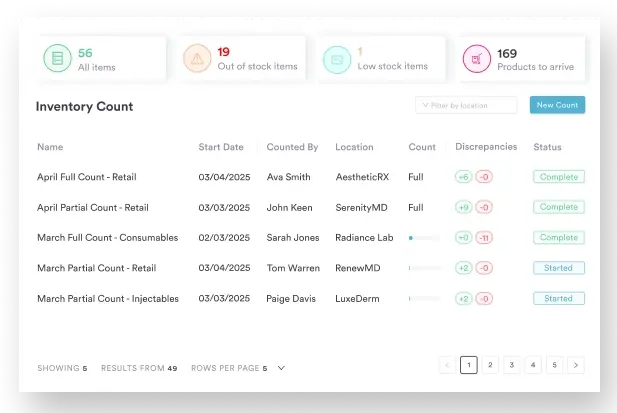
Setmore has no inventory management or retail capabilities whatsoever.
Pabau tracks:
Learn more about Pabau’s stock management features.
Setmore only offers basic email and SMS reminders. Marketing requires third-party tools.
Pabau includes:
You can set up automated recall campaigns for treatments and send personalized aftercare automatically. Engagement and results are tracked inside the platform.
Here’s how Pabau’s pricing compares with Setmore:
| Pricing factor | Setmore | Pabau |
|---|---|---|
| Entry price | Free (basic), $5/user/month (Pro) | $69/month (Startup) |
| How pricing scales | Per user | Per plan |
| Seat fees | Yes ($5-$12/user/month) | No |
| Feature gating | Free plan lacks SMS, recurring appointments | Core features included |
| Clinical records | Not included | Included on every plan |
| Marketing automation | Not included | Included on every plan |
| Inventory management | Not included | Included on every plan |
| Best for | Solo providers, small service businesses | Medical and aesthetic practices |
For a deeper comparison, see Setmore vs Fresha vs Pabau.
If you’re a solo provider or small salon that only needs basic scheduling, Setmore’s free plan can work well.
But if you’re running a medical or aesthetic practice, costs add up.
Per-user fees, limited clinical features, and reliance on third-party tools for marketing and inventory create inefficiency.
In those cases, an all-in-one system like Pabau makes more sense.
Book a demo to see how it could work for your practice.
Yes. You can upgrade from Free to Pro or downgrade from Pro to Free anytime in your account settings under “Products.” Changes typically take effect on your next billing cycle.
Yes. Annual billing saves 58% compared to monthly. Pro costs $5/user/month annually vs. $12/user/month monthly.
The Free plan works well for solo providers or teams of 1-4 users who book fewer than 200 appointments per month. Upgrade to Pro if you need unlimited appointments, SMS reminders, recurring appointments, or two-way calendar sync.