Best Hair Transplant Clinic Software in the US (2026 Guide)
Compare five practice management platforms built for US hair transplant clinics ...

March 25, 2026


Buy now, pay later is now available in Pabau

Semble pricing is modular, meaning costs scale with user count and features.
Ideal for solo practitioners or small clinics with simple workflows.
Growing clinics often outgrow Semble due to limited automation, reporting, and marketing tools.
Pabau is a more scalable, all-in-one alternative designed for medical-first clinics and aesthetic practices.
Hidden fees such as payment processing, optional hardware, and feature upgrades can increase overall costs.
Understanding Semble pricing is essential for clinics looking for a practice management platform that fits both their operational and financial needs.
While Semble provides a modular, per-user pricing model, growing clinics often find themselves needing more advanced features, automation, and reporting, which can significantly impact total costs.
This guide covers Semble pricing in 2026, including plan structures, hidden costs, feature limitations, and comparisons to leading alternatives like Pabau. By the end, you’ll have a clear picture of whether Semble is suitable for your clinic or if a more scalable platform is a better fit.
Semble uses a subscription-based, per-user pricing model. Pricing starts at approximately £119 per user per month. While there’s no free plan, Semble offers a free trial for clinics to explore core features before committing.
The exact monthly cost depends on:
For clinics planning multi-location expansion, it’s important to calculate total cost as team size grows, because per-user fees can quickly escalate.
| Plan | Pricing Model | Notes |
|---|---|---|
| Starter | Per user / month | Core scheduling and patient records |
| Essentials | Per user / month | Adds online booking and reminders |
| Advanced | Per user / month | Includes payments and reporting |
*Exact plan inclusions are confirmed during a demo or sales consultation.
Pabau is an all-in-one practice management platform built specifically for aesthetic, medical, and therapy clinics that need more than basic EHR and patient self-scheduling. Unlike Semble’s operational focus, Pabau combines clinical, commercial, and growth features in a single system:
Pabau offers tiered pricing based on clinic size and feature requirements. All plans include core practice management features, with higher tiers unlocking advanced automation, reporting, and multi-location tools.
| Platform | Pricing Structure | Best For |
|---|---|---|
| Semble | Per user, modular | Small, single-location clinics |
| Pabau | Tiered, all-in-one | Growing aesthetic & medical clinics |
Semble’s pricing plans are differentiated primarily by feature access, rather than usage limits. Core functionality is available on lower tiers, while more advanced tools—such as online booking, payments, and reporting, are unlocked as clinics move to higher-priced plans.
All Semble plans include appointment scheduling and basic diary management. Lower tiers focus on manual scheduling, while higher plans add online booking and automated reminders. This structure works well for clinics with simple booking needs but offers limited flexibility for more complex workflows.
| Scheduling Feature | Starter | Essentials | Advanced |
|---|---|---|---|
| Manual scheduling | ✔ | ✔ | ✔ |
| Online booking | ✖ | ✔ | ✔ |
| Automated reminders | ✖ | ✔ | ✔ |
Why this matters:
For solo practitioners or small clinics, this core functionality is sufficient. However, for multi-location or high-volume clinics, the lack of automation, pre- and post-care workflows, and patient experience management can limit operational efficiency.
Semble offers payments through Semble Pay, available on advanced plans. Clinics can accept card payments and issue invoices. However:
| Payments Feature | Availability |
|---|---|
| Card payments | Higher tiers |
| Invoicing | Higher tiers |
| Deposits | Limited |
| Packages & memberships | Limited |
For comparison, platforms like Pabau that prioritise deposits and payment policies often provide deeper controls.
Semble’s reporting is basic, offering appointment and revenue summaries. Advanced insights, performance analytics, and automated business intelligence are not included — which can limit data-driven decision-making for expanding clinics.
| Reporting Feature | Availability |
|---|---|
| Appointment reports | ✔ |
| Revenue summaries | ✔ |
| Advanced analytics | ✖ |
| Automated insights | ✖ |
Why this matters:
While small clinics can manage with these reports, data-driven decision-making becomes challenging as a practice grows. Clinics that need performance insights, retention tracking, or predictive analytics often turn to platforms like Pabau, which provide centralized dashboards with revenue, marketing, and operational analytics.
While Semble’s starting price (around £119 per user per month) is clear, clinics should account for additional costs that can increase total spend as the practice grows.
Tip: Factoring in these costs is essential for budgeting, especially for clinics with multiple locations or high-volume operations.
Below is a summary of Semble’s strengths and limitations, based on product positioning and user feedback on Capterra.
Semble is a straightforward, easy-to-use practice management platform designed primarily for clinics and practitioners that prioritize simplicity and operational efficiency over advanced automation, complex reporting, or multi-location scalability.
While it offers reliable scheduling, patient records, and basic payment options, Semble is best suited for practices with relatively small teams, simple workflows, and limited need for growth-focused features.
Here’s a breakdown of the types of clinics and practitioners that find Semble most effective.
Independent clinicians, including therapists, physiotherapists, and allied healthcare providers, often benefit the most from Semble. For these solo practitioners:
Small practices, typically consisting of one to three clinicians and minimal administrative staff, are another ideal fit for Semble. For these clinics:
Semble is particularly well-suited for clinics whose primary focus is operational stability rather than business expansion or advanced analytics. These clinics:
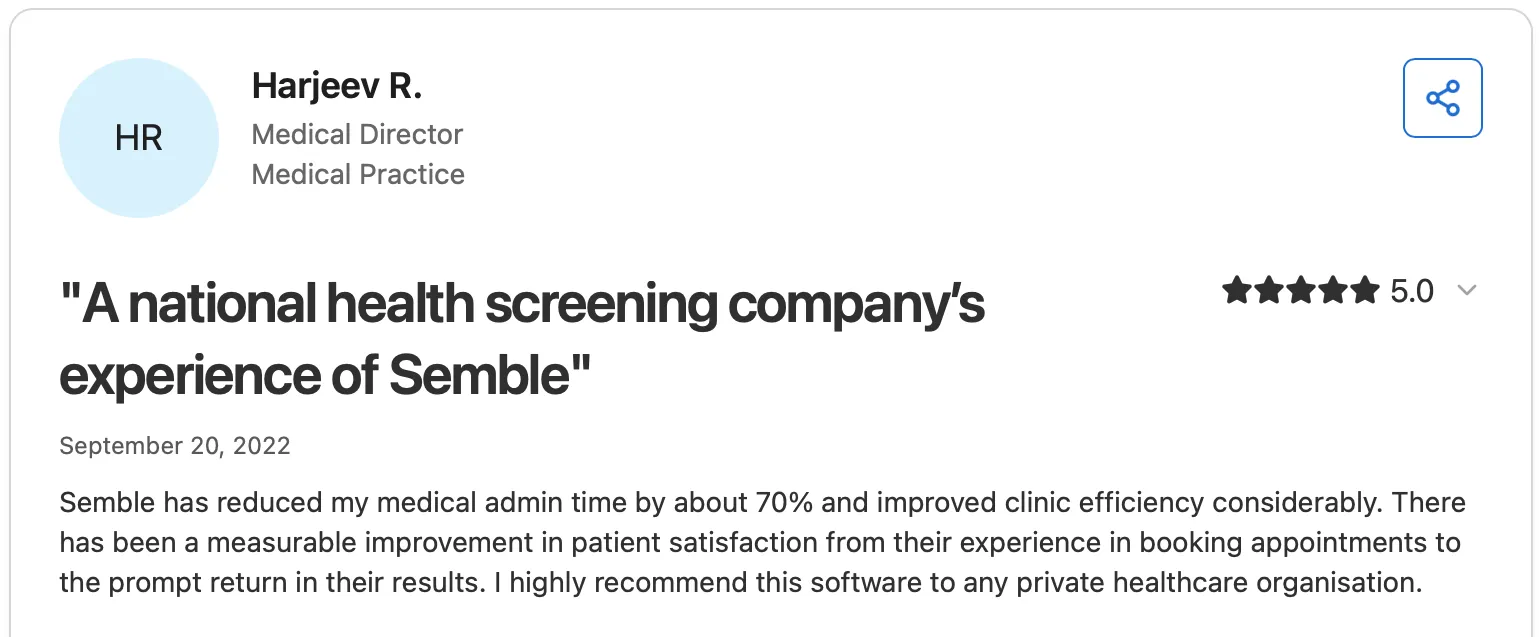
Below is a summary of what real users say about Semble on Capterra, based on verified customer feedback.
Semble is frequently praised for its ease of use and intuitive interface, helping clinics manage appointments, records, and online booking without a steep learning curve.
Several reviewers highlight how the system has improved administrative workflows and reduced time spent on scheduling and patient communication.
Many also note helpful features like integrated payments and responsiveness from support staff early in onboarding.
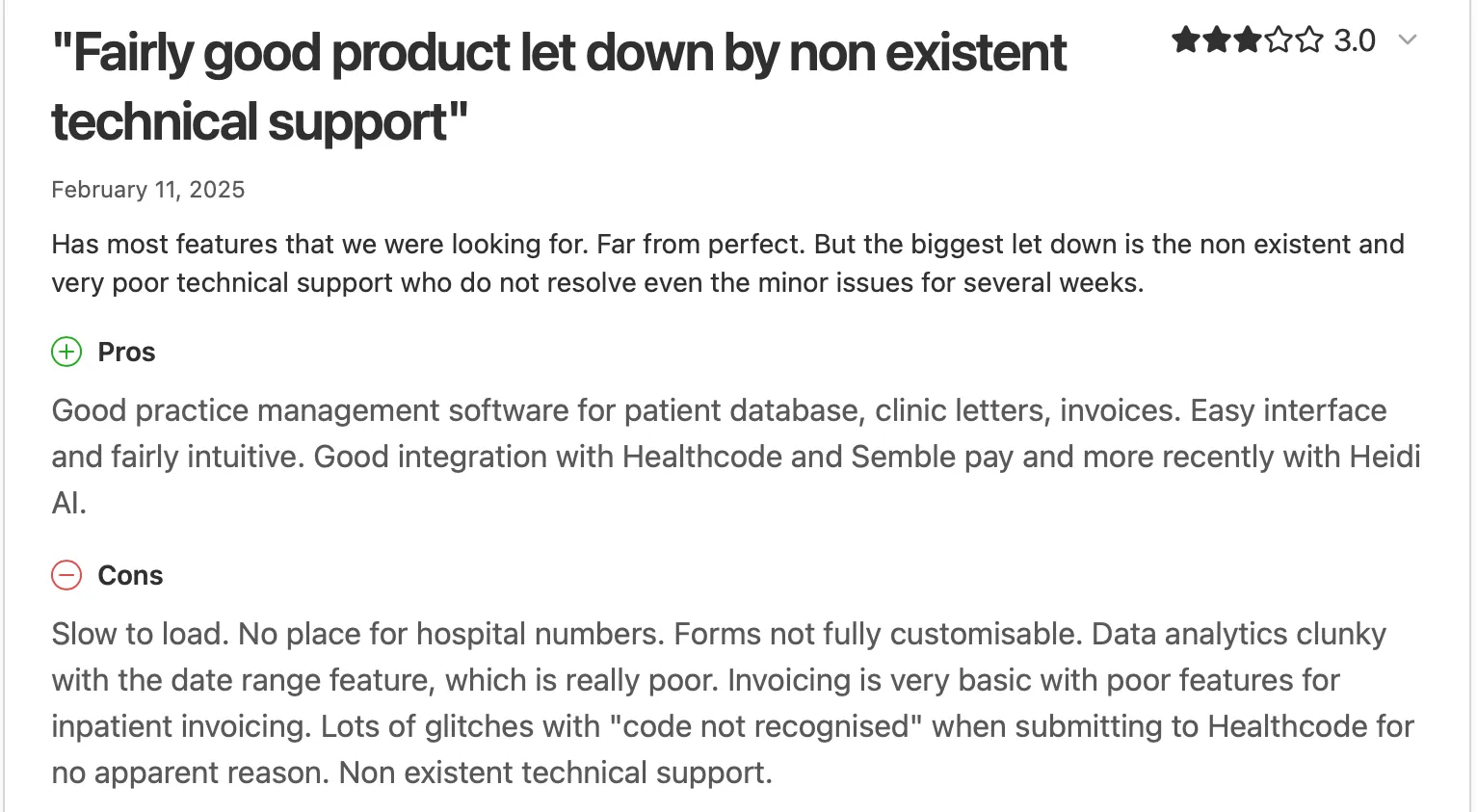
Some users report limitations around technical support responsiveness, basic analytics, and feature depth.
A few reviewers mention issues like slow loading, limited customisation in forms, and challenges with data migration or advanced reporting.
One review from a surgical practice user described significant medical data concerns during migration, highlighting areas where Semble may fall short for more complex workflows.
Pabau is a practice management software widely chosen as an alternative to Semble by clinics that have outgrown basic practice management and need a platform that supports clinical complexity, revenue growth, and scalability.
While Semble focuses primarily on electronic health records and day-to-day operations, Pabau is designed as a complete growth platform for medical and aesthetic practices.
Where Semble relies on tiered access to core functionality, Pabau brings together clinical workflows, payments, automation, and marketing tools in one system, reducing the need for third-party software as clinics expand services or locations.
Pabau provides advanced client management. It offers structured client records built for medical and aesthetic treatments, including consultation templates, treatment histories, consent management, and clinical imagery.
Native support for clinical photos and before-and-after galleries makes it particularly suitable for aesthetic clinics that require visual documentation as part of patient care.

Unlike Semble’s operational focus, Pabau includes tools designed to actively support clinic growth. These include memberships, treatment packages, automated recalls, and built-in marketing features that help clinics increase retention and repeat visits. Integrated payment policies also give practices greater control over deposits, cancellations, and no-show protection.
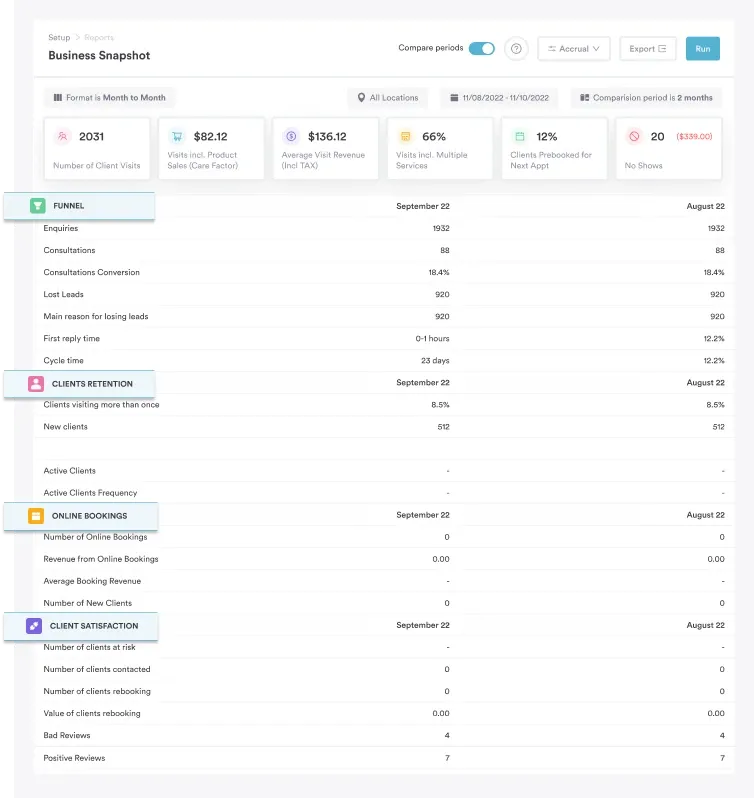
Pabau is designed to scale with growing clinics. Multi-location practices benefit from centralized dashboards, unified reporting, and advanced staff permissions, ensuring managers can monitor performance, revenue, and patient outcomes across every branch.
Semble, by contrast, is optimized for single-location operations and offers limited support for larger or multi-site teams.
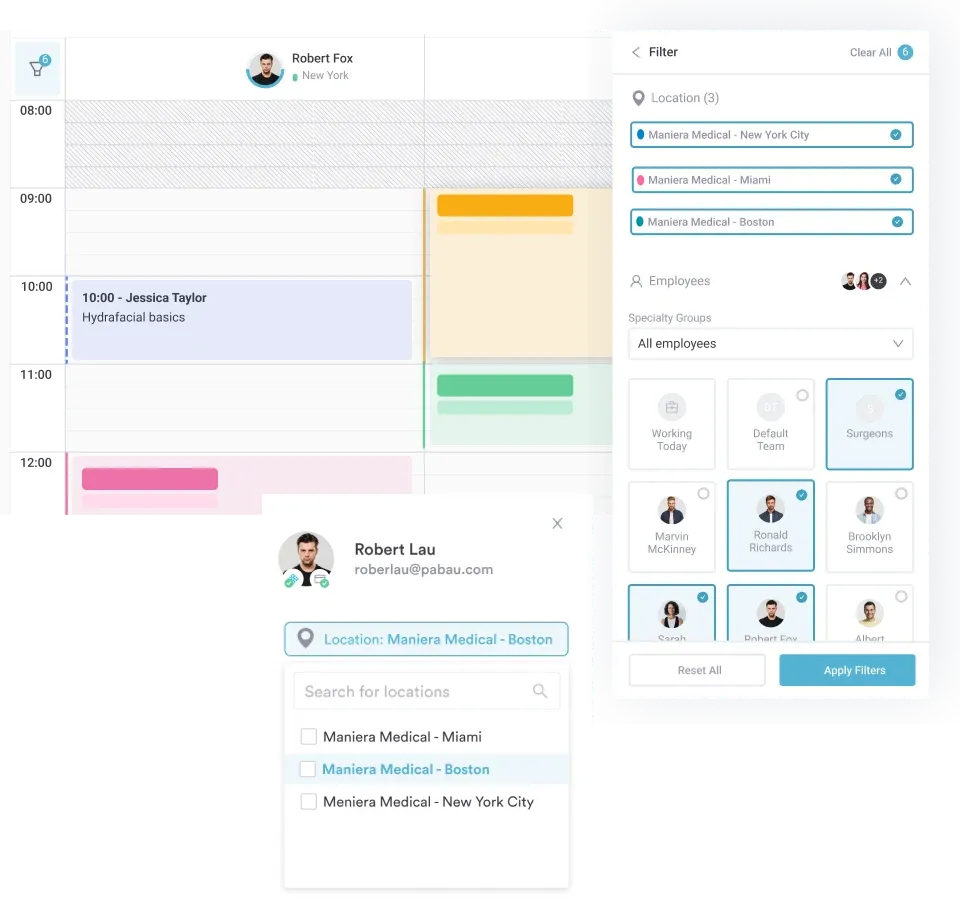
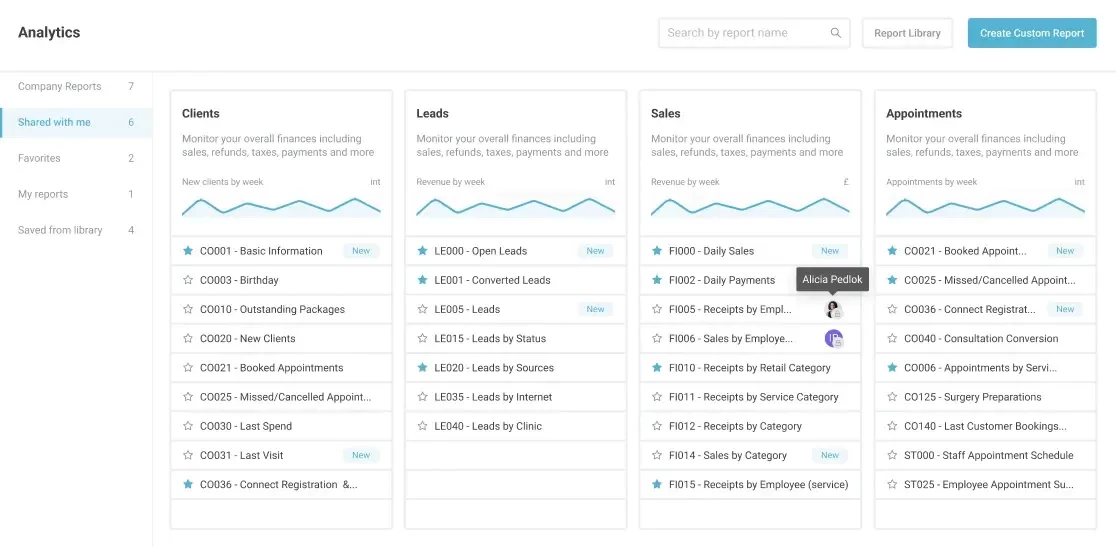
Pabau provides customizable operational and revenue dashboards, giving clinic owners real-time insights into performance metrics, practitioner utilization, and patient retention.
Semble’s reporting is more basic, primarily showing appointment activity and revenue summaries without deeper analytics, making it harder to make informed growth decisions.
If your clinic has outgrown basic scheduling and record-keeping, Pabau offers a more complete solution. By bringing together clinical workflows, appointments, payments, marketing, and reporting in one platform, Pabau helps practices reduce software complexity and scale with confidence.
Explore Pabau to see if it’s the right fit for your clinic, or book a demo to see the platform in action.