How to Effectively Manage Your Dermatology Practice In 2026
Pabau helps dermatology and aesthetic clinics manage scheduling, payments, marke...

March 17, 2026


Buy now, pay later is now available in Pabau

EHR integration enhances collaboration, data insights, compliance, and professionalism, but requires investment, careful setup, and ongoing maintenance.
API-based, HL7 FHIR, and third-party integrations each serve different purposes, so choose the right approach based on your practice’s size, existing tools, and growth goals.
All-in-one platforms reduce complexity: Systems like Pabau combine EHRs, scheduling, billing, patient communication, telehealth, and AI scribing into a single platform, minimizing integration headaches and administrative work.
Disconnected systems, duplicate data, and frustrated clinicians still plague healthcare teams.
But cloud-based EHR integration solves this by securely connecting electronic health records with the tools you already use—scheduling, labs, billing, telehealth platforms, and more.
In this guide, we’ll break down what EHR integration means, why it matters, and walk you step-by-step through the best methods, standards, and strategies to implement it successfully.
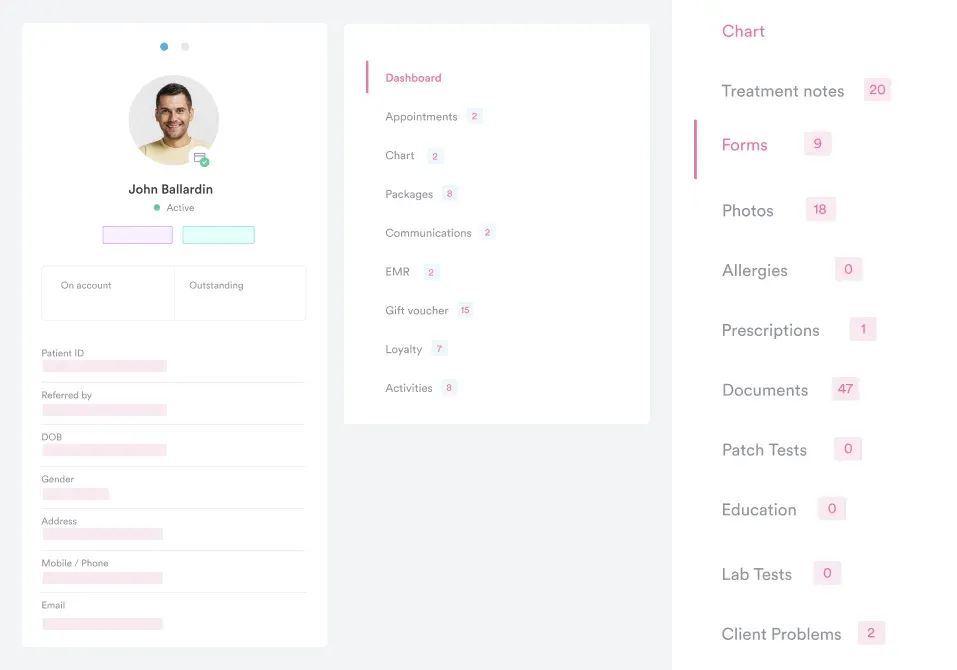
EHR integration is the process of connecting an electronic health record system with other external systems—such as billing platforms, laboratory portals, or patient engagement apps—so that data can flow automatically between them.
It allows different software programs to “talk” to each other, ensuring patient health information flows automatically and securely across your entire practice.
When a lab updates test results, the information instantly appears in the patient’s EHR. Similarly, integrating with billing software ensures charges and insurance claims are automatically updated without manual entry.
| Benefit | How EHR Integration Helps |
|---|---|
| Enhance patient care | Provides clinicians with complete, up-to-date records for better decisions. |
| Faster workflows | Reduces duplicate data entry and saves staff time. |
| Stronger compliance | Simplifies audits and ensures HIPAA/GDPR compliance. |
| Simplify billing | Updates billing and insurance automatically, reducing errors. |
| Reduce costs | Minimizes redundant tests, paperwork, and mistakes. |
| Scale easily | Supports growth, new services, and multi-location practices. |
Healthcare systems generate massive amounts of data, and without integration, much of it remains siloed and underused.
Integrated EHR systems allow healthcare organizations to:
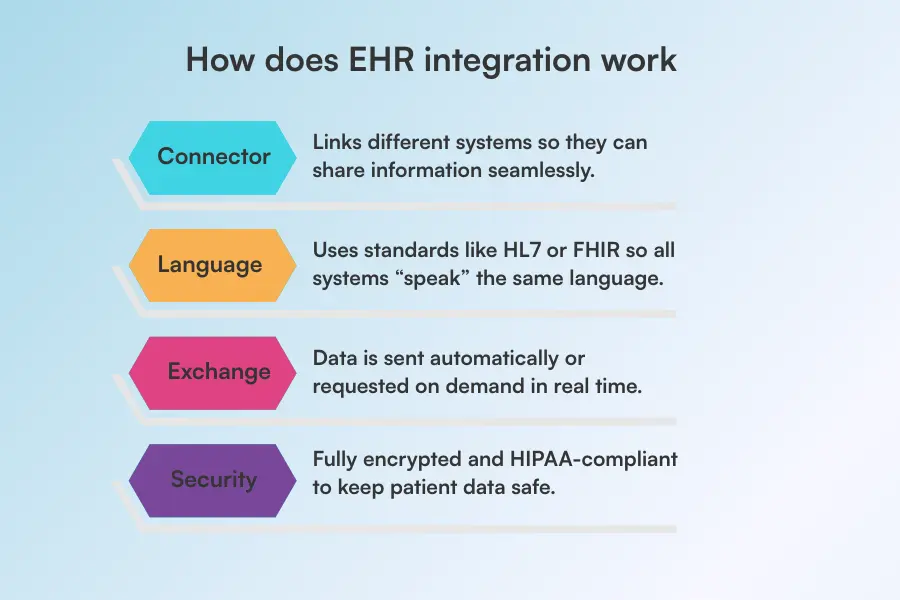
EHR integration functions like a digital bridge.
When a clinician enters health information in one system, smart “translator” rules make sure every other system understands it correctly—so data flows smoothly without any mix-ups.
Here’s how it works:
There are several ways EHR systems integrate with other healthcare tools. The right approach depends on your practice size, existing software, and long-term goals.
APIs (Application Programming Interfaces) allow different software systems to communicate in real time using pre-defined “endpoints.”
API integrations are highly flexible, enabling practices to customize clinical workflows, automate tasks, and quickly adapt to new tools or updates. They are simply the gold standard in 2026.
For example, platforms like Pabau leverage API integrations to connect scheduling, billing, and patient records, giving staff a unified view of operations without switching between systems.
HL7 (Health Level Seven) is a long-standing standard for exchanging healthcare information between systems.
HL7 integrations are particularly useful for labs, imaging centers, and hospitals, ensuring that test results, patient histories, and clinical notes move securely into your EHR.
This type of integration works well for practices that need standardized, reliable data transfers without building custom interfaces.
FHIR (Fast Healthcare Interoperability Resources) is a newer standard designed for modern, web-based healthcare apps.
FHIR integrations support real-time data sharing, mobile access, and cloud-based workflows, making them ideal for practices adopting telehealth or patient portals.
Their structured approach allows easy updates and scalability while maintaining compliance with healthcare regulations.
Third-party integrations connect your EHR to external software not natively part of your system.
This can include payment processors, marketing platforms, or specialized analytics tools.
For instance, Pabau’s payment processing integration ensures invoices and claims sync directly with patient records, reducing errors and administrative work. These integrations extend your EHR’s functionality while keeping all data centralized.
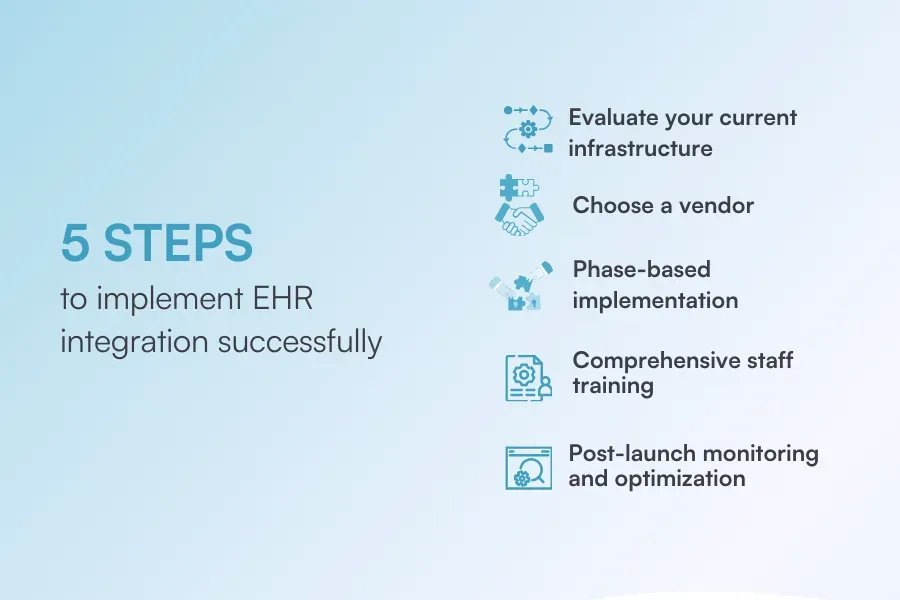
Implementing cloud-based EHR integration may seem complicated, but breaking it into clear steps makes it manageable.
Choosing an all-in-one system like Pabau often eliminates the need for complex, multi-step integrations by housing all core functions in one cloud-based system.
Here’s how implementation should go:
Before adding a new EHR integration, you must understand your baseline.
Check if the current software you are using is robust enough to handle the workload.
This means verifying if your system is cloud-ready and capable of secure, bi-directional API connections rather than just simple “read-only” data pulls.
Selecting the right EHR vendor is one of the most important steps for a successful integration.
Start by finding a system that fits your practice’s size, workflow, and budget—what works for a small clinic may not suit a larger multi-location practice.
Consider your team’s needs: does the system support appointment scheduling, billing, lab, pharmacy, prescription integrations, or telehealth? Don’t forget regulatory requirements, such as HIPAA or GDPRcompliance, to ensure patient data is secure and compliant.
Choosing the right vendor sets the foundation for smoother workflows, easier staff adoption, and fewer headaches during implementation.
Once you’ve chosen your EHR vendor, start the implementation step by step. A phased rollout keeps things manageable and avoids big disruptions.
Here’s where to start:
Even the most seamless EHR integrations won’t deliver results if your staff isn’t confident using them.
Take the time to walk your team through new workflows, showing them exactly how to access integrated data, update records, and navigate any changes.
Encourage questions and provide hands-on demonstrations so everyone can practice in a safe environment before going live.
Consider creating short guides or cheat sheets for quick reference, and schedule follow-ups to address any lingering challenges.
Integration isn’t done once it’s live.
Watch for errors or sync issues, and ask your team for feedback: Is data flowing quickly? Are there duplicates?
Use this info to adjust settings and make the system work as efficiently as possible.
EHR integration offers significant benefits but also comes with its challenges.
That’s why understanding both sides will help practices plan effectively.
| Pros | Cons |
|---|---|
| Seamless collaboration | High costs |
| Better data insights | Complex setup |
| Simplified compliance | Staff learning curve |
| Better patient engagement | Data migration risks |
A strong EHR system should work for you in the background, not slow you down.
That means you don’t have to worry about manually filling patient charts during visits or taking consultation notes by hand.
Looking at the bigger picture, implementing an all-in-one practice management software makes much more sense than stitching together multiple integrations. A system like Pabau, for instance, eliminates integration headaches by combining scheduling, billing, documentation, patient communication, and more into a single, seamless system.
So let’s see what the best practices of a strong EHR system are:
Review patient histories, concerns, and previous notes before the visit whenever possible. Detaching routine data entry from face-to-face time allows you to focus on the patient while still documenting accurately and efficiently.
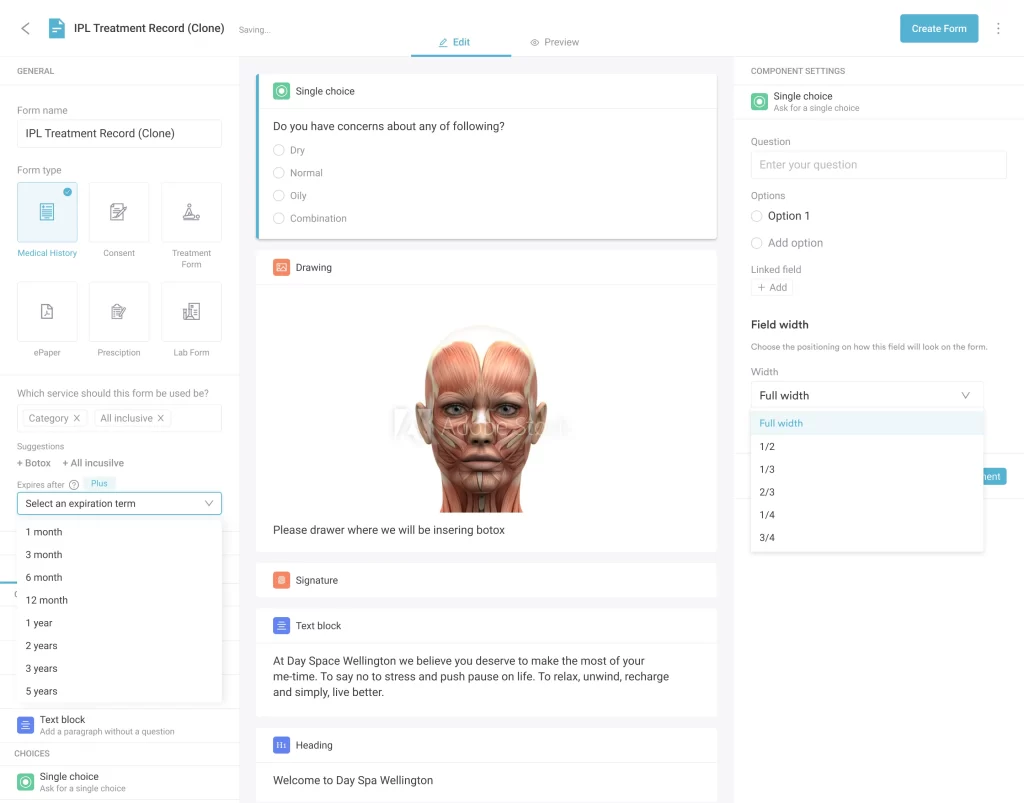
Pabau, for example, lets you send consent forms and medical history questionnaires to clients as soon as they schedule an appointment. Patients can complete these forms in advance, and all the information is automatically added to their patient records. This way, you can review everything before the visit and focus entirely on patient care.
Templates can significantly reduce charting time, but they should be customized and reviewed for each service to capture the specific information needed for upcoming treatments. Structured data entry—like dropdown menus, checkboxes, and predefined fields—also improves accuracy and efficiency, minimizing typos and ensuring consistent documentation.
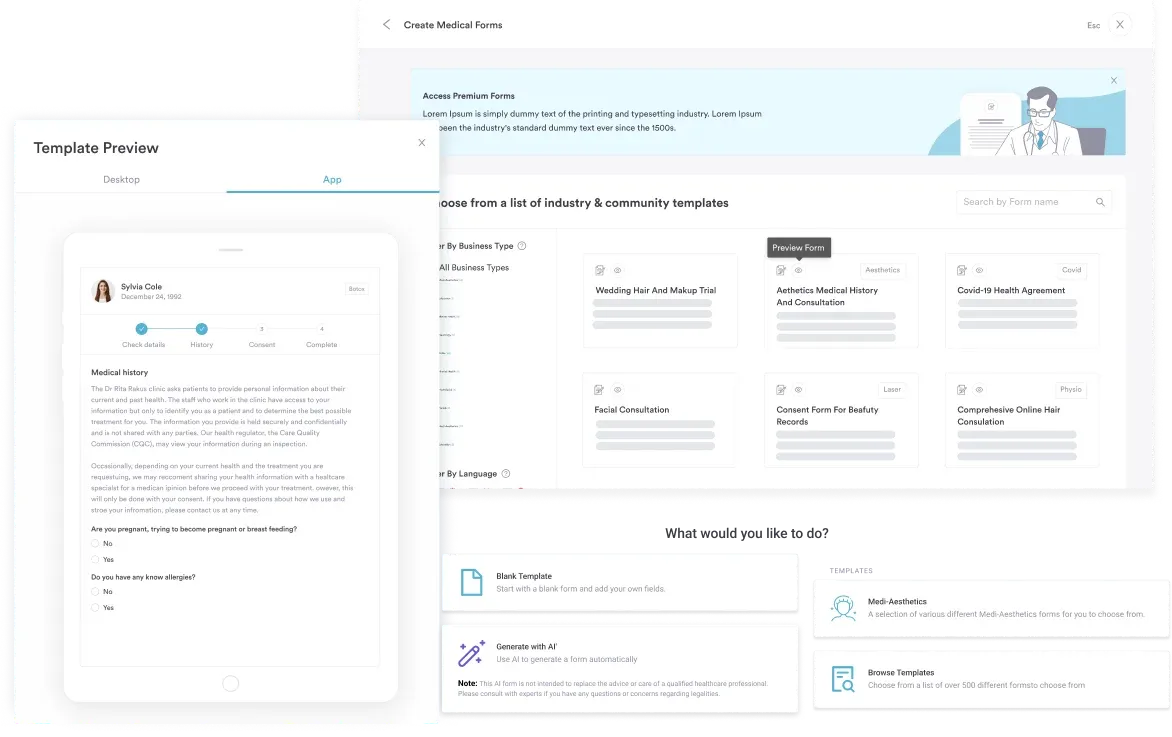
With Pabau, you don’t have to worry about building everything from scratch. It offers a library of ready-made templates to save time, but you can also create and customize your own templates to match your practice’s unique workflows.
Be mindful of how much time you spend looking at the screen during visits. Excessive “screen gazing” can make patients feel ignored, even if you’re taking notes.
Tools like Pabau’s AI scribe can automatically record important details from your conversation in real time, allowing you to focus fully on the patient.
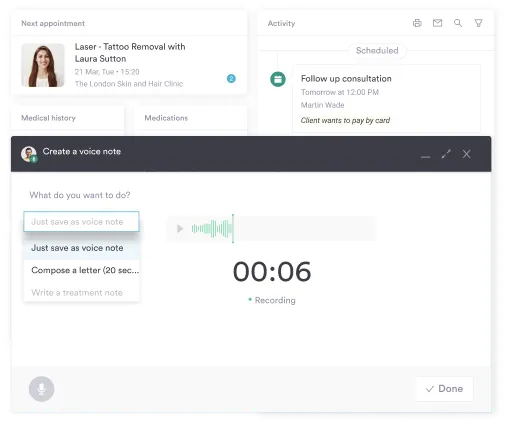
This not only saves time but also reduces medical errors that can occur when notes are written after the visit, helping you maintain accurate, high-quality documentation while keeping care truly patient-centered.
Keeping patients informed and engaged is important for better patient outcomes.
Sending them aftercare instructions, follow-up reminders, or satisfaction surveys after their visit ensures patients receive timely information and feel cared for between visits.
With platforms like Pabau, you can automatically send forms, appointment reminders, and post-treatment check-ins.
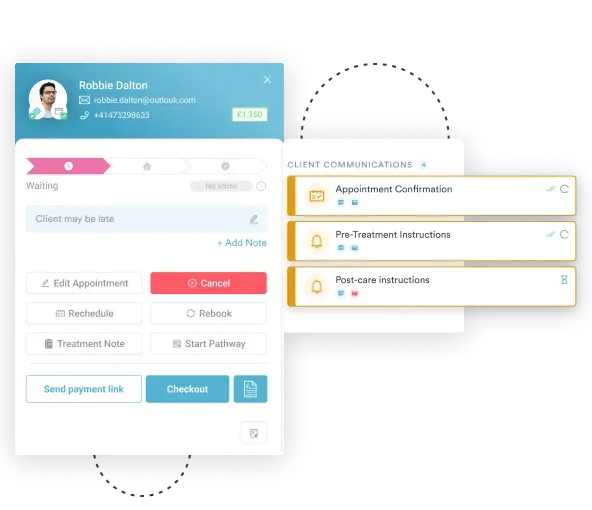
Patients can complete forms or confirm follow-ups directly through the system, and all responses are recorded in their EHR. This not only saves staff time but also improves patient adherence, satisfaction, and outcomes, creating a more seamless, professional experience for both patients and your team.
Learn more about the difference between PMS and EMR.
Pabau combines EHR, appointment scheduling, billing, templates and forms, AI-powered scribing, patient communication, telehealth, and automated reminders into a single, seamless platform. Clinicians can also review patient medical histories, track lab results, prescribe medications, and manage follow-ups through a client portal, which improves care coordination, outcomes, and patient satisfaction.