Best Dental Practice Management Software in the US (2026 Guide)
Key Takeaways Cloud-based platforms like Curve Dental and Denticon offer superio...

March 13, 2026

Discover free eBooks, guides and med spa templates on our new resources page


Buy now, pay later is now available in Pabau

Read case studies from our satisfied clients

Compare Pabau with alternative systems
 Integrations
 Measure Pabau savings
  Our security commitment
  About us
Learn why this holistic care and aesthetic medicine clinic chose Pabau to power patient care and performance.
Read more

Cloud-based platforms like Curve Dental and Denticon offer superior accessibility for multi-location practices compared to server-based systems
Pabau provides comprehensive practice workflows beyond scheduling – clinical charting, automated patient engagement, and integrated payments
Dentrix and Eaglesoft dominate US market share but require local server infrastructure and higher upfront licensing costs
Open Dental’s open-source model delivers cost flexibility for practices comfortable with technical customization
Insurance claim processing depth varies significantly – evaluate CDT code libraries and clearinghouse integrations before committing
Choosing the right dental practice management software has a direct impact on every operational workflow in your practice – from appointment scheduling and clinical charting to insurance claim submission and patient communication. US dental practices face a set of requirements that are unlike most other healthcare settings: deep integration with imaging hardware such as Dexis, Schick, and Carestream; native CDT code libraries for dental billing; and compliance with both HIPAA and state dental board reporting mandates. Getting this decision wrong creates friction across every patient encounter and billing cycle. (Note: Pabau is the publisher of this guide. We’ve included it first but evaluated all platforms by the same criteria.)
The dental software market divides sharply between legacy server-based platforms and modern cloud-first systems. Dentrix and Eaglesoft dominate the server-based segment with decades of installed base, mature insurance workflows, and tight integration with their respective equipment distribution networks. Cloud platforms – Curve Dental, Denticon, and Pabau – prioritise remote access, automated workflows, and the elimination of local server overhead, though they may require third-party integrations for specialty imaging hardware. Understanding this architectural divide is the starting point for any meaningful dental practice management software evaluation.
This guide evaluates seven leading platforms across scheduling, clinical documentation, billing automation, patient engagement, and operational reporting. Each system serves different practice profiles – from solo practitioners to multi-location DSO networks. We clarify which platforms excel at insurance complexity, which prioritise patient self-service, and where each fits within the broader landscape of practice management software options available to US dental teams in 2026.
Quick comparison of core features, deployment models, Capterra ratings, and starting pricing across the seven platforms evaluated:
Pabau serves as a unified clinical operating system across multiple healthcare verticals – aesthetics, wellness, private GP, and dental practices seeking flexibility beyond traditional dental-specific platforms. Unlike legacy dental software built exclusively around odontograms and insurance workflows, Pabau provides adaptable clinical documentation that accommodates both dental charting and broader treatment modalities. It is best understood alongside other multi-specialty options covered in our best medical practice management software guide.
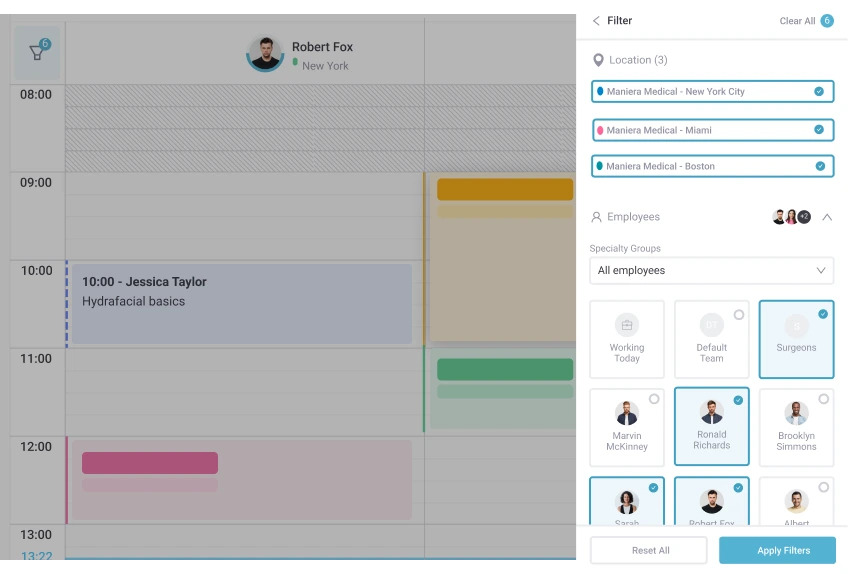
The platform prioritises patient engagement automation and cross-location operational consistency. Practices using Pabau access cloud-based scheduling, customisable intake forms, automated recall campaigns, and integrated payment processing without managing local server infrastructure. This makes Pabau particularly suited for multi-specialty clinics offering dental alongside cosmetic procedures, wellness services, or primary care – environments where traditional dental software creates operational silos.
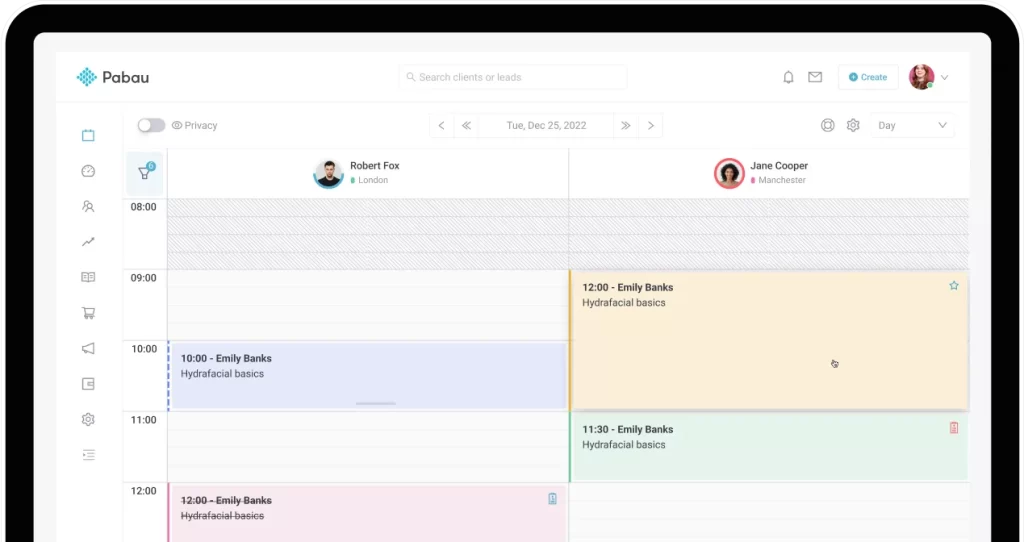
Pabau’s appointment scheduling supports drag-and-drop calendar management with multi-provider visibility. Online booking allows patients to self-schedule across services, including dental appointments, without staff intervention. The system automatically applies buffer times between procedures and handles concurrent bookings across multiple locations.
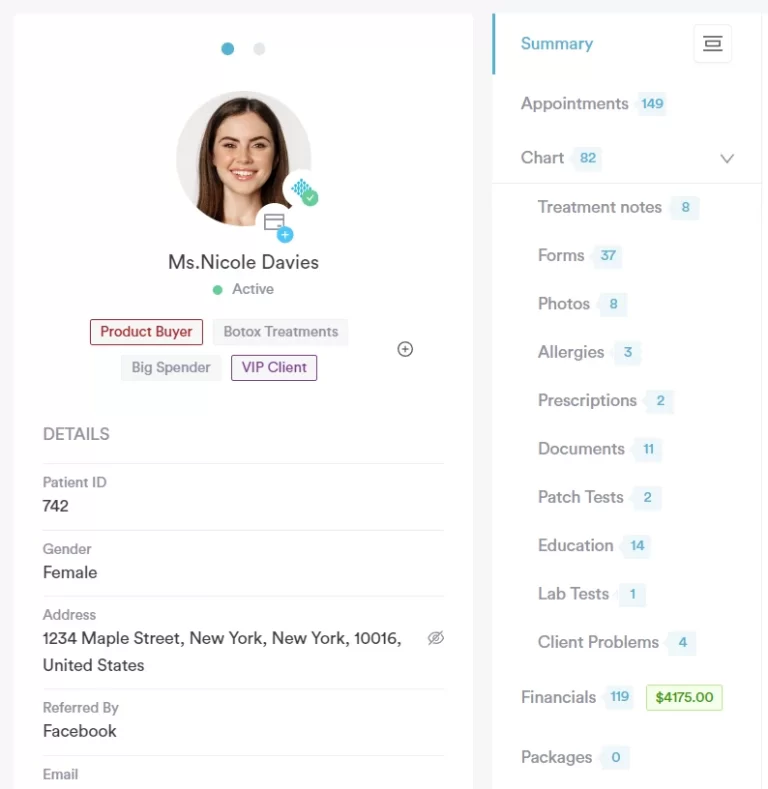
Pabau’s pricing structure is quote-based, with costs varying by practice size, user count, and module selection. Most implementations include onboarding support and data migration assistance. Contact Pabau’s sales team for practice-specific pricing.
Pabau is rated across multi-specialty healthcare workflows rather than purely dental. Reviews on Capterra highlight strong automation and scheduling capabilities, though some users note the platform requires configuration for dental-specific billing workflows.

Discover how Pabau’s unified platform handles scheduling, clinical documentation, and patient engagement without the complexity of traditional dental software.

Curve Dental positions itself as a modern cloud-native alternative to legacy server-based platforms. Built from the ground up for browser access, the system eliminates local server maintenance and enables providers to access patient records and scheduling from tablets, smartphones, or any internet-connected device. This architectural approach appeals to practices seeking operational flexibility without managing IT infrastructure.
The platform delivers core dental practice workflows – appointment scheduling, clinical charting, treatment planning, and billing – through a unified web interface. Curve Dental integrates with major dental imaging systems and provides patient communication tools for appointment reminders and recall campaigns. The system targets solo practitioners through mid-sized group practices looking to modernise away from server-dependent dental practice management software.
Pricing is indicative based on user reports; contact Curve Dental directly for exact quotes.
Curve Dental holds a 4.7/5 rating on Capterra from over 440 verified reviews. Users consistently praise the clean browser-based interface and ease of onboarding. Common criticisms focus on limited customisation of reports and occasional slowdowns during peak hours. One reviewer noted: “Transitioning from Dentrix was smoother than expected – the cloud access alone has changed how our team works.”
Denticon (by Planet DDS) serves as a cloud-based enterprise platform designed specifically for dental service organisations (DSOs) managing multiple practice locations. The system provides centralised patient records, unified billing, and consolidated reporting across all sites while maintaining location-specific scheduling and provider workflows. This architecture addresses the operational complexity of DSO networks where individual practices share patients, transfer cases, and require corporate-level financial oversight.
Planet DDS positions Denticon as a scalable alternative to deploying separate server-based systems at each location. The cloud infrastructure enables central IT management, standardised clinical protocols, and cross-location data analytics without replicating hardware at every site. Denticon’s feature set targets practices within DSO networks ranging from 5 to 500+ locations – it is not an appropriate fit for single-location general practices.
Indicative pricing; Planet DDS quotes custom contracts for each DSO network.
Denticon scores 4.5/5 on Capterra. DSO administrators highlight the centralised patient record system and cross-location reporting as standout strengths. Reviewers from smaller practices occasionally note the platform feels overbuilt for their needs. “For our 12-location group, Denticon finally gave us visibility across the entire network in one dashboard,” reported one operations director.
Dentrix maintains the largest installed base of any dental practice management software in the United States, with an estimated 38,000+ practices using the platform. Henry Schein, the parent company, leverages its dominant position in dental equipment distribution to bundle Dentrix with hardware purchases and service agreements. This creates a tight ecosystem where practices using Schein imaging systems, chairs, and supplies often default to Dentrix for practice management.
The platform operates as server-based software installed on local practice hardware. Dentrix covers core dental workflows – scheduling, charting, treatment planning, insurance billing, and reporting – with mature integrations to major imaging vendors. The system’s longevity means extensive third-party add-ons exist for specialised functions like orthodontic case management or oral surgery treatment planning.
Dentrix pricing is complex – initial software costs plus annual support fees, training, and optional modules. Community estimates suggest total cost of ownership of $500-$1,200/month for a single-provider practice. Contact Henry Schein directly for your specific configuration.
Dentrix holds a 3.9/5 rating on Capterra from over 500 reviews. Long-tenured users value the system’s comprehensive insurance workflows and deep imaging integration. Negative reviews frequently cite the dated interface, high cost, and frustration with customer support response times. “It does everything you need for billing, but you’re working with software that feels like it hasn’t been updated since 2005,” wrote one office manager.
Eaglesoft, owned by Patterson Dental, targets specialty dental practices requiring detailed clinical charting beyond basic general dentistry workflows. The platform provides specialty-specific templates for endodontics, periodontics, orthodontics, and oral surgery – workflows that general-purpose dental software often handles through generic notes rather than structured charting. This specialisation makes Eaglesoft the default choice for many specialty residency programs, creating user familiarity that persists into private practice.
The server-based system integrates with Patterson’s equipment distribution network similarly to how Dentrix pairs with Henry Schein hardware. Practices using Patterson chairs, imaging systems, and supplies often adopt Eaglesoft as part of bundled purchasing agreements. The platform’s strength lies in clinical documentation rather than patient engagement – the system prioritises precise treatment recording over automated marketing workflows.
Eaglesoft uses perpetual licensing with annual support contracts. Pricing varies by specialty module selection; community estimates suggest $150-$250/month total cost. Contact Patterson Dental for quotes.
Eaglesoft scores approximately 4.0/5 on Capterra from over 800 reviews. Specialty practitioners praise the detailed clinical charting for endo, perio, and ortho workflows. Common complaints relate to the server-based architecture and infrequent updates. “The perio charting is unmatched – I’ve tried three other platforms and nothing comes close for specialty documentation,” noted one periodontist reviewer. However, others flag: “The interface looks like Windows XP. It works, but training new staff takes forever.”
Open Dental operates under an open-source licensing model, making it the only major dental practice management software with freely available source code. This approach eliminates perpetual license fees and enables practices with technical capability to modify the software directly rather than requesting vendor customisations. The platform provides core dental workflows – scheduling, charting, billing, reporting – through a MySQL database backend that technically-inclined users can query and modify.
The system offers both server-based and cloud-hosted deployment options. Practices comfortable managing IT infrastructure can self-host on local servers at no software cost beyond optional support contracts. Those preferring managed hosting pay subscription fees for cloud deployment while retaining full data access. Open Dental’s active developer community publishes plugins, customisations, and integration scripts that extend the base platform’s functionality.
Open Dental earns a 4.7/5 rating on Capterra from over 1,100 reviews – one of the highest ratings in the dental software category. Users highlight the combination of cost-effectiveness and feature depth. “We’ve been on Open Dental for 8 years and it does everything Dentrix does at a fraction of the cost,” wrote one practice manager. Technical users love the MySQL access; non-technical staff occasionally find the UI less intuitive than cloud alternatives.
Practice-Web targets solo practitioners and small group practices seeking cloud accessibility without enterprise-level pricing. The platform delivers essential dental practice management functions – appointment scheduling, patient records, basic billing – through a browser-based interface at price points below larger competitors like Curve Dental or Denticon. This positioning makes Practice-Web a consideration for startup practices or single-provider offices prioritising affordability over advanced features.
The system operates entirely in the cloud with no local server requirements. Practice-Web provides core scheduling, charting, and patient communication tools sufficient for general dentistry workflows. The platform’s simplicity means faster onboarding but fewer customisation options compared to enterprise platforms. Solo practitioners managing their own schedules and limiting reliance on extensive insurance billing find Practice-Web’s streamlined feature set adequate.
Practice-Web pricing is indicative; contact them for current plans.
Practice-Web holds a 4.6/5 rating on Capterra. Solo practitioners consistently cite the fast setup and clean interface. Limitations surface when practices scale beyond 2-3 providers. “For a solo practice, Practice-Web has everything you need at a price that makes sense. The moment we added a second doctor, we started hitting its limits,” shared one reviewer.
The American Dental Association released CDT 2026 (Current Dental Terminology) effective January 1, 2026, with significant changes that every dental practice management software platform must support to keep practices billing correctly.
Key additions affecting software users include new codes for laser-assisted procedures, expanded documentation requirements for sedation services, and updated guidelines for implant-supported restorations.
What to check in your software:
Dentrix, Eaglesoft, and Open Dental each issued compatibility updates for CDT 2026. Curve Dental and Denticon pushed cloud updates automatically. Practices on self-hosted Open Dental installations should verify they have applied the latest version update – this does not happen automatically on server-hosted deployments.
Evaluate platforms against these operational decision criteria before committing to implementation:
Pabau serves practices seeking operational flexibility beyond traditional dental-only workflows. Clinics integrating dental services with aesthetics, wellness, or primary care avoid managing separate platforms. The cloud architecture, automated patient engagement, and cross-specialty clinical documentation support operational models where dental represents one service line within a broader healthcare offering. Compare Pabau with other practice management solutions to determine fit for your specific practice profile and operational priorities.

Need guidance on selecting the right practice management approach? What Is Practice Management Software? explains core platform capabilities and decision criteria across healthcare specialties.
Evaluating cloud versus server deployment? Best Medical Practice Management Software compares deployment models and operational implications across multi-specialty platforms.
Building patient engagement workflows? Patient Engagement covers automated recall campaigns, review collection, and communication strategies that complement clinical software.
Dental practice software selection hinges on matching platform architecture to operational reality. Server-based systems (Dentrix, Eaglesoft) deliver mature dental-specific features but tie practices to local infrastructure and limit remote access. Cloud platforms (Curve Dental, Denticon) prioritise accessibility and multi-location consistency at the cost of internet dependency.
Insurance billing depth remains the primary discriminator for many practices. Platforms with native clearinghouse integration and extensive CDT code libraries (Dentrix, Eaglesoft) serve practices where claim processing complexity justifies steeper learning curves. Cloud-first systems focus on scheduling efficiency and patient self-service over deep billing automation. With CDT 2026 now in effect, code currency is also a live operational concern – not just a procurement checkbox.
Pabau approaches dental practice management differently – as one clinical workflow within a broader multi-specialty platform. Practices integrating dental services with aesthetics, wellness, or primary care gain unified scheduling, cross-specialty documentation, and consolidated patient engagement without managing separate systems for each service line. The platform trades dental-specific imaging integration for operational flexibility across diverse treatment modalities. (Disclosure: Pabau is the publisher of this comparison. The evaluation criteria are applied consistently across all platforms.)
Evaluate platforms against your practice’s actual workflows, insurance dependency, and growth trajectory rather than feature checklists. The best dental practice management software is the one that matches how your team operates today while accommodating the practice model you’re building toward.
No single dental practice management software platform serves all practice profiles equally. Open Dental and Curve Dental lead on Capterra ratings (both 4.7/5), while Dentrix has the largest US installed base for established practices needing deep insurance workflows. Denticon is the top choice for multi-location DSOs. Eaglesoft leads for specialty charting requirements. Pabau suits multi-specialty clinics integrating dental with broader healthcare services. The best choice matches your deployment preference, insurance billing complexity, and specialty requirements.
Pricing varies significantly by platform and deployment model. Open Dental is free for self-hosted deployment, or approximately $199/month per location for managed cloud hosting. Practice-Web starts at around $149/month. Curve Dental is approximately $249-$300+/month per provider. Denticon runs around $280/month per location for DSO networks. Eaglesoft uses perpetual licensing with community estimates suggesting $150-$250/month total cost of ownership. Dentrix carries the highest total cost of ownership among server-based platforms, with community estimates of $500-$1,200/month for a single-provider practice including license, support, and modules. Request practice-specific quotes directly from each vendor for accurate pricing.
Core requirements for dental practice management software include appointment scheduling with multi-provider calendars, clinical charting with odontogram support, insurance billing with electronic claim submission and CDT code libraries, patient communication tools for reminders and recalls, treatment planning with procedure cost estimates, and reporting for production and collections tracking. Advanced needs may require imaging system integration (Dexis, Schick, Carestream), specialty-specific charting templates, multi-location management, or patient portal self-service. Prioritise features matching your practice’s actual workflows rather than comprehensive feature lists.
Cloud platforms (Curve Dental, Denticon, Pabau) deliver remote accessibility, automatic updates, and no server hardware requirements. They depend entirely on internet connectivity with no offline mode. Server-based systems (Dentrix, Eaglesoft) provide perceived data control and function during network outages but require IT maintenance, regular backups, and hardware refresh cycles. Cloud suits practices prioritising accessibility and minimal IT overhead. Server-based fits offices comfortable managing infrastructure in exchange for independence from internet reliability. Open Dental offers both deployment models, giving technically capable practices the choice.
Evaluate platforms against six criteria: deployment model (cloud versus server), insurance billing complexity, practice scale (solo versus multi-location), specialty requirements (general dentistry versus endo/perio/ortho), budget constraints (upfront licensing versus monthly subscriptions), and CDT code currency (confirm CDT 2026 compatibility before signing). Request demonstrations focused on your specific workflows rather than generic feature tours. Validate that imaging hardware integrations, clearinghouse connections, and state reporting requirements match your operational needs. Consider implementation timelines and staff training requirements alongside software capabilities.
CDT 2026 introduced 31 new codes, 14 revisions, and deleted 6 codes effective January 1, 2026. Practices must ensure their dental practice management software has been updated to include the new code set. Billing with deleted codes results in automatic claim rejection by insurance carriers. Cloud-based platforms like Curve Dental and Denticon push updates automatically – practices on these systems should be covered without action. Server-based systems like Dentrix and Eaglesoft require manual updates; contact your vendor if you have not received a CDT 2026 compatibility patch. Self-hosted Open Dental users should verify they have applied the latest version update manually.