Dental practice management software runs your schedule, charts and claims, so a poor fit shows up in every appointment.
For a dental-only office, Curve Dental is our top pick. Denticon suits multi-location DSOs. Open Dental and Practice-Web are the only two vendors that publish prices. Pabau, the multi-specialty practice software we build, ranks seventh here because it has no CDT code library.
Below, we score all seven on the same criteria, plus a CDT 2026 Readiness Check.
Key takeaways
1. Curve Dental — the strongest cloud-only pick for dental offices, with CDT 2026 updates pushed automatically.
2. Denticon — built for DSOs and dental groups, with centralized billing and automatic CDT 2026 updates.
3. Dentrix — the largest installed base, with 35,000+ practices and deep Henry Schein equipment ties.
4. Eaglesoft — structured specialty charting for endo, perio, ortho and oral surgery on server-based software.
5. Open Dental — published pricing from $199 a month per location and direct database access for technical teams.
6. Practice-Web — the lowest published price for a first office, at $179 a month for the first 12 months.
7. Pabau — the best fit for multi-specialty practices running dental alongside aesthetics, wellness or primary care in one system.
Found our content helpful?
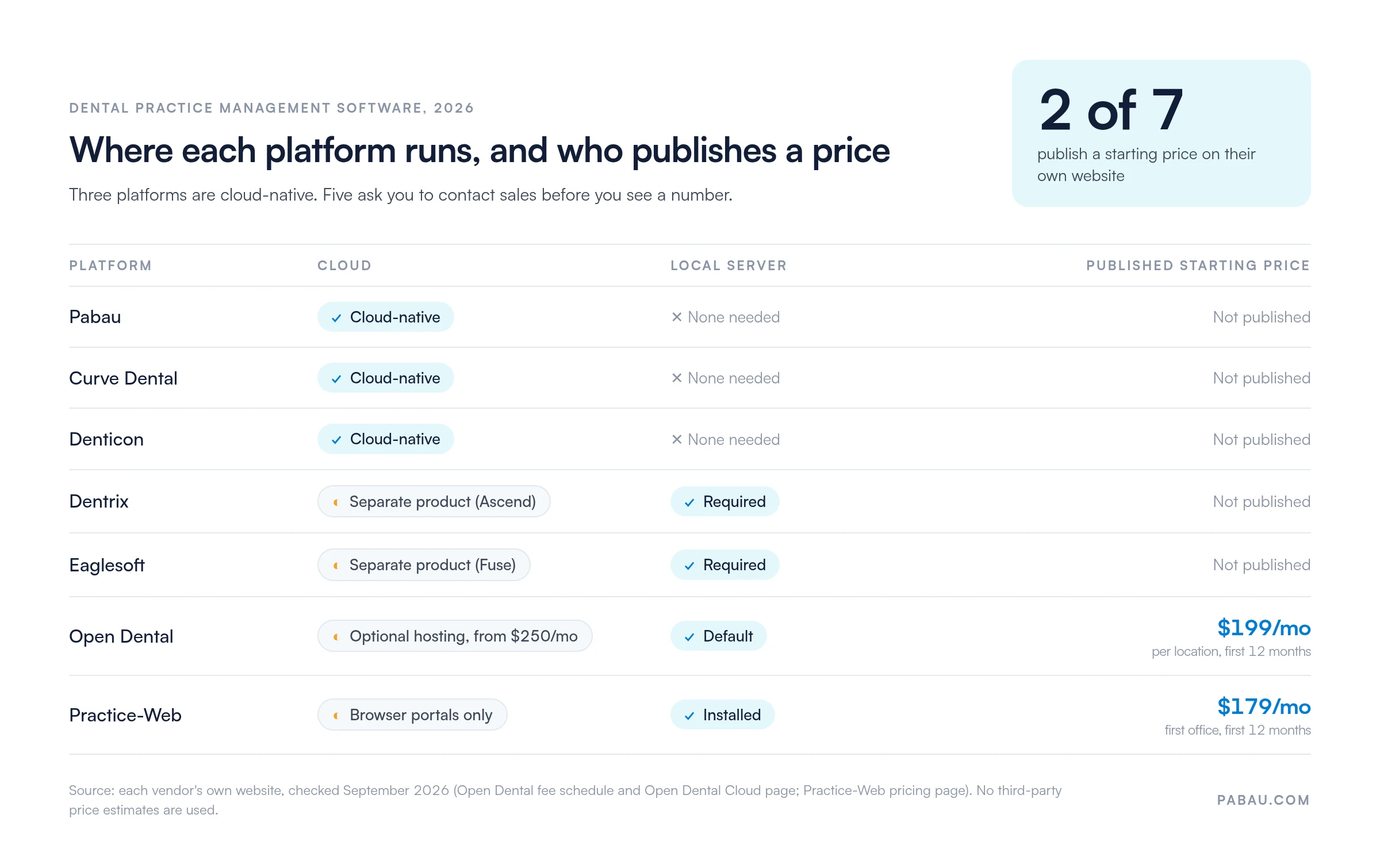
Only two of these dental software vendors publish a price
Only Open Dental and Practice-Web publish a starting price on their own websites. Three of the seven platforms are cloud-native. The last column shows how each one received the CDT 2026 code update, which matters for your next claim.
Platform
Best for
Capterra rating
Published starting price
Deployment
CDT 2026 update
1Curve Dental
Cloud-first dental offices
4.7/5 (440+ reviews)
No published pricing
Cloud
Pushed automatically
2Denticon
Multi-location DSOs
4.5/5
No published pricing
Cloud
Pushed automatically
3Dentrix
Established practices (Henry Schein)
3.9/5 (500+ reviews)
No published pricing
Local server
Vendor patch, practice installs
4Eaglesoft
Specialty practices
4.0/5 (800+ reviews)
No published pricing
Local server
Vendor patch, practice installs
5Open Dental
Cost-conscious, technical teams
4.7/5 (1,100+ reviews)
$199/mo per location
Local server, or Open Dental Cloud hosting
Practice installs latest version
6Practice-Web
Solo and small practices
4.6/5
$179/mo first office
Installed, with browser portals
Installed upgrade
7Pabau
Multi-specialty practices
4.7/5 (650+ reviews)
No published pricing
Cloud
No CDT code set
Pricing is where the market splits hardest, as the grid below shows.
Five of the seven vendors ask you to call sales before you see a number, so budget for a quote round. Figures come from each vendor’s own website, checked September 2026.
Cloud vs server-based dental software comes down to one trade-off
Cloud software saves you the server, but it stops when the internet does. Server software keeps running offline and hands you the upkeep instead.
Cloud based dental practice software runs in a browser on the vendor’s servers. There is no in-office server to buy, back up or patch. Curve Dental, Denticon and Pabau work this way, and updates, including code-set changes, reach every user at once.
Server-based systems install on hardware inside the practice. Dentrix and Eaglesoft dominate this segment, with decades of installed base and mature insurance workflows. Each is tied to its parent’s equipment network, Henry Schein and Patterson Dental respectively.
Imaging is the second split to check. Legacy systems connect natively to Dexis, Schick and Carestream, while some cloud tools need a bridge. Ask for a live X-ray capture in the demo, not a screenshot.
With those two splits in mind, here’s how each platform stacks up, starting with our top pick.
Curve Dental: The easiest way to drop your office server
Rating4.7/5★★★★★
The bottom line
Curve Dental is the cleanest route off a server for a dental-only practice, with updates pushed automatically.
Who it’s for
Solo to mid-sized dental practices
Offices leaving server-based software
Providers who want chart access on tablets
PricingNo published pricingcontact sales for a quote
Less flexible custom reporting than legacy systems
Curve Dental is a cloud-native, browser-based dental platform. The company says 6,000+ practice locations run on it across the US and Canada. Built for the browser from the start, it removes local server maintenance. Providers open charts and schedules from tablets, phones or any connected device.
Does Curve Dental handle reminders, recalls and online booking? Yes. Curve lists online booking, reminders, recare and patient communication under Curve GRO, its patient engagement tools. For offices comparing cloud based dental practice management software, that saves a separate reminder subscription.
The platform covers scheduling, charting, imaging, perio, treatment planning and billing through one web interface. Curve Dental targets solo practitioners through mid-sized groups moving away from server-dependent dental software.
What you get with Curve Dental
Browser-based access: No local installation, with schedules and charts available from any device with an internet connection
Integrated imaging: Imaging sits inside the clinical workflow, with cloud storage for radiographs and photos
Patient engagement: Online booking, appointment reminders and recare campaigns through Curve GRO
Payments: Curve Pay connects insurance billing, patient billing and membership plans to the patient record
CDT 2026 Readiness Check: Curve Dental pushed the CDT 2026 update through the cloud, so practices had nothing to install
Where Curve Dental pulls ahead
Cloud architecture: No server hardware to maintain, and software updates arrive without practice intervention
Mobile access: Providers review schedules and charts on tablets between operatories or off-site
Modern interface: A cleaner design than legacy platforms like Dentrix, so new staff get up to speed faster
What to watch with Curve Dental
Internet dependency: Chart access stops during a network outage, because there is no offline mode
Reporting limits: Custom report building is less flexible than in Dentrix or Eaglesoft
What Curve Dental users say
Curve Dental holds a 4.7/5 rating on Capterra from over 440 reviews. Users praise the clean browser interface and easy onboarding. Common criticisms focus on limited report customization and occasional slowdowns at peak hours. One reviewer said moving over from Dentrix went more smoothly than expected and that cloud access has changed how their team works.
Curve Dental suits offices ready to leave a server
Practices leaving server-based systems that want cloud access straight away
Providers who need schedules and charts on mobile devices across operatories or locations
Small to mid-sized practices that value ease of use over deep customization
Pricing
All plans
Solo to mid-sized groups. Covers: Scheduling, charting, imaging, billing, patient engagement.
Contact sales / no published pricing
Curve Dental does not publish prices on its website and quotes each practice after a demo.
Denticon: One database for every location in a DSO
Rating4.5/5★★★★★
The bottom line
Denticon runs a whole dental group from one cloud database, with claims and reporting consolidated across sites.
Who it’s for
Dental service organizations
Groups sharing patients across locations
Finance teams that need network-wide reporting
PricingNo published pricingcustom contract per network
Denticon, from Planet DDS, is a cloud platform built for dental groups running many locations from one database. Planet DDS says 13,000+ practices use it.
Patient records, billing and reporting are centralized, while scheduling and provider workflows stay location-specific. That fits DSO networks where practices share patients, transfer cases and need corporate financial oversight.
Planet DDS positions Denticon as an alternative to installing a separate server at each location. Central IT management, standard clinical protocols and cross-location analytics come without duplicate hardware. Denticon is not a good fit for a single-location general practice.
What Denticon centralizes
Centralized patient records: One patient database across the network, supporting transfers and shared treatment histories
Enterprise billing: Eligibility verification, batch electronic claims with attachments, and automatic 835 remittance posting
Role-based access: Separate permissions for corporate administrators, regional managers and location staff
Cross-location reporting: Production, collections and clinical metrics rolled up across the whole network
CDT 2026 Readiness Check: Denticon pushed the CDT 2026 update through the cloud to every location at once
Where Denticon earns its keep
DSO workflows: Patient transfers, shared care plans and cross-location referrals work without duplicate data entry
Scalable infrastructure: Adding a location means adding users, not buying another server
Corporate oversight: Executive dashboards show production, collections and clinical metrics across the network
The catch with Denticon for smaller offices
Solo practice overhead: Features and pricing built for networks make it impractical for one location
Implementation timeline: Multi-location rollouts need longer onboarding for data migration and staff training
What Denticon reviewers say
Denticon scores 4.5/5 on Capterra. DSO administrators single out the centralized patient record and cross-location reporting. Reviewers from smaller practices sometimes find it overbuilt for their needs. One operations director at a 12-location group said Denticon finally gave them visibility across the whole network in one dashboard.
Denticon fits groups like these
Dental service organizations that need unified patient records and billing across locations
DSO networks that prefer central IT management to a server at every site
Corporate dental groups that need executive reporting across several markets
35,000+ practices, so trained staff are easy to hire
Mature claims and remittance workflows
Dentrix Pay posts card payments to the ledger
What doesn’t
Needs a local server and IT upkeep
Dated interface and remote access by VPN
Dentrix is Henry Schein One’s on-premise dental practice management system for scheduling, charting, treatment planning, insurance billing and reporting.
The vendor says 35,000+ practices rely on it, the largest installed base in this guide. Henry Schein bundles it with equipment purchases and service agreements, so practices on Schein hardware often default to it.
The core Dentrix product installs on a local practice server. Henry Schein sells its cloud option, Dentrix Ascend, as a separate product. Decades on the market mean a wide range of third-party add-ons for orthodontic case management and oral surgery planning.
What Dentrix brings to an established practice
Large user community: Training resources, peer forums and third-party consultants are easy to find
Deep imaging integration: Native connections to Dexis, Schick and Carestream, with DICOM support for specialty equipment
Mature billing workflows: Claims management with clearinghouse integration and electronic remittance processing
Extensive reporting: Pre-built production, collections and productivity reports with adjustable parameters
CDT 2026 Readiness Check: Henry Schein issued a CDT 2026 compatibility update, which the practice installs on its server
Where Dentrix still leads
Market reach: The largest user base means plenty of trained staff, consultants and peer support
Breadth: Decades of development cover core dental workflows without many third-party integrations
Hardware ecosystem: Buying equipment, software and support from one vendor simplifies purchasing and service
The trade-offs of staying on Dentrix
Server dependency: The core product needs a local server with maintenance, backups and IT support
Interface age: The legacy design brings a steeper learning curve than modern cloud platforms
Limited remote access: Working off-site needs a VPN or remote desktop service
How Dentrix users rate it
Dentrix holds a 3.9/5 rating on Capterra from over 500 reviews. Long-time users value its insurance workflows and imaging integration. Negative reviews cite the dated interface, high cost and slow support responses. One office manager said the billing works but the software feels dated.
Choose Dentrix if these sound like you
Established practices with Henry Schein equipment contracts that want one vendor
Offices that put insurance billing depth ahead of a modern interface
Practices comfortable running a local server in exchange for proven stability
Pricing
Dentrix (on-premise)
All practice sizes. Covers: License, annual support, optional modules.
Contact sales / no published pricing
Henry Schein One does not publish Dentrix pricing, so the monthly cost depends on the license, support contract and modules quoted to your practice.
Eaglesoft: Specialty charting built for endo, perio and ortho
Rating4.0/5★★★★★
The bottom line
Eaglesoft earns its place on specialty charting, not on cloud access or patient engagement.
Who it’s for
Endo, perio, ortho and oral surgery practices
Residents trained on Eaglesoft
Practices buying Patterson equipment
PricingNo published pricingquote from Patterson Dental
Eaglesoft is Patterson Dental’s server-based system. It beats Dentrix on specialty charting, while Dentrix wins on user base and Henry Schein integration. Eaglesoft ships templates for endodontics, periodontics, orthodontics and oral surgery. General-purpose dental software often handles those in free-text notes instead.
Wide use in specialty residency programs gives many new specialists Eaglesoft experience before they enter private practice. Patterson bundles it with chairs, imaging and supplies, much as Henry Schein does with Dentrix. Its cloud platform, Fuse, is sold as a separate product.
What Eaglesoft adds for specialists
Specialty charting templates: Structured documentation for endo sequencing, perio probing, ortho progress and oral surgery planning
Treatment plan presentation: Case acceptance tools with procedure animations and cost breakdowns for consultations
Imaging integration: Direct connections to Patterson imaging hardware with specialty DICOM support
Insurance management: Claims processing with pre-authorization tracking and EOB reconciliation
CDT 2026 Readiness Check: Patterson issued a CDT 2026 update, and the practice installs it on its server
Where Eaglesoft beats general dental tools
Specialty documentation: Templates built for specialty workflows remove the workarounds general platforms need
Treatment presentation: Visual case acceptance helps explain complex procedures to patients and referring dentists
Residency adoption: Specialists trained on Eaglesoft need little retraining in private practice
Where Eaglesoft feels heavy
General practice fit: The specialty-focused feature set feels heavy for general dentistry
Server infrastructure: Eaglesoft needs local server hardware, backups and IT maintenance
Patient engagement: Built-in marketing automation is limited, so many practices add a third-party tool for recalls
What specialists say about Eaglesoft
Eaglesoft scores about 4.0/5 on Capterra from over 800 reviews. Specialists praise the detailed charting for endo, perio and ortho work. Complaints center on the server architecture and infrequent updates.
One periodontist rated the perio charting above the other platforms they had tried. Another reviewer said the interface looks dated and that training new staff takes a long time.
Who gets the most from Eaglesoft
Endodontic, periodontic, orthodontic and oral surgery practices that need specialty charting
Specialists who trained on Eaglesoft in residency and want continuity
Practices bundling software with Patterson equipment purchases
Pricing
Eaglesoft (on-premise)
Specialty and general practices. Covers: Specialty templates, imaging integration, claims management.
Contact sales / no published pricing
Patterson Dental does not publish Eaglesoft pricing, and quotes vary with the modules and support contract a practice selects.
Open Dental: Published prices and direct access to your data
Rating4.7/5★★★★★
The bottom line
Open Dental offers the clearest published pricing among established systems, plus direct access to your own database.
Who it’s for
Cost-conscious general practices
Offices with in-house or contracted IT
Teams that want custom reports from raw data
Pricing$199/monthper location, first 12 months, then $149
Patient Portal, Payment Portal and eReminders included
What doesn’t
Self-hosted updates are not automatic
Cloud hosting is an extra monthly fee
Open Dental costs $199 a month per location in the US for the first 12 months, then $149 a month. The software is included in that support fee. Those figures come from Open Dental’s own fee schedule. Hosted deployment through Open Dental Cloud starts at $250 a month on top of support, with a one-time $400 setup fee.
You will still see free dental practice management software lists naming Open Dental, and the history explains why. Open Dental carried an open-source GPL license until version 24.4. Newer versions are proprietary, and updates require an active support contract.
Open Dental covers scheduling, charting, billing and reporting on a MySQL database that technical users can query directly. Practices with IT capability self-host on local servers. An active user community publishes plugins, customizations and integration scripts.
What the Open Dental support fee buys
Data access: A standard MySQL database supports custom reporting, direct queries and third-party tools
Included eServices: Patient Portal, Payment Portal and eReminders come with an active support plan
Active community: User forums and developer documentation provide peer support and shared customizations
Flexible deployment: Self-host on local servers or pay for Open Dental Cloud hosting
CDT 2026 Readiness Check: Open Dental released a CDT 2026 update, but self-hosted practices must install the latest version themselves
Where Open Dental gives you control
Price transparency: The support fee, cloud tiers and setup charge are all on Open Dental’s website
Data ownership: Direct database access means no vendor-mediated exports
Customization: Practices can hire independent developers to build reports and integrations
What self-hosting Open Dental costs you
IT dependency: Self-hosting needs someone to manage the server, backups and troubleshooting
Interface: Functional but less polished than the cloud platforms in this guide
Cloud cost: Hosting fees are charged separately from support, so a cloud setup costs more than the headline fee
Why Open Dental reviews run high
Open Dental earns a 4.7/5 rating on Capterra from over 1,100 reviews, one of the highest in the dental category. Users highlight the mix of cost and feature depth.
One practice manager, eight years on Open Dental, said it covers the same ground as Dentrix at a fraction of the cost. Non-technical staff sometimes find the interface less intuitive than cloud alternatives.
Open Dental suits hands-on teams
Cost-conscious practices comfortable managing a server and basic troubleshooting
Offices that need custom reports or integrations beyond standard APIs
Practices that put data ownership ahead of a polished support experience
Pricing
Plan
Price
Who it’s for
Key features
Support (US)
$199/mo per location for 12 months, then $149/mo
Every Open Dental practice
Software, updates, phone, chat and email support
Open Dental Cloud, Small
$250/mo on top of support, plus $400 setup
Practices that want hosted deployment
7 concurrent sessions, 5GB database, 20GB images
Open Dental publishes these fees on its own website, and each cloud location must stay on support while hosted.
Practice-Web: The lowest published price for a solo office
Rating4.6/5★★★★★
The bottom line
Practice-Web is the lowest published price here, and it fits a solo office until a second or third dentist joins.
Who it’s for
Solo practitioners opening a new practice
Small groups of up to three dentists
Offices that want a published price
Pricing$179/monthfirst office, first 12 months, then $129
Practice-Web is the lowest published price in this guide, at $179 a month for a first office during the first 12 months, then $129. The plan includes installation, web-based training, software upgrades, Dentist and Patient Portals, and phone or remote support. Each dentist beyond three adds $20 a month.
Practice-Web installs on the practice’s own hardware, with browser-based portals for dentists and patients. It covers scheduling, charting and patient communication for general dentistry. Add-on “Smart Tools” cover two-way texting, online scheduling, eClaims with eligibility checks, and merchant card processing.
What Practice-Web covers out of the box
Browser portals: Dentist and Patient Portals give off-site access to schedules and patient information
Scheduling: Color-coded calendar management with automated reminders
Charting: General dental notes and treatment planning without specialty templates
Online registration: Mobile forms let patients register and complete paperwork before the visit
CDT 2026 Readiness Check: Upgrades are included in the plan, so ask Practice-Web which release carries CDT 2026 and confirm it is installed
Where Practice-Web keeps costs down
Affordability: The published price undercuts every vendor here that discloses one
Simplicity: A streamlined feature set cuts training time for small teams without admin staff
Predictable onboarding: Database conversion from an existing system has a published price of $1,195
Where Practice-Web runs out of room
Limited advanced features: No specialty charting, complex insurance workflows or enterprise reporting
Scalability: The feature set gets tight as practices add providers or locations
Add-on costs: Texting at $90 a month and online scheduling at $119 a month sit outside the base plan
What solo dentists say about Practice-Web
Practice-Web holds a 4.6/5 rating on Capterra. Solo practitioners cite fast setup and a clean interface. Limits show up past two or three providers. One reviewer said it suits a solo practice at its price, but the team hit its limits once a second doctor joined.
Practice-Web fits small, lean offices
Solo practitioners launching a practice on limited startup capital
Small group practices of two or three providers that want a published price
Offices that value simplicity and affordability over advanced features
Pricing
Plan
Price
Who it’s for
Key features
First office
$179/mo for 12 months, then $129/mo
Solo and small groups (up to 3 dentists)
Software, installation, training, upgrades, portals, support
Additional office
$129/mo
Practices adding a location
Software, installation, upgrades, portals, support
Practice-Web publishes these prices on its own website, and each dentist beyond three adds $20 a month.
Pabau: One patient record when dental is one service among several
Rating4.7/5★★★★★
The bottom line
One record holds the dental visit, the aesthetic treatment and the invoice, so mixed practices stop running two systems.
Who it’s for
Practices offering dental alongside aesthetics or wellness
Multi-location groups that need one calendar
Teams that want online booking and payments built in
PricingNo published pricingquote by location and user count
Pabau ranks last for dental-only offices, but it is the best fit when dental is one service line among several. One patient record holds the dental visit, the aesthetic treatment and the invoice.
Traditional dental software is built around odontograms and insurance claims. Pabau’s clinical records cover dental notes and other treatment types in the same chart.
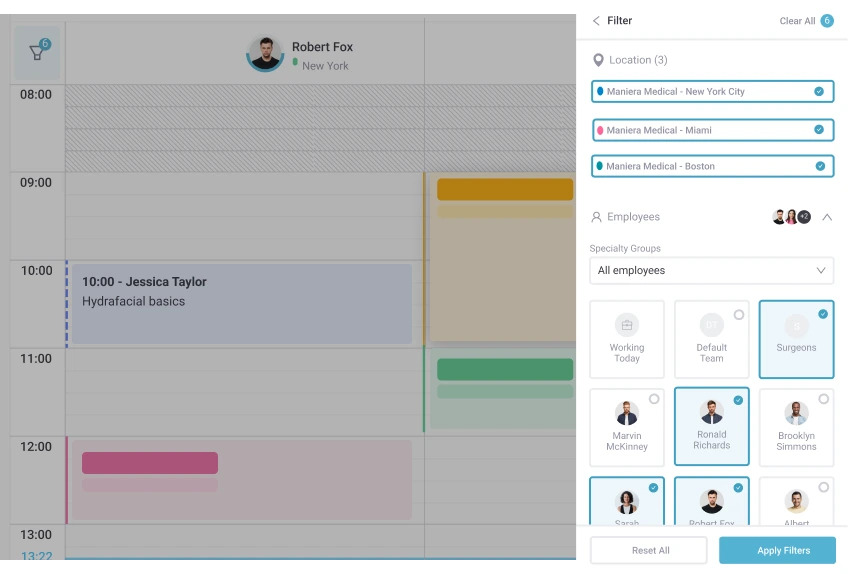
Pabau’s location and team filters show every site’s schedule in one calendar. Run that test if you manage dental chairs across locations.
The platform leans on patient engagement and consistency across sites. Practices get cloud scheduling, custom intake forms, automated recall campaigns and integrated payments without a local server.
That suits practices offering dental next to cosmetic procedures, wellness or primary care, where a dental-only system would split the patient record in two.
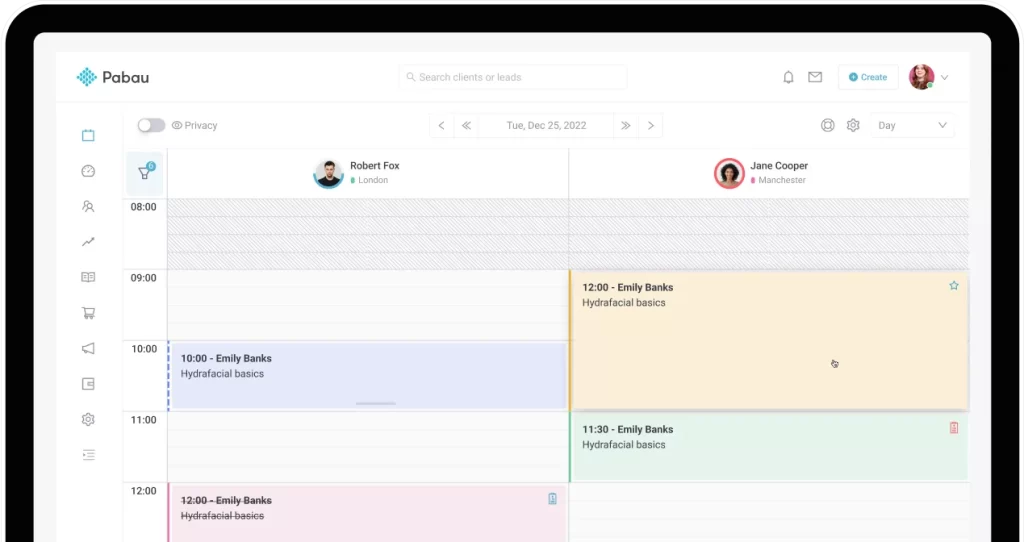
Pabau’s drag-and-drop calendar shows each provider’s column side by side. Front-desk staff can book a hygiene visit and a cosmetic consult in one view.
Pabau’s online booking lets patients book dental and non-dental services themselves, without a call to the front desk. The calendar applies buffer times between procedures and handles bookings across locations. Pabau Scribe, our AI medical scribe, drafts clinical notes as visits happen.
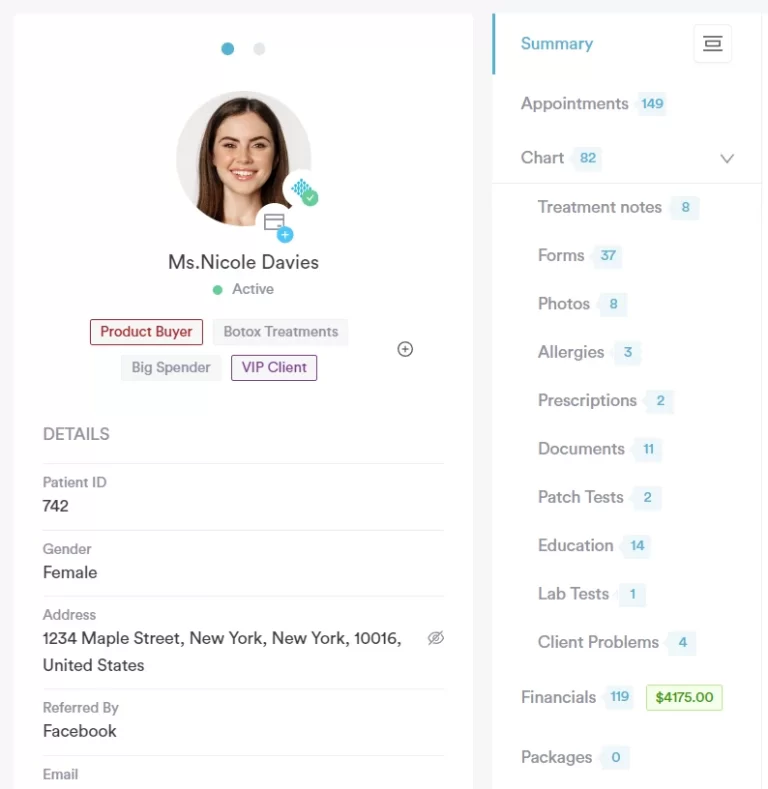
Pabau’s patient record keeps notes, forms, photos and financials under one profile. Check this view when judging whether dental and medical charts can share a system.
What Pabau covers beyond the dental chair
Cloud-native architecture: No local server, with access from any device through role-based permissions and audit trails
Custom clinical forms: Build dental intake forms, consent documents and treatment plans without code in the digital forms builder
Automated patient engagement: Recall sequences for hygiene visits, treatment follow-ups and review requests by SMS and email
Multi-location management: Centralized reporting and inventory across sites, with location-specific scheduling
Integrated payments: Card payments, deposits and subscription billing through Stripe, plus Pabau Pay, our card terminals, for in-person payments
Before-and-after photos: Organized visual records with comparison views for cosmetic dental cases
Calendar waitlist: Matches waiting patients to cancelled slots so staff can offer the earlier time in one click
CDT 2026 Readiness Check: Pabau is multi-specialty, and its code libraries cover ICD-10-CM and CPT/HCPCS rather than CDT
Where Pabau helps mixed practices
Cross-specialty flexibility: Practices offering dental with aesthetics, wellness or primary care avoid separate software for each service line
Patient engagement automation: Recall workflows, review requests and follow-up sequences are built in, with no third-party marketing tool
Cloud accessibility: Providers reach schedules, records and reports from any location without a VPN
Unified payments: Deposits, packages, subscriptions and point-of-sale transactions run through one payment setup
What Pabau can’t do for a dental-only office
Dental imaging: No native connection to Dexis, Schick or Carestream, so practices need an API workaround or a third-party bridge
Dental insurance claims: US claims run through Pabau’s claims management integration with Claim.MD, which is built around medical code sets rather than CDT
Specialty dental charting: Tooth-level perio charting and orthodontic planning need custom templates that dental-only platforms ship ready-made
How Pabau reviewers rate it
Pabau holds a 4.7/5 rating on Capterra from more than 650 reviews, across multi-specialty healthcare rather than dental alone. Reviewers highlight ease of use and responsive onboarding support. Some note that pricing takes a conversation to pin down, because Pabau quotes by location and user count.
Who should shortlist Pabau
Multi-specialty practices adding dental services to aesthetics, wellness or primary care
Practices that value patient self-service and automated engagement over deep dental claims processing
Cloud-first operations that want remote access without a local server
Groups that want one patient record across dental and non-dental treatments
Pricing
Plan
Price
Who it’s for
Key features
Solo
No published pricing
1 user
Full platform
Team / Medium / Group
No published pricing
2 to 15 users
Full platform
Enterprise
No published pricing
16+ users, multi-location
Full platform
Pabau prices by location and number of users, and every plan includes the full platform. See the plan structure on Pabau’s pricing page.
Dental software with integrated payments: Check the processor first
All seven platforms take card payments, but they differ on whose processor sits behind them. Curve Dental, Denticon, Dentrix and Pabau sell a payment product tied to their own platform. Eaglesoft, Open Dental and Practice-Web connect to partner processors.
The difference shows up at reconciliation. Here’s how an insured visit moves from the chair to the ledger:
The provider charts the procedure with its CDT code, and the fee lands on the patient ledger.
The system builds the claim and sends it as an 837D file, usually through a clearinghouse.
The clearinghouse checks the file for format errors before passing it to the payer.
The payer pays or denies the claim and returns an 835 remittance file.
The software posts the insurance payment, and the front desk collects the patient’s share by card.
Integration earns its keep at the last two steps. When the payment product is built in, card payments post to the ledger automatically, so nobody re-keys totals at close. Before you sign, ask whether you can bring your own processor. Also ask what happens to your processing rates if you leave.
Clearinghouse integration and electronic remittance
Eaglesoft
Eaglesoft Card Payments or CarePay+
Global Payments Integrated or Wellfit
Claims with pre-authorization tracking
Open Dental
In-software card processing
EdgeExpress or PayConnect
Electronic claims through supported clearinghouses
Practice-Web
Merchant card processing and pay-by-text add-ons
Partner processor
eClaims and eligibility check add-on
Pabau
Stripe integration, plus Pabau Pay card terminals
Stripe
US claims through Claim.MD (medical code sets)
For clearinghouse and payment links in one place, Denticon and Dentrix go deepest. Both post remittances and card payments back to the ledger. Pabau’s payments suit self-pay and cosmetic work, but its claims workflow runs on medical code sets rather than CDT.
CDT 2026 is the code test every dental system had to pass
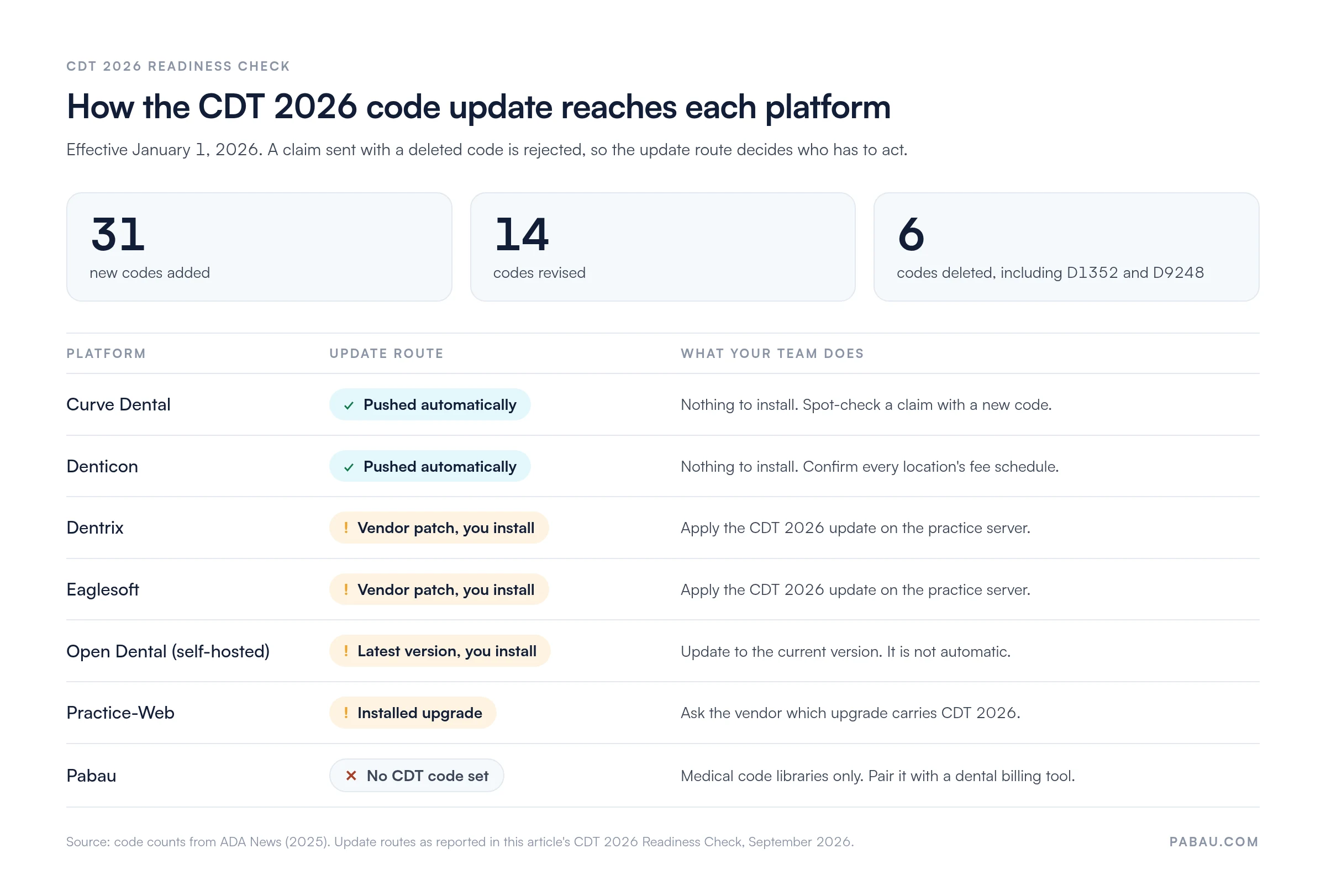
CDT 2026 added 31 codes, revised 14 and deleted six, effective January 1, 2026. Every dental system needed a code-set update. The figures come from ADA News, which counted 60 changes in total, including nine editorial actions. A claim sent with a deleted code is rejected.
The deletions are specific enough to test. According to ADA News, the six are:
D1352, the preventive resin restoration code, which overlapped with D2391
D1705, D1706, D1707 and D1712, four COVID-19 vaccine administration codes for vaccines no longer distributed
D9248, nonintravenous conscious sedation, replaced as part of an overhaul of the anesthesia codes
New codes also cover point-of-care saliva testing, cracked tooth testing, and cleaning and inspection of an occlusal guard. Our CDT 2026 Readiness Check asks one question of each platform: does the update arrive automatically, or does your team install it?
Cloud platforms took the code-set change off the practice’s to-do list, while server-based systems left it with the team. Code counts are from ADA News.
Dentrix, Eaglesoft and Open Dental each issued CDT 2026 compatibility updates, and Curve Dental and Denticon pushed theirs through the cloud automatically. Self-hosted Open Dental practices should confirm they are on the latest version, because server installs do not update themselves.
Before you submit your next claim, run the CDT 2026 Readiness Check on your own system:
Confirm your vendor released a CDT 2026 update and that it is installed
Try entering D1352 or D9248 and check that the system flags or blocks it
Check that revised code descriptions print correctly on claim forms
Confirm your HIPAA 837D electronic claim file uses the new code set
Add fees for the new codes to every fee schedule, since a new code may carry no fee until you set one
How to choose dental practice management software in six filters
Pick the deployment model first. Then filter by insurance volume, location count, specialty and budget, and confirm CDT 2026 support before you sign. The same filters work for a startup choosing its first system and for an office switching away from one.
Deployment model: Practices that want remote access and little IT overhead suit cloud platforms (Curve Dental, Denticon, Pabau). Practices with a server and in-house IT may prefer Dentrix or Eaglesoft for local control.
Insurance billing complexity: Practices that earn most of their revenue from insurance need mature clearinghouse and remittance workflows (Dentrix, Eaglesoft, Denticon). Cash-based or cosmetic practices can weight patient engagement higher.
Practice scale: Single locations need solid scheduling and charting. Multi-location groups need centralized billing and cross-site reporting, which is Denticon’s strength.
Clinical documentation and compliance: Check three items. Look for perio and specialty charting, audit trails, and a signed HIPAA business associate agreement.
Budget and pricing: Start with the two vendors that publish prices. Then request written quotes from the rest, including migration, training and add-ons.
CDT code currency: Confirm each shortlisted platform passes the CDT 2026 Readiness Check. Deleted codes on a claim lead straight to rejections.
A worked example. Take a two-dentist general office that bills mostly to insurance and has no IT person. The deployment filter rules out running Dentrix or Eaglesoft on a local server. Denticon handles insurance well, but with one location its network features go unused. That leaves Curve Dental, with insurance billing built into the cloud platform, at the top of the shortlist.
Want a published number to measure Curve’s quote against? Use Open Dental Cloud. Support at $199 a month plus hosting at $250 a month runs $449 a month. Add the $400 setup fee and year one comes to $5,788, before add-ons.
Reviews help break a tie. Open Dental and Curve Dental both hold 4.7/5 on Capterra. Read the one-star reviews too, since support response times vary more than features across dental software programs.
Once you have two or three names, test the screens your front desk lives in all day.
Test the dental administration software, not just the chart
Dental administration software is the back-office half of the system: scheduling rules, reminders, reporting, payroll exports and staff permissions, separate from clinical charting. Most demos lead with the odontogram, but the front desk spends its day in these screens.
Ask each vendor to show a full front-desk day in the demo:
Booking a new patient, collecting a deposit and sending intake forms before the visit
Running an end-of-day production and collections report by provider
Setting staff permissions so a hygienist cannot edit fee schedules
Filling a cancelled slot from a waitlist or recall list
In the practices we onboard, data migration always comes first. Patient records, appointment history and balances move before anyone configures a reminder. Ask each vendor what their migration covers and what it costs. Practice-Web publishes a $1,195 database conversion fee, and Open Dental Cloud charges a $400 setup fee.
How Pabau keeps dental and non-dental care in one record
Practices that add dental to an aesthetics, wellness or primary care business usually end up running two systems. One books the hygiene visit, the other books the injectable consult, and the front desk reconciles payments between them. Patients get two sets of forms and two reminders from two brands.
Pabau puts both service lines in one calendar, one patient record and one payment setup. Online booking lets patients book either service themselves. Automated recalls cover hygiene visits and cosmetic follow-ups alike, and Pabau Scribe drafts the notes, so providers finish charting before the next patient.
Every Pabau subscription includes every feature, and onboarding starts with migrating your existing records. If dental insurance billing is the core of your revenue, keep a CDT-coded system for claims and let Pabau handle the rest. Our comparisons for practice owners set Pabau beside individual vendors.
Run dental and aesthetic services in one system
Pabau puts dental visits, cosmetic treatments, online booking, recalls and payments in one patient record. Your front desk works from one calendar instead of two.
Start with the problem your current system causes most often. If claims bounce, weight insurance depth and code updates. When the server keeps failing, the cloud platforms fix that first.
Then make each finalist prove it on your own work. Ask them to book, chart and bill one of your patient scenarios in the demo. Send a test claim with a new CDT 2026 code before you sign. Get migration, training and add-on costs in writing, because they rarely appear in the headline price.
The trade-off to remember is control versus upkeep. A server gives you offline access and local control, and it also hands you the backups and patches. Cloud software takes that work away, as long as your internet holds.
If your practice runs dental next to aesthetics or wellness, one shared patient record may matter more than a CDT library. Book a demo to see how Pabau handles a mixed day of dental and cosmetic visits in one calendar.
Continue your research
Need a scheduling system for a multi-provider practice?Healthcare scheduling software compares booking, reminders and calendar features side by side.
Weighing billing-heavy platforms?AdvancedMD vs CareCloud compares two systems built around insurance claims.
Ready to leave eClinicalWorks?eClinicalWorks alternatives weighs the options for practices planning a switch.
Frequently asked questions
What is the difference between dental practice management software and a dental EHR?
Practice management software runs the business side, including scheduling, billing, claims and reporting. A dental EHR holds the clinical record, such as charting, treatment notes and imaging. Most dental platforms combine both in one system. Check that yours does, or your team will re-key data between two screens.
Can I take my patient data with me when I switch dental software?
Yes, but ask exactly what the conversion covers before you sign. Demographics and appointments tend to move cleanly. Ledger balances, perio charts, treatment plans and X-ray links need closer checks. Ask for a test conversion and compare a handful of patient records side by side.
What should I check before going live on new dental software?
Confirm that fee schedules and insurance plans converted, then send one test claim through the clearinghouse. Check that reminders now go out from the new system, not the old one. Train the front desk on check-in and checkout first, because staff use those screens all day.
Do dental practice management systems include a clearinghouse?
Most connect to one, but fees and setup vary by vendor. Some bundle electronic claims and eligibility checks into the subscription. Others sell them as an add-on, as Practice-Web does with its eClaims tool. Ask for per-claim and monthly clearinghouse costs in writing.
Can dental practice management software run on a Mac?
Browser-based platforms such as Curve Dental and Denticon run on a Mac, because they only need a web browser. Server-based systems like Dentrix, Eaglesoft and Open Dental are built for Windows. A Mac-only office would need a Windows virtual machine or remote desktop, which adds IT work.