










Key takeaways
An operation note is the written record of what happened during a procedure, completed by the clinician who performed it.
The free template on this page is a one-page form for minor procedures carried out under local anesthetic.
It covers patient details, allergies, a WHO checklist box, the procedure, your operative note, sutures and dressings, and post-operative instructions.
Major surgery under general or regional anesthesia needs a fuller operative report, so this form is not the right document for it.
Most of the detail sits in one open text box, so work through the same checklist every time you write in it.
Download your free operation notes template
A one-page operation note for minor procedures under local anesthetic. It covers patient details, allergies, a WHO checklist box, and the procedure. The rest of the page is your operative note, the anesthetic, sutures and dressings, post-operative instructions, and your signature.
Download templateAn operation note is the record of what you did during a procedure, written by the person who performed it. It tells the next clinician what happened, and it stands as the account of the procedure if anyone ever asks.
The template above is deliberately small. It is a single page built for minor procedures under local anesthetic, such as mole and cyst excisions, skin biopsies, and minor suturing. That makes it a fit for dermatology practices and skin practices running a regular minor surgery list.
That scope is worth knowing before you print it. A hospital case under general anesthesia needs a fuller operative report, and this guide sets out what that report adds.
For a treatment room procedure, one page is enough, as long as the open text box is filled in properly. The habits behind safer clinical notes matter more than the size of the form.
What is an operation note?
An operation note is a contemporaneous record of a procedure, completed by the clinician who performed it. It names the patient, the procedure, what was found, what was done, and what happens next.
It does three jobs at once.
- It is the legal record. If the procedure is ever questioned, the note is the primary evidence of what you did and why.
- It carries continuity of care. Whoever removes the sutures or reviews the wound relies on your note to know what to expect.
- It drives coding and billing. Coders read the note to pick the right procedure code, and thin notes cause denials.
Write it before the patient leaves, not later in the day. A note written from memory hours afterward loses the small details that made it worth writing.
What is inside the free template
The download is one page, and every field printed on it is listed below. Nothing else is on the form, so anything extra you want to record has to go in one of the open boxes.
| Field on the form | What to write in it |
|---|---|
| First name and last name | The patient name, matching the record you will file the form in. |
| Date of birth | Used with the name to confirm you have the right patient. |
| Allergies | Check yes or no, then write the allergy in the space provided. |
| WHO checklist | Check yes or no to confirm the safety checks happened. |
| Procedure | One line naming the procedure, the site, and the side. |
| Operation notes | The open box for your narrative, from preparation through to closure. |
| Local anesthetic | The agent, the strength, and the volume you infiltrated. |
| Sutures and dressings | Suture material and size, plus the dressing you applied. |
| Post op instructions | What the patient does at home, and when to call you. |
| Doctor signature and name | Signed and printed by the clinician who performed the procedure. |
The field list leaves out two things worth handling by hand. The form has no date of procedure field, and no field for a specimen sent to pathology.
Write the date next to the procedure line, and record any specimen inside the operation notes box. Both take seconds, and both are the first things a coder or a reviewer looks for.
How to complete the template
The form runs top to bottom in the order the procedure happens. Work through it in that order and the note writes itself.
- Fill in the patient details. Write the first name, last name, and date of birth. Add the date of the procedure next to the procedure line.
- Answer the allergy question. Check yes or no. If the answer is yes, name the allergy and the reaction in the space underneath.
- Confirm the WHO checklist. Only check yes once the checks have been run out loud with the patient, not because the box is there.
- Name the procedure. One line, with the site and the side written out in words. Left and right are worth spelling in full.
- Write the operation note. Use the checklist in the next section, so the open box reads the same way every time you use it.
- Record the anesthetic, sutures, and dressing. Agent, strength, and volume on one line. Suture material, size, and the dressing on the next.
- Write the post-operative instructions, then sign. Say what the patient does at home and when to call. Sign the form and print your name.
Give the patient a copy of the post-operative instructions, or send the same wording afterward. Clear patient education at that point means the patient is not guessing at home. File the form in the patient record the same day, while the detail is still fresh.
What to write in the operation notes box
The form gives you one open box for the whole procedure, with no prompts inside it. That freedom is why two clinicians in the same practice can hand in very different notes for the same operation.
Work through the same points every time and the box stays consistent:
- The indication, in one line: why the procedure was done.
- The site and the side, written in words rather than abbreviated.
- Consent taken, and the risks you discussed before starting.
- Skin preparation and draping.
- Anesthetic infiltration, and how long you waited before the first incision.
- The technique, step by step, including the incision and how deep you went.
- What you found, including anything you were not expecting.
- How bleeding was controlled.
- Any specimen sent, and the label it went out under.
- The closure, and any complication or deviation from the plan.
Here is how that reads on a filled form, for a pigmented lesion removed from the back.
| Field on the form | Example entry |
|---|---|
| Procedure | Excision of pigmented lesion, left upper back, 8 mm |
| Operation notes | Consent taken after discussing scar, bleeding, and recurrence. Site marked and confirmed with the patient. Skin cleaned with chlorhexidine and draped. Elliptical excision taken with a 2 mm margin, down to subcutaneous fat. Lesion removed intact and sent to pathology. Bleeding controlled with pressure. No complications. |
| Local anesthetic | 1% lidocaine with epinephrine, 3 ml infiltrated locally |
| Sutures and dressings | 4-0 nylon, four interrupted sutures, island dressing applied |
| Post op instructions | Keep dry for 48 hours. Remove the dressing on day two. Return on day 10 for suture removal. Call the practice if the wound bleeds or reddens. |
The entries above show the level of detail to aim for, not a protocol to copy. Your own agents, margins, and follow-up intervals belong in there instead.
When this template is not the right form
This form does not fit major surgery. A case under general or regional anesthesia, in a hospital or a surgery center, needs a full operative report instead.
A full operative report records the things a single page has no room for:
- Every member of the team and the role each one held
- The anesthesia type and agents, plus the ASA physical status grade
- Pre-operative and post-operative diagnoses, recorded separately
- A step-by-step narrative with an estimate of blood loss
- Sponge, needle, and instrument counts
- Specimens sent, with their labels and where each one went
- Itemized post-operative orders for the ward team
Those items are the standard for inpatient surgery, and they sit here as reference only. None of them is printed on the download, because the download is a minor procedure form.
Common mistakes on a minor procedure note
The same handful of omissions show up again and again on one-page notes. Each one is quick to avoid.
- No side recorded. A lesion on the back needs a side and a level, not just the word back. Vague sites are the hardest thing to defend later.
- The anesthetic line left blank. Write the agent, the strength, and the volume. Anyone reviewing a slow recovery will look for that line first.
- A specimen with no paper trail. If tissue went to the lab, the note has to say so, and say what label it carried.
- Generic post-operative instructions. Routine wound care tells the patient nothing. Give the timing, the dressing change, and the reason to call you.
- Filling it in later. A note written at the end of the list is a reconstruction, and it reads like one.
- No signature. An unsigned form is an incomplete record. Sign it, print your name, and file it.
A note that looks tidy but says little is the riskiest of the lot. It gives everyone downstream false confidence in the record.
Documentation standards for minor procedures
For hospital and surgery center cases, the timing rule is explicit. CMS and The Joint Commission both expect the operative report to be written or dictated immediately after the procedure.
If the full report cannot be filed right away, a brief progress note goes into the record first. That note carries the essentials until the report catches up.
Office-based minor surgery is governed by your own practice policy, your state rules, and the billing compliance standards your payers apply.
UK practices work to the record-keeping standards set by the General Medical Council and inspected by the Care Quality Commission.
The safest habit is the hospital one. Write the note now, sign it, and file it the same day. Record retention then depends on your state and the age of the patient.
From paper form to digital record
A printed form does its work in the treatment room, then turns into a filing task. Someone has to scan it, name it, and attach it to the right record. Handwriting can be misread on the way.
Building the same fields as a digital form removes that step. The advantages are practical rather than dramatic.

- The name and date of birth fill themselves in, so the identity fields cannot drift.
- Typed text is legible, and you can search it later for an audit or a recall.
- Required fields can be enforced, so a half-finished note cannot be filed.
- Every entry is timestamped, which shows when the note was written and by whom.
None of that changes what belongs in the note. It changes how reliably the note reaches the client record and stays findable.
How Pabau keeps every procedure note in the client record
Most practices print this form, fill it in, then scan it back. Practice management software like Pabau removes the middle step by holding the same fields as a digital form inside the client record.
The name, date of birth, and known allergies are already on file, so the top of the form is filled before you start. You add the procedure, the note, the anesthetic, the closure, and the post-operative instructions, then sign on screen.
The aftercare wording can go straight to the patient as a message when you save. They leave with the same instructions that sit in their record. Pabau Scribe, our AI scribe, can also draft the narrative from what you dictate, so the open box is done before you leave the room.
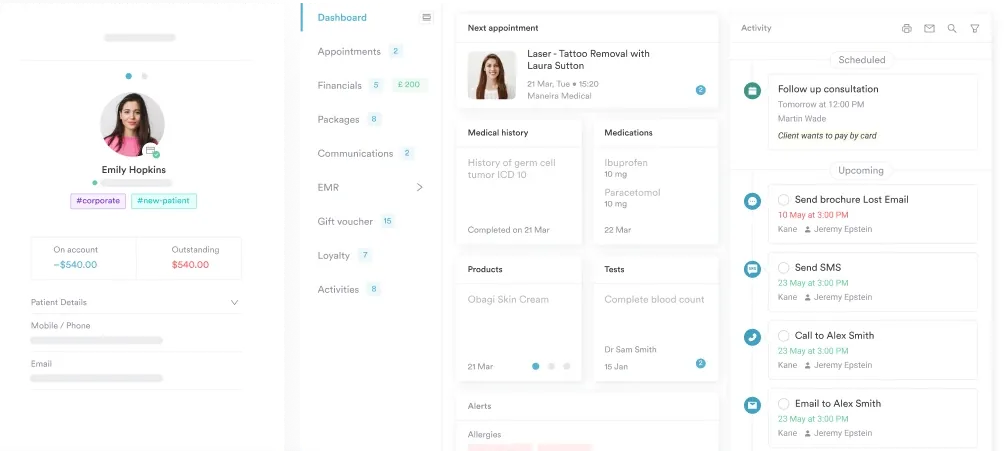
The result is one note, written once, filed on its own, and easy to find when the patient comes back for suture removal.

Keep every procedure note in the client record
Pabau holds your operation note as a digital form inside the client record. The signed note files itself, and the aftercare wording goes out to the patient the moment you save it.

Conclusion
This form is small on purpose. For a mole excision under local anesthetic, one page and a carefully written free-text box is a complete record of the procedure.
Its limits matter as much as its fields. If you are working in an operating room under general anesthesia, you need a full operative report. In a treatment room, print this page, complete every line, and file it the same day.
The habit worth building is consistency in that open box, because that is where the value of the note sits. Book a demo to see how Pabau keeps every signed procedure note inside the client record.

Continue your research
Running the safety checks before you start? The WHO Surgical Safety Checklist sets out the checks behind that box on the form.
Need to record the follow-up visit? The clinical progress notes template carries the wound review and suture removal into the record.
Want your notes to be quicker and safer to write? Safer clinical notes covers the habits that keep a note short without losing detail.
Wondering how long to keep the signed form? Medical record retention breaks the rules down state by state.
Comparing tools to write your notes in? Best clinical notes software weighs up the platforms practices use for clinical documentation.
Frequently asked questions
What is an operation note?
An operation note is the written record of a procedure, completed by the clinician who performed it. It names the patient, the procedure, the site, what was found, what was done, and the plan afterward. It is written right after the procedure, then signed.
Is this template suitable for surgery under general anesthesia?
No. The template is a one-page form for minor procedures under local anesthetic. A case under general or regional anesthesia needs a full operative report. That report records the surgical team, the anesthesia detail, the counts, and the specimens.
What goes in the operation notes box?
The narrative of the procedure. Record the indication, the site and side, consent, and the skin preparation. Then cover the anesthetic, the technique, the findings, how bleeding was controlled, any specimen sent, and the closure.
Does the template include a date of procedure field?
No. The form has a date of birth field, but no separate field for the date of the procedure. Write the date next to the procedure line before you sign, so the record cannot be read two ways later.
Who signs the operation note?
The clinician who performed the procedure signs the form and prints their name. If someone else writes the note, the person who performed the procedure still reviews it and signs it before it is filed.
When should an operation note be completed?
Immediately after the procedure, before the patient leaves. Hospital rules go further for major surgery. The operative report is written or dictated right after the case. If it is not ready yet, a brief progress note goes into the record first.
Can operation notes be handwritten?
Yes, and this template is built to be printed and written on. Digital notes are easier to read, search, and file, and they carry a timestamp. Either way, the note has to be legible, signed, and stored in the patient record.