EHR ROI: How to calculate and maximize your return
EHR ROI is the financial return a practice earns on its electronic health record...

Last Updated: Oct 15, 2026

A medical claims clearinghouse is an electronic middleman that validates your claims and routes them to insurance payers in the format each one requires.
Scrubbing catches data errors before the payer sees them, which is how practices approach the 98% clean claim rate HFMA sets as the target.
One clearinghouse connection replaces separate enrollment, formatting, and logins for every payer you bill.
Payment comes back down the same path as an electronic remittance advice, or 835 file, explaining what was paid and what was cut.
Practice management software like Pabau submits claims straight from the invoice, so nobody re-keys them into a separate portal.
A medical claims clearinghouse is a service that receives electronic claims from providers, checks them for errors, and forwards them to insurance payers. It also converts each claim into the format that particular payer will accept. If your practice is adding cosmetic services, compare software for med spas for the cash-pay side before you choose a clearinghouse.
Practices new to insurance billing usually assume they will submit claims to each insurer one by one. The clearinghouse is the reason nobody does that. You connect once, and that single connection reaches thousands of payers.
This guide follows one claim from the invoice in your software to the payment landing back in it. It also covers what clearinghouses cost, how to pick one, and what changes when a cash-pay practice starts billing insurance.
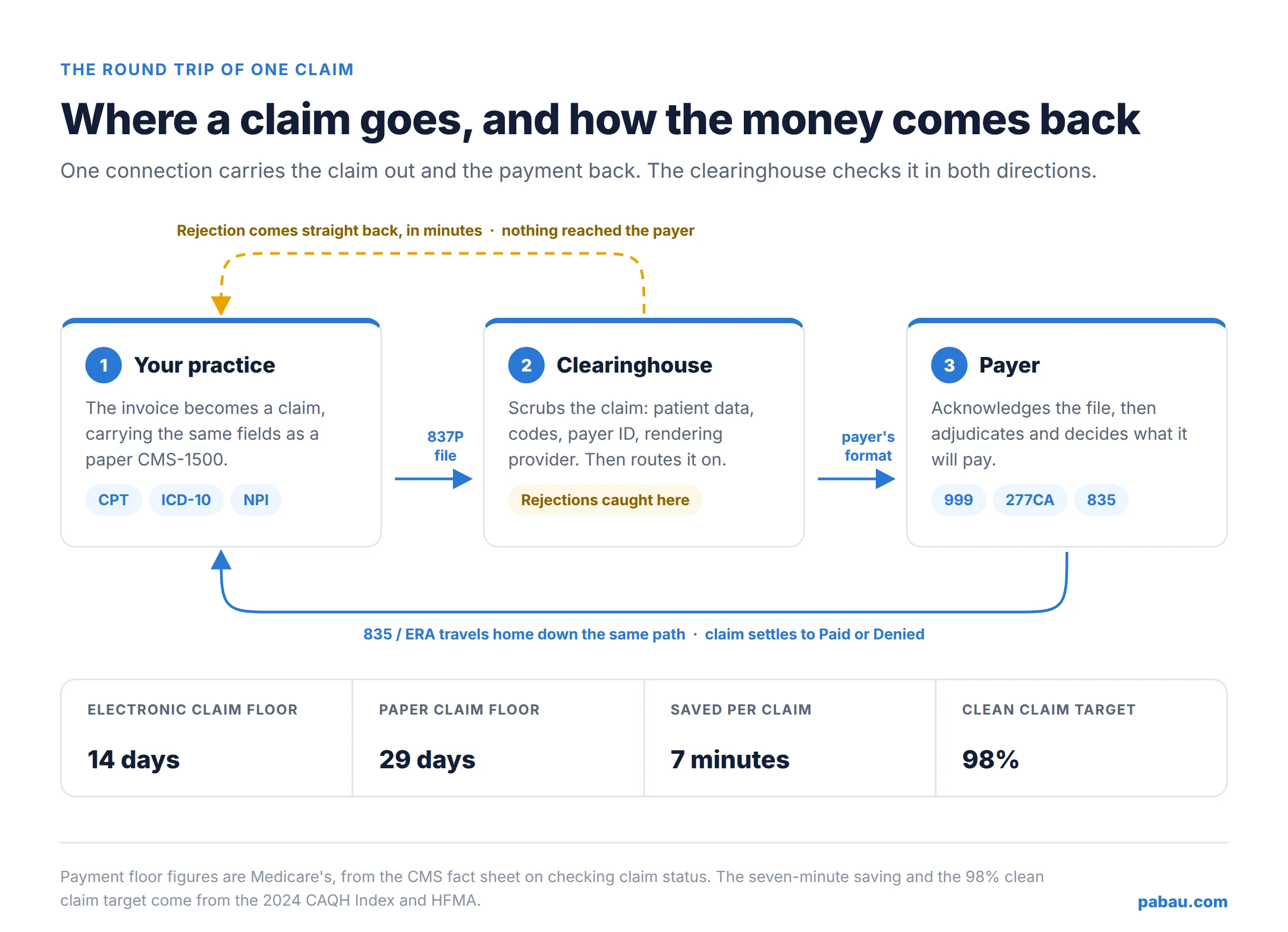
A clearinghouse takes your finished claim, checks it, translates it, and delivers it to the right payer. Here’s the full round trip a single claim makes.
Step six has two receipts worth knowing by name. Medicare’s guidance on claim status explains that a 999 acknowledgment tells you the whole file was readable. A 277CA then reports on each claim inside it.
If a claim fails either check, it never gets a tracking number. It won’t show up when you go looking for its status either.
After that, waiting is normal. Medicare holds clean claims in a payment floor before it pays anything. CMS tells providers to wait at least 14 days on an electronic claim, and 29 days on a paper one, before chasing it.
Because billing payers directly means enrolling with, formatting for, and logging into each one separately. A clearinghouse collapses that into one connection, one file format, and one place to check where a claim is.
The bigger win is catching errors early. A transposed member ID or a missing modifier costs you a few minutes when the clearinghouse flags it. So does a laterality modifier left off a shoulder repair billed as 29827. The same error costs you weeks if the payer finds it, because the claim has to come back, get corrected, and go out again.
The time saving is measurable. The 2024 CAQH Index puts the average saving at seven minutes per claim when medical providers submit electronically instead of manually. It also prices a manual claim submission at $6.33 of provider labor, against $3.05 for the electronic version.
Getting paid is faster too. Under Medicare’s payment floor, an electronic claim is eligible for payment 15 days sooner than a paper one.
All of that feeds one number worth tracking from day one. Your clean claim rate is the share of claims accepted on first submission. The Healthcare Financial Management Association puts the target at 98%. Scrubbing is most of how a small practice gets near it.
| What you deal with | Billing each payer directly | Billing through a clearinghouse |
|---|---|---|
| Setup | A separate enrollment, portal login, and file format for every payer. | One enrollment with the clearinghouse, then payer enrollments it manages for you. |
| Error feedback | You find out when the payer rejects or denies the claim, often weeks later. | Scrubbing flags most errors in minutes, before the claim leaves. |
| Tracking | Check each payer’s portal one at a time. | One dashboard with the status of every claim, whoever the payer is. |
| Time to payment | Paper claims sit in Medicare’s payment floor for 29 days. | Electronic claims clear the same floor in 14 days. |
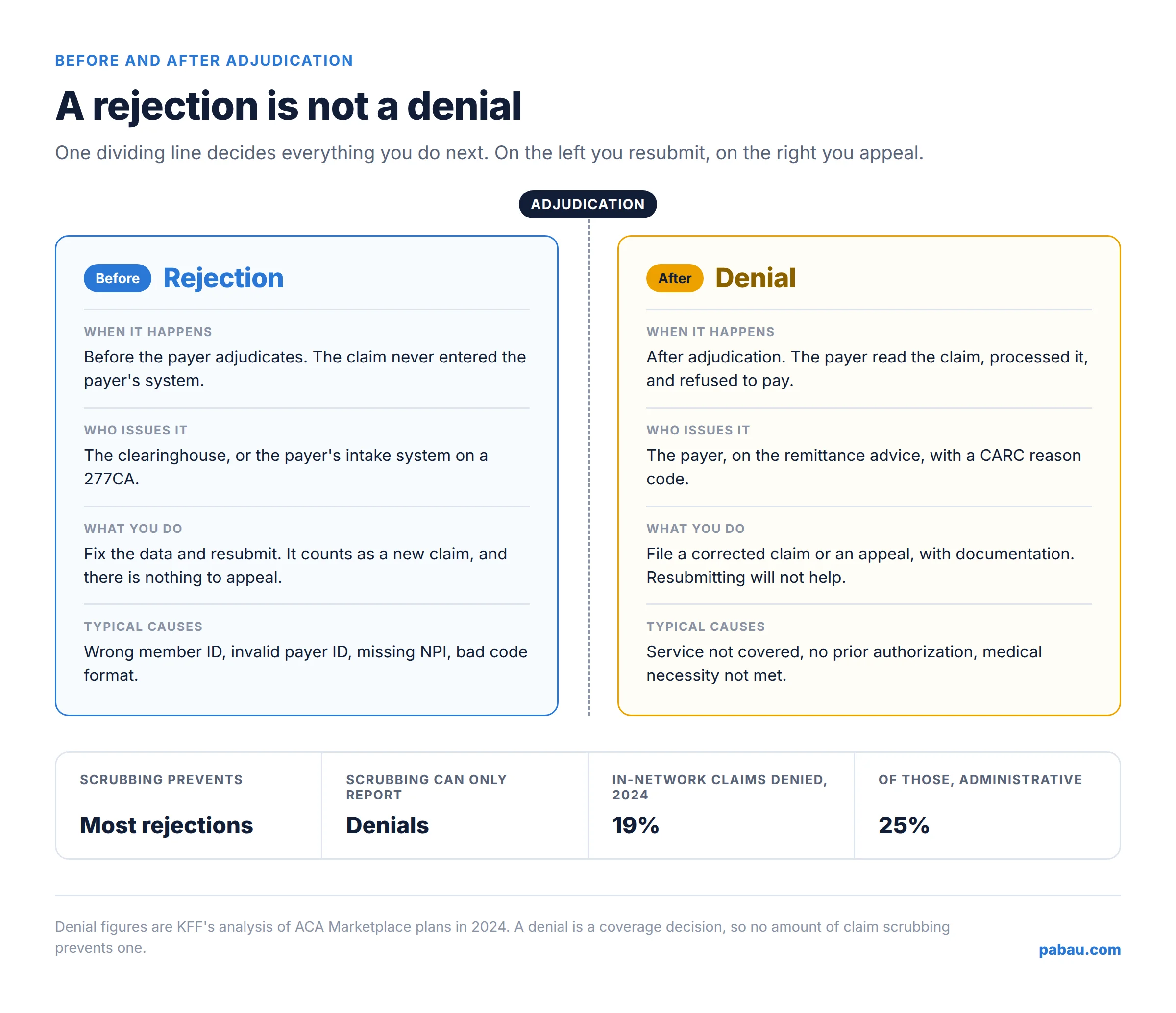
A rejection happens before the payer adjudicates the claim, and a denial happens after. That single distinction decides what you do next with the claim.
A rejection means the claim never entered the payer’s system. Something in the data or the formatting failed a front-end check, so there’s nothing to appeal. You correct the field and resubmit, and the claim is treated as new. Injury codes need care on the way back, since S56.109A still describes the first encounter for that injury.
A denial means the payer read the claim, processed it, and refused to pay. The reason arrives as a claim adjustment reason code (CARC) on the remittance. Resubmitting the same claim won’t help. You need a corrected claim or an appeal, with documentation behind it.
| Rejection | Denial | |
|---|---|---|
| When it happens | Before adjudication, at the clearinghouse or the payer’s front end. | After adjudication, once the payer has processed the claim. |
| Who issues it | The clearinghouse, or the payer’s intake system via a 277CA. | The payer, on the remittance advice. |
| What you do | Fix the data and resubmit as a new claim. | File a corrected claim or an appeal, with supporting documentation. |
| Typical causes | Wrong member ID, invalid payer ID, missing NPI, bad code format. | Service not covered, no prior authorization, medical necessity not met. |
Scrubbing kills most rejections. It can’t touch denials, because a denial is a coverage decision rather than a data problem. What a good clearinghouse does instead is report denials clearly, with the CARC code attached, so you can work them.
Denials are common enough to plan for. KFF found that Marketplace insurers denied 19% of in-network claims in 2024. Administrative reasons accounted for 25% of those denials, the largest named category.
Most clearinghouses charge one of three ways. You pay a per-claim fee, a flat monthly subscription per billing provider, or nothing up front with paid transactions on top. A small practice filing a few dozen claims a month usually pays less than a phone bill.
Claim.MD publishes all three shapes on one page. Its Basic plan is $30 a month and charges $0.30 per claim and per eligibility check.
Small Volume is $60 a month with 100 claims, ERAs, and eligibility checks included. Unlimited is $120 a month, with unlimited claims and ERAs plus 1,000 eligibility checks. None of the plans carries a setup fee.
Office Ally takes the free-tier route. Its Service Center clearinghouse starts at $0, with transactional fees on some activity.
| Pricing model | How it is billed | Who it suits |
|---|---|---|
| Per claim | A small base fee plus a set price for each claim and each eligibility check. Claim.MD’s Basic plan is $30 a month, then $0.30 per claim. | Practices testing insurance billing with low, unpredictable volume. |
| Flat monthly | One monthly price per billing provider, with an allowance of claims included. Claim.MD’s Small Volume plan is $60 a month for 100 claims. | Solo practitioners and small practices with steady monthly volume. |
| Free base tier | No subscription for core submission, with fees on specific transactions. Office Ally’s Service Center starts at $0. | Practices watching cash flow that can live with fees on the extras. |
Read the add-on lines before you compare headline prices. These four are commonly priced separately:
In a group practice, that last line is usually the one that moves the total. On Claim.MD, a faxed claim is $1.00 for five pages and an attachment is $0.60.
Start with the payer list, not the price. A clearinghouse that doesn’t connect to the two or three payers your patients carry is the wrong one at any price. Work down this list in order.
The names you’ll meet most often, in no particular order:
Of everything on that list, integration decides the most. A clearinghouse your software can’t reach means someone types every claim twice, once into your system and once into a portal. That’s where transcription errors come from, and it scales badly the moment insurance revenue grows. A digit lost from an imaging line such as 73590 is among the cheapest mistakes to make.
If you run a med spa or wellness practice adding insurable services, the clearinghouse is the last piece you set up rather than the first.
Weight management, hormone therapy, IV therapy, mental health, and women’s health all pull cash-pay businesses into insurance for the first time. The order of operations catches people out.
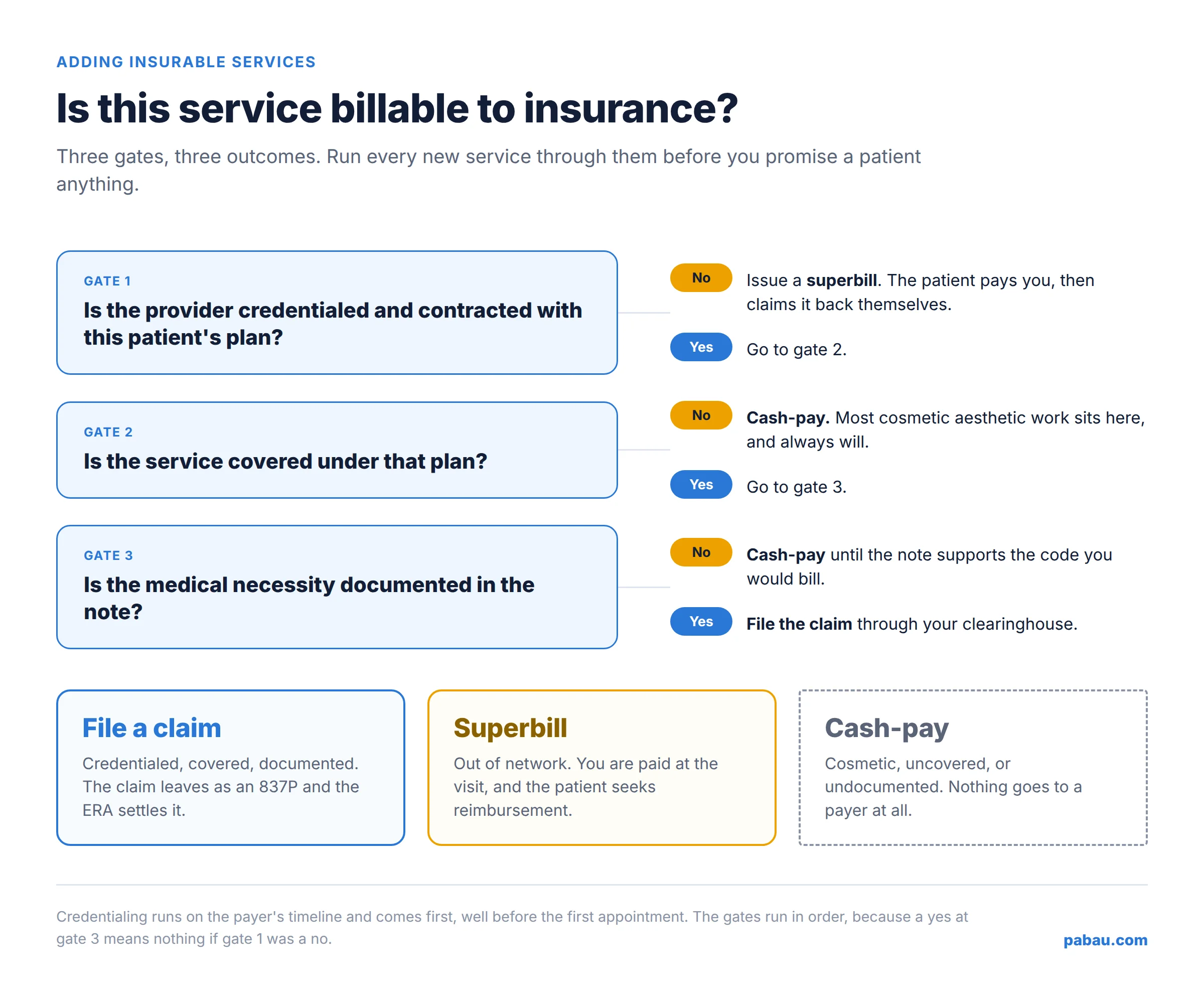
Credentialing comes first. A payer won’t pay a provider it hasn’t credentialed and contracted, no matter how clean the claim is. That process runs on the payer’s timeline, often several months, so it starts long before the first appointment.
Eligibility checking comes second. Once you’re in network, you check coverage before the visit rather than after it. That’s a 270 request and a 271 response, and the clearinghouse handles both.
Some plans want prior authorization on top of that, which is a separate step with its own paperwork. Skip it and the payer denies the claim after the visit has already happened.
Claims come third, and only for the services a payer will cover. Most aesthetic work stays cash-pay because it’s cosmetic. Shaving a suspicious facial lesion is medical work, and it bills under CPT code 11311. The specimen it produces bills separately as 88305 once the lab has reported on it.
Documentation decides the rest. A weight-management visit needs a note behind it, such as a nutrition SOAP note, that supports the code you put on the claim. A drug line asks the same, and J0694 has to report the dose given rather than the vial size.
Take one appointment. A med spa adds medical weight-loss consults, and a patient books in. Three things can happen next.
One appointment, three routes, and your software has to handle all of them. This is where booking-and-payments tools run out of road. They can take the payment, but they hold no diagnosis codes and no payer records, so they can’t produce an 837P. Supply lines make that plain, since a dressing billed under K0745 needs a diagnosis behind it.
Practice management software like Pabau removes that extra step by making the claim part of the invoice you were already raising. You finish the appointment, the invoice carries the CPT codes and the diagnoses, and the claim goes out from there. Nothing gets re-keyed into a separate portal.
Pabau’s claims management validates, submits, and tracks claims from the invoice through its Claim.MD integration, which reaches thousands of US payers. Before the visit, you can run a real-time eligibility check from the client card. The full benefit report comes back with it, so you know what the plan covers while the patient is still there.
The return trip is automatic. ERAs come back as 835 files and settle each claim to Paid or Denied. The payment is matched into billing, so nobody reconciles remittances by hand. Denials arrive with their CARC reason attached, and secondary claims, corrected claims, voids, and appeals are all handled in the same place.
The coding groundwork is built in too. Pabau ships CPT and ICD-10 catalogs, and diagnoses populate from the client’s active Problems, so the codes on the claim match the record behind it. Payer enrollment progress is tracked in the system, and you can still print or export a superbill or a CMS-1500 when a patient needs one.
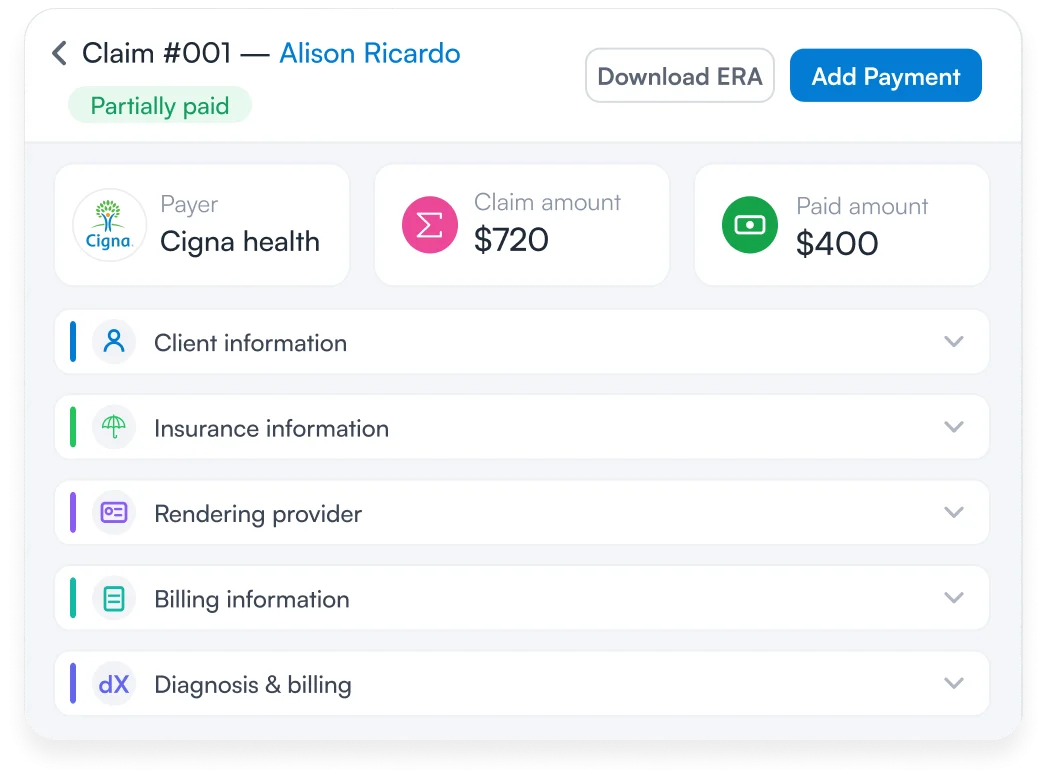

Pabau validates, submits, and tracks CMS-1500 claims through its Claim.MD integration to thousands of US payers. Eligibility checks, ERAs, and denial reasons all land in the same place as the invoice.

The clearinghouse is the reason a two-room practice can bill national insurers on the same terms as a hospital group. That part is largely solved, and it’s cheap. $30 a month buys the same rails the big systems run on.
What isn’t solved is everything on your side of the connection. The software sitting in front of the clearinghouse decides what a claim costs you in time.
It’s either a click at the end of an appointment, or an evening copying invoice lines into a portal. Pick the clearinghouse for its payer list, and pick your practice management system for whether it can reach that clearinghouse.
For a practice moving from cash-pay into insurance, that choice is worth making before the first credentialed provider goes live, not after the backlog builds. Book a demo to see how Pabau files, tracks, and settles insurance claims from the invoice.

Curious what the clearinghouse sends? What is an 837 file? opens up the electronic claim itself, loop by loop.
Weighing up one clearinghouse in detail? Claim.MD clearinghouse review walks through payer reach, enrollment, and daily use.
Worried about missing a filing deadline? Timely filing limits by payer lists the windows for initial claims, corrections, and appeals.
Need the rules behind the paperwork? Medical billing compliance covers the laws, the common violations, and a checklist to work from.
Patient paying you up front instead? Free superbill template gives you a filled-in example to hand over.
No. A clearinghouse is software that checks and routes the claims you create. A billing service is a team of people who create and chase those claims on your behalf. Many billing services submit through a clearinghouse, so a practice can end up paying for both.
Claim.MD, Availity, Office Ally, Waystar, and Cognizant’s TriZetto Provider Solutions are all healthcare clearinghouses. They differ mainly in payer coverage, pricing model, and how much of the wider revenue cycle they handle.
Yes. Availity operates a national clearinghouse and multi-payer portal, handling eligibility checks, claims, and remittances between providers and insurers. Several large payers route their provider transactions through it.
Usually yes, because an EHR records care while a clearinghouse transmits claims, and most EHRs do not connect to payers on their own. Some practice management systems include a clearinghouse integration, so check what yours already covers before buying a second one.
Small practices typically pay between $0 and $120 a month, depending on the model. Claim.MD publishes plans at $30, $60, and $120 a month, while Office Ally’s Service Center clearinghouse starts at $0 with transactional fees on some activity.
Yes. Claim.MD is a medical claims clearinghouse that accepts 837P and 837I files from billing systems. You can also enter CMS-1500 and UB-04 claims directly in its portal, and it returns ERAs and eligibility responses.