Anja Dodevska
HCPCS code L0638: Custom fabricated LSO billing guide
HCPCS code L0638 is a brace built for one patient HCPCS code L0638 is the Level ...

Last Updated: Nov 2, 2026
Free PDF 3 pages, print-ready Clinician-reviewed
The CMS-1500 form is the standard paper claim providers use to bill Medicare, Medicaid, and private insurers for outpatient care. This guide breaks down all 33 boxes, walks through completing the form step by step, and flags the errors that most often get claims rejected.
The standard healthcare claim form containing 33 numbered fields for billing Medicare, Medicaid, and private insurance. Includes patient demographics, insurance information, diagnosis codes, procedure codes, and billing provider details.
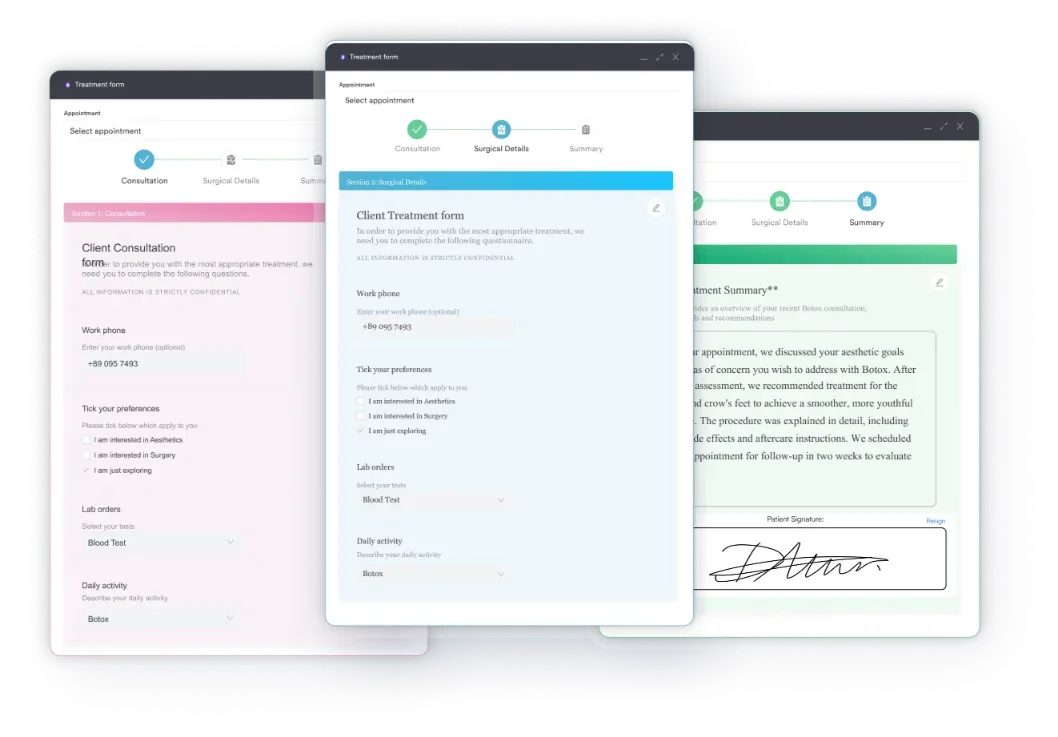
Start from scratch, or upload this PDF or any form you already use, and Pabau's AI Form rebuilds it with tick boxes, text fields and a signature. Attach it to the treatment once, and every patient gets it on time.
AI Form rebuilds the consent, history and aftercare forms you already use. You review each one, then publish.
Patients complete forms on their phone before they arrive, so the front desk stops retyping paper.
Every signed form is versioned and attached to the treatment record, ready when you need it.
Set how long a consent stays valid. Returning patients skip forms they have already signed.
Supports HIPAA and GDPR compliance AES-256 encryption 4.8 on G2 4.7 on Capterra Trusted by 4,000+ practices worldwide

The CMS-1500 form is the standard paper claim form maintained by the National Uniform Claim Committee (NUCC) for non-institutional providers billing Medicare, Medicaid, and private insurance.
The form contains 33 numbered boxes (fields), including patient demographics, insurance details, diagnosis codes (ICD-10), procedure codes (CPT/HCPCS), and provider billing information.
Missing required fields, incorrect diagnosis pointers, and incomplete provider information are the leading causes of claim rejections and payment delays.
Practice management software like Pabau can auto-populate patient, provider, and diagnosis data from client records onto the CMS-1500, cutting down the manual re-entry that leads to billing errors.
The CMS-1500 form is the standard paper claim form used by non-institutional healthcare providers to submit healthcare claims to Medicare, Medicaid, and private insurance companies.
It is maintained by the National Uniform Claim Committee, known as NUCC, and is recognized across the United States as the official professional claim submission document for physicians, therapists, mental health providers, medical spas, and other clinical practitioners.
The form exists because the Centers for Medicare and Medicaid Services, known as CMS, requires standardized claim documentation for accurate processing and reimbursement. Every box on the form serves a specific purpose: patient identification, insurance verification, clinical codes (diagnosis and procedure), service dates, and provider credentials.
While electronic claims (via 837P EDI format) have largely replaced paper submissions due to the Administrative Simplification Compliance Act (ASCA), the CMS-1500 form remains a critical reference document for billers, a fallback for waiver-eligible providers, and a training tool for anyone learning healthcare coding workflows.
The CMS-1500 claim form applies to any non-institutional provider or supplier billing government and private payers. This includes:
Institutional providers (hospitals, surgery centers) use the UB-04 form instead. Solo practitioners and group practices with ASCA electronic submission waivers may still need to understand the CMS-1500 form’s structure, even if they file electronically.
All 33 numbered boxes on the CMS-1500 form serve defined billing and compliance functions. This field-by-field reference helps clinicians and billers complete the form accurately and avoid the most common rejection reasons.
Each field must be completed accurately. A missing NPI, an incorrect diagnosis code pointer, or an incomplete address can trigger a claim hold or outright rejection. Many payers also require a completed prior authorization form before they’ll accept a claim for certain procedures.
Box 24 carries the procedure code column for every service line. An endoscopic service such as 31231 is entered there with its modifier, units, and charge.
Complete the CMS-1500 form in this sequence to ensure all required data flows correctly from patient intake through billing provider attestation.
Every service line also records a place of service in Box 24B. Where a repair such as 30465 happens can change how the payer prices that line.
These boxes capture demographics and insurance details. Digital intake forms can auto-populate most of this data, reducing manual entry errors. Box 4 (insured’s name) and Box 6 (patient relationship to insured) are key: if the patient is a dependent, the insured must be the policyholder, not the patient.
Box 21 is where most errors occur. Each ICD-10 diagnosis code must be linked to its corresponding service line via a diagnosis pointer. Box 24 requires a CPT or HCPCS procedure code – for example. The diagnosis pointer in column (E) of Box 24 tells the payer which diagnosis justifies that procedure.
Pointers matter most when one visit produces several service lines. If 31267 sits on line one, its pointer must name the Box 21 diagnosis behind it.
Box 33 (billing provider) must match the entity that will receive payment. The NPI in Box 33a and the tax ID in Box 25 must be accurate and registered with the payer. Without a valid NPI, Medicare will reject the claim outright.
Line-level provider detail lives in Box 24J. When a second provider performs a service such as 31624, that NPI belongs on the line itself.
The most frequent rejection reasons reflect these billing mistakes:
Most of these errors surface when a biller cross-checks the NPI, diagnosis pointers, and service dates against the patient’s insurance card and provider record before submission.
Unit counts in Box 24G cause quieter denials than a missing NPI. For a procedure such as 31295, the units billed must match what the operative note supports.
Two standard claim forms exist in U.S. healthcare. Understanding when to use each is essential.
Solo practices, therapy groups, and medical spas submit CMS-1500 forms. Only hospital-based providers or facility administrators use the UB-04.
The CMS-1500 form is a paper document, but most claims today are filed electronically via the 837P transaction set (ANSI ASC X12N standard). The Administrative Simplification Compliance Act (ASCA) mandates electronic submission for all Medicare claims except those with approved waivers.
The CMS-1500 form’s 33 boxes map to the 837P EDI segments. When billers submit electronically, practice management software auto-translates the CMS-1500 structure into the electronic format.
Paper waivers are rare and typically granted only to small practices with documented hardship.
Whatever code sits in Box 24, the 837P carries it in the same service-line loop. A surgical endoscopy like 31237 maps across with its modifier and pointer intact.
Most competitor resources stop at a static PDF download. Practice management software like Pabau takes the CMS-1500 workflow further: instead of manually retyping data from a patient’s chart into each of the 33 boxes.
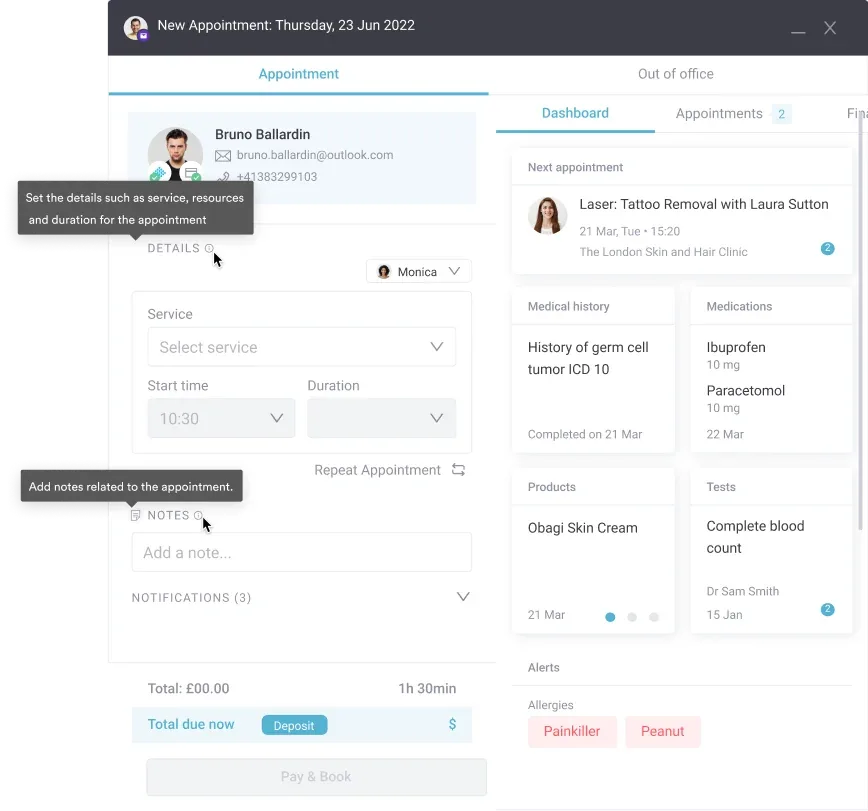
That auto-population is where the time savings show up. Because the diagnosis, procedure, and provider fields are pulled from records you’ve already created, rather than retyped from scratch, there’s less room for the transcription mistakes – a mismatched NPI, a diagnosis pointer that doesn’t line up – that get CMS-1500 claims kicked back.
Your practice still submits the completed claim to whichever payer or clearinghouse you already work with. Pabau’s role is making sure the data going into that claim is accurate and ready, not chasing it down field by field.

Let our team show you how Pabau eliminates manual CMS-1500 entry and speeds up claim reimbursement.

The CMS-1500 form remains the foundational reference for healthcare claim submission in the U.S. Whether you submit paper (rare), fillable PDFs, or electronic 837P transactions, understanding the form’s 33 fields and their dependencies prevents denials and accelerates payment.
Accuracy in Box 21 diagnosis codes, Box 24 procedure coding, and Box 33 billing provider information is non-negotiable, whether you’re completing the form by hand or letting your practice management software prep it for you. Book a demo to see how Pabau auto-populates client records into your CMS-1500 workflow, cutting down on the manual re-entry that leads to denials.

Need a real example of procedure-level billing? A4250 shows how a single HCPCS supply code flows into Box 24 billing details.
Billing for anesthesia services? 00630 covers claim details for lumbar region anesthesia.
Looking for another diagnosis code example? M96.5 documents postradiation scoliosis for a CMS-1500 Box 21 entry.
Billing an intermediate facial repair claim? Intermediate face repair billing guide explains the CPT code for intermediate facial wound repair and the three criteria a claim must meet.
The CMS-1500 form is the standard paper claim form used by non-institutional healthcare providers (physicians, therapists, DME suppliers, medical spas) to bill Medicare, Medicaid, and private insurance companies for services rendered. It documents patient demographics, insurance details, diagnosis codes (ICD-10), procedure codes (CPT/HCPCS), service dates, and provider credentials.
Solo practitioners, group practices, mental health clinics, physical therapy clinics, medical spas, and other non-institutional providers billing government and private payers must use or understand the CMS-1500 form. Institutional providers (hospitals, surgery centers) use the UB-04 form instead.
The CMS-1500 form is for non-institutional (professional) providers; the UB-04 form is for institutional (hospital/facility) providers. The CMS-1500 has 33 fields; the UB-04 has 81. Electronically, CMS-1500 maps to the 837P transaction set; UB-04 maps to the 837I.
Box 21 is where you enter up to 12 ICD-10 diagnosis codes. Each diagnosis is labeled with a letter (A–L); Box 24E uses these letters, not numbers, to link a service line to its diagnosis. Incorrect diagnosis codes or missing pointers trigger claim rejections.
Yes, modern claims are submitted electronically via the 837P EDI format, which maps to the CMS-1500 form’s structure. The Administrative Simplification Compliance Act (ASCA) mandates electronic submission for Medicare claims except in rare waiver cases.
HCFA 1500 is the legacy name for the CMS-1500 form. HCFA (now CMS) originally maintained the form, so older billers and systems still refer to it as the HCFA 1500. It is the same form as the modern CMS-1500.
You can download the blank CMS-1500 form from CMS.gov, the Government Publishing Office (GPO), or use Pabau’s free annotated template above. Most modern billing is done via software that generates the form automatically rather than printing and filling by hand.
The CMS-1500 form has 33 numbered boxes (fields). Each serves a specific function: patient demographics, insurance verification, diagnosis codes, procedure codes, service dates, charges, and provider information.
Missing NPI (Box 33a), incorrect diagnosis pointers (Box 24E), incomplete service dates (Box 24A), wrong insurance type (Box 1), and mismatched provider information are the leading rejection reasons. Double-checking before submission prevents most denials.
Pabau doesn’t submit CMS-1500 claims to Medicare, Medicaid, or private payers on your behalf. What it does do is auto-populate patient, provider, and diagnosis data from your client records and appointment history directly onto the form, so your team isn’t retyping the same information twice – cutting down on the transcription errors that cause claims to bounce back before they’re ever submitted.