EHR ROI: How to calculate and maximize your return
EHR ROI is the financial return a practice earns on its electronic health record...

Last Updated: Oct 15, 2026

An 837 file is the electronic healthcare claim providers send to payers, written in the X12 EDI format HIPAA adopted.
Three variants exist: 837P for professional claims, 837I for institutional claims, and 837D for dental claims.
Nobody types an 837 by hand. Billing software generates the file from the invoice and sends it.
Three files come back in order: a 999 confirms the batch parsed, a 277CA accepts each claim, and an 835 reports payment.
A rejected 837 never reached adjudication, so there is nothing to appeal. Fix the data and resubmit.
An 837 file is the electronic version of a healthcare claim. It is the standard file your practice sends to a payer instead of mailing a paper form. If your practice also offers cash-pay cosmetic visits, our roundup of the best medical spa software ranks eight platforms on charting and checkout. The file is plain text, built to the X12 EDI standard, and it is the format HIPAA requires for electronic claims.
Open one and it looks like machine noise. Rows of capital letters, asterisks and tildes, no labels, no line breaks in the places you expect. But the content is familiar. It carries exactly what a CMS-1500 carries: the patient, the provider, the insurance, the diagnoses, the services, and the charges.
Most people never need to read one. You do when a claim fails at the clearinghouse and the message names a segment you have never heard of. This guide translates the file into plain English, walks a sample fragment line by line, and shows what to do when one comes back rejected.
The three 837 variants each replace a different paper claim form. Which one you send depends on the kind of provider you are, not on the treatment or the payer.
| Variant | Paper equivalent | Who sends it |
|---|---|---|
| 837P (professional) | CMS-1500 | Physicians, nurse practitioners, physical therapists, med spas, private practices, suppliers |
| 837I (institutional) | UB-04, also called the CMS-1450 | Hospitals, skilled nursing facilities, hospices, other facilities |
| 837D (dental) | ADA Dental Claim Form | Dentists and dental specialists |
Federal regulation names each one separately. The professional version is ASC X12N 005010X222, the institutional version 005010X223, and the dental version 005010X224. You will see the professional one written as 5010A1, which is the same guide with its errata applied.
Dentists and dental specialists send the 837D, and the dental exam behind one of those claims is an oral health assessment. It records the patient’s teeth, gums, soft tissues, bite and health history.
Everything below uses the 837P, because that is what almost every non-facility practice sends. Office visits, injections and therapy sessions all bill on it. A drug given in the room, such as J0132, rides on the same 837P as the visit. So do the medication reviews an ADHD practice runs.
The implementation guide is not quite the last word, though. Payers publish companion guides that pin down the elements the standard leaves situational. Two plans can want the same field filled in differently, which is one reason a claim accepted by one payer bounces at another.
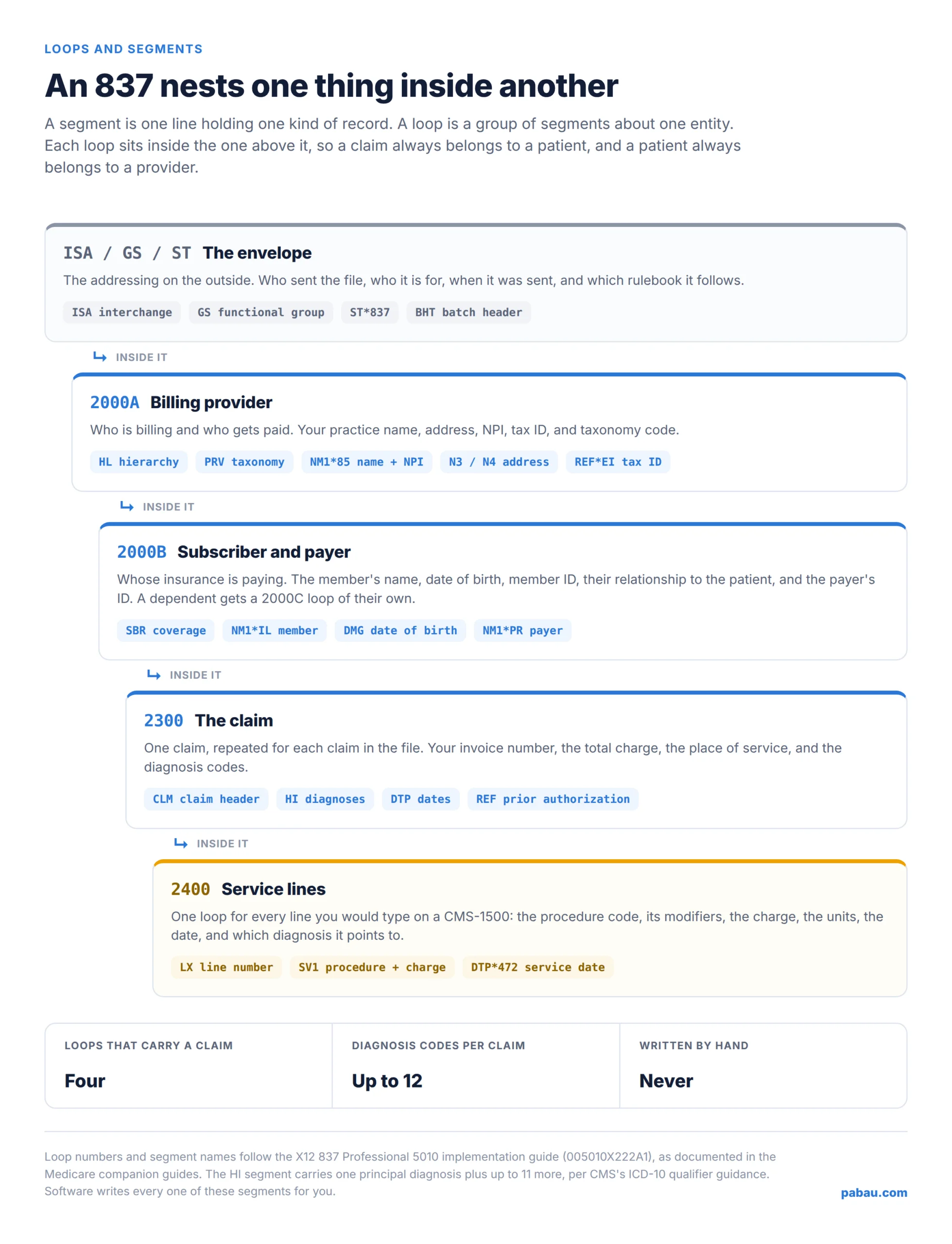
An 837 is organized into segments and loops. A segment is one line carrying one kind of record, and it always starts with a short code naming what it holds. A loop is a group of segments describing one entity, such as the billing provider or a single claim.
Inside a segment, data elements are separated by a delimiter, usually an asterisk. Sub-elements inside one element are separated by a colon. Every segment ends with a terminator, usually a tilde. Those three characters are all the punctuation the format has.
Loops are numbered, and the numbers matter because rejection messages quote them. These four carry the claim itself:
The HL segment is what builds that nesting. Each one carries its own number and its parent’s number. That is how the file says which claim belongs to which subscriber, under which provider. It is also why one 837 can hold hundreds of claims for dozens of patients.
Two-character qualifier codes do much of the remaining work. A qualifier tells the reader how to interpret the value sitting next to it. XX means the number that follows is an NPI, MI means a member ID, and PI means a payer ID. Same segment shape, different meaning, decided by two letters.
Around all of that sits the envelope. The ISA segment opens the interchange, the GS segment opens a functional group, and the ST segment opens the transaction set itself. They are the addressing on the outside of the parcel.
Below is a single-claim 837P for an imaginary wellness practice billing two therapy lines. Every name, ID and figure is illustrative, and a production file would carry more segments. The structure and the codes follow the standard.
One thing to know before you read it. The delimiters are not fixed by the standard. They are declared in the file itself, so the sender chooses them. Almost everyone picks an asterisk, a colon and a tilde, which is why most 837s look like this one.
ISA*00*          *00*          *ZZ*BRIGHTPATH     *ZZ*CLAIMMD        *260817*1042*^*00501*000000317*0*P*:~
GS*HC*BRIGHTPATH*CLAIMMD*20260817*1042*317*X*005010X222A1~
ST*837*0001*005010X222A1~
BHT*0019*00*PB0000317*20260817*1042*CH~
NM1*41*2*BRIGHT PATH WELLNESS*****46*BRIGHTPATH~
PER*IC*BILLING TEAM*TE*5125550142~
NM1*40*2*EXAMPLE HEALTH PLAN*****46*EHP001~
HL*1**20*1~
NM1*85*2*BRIGHT PATH WELLNESS*****XX*1999999984~
N3*140 CEDAR STREET~
N4*AUSTIN*TX*78701~
REF*EI*742555000~
HL*2*1*22*0~
SBR*P*18*******CI~
NM1*IL*1*RIVERA*MAYA****MI*EHP900123456~
DMG*D8*19880204*F~
NM1*PR*2*EXAMPLE HEALTH PLAN*****PI*EHP001~
CLM*INV-10427*135***11:B:1*Y*A*Y*Y~
HI*ABK:M5451~
LX*1~
SV1*HC:97110*90*UN*2***1~
DTP*472*D8*20260814~
LX*2~
SV1*HC:97140*45*UN*1***1~
DTP*472*D8*20260814~
SE*24*0001~
GE*1*317~
IEA*1*000000317~
Now the same file with every line translated.
| Segment | What it says |
|---|---|
ISA | Opens the interchange. Sender, receiver, date, time, control number, and a test-or-production flag. The P near the end means production. |
GS | Opens a functional group. HC marks it as a healthcare claim, and the last element names the rulebook: 005010X222A1. |
ST | Opens the transaction set. This is transaction 837, and it is numbered 0001 inside the group. |
BHT | The batch header. 00 means an original submission rather than a correction, and CH means the claims are chargeable. |
NM1*41 | The submitter, meaning whoever transmitted the file. Usually your software or your clearinghouse account. |
PER*IC | A contact for the submitter, so the payer’s EDI team can call someone about a broken file. |
NM1*40 | The receiver. Here the file is addressed to the health plan. |
HL*1 | Opens the hierarchy at level one, the billing provider. Loop 2000A starts here. |
NM1*85 | The billing provider’s name, with XX flagging the identifier that follows as an NPI. |
N3 / N4 | The practice’s street address, then its city, state and ZIP. |
REF*EI | The practice’s employer identification number, the tax ID the payment gets reported against. |
HL*2 | Opens level two, the subscriber, and points back to level one as its parent. Loop 2000B starts here. |
SBR | The coverage. P makes this payer primary, 18 means the patient is the subscriber, and CI means commercial insurance. |
NM1*IL | Names the insured: Maya Rivera. MI flags the value that follows as her member ID. |
DMG | Her date of birth and sex. D8 tells the reader the date is formatted CCYYMMDD. |
NM1*PR | The payer, with PI flagging its payer ID. Get this wrong and the claim goes to the wrong plan. |
CLM | The claim header. Invoice INV-10427, $135.00 total, place of service 11 (office), frequency code 1 for an original claim. |
HI | The diagnoses. ABK marks the principal ICD-10 code, here M54.51. Additional codes use ABF. |
LX*1 | Opens the first service line. Loop 2400 starts here, once per line item. |
SV1 | The service. HC marks a CPT or HCPCS code, 97110 is therapeutic exercise, charged at $90.00 for 2 units, pointing at diagnosis 1. |
DTP*472 | The date this service was performed. |
LX*2 onwards | The second line repeats the pattern: 97140 manual therapy, $45.00, 1 unit, same date. |
SE | Closes the transaction set and counts its segments. A count that disagrees with reality fails the 999. |
GE / IEA | Close the functional group and the interchange, repeating the control numbers from GS and ISA. |
Read it that way and the file stops being cryptic. Every segment is a box on the paper form: NM1*85 is box 33, HI is box 21, SV1 is a row in box 24. An add-on code such as 43273 gets its own SV1 row beneath the base procedure. Want the full map? The National Uniform Claim Committee publishes a crosswalk between the 1500 form and the 837P, item number by item number.
If you ever have to open a file yourself, use a plain text editor. A spreadsheet will split it on the delimiters and scramble the result, and there is no header row to rescue you. Some clearinghouses also render the file as a readable claim summary, which is easier again.
Sending the 837 starts a conversation of four transactions. Three files come back, and each one answers a different question about the same claim.
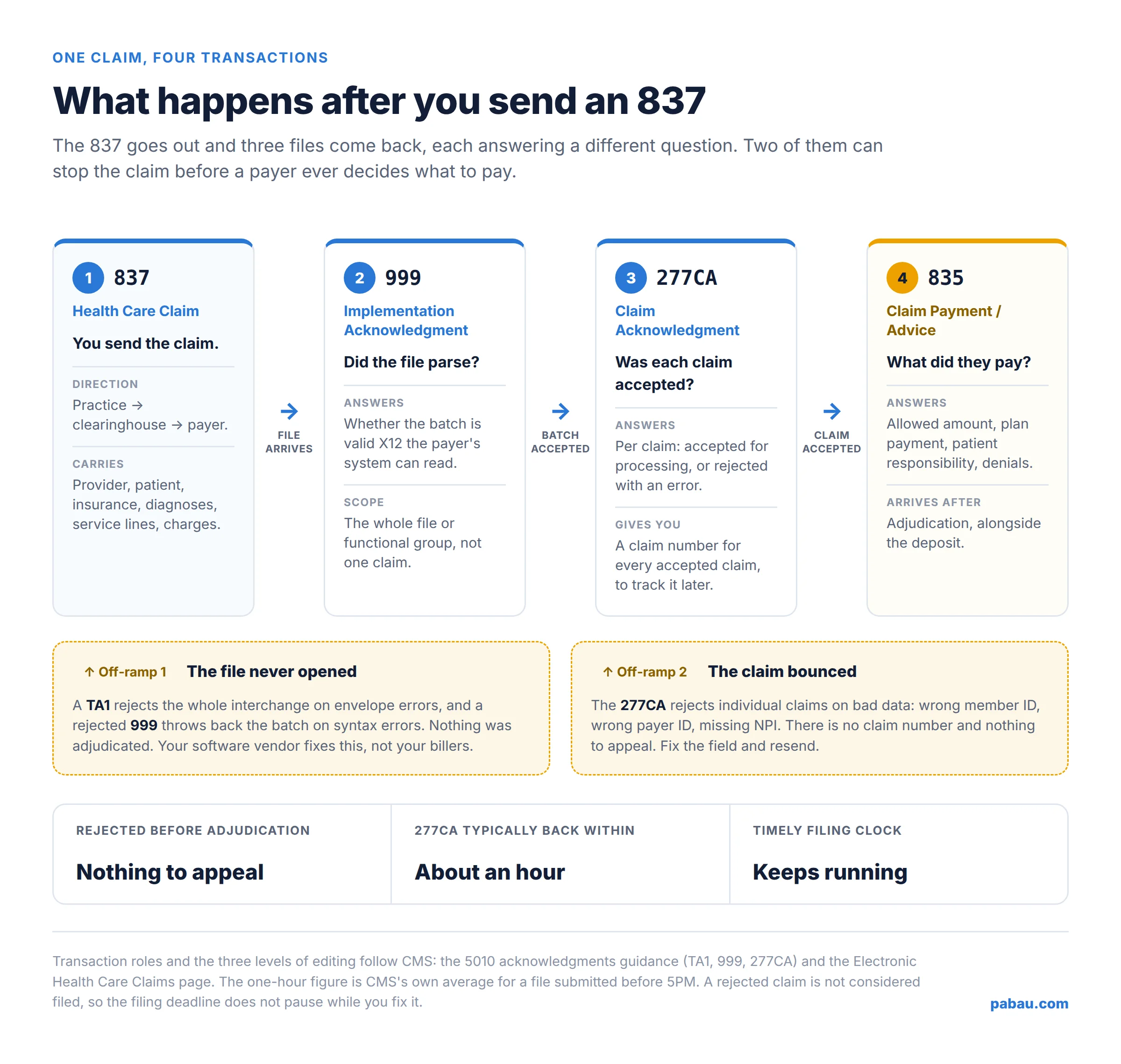
Editing happens in three passes. First the receiver checks whether the file meets the basic requirements of the HIPAA standard. Fail there and the whole batch comes back.
Next, each claim is checked against the implementation guide, and only the claims with errors are rejected. Only then is a claim tested against coverage and payment policy. That is the pass where a bundled line such as 20936 is zeroed rather than rejected.
Those passes map onto the files you receive:
A 999 is readable once you know three segment names. AK2 names the transaction set that had trouble. IK3 names the failing segment and its position in the file. IK4 names the element inside it. That is usually enough to tell your software vendor where to look.
The first two responses come back fast. Turnaround varies by payer and clearinghouse, often minutes to a few hours. The 835 takes as long as adjudication takes, which for a clean Medicare claim means a couple of weeks. High-value surgical lines such as 43361 can run longer, because the payer asks for the operative report.
One 277CA covers one file. Submit 100 claims and you get a single acknowledgment listing all of them, not 100 separate responses.
A rejection is not a denial. A rejected claim never entered adjudication, so no payer decided anything about it, which means there is nothing to appeal. You read the reason, correct the data, and send the claim again.
A denial is the opposite. The claim was accepted, processed, and refused, and it comes back with reason codes on the 835. That one you appeal or correct, depending on why it was refused.
Most 837 rejections come from a handful of fields, and they are dull ones:
Two of those errors, the payer ID and the member ID, are worth catching before you submit. An eligibility check on the day of the appointment confirms both, and it costs seconds.
The rejection reaches you in one of three places: a clearinghouse portal, a report your software pulls down, or the claim record itself. Wherever it lands, the method is the same. Find the loop and segment named in the message, then look at that field on the claim.
Then there is the trap. A rejected claim was never filed, as far as the payer is concerned, so the filing deadline keeps running while it sits in your queue. Long-running injury claims feel that most, where S72.302C already describes a later encounter.
Medicare’s window is 12 months from the date of service, and a claim returned as unprocessable does not pause the clock. Work rejections the week they arrive, not the month.
Nobody should be typing segments. Practice management software like Pabau generates the 837P from the invoice you have already raised. The claim becomes a by-product of billing the appointment, not a separate job.
The pieces the file needs are already in the record. CPT and ICD-10 catalogs are built in, so codes come from a searchable list instead of memory. Diagnoses auto-populate from the client’s active Problems, which is the HI segment filled in without anyone retyping it.
From there the claim is validated and submitted through our Claim.MD integration, which reaches thousands of US payers. Acknowledgments and rejections land on the claim record with the reason attached, and every claim keeps its own activity history. When the 835 arrives, it settles the claim automatically. Correct coding is one half of getting paid; claims management software handles submission through remittance.
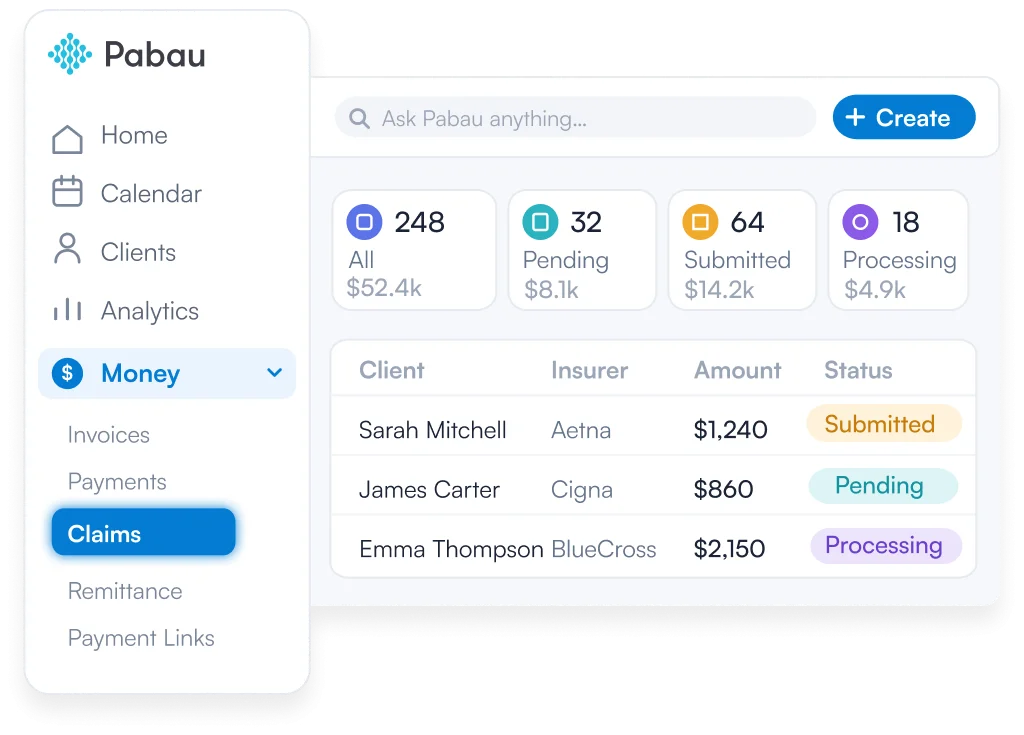

Pabau builds the 837P from your invoice using built-in CPT and ICD-10 catalogs, with diagnoses pulled from the client’s active Problems. Claims are validated and submitted through Claim.MD to thousands of US payers, and ERAs settle them automatically when payment arrives.

You will never write an 837, and you don’t need to. What changes is what happens the next time a claim bounces. “Rejected at the clearinghouse” becomes a specific field in a specific loop, and a fix you can make in a few minutes.
The habit worth building is speed. Rejections carry no appeal rights and no pause on the filing clock. The practices that get paid fastest read the 277CA the day it lands. That is a workflow question, not an EDI question.
Get the software to do the typing and the tracking, and keep your team on the part that needs judgment. Book a demo to see how Pabau builds, submits and tracks 837P claims from the invoice.

Wondering what the payer sends back? What is electronic remittance advice (ERA)? reads an 835 line by line, including how to spot a denial in the file.
Need to decode a refusal on the 835? Denial codes in medical billing covers the 20 reason codes you will meet most, and the fix for each.
Choosing how to send your claims? Claim.MD clearinghouse review follows what happens to your 837 once it leaves the practice.
Refused because nobody approved the treatment? The prior authorization process sets out the sign-off some payers want before you treat.
Payer says it does not recognize your provider? How to get credentialed with insurance companies walks through enrollment before you bill.
An 837 file is the electronic healthcare claim a provider sends to a payer. It uses the X12 EDI format adopted under HIPAA, and it carries the same information as a paper claim form.
The 837 goes out and the 835 comes back. An 837 is the claim you send to the payer. An 835 is the remittance advice explaining what the payer allowed, paid, adjusted, or denied.
It is the same thing. EDI stands for electronic data interchange, the family of standard business formats the 837 belongs to. People say “837 EDI file” to make clear they mean the raw file rather than a claim in general.
Read it segment by segment. Each line starts with a code naming what it holds, elements are separated by asterisks, and a tilde ends the line. Group the lines by loop: 2000A is the provider, 2000B the insurance, 2300 the claim, 2400 each service line.
They hold the same data in different forms. The CMS-1500 is the paper professional claim form, and the 837P is its electronic equivalent. The NUCC publishes a crosswalk mapping every form item number to its 837P data element.