Referral management software: Track and close every referral
Referral management software in healthcare sends, tracks, and follows up patient...

Last Updated: Oct 26, 2026

An electronic remittance advice (ERA) is the file a health plan sends to explain how it processed each of your claims.
The ERA explains the payment to you. The explanation of benefits (EOB) goes to the patient, and the electronic funds transfer (EFT) is the money.
Every ERA carries the paid amount per service line, the adjustments with their reason codes (CARCs), and the amount left with the patient.
ERAs are not automatic. You enroll for them payer by payer, and every plan runs its own process.
Posting software reads the 835 and settles claims for you, so the day’s remittances become a worklist of exceptions.
An electronic remittance advice (ERA) is the electronic file a health plan sends to explain how it processed your claims. Its standard format is the HIPAA 835, which is why ERA and 835 file get used interchangeably. An ERA only accounts for insured visits, so cash-pay revenue from aesthetic services needs its own tracking, which our medical spa systems comparison covers. CMS defines it as an explanation from a health plan to a provider about a claim payment.
After a claim goes out, one question decides everything downstream. What did the payer do with it? Your claim left the practice as an 837 file, and the ERA is the reply.
That reply breaks down per claim and per service line, in standard codes every plan has to use. Plenty of practices still get the same answer by logging into payer portals one plan at a time.
This guide covers what an ERA contains, how it differs from an EOB and an EFT, and how to read one line by line. It also covers the enrollment step that has to happen before any of it turns up.
The ERA is the explanation sent to the provider. The explanation of benefits (EOB) is the version the patient gets, and the electronic funds transfer (EFT) is the money. All three describe the same claim. They arrive separately, in different places, and often on different days.
| ERA | EOB | EFT | |
|---|---|---|---|
| Who receives it | The provider, or the clearinghouse acting for them | The patient or plan member | The provider’s bank account |
| What it is | The 835 file, written for software to read | A plain-language statement | An ACH payment |
| What it contains | Per-claim and per-line payments, adjustments, CARC and RARC codes | What the plan paid and what the patient owes | Amount, payer, payee, routing details, trace number |
| What it’s for | Posting payments and working denials | Telling the patient where they stand | Moving the money |
The terminology has one wrinkle worth knowing. In the standards themselves, the provider’s remittance is sometimes called an explanation of benefits, so the two terms overlap. In everyday US billing, EOB means the patient’s copy and ERA means yours.
The reconciliation problem is that the file and the deposit travel apart. CMS calls pairing them re-association. Both carry the same trace number, in the 835’s TRN segment and in the addenda record attached to the ACH payment. Match on that number rather than on the amount, because one deposit often covers many claims. Getting this code paid on the first pass is what a clean claim rate measures, and revenue cycle software reports it. Getting this code paid on the first pass is what a clean claim rate measures, and revenue cycle software reports it.
This is where practices lose hours. A deposit that doesn’t equal the sum of the claims sends somebody hunting through the file for the difference. Usually it’s a provider-level adjustment, and the annotated example below has one in it.
An ERA carries the payer’s full decision on a batch of claims, from the payment total down to the individual service line. Underneath the X12 jargon, it holds seven things.
Read the group code first, because it decides who absorbs the money. CO is contractual obligation, which you write off. PR is patient responsibility, which you bill. A preventive line like Z23 often comes back with nothing under PR, because the plan covers it in full. OA and PI cover other adjustments and payer-initiated reductions.
Payers can’t invent their own reasons for any of this. Under HIPAA, every payer including Medicare has to use the CARCs and RARCs on X12’s code lists. The same code means the same thing at every plan you bill, which is what makes automatic posting possible at all.
In medical billing, the ERA holds the same information as the paper remittance, structured so software can act on it. CMS even publishes free software called Medicare Remit Easy Print. It turns an 835 into a readable report for practices without a system that reads one.
Take one claim with two service lines. The figures below are illustrative. The codes, the group codes, and the arithmetic are exactly how a real 835 behaves.
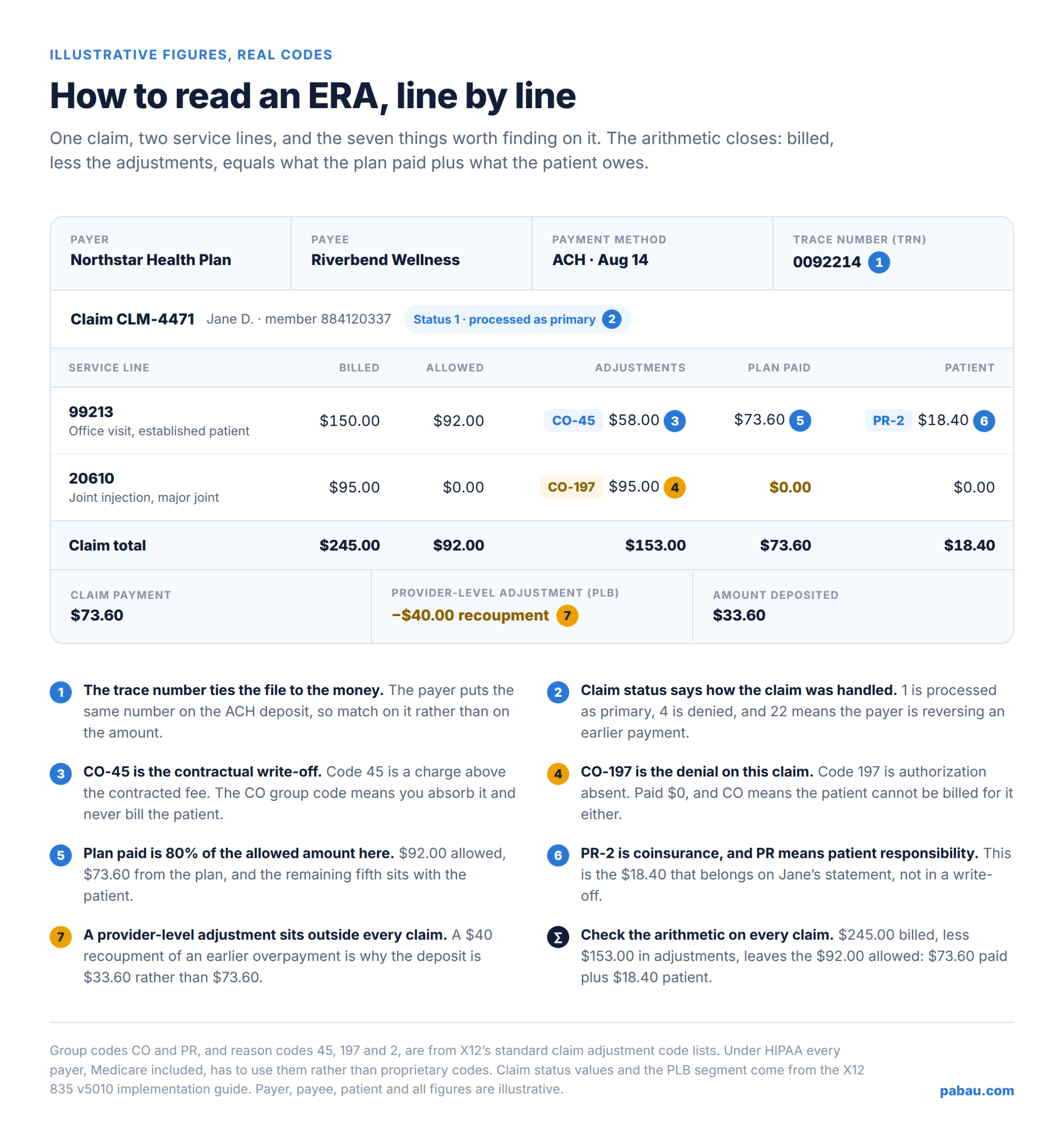
Start with the line that paid. Here is what each number on it means.
The arithmetic closes on every claim, which is how you check your own posting. Billed $150.00, less the $58.00 contractual adjustment, leaves the $92.00 allowed. Of that, $73.60 comes from the plan and $18.40 comes from the patient.
A denial looks like $0.00 paid, with a CO, PI, or OA adjustment carrying the reason. The second line in the example is one. You billed $95.00 for a joint injection, the plan paid nothing, and the adjustment is CO-197 for the full amount.
X12 defines code 197 as precertification, authorization, notification, or pre-treatment absent. That single code tells you the coding was fine and the authorization was missing. It also tells you the patient can’t be billed for it, because the group code is CO.
Don’t rely on the claim status code alone. A fully denied claim usually carries status 4, but a single line can be denied on a claim the payer marked as processed. Read the paid amount and the adjustment on every line, not just the claim total. A rehabilitation line such as H2018 can be cut to a unit cap while everything else pays.
Three more patterns are worth recognizing on sight. CO-16 means the claim lacks information or has a billing error, and front-end clean claim checks are what catch those before submission. A missing seventh character does it, so S72.436C has to state that the fracture is healing routinely.
X12 requires a remark code alongside CO-16. When that remark is MA130, the claim is unprocessable and carries no appeal rights. The fix is a corrected claim rather than an appeal.
CO-97 explains a line that looks like it vanished. The payer folded that service into another line’s payment, so the money sits elsewhere on the claim. Unattended modality codes like modality codes like G0283 can come back this way.
Claim status 22 is a reversal of a previous payment. The payer is taking money back. Reverse the original posting and restore the claim balance first, then work out whether the takeback is correct, because payers do reverse in error.
From there the code drives the work. Our round-up of the top denial codes covers what the common ones mean. Our guide to denial management covers the choice between a corrected claim, an appeal, and a write-off.
ERAs don’t arrive by default. You enroll for them payer by payer, and every plan runs its own process. Enrollment is easy to overlook, which is how a practice ends up fully electronic on submissions and still reading paper remittances.
There is a standard behind the paperwork. The CAQH CORE operating rules for EFT and ERA have been in force since January 1, 2014. They cap the data a plan can ask you for, and they require every plan to offer a secure electronic way to send it. Paper forms are still allowed alongside.
Turnaround varies by plan. Pennsylvania’s Medicaid program, for one, quotes four weeks to process a paper ERA application, against a much faster route through its provider portal. Until enrollment clears, you’re back on portal logins and paper.
Note that the ERA and the EFT are two separate enrollments. CAQH CORE publishes a rule for each, with its own data set, and plans often run them as two forms. Getting the file without the deposit is a familiar way to end up reconciling by hand anyway.
The paperwork scales with your payer list. An optometry practice billing vision plans and medical plans enrolls with each payer separately. A supplier billing equipment adds one more, since K0813 goes to a DME contractor rather than the medical plan. Every one has its own form and its own queue.
A clearinghouse takes the tracking off you. Rather than chasing forms across dozens of plans, you enroll through one payer directory and watch each payer’s status in one place. Our guide to medical claims clearinghouses covers where the clearinghouse sits on a claim’s route.
Auto-posting is software reading the 835 and doing the posting for you. It matches each claim in the file to the claim in your system, then applies what the payer decided to each one.
In one pass it posts the paid amount against the invoice and writes off the contractual adjustments. It moves patient responsibility onto the patient’s balance, flags the denials with their codes attached, and reconciles the file total against the deposit.
| Step | Manual posting | ERA auto-posting |
|---|---|---|
| Finding the claim | Searched by patient and date, one at a time | Matched on the claim number in the file |
| Payments and write-offs | Keyed in line by line | Posted straight from the file |
| Patient balances | Worked out by hand from the remittance | Moved across from the PR adjustments |
| Denials | Caught only if somebody notices the $0.00 | Flagged with the CARC on the claim |
| Reconciling the deposit | Claim totals added up against the bank | Matched on the trace number |
| Time per remittance | Scales with the number of claims on it | Roughly fixed, whatever it covers |
| Where errors hide | Typos and skipped lines, inside posted totals | Unmatched items, which surface as exceptions |
Volume decides how much that saves you. A busy dermatology practice can see hundreds of service lines on one remittance, and each line is a posting decision. A burn unit sees the opposite, where one claim under T31.81 can carry the whole deposit.
Auto-posting isn’t unattended, though. Three things need a person on them every time.
So the question to ask of any system is what it does with those three. A worklist you can clear in ten minutes beats a posted batch that buries them.
Practice management software like Pabau takes the ERA off your desk entirely. Claims go out to US payers through our Claim.MD integration, and the 835s come back down the same connection automatically.
Each remittance settles its own claim. A paid claim moves to Paid, with the payment matched into Pabau billing against the invoice it came from. A denied claim moves to Denied, with the payer’s CARC codes attached to it.
That last detail is what saves the follow-up. The denial reason sits on the claim, next to the amounts and the payer, so whoever picks it up can see why it came back. Every submission, response, and change stays on the claim’s own activity history.
Enrollment lives in the same place. You browse the Claim.MD payer directory, link each payer to the insurer on your side, and track how far each enrollment has got. So the day’s remittances arrive as a settled ledger, and what’s left is the short list that came back with a problem.
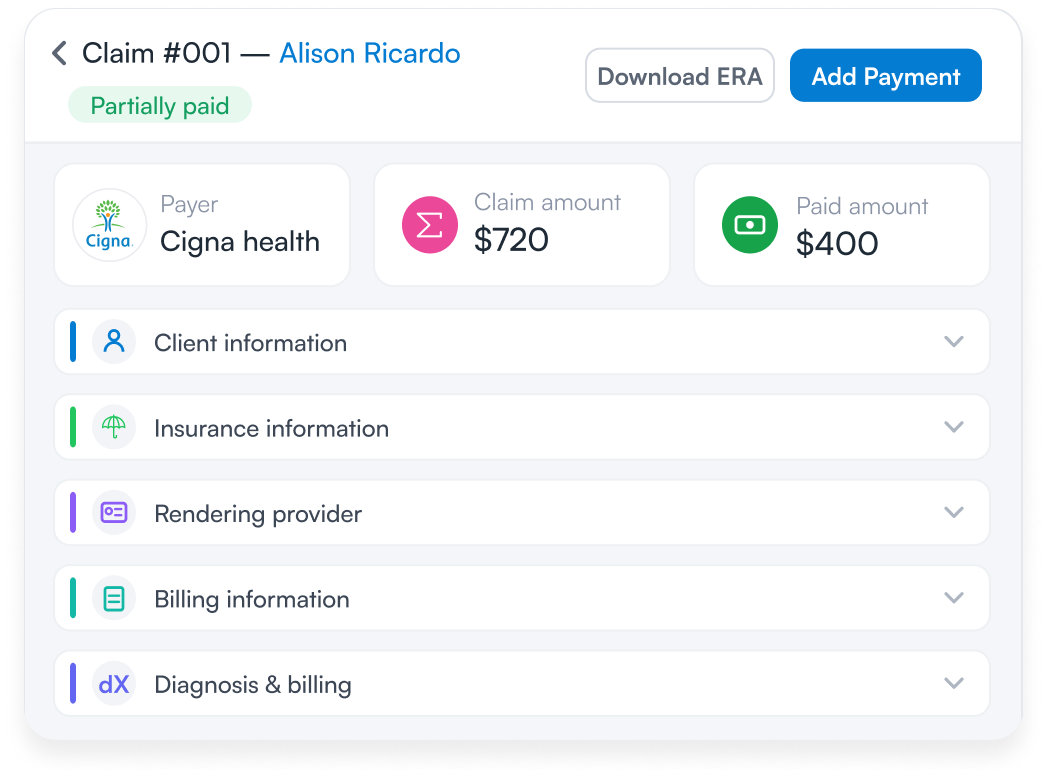

Pabau receives ERAs automatically through the Claim.MD integration, settles each claim to Paid or Denied, and matches the payment into your billing. Denial reasons arrive as CARC codes on the claim, so your team works the exceptions instead of reading files.

The ERA is the payer’s side of the conversation, and the only place a payer tells you exactly why. Read it the week it lands and you catch a denial while the fix is still cheap and the filing window is still open. Wait for a statement and you find out a month later.
Two things get you there. Enroll for ERAs with the payers you bill most, then put the file somewhere that posts it and hands you the exceptions. Neither is hard, and the second one turns a stack of remittances into ten minutes of review.
One trade-off is worth naming. Auto-posting hides the ordinary work, which is the whole point, so its value rests on somebody reading the exception list. Book a demo to see how Pabau settles ERAs against your claims and puts denial reasons where your team will find them.

Wondering what the claim looked like on the way out? What is an 837 file? covers the file your claim leaves in, and how it maps to the 835 that comes back.
Trying to decode a CARC denial code? Denial codes in medical billing lists the top 20 CARC codes billers see most, with a fix for each.
Not enrolled with your payers yet? How to get credentialed with insurance companies walks the applications that come before any ERA arrives.
Billing therapy in timed units? Medicare 8 minute rule shows how units are counted before a payer ever prices them.
Coding a dissociative or conversion disorder diagnosis? ICD-10 code F44.9 guide covers billing guidance, code hierarchy, and the ICD-9 crosswalk for this diagnosis.
An electronic remittance advice (ERA) is the electronic file a health plan sends a provider to explain how it processed each claim. It lists the paid amount, the adjustments with their reason codes, and the amount left with the patient. Its standard format is the HIPAA 835.
The EFT is the payment and the ERA is the explanation. An electronic funds transfer moves money into your bank account. An electronic remittance advice tells you which claims that money covers, and why each amount is what it is. Both carry the same trace number so you can match them.
The provider receives the ERA, or the clearinghouse or billing service acting for the provider. Patients don’t get ERAs. They get an explanation of benefits from their plan, which covers the same claim in plain language.
A remittance advice arrives because a payer has finished adjudicating claims you submitted. It comes whether or not money was paid. A remittance showing $0.00 paid is still telling you something, usually a denial with the reason code attached.
In practice, yes. The ERA is the transaction and the 835 is the X12 standard that defines its format, adopted under HIPAA. When a payer or clearinghouse talks about an 835 file, that file is your ERA.