











Key takeaways
Yes, Claim.MD is a medical claims clearinghouse, and it has been routing electronic claims for US providers for over four decades.
It handles electronic claims, remittance files, real-time eligibility, claim status and payer enrollment, so your staff stop mailing forms and calling payers.
Published plans run $30, $60 and $120 a month, which is rare in a market that hides prices behind sales calls.
Pabau’s US claims integration runs through Claim.MD, so read this as an informed review with an interest in the outcome.
The verdict is a strong fit for independent practices and the software they run on, and weaker for teams wanting predictive denial tools.
Claim.MD is a US medical claims clearinghouse. It sits between your practice and the insurance companies you bill. Claims go out one side, and remittances and eligibility answers come back the other. Its own FAQ describes it as a comprehensive claims clearinghouse, and its about page dates the company back over four decades.
Here is the disclosure, up front. Practice management software like Pabau needs a clearinghouse to move US claims, and we chose Claim.MD as ours. That gives us an interest in it looking good. It also gives us something no review site has. We built against Claim.MD’s API and ran claims through it end to end.
So this review draws on two things. The first is published reviews from named sources, criticism included. The second is what we saw ourselves, running claims in the sandbox from practice setup through submitted, adjudicated and paid claims.
Is Claim.MD a clearinghouse? What it does
Yes. Claim.MD is a clearinghouse in the standard sense of the word, and nothing more ambitious than that. It validates and routes electronic transactions between providers and payers. That covers one stage of revenue cycle management, the part where claims and remittances move. It does not employ billers on your behalf, and it is not an EHR or a practice management system.
What that covers in practice, mapped to the job each function does:
| Function | What it handles | What it replaces |
|---|---|---|
| Claim submission | 837P and 837I files, plus CSV, XLS, XML and print image uploads | Mailing CMS-1500 and UB-04 forms, or keying claims into payer portals |
| Claim validation | Real-time edits covering SNIP levels 1 to 7, diagnoses, CPT and NCCI | Finding out weeks later that a claim never reached adjudication |
| Remittance | ERA downloads as 835, XML or CSV, searchable for up to 10 years | Paper explanations of benefits and manual payment posting |
| Eligibility | Real-time checks in the portal or by API, on over 400 payers | Calling the payer before the appointment |
| Claim status | Status updates and a time-stamped history for every claim | Phoning payers to ask where a claim went |
| Enrollment | Online enrollment forms and payer-by-payer tracking | Chasing payer paperwork by fax with no record of it |
| Payer directory | A public payer list with IDs and the services each payer accepts | Guessing payer IDs and rebilling when they are wrong |
One number deserves care, because it is the one everybody wants. Claim.MD does not publish a single payer total anywhere on its site. Its about page describes connections to Medicare, Medicaid, Blue plans and thousands of commercial insurers. The public payer list runs past 200 pages of payer IDs. Through our own integration, Pabau submits to thousands of US payers.
Eligibility is the narrower network, and it is worth knowing before you switch. Claim.MD’s provider services page puts real-time eligibility at over 400 payers. Claims reach far more payers than benefit checks do, which is true of every clearinghouse we looked at.
How Claim.MD works, from our integration experience
We built against Claim.MD’s API rather than its portal. What follows is the machine view of the workflow a biller sees on screen.
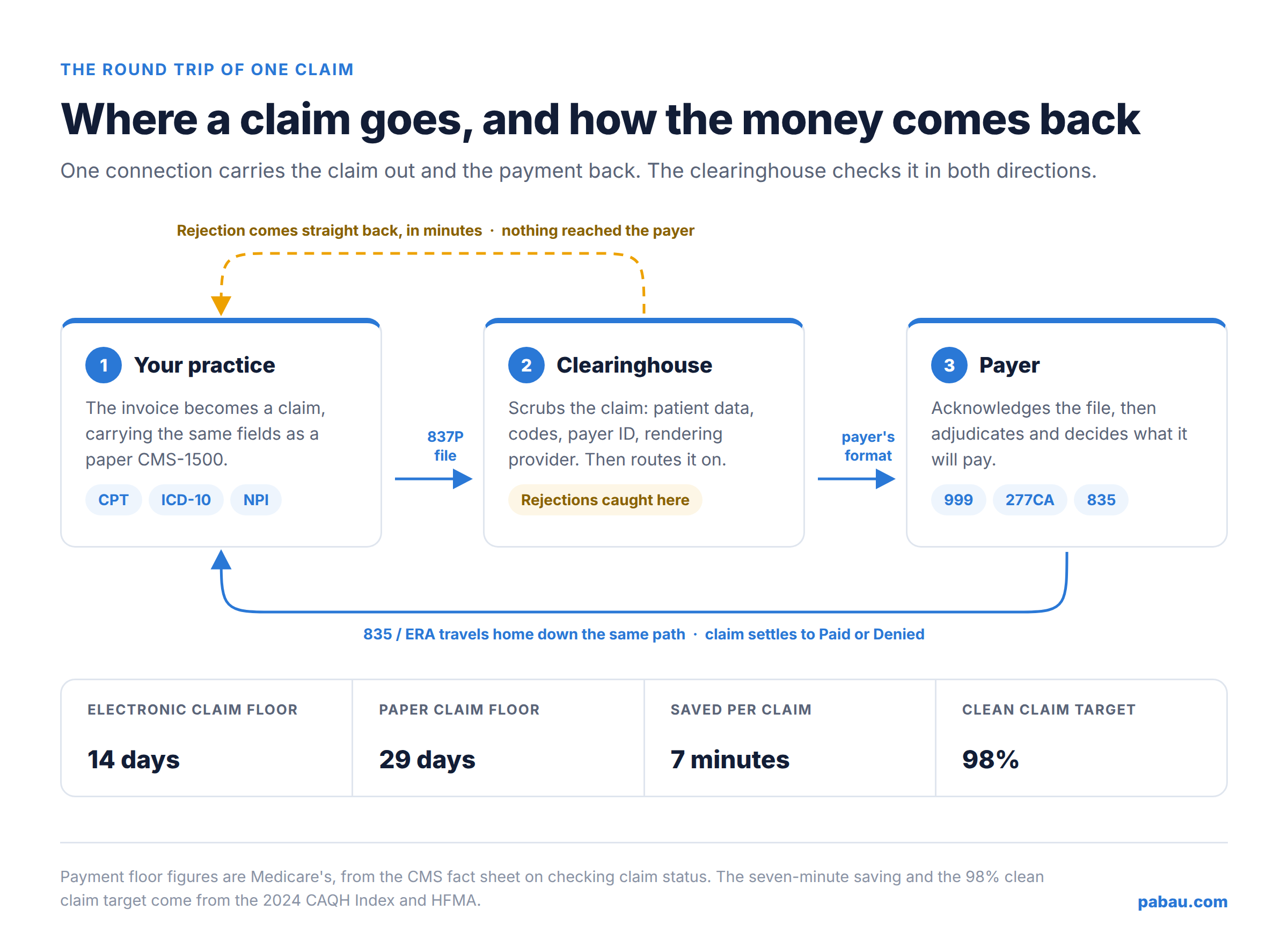
Setup and enrollment. A practice is identified by its tax ID and its NPIs, and each payer is linked to that account before claims flow. Some payers accept claims with no paperwork at all. Others need an enrollment approved first, and the payer list tells you which, payer by payer.
That approval sits with the payer, not with the clearinghouse, so the API does not remove the wait. What it does remove is the guesswork about where each enrollment stands.
Validation before submission. Claims are checked as they arrive. The edits run against payer-specific rules along with diagnosis, CPT and NCCI logic. A failed claim comes back with the field that caused it. That is what lets software show a biller something they can fix in seconds.
Acknowledgments and remittances. A submitted claim produces a trail. Acknowledgments confirm the payer received the file, and status updates report what happened next. The 835 remittance then arrives with the payment detail attached to the claim it belongs to.
Sandbox to live. We ran the full lifecycle in the sandbox before switching any practice on. Claims were created, validated, submitted, adjudicated and paid. The remittances came back and settled against the right invoices. That is the test we would ask any vendor to pass.
Claim.MD pricing summary
Claim.MD publishes three flat monthly plans on its own site, per tax ID. Basic is $30 a month and you pay for what you use, at $0.30 a claim and $0.30 an eligibility check. Small Volume is $60 a month and covers 100 claims, ERAs and eligibility checks, with extra claims at $0.50 each.
Unlimited is $120 a month for unlimited claims and ERAs, plus 1,000 eligibility checks a month. Extra checks on that plan are $0.02 or $0.10 each, depending on the payer. Additional tax IDs are priced separately, and one is included on Unlimited.
A few line items sit outside the plans. Paper or faxed claims and paper or faxed appeals are $1.00 each for five pages, then $0.20 a page. Electronic appeals are included. Every figure here comes from Claim.MD’s own site.
What users say: Claim.MD reviews around the web
Third-party reviews of Claim.MD land in a similar place. The product does its job, and the complaints are about commercial policy.
Clearinghouses.org rates it four stars out of five and marks it highly recommended. ChoosingTherapy’s review for therapists calls it one of the most widely used clearinghouses in mental health.
That review singles out the real-time scrub that flags missing information as a claim is submitted. It also credits the alerts that surface a missing attachment or a payer that never confirmed receipt. We see the same pattern in mental health billing, where ADHD practices and therapy groups file steady claim volumes.
Atlas Billers, a billing company that publishes vendor guides, praises the published pricing. It also rates its support team highly, noting they truly understand billing, and puts typical setup at about a week.
The same guide notes that Claim.MD sells no bundles and asks for no long-term contract. On the other side, it invests less in new tooling than the enterprise platforms do. There is no denial prediction, no predictive analytics and no automated denial management.
Who Claim.MD fits (and who it doesn’t)
| Strong fit | Look harder |
|---|---|
| Independent and small practices that want a predictable monthly bill | Enterprise groups that want denial prediction and analytics built in |
| Billing companies watching cost per claim across many tax IDs | Practices that want a billing service, not a pipe to send claims through |
| Software vendors integrating claims into their own product by API | Teams whose main payers fall outside the eligibility network |
| Anyone who wants to know the price before a sales call | Buyers who need a single vendor for claims, coding and collections |
The pattern is clear enough. Claim.MD is built for people who know what a clean claim looks like and want it delivered cheaply. That suits high-volume billers such as physical therapy practices, where a claim follows almost every visit.
It is a weaker choice for a practice hoping software will decide which denials to work first. Buyers at this price usually shortlist it against Office Ally, which also publishes its rates.
How Pabau runs your Claim.MD claims from the invoice
The best clearinghouse is one your team never has to open. In Pabau, a claim is built from the invoice that already exists. It is validated, then submitted to thousands of US payers through our Claim.MD integration. Nobody re-keys a CMS-1500 into a second system.
Eligibility runs from the client card and returns a full benefit report. Reception can quote a copay while the patient is still on the phone. ERAs come back and settle the claim automatically, matching payments to what was billed.
When something goes wrong, the CARC denial reason sits on the claim with a full activity history. Secondary claims, corrections, voids and appeals all start from there. Nobody has to reconstruct what the payer said from a paper remittance.
The setup side lives in Pabau too. You browse the payer directory, link the payers you bill, and track each enrollment as it moves. CPT and ICD-10 catalogs sit inside the invoice. You can still print or export a superbill or a CMS-1500 when someone asks for paper.

Submit clean claims without leaving your practice software
Pabau validates, submits and tracks US insurance claims from the invoice through its Claim.MD integration, with real-time eligibility from the client card. ERAs settle claims automatically, so your team spends its time on denials that need a human.

Conclusion
Claim.MD earns its place on a shortlist for most independent US practices. The prices are public. Validation catches errors while they are still cheap to fix. The claim history answers questions billers usually have to phone a payer about. What you give up is the predictive layer the enterprise platforms sell.
Weigh that verdict against the disclosure at the top. We picked Claim.MD after evaluating the market, and we ran claims through it before recommending it. Read the plan terms yourself, check your top payers against the payer list, and ask about enrollment for the ones that need it.
The clearinghouse is only half the decision, though. What decides how much time your team loses is whether claims start life inside your practice software or in a separate portal. Book a demo to see how Pabau validates, submits and settles US claims from the invoice.

Continue your research
Decoding a denial on a remittance? Denial codes in medical billing walks through the 20 most common CARC codes and the fix for each one.
Still waiting on payer approvals? How to get credentialed with insurance companies covers the paperwork that has to clear before claims pay.
Losing revenue to prior authorization? The prior authorization process sets out a step-by-step workflow your front desk can follow.
Billing patients who file their own claims? Our free superbill template includes a filled-in example you can copy.
Costing Claim.MD out plan by plan? Claim.MD pricing works through the add-ons and what a practice actually pays each month.
Frequently asked questions
Is Claim.MD a clearinghouse?
Yes. Claim.MD is a medical claims clearinghouse. It validates and routes electronic claims, remittances, eligibility checks and claim status between US providers and payers.
Is Claim.MD good?
For most independent practices, yes. Clearinghouses.org rates it four out of five, and reviewers praise the published pricing and the validation. The criticism is aimed at account policy and the absence of predictive denial tools.
How does Claim.MD work?
You upload or create a claim, and Claim.MD checks it against payer rules before sending it. The payer acknowledges the claim, adjudicates it, and returns an 835 remittance that Claim.MD ties back to the original claim.
How many payers does Claim.MD support?
Claim.MD does not publish a single total. It describes connections to Medicare, Medicaid, Blue plans and thousands of commercial insurers. It also lists real-time eligibility for over 400 payers, and Pabau’s integration reaches thousands of US payers.
How much does Claim.MD cost?
Claim.MD publishes three plans per tax ID. Basic is $30 a month with per-transaction fees, Small Volume is $60 a month for 100 transactions, and Unlimited is $120 a month. Our Claim.MD pricing breakdown works through what each plan costs in practice.