HCPCS code L0638: Custom fabricated LSO billing guide
HCPCS code L0638 is a brace built for one patient HCPCS code L0638 is the Level ...

Last Updated: Nov 2, 2026
P9010 is the HCPCS Level II code for blood (whole), for transfusion, per unit.
The critical distinction in the descriptor is "blood, whole." Whole blood contains red blood cells, plasma, platelets, and clotting factors in their natural ratios. Modern transfusion practice most often uses separated components, so whole blood transfusions are less common than packed red blood cells or plasma infusions. When whole blood is used and administered as a single unit, P9010 is the correct HCPCS code. Any other blood component takes a different P-series code.
Let Pabau's smart automation suggest the right codes, reduce claim denials, and keep your practice compliant—effortlessly.
Automate repetitive tasks and focus on what matters most—your patients.
Reduce coding errors and ensure compliance with the latest regulations.
Clean claims, fewer denials, and faster reimbursements.
Powerful insights and reporting to help your practice thrive.
HIPAA compliant SOC 2 certified GDPR-compliant Trusted by 4,000+ clinics worldwide

HCPCS code P9010 covers blood, whole, for transfusion, per unit. It applies when whole blood is administered, not a separated component.
P9010 is billed per unit of whole blood. Using it for packed red blood cells, plasma, or platelets is incorrect coding and invites denials.
Medicare covers P9010 under Part A for inpatient transfusions and under Part B in outpatient settings, subject to medical necessity documentation.
Payment for outpatient claims comes through the outpatient prospective payment system under APC 9510, not the physician fee schedule.
Pabau’s claims management software supports HCPCS Level II code selection and electronic claim submission, reducing the manual errors that drive P9010 denials.
HCPCS code P9010 is billed by facility-based providers and blood banking operations, not individual physicians. The billing entity is typically the hospital or transfusion center supplying and administering the blood. Knowing who submits the claim, and under what circumstances, prevents duplicate billing and place-of-service errors.
The clinical trigger is a physician order for whole blood transfusion. Without a signed, dated physician order establishing medical necessity, P9010 claims carry significant denial risk. That holds even when the transfusion was clinically appropriate. Payers across the board, including Medicare Administrative Contractors (MACs), require evidence of a physician order before approving blood product claims.
According to CMS guidance on HCPCS Level II codes, Medicare covers blood and blood products when medically necessary and properly documented. Coverage rules differ depending on whether the patient is an inpatient or outpatient, which determines whether Part A or Part B applies.
Medicare’s blood deductible is a common source of billing confusion. It applies to the first three pints of blood furnished in a calendar year. If a patient or blood bank replaces the blood through donation, the deductible may be waived. An unreplaced deductible lands on the patient, so practices that offer patient payment plans should track blood replacement carefully before billing the balance.
Commercial payers follow similar principles but vary on coverage conditions and prior authorization requirements. MAC jurisdictions such as Novitas Solutions (Jurisdictions H and L) publish specific blood product billing policies. Those policies take precedence over general Medicare guidance for providers in those regions. Always verify with the applicable MAC before submitting blood product claims in a new jurisdiction.
P9010 is not paid from the physician fee schedule. Hospital outpatient claims for whole blood are paid under the outpatient prospective payment system (OPPS), where the code maps to APC 9510. CMS prices that group using a blood-specific cost-to-charge-ratio method rather than relative value units, then adjusts the amount by the hospital’s wage index. Read the current figure from the quarterly OPPS addenda or from your MAC’s published rate.
Key points about P9010 reimbursement:
For the current verified amount, read the OPPS addenda for the quarter you are billing, or your MAC’s published rate for P9010. Other outpatient items paid under the same system, such as C1893, are looked up the same way. Never load a third-party rate figure into a charge master without checking it against the current CMS files.
Missing or incomplete documentation is the leading cause of P9010 claim denials. Medicare and most commercial payers expect a complete, retrievable record for every whole blood transfusion billed. The six items below are the minimum standard, and each one blocks a specific denial or audit finding:
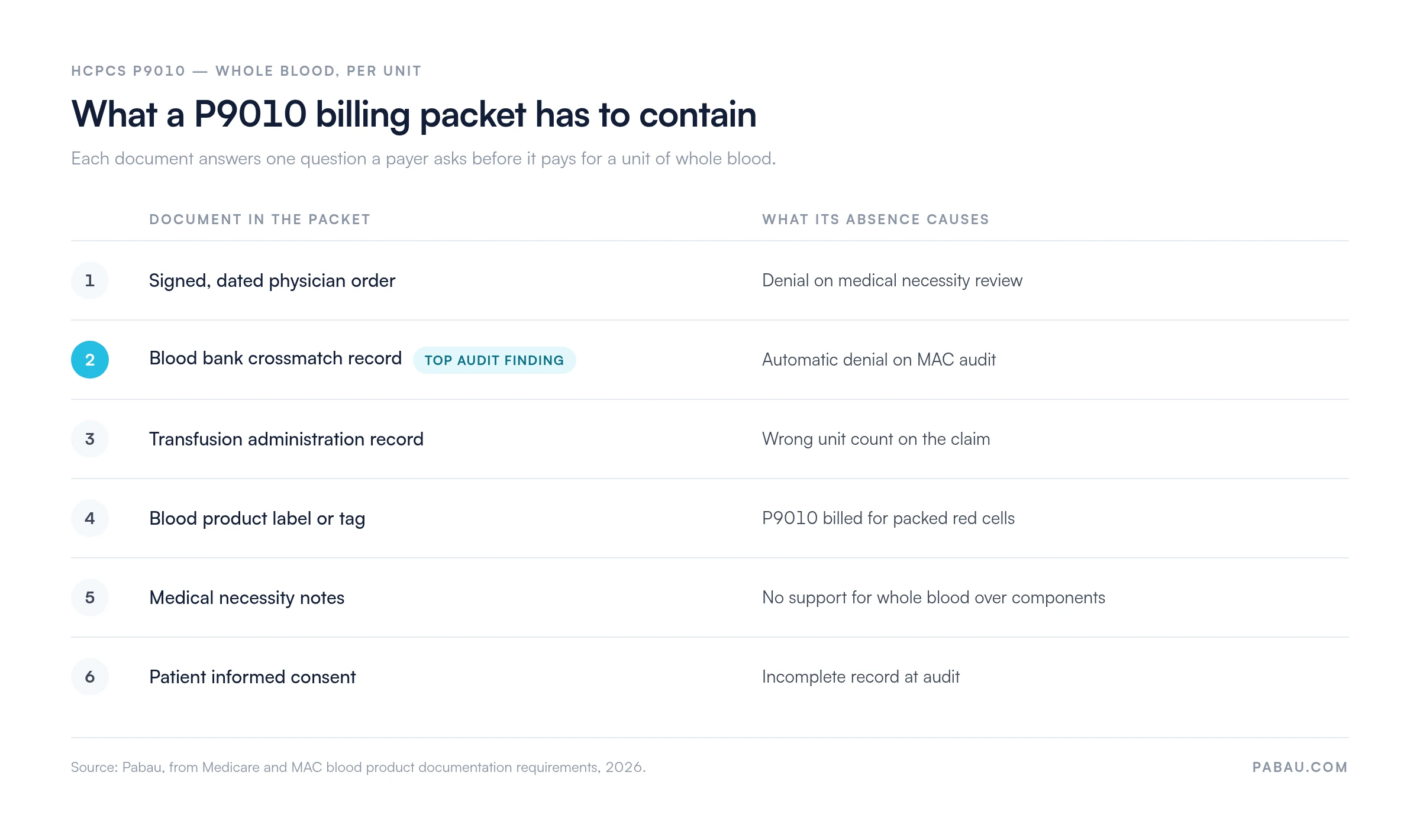
Facilities should store these documents in a format that supports secure access and retention, consistent with HIPAA compliance requirements. Blood bank records in particular may be subject to state-level retention rules that exceed the standard six-year federal baseline.
Audit your P9010 claims quarterly by pulling a random sample and verifying that all six documentation elements are present in the patient record. Quarterly audits catch missing crossmatch records and incomplete transfusion logs before a MAC auditor finds them, and before denials settle into a pattern.
Claim submission for P9010 follows standard HCPCS Level II supply code rules, but blood products carry extra payer-specific requirements worth building into your billing workflow. Getting the revenue code, place-of-service code, and unit count right from the start removes the most common rejection reasons. Clean claims also cut the rework that drives up revenue cycle management costs.
For facilities using a medical claims clearinghouse, verify that the clearinghouse has P9010 in its HCPCS crosswalk tables. Confirm too that it routes the claim without stripping the blood product revenue code. Some clearinghouses require manual configuration for P-series codes. Pabau submits electronic claims through its Claim.MD integration, so the code, units, and payer travel together to the payer.
P9010 covers only whole blood. The P-series contains separate codes for each blood component, and using the wrong code for a component transfusion is a coding error with audit implications. The table below covers the codes most commonly confused with P9010:
Most modern blood transfusions use packed red blood cells, either P9021 or P9016, rather than whole blood. Billing P9010 for a packed RBC transfusion is incorrect coding. Verify the blood bank administration record specifies “whole blood” before using P9010 on any claim. When uncertain, consult the blood bank technician or the transfusion medicine physician before submitting.
The supplies used to deliver the transfusion carry their own codes as well, such as A4755 for blood tubing. Billing the product and the supply on the same claim means checking both descriptors against the administration record.
Blood product billing errors generate a disproportionate share of MAC audit findings in hospital outpatient settings. The denial codes that accompany P9010 rejections point straight at the systemic issues worth fixing. These are the errors that appear most frequently:
An effective denial management process for blood product claims starts with tracking denial reason codes by code. P9010 denials often cluster around one error type, usually missing crossmatch records or wrong product codes. That pattern points at the blood bank documentation handoff, not at random billing mistakes.
Manual blood product billing relies on staff catching every code selection, unit count, and missing document before claim submission. That dependence on individual attention is where errors accumulate, especially in high-volume hospital outpatient departments processing dozens of transfusion claims each week.
Practice management software like Pabau, and its claims management software in particular, reduces that exposure in three practical ways. First, HCPCS code validation in the billing workflow flags P9010 when the charge description master entry points to a blood component rather than whole blood. That catches the most common coding mismatch before submission.
Second, automated required-field checks stop a claim advancing to submission when the physician order or ICD-10 code is missing. Third, integrated denial tracking surfaces patterns in P9010 rejections, so billing managers see the upstream workflow problem instead of sorting denial reports by hand.
The same discipline applies outside the hospital. Pabau tracks products per unit for IV therapy practices and regenerative medicine clinics. Each vial or blood-derived preparation ties back to the treatment note that justifies it.
Facilities looking to tighten blood product billing accuracy can compare medical billing software options that handle HCPCS Level II codes alongside broader revenue cycle work. The test is simple. Does the system stop a P9010 charge that the documentation does not support?
Build a charge description master entry for P9010 that requires a blood bank documentation attestation before the charge posts. This creates an automated checkpoint without adding manual steps to the billing workflow. It also leaves an audit trail showing the documentation was confirmed at charge entry.

Pabau’s claims management software helps facilities submit accurate HCPCS Level II claims, track claim status, and manage denials in one place. See how it works for your billing team.

P9010 has a narrow scope. It covers one product, whole blood, billed per unit, and the errors that deny it are the ones a checklist can catch. Product misidentification, unit count mistakes, and missing blood bank records account for most of them.
So the work is not really coding work. Fix the handoff between the blood bank and the billing team, and the crossmatch record arrives with the charge instead of arriving after a denial. Get the payment source right too, because the OPPS addenda and your MAC’s rate decide what the claim is worth, not the physician fee schedule.
The trade-off worth remembering is a small one. A validation step at charge entry costs seconds. A denied blood product claim costs a rework cycle and a record you have to rebuild. Book a demo to see how Pabau keeps HCPCS Level II code selection, documentation, and denial tracking in one place for your billing team.

Looking to reduce denial rates across your HCPCS code portfolio? Clean claim submission guidelines covers the structural requirements that prevent automatic rejections on blood product and supply codes.
Billing a device paid under the same outpatient system? C1825 walks through how an outpatient device code is priced and documented for 2026.
Need to get units right on an injectable claim? J1580 shows how a dosage converts into billable units without triggering an edit.
Working with an inhalation solution billed per unit? J7614 sets out the unit definition and the documentation a payer expects.
HCPCS code P9010 is an HCPCS Level II supply code used to bill for whole blood administered for transfusion, billed per unit. Hospital outpatient departments, blood banks, and transfusion centers use it when whole blood is the product administered. Whole blood keeps red blood cells, plasma, and platelets intact. It does not apply to packed red blood cells, plasma, platelets, or any other blood component.
Yes, Medicare covers P9010 when the transfusion is medically necessary and properly documented. Part A covers whole blood transfusions for inpatients. Part B covers outpatient transfusions, which are paid under the outpatient prospective payment system through APC 9510. The first three pints of blood in a calendar year are subject to a blood deductible unless the patient or a blood bank arranges replacement.
Medicare pays P9010 on outpatient claims through the outpatient prospective payment system, under APC 9510. CMS sets that amount with a blood-specific cost-to-charge-ratio method, then adjusts it by the hospital’s wage index. There is no physician fee schedule amount for P9010. Read the current figure from the quarterly OPPS addenda or from your MAC’s published rate.
Required documentation includes a signed physician order and blood bank crossmatch records confirming ABO and Rh compatibility. You also need a transfusion administration record with start and stop times and vital signs. Patient informed consent and clinical notes establishing why whole blood was necessary complete the packet. Missing crossmatch documentation is the most common audit finding for P9010 claims and leads to automatic denial.
P9010 describes whole blood for transfusion, per unit, meaning the blood contains all components in their natural ratios. P9021 describes packed red blood cells, which are whole blood units with the plasma removed. Packed RBCs are the most commonly transfused blood product in modern clinical practice. Using P9010 when packed RBCs were administered is incorrect coding, and it creates audit liability even if the claim pays.
Identify which blood product was administered, then select the matching P-series code. P9010 covers whole blood, P9021 packed RBCs, P9016 leukoreduced RBCs, and P9012 cryoprecipitate. Bill per unit administered, using the correct place-of-service code and revenue code for the facility type. Keep the physician order and blood bank documentation with the claim record. Submit through a validated clearinghouse with the ICD-10 diagnosis code supporting medical necessity.
The most frequent error is using P9010 for packed red blood cell transfusions instead of whole blood. Others are the wrong unit count, a missing blood bank crossmatch record, the wrong place-of-service code, and no ICD-10 diagnosis code supporting medical necessity. A standardized documentation checklist and HCPCS code validation at charge entry prevent all of them.