Choosing the best medical billing software US practices can buy starts with one question. How do your patients pay? Billing software turns each visit into a claim or an invoice, then tracks it until it’s paid.
Practice management software like Pabau is our top pick for cash-pay, aesthetic and multi-specialty practices, since notes, invoices and payments share one record. AdvancedMD leads for insurance-heavy billing. SimplePractice suits therapists, CollaborateMD fits tight budgets and athenahealth serves large health systems.
Get the choice wrong and your team spends each week re-keying charges and chasing denials. Below, we rank seven platforms on claims depth, specialty fit, pricing and reviews. Then we follow a claim from booking to payment and share a pre-submission checklist. Cash-pay aesthetic practices can also check our ranking of the best medical spa software, which runs a chart-to-checkout test on eight platforms.
Key takeaways
1. Pabau — best for aesthetic, cash-pay and multi-specialty practices that want billing, notes and payments in one system.
2. AdvancedMD — best for insurance-heavy practices that need denial management and a built-in clearinghouse.
3. CollaborateMD — best for small practices that want affordable cloud billing without a full EHR.
4. DrChrono (EverCommerce) — best for specialists who want customizable EHR templates linked to billing.
5. Kareo (Tebra) — best for independent practices with straightforward, billing-first insurance workflows.
6. SimplePractice — best for solo therapists and small mental health groups that bill insurance.
7. athenahealth — best for large group practices and health systems with high claim volume.
Found our content helpful?
How the 7 platforms stack up
Platform
Best for
Standout feature
Starting price
Capterra rating
Pabau
Multi-specialty, aesthetic and cash-pay practices
Billing, clinical notes, payments and CRM in one record
From $62/mo (one user, full platform)
4.7/5 (652 reviews)
AdvancedMD
High-volume insurance billing practices
Denial management and RCM suite
From $429/mo per provider
3.6/5 (460+ reviews)
CollaborateMD
Small practices seeking affordable billing
Intuitive cloud-based billing interface
Around $299/mo per provider
4.1/5 (113 reviews)
DrChrono (EverCommerce)
Specialists needing custom EHR plus billing
Highly customizable EHR templates with billing
Contact sales / no published pricing
3.9/5 (492 reviews)
Kareo (Tebra)
Independent practices with billing-first needs
Integrated practice management and billing
Contact sales / no published pricing
4.0/5 (1,384 reviews)
SimplePractice
Mental and behavioral health practitioners
Telehealth plus insurance billing for therapists
From $49/mo
4.5/5 (2,600+ reviews)
athenahealth
Large practices and health systems
Payer network integrations and clearinghouse
Percentage of collections
3.7/5 (800+ reviews)
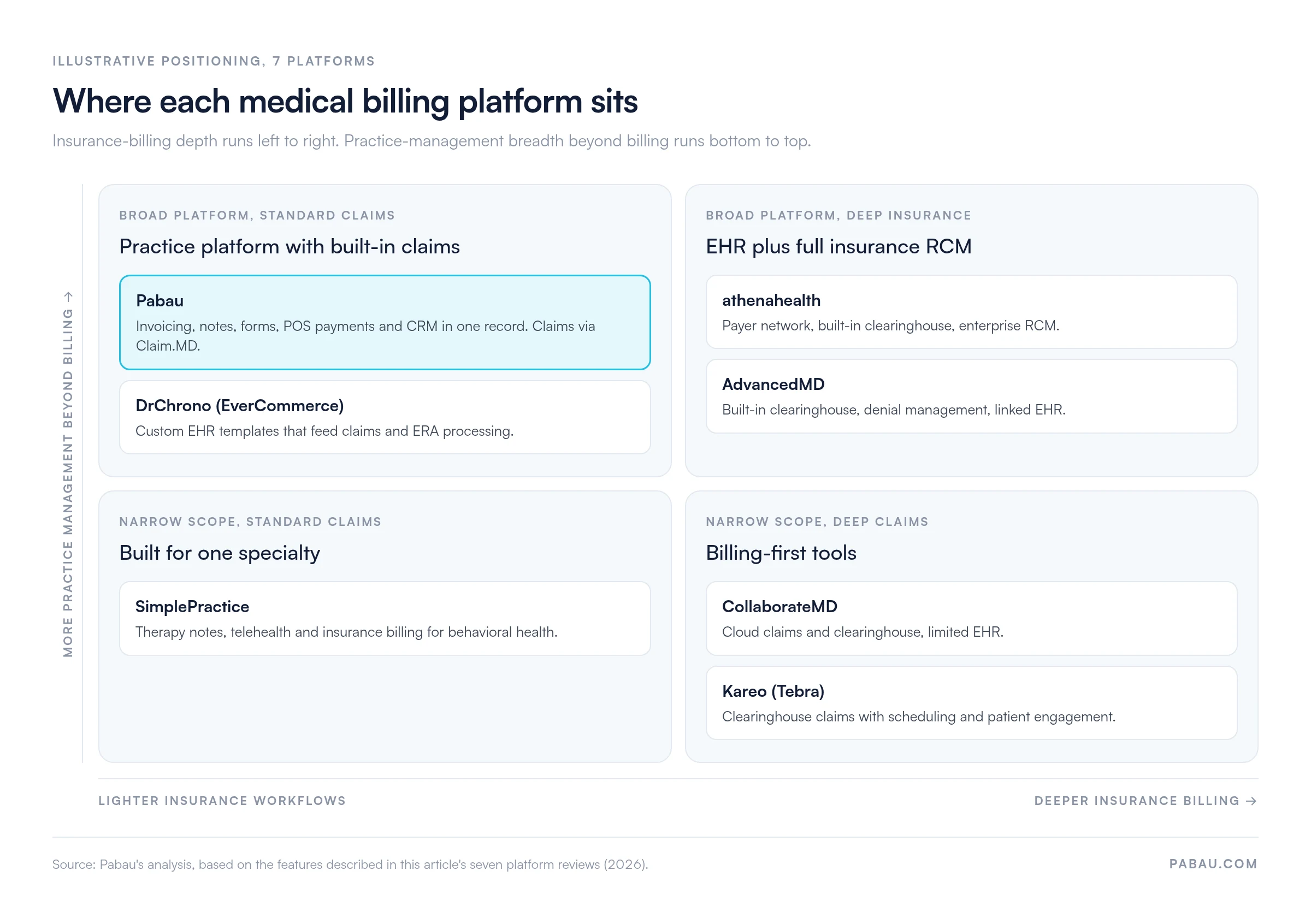
The table ranks features. A bigger split, though, runs between platforms built around insurance claims and platforms that run the whole practice. The grid below places each one on those two axes.
Only athenahealth and AdvancedMD pair deep insurance billing with a full EHR. Pabau and DrChrono cover more of the practice and handle standard claims. Positions are based on this article’s platform comparison.
1. Pabau: Billing that follows the treatment in multi-specialty practices
Rating4.7/5★★★★★Top pick
The bottom line
Pabau puts invoicing, clinical notes and payments in one patient record, so billing follows the treatment instead of waiting for it.
Pabau is the best fit for aesthetic, cash-pay and multi-specialty practices because invoicing, clinical documentation and payments share one patient record. It also ties claims management to that record. That means a practitioner can close a treatment note, raise the invoice and take payment in one session.
That design suits practices blending clinical, cosmetic and wellness services, including med spas, dermatology, physical therapy and mental health. In practices we onboard, the usual starting point is three disconnected tools: a booking app, a card terminal and a spreadsheet of unpaid invoices.
Patch tests show how that works day to day. The result goes on a digital form, stored on the same patient record as the invoice, the deposit and the follow-up recall.
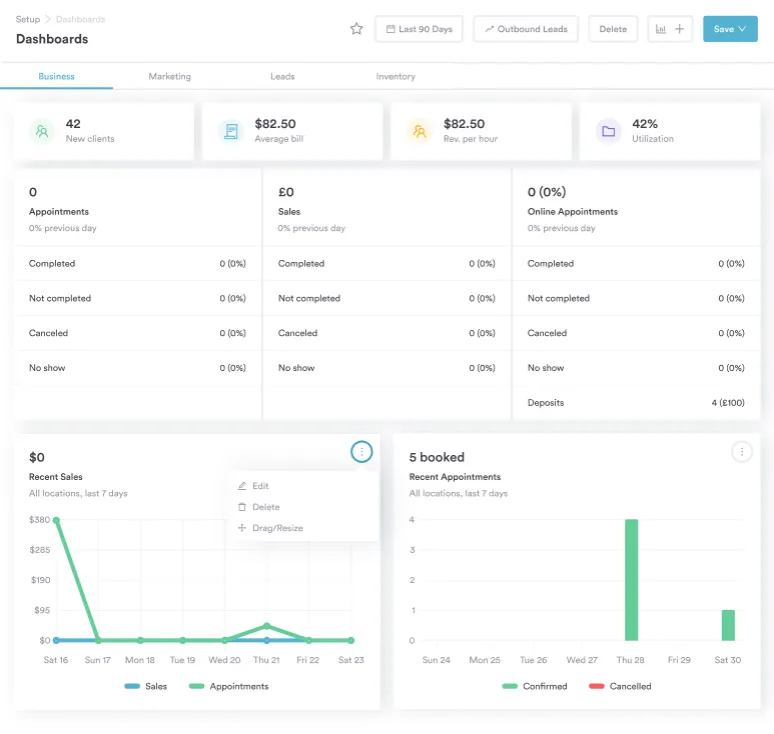
Pabau’s reporting dashboard tracks sales, revenue and appointments across locations, so month-end billing checks happen on one screen instead of three exports.
What Pabau handles from booking to payment
Claims management: CPT code-based invoicing and insurance claims through the Claim.MD connection, including eligibility checks and electronic remittance advice (ERA) posting.
Integrated payment processing: Pabau Pay, our card terminals, plus online payment links and deposit collection without third-party tools.
Digital forms and consent: Customizable intake and consent forms that feed directly into the patient record.
Automated workflows: Recall sequences, appointment reminders and aftercare messages that send without manual work.
Multi-location management: Centralized reporting and billing across every location from a single dashboard.
AI clinical documentation: Pabau Scribe, our AI scribe, drafts treatment notes, which cuts post-appointment documentation time.
Client Portal: Patients book, complete forms and view invoices through a branded portal, which reduces front-desk admin.
HIPAA-aligned workflows: Role-based permissions, audit trails and encrypted data handling built with US compliance in mind.
Pabau pulls ahead when one record does the work
Unified clinical and billing workflow: Treatment notes, invoices and payment capture happen in one session, which removes double entry.
Multi-specialty adaptability: Pabau supports aesthetic, wellness, physical therapy, mental health, dermatology and multi-specialty practices without separate modules.
Onboarding and support: Reviewers consistently highlight responsive support during setup, which matters most for smaller independent practices.
Operational automation: Recall campaigns, deposit collection and consent automation take repetitive tasks off the front desk.
Scalability: Multi-location management lets a practice grow from one site to a network with centralized billing and reporting.
Pabau falls short on high-volume denial work
US insurance billing depth: Pabau connects to Claim.MD for electronic claims to thousands of payers, real-time eligibility checks, claim status tracking and ERA posting. Very high-volume practices with complex payer mixes may still want a dedicated revenue cycle management (RCM) platform for deep denial work.
Mobile app: Some reviewers say the mobile experience trails the desktop platform.
Initial configuration: Setup takes time, which Pabau handles through structured onboarding with a dedicated coordinator rather than a self-serve trial.
652 Capterra reviewers point to Pabau’s support and single platform
According to Capterra reviewers, Pabau holds a 4.7 out of 5 rating from 652 verified reviews. Positive themes include responsive support, one platform replacing several tools, and smooth onboarding. Some users mention occasional sync issues and a mobile experience that lags the desktop version.
Pabau fits practices that mix cash-pay and claims
Aesthetic, med spa and cosmetic practices that need billing tied to treatment records and consent management.
Multi-specialty practices that want one platform for scheduling, clinical documentation and invoicing.
Growing practices planning to open more locations without switching software.
Practices with significant cash-pay revenue that need flexible invoicing alongside insurance claims.
Pricing
Plan
Price
Users
Key inclusions
Starter
From $62/month
1 user, up to 100 patients
Full platform
Solo
Priced by location
1 user, unlimited patients
Full platform
Team
Priced by location
2–3 users
Full platform
Medium
Priced by location
4–5 users
Full platform
Group
Priced by location
6–15 users
Full platform
Enterprise
Custom quote
16+ users
Full platform plus multi-location support
Every Pabau plan includes the full platform, and plans differ by user count and location. Rates for your region are listed on Pabau’s own pricing page.
2. AdvancedMD: The deepest insurance billing, if you can handle the learning curve
Rating3.6/5★★★★★Best for insurance billing
The bottom line
AdvancedMD is the deepest insurance billing software in this list, built for practices whose revenue depends on clean claims and fast denial rework.
Who it’s for
Primary care and internal medicine
Specialists with high claim volume
Practices with complex payer mixes
PricingFrom $429/monthper provider, medical specialties
Where Pabau trades some claims depth for breadth, AdvancedMD goes the other way. It’s the strongest insurance billing software in this list for practices that live on claims. Its RCM suite runs clearinghouse submission, ERA processing and denial management in one workflow.
Its built-in clearinghouse sends claims electronically without a separate connector. When a claim comes back denied, staff track, correct and resubmit it inside the same system. Rework stays out of side spreadsheets.
AdvancedMD’s billing reports track claim acceptance, days in accounts receivable and collections, the figures an insurance-heavy practice watches most closely.
The RCM tools behind AdvancedMD
Denial management: Automated workflows to identify, track and resubmit denied claims.
Clearinghouse integration: Built-in clearinghouse for electronic claims submission and ERA processing.
RCM reporting: Detailed analytics on claim acceptance rates, days in AR and collections performance.
EHR integration: Clinical documentation links directly to billing for accurate charge capture.
Appointment scheduling: Scheduling with insurance eligibility verification at booking.
AdvancedMD shines when claims are the business
Comprehensive denial management workflows reduce revenue lost to rejected claims.
A strong reporting suite gives detailed visibility into practice financial performance.
AdvancedMD is purpose-built for US insurance billing, with payer-specific rules built in.
AdvancedMD asks a lot of small teams
The learning curve is steeper than most competitors, and implementation can stretch onboarding timelines.
The higher price point may not suit smaller or solo practices with limited billing volume.
AdvancedMD is less suited to cash-pay or mixed cosmetic and clinical billing.
Reviewers back AdvancedMD’s denial tools but flag the setup
According to Capterra reviewers, AdvancedMD holds a 3.6 out of 5 rating. Positive themes include comprehensive RCM capabilities and strong denial management tools. Common criticisms center on a steep learning curve, the higher price point and complex implementation. G2 reviewers rate it 3.4 out of 5.
AdvancedMD suits high claim volume practices
Primary care, internal medicine and specialist practices processing high insurance claim volumes.
Practices that need sophisticated denial management and AR follow-up tools.
Pricing
Plan
Price
Users
Key inclusions
Medical specialties software
$429–$1,070/month
Per provider
Practice management, EHR and billing software
Mental health software
$130–$399/month
Per provider
Software bundle for behavioral health practices
Billing services
$229–$1,070/month
Per provider
Outsourced billing on AdvancedMD software
RCM services
4–8% of collections
Per practice
Full outsourced revenue cycle management
AdvancedMD publishes these ranges on its own pricing page. The final figure depends on your specialty and the modules you bundle.
3. CollaborateMD: Affordable cloud billing for small practices that chart elsewhere
Rating4.1/5★★★★★Best for small practices
The bottom line
CollaborateMD gives small practices cloud claims and clearinghouse connectivity without paying for an EHR they will not use.
Who it’s for
Small independent practices
Practices moving off manual billing
Offices that already have an EHR
PricingAround $299/monthper provider, typical starting point
AdvancedMD’s depth starts at $429 a month per provider, and CollaborateMD is the budget answer. It’s the best pick for small practices that want reliable cloud claims without a full EHR. Reviewers keep praising how quickly front-desk staff learn it.
CollaborateMD handles electronic claims, clearinghouse connectivity and patient statements, while its EHR tools are more limited than all-in-one competitors. For a small office on a budget, that trade-off works. The subscription pays for billing, and charting stays in the EHR you already use.
CollaborateMD’s cloud billing dashboard keeps claims, patient balances and statements in one browser view, with no local software to install.
What CollaborateMD covers, and what it leaves out
Cloud-based billing: Accessible from any device without local software installation.
Clearinghouse integration: Electronic claims submission to major payers.
Patient billing: Patient statements and payment tracking inside the billing workflow.
Reporting: Financial reports covering collections, outstanding balances and claims status.
CollaborateMD wins on ease and price
The intuitive interface reduces training time compared with more complex platforms.
Good customer support is a recurring positive theme in verified reviews.
Accessible pricing makes CollaborateMD viable for smaller practices with tighter budgets.
CollaborateMD stops at billing
Limited EHR functionality means practices that also need clinical documentation will require a separate system.
CollaborateMD offers fewer third-party integrations than larger platforms.
Reporting is less advanced than AdvancedMD or athenahealth.
Reviewers like CollaborateMD’s interface and its price
According to Capterra reviewers, CollaborateMD holds a 4.1 out of 5 rating from 113 reviews. Positive themes include an intuitive interface, responsive support and affordability for smaller practices. Reviewers name limited EHR capability and fewer integrations as the main constraints.
CollaborateMD suits offices moving off manual billing
Small independent practices that mainly need billing software without a full EHR.
Practices moving from manual billing that want a lower-complexity cloud option.
Pricing
Plan
Price
Users
Key inclusions
Medical practice plans (Core, Optimize, Pro)
Typically from around $299/month
Per provider
Quoted per practice
Medical billing companies
From $0.32 per claim
Volume-based
Rate falls as claim volume grows
Lab interfaces (Quest Diagnostics, Labcorp)
$2,500 each, normally paid by the lab
One-time
Direct lab connection, fee usually covered by Quest or Labcorp
CollaborateMD quotes each practice individually, so treat $299 as the vendor’s own stated starting point rather than a list price. Quest and Labcorp normally pay the $2,500 lab interface fee directly, so most practices never cover it.
4. DrChrono (EverCommerce): Custom EHR templates that drive the claim
Rating3.9/5★★★★★
The bottom line
DrChrono suits specialists who want to build clinical templates around their workflow and have those notes drive billing.
CollaborateMD leaves charting to another system, while DrChrono builds billing around it. It’s the best pick here for specialists who want custom EHR templates that feed claims directly. EverCommerce has owned it since a November 2021 acquisition. Its iPad-first interface suits practitioners who document at the point of care.
The DrChrono billing module handles CPT code capture, insurance claims and ERA processing. Setup can take meaningful configuration work, so budget time for it before go-live.
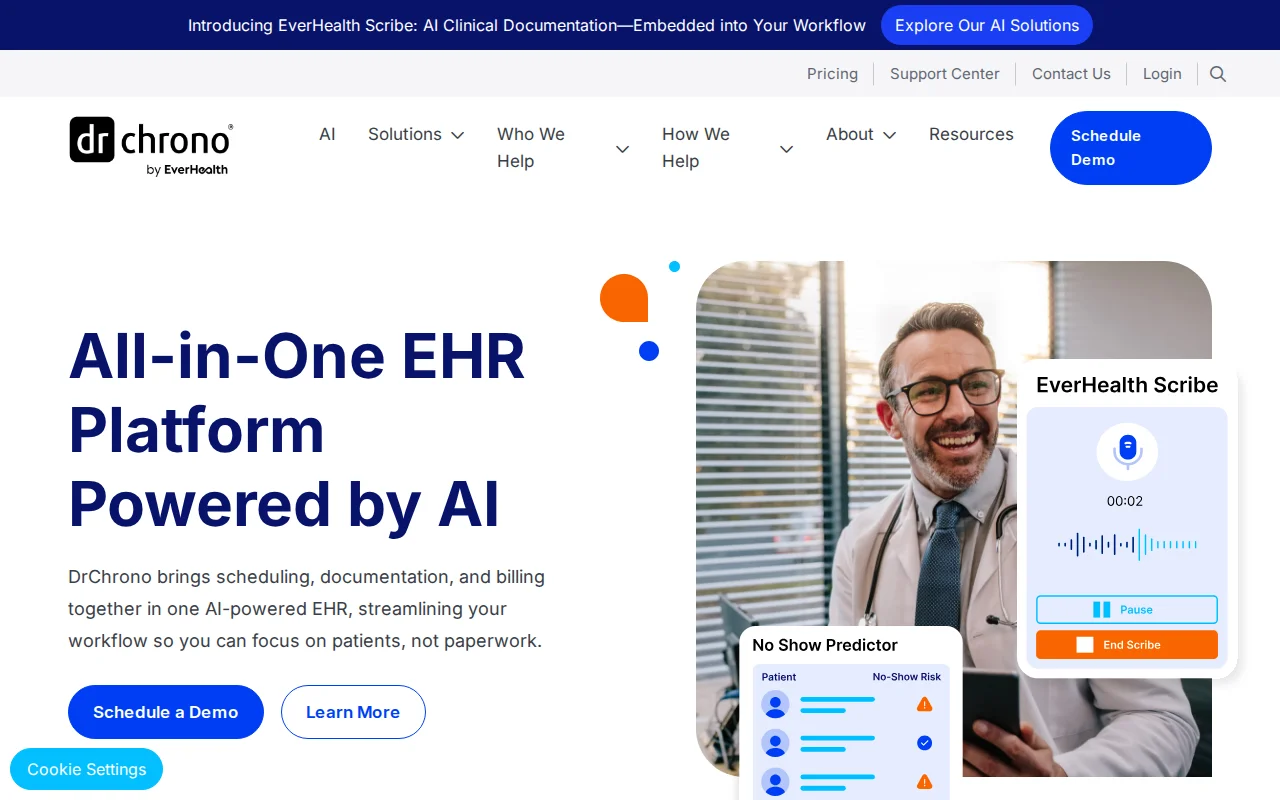
DrChrono puts clinical documentation and billing in one interface, so a specialty template can drive charge capture without re-keying.
How DrChrono links charting to billing
Customizable EHR templates: Specialty-specific clinical note templates built around physician workflows.
Integrated billing: CPT code capture, claims submission and ERA processing in a single platform.
iPad-optimized interface: Clinical and billing workflows designed for tablet use at the point of care.
Practice management: Appointment scheduling, patient demographics and insurance eligibility verification.
DrChrono shines at the point of care
Highly customizable templates allow specialty-specific documentation that feeds billing accurately.
The iPad-friendly interface helps practitioners who document at the bedside or in procedure rooms.
Integrated billing narrows the distance between clinical notes and charge capture.
DrChrono support draws mixed reviews
Inconsistent customer support is a recurring concern in user reviews.
The billing module can be complex to set up without dedicated implementation help.
Users report occasional performance issues, particularly under high transaction loads.
DrChrono reviewers praise the templates and question the support
According to Capterra reviewers, DrChrono holds a 3.9 out of 5 rating from 492 verified reviews. Users praise the customizable templates and the integrated clinical-billing workflow. Support inconsistency and billing setup complexity are the most common criticisms.
DrChrono suits specialists who build their own templates
Specialist practices that need deeply customizable clinical templates linked to billing.
Practitioners who prefer iPad-based workflows for documentation and charge capture.
Pricing
DrChrono (EverCommerce)
Per provider · Custom EHR, integrated billing, iPad interface
Contact sales
DrChrono doesn’t publish list prices. It tailors each quote to provider count, features and implementation needs during the demo.
5. Kareo (Tebra): A billing-first workflow for independent practices
Rating4/5★★★★★
The bottom line
Kareo gives independent practices a billing-first workflow with an integrated clearinghouse, scheduling and patient engagement under the Tebra brand.
Kareo, now sold under the Tebra brand, suits independent practices that want a simple billing-first workflow. It covers electronic claims through an integrated clearinghouse. Scheduling and practice management come with it, sized for small to mid-sized practices.
The Tebra merger added patient engagement tools, though some users report stability issues since. Behavioral health groups weighing Kareo against a specialist tool should test therapy-code billing in the demo, since Kareo targets general independent practice.
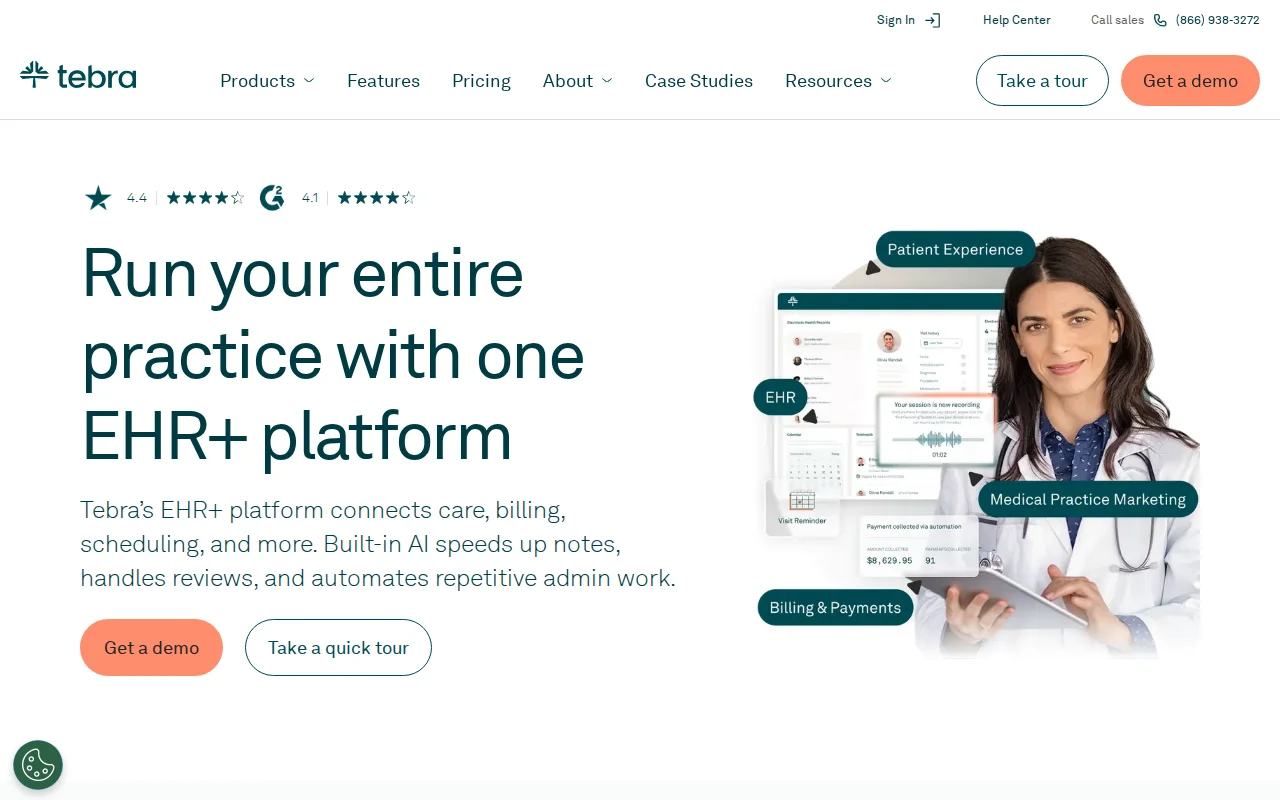
Tebra’s EHR+ package combines Kareo billing with practice management, so an independent practice can schedule, chart and submit claims from one account.
What Kareo includes under Tebra
Electronic claims submission: Clearinghouse integration for direct claim submission to payers.
Practice management: Scheduling, patient demographics and insurance eligibility in one workflow.
Billing dashboard: Claims tracking, payment posting and outstanding balance management.
Patient engagement: Patient messaging and reputation management tools added after the Tebra merger.
Kareo keeps billing front and center
Billing workflows are designed specifically for independent practice owners.
Clearinghouse integration handles electronic claims reliably for established payer relationships.
Practice management and scheduling are well integrated into the billing workflow.
Kareo users still report post-merger issues
Slow customer support responses are a common negative theme in reviews.
Software bugs reported after the Tebra merger have affected some users.
Pricing can run high relative to what smaller solo practices need.
Kareo reviewers value simple billing but report slow support
According to Capterra reviewers, Kareo holds a 3.9 out of 5 rating from 1,384 reviews. Positive themes include straightforward billing workflows and a good fit for independent practices. Support response times and post-merger software issues are the most frequent concerns. G2 reviewers rate it 3.8 out of 5.
Kareo suits independents with simple payer mixes
Independent physicians and small group practices with straightforward insurance billing needs.
Practices that want a billing-first platform with scheduling and patient management.
Pricing
Tebra packages (incl. Billing Starter, EHR+)
Per provider · Billing included in Tebra’s packages
Contact sales
Tebra lists five packages on its site but prices each one per practice after a demo.
6. SimplePractice: Behavioral health billing built around the therapy session
Rating4.5/5★★★★★Best for therapists
The bottom line
SimplePractice is the most complete option here for solo therapists and small mental health groups that bill insurance and run telehealth.
Who it’s for
Solo therapists and counselors
Psychologists
Small group mental health practices
PricingFrom $49/monthStarter plan, one practitioner
The platforms so far serve general medicine, but SimplePractice is built for one specialty. It’s the best behavioral health billing software here for solo therapists and small groups that bill insurance. Insurance billing, telehealth, progress notes and scheduling all revolve around the therapy session.
Practices outside mental and behavioral health will find it thin. It also isn’t built for multi-location management, so a therapy group adding sites should look further. Pabau’s centralized multi-location billing and reporting is the closer fit there.
Claim costs are changing too. From October 1, 2026, SimplePractice charges from $0.39 per submitted claim on every plan, according to its support center. Free claims on the Essential and Plus plans end on that date.
SimplePractice’s billing screen handles insurance claims, ERAs and patient payments together, which suits practices billing recurring weekly sessions.
What SimplePractice builds around the session
Insurance billing: Built-in insurance billing with ERAs and EOBs processed inside the platform.
Telehealth: Integrated video sessions with automated reminders and consent collection.
Progress notes: Template-based clinical documentation designed for therapy sessions.
Client portal: Secure messaging, form completion and online scheduling for patients.
Automated billing: AutoPay and automated claim submission reduce manual steps for recurring appointments.
SimplePractice leads for therapy billing
SimplePractice is exceptionally well suited to mental health billing, including claim submission and ERA management.
Telehealth is built into the platform, with HIPAA-compliant video sessions.
Reviewers rate its interface as one of the cleanest in the category.
SimplePractice thins out beyond behavioral health
Functionality outside mental and behavioral health is limited, so multi-specialty or medical practices will find it thin.
Billing customization options are narrower for practices with non-standard workflows.
SimplePractice isn’t built for multi-location management or complex operational automation.
SimplePractice earns some of the top scores in this list
According to Capterra reviewers, SimplePractice earns a 4.5 out of 5 rating, one of the highest in this comparison. Positive themes include ease of use, strong telehealth and a close fit for mental health practitioners.
Limits outside behavioral health and fewer billing customization options are the main criticisms. G2 reviewers rate it 4.4 out of 5.
SimplePractice suits solo therapists and small groups
Solo therapists, psychologists, counselors and small group mental health practices.
Practitioners billing insurance for therapy sessions who also need integrated telehealth.
Pricing
Plan
Price
Users
Key inclusions
Starter
$49/month
1 practitioner
Core features
Essential
$79/month
1 practitioner
Core features, free claims until September 30, 2026
Plus
$99/month, then $74 per extra practitioner
Solo or group
Group appointments, group telehealth, premium support line
Custom
Contact sales
6+ practitioners
Custom group pricing
SimplePractice lists these standard monthly rates on its own pricing page. Per-claim fees apply on top from October 1, 2026.
7. athenahealth: Enterprise claims muscle for large groups, priced on collections
Rating3.7/5★★★★★Best for large groups
The bottom line
athenahealth brings enterprise revenue cycle management and a wide payer network to large groups where claim volume justifies the setup.
Who it’s for
Large multi-physician groups
Health systems
Mid-market groups with complex payer mixes
PricingPercentage of collectionsrate quoted per practice
At the other end of the scale, athenahealth is the best fit for large groups and health systems billing many payers. Its built-in clearinghouse connects to a wide payer network, and its revenue cycle tools handle complex multi-payer billing at scale.
Mid-market groups and multi-location systems get the most from it. Pricing is a percentage of collections, so costs scale with revenue. That can suit high-volume groups, but it makes budgeting hard for smaller practices.
Federally qualified health centers (FQHCs) that bill uninsured patients on a sliding fee scale should ask athenahealth to demo that workflow. We didn’t test it for this review.
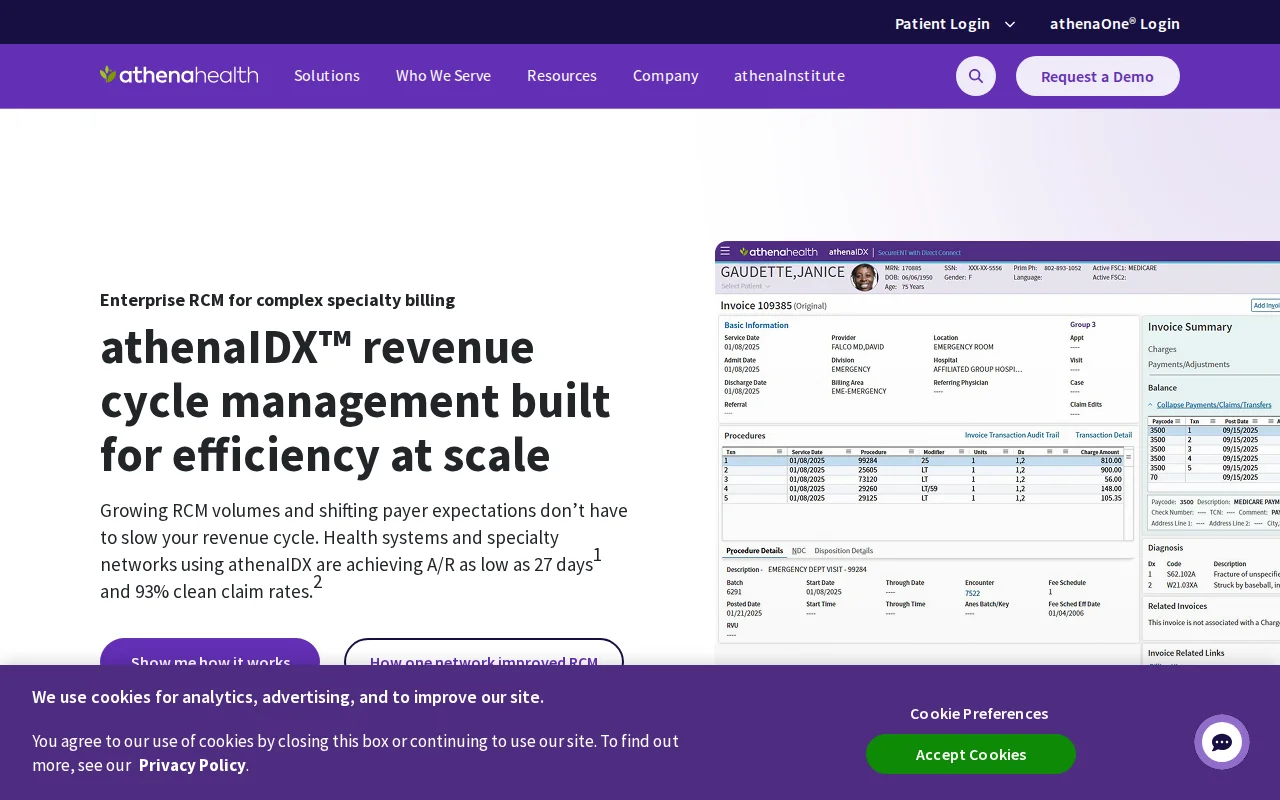
athenahealth’s revenue cycle platform manages claims at enterprise scale, which is why it suits groups submitting claims to many payers every day.
The enterprise toolkit athenahealth brings
Payer network integration: Large clearinghouse with connections to major US payers for electronic claims.
RCM suite: Comprehensive revenue cycle management, including denial management and AR follow-up.
Analytics: Detailed reporting on financial performance, claim acceptance and payer behavior.
EHR integration: Clinical documentation integrated with billing for accurate charge capture.
athenahealth shines across many payers
Large payer network integration makes athenahealth strong in complex multi-payer environments.
Its analytics and reporting are among the most detailed in the category.
Clearinghouse capabilities handle high-volume electronic claims at scale.
athenahealth costs rise with your revenue
Percentage-based pricing can become unpredictable and expensive as practice revenue grows.
Long implementation timelines make athenahealth a hard fit for practices that need fast deployment.
Small or solo practices usually find the cost structure and complexity outweigh the benefits.
athenahealth reviewers rate the payer network above the pricing
According to Capterra reviewers, athenahealth holds a 3.7 out of 5 rating. Positive themes include large payer network integration and strong analytics. Unpredictable percentage-based pricing and long implementation timelines are the main concerns. G2 reviewers rate it 3.9 out of 5.
athenahealth suits large multi-physician groups
Large multi-physician group practices and health systems with high insurance billing volumes.
Organizations where the percentage-of-collections model fits their revenue and administrative structure.
Pricing
athenaOne
Per practice · EHR, clearinghouse, RCM, analytics
Percentage of collections
athenahealth’s own site confirms the percentage-of-collections model but publishes no rate, so you’ll need a quote.
Notable mention: Waystar runs claims at scale but not the practice
Waystar is a revenue cycle technology platform used by large health systems and hospital networks. It specializes in claims management, denial prevention and payment accuracy at enterprise scale. Waystar is not a practice management system and does not include EHR, scheduling or clinical documentation.
Waystar is best suited to organizations that already have an EHR and need a dedicated, high-volume RCM layer on top. The company reports processing over $2.4 trillion in annual gross claims for more than 1 million distinct providers.
It belongs in the conversation only if claims volume and payer complexity are your main operational challenges. For a side-by-side view against an all-in-one platform, see our Pabau vs Waystar comparison.
Your payer mix decides which medical billing software fits
Choose by payer mix first. Insurance-heavy practices need clearinghouse and denial depth, while cash-pay and aesthetic practices need flexible invoicing and point-of-sale payments.
With that settled, run these five factors against your own practice:
Billing model: Insurance-dependent practices need strong clearinghouse integration and denial management (AdvancedMD, athenahealth). Practices with significant cash-pay or cosmetic revenue need flexible invoicing and point-of-sale payments (Pabau). Their claims can still run through a clearinghouse connection such as Claim.MD.
Clinical integration: If billing should flow from clinical notes, pick a platform where the EHR and billing share one data layer. An API sync between two systems is a weaker substitute.
Practice size and implementation speed: Solo and small practices should weigh onboarding burden heavily. Enterprise platforms like athenahealth can take months to implement. Billing-first cloud tools such as CollaborateMD need far less training.
Specialty fit: Mental health practices need telehealth, therapy note templates and insurance billing for therapy codes, which SimplePractice covers. Multi-specialty and aesthetic practices need broader operational coverage.
Pricing model transparency: Pricing set by user count and location, which is Pabau’s approach, keeps budgeting predictable. Percentage-of-collections models scale costs in ways that are hard to forecast.
Match your practice type to the right billing platform
The Specialty-Fit Table turns those five factors into a pick for each practice type. It names the billing capability that earns the pick and the trade-off to check before you sign.
Practice type
Best fit
Why it fits
Check before you sign
Aesthetic, med spa and cash-pay practices
Pabau
Invoicing, clinical notes, POS payments and digital forms in one record
Complex payer mixes may still need a dedicated RCM tool
Multi-specialty and multi-location practices
Pabau
Centralized billing and reporting across every location
Heavy insurance volume needs deeper denial tools
High-volume insurance, complex payer mix
AdvancedMD
Built-in clearinghouse, denial management and eligibility checks at booking
Steep learning curve, from $429/month per provider
Small, cost-sensitive independent practices
CollaborateMD
Easy cloud billing, clearinghouse and patient statements
Limited EHR and fewer integrations
Specialists wanting a custom EHR plus billing
DrChrono (EverCommerce)
Custom templates feed claims and ERA processing
Inconsistent support and setup effort
Independent practices with billing-first needs
Kareo (Tebra)
Integrated clearinghouse with scheduling and patient engagement
Slower support and post-merger bugs
Solo therapists and small mental health groups
SimplePractice
Therapy notes, telehealth and insurance billing for therapy codes
No multi-location management, per-claim fees from October 1, 2026
Large groups and health systems with high claim volume
athenahealth
Payer network, clearinghouse and enterprise RCM
Percentage-of-collections pricing, long implementation
Enterprises with an existing EHR
Waystar (notable mention)
Claims management and denial prevention at scale
Not a practice management system
Pro Tip
Before committing to any billing platform, audit your payer mix for the last 12 months. If more than 40% of revenue comes from cash-pay, cosmetic or wellness services, a billing-only platform will underserve your practice. Look for a system that handles insurance and cash-pay invoicing in one workflow.
Practices that blend clinical, cosmetic and wellness services usually get more from an integrated platform than from a billing-only tool. The same holds for practices planning to grow past one location.
Insurance-first practices should shortlist from the right-hand side of the grid above. Billing outside the US? Our guide to the best billing software in Australia covers that market.
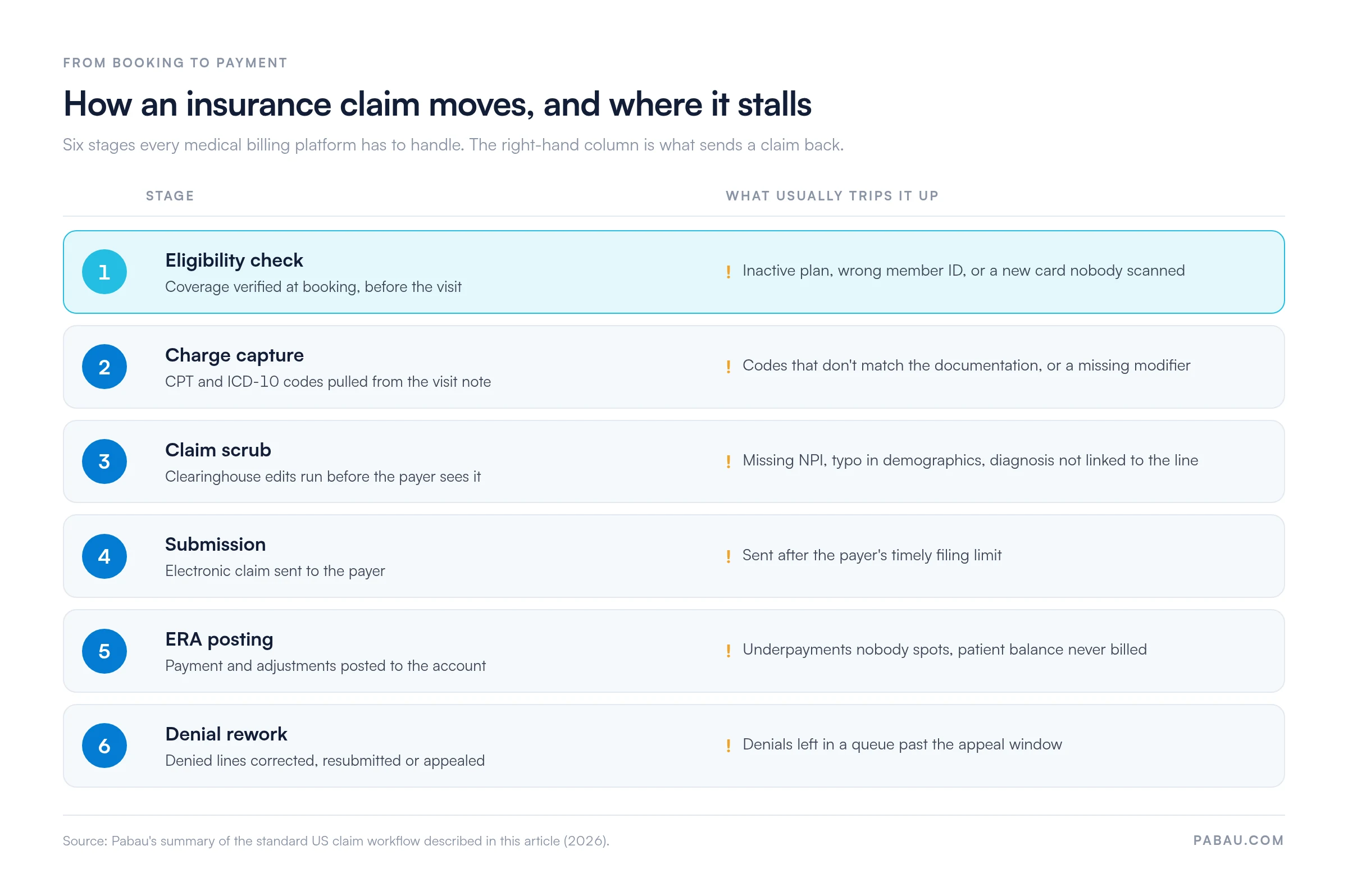
Every insurance claim passes six stages before it gets paid
Every platform above handles the same six stages, from the eligibility check to denial rework. What separates them is how many errors each one catches before the payer does.
Here’s the path a typical insurance claim takes, with the snag that sends it back at each step.
A claim can stall at any of six stages, and the cheapest fixes happen at the first two. Stages follow the standard US claim workflow described in this article.
Take a routine follow-up visit. The front desk runs eligibility when the patient books, and the plan comes back active. After the visit, the provider signs the note and the software pulls the CPT and ICD-10 codes into a charge.
Overnight, the clearinghouse scrubs the claim and flags a missing modifier. The biller fixes it in the morning and resubmits.
When the payer’s remittance arrives, the payment posts and the patient’s copay goes out on a statement. A clean claim clears every stage on the first pass, and that first-pass rate is worth asking every vendor about.
Five billing habits that send claims straight back
Most rejections trace back to a handful of habits rather than the software itself. Watch for these:
One-time eligibility checks: coverage is checked at intake and never again, so a mid-year plan change goes unnoticed.
Coding from memory: codes are picked from habit instead of from the signed note.
Missing modifiers: a procedure billed with a same-day office visit goes out without the modifier that separates them.
Weekly batching: claims sit in a queue and eat into the payer’s timely filing window.
Denials worked by date: the oldest denial gets attention first, even when a bigger one is closer to its appeal deadline.
Run this six-point check before you submit a claim
Run each claim past these checks before it leaves the building. Good billing software automates most of them.
Coverage is verified for this date of service.
Patient name, date of birth and member ID match the insurance card exactly.
Every CPT code traces to the signed note, with modifiers where needed.
Each procedure line points to a supporting ICD-10 diagnosis.
Rendering and billing NPIs are on the claim.
A prior authorization number is attached where the payer requires one.
In a demo, ask the vendor which of these checks the platform flags before submission and which it leaves to your team. If a claim still comes back, our guide to denial codes explains what each payer reason code means.
How Pabau keeps medical billing on one patient record
Now picture that checklist running across three systems. The provider signs the note in one and the biller rebuilds the charge in another. Then the front desk takes the copay on a terminal that talks to neither. Each handoff is another chance to drop a modifier or mistype a member ID.
Pabau keeps those steps on one patient record. The signed treatment note feeds a CPT-coded invoice. Insurance claims go out through the Claim.MD connection, with eligibility checks and ERA posting built in. Pabau Pay, our card terminals, then takes the patient’s share at checkout.
The result is fewer re-keyed charges and one screen showing what’s been billed, paid and still owed. Every subscription includes the full platform, so claims, forms and reporting are never locked behind a higher tier.
See billing, notes and payments in one system
Book a demo to see how Pabau links treatment notes, invoices and card payments, so your team stops re-keying charges between systems.
Start with your payer mix, then look at features. If most revenue arrives through insurance claims, AdvancedMD or athenahealth repay their learning curve with denial and clearinghouse depth. Therapists will rarely beat SimplePractice. A small office that already charts elsewhere gets good value from CollaborateMD.
Mixed and cash-pay practices face a different risk. A billing-only tool leaves notes, invoices and payments in separate places, and every handoff between them invites a keying error.
Whichever way you lean, test the shortlist on your own work. Bring last month’s three trickiest claims to each demo and ask the vendor to run them through the six stages above.
If your practice mixes cash-pay and insurance, book a demo and we’ll run those claims through Pabau, from signed note to posted payment.
Continue your research
Weighing a built-in clearinghouse against a standalone one?Medical claims clearinghouse explains how claims travel from your software to payers.
Struggling to reconcile payer payments?Electronic remittance advice explains how ERAs post payments and surface underpayments.
Frequently asked questions
Does medical billing software handle both CMS-1500 and UB-04 claims?
Not always. The CMS-1500 (837P electronically) is the professional claim most practices file. The UB-04 (837I) is the institutional claim that hospitals and facilities file. If you bill both, confirm the platform and its clearinghouse support each format.
Can I switch billing software without losing open claims?
Yes, if you plan the cutover. Submit new claims from the new system, and keep the old one open until its outstanding claims and denials are worked down. Migrate patient demographics, insurance details and open balances before go-live.
Does billing software make my practice HIPAA compliant?
Software supports HIPAA compliance, but it can’t make you compliant on its own. The vendor must sign a business associate agreement (BAA), and your team still has to use access controls properly. Ask each vendor for the BAA before you sign.
What’s the difference between billing software and a billing company?
Billing software is a tool your staff use to submit and track claims. A billing company is an outsourced service that does that work for you, usually for a share of collections. AdvancedMD, for example, lists its RCM service at 4–8% of collections.
Is AI replacing medical billers?
No. AI is taking over repetitive checks such as claim scrubbing and denial prediction. Billers still handle the exceptions, payer calls and appeals that need judgment, so expect the role to shift toward that work.