Medicare charting cheat sheet
A Medicare charting cheat sheet is a one-page reference that lists what Medicare...

6
Last Updated: Oct 21, 2026

Healthcare chatbots split into three types: rule-based scripts, AI-powered tools that read free text, and hybrids of the two.
Software covered: 1. Woebot, 2. Ada Health, 3. Infermedica, 4. Buoy Health, 5. Azure Health Bot, 6. K Health.
None of the six writes to a private practice’s patient record out of the box, so each one needs custom integration work.
HIPAA compliance depends on a signed Business Associate Agreement, and not every chatbot vendor will sign one.
Practice management software like Pabau automates booking, intake, and reminders, and its new AI Receptionist can now hold live booking calls too, without adding a second system to run.
Practices that look into chatbots in healthcare are usually solving a staffing problem. The front desk is buried in appointment calls, intake forms arrive on paper, and reminder sequences never get sent. An AI agent for healthcare that absorbs that work sounds appealing.
A standalone chatbot brings its own problems, though. Integration work, ongoing maintenance, and compliance obligations all land on the practice, and vendors tend to understate all three.
This guide covers the six leading healthcare chatbots, what each one does well, and where each falls short. It also tackles the question behind the search: whether your practice needs a chatbot at all. A practice management platform with built-in booking and intake may already cover the same work.
A healthcare chatbot is software that holds a text or voice conversation with a patient to finish a task. That task might be booking an appointment, checking symptoms, sending a medication reminder, or answering a coverage question. The chatbot replaces a phone call or a paper form with a dialogue.
Two different architectures sit behind that dialogue. Rule-based chatbots follow a decision tree: the patient picks from a menu and the bot branches, so the outcome is predictable. AI-powered chatbots use natural language processing, known as NLP, to read free text and generate a response.
The AI version handles ambiguity better. It also carries more risk around accuracy, hallucination, and how a regulator classifies the product. The FDA’s Software as a Medical Device (SaMD) framework governs AI tools that influence clinical decisions.
A symptom-checker chatbot that recommends a care pathway may fall under SaMD rules. An appointment-booking bot almost certainly does not. That distinction shapes your whole compliance plan.
Before you compare products, it helps to know the three types of healthcare chatbot and what each one is for.
Most clinically focused tools are AI-powered or hybrid, including Ada Health, Infermedica, and Buoy Health. Scheduling bots embedded in website widgets are usually scripted. Knowing which type you are looking at changes the compliance questions you need to ask.
The six products below cover the dominant categories: mental health conversational AI, symptom assessment, enterprise bot infrastructure, and consumer AI triage. Pabau sits at the bottom of the table as a practice management platform that now ships its own conversational AI agent, an AI Receptionist that books, reschedules, and cancels appointments live on a call.
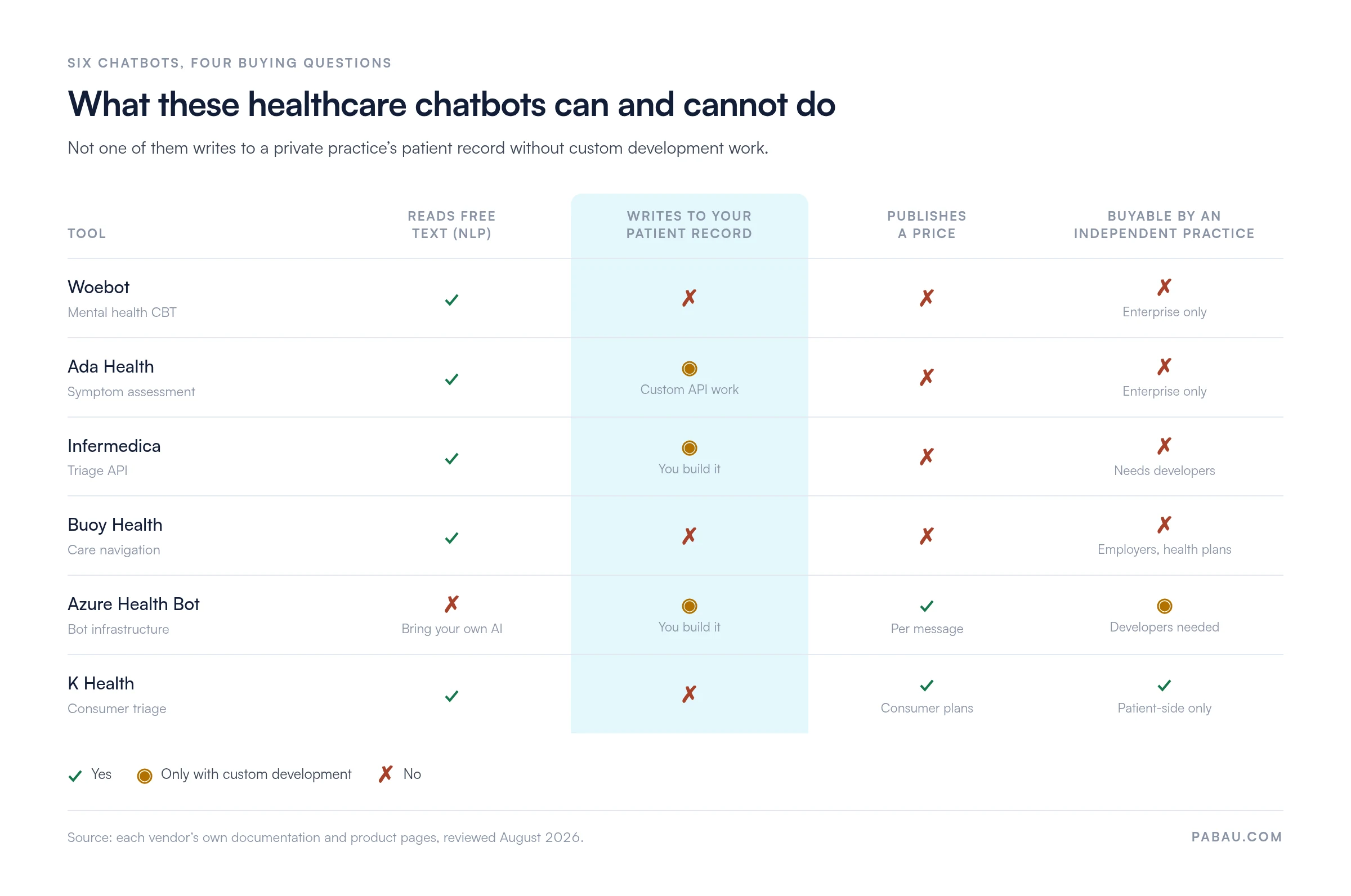
Read down the capability columns below and one pattern shows up. Not one of these tools writes to a private practice’s patient record without custom development work.
The strongest published evidence base of any chatbot here, but you buy it as a health system, not as a practice.
Woebot is a conversational AI agent built for mental health support. It applies cognitive behavioral therapy (CBT) techniques through text dialogues, checking in on mood and guiding the user through structured exercises. Woebot Health sells to health systems, employers, and payers rather than directly to patients.
Woebot has no public Capterra or G2 profile with enough reviews to produce a meaningful rating. Themes from published studies and community forums point to strong engagement over short periods. Users praise the accessible tone and the structured exercises. The absence of a direct route to a human is the most consistent complaint.
If you only need a structured self-reflection exercise to hand a patient, a form does the job. Our mental health check-in worksheet is one example, and it needs no vendor contract.
| Plan | Price | Sold to | What is included |
|---|---|---|---|
| Enterprise deployment | Contact sales, no published pricing | Health systems, payers, employers | CBT chatbot access plus API integration |
| Health plan access | Contact sales, no published pricing | Members of partner health plans | Patient access through the plan |
Woebot Health publishes no prices, so any budget figure comes out of a direct conversation with their team.
Deep, doctor-reviewed symptom assessment for large health systems, with little on offer to an independent practice.
Ada Health is an AI symptom assessment platform used by health systems, insurers, and large provider networks. Patients describe symptoms in conversation, and Ada’s clinical AI works through a differential diagnosis pathway. It then produces an assessment report the patient can share with a clinician or use to pick a care setting.
Ada Health has no public Capterra or G2 profile. According to Trustpilot reviewers, the Ada app rates 3.8 out of 5 at the time of writing. Positive reviews single out the thoroughness of the assessment and the language coverage. The recurring criticism is conservative emergency routing for symptoms that are not urgent.
| Plan | Price | Sold to | What is included |
|---|---|---|---|
| Enterprise license | Contact sales, no published pricing | Health systems, insurers, provider networks | Symptom assessment plus the enterprise API |
| Consumer app | No published price | Individual patients | Standalone symptom assessment |
Ada Health negotiates every enterprise license directly, so no figure is published for either product.
Before you deploy an AI symptom assessment tool, check whether it counts as a Software as a Medical Device. Tools that influence a clinical decision carry obligations that administrative automation does not. Read the FDA’s framework in the US, or the MHRA’s classification in the UK, then talk to your compliance officer.
A clinical triage engine you build on, so it fits health systems with developers and nobody else.
Infermedica is a clinical decision support platform that powers symptom checking and triage through an API. It does not ship a finished patient-facing product. Instead it supplies the clinical intelligence that health system developers embed in their own portals, apps, and chat interfaces. Physicians built the triage engine and trained it on structured clinical datasets.
According to G2 reviewers, Infermedica earns 4.4 out of 5. Positive feedback highlights the API documentation and the accuracy of the triage logic. The most consistent criticism covers enterprise pricing and the engineering effort integration takes.
| Plan | Price | Sold to | What is included |
|---|---|---|---|
| Enterprise API | Contact sales, priced on call volume | Health systems, insurers, telehealth platforms | Triage and interview API plus enterprise support |
Infermedica prices on API call volume, so your cost tracks how many symptom interviews patients actually run.
Care navigation built for US employers and health plans, not for the practice the patient ends up visiting.
Buoy Health helps people navigate the US healthcare system by describing symptoms and getting guidance on where to seek care. Its customers are employers and health plans that want to cut avoidable emergency visits. The AI was trained on clinical data, and Buoy positions it as a navigation tool rather than a diagnostic one.
Buoy Health has no public Capterra, G2, or Trustpilot profile with enough reviews for a meaningful rating. Feedback in community forums and employer benefit platforms praises the accessible interface and the US care routing. International coverage and clinical workflow integration come up as the consistent limitations.
| Plan | Price | Sold to | What is included |
|---|---|---|---|
| Enterprise B2B | Contact sales, no published pricing | Employers and health plans | Symptom-led navigation plus benefits integration |
Buoy Health sells only to employers and health plans, and publishes no pricing for either route.
HIPAA-eligible plumbing with a BAA available, but your team still builds and maintains the bot itself.
Azure Health Bot is Microsoft’s cloud platform for building HIPAA-eligible healthcare conversational agents. It is not a finished chatbot. It is a configurable bot framework pre-loaded with healthcare templates for symptom checking, appointment scheduling, and FAQ handling. Developer teams inside health systems use it to build their own patient-facing tools, and it connects to the wider Microsoft stack.
Azure Health Bot has no review profile separate from wider Azure developer feedback. Enterprise adopters speak well of the compliance documentation and the Microsoft ecosystem integration. Organizations without development resources flag the configuration overhead as the main barrier.
| Plan | Price | Sold to | What is included |
|---|---|---|---|
| Pay-as-you-go | Per message, through Azure billing | Any Azure customer | Bot framework, healthcare templates, BAA |
There is no fixed monthly fee, so run your projected message volume through the Azure pricing calculator before you commit.
The only tool here that finishes the consult with a clinician, though it never touches your practice systems.
K Health pairs AI triage with access to licensed clinicians, which makes it one of the few healthcare chatbots that finishes what it starts. Most symptom checkers stop at a recommendation. The platform markets mainly to patients who want primary care access for common conditions. It competes for the same visits that GP practice software users handle.
K Health has no verified Capterra or G2 profile with enough reviews for a meaningful rating. App store reviews are broadly positive about how fast a clinician answers and how well the AI handles common conditions. Prescription limits for specialist conditions come up as a recurring frustration.
| Plan | Price | Sold to | What is included |
|---|---|---|---|
| Consumer subscription | Monthly subscription, listed on their site | Individual patients | AI triage plus clinician access |
| Enterprise and health plan | Contact sales | Employers and health plans | Negotiated deployment for members |
K Health publishes consumer pricing on its own site, and has changed it since launch, so check the current figure before budgeting.
Two sets of benefits sit behind any chatbot deployment: one for patients, one for the clinical team. They overlap, but conflating them leads to poor buying decisions.
A patient portal covers much of this ground without any conversational AI at all. Patients rebook, view documents, and message the practice from one place.
Published percentage reductions for no-shows are inconsistent across settings, so treat any headline figure with care. Our guide to the patient no-show rate covers what moves the number, and patient communication covers the messaging around it.
The operational benefits above are worth having. The risks below are under-discussed in most vendor-produced content, and a balanced evaluation needs both sides.
AI chatbots handling symptom assessment can produce plausible-sounding answers that are clinically wrong. This is the hallucination problem familiar from large language models, applied where a wrong answer can hurt someone. No federal guidance sets accuracy standards for healthcare chatbots as of this writing, so validating accuracy falls to the organization deploying the tool.
Any chatbot that handles protected health information in the US needs the vendor to sign a Business Associate Agreement, or BAA. Not every chatbot vendor will sign one. General-purpose platforms such as Tidio, Intercom, and Landbot were built for retail support, and their data handling may not meet healthcare requirements. Verify the BAA before you deploy.
Running booking, intake, and messaging inside one system keeps you on one compliance posture. Our guide to HIPAA compliant AI tools covers what to check before you add a second vendor.
A chatbot that books appointments but cannot write back to the clinical record creates a silo. Staff then copy information from the chatbot dashboard into the practice system by hand, which erases most of the efficiency gain. API integration is achievable for most platforms, but somebody has to configure it and keep it working. Our guide to patient onboarding software covers what a connected intake flow looks like.
Some patients will not engage with a chatbot however good it is, particularly older patients and those with complex conditions. Drop the phone line and human support, and you lose that group. Chatbot adoption works best alongside existing channels rather than in place of them.
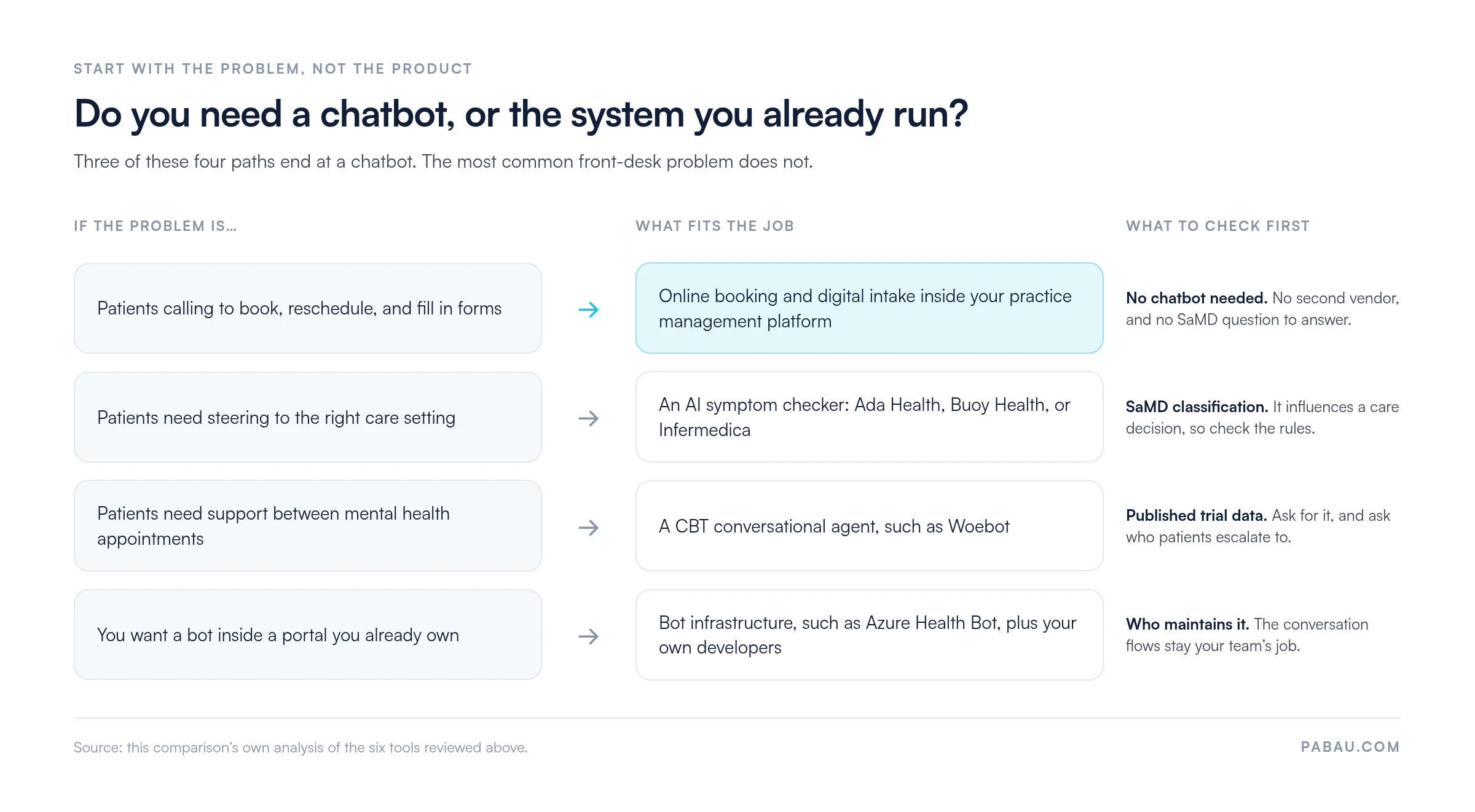
Start with the work you want to stop doing by hand, not with the product category. The four paths below cover almost every reason a practice looks at this software in the first place.
The near-term direction points three ways:
The first is already rolling out in Pabau’s AI agent workforce, which covers reception, finance, marketing and sales. Each agent starts in training, drafting its messages for a human to approve before a patient sees them.
The second one already exists in Pabau Scribe, our AI medical scribe. It drafts the note inside the practice workflow rather than as a patient-facing tool.
If that appeals, compare the field first. Our round-up of the best AI medical scribes covers the options. The drafted note can follow whatever format your team already uses, including a PIE note.
The market itself is growing quickly. Grand View Research puts the global healthcare chatbot market at roughly $1.2 billion in 2024. It projects $4.36 billion by 2030, on a 24% compound annual growth rate. Regulation will follow, with the FDA’s SaMD framework refining how AI clinical tools are classified and validated.
For a private practice, the useful question is not which chatbot wins by 2030. It is which automation investment cuts your overhead and your compliance exposure this year. That usually points toward integrated practice management rather than a standalone conversational agent.
Picture the work a scheduling bot is meant to absorb. Someone answers the phone to move an appointment, prints an intake form, scans it back in, and types the answers into the patient record. Reminders go out one message at a time, when there is a spare ten minutes.
Pabau is an all-in-one practice management system built for aesthetic, wellness, medical, and multi-specialty practices. Patients self-book through the online booking portal and pay a deposit at the point of booking. Intake and consent forms go out automatically and land in the patient record once completed. Reminders and recall sequences fire from the same automated patient workflows engine.
Pabau Agent Workforce, announced in August 2026, adds AI agents that hire into a specific role rather than bolt on as a widget. The AI Receptionist can book, reschedule, or cancel an appointment live on a call, answer calls after hours, text back a missed caller, invite no-shows to rebook, and send aftercare instructions. Because the agent reads the data already inside Pabau’s HIPAA-compliant environment, there is no separate integration to build. Every agent starts in training, where a practice approves each drafted action before it reaches a patient and can grant autonomy skill by skill, and every action is logged. The rollout starts in mid-September 2026. Those conversations sit in one shared patient inbox with the calls, texts, and emails your team answers by hand.
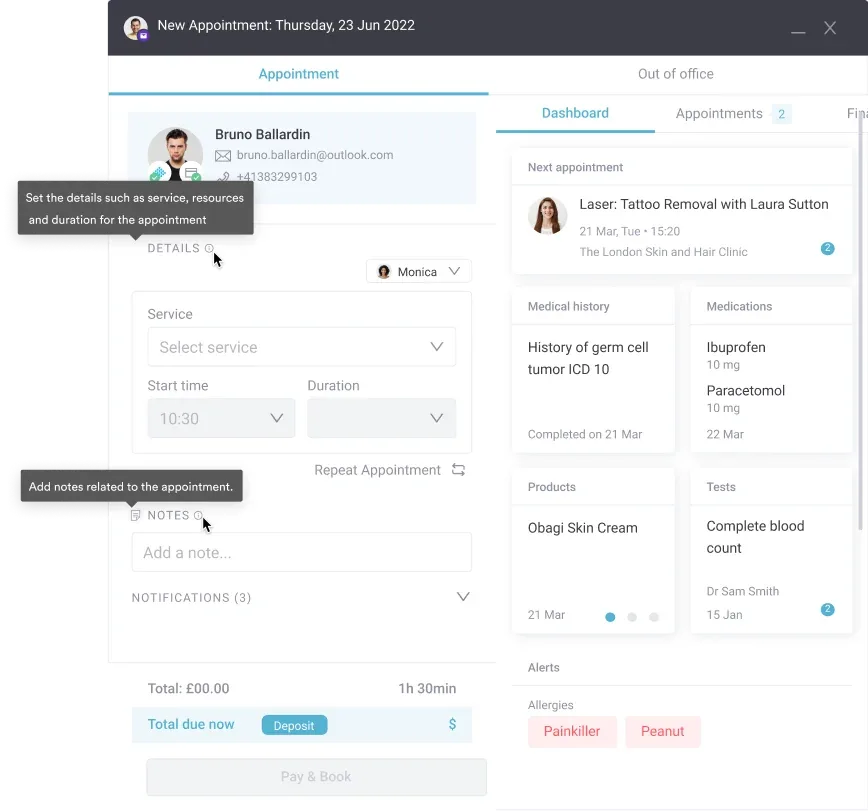
The outcome is one system to learn, one database, and one compliance posture. There is no middleware to map, no sync to babysit, and no second BAA to negotiate. Practices such as Ageless Enhancements run booking, records, and follow-up from the same place.
Two honest caveats. The AI Receptionist starts rolling out in mid-September 2026, so most of today’s booking flows are still structured forms rather than free-text AI chat. The platform is also broad, so it comes with structured onboarding rather than a same-day widget install.
According to Capterra reviewers, Pabau rates 4.7 out of 5 across more than 600 reviews. Praise clusters around the automated reminders and the onboarding support. The most cited limitation is the learning curve while a team gets to know the platform.
| Plan / Tier | Price | Details |
|---|---|---|
| Starter | From $62/month | One user, full platform access |
| Team and multi-location | Scales by users and locations | Every subscription includes every feature |
| Enterprise | Custom quote | Contact sales for pricing |
Pricing scales with your user count and locations, and every subscription includes every feature. The full breakdown sits on Pabau’s pricing page.

Pabau handles online booking, digital intake, consent, and reminder sequences from the same record that holds the clinical note. Book a demo to see how it fits your front desk.

Chatbots in healthcare are not one category. A CBT agent, a triage engine, an employer navigation tool, bot infrastructure, and a consumer triage app answer different questions. Buying the wrong type costs more than buying nothing.
So start from the work you want to stop doing by hand. If that work is booking, intake, consent, and reminders, none of the six tools above will touch your patient record. A practice management platform will.
For private practices, med spas, and multi-specialty groups, that is usually the cheaper answer and the smaller compliance surface. Pabau brings scheduling, patient communication, and AI and patient experience into one system. Book a demo to see how it fits your front desk.

Wondering where else AI fits in a practice? AI in practice management walks through scheduling, documentation, and patient communication.
Still comparing ways to talk to patients? Patient communication software ranks the tools that handle reminders, recalls, and two-way messaging.
Need a plan rather than another tool? Patient engagement program sets out how to build one that survives a busy week.
Is documentation eating your evenings? AI scribe benefits covers what physicians gain when the note is drafted from the consultation.
Adding video visits to the mix? HIPAA-compliant telehealth platforms compares the options that will sign a BAA.
Chatbots in healthcare are software applications that hold text or voice conversations with patients or staff to complete a health-related task. Those tasks include appointment scheduling, symptom assessment, medication reminders, mental health support, and administrative questions. Some follow scripted decision trees. Others use natural language processing to read free-text patient input.
Rule-based chatbots follow scripted decision trees, so the patient picks from set options and the bot branches. AI-powered chatbots use natural language processing to read free text and generate a response. The AI version copes better with complex or ambiguous questions. It also carries more risk around accuracy, hallucination, and classification as a Software as a Medical Device under FDA guidance.
No. No healthcare chatbot on the market today is a safe substitute for a licensed physician making a diagnosis or a treatment decision. Triage tools such as Ada Health, Infermedica, and K Health support navigation and information gathering. They can point a patient toward the right care setting or gather structured pre-consultation detail. The clinical decision still belongs to a clinician.
For private practices and multi-specialty groups, a platform with native online booking usually beats a standalone scheduling chatbot. Booking writes straight to the patient record, with no middleware to maintain. Large hospital systems that need a bot inside an existing portal are better served by Azure Health Bot. It gives developer teams a HIPAA-eligible framework to configure for scheduling.